ESP VOLVO XC90 TWIN ENGINE HYBRID 2017 Workshop Manual
[x] Cancel search | Manufacturer: VOLVO, Model Year: 2017, Model line: XC90 TWIN ENGINE HYBRID, Model: VOLVO XC90 TWIN ENGINE HYBRID 2017Pages: 584, PDF Size: 14.2 MB
Page 321 of 584

DRIVER SUPPORT
}}
319
Radar sensor limitations
The radar sensor used by several of the driversupport systems has certain limitations, whichalso affect the systems using it.
Obstructions
The marked area must not be obstructed in any way.This area of the windshield should always be kept clean
The radar sensor is located at the upper, centersection of the windshield along with the camera.
WARNING
Never place any objects, decals, electronic tolldevices, window tinting films etc., on the wind-shield in front of or around the camera/radarsensor. This could reduce or block these com-ponents' functions, and could cause one ormore of the systems that utilize them to stopfunctioning.
This can also result in certain functions beingreduced or disabled, or they may respondincorrectly.
If this symbol and the messageWindscreen Sensors blockedappear in the instrument panel, thisindicates that the camera and/or radarsensor cannot detect other vehicles ahead.
The following table shows some of the situationsthat can cause the message to be displayed andsuggested actions.
CauseAction
The area of the windshield in front of the camera/radar sensor is dirty or covered by iceor snow.Clean the windshield or remove the ice/ snow.
Thick fog or heavy rain/snow reduces the camera/radar sensor's range of visibility.No action. The driver should be extra alert in conditions of thistype.
Water or snow on the surface of the road swirl up and block radar signals or the camera'sview.No action. The driver should be extra alert in conditions of thistype.
There is dirt between the inside of the windshield and the camera/radar sensor.Have the area of the windshield cleaned by a trained and quali-fied Volvo service technician.
Page 323 of 584

DRIVER SUPPORT
* Option/accessory, for more information, see Introduction.321
CAUTION
•Service and maintenance on City Safetymay only be carried out by a trained andqualified Volvo service technician.
•If a crack, scratch or stone chip shouldoccur in the section of the windshield infront the camera/radar sensor, contact atrained and qualified Volvo service techni-cian to repair or replace the windshield.Failing to do so may result in reducedCity Safety functionality.
•This can also result in certain functionsbeing reduced or disabled, or they mayrespond incorrectly.
To help avoid the risk of incorrect, reduced ordisabled functionality for driver support sys-tems using the camera or radar sensors:
•Volvo recommends that cracks, scratchesor stone chips on the windshield in frontof the camera/radar sensor should notbe repaired; in such cases, the entirewindshield should be replaced.
•Before the windshield is replaced, con-tact a Volvo retailer to ensure that thecorrect windshield is ordered and instal-led. If the wrong type of windshield isused, this may cause City Safety to func-tion improperly or not at all.
•Volvo recommends the use of only Genu-ine Volvo Replacement Windshields.
•When replacing windshield wipers, usethe same type or ones approved by Volvo.
After the windshield has been replaced, thecamera/radar sensor will have to be recalibra-ted by a trained and qualified Volvo servicetechnician to help ensure proper function ofall of the vehicle's camera-/radar-based sys-tems.
Maintenance
In order for camera and radar sensor to functionproperly, the area of the windshield must be keptfree of dirt, ice, snow, etc. and should be washedregularly with a suitable car washing detergent.
NOTE
Dirt, ice and/or snow covering the cameraand radar sensors reduce functionality andmay disable the vehicle's camera-/radar-based systems.
This can also result in certain functions beingreduced or disabled, or they may respondincorrectly.
Related information
•Driver support system radar sensor (p. 318)
•Camera limitations (p. 323)
•Pilot Assist-1 limitations (p. 304)
•Pilot Assist-2 limitations (p. 315)
•City Safety limitations (p. 334)
•City Safety limitations (p. 334)
•Road Sign Information (RSI)* limitations(p. 348)
•Park Assist Pilot (PAP)* limitations (p. 372)
Page 324 of 584
DRIVER SUPPORT
* Option/accessory, for more information, see Introduction.322
Radar sensor - type approval
USA & Canada:
FCC ID: L2C0054TR IC: 3432A-0054TR FCCID: L2C0055TR IC: 3432A-0055TR
This device complies with Part 15 of the FCCRules and with Industry Canada license-exemptRSS standard(s). Operation is subject to the fol-lowing two conditions:
(1) This device may not cause harmful interfer-ence, and
(2) This device must accept any interferencereceived, including interference that may causeundesired operation.
WARNING
Changes or modifications not expressivelyapproved by the party responsible for compli-ance could void the user's authority to oper-ate the equipment.
The term “IC:” before the radio certification num-ber only signifies that Industry Canada technicalspecifications were met.
Related information
•Driver support system radar sensor (p. 318)
Driver support system camera
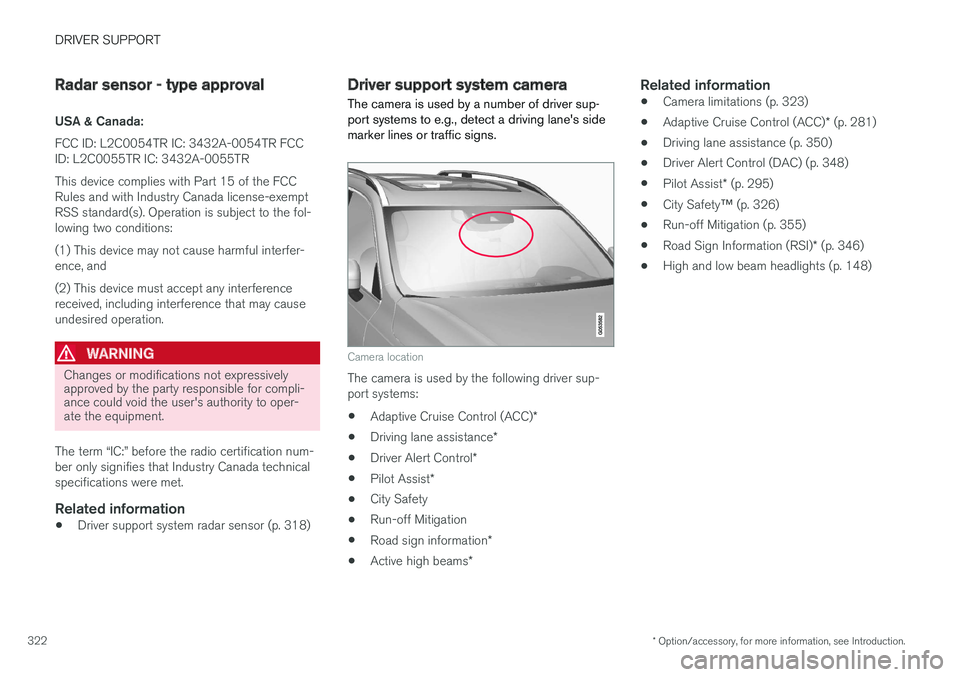
The camera is used by a number of driver sup-port systems to e.g., detect a driving lane's sidemarker lines or traffic signs.
Camera location
The camera is used by the following driver sup-port systems:
•Adaptive Cruise Control (ACC)*
•Driving lane assistance*
•Driver Alert Control*
•Pilot Assist*
•City Safety
•Run-off Mitigation
•Road sign information*
•Active high beams*
Related information
•Camera limitations (p. 323)
•Adaptive Cruise Control (ACC)* (p. 281)
•Driving lane assistance (p. 350)
•Driver Alert Control (DAC) (p. 348)
•Pilot Assist* (p. 295)
•City Safety™ (p. 326)
•Run-off Mitigation (p. 355)
•Road Sign Information (RSI)* (p. 346)
•High and low beam headlights (p. 148)
Page 326 of 584
||
DRIVER SUPPORT
324
CauseAction
There is dirt between the inside of the windshield and the camera/radar sensor.Have the area of the windshield cleaned by a trained and qualifiedVolvo service technician.
Strong backlightingNo action required. The came will reset automatically when lightingconditions improve.
High temperatures
If the temperature in the passenger compartmentis very high, the camera and radar sensor may betemporarily turned off for approx. 15 minutesafter the engine has been started to protect theirelectronic components. When the temperaturehas cooled sufficiently, the camera and radarsensor will restart automatically.
Damaged windshield CAUTION
•Service and maintenance on City Safetymay only be carried out by a trained andqualified Volvo service technician.
•If a crack, scratch or stone chip shouldoccur in the section of the windshield infront the camera/radar sensor, contact atrained and qualified Volvo service techni-cian to repair or replace the windshield.Failing to do so may result in reducedCity Safety functionality.
•This can also result in certain functionsbeing reduced or disabled, or they mayrespond incorrectly.
To help avoid the risk of incorrect, reduced ordisabled functionality for driver support sys-tems using the camera or radar sensors:
•Volvo recommends that cracks, scratchesor stone chips on the windshield in frontof the camera/radar sensor should not
be repaired; in such cases, the entirewindshield should be replaced.
•Before the windshield is replaced, con-tact a Volvo retailer to ensure that thecorrect windshield is ordered and instal-led. If the wrong type of windshield isused, this may cause City Safety to func-tion improperly or not at all.
•Volvo recommends the use of only Genu-ine Volvo Replacement Windshields.
•When replacing windshield wipers, usethe same type or ones approved by Volvo.
After the windshield has been replaced, thecamera/radar sensor will have to be recalibra-ted by a trained and qualified Volvo servicetechnician to help ensure proper function ofall of the vehicle's camera-/radar-based sys-tems.
Maintenance
In order for camera and radar sensor to functionproperly, the area of the windshield must be kept
Page 327 of 584

DRIVER SUPPORT
* Option/accessory, for more information, see Introduction.325
free of dirt, ice, snow, etc. and should be washedregularly with a suitable car washing detergent.
NOTE
Dirt, ice and/or snow covering the cameraand radar sensors reduce functionality andmay disable the vehicle's camera-/radar-based systems.
This can also result in certain functions beingreduced or disabled, or they may respondincorrectly.
Related information
•Driver support system camera (p. 322)
•Radar sensor limitations (p. 319)
•Driving lane assistance (p. 350)
•Driver Alert Control limitations (p. 350)
•Pilot Assist-1 limitations (p. 304)
•Pilot Assist-2 limitations (p. 315)
•City Safety limitations (p. 334)
•Road Sign Information (RSI)* limitations(p. 348)
•Park Assist Pilot (PAP)* limitations (p. 372)
Page 329 of 584
DRIVER SUPPORT
}}
327
WARNING
Warnings will only be provided if there is animminent risk of a collision taking place. Thedriver should be aware of the system's limita-tions before operating the vehicle.
Warnings and automatic braking for pedes-trians and cyclists are deactivated at speedsabove approx. 43 mph (70 km/h).
City Safety's auto-brake function can helpprevent a collision or reduce the speed atwhich a collision occurs. However, the drivershould always apply the brakes, even if auto-brake is operating.
The driver is always responsible for maintain-ing the correct speed and distance in relationto the vehicle ahead. Never wait for a collisionwarning or for City Safety to intervene.
City Safety does not activate the auto-brakefunction during fast acceleration.
City Safety maintenance may only be carriedout by a trained and qualified Volvo servicetechnician.
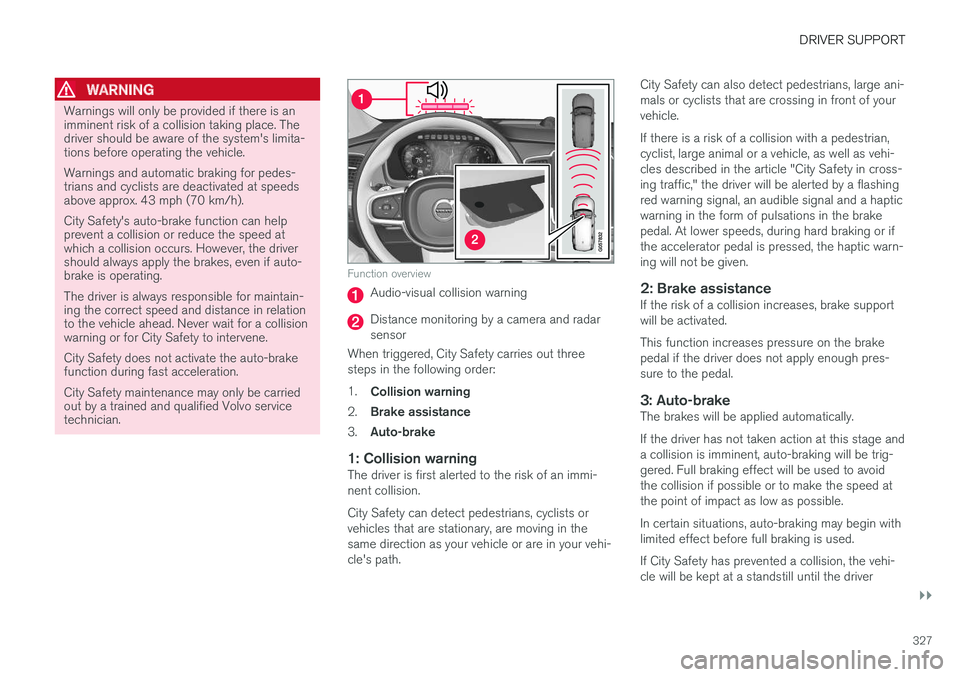
Function overview
Audio-visual collision warning
Distance monitoring by a camera and radarsensor
When triggered, City Safety carries out threesteps in the following order:
1.Collision warning
2.Brake assistance
3.Auto-brake
1: Collision warning
The driver is first alerted to the risk of an immi-nent collision.
City Safety can detect pedestrians, cyclists orvehicles that are stationary, are moving in thesame direction as your vehicle or are in your vehi-cle's path.
City Safety can also detect pedestrians, large ani-mals or cyclists that are crossing in front of yourvehicle.
If there is a risk of a collision with a pedestrian,cyclist, large animal or a vehicle, as well as vehi-cles described in the article "City Safety in cross-ing traffic," the driver will be alerted by a flashingred warning signal, an audible signal and a hapticwarning in the form of pulsations in the brakepedal. At lower speeds, during hard braking or ifthe accelerator pedal is pressed, the haptic warn-ing will not be given.
2: Brake assistance
If the risk of a collision increases, brake supportwill be activated.
This function increases pressure on the brakepedal if the driver does not apply enough pres-sure to the pedal.
3: Auto-brake
The brakes will be applied automatically.
If the driver has not taken action at this stage anda collision is imminent, auto-braking will be trig-gered. Full braking effect will be used to avoidthe collision if possible or to make the speed atthe point of impact as low as possible.
In certain situations, auto-braking may begin withlimited effect before full braking is used.
If City Safety has prevented a collision, the vehi-cle will be kept at a standstill until the driver
Page 330 of 584
||
DRIVER SUPPORT
328
takes action. If the vehicle has slowed to avoidcolliding with the vehicle ahead, your speed willbe reduced to that vehicle's speed.
When auto-brake is triggered, the seat belt pre-tensioners may also be activated, see the article"Seat belts" for additional information.
Auto-braking can be cancelled if the driverpresses hard on the accelerator pedal.
When City Safety applies the brakes, the brakelights will illuminate.
When City Safety is triggered and applies thebrakes, a text message will be displayed in theinstrument panel.
Related information
•City Safety™ troubleshooting (p. 332)
•City Safety in crossing traffic (p. 331)
•City Safety limitations (p. 334)
•City Safety symbols and messages (p. 337)
•Detecting obstructions with City Safety(p. 329)
•Rear Collision Warning (RCW) (p. 338)
•City Safety warning level settings (p. 328)
•City Safety in crossing traffic (p. 331)
•Seat belts (p. 66)
•City Safety when evasive action is not possi-ble (p. 332)
City Safety warning level settings
City Safety is always activated but the function'swarning distance can be adjusted.
NOTE
City Safety cannot be turned off and activatesautomatically each time the engine/electricmotor is started.
Setting a warning level (distance)
The distance set for warnings determines thesystem's responsiveness and sets the distance atwhich visual, audible and tangible (haptic) warn-ings will be triggered.
To do so:
1.Tap Settings in the center display's Topview.
2.Tap My CarIntelliSafeCity Safety.
3.Choose among Earlier, Normal or Later.
Begin by choosing Earlier. If too many warningsare given, change to Normal.
If the driver feels that warnings are given toooften, the warning level can be lowered. Thismeans that warnings will be provided later, result-ing in fewer warnings being given.
The setting Later should only used in exceptionalcircumstances, e.g., for a more dynamic drivingstyle.
WARNING
•No automatic system can be guaranteedto function 100% correctly in all situa-tions. For that reason, never test CitySafety by driving toward a person orobject. This could result in serious injuryor death.
•Even if the setting Earlier has beenselected, warnings may be perceived asbeing given late, e.g., if the difference inspeed is great or if the vehicle aheadbrakes suddenly.
•City Safety can provide a warning for apotential collision but it can never shortenthe driver's reaction time.
•To help make City Safety as effective aspossible, always using the setting Earlieris recommended.
NOTE
•Due to local traffic regulations in certainmarkets, RCW will not activate the rearturn signals. That part of the function willbe deactivated.
•The use of the rear turn signals will alsobe deactivated if the City Safety warninglevel is set at Later. See also the section"Setting a warning level (distance)" in thearticle "City Safety settings."
•If RCW detects a vehicle approachingfrom behind, the seat belt pretensioners
Page 331 of 584
DRIVER SUPPORT
}}
329
and Whiplash Protection System will beactivated.
Related information
•City Safety limitations (p. 334)
•City Safety™ (p. 326)
•Rear Collision Warning (RCW) (p. 338)
Detecting obstructions with CitySafety
City Safety can detect vehicles, cyclists, largeanimals and pedestrians.
Vehicles
City Safety detects most types of vehicles thatare either stationary, moving in the same direc-tion as your vehicle or those described in the arti-cle "City Safety in crossing traffic."
In order for City Safety to detect a vehicle indarkness, its headlights and taillights must be onand clearly visible.
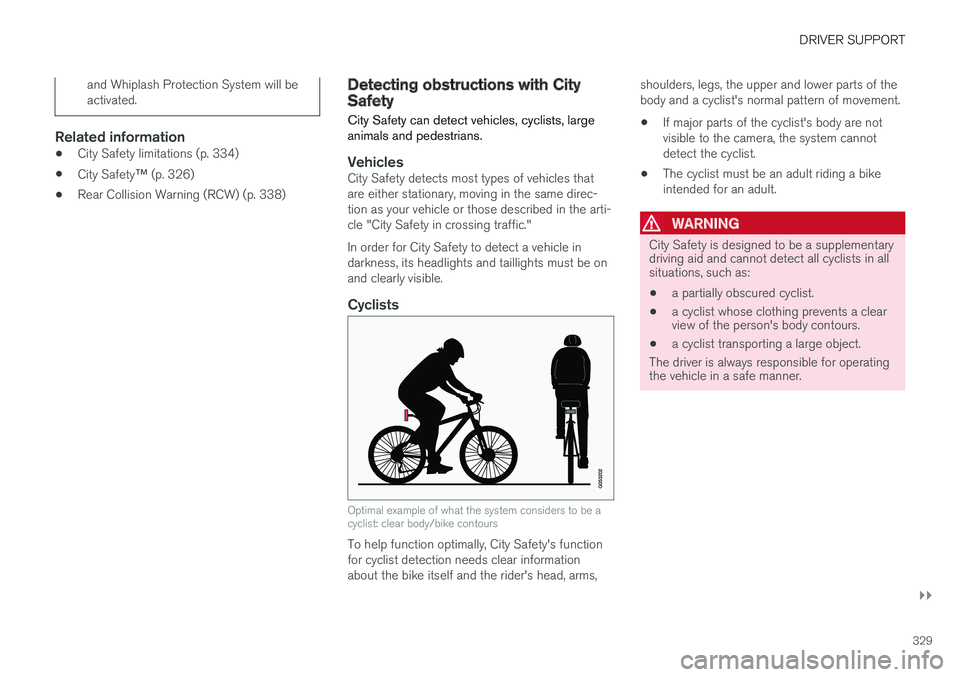
Cyclists
Optimal example of what the system considers to be acyclist: clear body/bike contours
To help function optimally, City Safety's functionfor cyclist detection needs clear informationabout the bike itself and the rider's head, arms,
shoulders, legs, the upper and lower parts of thebody and a cyclist's normal pattern of movement.
•If major parts of the cyclist's body are notvisible to the camera, the system cannotdetect the cyclist.
•The cyclist must be an adult riding a bikeintended for an adult.
WARNING
City Safety is designed to be a supplementarydriving aid and cannot detect all cyclists in allsituations, such as:
•a partially obscured cyclist.
•a cyclist whose clothing prevents a clearview of the person's body contours.
•a cyclist transporting a large object.
The driver is always responsible for operatingthe vehicle in a safe manner.
Page 332 of 584
||
DRIVER SUPPORT
330
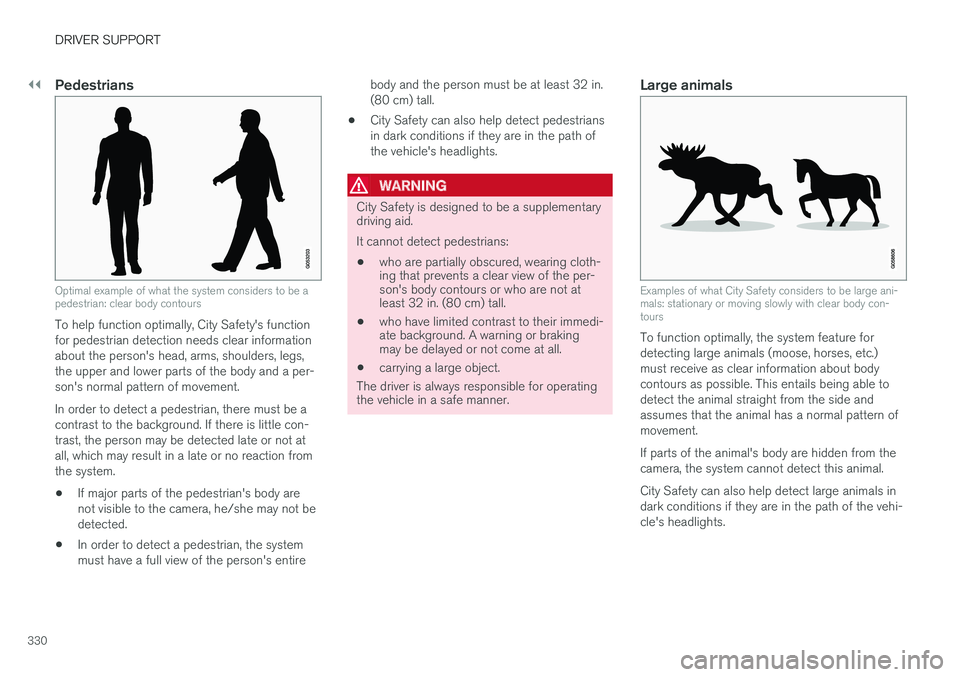
Pedestrians
Optimal example of what the system considers to be apedestrian: clear body contours
To help function optimally, City Safety's functionfor pedestrian detection needs clear informationabout the person's head, arms, shoulders, legs,the upper and lower parts of the body and a per-son's normal pattern of movement.
In order to detect a pedestrian, there must be acontrast to the background. If there is little con-trast, the person may be detected late or not atall, which may result in a late or no reaction fromthe system.
•If major parts of the pedestrian's body arenot visible to the camera, he/she may not bedetected.
•In order to detect a pedestrian, the systemmust have a full view of the person's entire
body and the person must be at least 32 in.(80 cm) tall.
•City Safety can also help detect pedestriansin dark conditions if they are in the path ofthe vehicle's headlights.
WARNING
City Safety is designed to be a supplementarydriving aid.
It cannot detect pedestrians:
•who are partially obscured, wearing cloth-ing that prevents a clear view of the per-son's body contours or who are not atleast 32 in. (80 cm) tall.
•who have limited contrast to their immedi-ate background. A warning or brakingmay be delayed or not come at all.
•carrying a large object.
The driver is always responsible for operatingthe vehicle in a safe manner.
Large animals
Examples of what City Safety considers to be large ani-mals: stationary or moving slowly with clear body con-tours
To function optimally, the system feature fordetecting large animals (moose, horses, etc.)must receive as clear information about bodycontours as possible. This entails being able todetect the animal straight from the side andassumes that the animal has a normal pattern ofmovement.
If parts of the animal's body are hidden from thecamera, the system cannot detect this animal.
City Safety can also help detect large animals indark conditions if they are in the path of the vehi-cle's headlights.
Page 333 of 584
DRIVER SUPPORT
331
WARNING
City Safety is designed to be a supplementarydriving aid.
It cannot detect large animals in all situationssuch as:
•large animals that are partially obscured
•large animals straight from the front orrear
•large animals that are running or movingquickly
•large animals that have limited contrast totheir immediate background. A warning orbraking may be delayed or not come atall.
•smaller animals such as dogs or cats
The driver is always responsible for operatingthe vehicle in a safe manner.
Related information
•City Safety™ (p. 326)
•City Safety limitations (p. 334)
•City Safety in crossing traffic (p. 331)
City Safety in crossing traffic
City Safety can help the driver when turning inthe path of an oncoming vehicle in an intersec-tion.
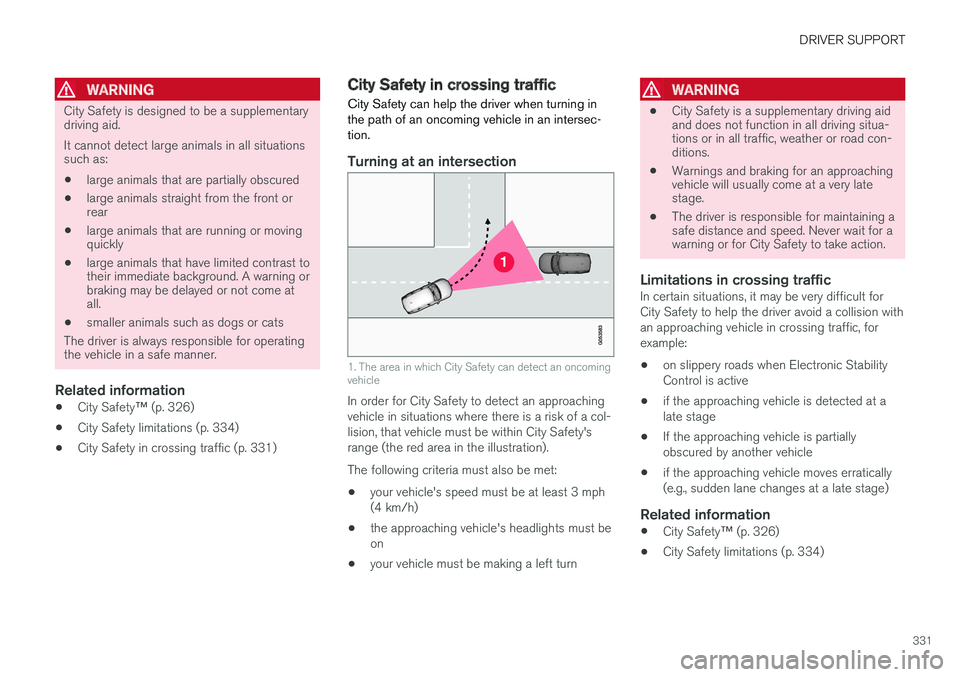
Turning at an intersection
1. The area in which City Safety can detect an oncomingvehicle
In order for City Safety to detect an approachingvehicle in situations where there is a risk of a col-lision, that vehicle must be within City Safety'srange (the red area in the illustration).
The following criteria must also be met:
•your vehicle's speed must be at least 3 mph(4 km/h)
•the approaching vehicle's headlights must beon
•your vehicle must be making a left turn
WARNING
•City Safety is a supplementary driving aidand does not function in all driving situa-tions or in all traffic, weather or road con-ditions.
•Warnings and braking for an approachingvehicle will usually come at a very latestage.
•The driver is responsible for maintaining asafe distance and speed. Never wait for awarning or for City Safety to take action.
Limitations in crossing traffic
In certain situations, it may be very difficult forCity Safety to help the driver avoid a collision withan approaching vehicle in crossing traffic, forexample:
•on slippery roads when Electronic StabilityControl is active
•if the approaching vehicle is detected at alate stage
•If the approaching vehicle is partiallyobscured by another vehicle
•if the approaching vehicle moves erratically(e.g., sudden lane changes at a late stage)
Related information
•City Safety™ (p. 326)
•City Safety limitations (p. 334)