ESP VOLVO XC90 TWIN ENGINE HYBRID 2017 Repair Manual
[x] Cancel search | Manufacturer: VOLVO, Model Year: 2017, Model line: XC90 TWIN ENGINE HYBRID, Model: VOLVO XC90 TWIN ENGINE HYBRID 2017Pages: 584, PDF Size: 14.2 MB
Page 335 of 584

DRIVER SUPPORT
}}
* Option/accessory, for more information, see Introduction.333
The following table shows some of the situationsthat can cause the message to be displayed andsuggested actions.
CauseAction
The area of the wind-shield in front of thecamera/radar sensor isdirty or covered by ice orsnow.
Clean the wind-shield or removethe ice/ snow.
Thick fog or heavy rain/snow blocks reduces thecamera/radar sensor'srange of visibility.
No action. Thedriver should beextra alert in condi-tions of this type.
There is dirt betweenthe inside of the wind-shield and the camera/radar sensor.
Have the area ofthe windshieldcleaned by atrained and quali-fied Volvo servicetechnician.
CAUTION
•Service and maintenance on City Safetymay only be carried out by a trained andqualified Volvo service technician.
•If a crack, scratch or stone chip shouldoccur in the section of the windshield infront the camera/radar sensor, contact atrained and qualified Volvo service techni-cian to repair or replace the windshield.Failing to do so may result in reducedCity Safety functionality.
•This can also result in certain functionsbeing reduced or disabled, or they mayrespond incorrectly.
To help avoid the risk of incorrect, reduced ordisabled functionality for driver support sys-tems using the camera or radar sensors:
•Volvo recommends that cracks, scratchesor stone chips on the windshield in frontof the camera/radar sensor should notbe repaired; in such cases, the entirewindshield should be replaced.
•Before the windshield is replaced, con-tact a Volvo retailer to ensure that thecorrect windshield is ordered and instal-led. If the wrong type of windshield isused, this may cause City Safety to func-tion improperly or not at all.
•Volvo recommends the use of only Genu-ine Volvo Replacement Windshields.
•When replacing windshield wipers, usethe same type or ones approved by Volvo.
After the windshield has been replaced, thecamera/radar sensor will have to be recalibra-ted by a trained and qualified Volvo servicetechnician to help ensure proper function ofall of the vehicle's camera-/radar-based sys-tems.
Maintenance
In order for City Safety to function properly, thearea of the windshield must be kept free of dirt,ice, snow, etc.
Other vehicle functions
If a message is displayed in the instrument panel,this means that the other systems using the cam-era/radar sensor (see the list below) will not havefull functionality or may not function at all.
The camera and radar sensor is used by the fol-lowing functions:
•Distance Alert*
•Driver Alert Control*
•Adaptive Cruise Control*
•Pilot Assist*
•Run-off Mitigation
•Road Sign Information*
•Active High Beams*
•Lane Keeping Aid*
Page 338 of 584

||
DRIVER SUPPORT
336
•Do not place, attach or mount any objectson the inside or outside of the windshieldnear or over the sensor. This could affectthe camera-based functions.
•Objects, snow, ice or dirt in the camera'sfield of vision may result in certain func-tions being reduced or disabled, or theymay respond incorrectly.
Related information
•City Safety™ (p. 326)
•Adaptive Cruise Control (ACC) - trouble-shooting (p. 291)
•City Safety™ troubleshooting (p. 332)
•Camera limitations (p. 323)
•Radar sensor limitations (p. 319)
Page 341 of 584
DRIVER SUPPORT
}}
* Option/accessory, for more information, see Introduction.339
Blind Spot Information (BLIS)*
Blind Spot Information is a system designed toalert the driver to the presence of other vehiclesmoving in the same direction as your vehicle onroads with several lanes.
Blind Spot Information is a driving aid intendedto:
•detect other vehicles in your door mirrors'"blind area"
•detect vehicles that are about to pass yourvehicle or are approaching your vehiclequickly from behind in the left and/or rightlanes
WARNING
•Blind Spot Information is an informationsystem, NOT a warning or safety systemand does not function in all situations.
•Blind Spot Information does not eliminatethe need for you to visually confirm theconditions around you, and the need foryou to turn your head and shoulders tomake sure that you can safely changelanes or back up.
•As the driver, you have full responsibilityfor changing lanes/backing up in a safemanner.
Overview
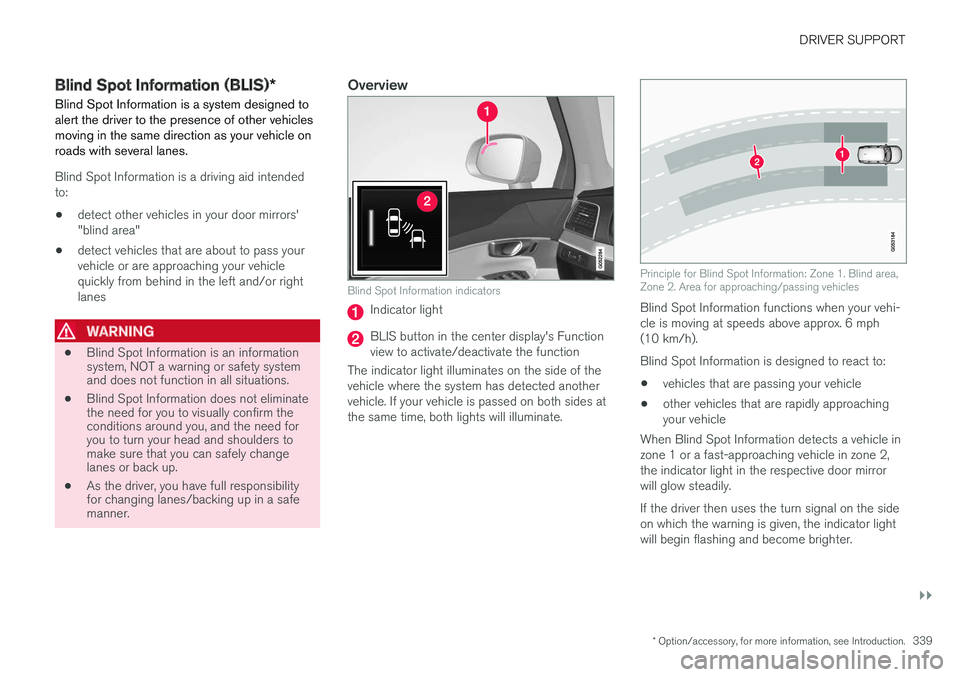
Blind Spot Information indicators
Indicator light
BLIS button in the center display's Functionview to activate/deactivate the function
The indicator light illuminates on the side of thevehicle where the system has detected anothervehicle. If your vehicle is passed on both sides atthe same time, both lights will illuminate.
Principle for Blind Spot Information: Zone 1. Blind area,Zone 2. Area for approaching/passing vehicles
Blind Spot Information functions when your vehi-cle is moving at speeds above approx. 6 mph(10 km/h).
Blind Spot Information is designed to react to:
•vehicles that are passing your vehicle
•other vehicles that are rapidly approachingyour vehicle
When Blind Spot Information detects a vehicle inzone 1 or a fast-approaching vehicle in zone 2,the indicator light in the respective door mirrorwill glow steadily.
If the driver then uses the turn signal on the sideon which the warning is given, the indicator lightwill begin flashing and become brighter.
Page 344 of 584
||
DRIVER SUPPORT
* Option/accessory, for more information, see Introduction.342
•An audible signal indicates that CTA hasdetected something that is approaching fromthe side. The signal will come from either theleft or right infotainment system speakers,depending on which the side of your vehiclethe approaching vehicle/ object has beendetected.
•A warning is indicated using the Park Assist*system's graphic in the instrument panel.
•An icon is also shown in the Park AssistCamera's* Top view.
Related information
•Activating/deactivating Cross Traffic Alert(CTA)* (p. 342)
•Blind Spot Information (BLIS)* with CrossTraffic Alert (CTA)* symbols and messages(p. 345)
•Cross Traffic Alert (CTA)* limitations (p. 343)
Activating/deactivating Cross Traffic
Alert (CTA)*
Cross Traffic Alert (CTA) can be activated/deac-tivated separately from Blind Spot Information(BLIS).
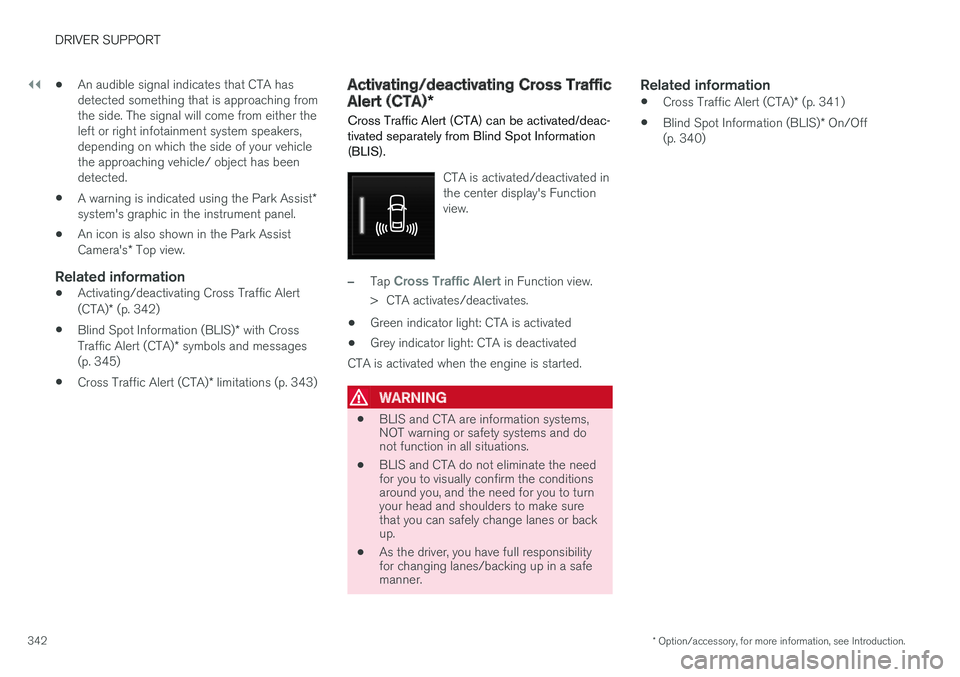
CTA is activated/deactivated inthe center display's Functionview.
–Tap Cross Traffic Alert in Function view.
>CTA activates/deactivates.
•Green indicator light: CTA is activated
•Grey indicator light: CTA is deactivated
CTA is activated when the engine is started.
WARNING
•BLIS and CTA are information systems,NOT warning or safety systems and donot function in all situations.
•BLIS and CTA do not eliminate the needfor you to visually confirm the conditionsaround you, and the need for you to turnyour head and shoulders to make surethat you can safely change lanes or backup.
•As the driver, you have full responsibilityfor changing lanes/backing up in a safemanner.
Related information
•Cross Traffic Alert (CTA)* (p. 341)
•Blind Spot Information (BLIS)* On/Off(p. 340)
Page 348 of 584
DRIVER SUPPORT
* Option/accessory, for more information, see Introduction.346
Road Sign Information (RSI)*
RSI is a feature that helps the driver see roadsigns showing the posted speed limit.
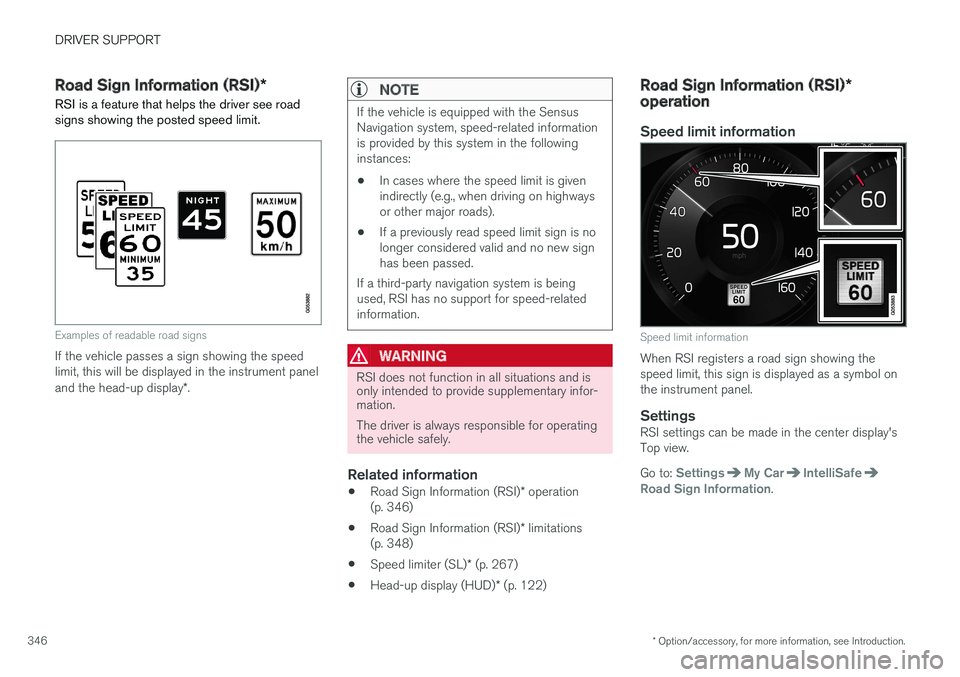
Examples of readable road signs
If the vehicle passes a sign showing the speedlimit, this will be displayed in the instrument paneland the head-up display*.
NOTE
If the vehicle is equipped with the SensusNavigation system, speed-related informationis provided by this system in the followinginstances:
•In cases where the speed limit is givenindirectly (e.g., when driving on highwaysor other major roads).
•If a previously read speed limit sign is nolonger considered valid and no new signhas been passed.
If a third-party navigation system is beingused, RSI has no support for speed-relatedinformation.
WARNING
RSI does not function in all situations and isonly intended to provide supplementary infor-mation.
The driver is always responsible for operatingthe vehicle safely.
Related information
•Road Sign Information (RSI)* operation(p. 346)
•Road Sign Information (RSI)* limitations(p. 348)
•Speed limiter (SL)* (p. 267)
•Head-up display (HUD)* (p. 122)
Road Sign Information (RSI)*operation
Speed limit information
Speed limit information
When RSI registers a road sign showing thespeed limit, this sign is displayed as a symbol onthe instrument panel.
Settings
RSI settings can be made in the center display'sTop view.
Go to: SettingsMy CarIntelliSafeRoad Sign Information.
Page 353 of 584

DRIVER SUPPORT
}}
351
Driving lane assistance provide vibrations in the steeringwheel8.
Depending on the settings used, Lane KeepingAid functions in different ways:
•Assistance type Steering9 is activated: whenthe vehicle approaches a traffic lane markerline, LKA will provide active steering assis-tance to help steer it back into the lane.
•Assistance type Warning9 is activated: if thevehicle is moving out of its traffic lane, anaudible signal and/or vibrations in the steer-ing wheel will be provided.
NOTE
If the turn signal is used, Lane Keeping Aidwill not provide an alert or steering assis-tance.
WARNING
Lane Keeping Aid is only intended to assistthe driver and does not function in all driving,weather, traffic or road conditions.
As the driver, you have full responsibility foroperating the vehicle in a safe manner.
Steering assistance
In order for LKA's steering assistance to function,the driver's hands must be on the steering wheel,which the system monitors continuously.
If the driver's hands are not onthe steering wheel, this symbolwill illuminate in the instrumentpanel and the following mes-sage will be displayed:
•Lane Keeping Aid – Apply steering
If the driver does not begin to steer the vehicle,the symbol will illuminate again, an audible signal
will sound and the following message will be dis-played:
•Lane Keeping Aid – Standby untilsteering applied
If the driver still does not begin to steer the vehi-cle, LKA will go into standby mode. The functionwill not become available again until the driveractively steers the vehicle
Lane assistance do not react
The traffic lane assistance system do not intervene insharp curves
In certain cases, such as during active driving or ifthe turn signal is used, the traffic lane system willnot react if the vehicle crosses a lane markerline.
8The level of vibrations varies; the farther the vehicle is over a lane marker line, the greater the number of vibrations:9See "Type of assistance" in the article "Activating/deactivating Lane Keeping Aid".
Page 358 of 584

||
DRIVER SUPPORT
* Option/accessory, for more information, see Introduction.356
The setting selected when the engine wasswitched off will be used the next time theengine is started.
Limitations
In certain situations, it may be difficult for Run-offMitigation to assist the driver. In such cases, it isadvisable to deactivate the function.
Examples of these situations include:
•road construction
•winter driving conditions
•poor road surfaces
•narrow roads
•a very active driving style
•bad weather with reduced visibility
•edges or lines other than the lane's markerlines
•roads with indistinct or no lane marker lines
The Run-off Mitigation function use the vehicle'scamera, which has general limitations. See thearticle "Camera limitations".
WARNING
•Run-off Mitigation is only intended toassist the driver and does not function inall driving, weather, traffic or road condi-tions.
•This function cannot detect barriers, railsor similar obstructions at the side of aroad or traffic lane.
•As the driver, you have full responsibilityfor operating the vehicle in a safe man-ner.
Related information
•Run-off Mitigation* symbols and messages(p. 357)
•Driving lane assistance (p. 350)
•Camera limitations (p. 323)
Page 362 of 584
DRIVER SUPPORT
* Option/accessory, for more information, see Introduction.360
Park Assist limitations
The Park Assist system has certain limitations.
NOTE
A trailer hitch whose wiring is integrated withthe vehicle's electrical system will be takeninto account when measuring the availablespace behind the vehicle.
NOTE
•The system will not detect high objects,such as a loading dock, etc.
•Certain materials or fabrics may not bedetected by the sensors. Objects made ofthese materials or people wearing cloth-ing made of these fabrics may not bedetected.
•Children or animals near the vehicle maynot always be detected.
•Objects such as chains, thin shiny polesor low objects may temporarily not bedetected by the system. This may resultin the pulsing tone unexpectedly stoppinginstead of changing to a constant tone asthe vehicle approaches the object. Insuch cases, use caution when backing upor stop the vehicle to help avoid damage.
•In certain circumstances, the park assistsystem may give unexpected warning sig-nals that can be caused by externalsound sources that use the same ultra-sound frequencies as the system. Thismay include such things as the horns ofother vehicles, wet tires on asphalt, pneu-matic brakes, motorcycle exhaust pipes,other vehicles with similar ultrasound sys-tems, etc. This does not indicate a fault inthe system.
Cleaning the sensors
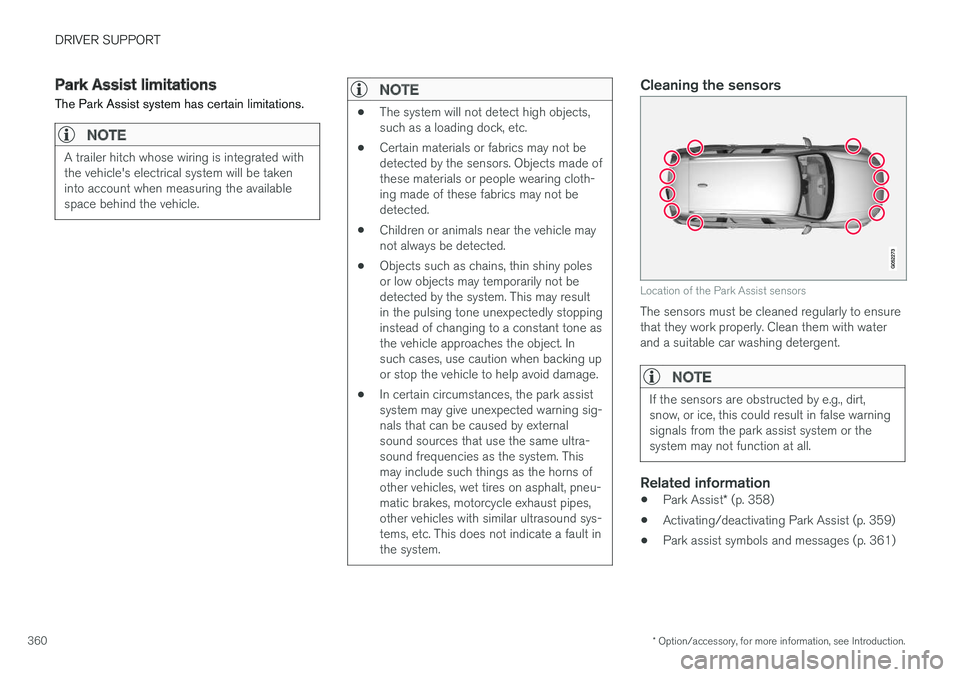
Location of the Park Assist sensors
The sensors must be cleaned regularly to ensurethat they work properly. Clean them with waterand a suitable car washing detergent.
NOTE
If the sensors are obstructed by e.g., dirt,snow, or ice, this could result in false warningsignals from the park assist system or thesystem may not function at all.
Related information
•Park Assist* (p. 358)
•Activating/deactivating Park Assist (p. 359)
•Park assist symbols and messages (p. 361)
Page 364 of 584

DRIVER SUPPORT
* Option/accessory, for more information, see Introduction.362
Park Assist Camera (PAC)*
The Park Assist Camera system is designed toprovide the driver with a view of the area aroundthe vehicle in the form of a camera image andgraphics in the center display.
PAC is a supplementary parking aid that can beactivated automatically when the gear selector isin R or by tapping a button in the center display,depending on the selected settings. See also thearticle "Starting the Park Assist Camera."
Lines: Guiding lines On/Off
Towbar: Guiding lines for a trailer hitch*11
On/Off
PAS: Park Assist On/Off
CTA: Cross Traffic Alert* On/Off
Zoom: Zoom in/out12
NOTE
A trailer hitch whose wiring is integrated withthe vehicle's electrical system will be takeninto account when measuring the availablespace behind the vehicle.
WARNING
•PAC is designed to be a supplementaryaid when parking the vehicle. It is not,however, intended to replace the driver
Page 365 of 584

DRIVER SUPPORT
* Option/accessory, for more information, see Introduction.363
Backing up
Location of the rear Park Assist Camera (generic illus-tration)
The rear camera shows a wide area behind thevehicle and on certain models, part of the bumperand the trailer hitch (if installed) will be visible.
Some objects on the screen may appear to “lean”slightly, which is normal.
WARNING
People/objects/obstructions displayed on thecenter console screen may be closer to thevehicle than they appear.
Front camera
Location of the front Park Assist Camera (generic illus-tration)
The front camera is located behind the grill andcan be useful when driving off in areas with lim-ited visibility (hedges, bushes, etc). It is active atspeeds up to approx. 16 mph (25 km/h) and isautomatically turned off when the vehicleexceeds this speed.
However, if the vehicle's speed does not exceed30 mph (50 km/h) and its speed goes under14 mph (22 km/h) within 60 seconds after thecamera has been switched off, the front camerawill reactivate.
NOTE
The front camera will only reactivate automati-cally if Auto Camera Reverse Activation
has been selected in SettingsMy CarPark Assist.
Side camera
The side cameras are located in the respectivedoor mirrors and shows views along the sides ofthe vehicle.
Related information
•Park Assist Camera (PAC)* trajectory linesand fields (p. 364)
•Park Assist Camera* (PAC) limitations(p. 367)
•Starting the Park Assist Camera (PAC)*(p. 366)