steering wheel VOLVO XC90 TWIN ENGINE HYBRID 2017 Owner's Manual
[x] Cancel search | Manufacturer: VOLVO, Model Year: 2017, Model line: XC90 TWIN ENGINE HYBRID, Model: VOLVO XC90 TWIN ENGINE HYBRID 2017Pages: 584, PDF Size: 14.2 MB
Page 130 of 584
INSTRUMENTS AND CONTROLS
* Option/accessory, for more information, see Introduction.128
Climate system voice commands
Voice commands can be used to control the cli-mate system to e.g., change the temperature,activate seat heating* or change blower (fan)speed.
To use the voice control system, press the on the right-side steering wheel keypad and sayone of the following commands after the tone:
•"Climate": starts a command dialog andprovides examples of commands that can beused.
•"Set temperature to X degrees": sets thedesired temperature.
•"Raise temperature"/"Lowertemperature": raises/lowers the tempera-ture.
•"Sync temperature": synchronizes the tem-perature in all of the vehicle's climate zoneswith the one set for the driver's side.
•"Air on feet"/"Air on body": opens thedesired air vent.
•"Air on feet off"/"Air on body off": closesthe desired air vent.
•"Set fan to max"/"Turn off fan": changesthe blower speed to Max/Off.
•"Raise fan speed"/"Lower fan speed":raises/lowers the blower speed.
•"Turn on auto": activates automatic climatecontrol.
•"Air condition on"/"Air condition off":activates/deactivates the air conditioning.
•"Recirculation on"/"Recirculation off":activates/deactivates recirculation.
•"Turn on defroster "/"Turn off defroster":activates/deactivates window and door mirrordefrosting.
•"Turn on max defroster"/"Turn off maxdefroster": activates/deactivates maxdefroster.
•"Turn on electric defroster"/"Turn offelectric defroster": activates/deactivatesthe electrically heated windshield*.
•"Turn on rear defroster"/"Turn off reardefroster": activates/deactivates the electri-cally heated rear window and door mirrors.
•"Turn steering wheel heat on"/"Turnsteering wheel heat off": activates/deacti-vates the electrically heated steering wheel*.
•"Raise steering wheel heat"/"Lowersteering wheel heat": raises/lowers theheating level for the electrically heated steer-ing wheel*.
•"Turn on seat heat"/"Turn off seat heat":activates/deactivates the electrically heatedseats*.
•"Raise seat heat"/"Lower seat heat": rai-ses/lowers the heating level for the electri-cally heated seats*.
•"Turn on seat ventilation"/"Turn off seatventilation": activates/deactivates seat ven-tilation*.
•"Raise seat ventilation"/"Lower seatventilation": raises/lowers the level for seatventilation*.
Related information
•Climate system controls (p. 199)
•Voice control (p. 125)
•Using voice commands (p. 125)
Page 131 of 584

INSTRUMENTS AND CONTROLS
129
Navigation system voice commands
Many of the navigation system's functions canbe activated using voice commands.
The procedure for using voice control is descri-bed in greater detail in the articles "Voice con-trol," "Using voice control" and "Voice controlsettings."
Voice commands
The following list contains examples of com-mands that are unique to navigation system.
To use the voice control system, press the on the right-side steering wheel keypad and sayone of the following commands after the tone:
•"Navigation": Starts a navigation voice com-mand dialog and displays available com-mands.
•"Take me home": Guidance will be given tothe location set as Home.
•"Go to [City]": Enter a city as a destination,e.g., "Go to New York."
•"Go to [Address]": Enter an address as adestination, e.g., Go to 125 43 St., NewYork."
•"Go to Intersection": Starts a dialog wheretwo street names are entered. The destina-tion will then be the intersection of the twostreets.
•"Go to [Zip code]": Enter a zip code as adestination, e.g., "Go to 07405."
•"Go to [Name]": Enter a name from a list ofcontacts e.g., "Go to John Smith."
•"Search [POI category] in [City]": The listof results will be sorted around the center ofthe selected city/town, e.g., Search restau-rants in Butler.
•Search [POI category]": For example,Search Yankee Stadium.
•"Change country/Change state":Changes the country/state in which a searchis conducted.
•"Show favorites": Shows a list of Favoritesin the center display's Top view.
•"Clear itinerary": Deletes all intermediatedestinations in an itinerary.
•"Repeat voice guidance": Repeats themost recent guidance instruction.
•"Pause guidance": Pauses guidance onthe map.
•"Resume guidance": Resumes guidanceon the map.
•"Turn off voice guidance": Turns voicenavigation guidance off.
•"Turn on voice guidance": Turns voicenavigation guidance on.
Related information
•Voice control (p. 125)
•Using voice commands (p. 125)
•Voice control settings (p. 130)
Page 133 of 584
INSTRUMENTS AND CONTROLS
}}
131
SymbolExplanation
Left/right turn signals
Both turn signal indicators willflash when the hazard warningflashers are being used.
Forward lights
Active Bending Lights (ABL)
This symbol will illuminate if thereis a fault in the ABL system or ifany other fault is detected in theheadlight system.
Automatic/active high beamson
The symbol will be blue when theautomatic high beams are on.
Automatic/active high beamsoffThe symbol will be white whenthe automatic high beams are off.
High beam indicator
The symbol will illuminate whenthe high beams are on or whenhigh beam flash is being used.
SymbolExplanation
Automatic/active high beamson
The symbol will be blue when theautomatic high beams are on. Theparking lights will also be on.
Automatic/active high beamsoff
The symbol will be white when theautomatic high beams are off. Theparking lights will be on.
High beams on
The high beams and parking lightswill be on.
Not in use
Rear fog lights
The symbol illuminates when therear fog lights are on.
Rain sensor
The symbol illuminates when therain sensor is on.
SymbolExplanation
PreconditioningC
The symbol illuminates when theengine/cabin heater/air condition-ing are preconditioning the vehi-cle.
Stability system
This symbol flashes when the sta-bility system is actively working tostabilize the vehicle. If the symbolglows steadily, there is a fault inthe system.
Stability system, sport mode
This symbol illuminates whenSport mode is activated. Sportmode offers more active drivingcharacteristics by monitoringmovement of the acceleratorpedal, steering wheel and corner-ing by allowing more lateral move-ment of the rear wheels beforethe stability system is activated.
Page 135 of 584
INSTRUMENTS AND CONTROLS
}}
133
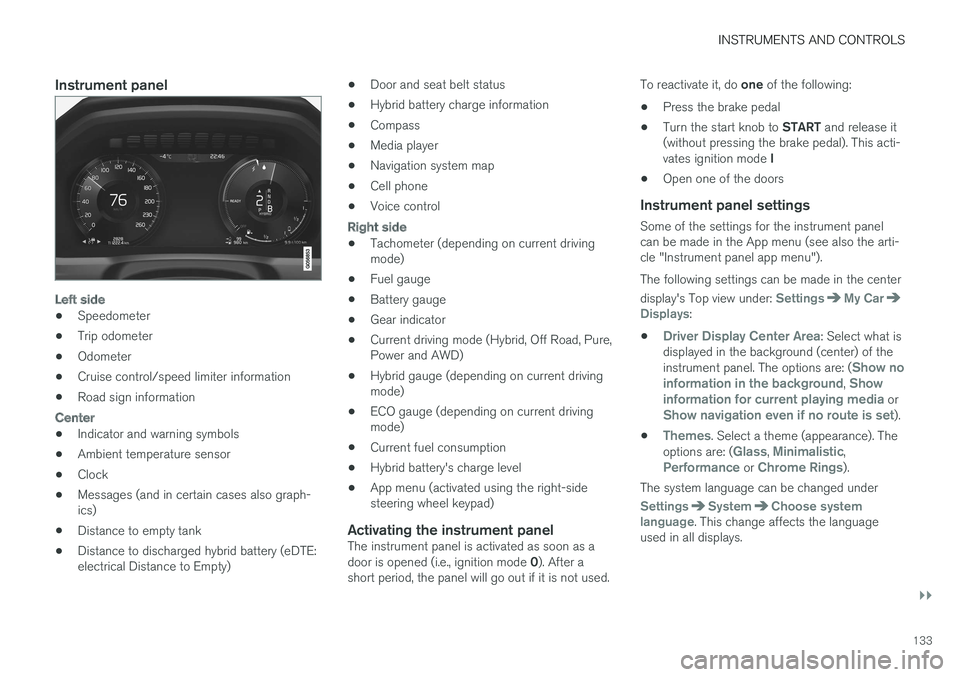
Instrument panel
Left side
•Speedometer
•Trip odometer
•Odometer
•Cruise control/speed limiter information
•Road sign information
Center
•Indicator and warning symbols
•Ambient temperature sensor
•Clock
•Messages (and in certain cases also graph-ics)
•Distance to empty tank
•Distance to discharged hybrid battery (eDTE:electrical Distance to Empty)
•Door and seat belt status
•Hybrid battery charge information
•Compass
•Media player
•Navigation system map
•Cell phone
•Voice control
Right side
•Tachometer (depending on current drivingmode)
•Fuel gauge
•Battery gauge
•Gear indicator
•Current driving mode (Hybrid, Off Road, Pure,Power and AWD)
•Hybrid gauge (depending on current drivingmode)
•ECO gauge (depending on current drivingmode)
•Current fuel consumption
•Hybrid battery's charge level
•App menu (activated using the right-sidesteering wheel keypad)
Activating the instrument panel
The instrument panel is activated as soon as adoor is opened (i.e., ignition mode 0). After ashort period, the panel will go out if it is not used.
To reactivate it, do one of the following:
•Press the brake pedal
•Turn the start knob to START and release it(without pressing the brake pedal). This acti-vates ignition mode I
•Open one of the doors
Instrument panel settings
Some of the settings for the instrument panelcan be made in the App menu (see also the arti-cle "Instrument panel app menu").
The following settings can be made in the center
display's Top view under: SettingsMy CarDisplays:
•Driver Display Center Area: Select what isdisplayed in the background (center) of theinstrument panel. The options are: (Show noinformation in the background, Showinformation for current playing media orShow navigation even if no route is set).
•Themes. Select a theme (appearance). Theoptions are: (Glass, Minimalistic,Performance or Chrome Rings).
The system language can be changed under
SettingsSystemChoose systemlanguage. This change affects the languageused in all displays.
Page 146 of 584

||
INSTRUMENTS AND CONTROLS
144
8. Repeat the calibration procedure if neces-sary.
Related information
•Defrosting windows and mirrors (p. 206)
•Compass (p. 142)
Lighting panel and controls
The lighting ring on the left-side steering wheellever can be used to activate the vehicle's exte-rior lighting.
Instrument lighting brightness can be adjustedusing the thumb wheel on the lighting panel.
Lighting ring on the left-side steering
wheel lever
Lightingring posi-tion
Result
With the ignition in mode II or ifthe engine is running:
•In the US: the Daytime Run-ning Lights (DRL) will be off
•In Canada: the Daytime Run-ning Lights will be on
•High beam flash can be used
With the ignition in mode II or if
the engine is running:A
•Parking lights will be on
•In the US: the Daytime Run-ning Lights will be off
•In Canada: the Daytime Run-ning Lights will be on
•High beam flash can be used
With the ignition in mode II or ifthe engine is running:
•The Daytime Running Lightswill be off
•The low beam headlights willbe on
•High Beams/High Beamflash can be used
Page 148 of 584

INSTRUMENTS AND CONTROLS
146
Parking lights
Turn the parking lights on by turning the lightingring on the left-side steering wheel lever.
Lighting ring in the parking light position
Turn the lighting ring to the position (thelicense plate lighting comes on at the sametime).
Canadian models: If the ignition is in position IIor the engine is running, the daytime runninglights will illuminate instead of the front parkinglights.
With the lighting ring in this position, the parkinglights will remain on even when the ignition isswitched off.
In dark conditions, the rear parking lights alsoilluminate when the tailgate is opened to alertanyone traveling behind your vehicle. This hap-
pens regardless of the position that the lightingring is in or which mode the ignition is in.
Related information
•Lighting panel and controls (p. 144)
Daytime Running Lights (DRL)
The car monitors ambient lighting conditions.
With the ring on the left-side steering wheel
lever in the position and the ignition inmode II (or the engine running), the lights toggleautomatically between DRL and low beam head-lights.
Ring in the AUTO position.
NOTE
Volvo recommends the use of Daytime Run-ning Lights in the United States. The use ofthese lights is mandatory in Canada.
With the lighting ring in the 0 position:
•In the US: DRL will be off
•In Canada: DRL will be on
Page 150 of 584

INSTRUMENTS AND CONTROLS
148
High and low beam headlights
If the ignition is in mode II or when the engine isstarted, the low beams are activated automati-
cally if the lighting ring is in position . Indark conditions, the low beams will also be on if
the lighting ring is in the position.
Lighting ring
High beam flash
Continuous high beams
High beam flash
Pull the lever slightly toward the steering wheel.The high beams illuminate until the lever isreleased.
Continuous high beams
Continuous high beams are available if the light-
ing ring is turned to 9 or . Toggle tohigh beams by moving the lever forward. Returnto low beams by moving the lever toward thesteering wheel.
The symbol will illuminate in the instrumentpanel when the high beams are on.
Active high beams
The active high beam system uses a camera atthe upper edge of the windshield to detect theheadlights of oncoming vehicles or the taillightsof a vehicle directly ahead. When this happens,the headlights will automatically switch from highbeams to low beams.
When the camera no longer detects anapproaching vehicle or one that is ahead, yourheadlights will switch back to high beams.
Vehicles with halogen headlights 10
When the camera no longer detects the head-lights of an approaching vehicle or the taillightsof a vehicle ahead, your headlights will switchback to high beams after several seconds.
Operation
Activate/deactivate this function by turning the
lighting ring past the position to .
When released, the ring will automatically return
to the position.
If the active high beam function has not beenactivated, switching between high and low beamsmust be done manually.
A white symbol () in the instrument panelindicates that the function has been activated.
When the high beams are on, the symbol willchange to blue.
NOTE
•Keep the windshield in front of the cam-era free of ice, snow, dirt, etc.
•Do not mount or in any way attach any-thing on the windshield that couldobstruct the camera.
If a message is displayed in the instru-ment panel saying that active highbeams are temporarily unavailable,switching between high and low beamswill have to be done manually. However, the light
switch can remain in the position. Thesame applies if a message saying that the wind-shield sensors are blocked and the symbol above
are displayed. The symbol will go out if thishappens.
9When the low beams are on.
10
Halogen headlights are not available on all models.
Page 151 of 584
INSTRUMENTS AND CONTROLS
}}
* Option/accessory, for more information, see Introduction.149
Active high beams may be temporarily unavailable(e.g., in heavy fog or rain). When the systembecomes active again or if the sensors in thewindshield are no longer obscured, the messages
will disappear and the symbol will illumi-nate.
WARNING
•Automatic high beams are a driving aiddesigned to help provide the best possi-ble headlight illumination in good drivingconditions.
•The use of aftermarket or non-Volvoglass can have an adverse effect on theautomatic high beam function.
•The driver is always responsible for man-ually toggling between high and lowbeams when this is required by traffic orweather conditions.
CAUTION
In the following situations, it may be neces-sary to switch between high and low beamsmanually:
•In heavy fog or rain
•In blowing snow or slush
•In bright moonlight
•In freezing rain
•In areas with dim street lighting
•When oncoming vehicles have dim frontlighting
•If there are pedestrians on or near theroad
•If there are reflective objects, such assigns, near the road
•When oncoming vehicles' lights areobscured by e.g., fences, bushes, etc.
•When there are vehicles on connectingroads
•At the top of hills or in dips in the road
•In sharp curves
Related information
•City Safety™ troubleshooting (p. 332)
•Lighting panel and controls (p. 144)
Active Bending Lights*
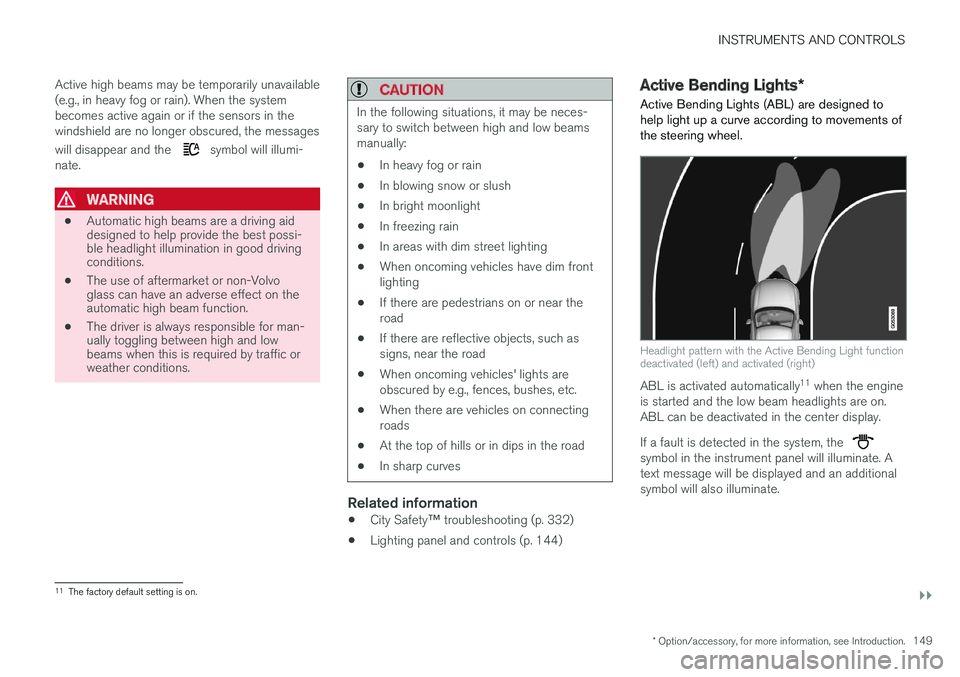
Active Bending Lights (ABL) are designed tohelp light up a curve according to movements ofthe steering wheel.
Headlight pattern with the Active Bending Light functiondeactivated (left) and activated (right)
ABL is activated automatically11 when the engineis started and the low beam headlights are on.ABL can be deactivated in the center display.
If a fault is detected in the system, the symbol in the instrument panel will illuminate. Atext message will be displayed and an additionalsymbol will also illuminate.
11The factory default setting is on.
Page 153 of 584
INSTRUMENTS AND CONTROLS
}}
* Option/accessory, for more information, see Introduction.151
Brake lights
The brake lights illuminate automatically whenthe brakes are applied.
In addition to illuminating when the brake pedal isdepressed, the brake lights also illuminate whenone of the driver support systems (e.g., adaptivecruise control, City Safety or collision warning)slow the vehicle.
Related information
•Adaptive Cruise Control (ACC)* (p. 281)
•City Safety™ (p. 326)
•Emergency brake lights (p. 380)
Hazard warning flashers
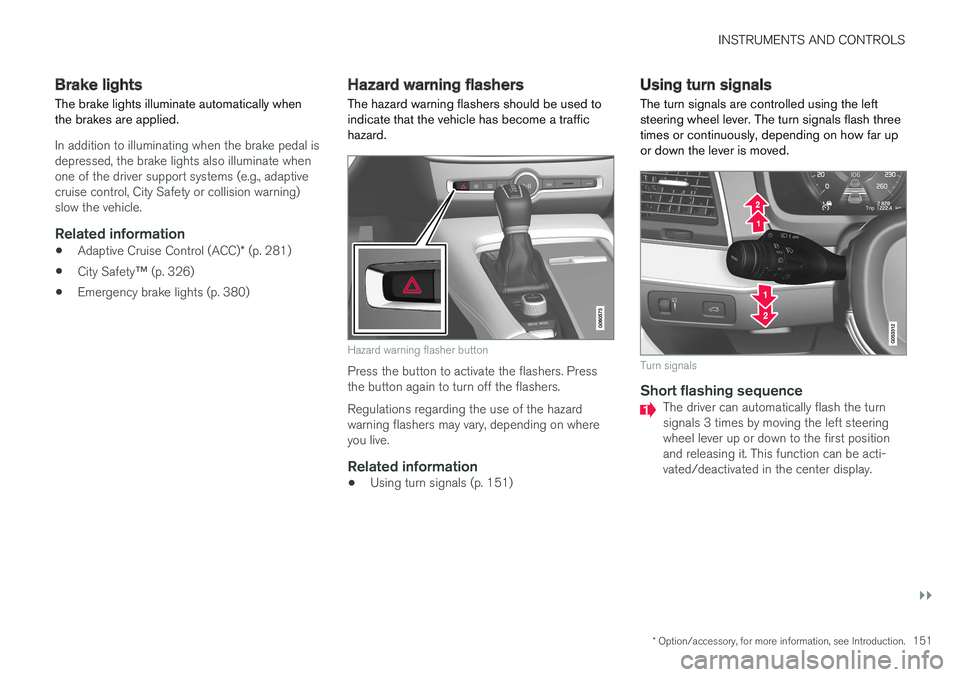
The hazard warning flashers should be used toindicate that the vehicle has become a traffichazard.
Hazard warning flasher button
Press the button to activate the flashers. Pressthe button again to turn off the flashers.
Regulations regarding the use of the hazardwarning flashers may vary, depending on whereyou live.
Related information
•Using turn signals (p. 151)
Using turn signals
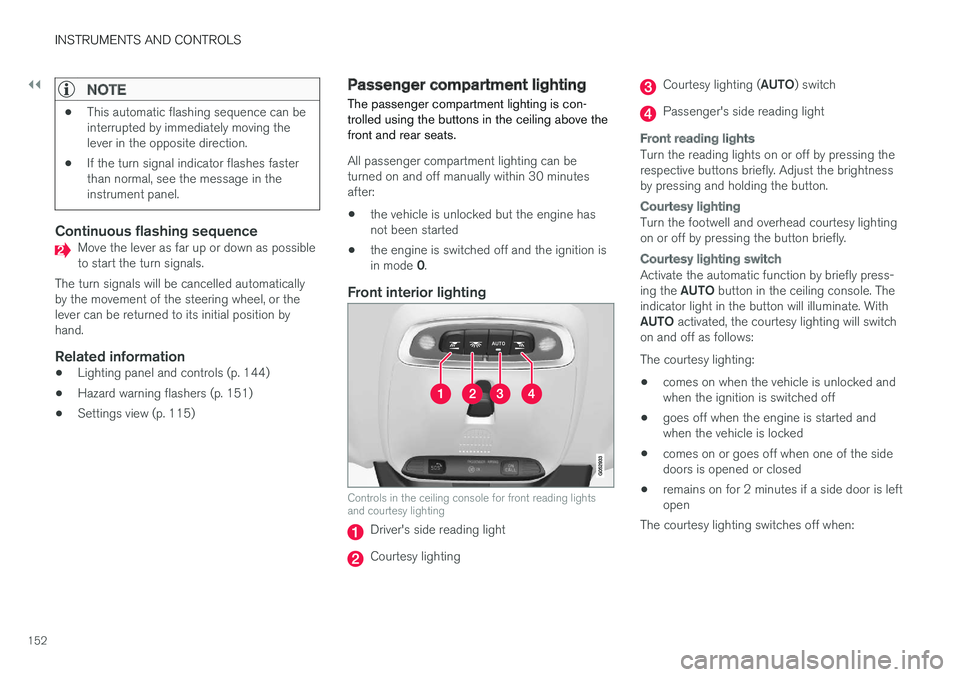
The turn signals are controlled using the leftsteering wheel lever. The turn signals flash threetimes or continuously, depending on how far upor down the lever is moved.
Turn signals
Short flashing sequence
The driver can automatically flash the turnsignals 3 times by moving the left steeringwheel lever up or down to the first positionand releasing it. This function can be acti-vated/deactivated in the center display.
Page 154 of 584
||
INSTRUMENTS AND CONTROLS
152
NOTE
•This automatic flashing sequence can beinterrupted by immediately moving thelever in the opposite direction.
•If the turn signal indicator flashes fasterthan normal, see the message in theinstrument panel.
Continuous flashing sequence
Move the lever as far up or down as possibleto start the turn signals.
The turn signals will be cancelled automaticallyby the movement of the steering wheel, or thelever can be returned to its initial position byhand.
Related information
•Lighting panel and controls (p. 144)
•Hazard warning flashers (p. 151)
•Settings view (p. 115)
Passenger compartment lighting
The passenger compartment lighting is con-trolled using the buttons in the ceiling above thefront and rear seats.
All passenger compartment lighting can beturned on and off manually within 30 minutesafter:
•the vehicle is unlocked but the engine hasnot been started
•the engine is switched off and the ignition isin mode 0.
Front interior lighting
Controls in the ceiling console for front reading lightsand courtesy lighting
Driver's side reading light
Courtesy lighting
Courtesy lighting (AUTO) switch
Passenger's side reading light
Front reading lights
Turn the reading lights on or off by pressing therespective buttons briefly. Adjust the brightnessby pressing and holding the button.
Courtesy lighting
Turn the footwell and overhead courtesy lightingon or off by pressing the button briefly.
Courtesy lighting switch
Activate the automatic function by briefly press-ing the AUTO button in the ceiling console. Theindicator light in the button will illuminate. WithAUTO activated, the courtesy lighting will switchon and off as follows:
The courtesy lighting:
•comes on when the vehicle is unlocked andwhen the ignition is switched off
•goes off when the engine is started andwhen the vehicle is locked
•comes on or goes off when one of the sidedoors is opened or closed
•remains on for 2 minutes if a side door is leftopen
The courtesy lighting switches off when: