brake YAMAHA EC-03 2011 Owner's Manual
[x] Cancel search | Manufacturer: YAMAHA, Model Year: 2011, Model line: EC-03, Model: YAMAHA EC-03 2011Pages: 78, PDF Size: 2.04 MB
Page 57 of 78
PERIODIC MAINTENANCE AND ADJUSTMENT
8-8
2
3
4
5
6
789
EAU22361
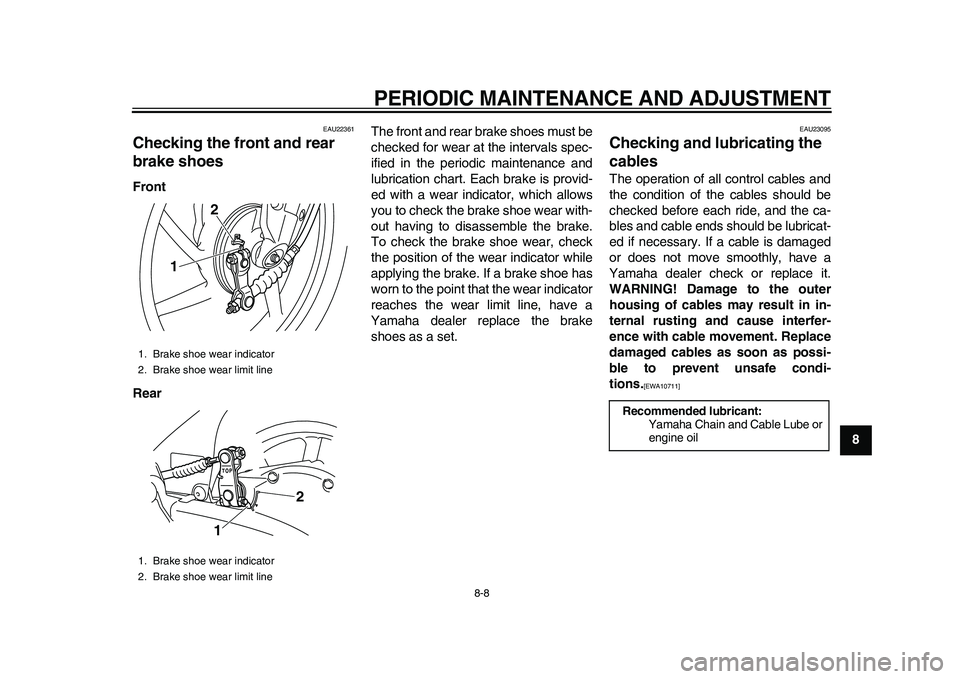
Checking the front and rear
brake shoes Front
RearThe front and rear brake shoes must be
checked for wear at the intervals spec-
ified in the periodic maintenance and
lubrication chart. Each brake is provid-
ed with a wear indicator, which allows
you to check the brake shoe wear with-
out having to disassemble the brake.
To check the brake shoe wear, check
the position of the wear indicator while
applying the brake. If a brake shoe has
worn to the point that the wear indicator
reaches the wear limit line, have a
Yamaha dealer replace the brake
shoes as a set.
EAU23095
Checking and lubricating the
cables The operation of all control cables and
the condition of the cables should be
checked before each ride, and the ca-
bles and cable ends should be lubricat-
ed if necessary. If a cable is damaged
or does not move smoothly, have a
Yamaha dealer check or replace it.
WARNING! Damage to the outer
housing of cables may result in in-
ternal rusting and cause interfer-
ence with cable movement. Replace
damaged cables as soon as possi-
ble to prevent unsafe condi-
tions.
[EWA10711]
1. Brake shoe wear indicator
2. Brake shoe wear limit line
1. Brake shoe wear indicator
2. Brake shoe wear limit line
12
1
2
Recommended lubricant:
Yamaha Chain and Cable Lube or
engine oil
1CB-9-E0.book 8 ページ 2010年10月15日 金曜日 午前10時19分
Page 58 of 78
PERIODIC MAINTENANCE AND ADJUSTMENT
8-9
1
2
3
4
5
6
78
9
EAU43631
Lubricating the front and rear
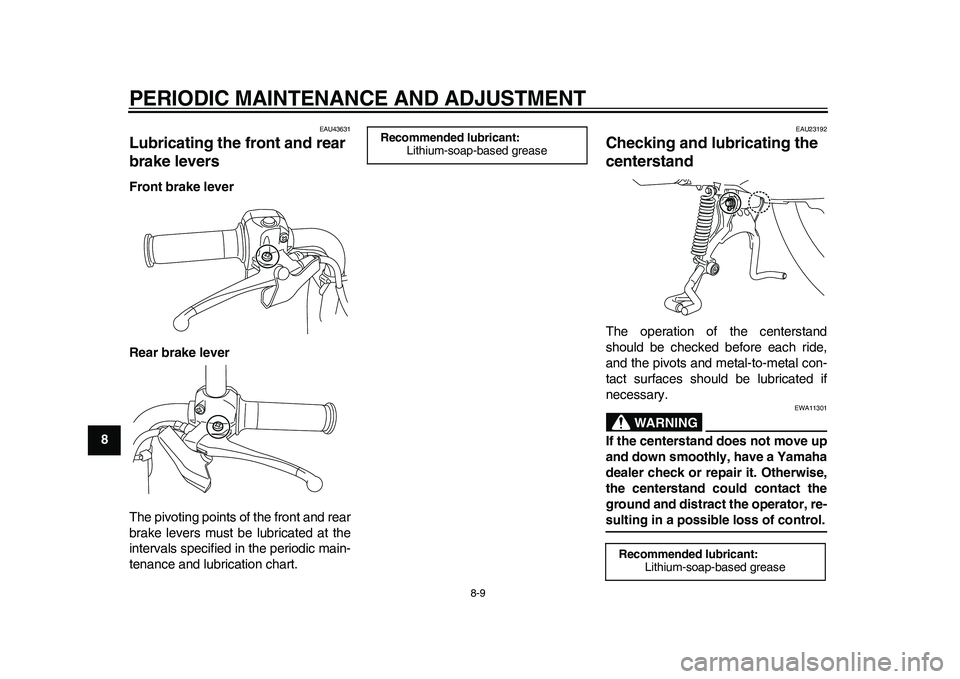
brake levers Front brake lever
Rear brake lever
The pivoting points of the front and rear
brake levers must be lubricated at the
intervals specified in the periodic main-
tenance and lubrication chart.
EAU23192
Checking and lubricating the
centerstand The operation of the centerstand
should be checked before each ride,
and the pivots and metal-to-metal con-
tact surfaces should be lubricated if
necessary.
WARNING
EWA11301
If the centerstand does not move up
and down smoothly, have a Yamaha
dealer check or repair it. Otherwise,
the centerstand could contact the
ground and distract the operator, re-sulting in a possible loss of control.
Recommended lubricant:
Lithium-soap-based grease
Recommended lubricant:
Lithium-soap-based grease
1CB-9-E0.book 9 ページ 2010年10月15日 金曜日 午前10時19分
Page 59 of 78
PERIODIC MAINTENANCE AND ADJUSTMENT
8-10
2
3
4
5
6
789
EAU42081
Checking the front fork The condition and operation of the front
fork must be checked as follows at the
intervals specified in the periodic main-
tenance and lubrication chart.
To check the condition
Check the inner tubes for scratches
and damage.
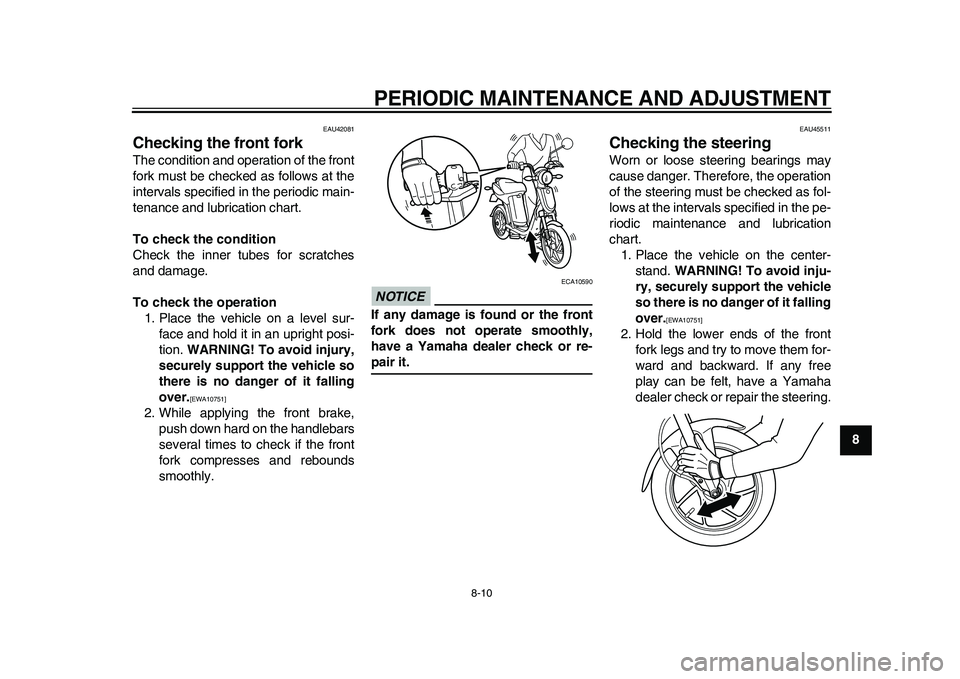
To check the operation
1. Place the vehicle on a level sur-
face and hold it in an upright posi-
tion. WARNING! To avoid injury,
securely support the vehicle so
there is no danger of it falling
over.
[EWA10751]
2. While applying the front brake,
push down hard on the handlebars
several times to check if the front
fork compresses and rebounds
smoothly.
NOTICE
ECA10590
If any damage is found or the front
fork does not operate smoothly,
have a Yamaha dealer check or re-pair it.
EAU45511
Checking the steering Worn or loose steering bearings may
cause danger. Therefore, the operation
of the steering must be checked as fol-
lows at the intervals specified in the pe-
riodic maintenance and lubrication
chart.
1. Place the vehicle on the center-
stand. WARNING! To avoid inju-
ry, securely support the vehicle
so there is no danger of it falling
over.
[EWA10751]
2. Hold the lower ends of the front
fork legs and try to move them for-
ward and backward. If any free
play can be felt, have a Yamaha
dealer check or repair the steering.
1CB-9-E0.book 10 ページ 2010年10月15日 金曜日 午前10時19分
Page 61 of 78
PERIODIC MAINTENANCE AND ADJUSTMENT
8-12
2
3
4
5
6
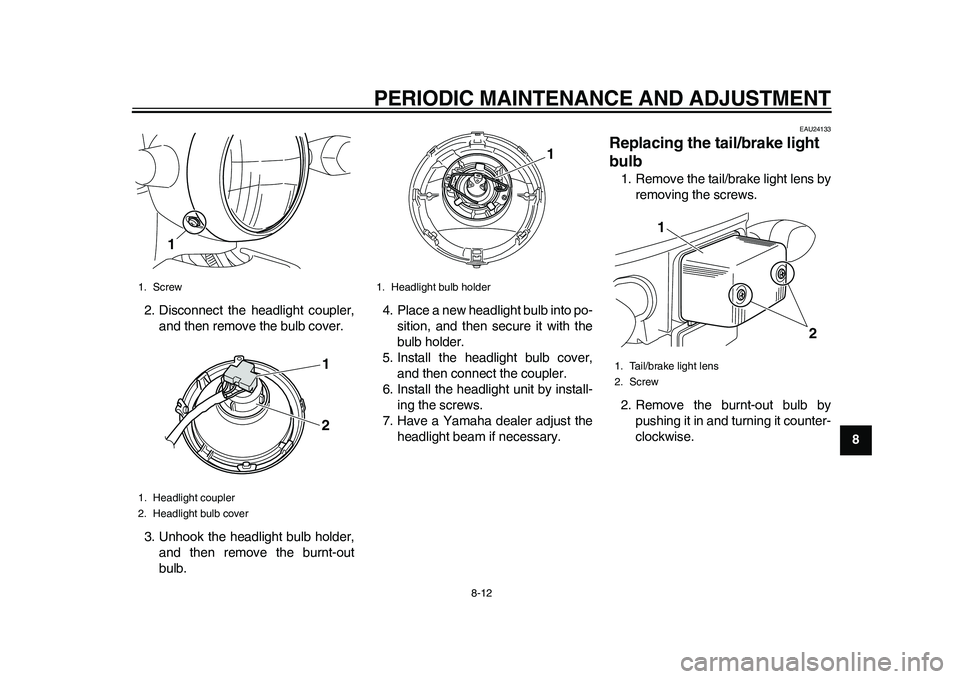
789 2. Disconnect the headlight coupler,
and then remove the bulb cover.
3. Unhook the headlight bulb holder,
and then remove the burnt-out
bulb.4. Place a new headlight bulb into po-
sition, and then secure it with the
bulb holder.
5. Install the headlight bulb cover,
and then connect the coupler.
6. Install the headlight unit by install-
ing the screws.
7. Have a Yamaha dealer adjust the
headlight beam if necessary.
EAU24133
Replacing the tail/brake light
bulb 1. Remove the tail/brake light lens by
removing the screws.
2. Remove the burnt-out bulb by
pushing it in and turning it counter-
clockwise.
1. Screw
1. Headlight coupler
2. Headlight bulb cover
1
1
2
1. Headlight bulb holder
1
1. Tail/brake light lens
2. Screw
1
2
1CB-9-E0.book 12 ページ 2010年10月15日 金曜日 午前10時19分
Page 62 of 78
PERIODIC MAINTENANCE AND ADJUSTMENT
8-13
1
2
3
4
5
6
78
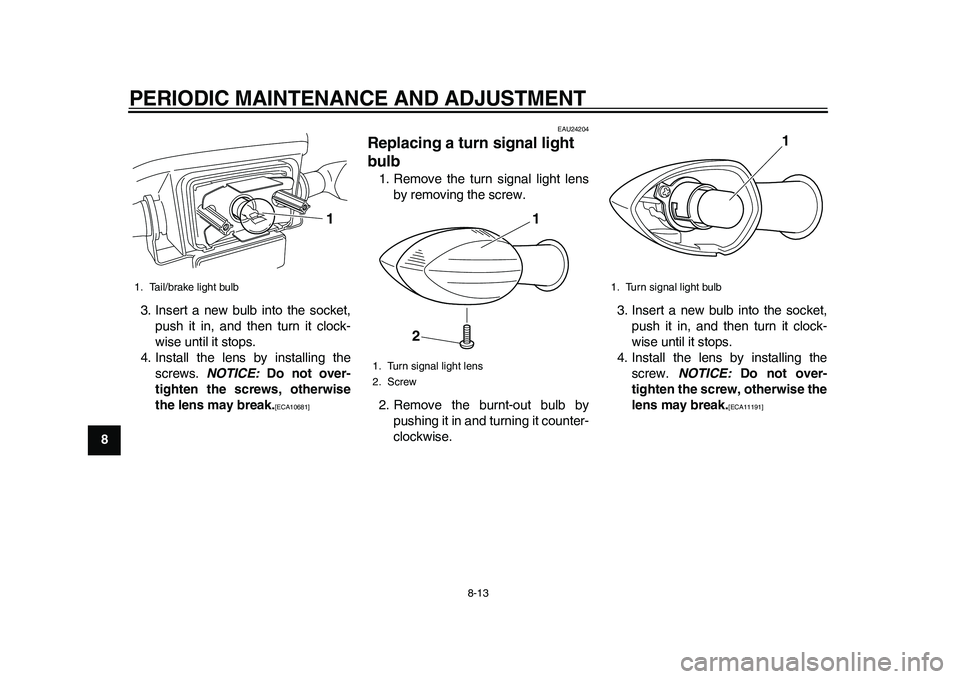
93. Insert a new bulb into the socket,
push it in, and then turn it clock-
wise until it stops.
4. Install the lens by installing the
screws. NOTICE: Do not over-
tighten the screws, otherwise
the lens may break.
[ECA10681]
EAU24204
Replacing a turn signal light
bulb 1. Remove the turn signal light lens
by removing the screw.
2. Remove the burnt-out bulb by
pushing it in and turning it counter-
clockwise.3. Insert a new bulb into the socket,
push it in, and then turn it clock-
wise until it stops.
4. Install the lens by installing the
screw. NOTICE: Do not over-
tighten the screw, otherwise the
lens may break.
[ECA11191]
1. Tail/brake light bulb
1
1. Turn signal light lens
2. Screw
1
2
1. Turn signal light bulb
1
1CB-9-E0.book 13 ページ 2010年10月15日 金曜日 午前10時19分
Page 64 of 78
PERIODIC MAINTENANCE AND ADJUSTMENT
8-15
1
2
3
4
5
6
78
9
EAU50182
Troubleshooting If a problem occurs, check the following
before taking the vehicle to a Yamaha
dealer. However, if no electric power is
supplied (nothing appears in the dis-
play), have a Yamaha dealer check the
vehicle.
The vehicle does not enter the
standby mode when the key is
turned to “ON”
Check the following:
1. Is the vehicle currently being
charged?
The vehicle does not enter the
standby mode when the key is
turned to “ON” during charging.
2. Was the key turned to “ON” while
the accelerator grip was being
opened?
If the key is turned to “ON” while
the accelerator grip is opened, the
vehicle does not enter the standby
mode. Close the accelerator grip,
turn the key to “OFF” and then
back to “ON”.
If the vehicle still fails to enter the stand-
by mode, have a Yamaha dealer checkthe vehicle.
The vehicle does not start off
Is the vehicle in the riding mode? (Does
the operating status indicator “RUN”
appear in the display?)
The vehicle cannot be ridden unless it
is in the riding mode.
After checking the above, try starting off
again by following the procedures de-
scribed on page 7-1 “Preparations for
starting off” and page 7-3 “Starting off”
to restart the vehicle.
If the vehicle still does not start off, have
a Yamaha dealer check it.
The warning mark “ ” appears
Turn the key to “OFF” and then back to
“ON”. If the warning mark “ ” still ap-
pears, have a Yamaha dealer check
the vehicle.
TIPAlthough the warning mark appears,
the vehicle can still be ridden if the op-
erating status indicator “RUN” appearsand the vehicle is in the riding mode.A light does not come on
Check the following:
1. Is the vehicle currently being
charged? Lights do not come on if
the vehicle is being charged.
2. Is the key turned to “ON”? (Does
anything appear in the display?)
If nothing appears in the display,
the auto-off function may be acti-
vated. Turn the key to “OFF” and
then back to “ON”.
3. Are all switches working properly?
After checking the above, and a light
does still not come on, proceed with the
following.
If the headlight fails to come on,
the bulb may be burned out. Refer
to page 8-11 for replacement pro-
cedures.
If a tail/brake light or turn signal
light fails to come on, a bulb may
be burned out. Refer to page 8-12
or 8-13 for replacement proce-
dures.
If a light still does not come on, a fuse
may be blown. Have a Yamaha dealer
check the vehicle.
1CB-9-E0.book 15 ページ 2010年10月15日 金曜日 午前10時19分
Page 71 of 78
SCOOTER CARE AND STORAGE
9-2
2
3
4
5
6
7
89
Improper cleaning can damage
plastic parts (such as cowlings,
panels, windshields, headlight
lenses, meter lenses, etc.) and
the mufflers. Use only a soft,
clean cloth or sponge with wa-
ter to clean plastic. However, if
the plastic parts cannot be thor-
oughly cleaned with water, di-
luted mild detergent with water
may be used. Be sure to rinse
off any detergent residue using
plenty of water, as it is harmful
to plastic parts.
Do not use any harsh chemical
products on plastic parts. Be
sure to avoid using cloths or
sponges which have been in
contact with strong or abrasive
cleaning products, solvent or
thinner, gasoline, rust removers
or inhibitors, brake fluid, anti-
freeze or electrolyte.
Do not use high-pressure wash-
ers or steam-jet cleaners since
they cause water seepage and
deterioration in the following ar-
eas: seals (of wheel and swing-
arm bearings, fork and brakes),electric components (couplers,
connectors, instruments, accel-
erator grip, switches and lights),
breather hoses and vents.
For scooters equipped with a
windshield: Do not use strong
cleaners or hard sponges as
they will cause dulling or
scratching. Some cleaning com-
pounds for plastic may leave
scratches on the windshield.
Test the product on a small hid-
den part of the windshield to
make sure that it does not leave
any marks. If the windshield is
scratched, use a quality plastic
polishing compound afterwashing.
After normal use
Remove dirt with warm water, a mild
detergent, and a soft, clean sponge,
and then rinse thoroughly with clean
water. Use a toothbrush or bottlebrush
for hard-to-reach areas. Stubborn dirt
and insects will come off more easily if
the area is covered with a wet cloth for
a few minutes before cleaning.After riding in the rain, near the sea or
on salt-sprayed roadsSince sea salt or salt sprayed on the
roads during winter are extremely cor-
rosive in combination with water, carry
out the following steps after each ride in
the rain, near the sea or on
salt-sprayed roads.TIPSalt sprayed on roads in the winter mayremain well into spring.
1. Clean the scooter with cold water
and a mild detergent after the mo-
tor has cooled down. NOTICE: Do
not use warm water since it in-
creases the corrosive action of
the salt.
[ECA10791]
2. Apply a corrosion protection spray
on all metal, including chrome- and
nickel-plated, surfaces to prevent
corrosion.
After cleaning
1. Dry the scooter with a chamois or
an absorbing cloth.
2. Use a chrome polish to shine
chrome, aluminum and stain-
less-steel parts.
1CB-9-E0.book 2 ページ 2010年10月15日 金曜日 午前10時19分
Page 72 of 78
SCOOTER CARE AND STORAGE
9-3
1
2
3
4
5
6
7
893. To prevent corrosion, it is recom-
mended to apply a corrosion pro-
tection spray on all metal,
including chrome- and nickel-plat-
ed, surfaces.
4. Use spray oil as a universal clean-
er to remove any remaining dirt.
5. Touch up minor paint damage
caused by stones, etc.
6. Wax all painted surfaces.
7. Let the scooter dry completely be-
fore storing or covering it.
WARNING
EWA15820
Contaminants on the brakes or tires
can cause loss of control.
Make sure that there is no oil or
wax on the brakes or tires. If
necessary, wash the tires with
warm water and a mild deter-
gent.
Before operating the scooter,
test its braking performanceand cornering behavior.
NOTICE
ECA10800
Apply spray oil and wax spar-
ingly and make sure to wipe offany excess.
Never apply oil or wax to any
rubber and plastic parts, but
treat them with a suitable care
product.
Avoid using abrasive polishing
compounds as they will wearaway the paint.
TIP
Consult a Yamaha dealer for ad-
vice on what products to use.
Washing, rainy weather or humid
climates can cause the headlight
lens to fog. Turning the headlight
on for a short period of time will
help remove the moisture from thelens.
EAU50842
Storage Short-term
Always store your scooter in a cool, dry
place and, if necessary, protect it
against dust with a porous cover. Be
sure the motor is cool before covering
the scooter.NOTICE
ECA17130
Storing the scooter in a poorly
ventilated room or covering it
with a tarp while it is still wet,
will allow water and humidity to
seep in and cause rust, power
unit failure, electric leakage, or
short-circuiting.
To prevent corrosion, avoid
damp cellars, stables (because
of the presence of ammonia)
and areas where strong chemi-cals are stored.
Long-term
NOTICE
ECA17142
Charge the battery if the level
drops to the last segment. In or-
1CB-9-E0.book 3 ページ 2010年10月15日 金曜日 午前10時19分
Page 74 of 78
10-1
1
2
3
4
5
6
7
8
910
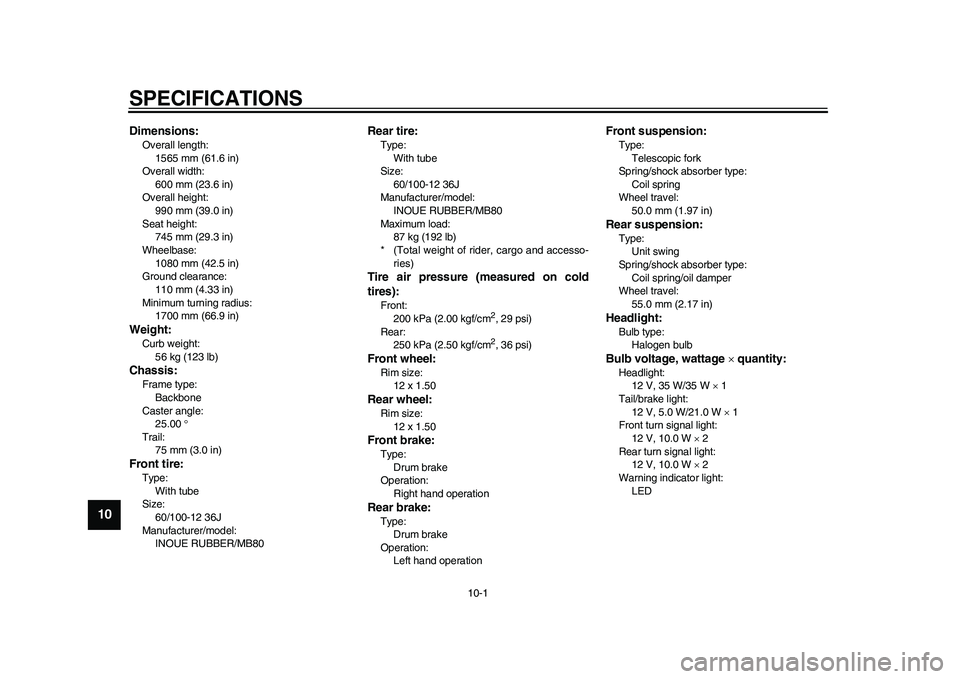
SPECIFICATIONS
EAU50970
Dimensions:Overall length:
1565 mm (61.6 in)
Overall width:
600 mm (23.6 in)
Overall height:
990 mm (39.0 in)
Seat height:
745 mm (29.3 in)
Wheelbase:
1080 mm (42.5 in)
Ground clearance:
110 mm (4.33 in)
Minimum turning radius:
1700 mm (66.9 in)Weight:Curb weight:
56 kg (123 lb)Chassis:Frame type:
Backbone
Caster angle:
25.00
Trail:
75 mm (3.0 in)Front tire:Type:
With tube
Size:
60/100-12 36J
Manufacturer/model:
INOUE RUBBER/MB80
Rear tire:Type:
With tube
Size:
60/100-12 36J
Manufacturer/model:
INOUE RUBBER/MB80
Maximum load:
87 kg (192 lb)
* (Total weight of rider, cargo and accesso-
ries)Tire air pressure (measured on cold
tires):Front:
200 kPa (2.00 kgf/cm
2, 29 psi)
Rear:
250 kPa (2.50 kgf/cm2, 36 psi)
Front wheel:Rim size:
12 x 1.50Rear wheel:Rim size:
12 x 1.50Front brake:Type:
Drum brake
Operation:
Right hand operationRear brake:Type:
Drum brake
Operation:
Left hand operation
Front suspension:Type:
Telescopic fork
Spring/shock absorber type:
Coil spring
Wheel travel:
50.0 mm (1.97 in)Rear suspension:Type:
Unit swing
Spring/shock absorber type:
Coil spring/oil damper
Wheel travel:
55.0 mm (2.17 in)Headlight:Bulb type:
Halogen bulbBulb voltage, wattage quantity:Headlight:
12 V, 35 W/35 W 1
Tail/brake light:
12 V, 5.0 W/21.0 W 1
Front turn signal light:
12 V, 10.0 W 2
Rear turn signal light:
12 V, 10.0 W 2
Warning indicator light:
LED
1CB-9-E0.book 1 ページ 2010年10月15日 金曜日 午前10時19分
Page 76 of 78
INDEXAAcceleration and deceleration....................7-4
Accelerator grip, checking..........................8-4BBattery, charging location ..........................6-1
Battery, charging procedure.......................6-3
Battery, charging safely .............................1-5
Battery, charging time ................................6-8
Battery, effective use of .............................3-3
Battery level ...............................................3-4
Battery type, about .....................................6-9
Beeper .......................................................4-1
Brake lever, front......................................4-11
Brake lever, rear ......................................4-11
Brake levers, lubricating.............................8-9
Brake shoes, checking ...............................8-8
Braking .......................................................7-5CCables, checking and lubricating ...............8-8
Care ...........................................................9-1
Centerstand, checking and lubricating .......8-9
Charging cord and plug, checking ...........8-14
Charging display, progress status..............6-9FFeatures .....................................................3-1
Front and rear brake lever free play,
adjusting ..................................................8-6
Front fork, checking .................................8-10GGrab bar ...................................................4-13HHandlebar switches..................................4-11
Headlight bulb, replacing .........................8-11
Helmet holder...........................................4-12Horn switch .............................................. 4-11
IIdentification numbers ............................. 11-1LLuggage hook .......................................... 4-13MMain switch/steering lock........................... 4-1
Maintenance and lubrication, periodic ....... 8-2
Matte color, caution ................................... 9-1
Model label .............................................. 11-1
Motor, checking for irregular sounds ......... 8-4
Multi-function display ................................. 4-2PParking ...................................................... 7-5
Part locations ............................................. 2-1SSafe-riding points....................................... 1-4
Safety information...................................... 1-1
Seat ......................................................... 4-12
Security lock, using.................................... 4-7
Specifications .......................................... 10-1
Standard mode/power mode ..................... 3-1
Starting off ................................................. 7-3
Starting off, preparations ........................... 7-1
Steering, checking ................................... 8-10
Storage ...................................................... 9-3TTail/brake light bulb, replacing ................. 8-12
Tires........................................................... 8-5
Traveling distance ..................................... 3-2
Troubleshooting ....................................... 8-15
Turn signal light bulb, replacing ............... 8-13
Turn signal switch .................................... 4-11
VVehicle identification number .................. 11-1WWheel bearings, checking ....................... 8-11
Wheels ...................................................... 8-6
1CB-9-E0.book 2 ページ 2010年10月15日 金曜日 午前10時19分