engine YAMAHA KODIAK 700 2017 User Guide
[x] Cancel search | Manufacturer: YAMAHA, Model Year: 2017, Model line: KODIAK 700, Model: YAMAHA KODIAK 700 2017Pages: 178, PDF Size: 4.61 MB
Page 33 of 178
4-1
4
EBU17738
INSTRUMENT AND CONTROL FUNCTIONS
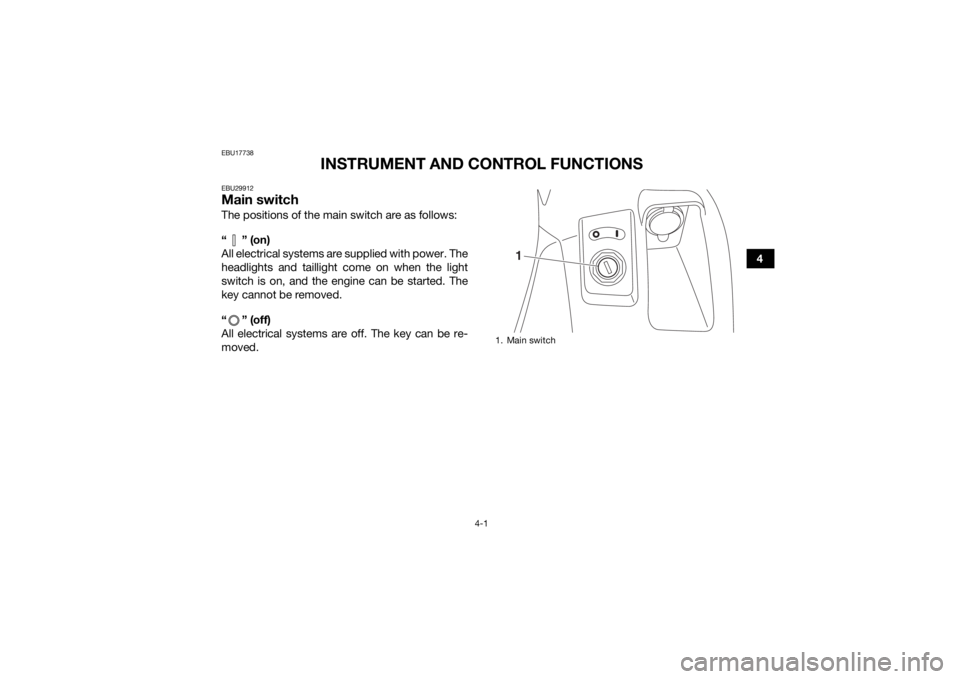
EBU29912Main switchThe positions of the main switch are as follows:
“” (on)
All electrical systems are supplied with power. The
headlights and taillight come on when the light
switch is on, and the engine can be started. The
key cannot be removed.
“ ” (off)
All electrical systems are off. The key can be re-
moved.
1. Main switch
1
UB1661E0.book Page 1 Thursday, May 12, 2016 2:47 PM
Page 34 of 178
4-2
4
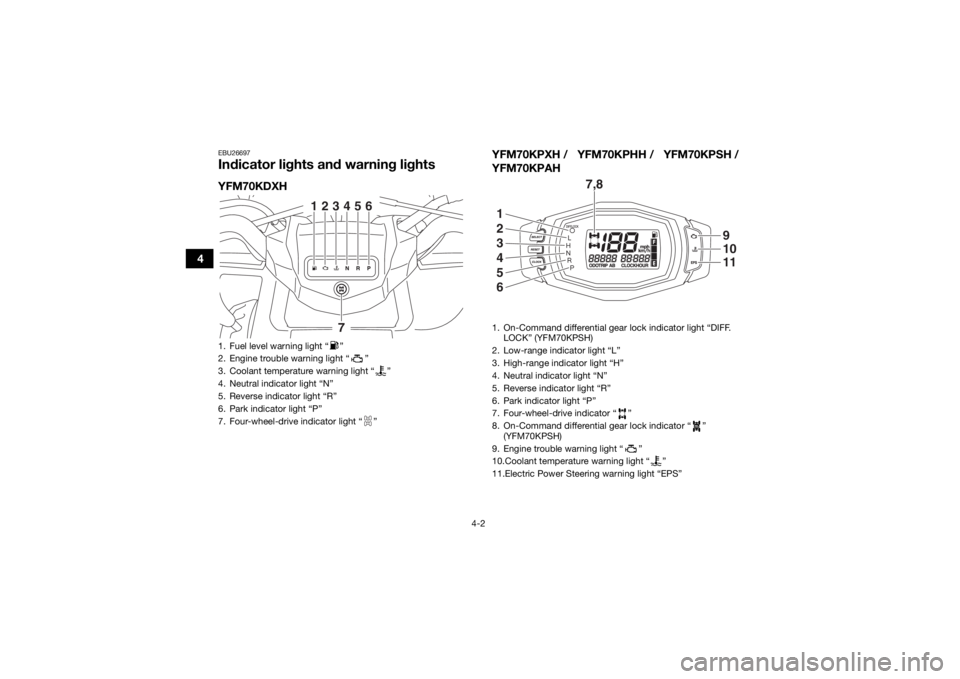
EBU26697Indicator lights and warning lightsYFM70KDXHYFM70KPXH / YFM70KPHH / YFM70KPSH /
YFM70KPAH1. Fuel level warning light “ ”
2. Engine trouble warning light “ ”
3. Coolant temperature warning light “ ”
4. Neutral indicator light “N”
5. Reverse indicator light “R”
6. Park indicator light “P”
7. Four-wheel-drive indicator light “ ”
123456
7
1. On-Command differential gear lock indicator light “DIFF.
LOCK” (YFM70KPSH)
2. Low-range indicator light “L”
3. High-range indicator light “H”
4. Neutral indicator light “N”
5. Reverse indicator light “R”
6. Park indicator light “P”
7. Four-wheel-drive indicator “ ”
8. On-Command differential gear lock indicator “ ” (YFM70KPSH)
9. Engine trouble warning light “ ”
10.Coolant temperature warning light “ ”
11.Electric Power Steering warning light “EPS”
7,8
1
2
3
4
5
6
91011
UB1661E0.book Page 2 Thursday, May 12, 2016 2:47 PM
Page 35 of 178
4-3
4
EBU17992Low-range indicator light “ ” (YFM70KPXH /
YFM70KPHH / YFM70KPSH / YFM70KPAH)
This indicator light comes on when the transmis-
sion is in the low-range position.EBU17982High-range indicator light “ ” (YFM70KPXH /
YFM70KPHH / YFM70KPSH / YFM70KPAH)
This indicator light comes on when the transmis-
sion is in the high-range position.EBU17861Neutral indicator light “ ”
This indicator light comes on when the transmis-
sion is in the neutral position.EBU17831Reverse indicator light “ ”
This indicator light comes on when the transmis-
sion is in the reverse position.EBU17971Park indicator light “ ”
This indicator light comes on when the transmis-
sion is in the park position.
EBU34560Coolant temperature warning light “ ”
This warning light comes on when the engine
overheats. When this occurs during operation,
stop the engine as soon as it is safe to do so and
allow it to cool down for about 10 minutes.
The electrical circuit of the warning light can be
checked by turning the key to “ ” (on). The
warning light should come on for a few seconds,
and then go off.
If the warning light does not come on initially when
the key is turned to “ ” (on), or if the warning
light remains on, have a Yamaha dealer check the
electrical circuit.NOTICEECB02400The engine may overheat if the ATV is over-
loaded. In this case, reduce the load to spec-
ification.
The engine may also overheat if mud or dirt
has accumulated on the radiator (i.e., after
riding in wet terrain). In this case, have a
Yamaha dealer clean the radiator.
UB1661E0.book Page 3 Thursday, May 12, 2016 2:47 PM
Page 36 of 178

4-4
4
Start the engine after making sure that the
warning light is out. Continuous use while
the warning light is on may cause damage to
the engine.
EBU29933Fuel level warning light “ ” (YFM70KDXH)
This warning light comes on when the fuel level
drops below approximately 4.0 L (1.06 US gal,
0.88 Imp.gal). When this occurs, refuel as soon as
possible.
The electrical circuit of the warning light can be
checked by setting the engine stop switch to “ ”
and turning the key to “ ” (on). The warning light
should come on for a few seconds, and then go
off.
If the warning light does not come on initially when
the key is turned to “ ” (on), or if the warning
light remains on, have a Yamaha dealer check the
electrical circuit.
EBU27287Engine trouble warning light “ ”
YFM70KDXH
This warning light comes on or flashes when an
electrical circuit monitoring the engine is not work-
ing correctly. When this occurs, have a Yamaha
dealer check the self-diagnosis system.
YFM70KPXH / YFM70KPHH / YFM70KPSH /
YFM70KPAH
This warning light comes on or flashes if a problem
is detected in the electrical circuit monitoring the
engine. When this occurs, the display will indicate
an error code (see page 4-9). Have a Yamaha
dealer check the self-diagnosis system.
The electrical circuit of the warning light can be
checked by turning the key to “ ” (on). The
warning light should come on for a few seconds,
and then go off.
If the warning light does not come on initially when
the key is turned to “ ” (on), or if the warning
light remains on, have a Yamaha dealer check the
vehicle.
UB1661E0.book Page 4 Thursday, May 12, 2016 2:47 PM
Page 37 of 178
4-5
4
EBU30571Electric Power Steering warning light “EPS”
(for EPS model)
This warning light comes on when the key is
turned to “ ” (on), and then goes off once the
engine is started. If the warning light remains on or
comes on after the engine is started, the EPS sys-
tem may not be working correctly. When this oc-
curs, have a Yamaha dealer check the EPS
system.
The electrical circuit of the warning light can be
checked by turning the key to “ ” (on). If the
warning light does not come on, have a Yamaha
dealer check the electrical circuit.TIPIf the engine is stopped using the engine stop
switch and the key is in the “ ” (on) position,
the EPS warning light comes on to indicate that
the power assistance for the steering is not
functioning.
If the steering load is too heavy (i.e., excessive
steering use when the ATV is traveling at a slow
speed), the power assist is reduced to protect
the EPS motor from overheating.
EBU34250Four-wheel-drive indicator light “ ”
(YFM70KDXH)
This indicator light comes on when the drive lever
is set to the “4WD” position.TIPDue to the synchronizing mechanism in the differ-
ential gear case, the light may not come on until
the ATV starts moving. Four-wheel-drive indicator “ ” (YFM70KPXH /
YFM70KPHH / YFM70KPSH / YFM70KPAH)
This indicator comes on when the drive lever or
the On-Command four-wheel-drive switch is set
to the “4WD” position.TIPDue to the synchronizing mechanism in the differ-
ential gear case, the indicator may not come on
until the ATV starts moving.
UB1661E0.book Page 5 Thursday, May 12, 2016 2:47 PM
Page 39 of 178
4-7
4
two tripmeters
clock
hour meter
fuel gauge
error code display
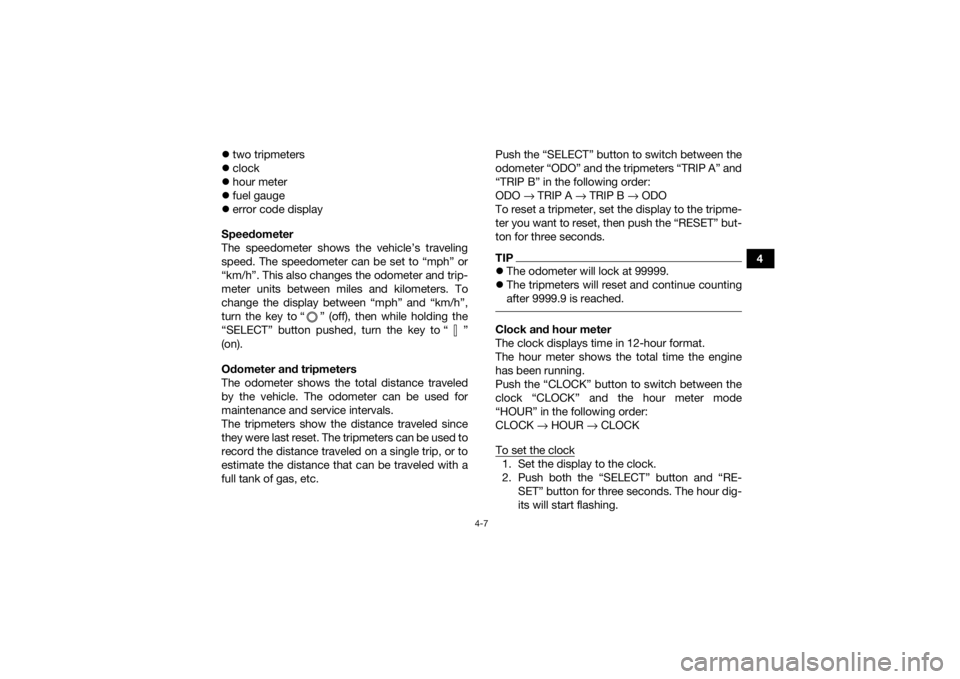
Speedometer
The speedometer shows the vehicle’s traveling
speed. The speedometer can be set to “mph” or
“km/h”. This also changes the odometer and trip-
meter units between miles and kilometers. To
change the display between “mph” and “km/h”,
turn the key to “ ” (off), then while holding the
“SELECT” button pushed, turn the key to “ ”
(on).
Odometer and tripmeters
The odometer shows the total distance traveled
by the vehicle. The odometer can be used for
maintenance and service intervals.
The tripmeters show the distance traveled since
they were last reset. The tripmeters can be used to
record the distance traveled on a single trip, or to
estimate the distance that can be traveled with a
full tank of gas, etc. Push the “SELECT” button to switch between the
odometer “ODO” and the tripmeters “TRIP A” and
“TRIP B” in the following order:
ODO
→ TRIP A → TRIP B → ODO
To reset a tripmeter, set the display to the tripme-
ter you want to reset, then push the “RESET” but-
ton for three seconds.
TIP The odometer will lock at 99999.
The tripmeters will reset and continue counting
after 9999.9 is reached. Clock and hour meter
The clock displays time in 12-hour format.
The hour meter shows the total time the engine
has been running.
Push the “CLOCK” button to switch between the
clock “CLOCK” and the hour meter mode
“HOUR” in the following order:
CLOCK → HOUR → CLOCK
To set the clock1. Set the display to the clock.
2. Push both the “SELECT” button and “RE- SET” button for three seconds. The hour dig-
its will start flashing.
UB1661E0.book Page 7 Thursday, May 12, 2016 2:47 PM
Page 41 of 178
4-9
4
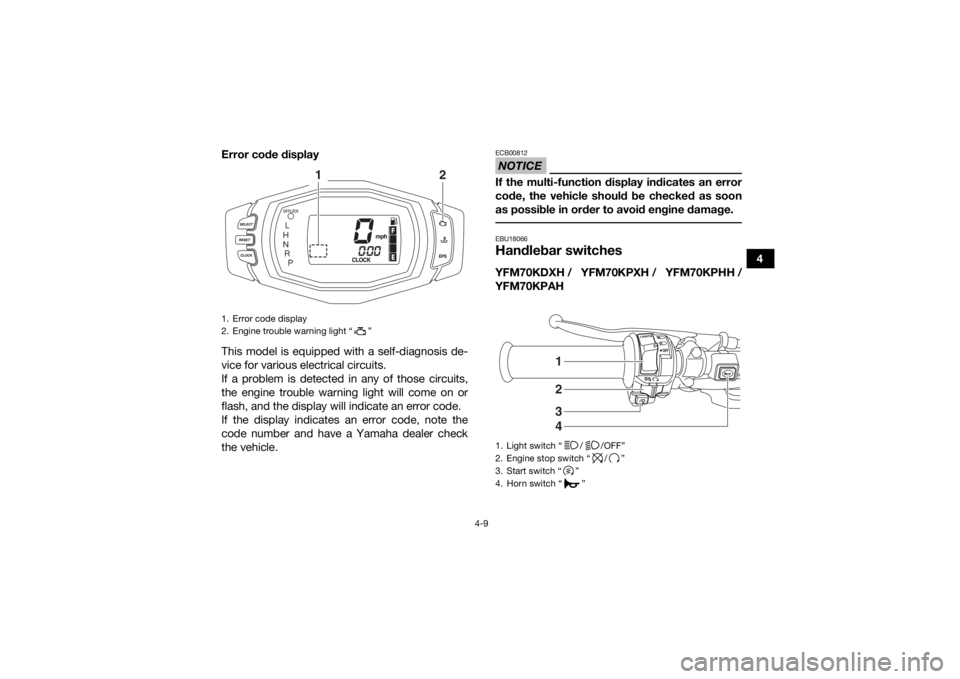
Error code display
This model is equipped with a self-diagnosis de-
vice for various electrical circuits.
If a problem is detected in any of those circuits,
the engine trouble warning light will come on or
flash, and the display will indicate an error code.
If the display indicates an error code, note the
code number and have a Yamaha dealer check
the vehicle.
NOTICEECB00812If the multi-function display indicates an error
code, the vehicle should be checked as soon
as possible in order to avoid engine damage. EBU18066Handlebar switchesYFM70KDXH / YFM70KPXH / YFM70KPHH /
YFM70KPAH
1. Error code display
2. Engine trouble warning light “ ”
1
2
1. Light switch “ / /OFF”
2. Engine stop switch “ / ”
3. Start switch “ ”
4. Horn switch “ ”
3421
UB1661E0.book Page 9 Thursday, May 12, 2016 2:47 PM
Page 42 of 178
4-10
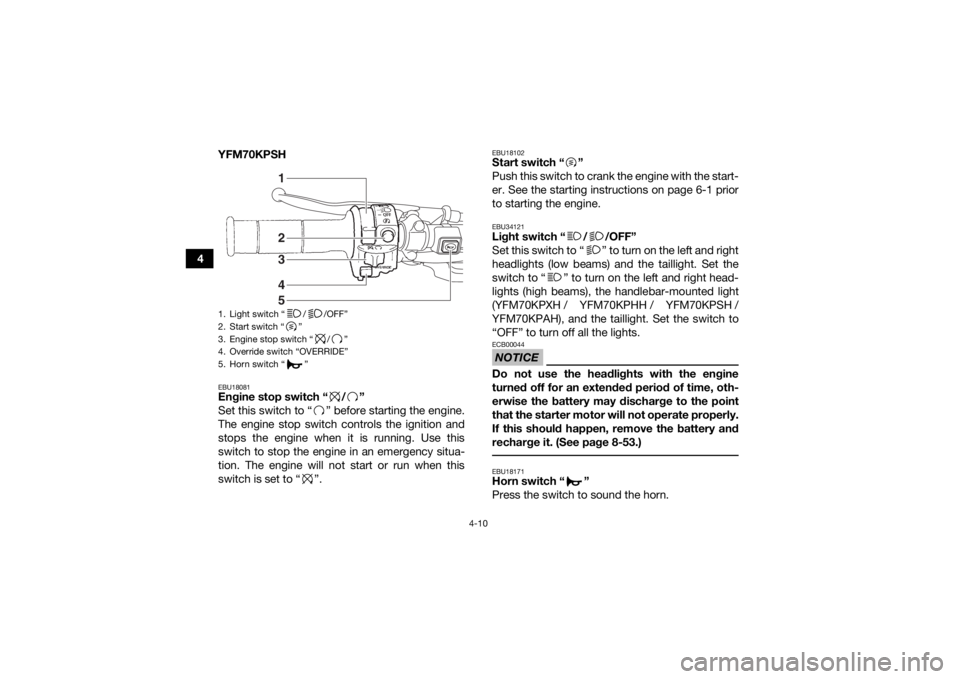
4YFM70KPSH
EBU18081Engine stop switch “ / ”
Set this switch to “ ” before starting the engine.
The engine stop switch controls the ignition and
stops the engine when it is running. Use this
switch to stop the engine in an emergency situa-
tion. The engine will not start or run when this
switch is set to “ ”.
EBU18102Start switch “ ”
Push this switch to crank the engine with the start-
er. See the starting instructions on page 6-1 prior
to starting the engine.EBU34121Light switch “ / /OFF”
Set this switch to “ ” to turn on the left and right
headlights (low beams) and the taillight. Set the
switch to “ ” to turn on the left and right head-
lights (high beams), the handlebar-mounted light
(YFM70KPXH / YFM70KPHH / YFM70KPSH /
YFM70KPAH), and the taillight. Set the switch to
“OFF” to turn off all the lights.NOTICEECB00044Do not use the headlights with the engine
turned off for an extended period of time, oth-
erwise the battery may discharge to the point
that the starter motor will not operate properly.
If this should happen, remove the battery and
recharge it. (See page 8-53.) EBU18171Horn switch “ ”
Press the switch to sound the horn.
1. Light switch “ / /OFF”
2. Start switch “ ”
3. Engine stop switch “ / ”
4. Override switch “OVERRIDE”
5. Horn switch “ ”
41325
UB1661E0.book Page 10 Thursday, May 12, 2016 2:47 PM
Page 43 of 178
4-11
4
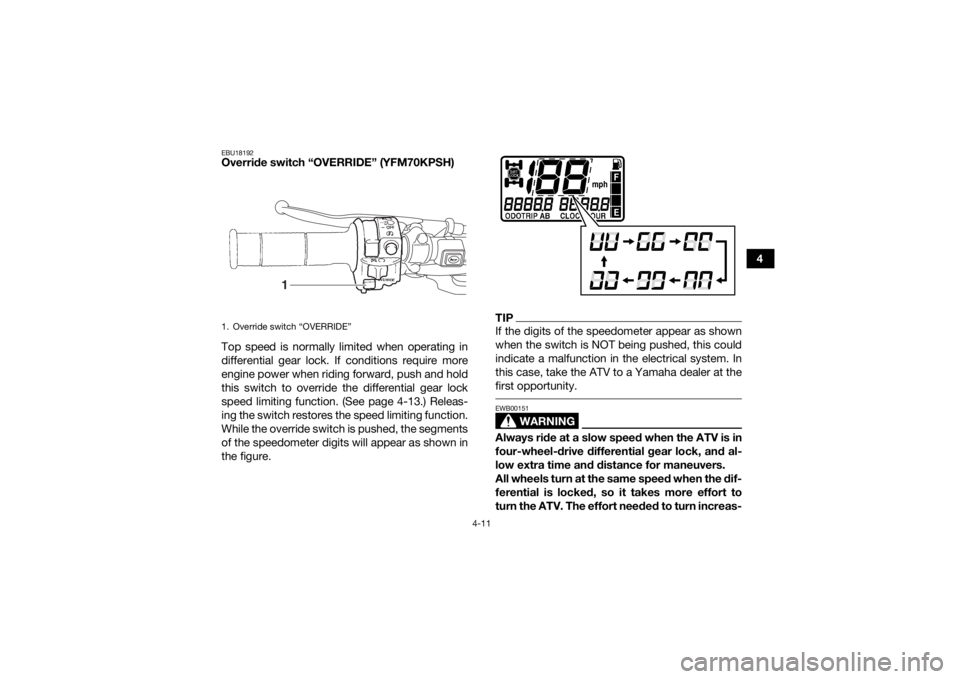
EBU18192Override switch “OVERRIDE” (YFM70KPSH)
Top speed is normally limited when operating in
differential gear lock. If conditions require more
engine power when riding forward, push and hold
this switch to override the differential gear lock
speed limiting function. (See page 4-13.) Releas-
ing the switch restores the speed limiting function.
While the override switch is pushed, the segments
of the speedometer digits will appear as shown in
the figure.
TIPIf the digits of the speedometer appear as shown
when the switch is NOT being pushed, this could
indicate a malfunction in the electrical system. In
this case, take the ATV to a Yamaha dealer at the
first opportunity.
WARNING
EWB00151Always ride at a slow speed when the ATV is in
four-wheel-drive differential gear lock, and al-
low extra time and distance for maneuvers.
All wheels turn at the same speed when the dif-
ferential is locked, so it takes more effort to
turn the ATV. The effort needed to turn increas-
1. Override switch “OVERRIDE”
1
UB1661E0.book Page 11 Thursday, May 12, 2016 2:47 PM
Page 47 of 178
4-15
4
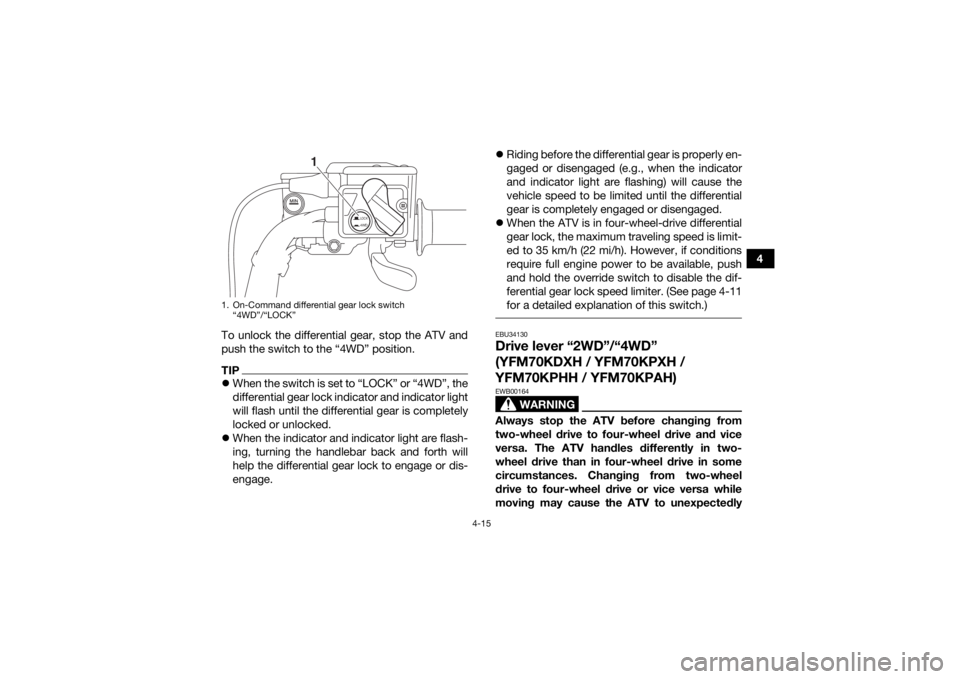
To unlock the differential gear, stop the ATV and
push the switch to the “4WD” position.
TIP When the switch is set to “LOCK” or “4WD”, the
differential gear lock indicator and indicator light
will flash until the differential gear is completely
locked or unlocked.
When the indicator and indicator light are flash-
ing, turning the handlebar back and forth will
help the differential gear lock to engage or dis-
engage.
Riding before the differential gear is properly en-
gaged or disengaged (e.g., when the indicator
and indicator light are flashing) will cause the
vehicle speed to be limited until the differential
gear is completely engaged or disengaged.
When the ATV is in four-wheel-drive differential
gear lock, the maximum traveling speed is limit-
ed to 35 km/h (22 mi/h). However, if conditions
require full engine power to be available, push
and hold the override switch to disable the dif-
ferential gear lock speed limiter. (See page 4-11
for a detailed explanation of this switch.)
EBU34130Drive lever “2WD”/“4WD”
(YFM70KDXH / YFM70KPXH /
YFM70KPHH / YFM70KPAH)
WARNING
EWB00164Always stop the ATV before changing from
two-wheel drive to four-wheel drive and vice
versa. The ATV handles differently in two-
wheel drive than in four-wheel drive in some
circumstances. Changing from two-wheel
drive to four-wheel drive or vice versa while
moving may cause the ATV to unexpectedly
1. On-Command differential gear lock switch
“4WD”/“LOCK”
LOCK4WD
1
UB1661E0.book Page 15 Thursday, May 12, 2016 2:47 PM