lock YAMAHA TMAX 2015 User Guide
[x] Cancel search | Manufacturer: YAMAHA, Model Year: 2015, Model line: TMAX, Model: YAMAHA TMAX 2015Pages: 112, PDF Size: 6.38 MB
Page 28 of 112
4-1
1
2
34
5
6
7
8
9
10
11
12
INSTRUMENT AND CONTROL FUNCTIONS
EAU49397
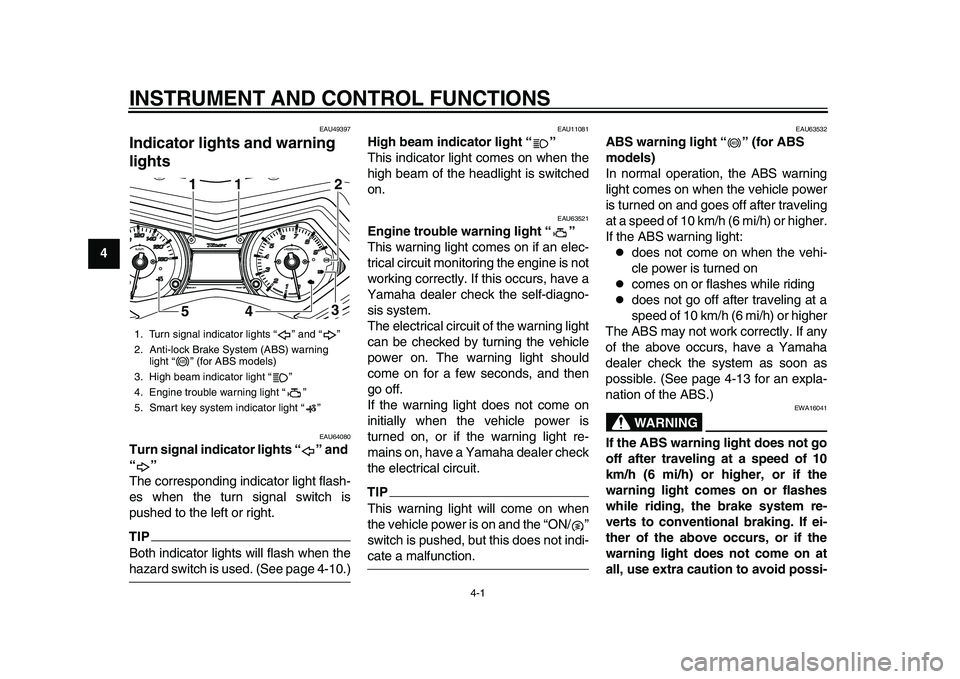
Indicator ligh ts and warning
lights
EAU64080
Turn signal indicator lights “ ” and
“”
The corresponding indicator light flash-
es when the turn signal switch is
pushed to the left or right.TIPBoth indicator lights will flash when thehazard switch is used. (See page 4-10.)
EAU11081
High beam indicator light “ ”
This indicator light comes on when the
high beam of the headlight is switched
on.
EAU63521
Engine trouble warning light “ ”
This warning light comes on if an elec-
trical circuit monitoring the engine is not
working correctly. If this occurs, have a
Yamaha dealer check the self-diagno-
sis system.
The electrical circuit of the warning light
can be checked by turning the vehicle
power on. The warning light should
come on for a few seconds, and then
go off.
If the warning light does not come on
initially when the vehicle power is
turned on, or if the warning light re-
mains on, have a Yamaha dealer check
the electrical circuit.TIPThis warning light will come on when
the vehicle power is on and the “ON/ ”
switch is pushed, but this does not indi-cate a malfunction.
EAU63532
ABS warning light “ ” (for ABS
models)
In normal operation, the ABS warning
light comes on when the vehicle power
is turned on and goes off after traveling
at a speed of 10 km/h (6 mi/h) or higher.
If the ABS warning light:
does not come on when the vehi-
cle power is turned on
comes on or flashes while riding
does not go off after traveling at a
speed of 10 km/h (6 mi/h) or higher
The ABS may not work correctly. If any
of the above occurs, have a Yamaha
dealer check the system as soon as
possible. (See page 4-13 for an expla-
nation of the ABS.)WARNING
EWA16041
If the ABS warning light does not go
off after traveling at a speed of 10
km/h (6 mi/h) or higher, or if the
warning light comes on or flashes
while riding, the brake system re-
verts to conventional braking. If ei-
ther of the above occurs, or if the
warning light does not come on at
all, use extra caution to avoid possi-
1. Turn signal indicator lights “ ” and “ ”
2. Anti-lock Brake System (ABS) warning light “ ” (for ABS models)
3. High beam indicator light “ ”
4. Engine trouble warning light “ ”
5. Smart key system indicator light “ ”
1
541
1
3 2
ABS
ABS
2PW-9-E0_1.book 1 ページ 2015年2月19日 木曜日 午後3時30分
Page 29 of 112
INSTRUMENT AND CONTROL FUNCTIONS
4-2
1
2
345
6
7
8
9
10
11
12
ble wheel lock during emergency
braking. Have a Yamaha dealer
check the brake system and electri-
cal circuits as soon as possible.TIP
If the start switch is pushed while
the engine is running, the ABS
warning light will come on, but this
is not a malfunction.
The ABS warning light may come
on when revving the engine with
the scooter on its centerstand, but
this does not indicate a malfunc-tion.
EAU61652
Smart key system indicator light
“”
This indicator light communicates the
status of the smart key system. When
the smart key system is operating nor-
mally, this indicator light will be off. If
there is an error in the smart key sys-
tem, the indicator light will flash. The in-
dicator light will also flash when
communication between the vehicle
and smart key takes place and when
certain smart key system operations are carried out. (See page 3-1.)
TIPWhen the start switch is pushed, the in-
dicator light will come on for about one
second and then go off. If the indicator
light does not come on or go off as nor-
mal, have a Yamaha dealer check thevehicle.
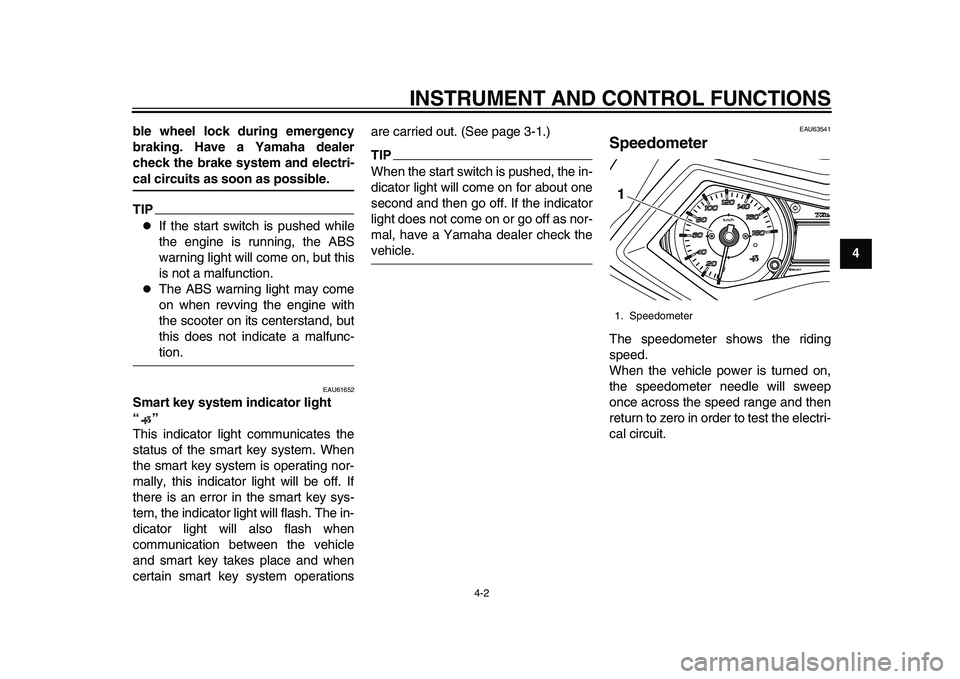
EAU63541
SpeedometerThe speedometer shows the riding
speed.
When the vehicle power is turned on,
the speedometer needle will sweep
once across the speed range and then
return to zero in order to test the electri-
cal circuit.1. Speedometer1
2PW-9-E0_1.book 2 ページ 2015年2月19日 木曜日 午後3時30分
Page 30 of 112
INSTRUMENT AND CONTROL FUNCTIONS
4-3
1
2
34
5
6
7
8
9
10
11
12
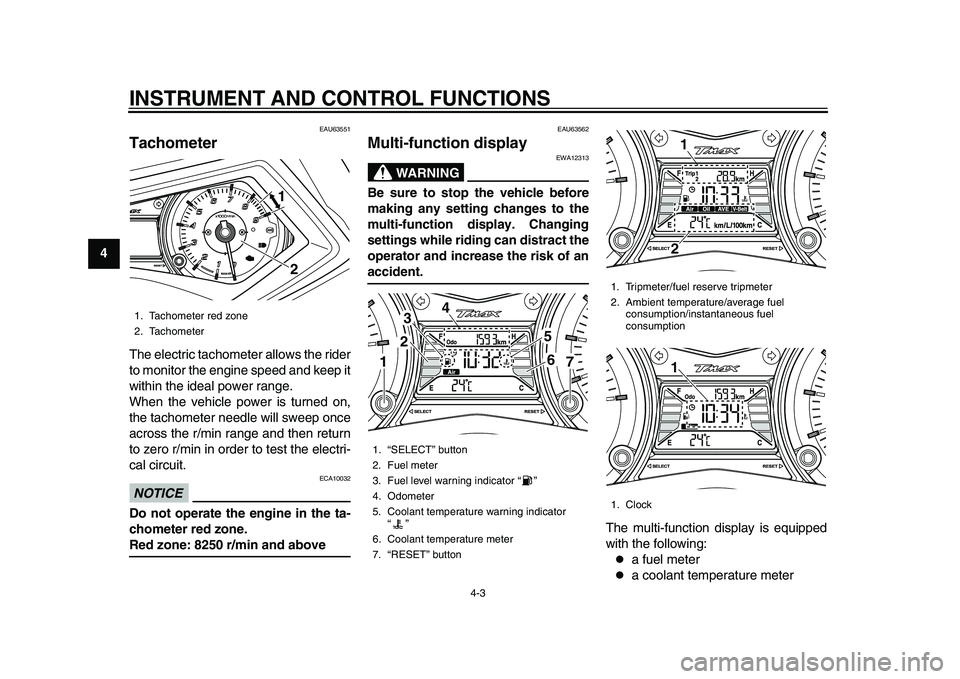
EAU63551
TachometerThe electric tachometer allows the rider
to monitor the engine speed and keep it
within the ideal power range.
When the vehicle power is turned on,
the tachometer needle will sweep once
across the r/min range and then return
to zero r/min in order to test the electri-
cal circuit.NOTICE
ECA10032
Do not operate the engine in the ta-
chometer red zone.Red zone: 8250 r/min and above
EAU63562
Multi-function display
WARNING
EWA12313
Be sure to stop the vehicle before
making any setting changes to the
multi-function display. Changing
settings while riding can distract the
operator and increase the risk of anaccident.
The multi-function display is equipped
with the following:
a fuel meter
a coolant temperature meter
1. Tachometer red zone
2. Tachometer
21
1. “SELECT” button
2. Fuel meter
3. Fuel level warning indicator “ ”
4. Odometer
5. Coolant temperature warning indicator “”
6. Coolant temperature meter
7. “RESET” button
23
4
56
11
7
1. Tripmeter/fuel reserve tripmeter
2. Ambient temperature/average fuel consumption/instantaneous fuel
consumption
1. Clock
211
2PW-9-E0_1.book 3 ページ 2015年2月19日 木曜日 午後3時30分
Page 31 of 112
INSTRUMENT AND CONTROL FUNCTIONS
4-4
1
2
345
6
7
8
9
10
11
12
an odometer
two tripmeters (which show the
distance traveled since they were
last set to zero)
a fuel reserve tripmeter (which
shows the distance traveled when
the remaining fuel in the fuel tank
reaches approximately 3.0 L (0.79
US gal, 0.66 Imp.gal))
a self-diagnosis device
a clock
an ambient temperature display
a fuel consumption display (aver-
age and instantaneous consump-
tion functions)
an oil change tripmeter (which
shows the distance traveled since
the last engine oil change)
a V-belt replacement tripmeter
(which shows the distance trav-
eled since the last V-belt replace-
ment)
TIP
Be sure to turn the vehicle power
on before using the “SELECT” and
“RESET” buttons.
When the vehicle power is turned
on, all of the display segments of the multi-function display will ap-
pear one after the other and then
disappear, in order to test the elec-
trical circuits.
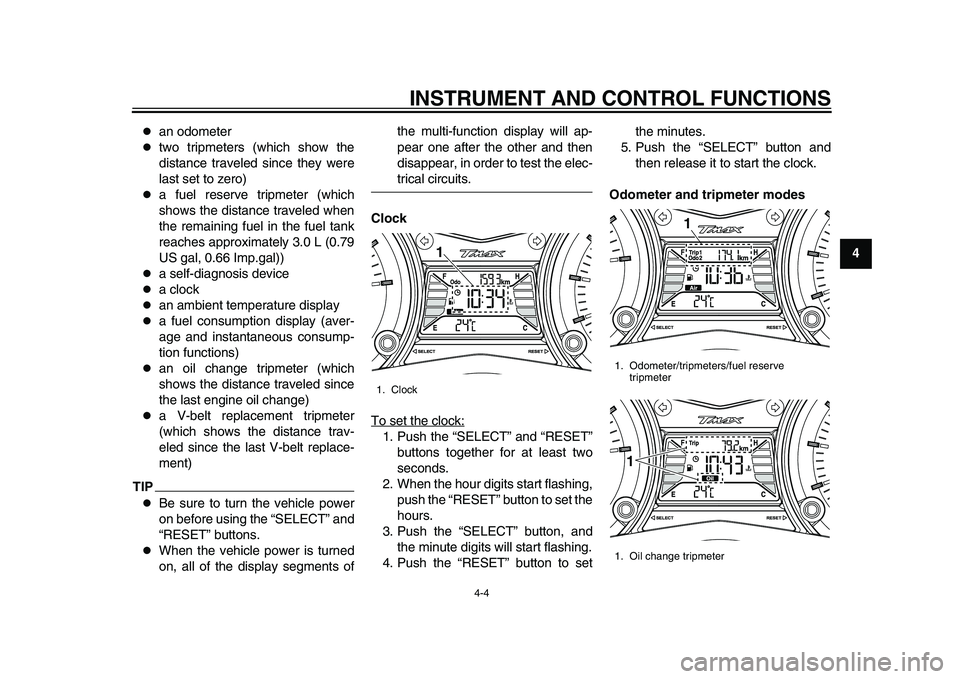
Clock
To set the clock:
1. Push the “SELECT” and “RESET” buttons together for at least two
seconds.
2. When the hour digits start flashing, push the “RESET” button to set the
hours.
3. Push the “SELECT” button, and the minute digits will start flashing.
4. Push the “RESET” button to set the minutes.
5. Push the “SELECT” button and then release it to start the clock.
Odometer and tripmeter modes1. Clock
1
1. Odometer/tripmeters/fuel reserve tripmeter
1. Oil change tripmeter
1
1
2PW-9-E0_1.book 4 ページ 2015年2月19日 木曜日 午後3時30分
Page 39 of 112
INSTRUMENT AND CONTROL FUNCTIONS
4-12
1
2
345
6
7
8
9
10
11
12
with the “ ” mark on the rear brake le-
ver.
EAU63230
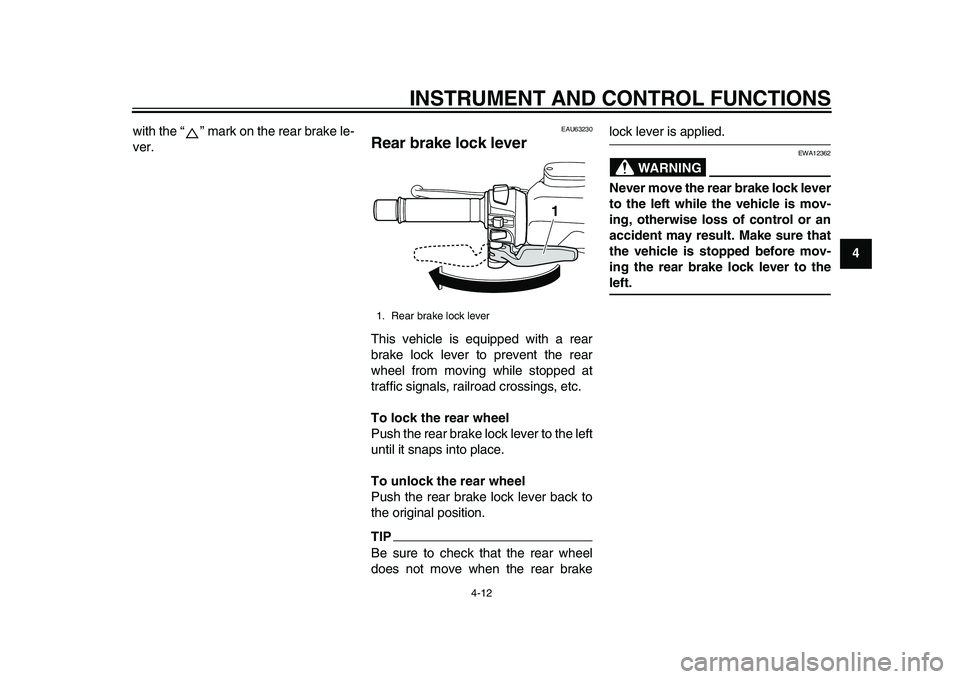
Rear brake lock leverThis vehicle is equipped with a rear
brake lock lever to prevent the rear
wheel from moving while stopped at
traffic signals, railroad crossings, etc.
To lock the rear wheel
Push the rear brake lock lever to the left
until it snaps into place.
To unlock the rear wheel
Push the rear brake lock lever back to
the original position.TIPBe sure to check that the rear wheel
does not move when the rear brake
lock lever is applied.
WARNING
EWA12362
Never move the rear brake lock lever
to the left while the vehicle is mov-
ing, otherwise loss of control or an
accident may result. Make sure that
the vehicle is stopped before mov-
ing the rear brake lock lever to theleft.
1. Rear brake lock lever
1
2PW-9-E0_1.book 12 ページ 2015年2月19日 木曜日 午後3時30分
Page 40 of 112
INSTRUMENT AND CONTROL FUNCTIONS
4-13
1
2
34
5
6
7
8
9
10
11
12
EAU63591
ABS (for ABS models)The Yamaha ABS (Anti-lock Brake
System) features a dual electronic con-
trol system, which acts on the front and
rear brakes independently.
Operate the brakes with ABS as you
would conventional brakes. If the ABS
is activated, a pulsating sensation may
be felt at the brake levers. In this situa-
tion, continue to apply the brakes and
let the ABS work; do not “pump” the
brakes as this will reduce braking effec-
tiveness.
WARNING
EWA16051
Always keep a sufficient distance
from the vehicle ahead to match the
riding speed even with ABS.
The ABS performs best with
long braking distances.
On certain surfaces, such as
rough or gravel roads, the brak-
ing distance may be longer withthe ABS than without.
The ABS is monitored by an ECU,
which will revert the system to conven-
tional braking if a malfunction occurs.
TIP
The ABS performs a self-diagno-
sis test each time the vehicle is
turned on and travels at a speed of
10 km/h (6 mi/h) or higher. During
this test, a clicking noise can be
heard and if either brake lever is
even slightly applied, a vibration
can be felt at the lever, but this
does not indicate a malfunction.
This ABS has a test mode which
allows the owner to experience the
pulsation at the brake levers when
the ABS is operating. However,
special tools are required, so
please consult your Yamaha deal-er.
NOTICE
ECA20100
Be careful not to damage the wheel
sensor or wheel sensor rotor; other-
wise, improper performance of theABS will result.
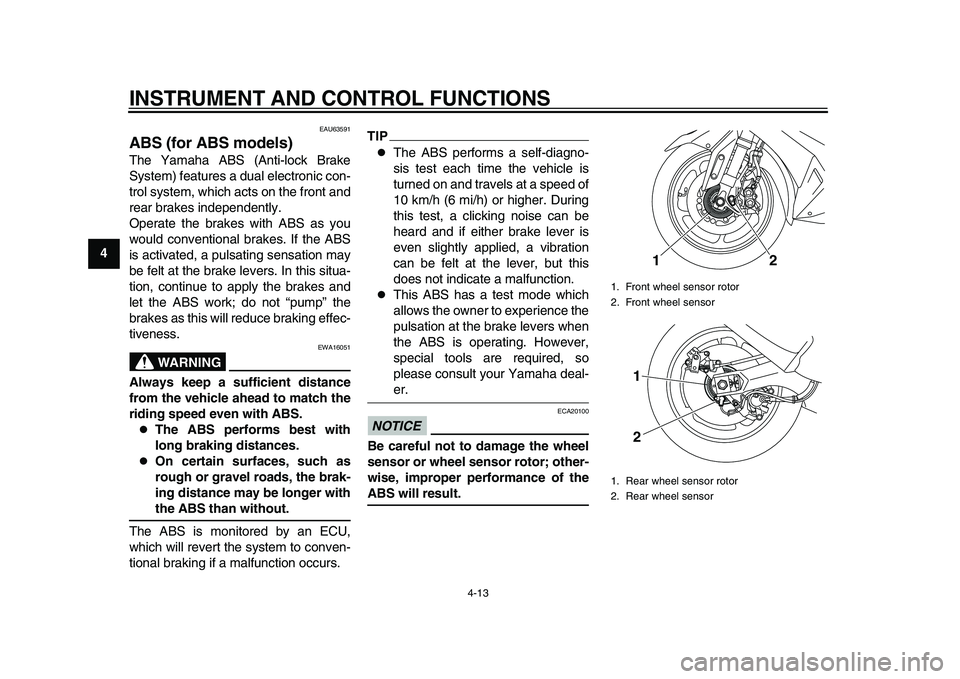
1. Front wheel sensor rotor
2. Front wheel sensor
1. Rear wheel sensor rotor
2. Rear wheel sensor
12
1
2
2PW-9-E0_1.book 13 ページ 2015年2月19日 木曜日 午後3時30分
Page 41 of 112
INSTRUMENT AND CONTROL FUNCTIONS
4-14
1
2
345
6
7
8
9
10
11
12
EAU63691
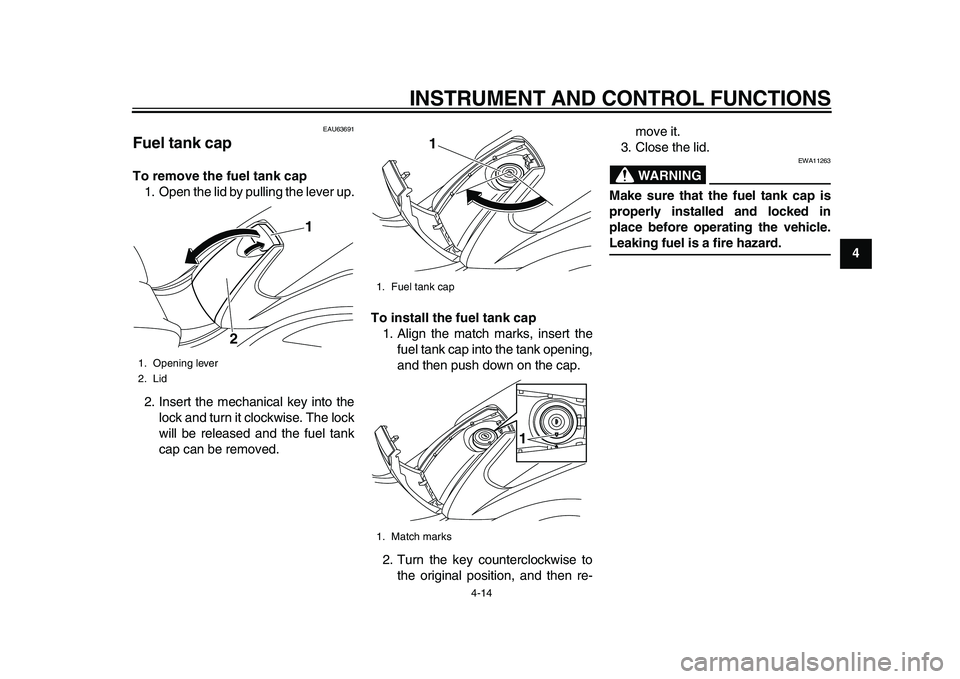
Fuel tank capTo remove the fuel tank cap 1. Open the lid by pulling the lever up.
2. Insert the mechanical key into the lock and turn it clockwise. The lock
will be released and the fuel tank
cap can be removed. To install the fuel tank cap
1. Align the match marks, insert the fuel tank cap into the tank opening,
and then push down on the cap.
2. Turn the key counterclockwise to the original position, and then re- move it.
3. Close the lid.
WARNING
EWA11263
Make sure that the fuel tank cap is
properly installed and locked in
place before operating the vehicle.Leaking fuel is a fire hazard.
1. Opening lever
2. Lid
1
2
1. Fuel tank cap
1. Match marks
1
1
2PW-9-E0_1.book 14 ページ 2015年2月19日 木曜日 午後3時30分
Page 45 of 112
INSTRUMENT AND CONTROL FUNCTIONS
4-18
1
2
345
6
7
8
9
10
11
12
jection, and securely close the
seat.
WARNING! Never ride with
a helmet attached to the helmet
holder, since the helmet may hit
objects, causing loss of control
and possibly an accident.
[EWA10162]
To release the helmet from the hel-
met holder
Open the seat, remove the helmet
holding cable from the helmet holder
and the helmet, and then close the
seat.
EAU63510
Storage compartmentsFront storage compartment
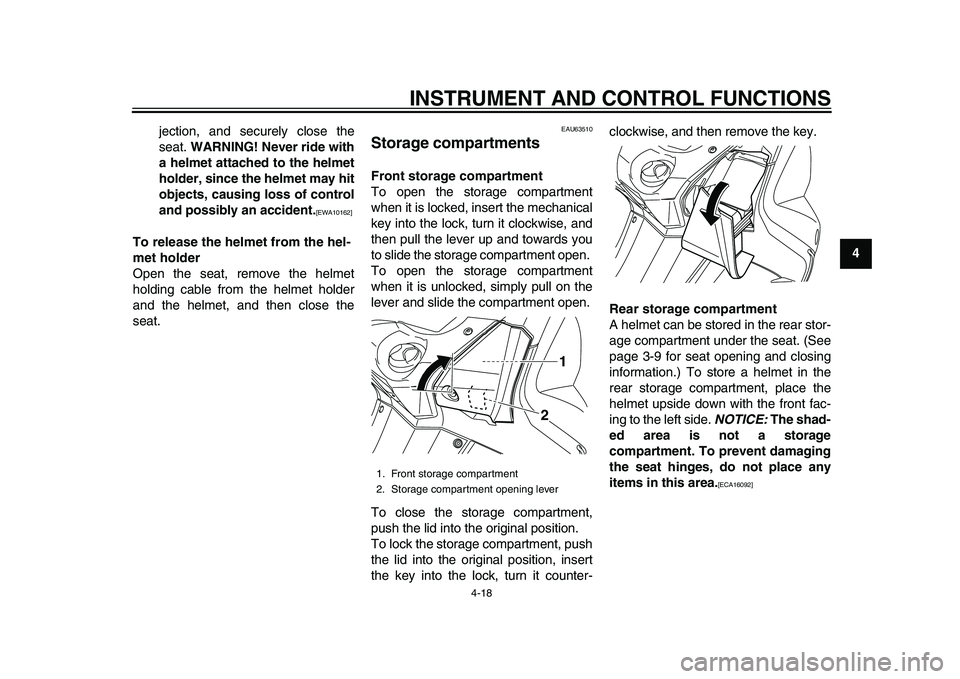
To open the storage compartment
when it is locked, insert the mechanical
key into the lock, turn it clockwise, and
then pull the lever up and towards you
to slide the storage compartment open.
To open the storage compartment
when it is unlocked, simply pull on the
lever and slide the compartment open.
To close the storage compartment,
push the lid into the original position.
To lock the storage compartment, push
the lid into the original position, insert
the key into the lock, turn it counter- clockwise, and then remove the key.
Rear storage compartment
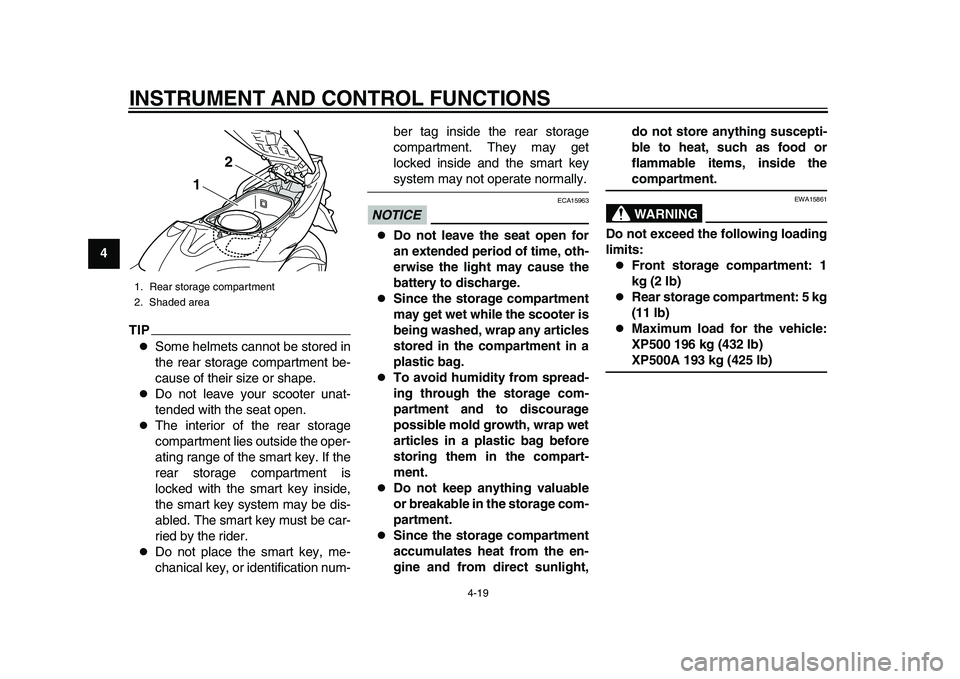
A helmet can be stored in the rear stor-
age compartment under the seat. (See
page 3-9 for seat opening and closing
information.) To store a helmet in the
rear storage compartment, place the
helmet upside down with the front fac-
ing to the left side.
NOTICE: The shad-
ed area is not a storage
compartment. To prevent damaging
the seat hinges, do not place any
items in this area.
[ECA16092]
1. Front storage compartment
2. Storage compartment opening lever
1
2
2PW-9-E0_1.book 18 ページ 2015年2月19日 木曜日 午後3時30分
Page 46 of 112
INSTRUMENT AND CONTROL FUNCTIONS
4-19
1
2
34
5
6
7
8
9
10
11
12
TIP
Some helmets cannot be stored in
the rear storage compartment be-
cause of their size or shape.
Do not leave your scooter unat-
tended with the seat open.
The interior of the rear storage
compartment lies outside the oper-
ating range of the smart key. If the
rear storage compartment is
locked with the smart key inside,
the smart key system may be dis-
abled. The smart key must be car-
ried by the rider.
Do not place the smart key, me-
chanical key, or identification num- ber tag inside the rear storage
compartment. They may get
locked inside and the smart key
system may not operate normally.
NOTICE
ECA15963
Do not leave the seat open for
an extended period of time, oth-
erwise the light may cause the
battery to discharge.
Since the storage compartment
may get wet while the scooter is
being washed, wrap any articles
stored in the compartment in a
plastic bag.
To avoid humidity from spread-
ing through the storage com-
partment and to discourage
possible mold growth, wrap wet
articles in a plastic bag before
storing them in the compart-
ment.
Do not keep anything valuable
or breakable in the storage com-
partment.
Since the storage compartment
accumulates heat from the en-
gine and from direct sunlight,
do not store anything suscepti-
ble to heat, such as food or
flammable items, inside the
compartment.WARNING
EWA15861
Do not exceed the following loading
limits:
Front storage compartment: 1
kg (2 lb)
Rear storage compartment: 5 kg
(11 lb)
Maximum load for the vehicle:
XP500 196 kg (432 lb)XP500A 193 kg (425 lb)
1. Rear storage compartment
2. Shaded area
1
2
2PW-9-E0_1.book 19 ページ 2015年2月19日 木曜日 午後3時30分
Page 56 of 112
OPERATION AND IMPORTANT RIDING POINTS
6-2
1
2
3
4
56
7
8
9
10
11
12 the steering lock (if applied) will be
released. The engine trouble
warning light should come on for a
few seconds and then go off.
For ABS models:
The ABS warning light should
come on when the power of the ve-
hicle is turned on, and go off once
the vehicle reaches a traveling
speed of 10 km/h (6 mi/h) or high-
er.
NOTICE
ECA21980
If the engine warning light or the
ABS warning light (for
ABS-equipped models) does not
come on and then go off as ex-
plained above, see page 4-1 for thewarning light circuit check.
3. Close the throttle completely.
4. Start the engine by pushing the “ON/ ” switch while applying the
front or rear brake.
If the engine does not start within 5
seconds of pressing the “ON/ ”
switch, wait 10 seconds before
pressing the switch again to allow the battery voltage to restore.
NOTICE
ECA11043
For maximum engine life, never ac-
celerate hard when the engine iscold!
EAU45093
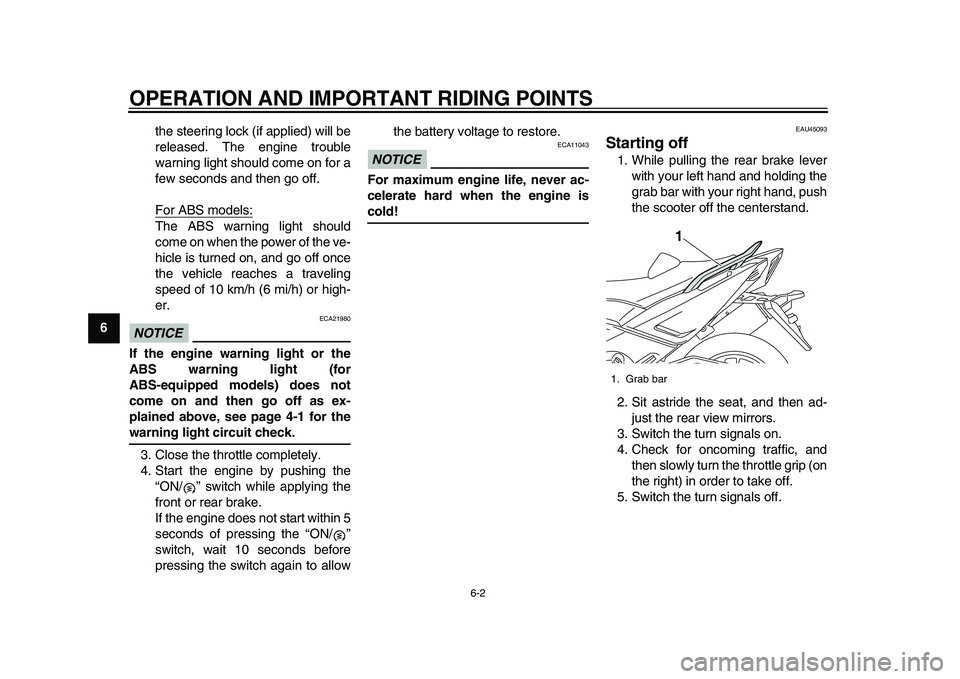
Starting off1. While pulling the rear brake lever
with your left hand and holding the
grab bar with your right hand, push
the scooter off the centerstand.
2. Sit astride the seat, and then ad- just the rear view mirrors.
3. Switch the turn signals on.
4. Check for oncoming traffic, and then slowly turn the throttle grip (on
the right) in order to take off.
5. Switch the turn signals off.1. Grab bar
1
2PW-9-E0_1.book 2 ページ 2015年2月19日 木曜日 午後3時30分