light YAMAHA TMAX 2018 User Guide
[x] Cancel search | Manufacturer: YAMAHA, Model Year: 2018, Model line: TMAX, Model: YAMAHA TMAX 2018Pages: 122, PDF Size: 14.97 MB
Page 28 of 122

Smart key system
3-13
1
2
3
4
5
6
7
8
9
10
11
12
13
14
EAU77251
Parking mode
The steering is locked, and the hazard
lights and turn signal lights can be
turned on, but all other electrical sys-
tems are off.
To enter parking mode 1. Lock the steering. (See page 3-10. )
2. Press the “ / ” switch for one second.
TIP
If the steering lock has not been ap-
plied, the beeper will sound for 3 sec-
onds (the smart key system indicator
light will also flash) and the vehicle will
not enter parking mode.
3. Upon authentification of the smart key, the beeper will sound twice
and the vehicle will enter parking
mode. The smart key system indi-
cator light will come on.
TIP
The seat, fuel tank cap lid, and the front
storage compartment (for XP530-A,
XP530D-A) cannot be opened while in
parking mode.
NOTICE
ECA20760
Using the hazard or turn signal
lights for an extended length of time
may cause the battery to discharge.
To exit parking mode
Press the “ / ” switch. Upon authen-
tication of the smart key, the beeper will
sound once and the smart key system
indicator light will go off.
UBV1E1_1.book 13 ページ 2018年4月27日 金曜日 午後4時41分
Page 29 of 122

4-1
1
2
3
4
5
6
7
8
9
10
11
12
13
14
Special features
EAU77263
Cruise control system
(XP530D-A)
The cruise control system is designed
to maintain a set cruising speed be-
tween about 50 km/h (31 mi/h) and 140
km/h (87 mi/h).
WARNING
EWA16341
Improper use of the cruise con-
trol system may result in loss of
control, which could lead to an
accident. Do not activate the
cruise control system in heavy
traffic, poor weather conditions,
or among winding, slippery,
hilly, rough or gravel roads.
When traveling uphill or down-
hill, the cruise control system
may not be able to maintain the
set cruising speed.
To prevent accidentally activat-
ing the cruise control system,
turn it off when not in use. Make
sure that the cruise control sys-
tem indicator light “ ” is off. Activating the cruise control sys-
tem
1. Push the cruise control power switch “ ” to turn on the system.
The cruise control system indicator
light “ ” will come on.
2. Push the “SET–” side of the cruise control setting switch to activate
the cruise control system. Your
current traveling speed will be-
come the set cruising speed. The
cruise control setting indicator light
“SET” will come on.
Adjusting the set cruising speed
While the cruise control system is oper-
ating, push the “RES+” side of the
cruise control setting switch to increase
the set cruising speed or the “SET–”
side to decrease the set speed.
TIP
Pushing the setting switch once will
change the speed in increments of ap-
proximately 2.0 km/h (1.2 mi/h). Hold-
ing down the “RES+” or “SET–” side of
the cruise control setting switch will in-
crease or decrease the speed continu-
ously until the switch is released.
You can also manually increase your
1. Cruise control setting indicator light “SET”
2. Cruise control system indicator light “ ”
1 2
1. Cruise control setting switch “RES+/SET–”
2. Cruise control power switch “ ”
RE S
SETPASS1
2
UBV1E1_1.book 1 ページ 2018年4月27日 金曜日 午後4時41分
Page 30 of 122

Special features
4-2
1
2
3
4
5
6
7
8
9
10
11
12
13
14 traveling speed using the throttle. After
you have accelerated, you can set a
new cruising speed by pushing the
“SET–” side of the setting switch. If you
do not set a new cruising speed, when
you return the throttle grip, the vehicle
will decelerate to the previously set
cruising speed.
Deactivating the cruise control sys-
tem
Perform one of the following operations
to cancel the set cruising speed. The
“SET” indicator light will turn off.
Turn the throttle grip past the
closed position in the deceleration
direction.
Apply the front or rear brake.
TIP
Traveling speed decreases as soon as
the cruise control system is deactivat-
ed; unless the throttle grip is turned.
Using the resume function
Push the “RES+” side of the cruise con-
trol setting switch to reactivate the
cruise control system. The traveling
speed will return to the previously set
cruising speed. The “SET” indicator
light will come on.
WARNING
EWA16351
It is dangerous to use the resume
function when the previously set
cruising speed is too high for cur-
rent conditions.
Turning off the cruise control sys-
tem
Push the cruise control power switch
“ ” to turn off the cruise control sys-
tem. The “ ” indicator light and the
“SET” indicator light will turn off.
TIP
Whenever the cruise control system or
the vehicle power is turned off, the pre-
viously set cruisi
ng speed is erased.
You will not be able to use the resume
function until a new cruising speed has
been set.
Automatic deactivation of the cruise
control system
The cruise control system is electroni-
cally controlled and linked with other
control systems. The cruise control sys-
tem will automatically deactivate under
the following conditions:
The cruise control system is not
able to maintain the set cruising
speed (such as when going up a
steep hill).
Wheel slip or wheel spin is detect-
ed. (If the traction control system is
on, traction control will engage.)
Engine trouble, etc.
If the cruise control system is automati-
cally deactivated, the “ ” indicator
light will turn off and the “SET” indicator
light will flash for 4 seconds.
If the cruise control system was auto-
1. Deceleration direction
M ODE1
UBV1E1_1.book 2 ページ 2018年4月27日 金曜日 午後4時41分
Page 32 of 122

Special features
4-4
1
2
3
4
5
6
7
8
9
10
11
12
13
14 range to the high-speed range.
Sports mode “S”
This mode offers a sportier engine re-
sponse in the low- to mid-speed range
compared to the touring mode.
EAU77281
Traction control system
The traction control system (TCS)
helps maintain traction when accelerat-
ing on slippery surfaces, such as un-
paved or wet roads. If sensors detect
that the rear wheel is starting to slip (un-
controlled spinning), the traction control
system assists by
regulating engine
power as needed until traction is re-
stored.
When traction control has engaged, the
“ ” indicator light will flash. You may
notice changes in engine response or
exhaust sounds.
WARNING
EWA18860
The traction control system is not a
substitute for riding appropriately
for the conditions. Traction control
cannot prevent loss of traction due
to excessive speed when entering
turns, when accelerating hard at a
sharp lean angle, or while braking,
and cannot prevent front wheel slip-
ping. As with any vehicle, approach
surfaces that may be slippery with
caution and avoid especially slip-
pery surfaces.
Setting the traction control system
1. Traction control system indicator light “ ”
1
UBV1E1_1.book 4 ページ 2018年4月27日 金曜日 午後4時41分
Page 33 of 122

Special features
4-5
1
2
3
4
5
6
7
8
9
10
11
12
13
14
When the vehicle is turned on, traction
control is automatically turned on.
To turn the traction control system off,
see page 5-11.
TIP
Turn the traction control system off to
help free the rear wheel if the vehicle
gets stuck in mud, sand, or other soft
surfaces.
NOTICE
ECA16801
Use only the specified tires. (See
page 8-17.) Using different sized
tires will prevent the traction control
system from controlling tire rotation
accurately.
Resetting the traction control sys-
tem
The traction control system will auto-
matically disable under certain condi-
tions; such as when a sensor fault is
detected, or when only one wheel is al-
lowed to rotate for more than a few sec-
onds. Should this happen, the “ ”
indicator light will come on, and possi-
bly the “ ” warning light, too.
TIP
When the vehicle is on the centerstand,
do not rev the engine for an extended
period of time. Otherwise, the traction
control system will automatically dis-
able and need to be reset.
If the traction control system automati-
cally disables, try resetting it as follows.
1. Stop the vehicle and turn it off completely.
2. Wait a few seconds and then turn the vehicle power on.
3. The “ ” indicator light should turn off and the system be enabled.
TIP
If the “ ” indicator light remains on af-
ter resetting, the vehicle may still be rid-
den; however, have a Yamaha dealer
check the vehicle as soon as possible.
4. Have a Yamaha dealer check the vehicle and turn off the “ ” warn-
ing light.
UBV1E1_1.book 5 ページ 2018年4月27日 金曜日 午後4時41分
Page 34 of 122

5-1
1
2
3
4
5
6
7
8
9
10
11
12
13
14
Instrument and control functions
EAU77490
Handlebar switches
Left
Right
EAU73921Dimmer/Pass switch “ / /PASS”
Set this switch to “ ” for the high
beam and to “ ” for the low beam.
To flash the high beam, push the pass
side “PASS” of the switch while the
headlights are on low beam.
EAU66040Turn signal switch “ / ”
To signal a right-hand turn, push this
switch to “ ”. To signal a left-hand
turn, push this switch to “ ”. When re-
leased, the switch returns to the center
position. To cancel the turn signal
lights, push the switch in after it has re-
turned to the center position.
EAU66030Horn switch “ ”
Press this switch to sound the horn.
EAU77450Engine stop switch “ / ”
Set this switch to “ ” before starting
the engine. Set this switch to “ ” to
stop the engine in case of an emergen-
cy, such as when the vehicle overturns
or when the throttle cable is stuck.
EAU77290“ON/ ” switch
With the smart key turned on and within
range, press this switch to turn on the
power to the vehicle. Then with the sid-
estand up and while applying the front
or rear brake, push this switch to crank
the engine with the starter. See page
7-2 for starting instructions prior to
starting the engine.
EAU79601Hazard switch “ ”
With the vehicle power is on or in park-
ing mode, use this switch to turn on the
hazard lights (simultaneous flashing of
all turn signal lights).
The hazard lights are used in case of
an emergency or to warn other drivers
when your vehicle is stopped where it
might be a traffic hazard.
1. Select switch “ / ”
2. Menu switch “MENU”
3. Dimmer/Pass switch “ / /PASS”
4. Cruise control setting switch “RES+/SET–” (XP530D-A)
5. Turn signal switch “ / ”
6. Horn switch “ ”
7. Cruise control power switch “ ” (XP530D-A)
1. Engine stop switch “ / ”
2. Mode switch “MODE” (XP530-A, XP530D-A)
3. Hazard switch “ ”
4. “ON/ ” switch
RE S
SETPA SS
1
2
3
4
5
6
7
M ODE
1
3
4
2
UBV1E1_1.book 1 ページ 2018年4月27日 金曜日 午後4時41分
Page 35 of 122

Instrument and control functions
5-2
1
2
3
4
5
6
7
8
9
10
11
12
13
14
NOTICE
ECA10062
Do not use the hazard lights for an
extended length of time with the en-
gine not running, otherwise the bat-
tery may discharge.
EAU73951Cruise control switches
See page 4-1 for an explanation of the
cruise control system.
EAU77301Menu switch “MENU”
This switch is used to make setting
changes within the multi-function dis-
play. (See page 5-5.)
EAU77311Select switch “ / ”
This switch is used to make setting
changes within the multi-function dis-
play. (See page 5-5.)
EAU73931Drive mode switch “MODE”
See page 4-3 for an explanation of the
drive mode.
EAU77122
Indicator ligh ts and warning
lights
EAU11032Turn signal indicator lights “ ” and
“”
Each indicator light will flash when its
corresponding turn signal lights are
flashing.
EAU11081High beam indicator light “ ”
This indicator light comes on when the
high beam of the headlight is switched
on.
EAU77550Cruise control indicator lights
See page 4-1 for an explanation of
these indicator lights.
EAU77560Engine trouble warning light “ ”
This warning light comes on if a prob-
lem is detected in the engine or other
1. High beam indicator light “ ”
2. Traction control system indicator light “ ”
3. Turn signal indicator lights “ ” and “ ”
4. Smart key system indicator light “ ”
5. Anti-lock Brake System (ABS) warning light “”
6. Engine trouble warning light “ ”
7. Cruise control indicator lights (XP530D-A)
12 45 6
3
7
ABS
UBV1E1_1.book 2 ページ 2018年4月27日 金曜日 午後4時41分
Page 36 of 122

Instrument and control functions
5-3
1
2
3
4
5
6
7
8
9
10
11
12
13
14 vehicle control system. If this occurs,
have a Yamaha dealer check the on-
board diagnostic system.
The electrical circuit of the warning light
can be checked by turning the vehicle
power on. The warning light should
come on for a few seconds, and then
go off.
If the warning light does not come on at
all, or if the warning light remains on,
have a Yamaha dealer check the vehi-
cle.
EAU77072Anti-lock brake system warning light
“”
This warning light comes on when a
problem is detected with the ABS. (See
page 5-19.)
When the vehicle power is turned on,
this light will come on and then go off af-
ter reaching a traveling speed of 10
km/h (6 mi/h). If the warning light:
does not come on when the vehi-
cle power is turned on
does not go off after traveling at a
speed of 10 km/h (6 mi/h) or higher
comes on or flashes while riding
the anti-lock brake system may not
work correctly. Have a Yamaha dealer
check the vehicle as soon as possible.
WARNING
EWA16041
If the ABS warning light does not go
off after traveling at a speed of 10
km/h (6 mi/h) or higher, or if the
warning light comes on or flashes
while riding, the brake system re-
verts to conventional braking. If ei-
ther of the above occurs, or if the
warning light does not come on at
all, use extra caution to avoid possi-
ble wheel lock during emergency braking. Have a Yamaha dealer
check the brake system and electri-
cal circuits as soon as possible.
TIP
The ABS warning light may come on
when revving the engine with the scoot-
er on its centerstand, but this does not
indicate a malfunction.
EAU74082Traction control system indicator
light “ ”
This indicator light will flash when trac-
tion control has engaged.
If the traction control system is turned
off, this indicator light will come on.
TIP
When the vehicle is turned on, the light
should come on for a few seconds and
then go off. If the light does not come
on, or if the light remains on, have a
Yamaha dealer check the vehicle.
EAU78080Smart key system indicator light
“”
This indicator light will flash when com-
munication between the vehicle and
smart key takes place and when certain
smart key system operations are car-
ried out.
The indicator light may also flash when
there is an error in the smart key sys-
tem.
TIP
When the start switch is pushed, the in-
dicator light will come on for about one
second and then go off. If the indicator
light does not come on or go off as nor-
mal, have a Yamaha dealer check the
ABS
UBV1E1_1.book 3 ページ 2018年4月27日 金曜日 午後4時41分
Page 44 of 122
Instrument and control functions
5-11
1
2
3
4
5
6
7
8
9
10
11
12
13
14 The instantaneous fuel consumption
mode “CRNT.F” can be set to “km/L” or
“L/100km”. For UK-spec vehicles:
“MPG”. (See page 5-14.)
TIP
Instantaneous fuel consumption
cannot be reset.
If traveling at speeds under 10
km/h (6 mi/h), “– –.–” will be dis-
played.
NOTICE
ECA15474
If there is a malfunction, “– –.–” will
be continuously displayed. Have a
Yamaha dealer check the vehicle.
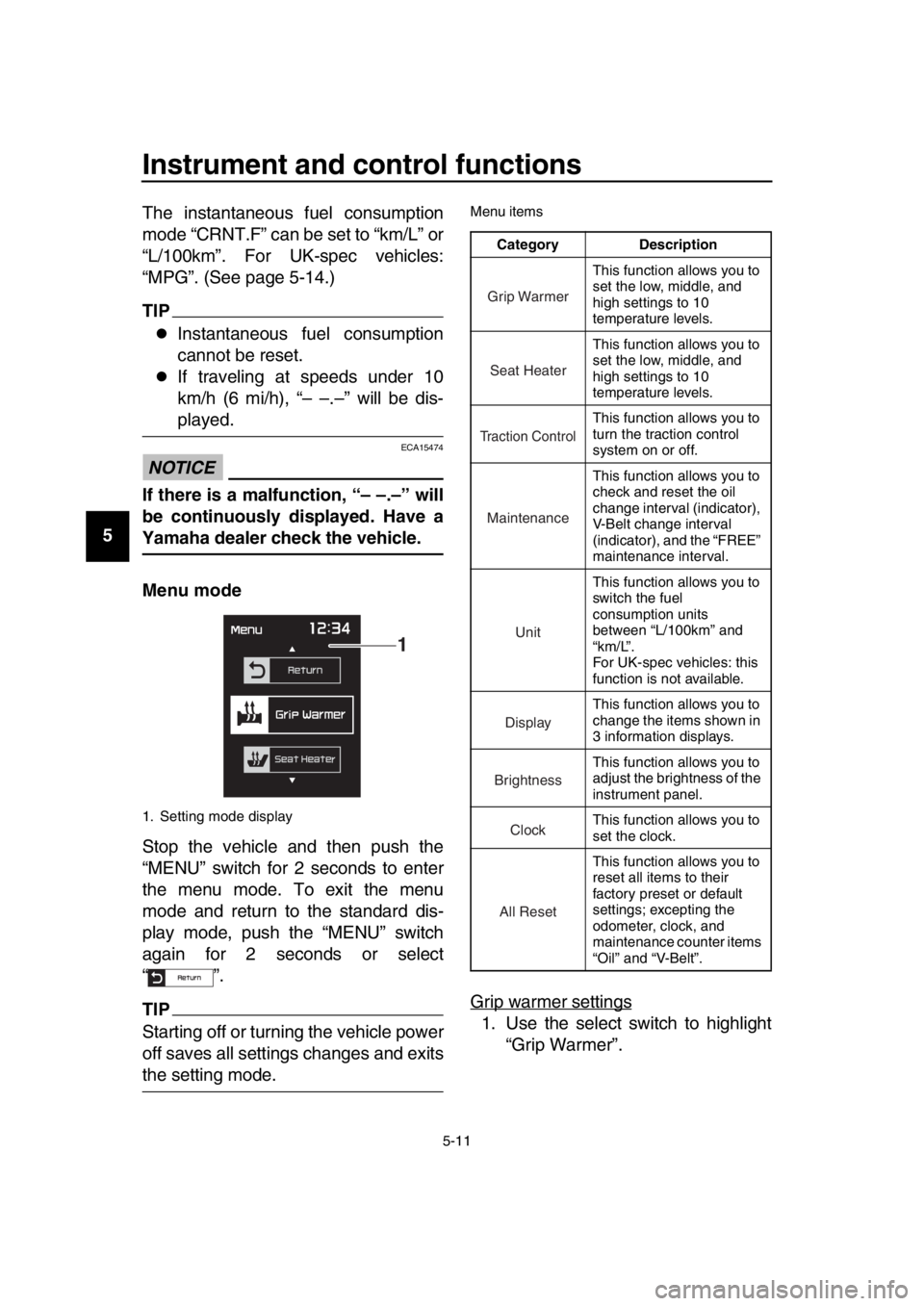
Menu mode
Stop the vehicle and then push the
“MENU” switch for 2 seconds to enter
the menu mode. To exit the menu
mode and return to the standard dis-
play mode, push the “MENU” switch
again for 2 seconds or select
“”.
TIP
Starting off or turning the vehicle power
off saves all settings changes and exits
the setting mode.
Menu items
Grip warmer settings
1. Use the select switch to highlight
“Grip Warmer”.
1. Setting mode display
1
Category Description
This function allows you to
set the low, middle, and
high settings to 10
temperature levels.
This function allows you to
set the low, middle, and
high settings to 10
temperature levels.
This function allows you to
turn the traction control
system on or off.
This function allows you to
check and reset the oil
change interval (indicator),
V-Belt change interval
(indicator), and the “FREE”
maintenance interval.
This function allows you to
switch the fuel
consumption units
between “L/100km” and
“km/L”.
For UK-spec vehicles: this
function is not available.
This function allows you to
change the items shown in
3 information displays.
This function allows you to
adjust the brightness of the
instrument panel.
This function allows you to
set the clock.
This function allows you to
reset all items to their
factory preset or default
settings; excepting the
odometer, clock, and
maintenance counter items
“Oil” and “V-Belt”.
Grip Warmer
Seat Heater
Tr action Control
Maintenance
Unit
Display
Brightness
Clock
All Reset
UBV1E1_1.book 11 ページ 2018年4月27日 金曜日 午後4時41分
Page 45 of 122

Instrument and control functions
5-12
1
2
3
4
5
6
7
8
9
10
11
12
13
14
2. Push the “MENU” switch. The grip
warmer setting display will be
shown and “High” will flash in the
display.
3. Push the “MENU” switch. The tem- perature level for the high setting
will start flashing.
Use the select switch to set the
temperature level, and then push
the “MENU” switch. “High” will start
flashing.
4. Use the select switch to highlight “Mid” or “Low”, and then change
the setting using the same proce- dure that was used for the high set-
ting.
5. When you finished changing the settings, use the select switch to
highlight “ ”, and then push the
“MENU” switch to return to the
menu screen.
Seat heater settings
1. Use the select switch to highlight “Seat Heater”.
2. Push the “MENU” switch. The seat heater setting display will be
shown and “High” will flash in the
display.
3. Push the “MENU” switch. The tem- perature level for the high setting
will start flashing.
Use the select switch to set the
temperature level, and then push
the “MENU” switch. “High” will start
flashing.
UBV1E1_1.book 12 ページ 2018年4月27日 金曜日 午後4時41分