ECO mode YAMAHA TMAX 2018 Owners Manual
[x] Cancel search | Manufacturer: YAMAHA, Model Year: 2018, Model line: TMAX, Model: YAMAHA TMAX 2018Pages: 122, PDF Size: 14.97 MB
Page 7 of 122

Table of contents
Checking the rear brake lock......... 8-20
Checking the front and rear brake pads ........................................... 8-21
Checking the brake fluid level ....... 8-21
Changing the brake fluid ............... 8-22
Drive belt slack .............................. 8-23
Checking and lubricating the
cables......................................... 8-23
Checking and lubricating the throttle grip and cable ................ 8-24
Lubricating the front and rear brake levers ............................... 8-24
Checking and lubricating the
centerstand and sidestand ......... 8-25
Checking the front fork .................. 8-25
Checking the steering.................... 8-26
Checking the wheel bearings ........ 8-26
Battery ........................................... 8-27
Replacing the fuses ....................... 8-28
Vehicle lights ................................. 8-31
Replacing a front turn signal light
bulb ............................................ 8-31
Replacing the license plate light bulb ............................................ 8-32
Troubleshooting............................. 8-33
Troubleshooting charts .................. 8-34
Emergency mode .......................... 8-36
Scooter care and storage ................. 9-1
Matte color caution .......................... 9-1
Care................................................. 9-1
Storage ............................................ 9-4
Specifications ................................. 10-1
Consumer information ................... 11-1
Identification numbers ................... 11-1
Diagnostic connector ..................... 11-2
Vehicle data recording................... 11-2
Index ................................................ 12-1
UBV1E1_1.book 2 ページ 2018年4月27日 金曜日 午後4時41分
Page 17 of 122

Smart key system
3-2
1
2
3
4
5
6
7
8
9
10
11
12
13
14
NOTICE
ECA15764
The smart key system uses weak ra-
dio waves. The smart key system
may not work in the following situa-
tions.
The smart key is placed in a lo-
cation exposed to strong radio
waves or other electromagnetic
noise
There are facilities nearby that
are emitting strong radio waves
(TV or radio towers, power
plants, broadcasting stations,
airports, etc.)
You are carrying or using com-
munication equipment such as
radios or mobile phones in
close proximity of the smart key
The smart key is in contact with
or covered by a metallic object
Other vehicles equipped with a
smart key system are nearby
In such situations, move the smart
key to another location and perform
the operation again. If it still does
not work, use the mechanical key to
carry out the operation in emergen-
cy mode. (See page 8-36.)
EAU77213
Operating range of the smart
key system
The operating range of the smart key
system is about 80 cm (31.5 in) from
the center of the handlebars.
TIP
As the smart key system uses
weak radio waves, the operating
range may be affected by the sur-
rounding environment.
When the battery of the smart key
is discharged, the smart key may
not work or its operating range be-
come very small.
If the smart key is turned off, the
vehicle will not recognize the smart
key even if it is within operating
range.
If the “ON/ ” switch, “OFF/LOCK”
switch, or “ / ” switch are re-
peatedly pressed when the smart
key is out of range or cannot com-
1. “ / ” switch
2. “OFF/LOCK” switch
12
UBV1E1_1.book 2 ページ 2018年4月27日 金曜日 午後4時41分
Page 28 of 122

Smart key system
3-13
1
2
3
4
5
6
7
8
9
10
11
12
13
14
EAU77251
Parking mode
The steering is locked, and the hazard
lights and turn signal lights can be
turned on, but all other electrical sys-
tems are off.
To enter parking mode 1. Lock the steering. (See page 3-10. )
2. Press the “ / ” switch for one second.
TIP
If the steering lock has not been ap-
plied, the beeper will sound for 3 sec-
onds (the smart key system indicator
light will also flash) and the vehicle will
not enter parking mode.
3. Upon authentification of the smart key, the beeper will sound twice
and the vehicle will enter parking
mode. The smart key system indi-
cator light will come on.
TIP
The seat, fuel tank cap lid, and the front
storage compartment (for XP530-A,
XP530D-A) cannot be opened while in
parking mode.
NOTICE
ECA20760
Using the hazard or turn signal
lights for an extended length of time
may cause the battery to discharge.
To exit parking mode
Press the “ / ” switch. Upon authen-
tication of the smart key, the beeper will
sound once and the smart key system
indicator light will go off.
UBV1E1_1.book 13 ページ 2018年4月27日 金曜日 午後4時41分
Page 31 of 122

Special features
4-3
1
2
3
4
5
6
7
8
9
10
11
12
13
14
matically deactivated, please stop and
confirm that your vehicle is in good op-
erating condition before continuing on.
When traveling on roads with steep
grades, the cruise control system may
not be able to maintain the set cruising
speed.
When going uphill, the actual trav-
eling speed may become lower
than the set cruising speed. If this
occurs, accelerate to the desired
traveling speed using the throttle.
When going downhill, the actual
traveling speed may become high-
er than the set cruising speed. If
this occurs, the setting switch can-
not be used to adjust the set cruis-
ing speed. To reduce the traveling
speed, apply the brakes. When the
brakes are applied, the cruise con-
trol system will deactivate.
EAU77272
D-mode (drive mode)
(XP530-A, XP530D-A)
D-mode is an electronically controlled
engine performance system with two
mode selections (touring mode “T” and
sports mode “S”).
WARNING
EWA18440
Do not change the drive mode while
the vehicle is moving.
With the throttle grip closed, push the
drive mode switch “MODE” to switch
between modes “S” (sports) and “T”
(touring).
TIP
The current drive mode is shown in
the drive mode display (page 5-7).
The current drive mode is saved
when the vehicle is turned off.
TIP
D-mode cannot be changed while
cruise control (XP530D-A) is activated.
Touring mode “T”
The touring mode “T” is suitable for var-
ious riding conditions.
This mode allows the rider to enjoy
smooth drivability from the low-speed
1. Drive mode switch “MODE”
M
ODE
1
UBV1E1_1.book 3 ページ 2018年4月27日 金曜日 午後4時41分
Page 38 of 122
Instrument and control functions
5-5
1
2
3
4
5
6
7
8
9
10
11
12
13
14
EAU77141
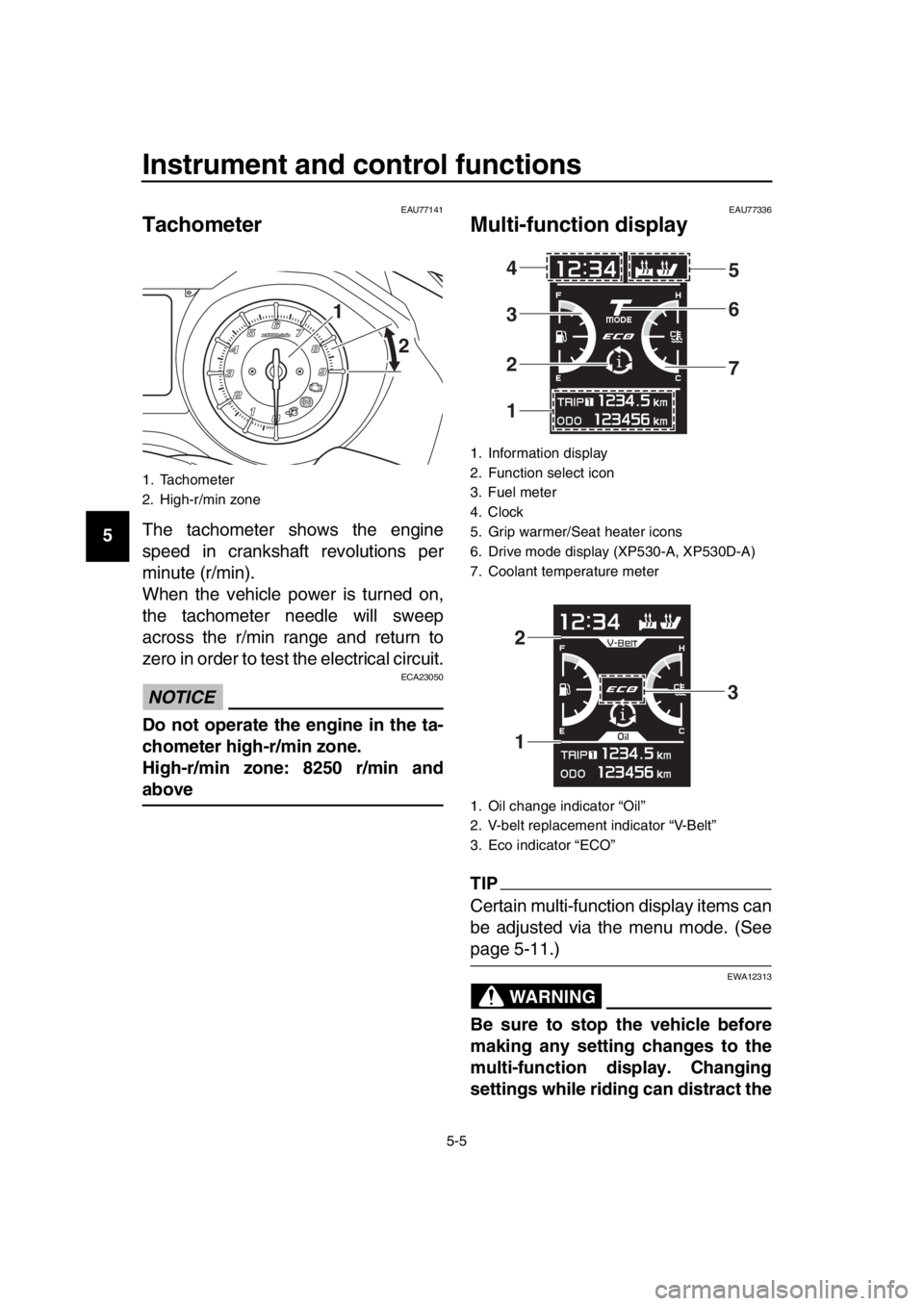
Tachometer
The tachometer shows the engine
speed in crankshaft revolutions per
minute (r/min).
When the vehicle power is turned on,
the tachometer needle will sweep
across the r/min range and return to
zero in order to test the electrical circuit.
NOTICE
ECA23050
Do not operate the engine in the ta-
chometer high-r/min zone.
High-r/min zone: 8250 r/min and
above
EAU77336
Multi-function display
TIP
Certain multi-function display items can
be adjusted via the menu mode. (See
page 5-11.)
WARNING
EWA12313
Be sure to stop the vehicle before
making any setting changes to the
multi-function display. Changing
settings while riding can distract the
1. Tachometer
2. High-r/min zone
1 2
1. Information display
2. Function select icon
3. Fuel meter
4. Clock
5. Grip warmer/Seat heater icons
6. Drive mode display (XP530-A, XP530D-A)
7. Coolant temperature meter
1. Oil change indicator “Oil”
2. V-belt replacement indicator “V-Belt”
3. Eco indicator “ECO”
1 2 3 4 5
6
7
1 2
3
UBV1E1_1.book 5 ページ 2018年4月27日 金曜日 午後4時41分
Page 44 of 122
Instrument and control functions
5-11
1
2
3
4
5
6
7
8
9
10
11
12
13
14 The instantaneous fuel consumption
mode “CRNT.F” can be set to “km/L” or
“L/100km”. For UK-spec vehicles:
“MPG”. (See page 5-14.)
TIP
Instantaneous fuel consumption
cannot be reset.
If traveling at speeds under 10
km/h (6 mi/h), “– –.–” will be dis-
played.
NOTICE
ECA15474
If there is a malfunction, “– –.–” will
be continuously displayed. Have a
Yamaha dealer check the vehicle.
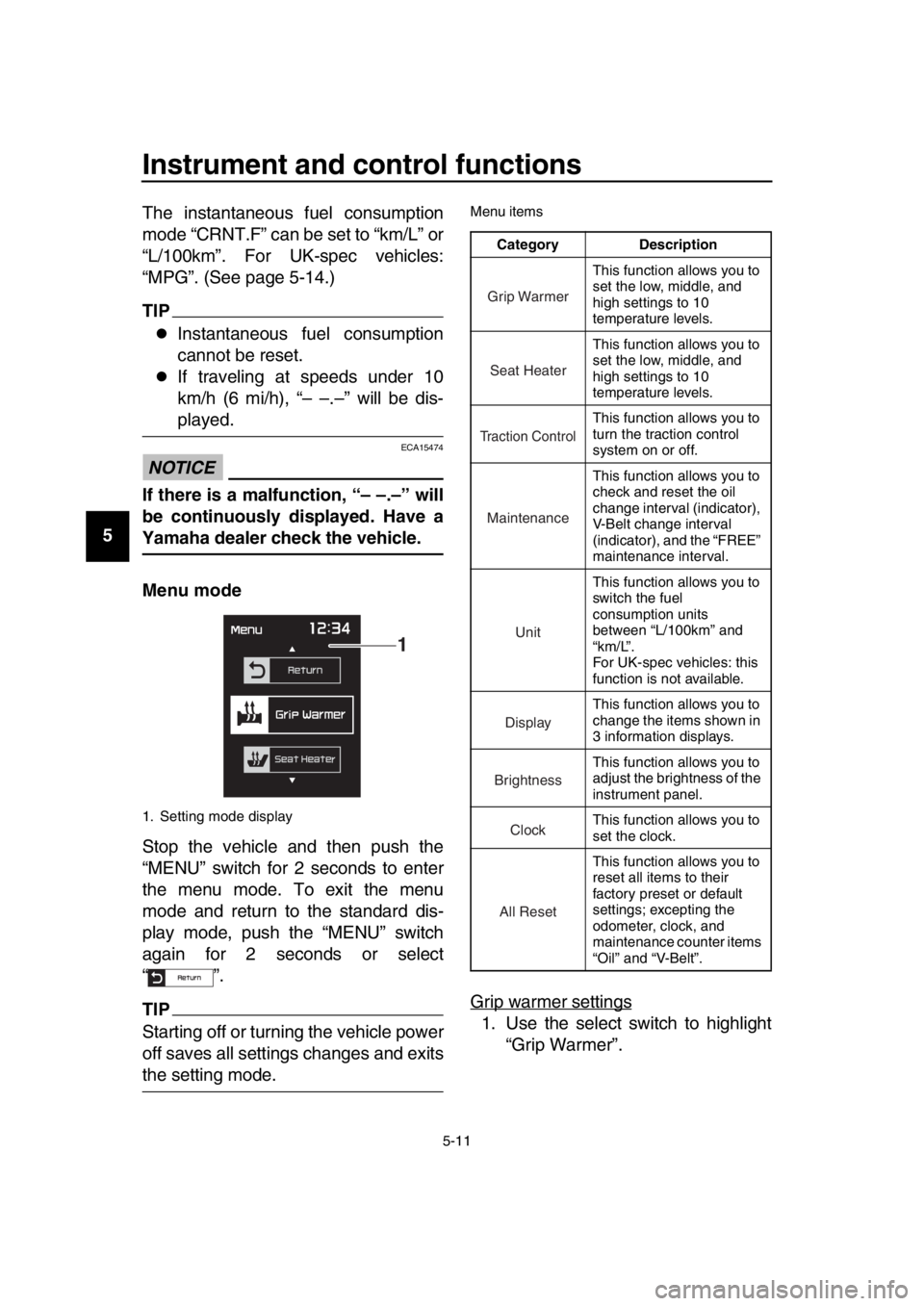
Menu mode
Stop the vehicle and then push the
“MENU” switch for 2 seconds to enter
the menu mode. To exit the menu
mode and return to the standard dis-
play mode, push the “MENU” switch
again for 2 seconds or select
“”.
TIP
Starting off or turning the vehicle power
off saves all settings changes and exits
the setting mode.
Menu items
Grip warmer settings
1. Use the select switch to highlight
“Grip Warmer”.
1. Setting mode display
1
Category Description
This function allows you to
set the low, middle, and
high settings to 10
temperature levels.
This function allows you to
set the low, middle, and
high settings to 10
temperature levels.
This function allows you to
turn the traction control
system on or off.
This function allows you to
check and reset the oil
change interval (indicator),
V-Belt change interval
(indicator), and the “FREE”
maintenance interval.
This function allows you to
switch the fuel
consumption units
between “L/100km” and
“km/L”.
For UK-spec vehicles: this
function is not available.
This function allows you to
change the items shown in
3 information displays.
This function allows you to
adjust the brightness of the
instrument panel.
This function allows you to
set the clock.
This function allows you to
reset all items to their
factory preset or default
settings; excepting the
odometer, clock, and
maintenance counter items
“Oil” and “V-Belt”.
Grip Warmer
Seat Heater
Tr action Control
Maintenance
Unit
Display
Brightness
Clock
All Reset
UBV1E1_1.book 11 ページ 2018年4月27日 金曜日 午後4時41分
Page 47 of 122

Instrument and control functions
5-14
1
2
3
4
5
6
7
8
9
10
11
12
13
14
2. Push the “MENU” switch, and then
use the select switch to select the
item to reset.
3. While the selected item is flashing, push the select switch “ ” for one
second.
4. When you finished resetting, use the select switch to highlight “ ”,
and then push the “MENU” switch
to return to the menu screen.
Selecting the units
TIP
U.K. specification vehicles only: This function does not indicate on setting
mode display and cannot be selected.
1. Use the select switch to highlight “Unit”.
2. Push the “MENU” switch. The unit setting display will be shown and
“L/100km” will flash in the display.
3. Use the select switch to select “L/100km” or “km/L”, and then
push the “MENU” switch again.
4. Push the “MENU” switch to return to the menu screen.
UBV1E1_1.book 14 ページ 2018年4月27日 金曜日 午後4時41分
Page 67 of 122

7-1
1
2
3
4
5
6
7
8
9
10
11
12
13
14
Operation and important riding points
EAU15952
Read the Owner’s Manual carefully to
become familiar with all controls. If
there is a control or function you do not
understand, ask your Yamaha dealer.
WARNING
EWA10272
Failure to familiarize yourself with
the controls can lead to loss of con-
trol, which could cause an accident
or injury.
EAU77750
TIP
This model is equipped with:
a lean angle sensor to stop the en-
gine in case of a turnover. In this
case, the engine trouble warning
light will come on, but this is not a
malfunction. Turn the vehicle pow-
er off to extinguish the warning
light. Failing to do so will prevent
the engine from starting even
though the engine will crank when
pushing the start switch.
an engine auto-stop system. The
engine stops automatically if left
idling for 20 minutes. If the engine
stops, simply push the start switch
to restart the engine.
UBV1E1_1.book 1 ページ 2018年4月27日 金曜日 午後4時41分
Page 82 of 122
Periodic maintenance and adjustment
8-10
1
2
3
4
5
6
7
8
9
10
11
12
13
14
EAU36112
Canister
This model is equipped with a canister
to prevent the discharging of fuel vapor
into the atmosphere. Before operating
this vehicle, make sure to check the fol-
lowing:
Check each hose connection.
Check each hose and canister for
cracks or damage. Replace if dam-
aged.
Make sure that the canister breath-
er is not blocked, and if necessary,
clean it.
EAU77363
Engine oil and oil filter
cartridge
The engine oil level should be checked
before each ride. In addition, the oil
must be changed and the oil filter car-
tridge replaced at the intervals speci-
fied in the periodic maintenance and
lubrication chart.
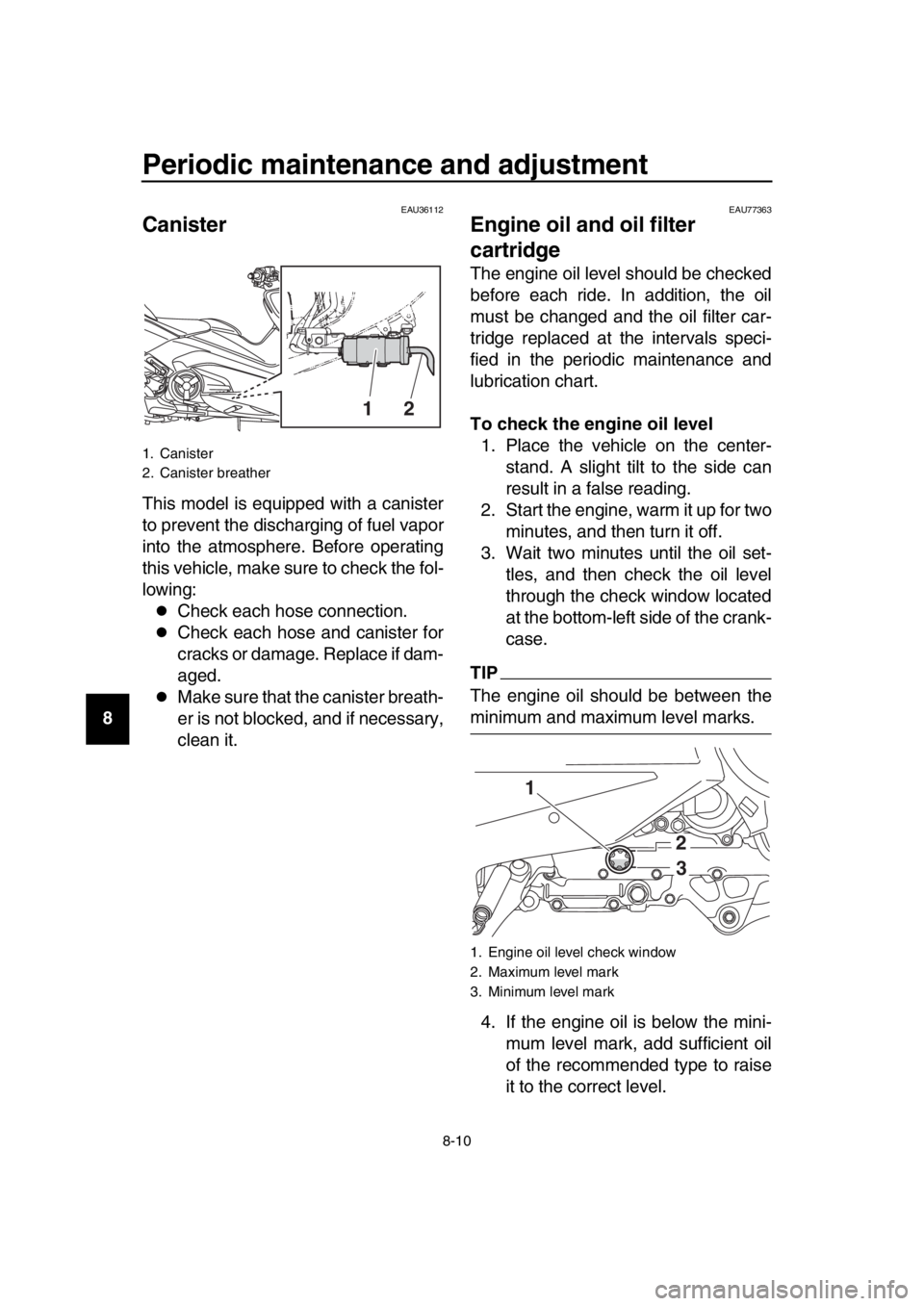
To check the engine oil level 1. Place the vehicle on the center- stand. A slight tilt to the side can
result in a false reading.
2. Start the engine, warm it up for two minutes, and then turn it off.
3. Wait two minutes until the oil set- tles, and then check the oil level
through the check window located
at the bottom-left side of the crank-
case.
TIP
The engine oil should be between the
minimum and maximum level marks.
4. If the engine oil is below the mini- mum level mark, add sufficient oil
of the recommended type to raise
it to the correct level.
1. Canister
2. Canister breather
12
1. Engine oil level check window
2. Maximum level mark
3. Minimum level mark
2
3
1
UBV1E1_1.book 10 ページ 2018年4月27日 金曜日 午後4時41分
Page 108 of 122

Periodic maintenance and adjustment
8-36
1
2
3
4
5
6
7
8
9
10
11
12
13
14
EAU77372
Emergency mode
When the smart key is lost, damaged,
or its battery has discharged, the vehi-
cle can still be turned on and the engine
started. You will need a mechanical key
and the smart key system identification
number. To operate the vehicle in
emergency mode, carry out the follow-
ing steps.
TIP
Emergency mode operation will be
cancelled if the respective steps are not
carried out within the time set for each
operation or if the “OFF/LOCK” switch
is pushed. 1. Stop the vehicle in a safe place.
2. Unlock the seat by inserting the mechanical key into the lock locat-
ed right side of body and turn it
counter clockwise.
3. Open the seat and check that the trunk light comes on.
4. Push the “ON/ ” switch once.
5. Without completely shutting the seat, raise and lower it three times
within 10 seconds.
TIP
Use the rear storage compartment light
as a guide when raising and lowering
the seat. The smart key system indicator
light on the speedometer will come
on for three seconds to indicate
the transition to emergency mode.
6. After the smart key system indica- tor light goes off, use the “ / ”
switch to enter the identification
number.
7. Inputting the identification number is done by counting the number of
flashes of the smart key system in-
dicator light.
For example, if the identification
number is 123456:
Push and hold the “ / ” switch.
The smart key system indicator
light will start to flash.
1. Smart key system indicator light “ ”
1. Identification number
1
12345 6
1
UBV1E1_1.book 36 ページ 2018年4月27日 金曜日 午後4時41分