emergency mode YAMAHA TMAX 2018 Owners Manual
[x] Cancel search | Manufacturer: YAMAHA, Model Year: 2018, Model line: TMAX, Model: YAMAHA TMAX 2018Pages: 122, PDF Size: 14.97 MB
Page 7 of 122

Table of contents
Checking the rear brake lock......... 8-20
Checking the front and rear brake pads ........................................... 8-21
Checking the brake fluid level ....... 8-21
Changing the brake fluid ............... 8-22
Drive belt slack .............................. 8-23
Checking and lubricating the
cables......................................... 8-23
Checking and lubricating the throttle grip and cable ................ 8-24
Lubricating the front and rear brake levers ............................... 8-24
Checking and lubricating the
centerstand and sidestand ......... 8-25
Checking the front fork .................. 8-25
Checking the steering.................... 8-26
Checking the wheel bearings ........ 8-26
Battery ........................................... 8-27
Replacing the fuses ....................... 8-28
Vehicle lights ................................. 8-31
Replacing a front turn signal light
bulb ............................................ 8-31
Replacing the license plate light bulb ............................................ 8-32
Troubleshooting............................. 8-33
Troubleshooting charts .................. 8-34
Emergency mode .......................... 8-36
Scooter care and storage ................. 9-1
Matte color caution .......................... 9-1
Care................................................. 9-1
Storage ............................................ 9-4
Specifications ................................. 10-1
Consumer information ................... 11-1
Identification numbers ................... 11-1
Diagnostic connector ..................... 11-2
Vehicle data recording................... 11-2
Index ................................................ 12-1
UBV1E1_1.book 2 ページ 2018年4月27日 金曜日 午後4時41分
Page 23 of 122
Smart key system
3-8
1
2
3
4
5
6
7
8
9
10
11
12
13
14
EAU77232
Powering on the vehicle
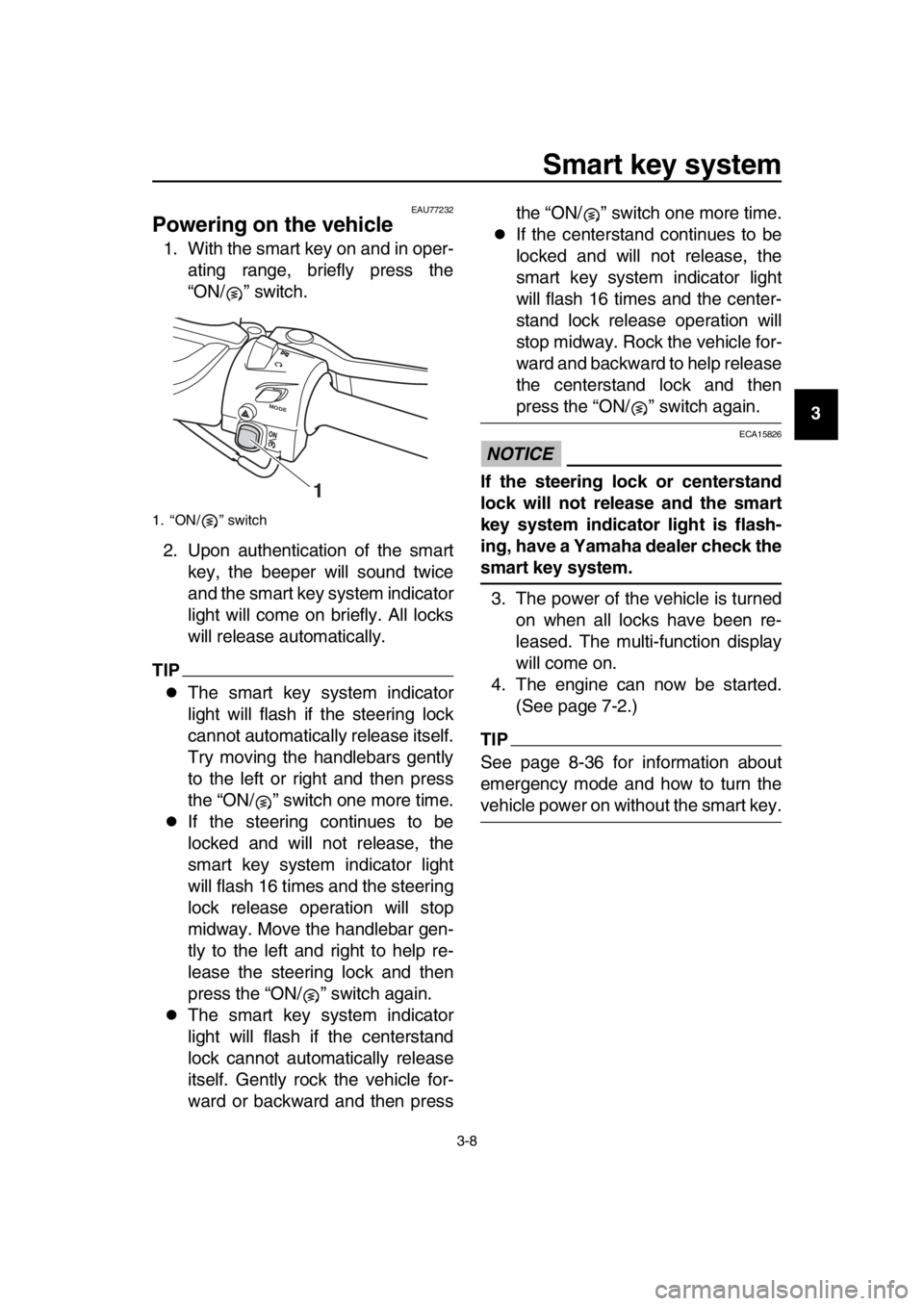
1. With the smart key on and in oper- ating range, briefly press the
“ON/ ” switch.
2. Upon authentication of the smart key, the beeper will sound twice
and the smart key system indicator
light will come on briefly. All locks
will release automatically.
TIP
The smart key system indicator
light will flash if the steering lock
cannot automatically release itself.
Try moving the handlebars gently
to the left or right and then press
the “ON/ ” switch one more time.
If the steering continues to be
locked and will not release, the
smart key system indicator light
will flash 16 times and the steering
lock release operation will stop
midway. Move the handlebar gen-
tly to the left and right to help re-
lease the steering lock and then
press the “ON/ ” switch again.
The smart key system indicator
light will flash if the centerstand
lock cannot automatically release
itself. Gently rock the vehicle for-
ward or backward and then press the “ON/ ” switch one more time.
If the centerstand continues to be
locked and will not release, the
smart key system indicator light
will flash 16 times and the center-
stand lock release operation will
stop midway. Rock the vehicle for-
ward and backward to help release
the centerstand lock and then
press the “ON/ ” switch again.
NOTICE
ECA15826
If the steering lock or centerstand
lock will not release and the smart
key system indicator light is flash-
ing, have a Yamaha dealer check the
smart key system.
3. The power of the vehicle is turned on when all locks have been re-
leased. The multi-function display
will come on.
4. The engine can now be started. (See page 7-2.)
TIP
See page 8-36 for information about
emergency mode and how to turn the
vehicle power on without the smart key.
1. “ON/ ” switch
MODE
1
UBV1E1_1.book 8 ページ 2018年4月27日 金曜日 午後4時41分
Page 34 of 122

5-1
1
2
3
4
5
6
7
8
9
10
11
12
13
14
Instrument and control functions
EAU77490
Handlebar switches
Left
Right
EAU73921Dimmer/Pass switch “ / /PASS”
Set this switch to “ ” for the high
beam and to “ ” for the low beam.
To flash the high beam, push the pass
side “PASS” of the switch while the
headlights are on low beam.
EAU66040Turn signal switch “ / ”
To signal a right-hand turn, push this
switch to “ ”. To signal a left-hand
turn, push this switch to “ ”. When re-
leased, the switch returns to the center
position. To cancel the turn signal
lights, push the switch in after it has re-
turned to the center position.
EAU66030Horn switch “ ”
Press this switch to sound the horn.
EAU77450Engine stop switch “ / ”
Set this switch to “ ” before starting
the engine. Set this switch to “ ” to
stop the engine in case of an emergen-
cy, such as when the vehicle overturns
or when the throttle cable is stuck.
EAU77290“ON/ ” switch
With the smart key turned on and within
range, press this switch to turn on the
power to the vehicle. Then with the sid-
estand up and while applying the front
or rear brake, push this switch to crank
the engine with the starter. See page
7-2 for starting instructions prior to
starting the engine.
EAU79601Hazard switch “ ”
With the vehicle power is on or in park-
ing mode, use this switch to turn on the
hazard lights (simultaneous flashing of
all turn signal lights).
The hazard lights are used in case of
an emergency or to warn other drivers
when your vehicle is stopped where it
might be a traffic hazard.
1. Select switch “ / ”
2. Menu switch “MENU”
3. Dimmer/Pass switch “ / /PASS”
4. Cruise control setting switch “RES+/SET–” (XP530D-A)
5. Turn signal switch “ / ”
6. Horn switch “ ”
7. Cruise control power switch “ ” (XP530D-A)
1. Engine stop switch “ / ”
2. Mode switch “MODE” (XP530-A, XP530D-A)
3. Hazard switch “ ”
4. “ON/ ” switch
RE S
SETPA SS
1
2
3
4
5
6
7
M ODE
1
3
4
2
UBV1E1_1.book 1 ページ 2018年4月27日 金曜日 午後4時41分
Page 105 of 122
Periodic maintenance and adjustment
8-33
1
2
3
4
5
6
7
8
9
10
11
12
13
14
EAU25864
Troubleshooting
Although Yamaha scooters receive a
thorough inspection before shipment
from the factory, trouble may occur dur-
ing operation. Any problem in the fuel,
compression, or ignition systems, for
example, can cause poor starting and
loss of power.
The following troubleshooting chart
represents a quick and easy procedure
for checking these vital systems your-
self. However, should your scooter re-
quire any repair, take it to a Yamaha
dealer, whose skilled technicians have
the necessary tools, experience, and
know-how to service the scooter prop-
erly.
Use only genuine Yamaha replace-
ment parts. Imitation parts may look like
Yamaha parts, but they are often inferi-
or, have a shorter service life and can
lead to expensive repair bills.
WARNING
EWA15142
When checking the fuel system, do
not smoke, and make sure there are
no open flames or sparks in the ar-
ea, including pilot lights from water
heaters or furnaces. Gasoline or
gasoline vapors can ignite or ex-
plode, causing severe injury or
property damage.
EAU77992Smart key system troubleshooting
Please check the following items when
the smart key system does not work.
Is the smart key turned on? (See
page 3-5.)
Is the smart key battery dis-
charged? (See page 3-6.)
Is the smart key battery installed correctly? (See page 3-6.)
Is the smart key being used in a lo-
cation with strong radio waves or
other electromagnetic noise? (See
page 3-1.)
Are you using the smart key that is
registered to the vehicle?
Is the vehicle battery discharged?
When the vehicle battery is dis-
charged, the smart key system will
not operate. Please have the vehi-
cle battery charged or replaced.
(See page 8-27.)
If the smart key system does not work
after checking the above items, have a
Yamaha dealer check the smart key
system.
TIP
See Emergency mode on page 8-36 for
information on starting the engine with-
out the smart key.
UBV1E1_1.book 33 ページ 2018年4月27日 金曜日 午後4時41分
Page 108 of 122

Periodic maintenance and adjustment
8-36
1
2
3
4
5
6
7
8
9
10
11
12
13
14
EAU77372
Emergency mode
When the smart key is lost, damaged,
or its battery has discharged, the vehi-
cle can still be turned on and the engine
started. You will need a mechanical key
and the smart key system identification
number. To operate the vehicle in
emergency mode, carry out the follow-
ing steps.
TIP
Emergency mode operation will be
cancelled if the respective steps are not
carried out within the time set for each
operation or if the “OFF/LOCK” switch
is pushed. 1. Stop the vehicle in a safe place.
2. Unlock the seat by inserting the mechanical key into the lock locat-
ed right side of body and turn it
counter clockwise.
3. Open the seat and check that the trunk light comes on.
4. Push the “ON/ ” switch once.
5. Without completely shutting the seat, raise and lower it three times
within 10 seconds.
TIP
Use the rear storage compartment light
as a guide when raising and lowering
the seat. The smart key system indicator
light on the speedometer will come
on for three seconds to indicate
the transition to emergency mode.
6. After the smart key system indica- tor light goes off, use the “ / ”
switch to enter the identification
number.
7. Inputting the identification number is done by counting the number of
flashes of the smart key system in-
dicator light.
For example, if the identification
number is 123456:
Push and hold the “ / ” switch.
The smart key system indicator
light will start to flash.
1. Smart key system indicator light “ ”
1. Identification number
1
12345 6
1
UBV1E1_1.book 36 ページ 2018年4月27日 金曜日 午後4時41分
Page 109 of 122
Periodic maintenance and adjustment
8-37
1
2
3
4
5
6
7
8
9
10
11
12
13
14
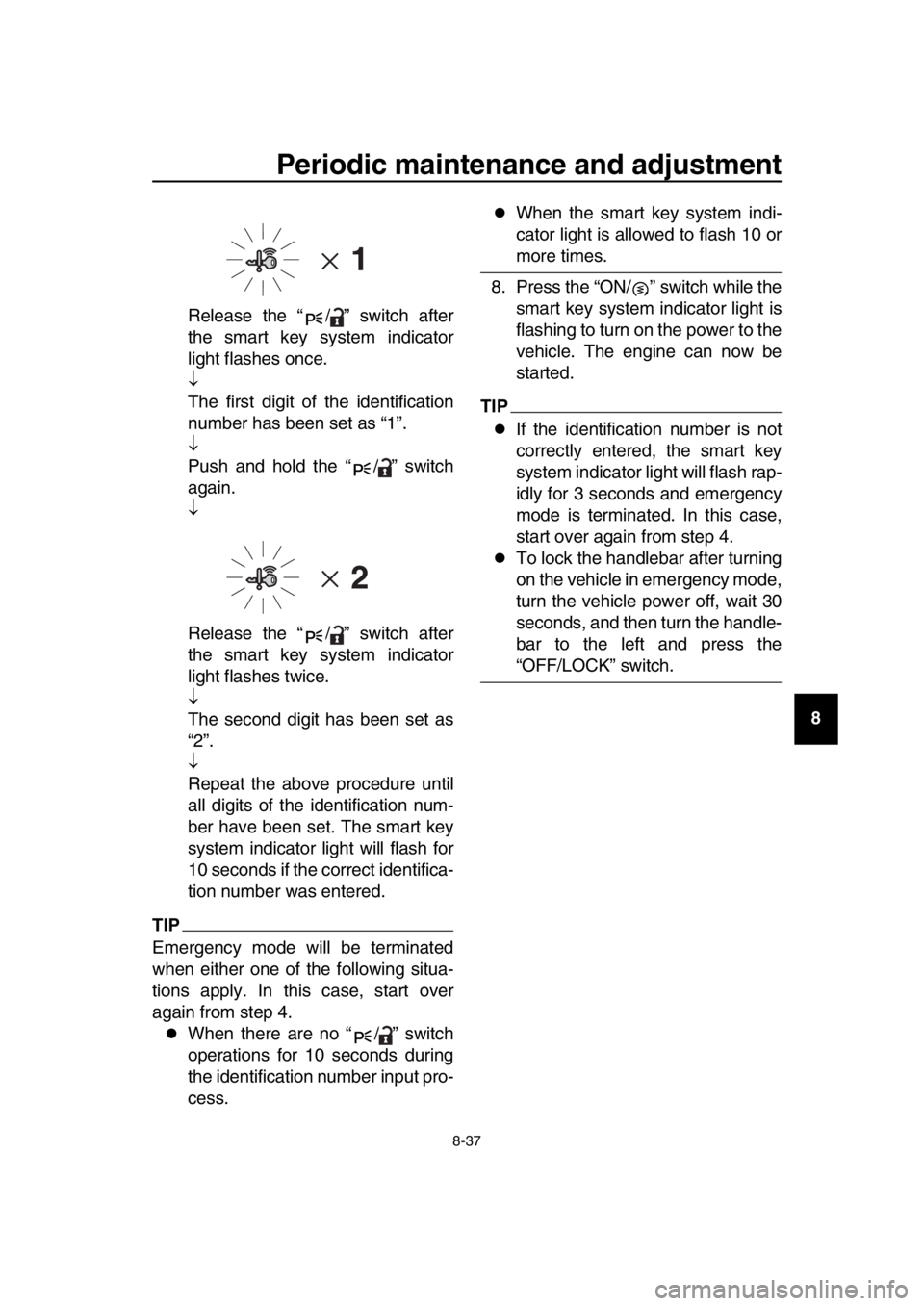
Release the “ / ” switch after
the smart key system indicator
light flashes once.
The first digit of the identification
number has been set as “1”.
Push and hold the “ / ” switch
again.
Release the “ / ” switch after
the smart key system indicator
light flashes twice.
The second digit has been set as
“2”.
Repeat the above procedure until
all digits of the identification num-
ber have been set. The smart key
system indicator light will flash for
10 seconds if the correct identifica-
tion number was entered.
TIP
Emergency mode will be terminated
when either one of the following situa-
tions apply. In this case, start over
again from step 4.
When there are no “ / ” switch
operations for 10 seconds during
the identification number input pro-
cess.
When the smart key system indi-
cator light is allowed to flash 10 or
more times.
8. Press the “ON/ ” switch while the smart key system indicator light is
flashing to turn on the power to the
vehicle. The engine can now be
started.
TIP
If the identification number is not
correctly entered, the smart key
system indicator light will flash rap-
idly for 3 seconds and emergency
mode is terminated. In this case,
start over again from step 4.
To lock the handlebar after turning
on the vehicle in emergency mode,
turn the vehicle power off, wait 30
seconds, and then turn the handle-
bar to the left and press the
“OFF/LOCK” switch.
UBV1E1_1.book 37 ページ 2018年4月27日 金曜日 午後4時41分
Page 119 of 122

12-1
1
2
3
4
5
6
7
8
9
10
11
12
13
14
Index
A
Acceleration and deceleration .................7-3
Air filter element, engine........................8-14
Anti-lock brake system (ABS)................5-19
Anti-lock brake system warning light .......5-3
Auxiliary DC jack ...................................5-28
B
Battery ...................................................8-27
Brake fluid, changing .............................8-22
Brake fluid level, checking .....................8-21
Brake lever, front ...................................5-17
Brake lever, rear ....................................5-18
Brake levers, lubricating ........................8-24
Braking ....................................................7-4
C
Cables, checking and lubricating...........8-23
Canister .................................................8-10
Care.........................................................9-1
Catalytic converter.................................5-23
Centerstand and sidestand, checking and lubricating.....................................8-25
Coolant ..................................................8-13
Cruise control indicator lights ..................5-2
Cruise control switches ...........................5-2
Cruise control system (XP530D-A) .........4-1
D
Data recording, vehicle..........................11-2
Diagnostic connector .............................11-2
Dimmer/Pass switch ................................5-1
D-mode (drive mode) (XP530-A,
XP530D-A) ............................................4-3
Drive belt slack ......................................8-23
Drive mode switch ...................................5-2
E
Emergency mode ..................................8-36
Engine break-in .......................................7-5
Engine idling speed, checking ...............8-15
Engine oil and oil filter cartridge ............8-10
Engine serial number ............................11-1
Engine stop switch ..................................5-1
Engine trouble warning light ....................5-2
F
Front and rear brake lever free play, checking ..............................................8-19
Front and rear brake pads, checking.....8-21
Front fork, checking ...............................8-25
Fuel .......................................................5-21
Fuel consumption, tips for reducing ........7-5
Fuel tank cap .........................................5-20
Fuel tank overflow hose ........................5-22 Fuses, replacing.................................... 8-28
H
Handlebar switches................................. 5-1
Hazard switch ......................................... 5-1
High beam indicator light ........................ 5-2
Horn switch ............................................. 5-1
How to lock the centerstand.................. 3-10
How to lock the steering........................ 3-10
I
Identification numbers ........................... 11-1
Ignition circuit cut-off system................. 5-30
Indicator lights and warning lights ........... 5-2
K
Key, handling of smart and mechanical
key ........................................................ 3-3
L
License plate light bulb, replacing ......... 8-32
M
Maintenance and lubrication, periodic .... 8-4
Maintenance, emission control system ... 8-3
Matte color, caution................................. 9-1
Menu switch ............................................ 5-2
Model label............................................ 11-1
Multi-function display .............................. 5-5
O
ON/Start switch ....................................... 5-1
Operating range of the smart key system .................................................. 3-2
P
Panels, removing and installing .............. 8-7
Parking .................................................... 7-6
Parking mode ........................................ 3-13
Part locations .......................................... 2-1
Powering off the vehicle .......................... 3-9
Powering on the vehicle .......................... 3-8
R
Rear brake lock cable, adjusting ........... 8-20
Rear brake lock, checking..................... 8-20
Rear brake lock lever ............................ 5-18
Rear view mirrors .................................. 5-26
S
Safe-riding points .................................... 1-5
Safety information ................................... 1-1
Select switch ........................................... 5-2
Shock absorber assembly..................... 5-27
Sidestand .............................................. 5-29
Smart key ................................................ 3-5
Smart key battery, replacing ................... 3-6
Smart key system ................................... 3-1
Smart key system indicator light ............. 5-3
UBV1E1_1.book 1 ページ 2018年4月27日 金曜日 午後4時41分