warning YAMAHA TRICITY 300 2021 User Guide
[x] Cancel search | Manufacturer: YAMAHA, Model Year: 2021, Model line: TRICITY 300, Model: YAMAHA TRICITY 300 2021Pages: 112, PDF Size: 15.18 MB
Page 29 of 112
Standin g assist
4-2
4
2. Press the standing assist switch
once.
3. The standing assist indicator light comes on and the beeper sounds
once. The assist is now engaged.
En gag in g con ditions of the stan din g
assist
The standing assist can be engaged
when the following conditions are met: Vehicle speed is 10 km/h (6 mi/h)
or less with vehicle power on
Engine speed is 2000 r/min or less
Throttle grip is in fully closed posi-
tion with engine running
Standing assist warning light is off
Standing assist switch is on
NOTICE
ECA26993
If the vehicle battery volta ge is low,
the stan din g assist may hol d at its
current position even if the switch is
operated . To prevent this from oc-
currin g, avoi d improper use such as
the followin g:
Pushin g the en gine start switch
an d the stan din g assist switch
at the same time.
Operatin g the stan din g assist
repeated ly when the en gine is
not runnin g.
Disengaging the standing assist1. Stop the vehicle and hold it up-
right.
2. Press the standing assist switch twice.
3. The standing assist indicator light flashes, and the beeper sounds
twice. The assist is now disen-
gaged.
Automatic disen gag in g con ditions
of the stan din g assist
The standing assist disengages auto-
matically when one of the following
conditions is detected. Vehicle speed is over 10 km/h (6
mi/h) with vehicle power on
Engine speed is over 2300 r/min
Throttle grip is turned with engine
running
WARNING
EWA21013
Do not race the en gine when
stoppe d an d the stan din g assist
is en gag ed . Otherwise the stan
din g assist will disen gag e
an d may cause a loss of bal-
ance.
Do not coast with the vehicle
power off. Otherwise, if you turn
the vehicle power on while the
vehicle is coastin g, the stan din g
assist may disen gag e, which
coul d cause a loss of balance.
UBEDE0E0.book Page 2 Thursday, October 1, 2020 1:04 PM
Page 30 of 112
Instrument and control functions
5-1
5
EAU4939P
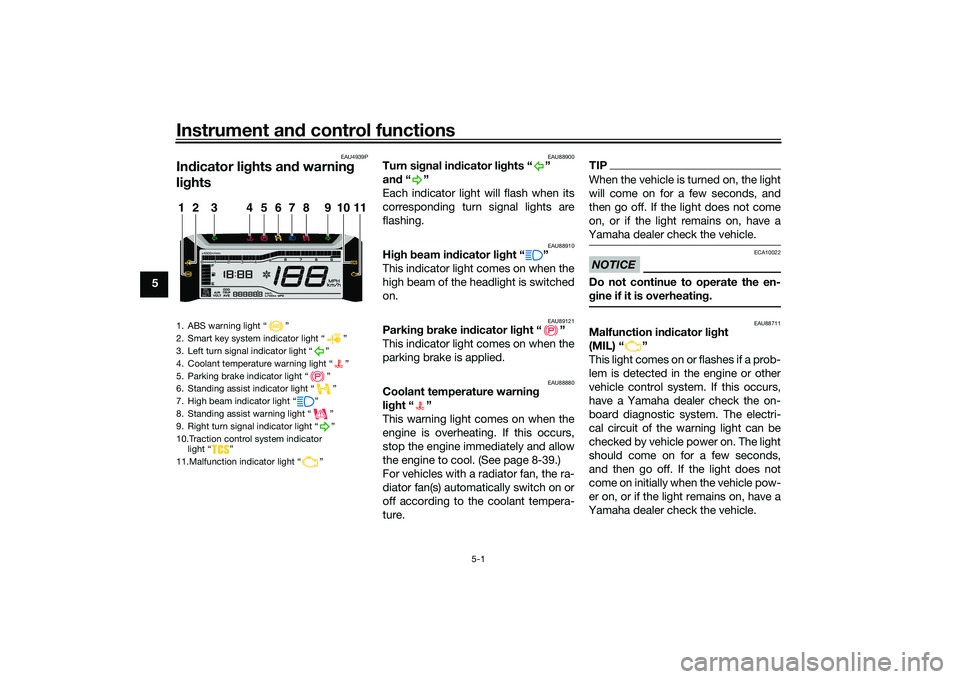
In dicator li ghts an d warnin g
li g hts
EAU88900
Turn si gnal in dicator li ghts “ ”
an d“”
Each indicator light will flash when its
corresponding turn signal lights are
flashing.
EAU88910
Hi gh beam in dicator li ght “ ”
This indicator light comes on when the
high beam of the headlight is switched
on.
EAU89121
Parkin g b rake in dicator li ght “ ”
This indicator light comes on when the
parking brake is applied.
EAU88880
Coolant temperature warnin g
li g ht “ ”
This warning light comes on when the
engine is overheating. If this occurs,
stop the engine immediately and allow
the engine to cool. (See page 8-39.)
For vehicles with a radiator fan, the ra-
diator fan(s) automatically switch on or
off according to the coolant tempera-
ture.
TIPWhen the vehicle is turned on, the light
will come on for a few seconds, and
then go off. If the light does not come
on, or if the light remains on, have a
Yamaha dealer check the vehicle.NOTICE
ECA10022
Do not continue to operate the en-
g ine if it is overheatin g.
EAU88711
Malfunction in dicator li ght
(MIL) “ ”
This light comes on or flashes if a prob-
lem is detected in the engine or other
vehicle control system. If this occurs,
have a Yamaha dealer check the on-
board diagnostic system. The electri-
cal circuit of the warning light can be
checked by vehicle power on. The light
should come on for a few seconds,
and then go off. If the light does not
come on initially when the vehicle pow-
er on, or if the light remains on, have a
Yamaha dealer check the vehicle.
1. ABS warning light “ ”
2. Smart key system indicator light “ ”
3. Left turn signal indicator light “ ”
4. Coolant temperature warning light “ ”
5. Parking brake indicator light “ ”
6. Standing assist indicator light “ ”
7. High beam indicator light “ ”
8. Standing assist warning light “ ”
9. Right turn signal indicator light “ ”
10.Traction control system indicator light “ ”
11.Malfunction indicator light “ ”1
11
2
3
4
5
6
7
8
9
10
UBEDE0E0.book Page 1 Thursday, October 1, 2020 1:04 PM
Page 31 of 112
Instrument and control functions
5-2
5
NOTICE
ECA26820
If the MIL starts flashin g, re duce en-
g ine spee d to prevent exhaust sys-
tem damag e.TIPThe engine is sensitively controlled for
the on-board diagnostic system to de-
tect deterioration and malfunction of
the emission control system. Due to
this specification, the MIL may come
on or flash for vehicle modifications,
lack of maintenance, or excessive or
improper use of the vehicle. To prevent
this, observe these precautions.
Do not attempt to modify the soft-
ware of the engine control unit.
Do not add any electrical acces-
sories that interfere with engine
control.
Do not use aftermarket accesso-
ries or parts such as suspension,
spark plugs, injectors, exhaust
system, etc.
Do not change drivetrain specifi-
cations (chain, sprockets, wheels,
tires, etc.).
Do not remove or alter the O2 sen-
sor, air induction system, or ex-
haust parts (catalysts or EXUP,
etc.).
Maintain proper V-belt and drive
belt (if equipped).
Maintain correct tire pressure.
Do not operate the vehicle in an
extreme manner. For example, re-
peated or excessive opening and
closing of the throttle, racing,
burnouts, wheelies, etc.
EAU88890
ABS warnin g lig ht “ ”
This warning light comes on when the
vehicle is first turned on, and goes off
after starting riding. If the warning light
comes on while riding, the anti-lock
brake system may not work correctly.
WARNING
EWA16043
If the ABS warnin g li ght does not
turn off after reachin g 10 km/h (6
mi/h), or if the warnin g li ght comes
on while ri din g:
Use extra caution to avoi d pos-
si ble wheel lock durin g emer-
g ency brakin g.
Have a Yamaha dealer check
the vehicle as soon as possi ble.
TIPThe ABS warning light may come on
while revving the engine with the vehi-
cle on its centerstand, but this does
not indicate a malfunction.
EAU88930
Traction control system in dicator
li g ht “ ”
This indicator light will flash when trac-
tion control has engaged.
If the traction control system is turned
off, this indicator light will come on.
(See page 5-14.)TIPWhen the vehicle is turned on, the light
should come on for a few seconds and
then go off. If the light does not come
on, or if the light remains on, have a
Yamaha dealer check vehicle.
EAU89252
Stan din g assist in dicator li ght “ ”
This indicator light flashes when the
standing assist can be used.
UBEDE0E0.book Page 2 Thursday, October 1, 2020 1:04 PM
Page 32 of 112
Instrument and control functions
5-3
5 The indicator light comes on when the
standing assist is engaged.
TIPWhen the vehicle is turned on, the light
will come on for a few seconds, and
then go off. If the light does not come
on, have a Yamaha dealer check the
vehicle.
EAU89262
Stan
din g assist warnin g lig ht “ ”
This warning light comes on if a prob-
lem is detected in the standing assist.
If this occurs, have a Yamaha dealer
check the system.TIP Depending on the problem, the
engine speed may be limited and
the vehicle cannot be driven nor-
mally.
When the vehicle is turned on, the
light will come on for a few sec-
onds, and then go off. If the light
does not come on, or if the light
remains on, have a Yamaha dealer
check the vehicle.
EAU78083
Smart key system in dicator
li g ht “ ”
This indicator light will flash when com-
munication between the vehicle and
smart key takes place and when cer-
tain smart key system operations are
carried out.
The indicator light may also flash when
there is an error in the smart key sys-
tem.TIPWhen the vehicle is turned on, the light
should come on for a few seconds and
then go off. If the light does not come
on, or if the light remains on, have a
Yamaha dealer check the vehicle.
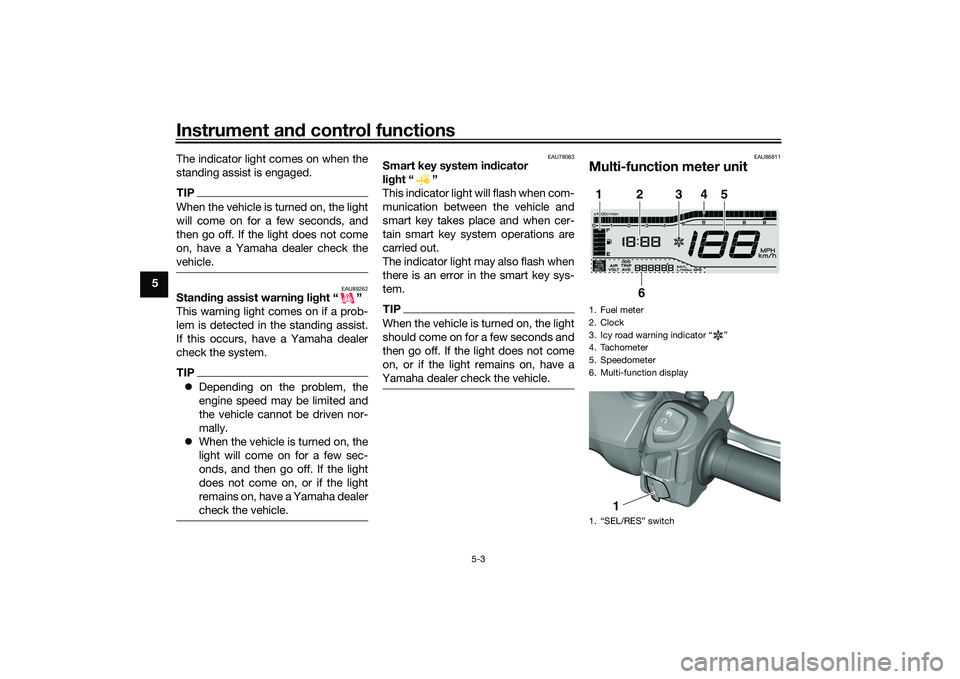
EAU86811
Multi-function meter unit1. Fuel meter
2. Clock
3. Icy road warning indicator “ ”
4. Tachometer
5. Speedometer
6. Multi-function display
1. “SEL/RES” switch1
2
3
4
5
6
1
UBEDE0E0.book Page 3 Thursday, October 1, 2020 1:04 PM
Page 33 of 112
Instrument and control functions
5-4
5
WARNING
EWA12423
Be sure to stop the vehicle before
makin g any settin g chan ges to the
multi-function meter unit. Chang ing
settin gs while ri din g can distract the
operator an d increase the risk of an
acci dent.
EAU89230
Switchin g the display units
The display units can be switched be-
tween kilometers and miles.
To switch the display units1. Turn the vehicle off.
2. While pushing the “SEL” switch, turn the vehicle on.
3. Continue to push the “SEL” switch for at least 5 seconds.
EAU86831
Spee dometer
The speedometer shows the vehicle’s
traveling speed.
EAU87180
Tachometer
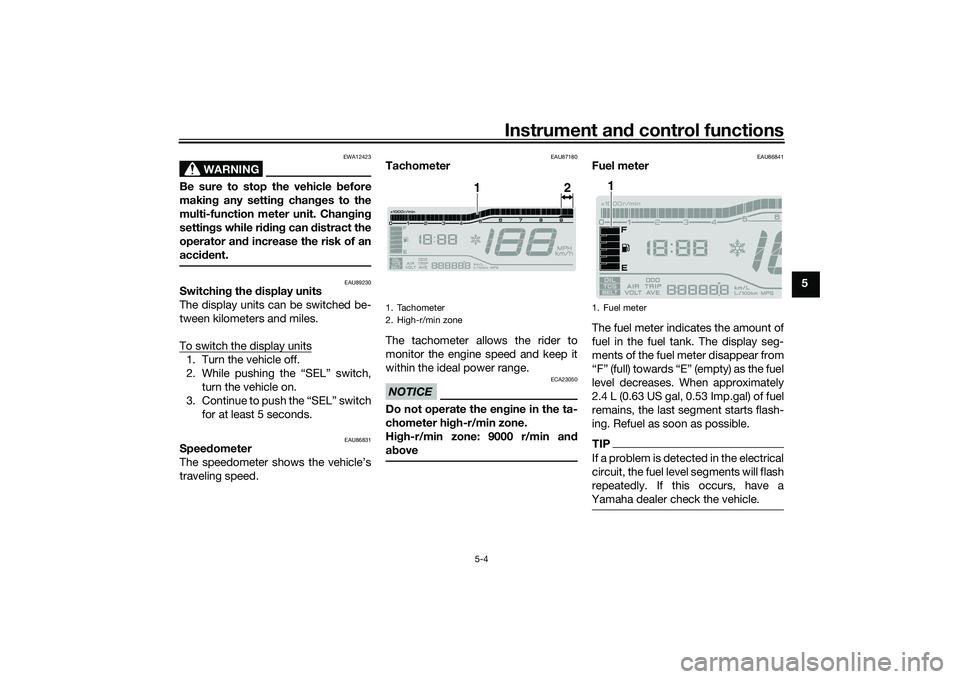
The tachometer allows the rider to
monitor the engine speed and keep it
within the ideal power range.NOTICE
ECA23050
Do not operate the en gine in the ta-
chometer hi gh-r/min zone.
Hi gh-r/min zone: 9000 r/min an d
a b ove
EAU86841
Fuel meter
The fuel meter indicates the amount of
fuel in the fuel tank. The display seg-
ments of the fuel meter disappear from
“F” (full) towards “E” (empty) as the fuel
level decreases. When approximately
2.4 L (0.63 US gal, 0.53 Imp.gal) of fuel
remains, the last segment starts flash-
ing. Refuel as soon as possible.TIPIf a problem is detected in the electrical
circuit, the fuel level segments will flash
repeatedly. If this occurs, have a
Yamaha dealer check the vehicle.
1. Tachometer
2. High-r/min zone
1
2
1. Fuel meter
1
UBEDE0E0.book Page 4 Thursday, October 1, 2020 1:04 PM
Page 37 of 112
Instrument and control functions
5-8
5
“AVE_ _._ MPG”: the average dis-
tance that can be traveled on
1.0 Imp.gal of fuel.
TIPTo reset the display, push the
“RES” switch until it resets.
After resetting, “_ _._” is shown
until the vehicle has traveled some
distance.
EAU89201
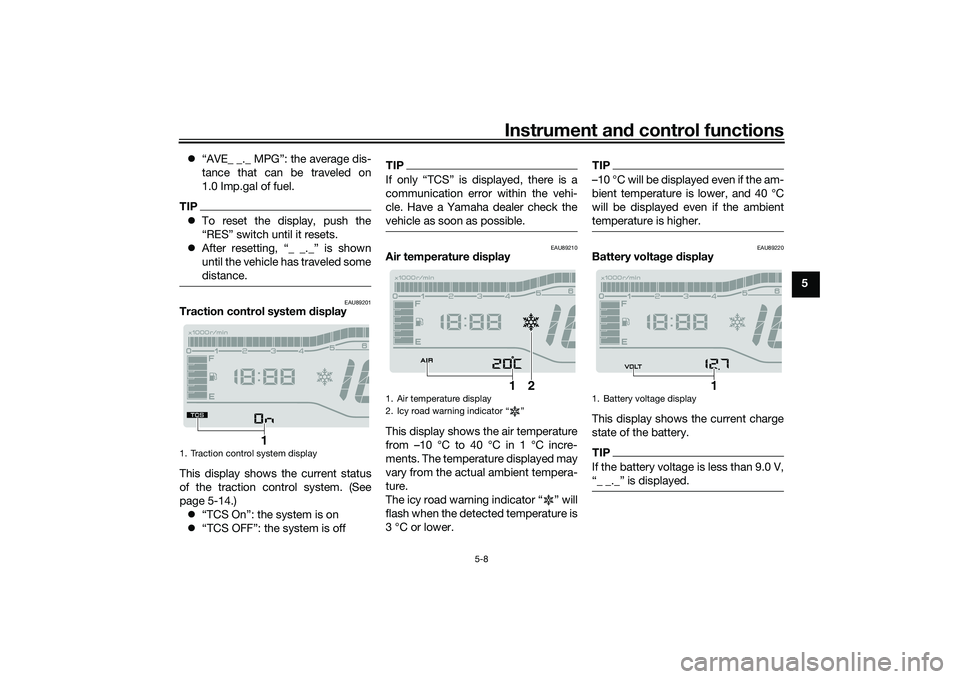
Traction control system display
This display shows the current status
of the traction control system. (See
page 5-14.) “TCS On”: the system is on
“TCS OFF”: the system is off
TIP
communication error within the vehi-
cle. Have a Yamaha dealer check the
vehicle as soon as possible.
EAU89210
Air temperature display
This display shows the air temperature
from –10 °C to 40 °C in 1 °C incre-
ments. The temperature displayed may
vary from the actual ambient tempera-
ture.
The icy road warning indicator “ ” will
flash when the detected temperature is
3 °C or lower.
TIP…10 °C will be displayed even if the am-
bient temperature is lower, and 40 °C
will be displayed even if the ambient
temperature is higher.
EAU89220
Battery volta ge display
This display shows the current charge
state of the battery.TIPIf the battery voltage is less than 9.0 V,
1. Traction control system display
1
1. Air temperature display
2. Icy road warning indicator Ž
1
2
1. Battery voltage display
1
UBEDE0E0.book Page 8 Thursday, October 1, 2020 1:04 PM
Page 41 of 112
Instrument and control functions
5-12
5
and brake pedal when the rear
brake lever is being pulled, but this
does not indicate a malfunction.
The unified brake system does not
operate when the front brake lever
is being pulled directly.
EAU89340
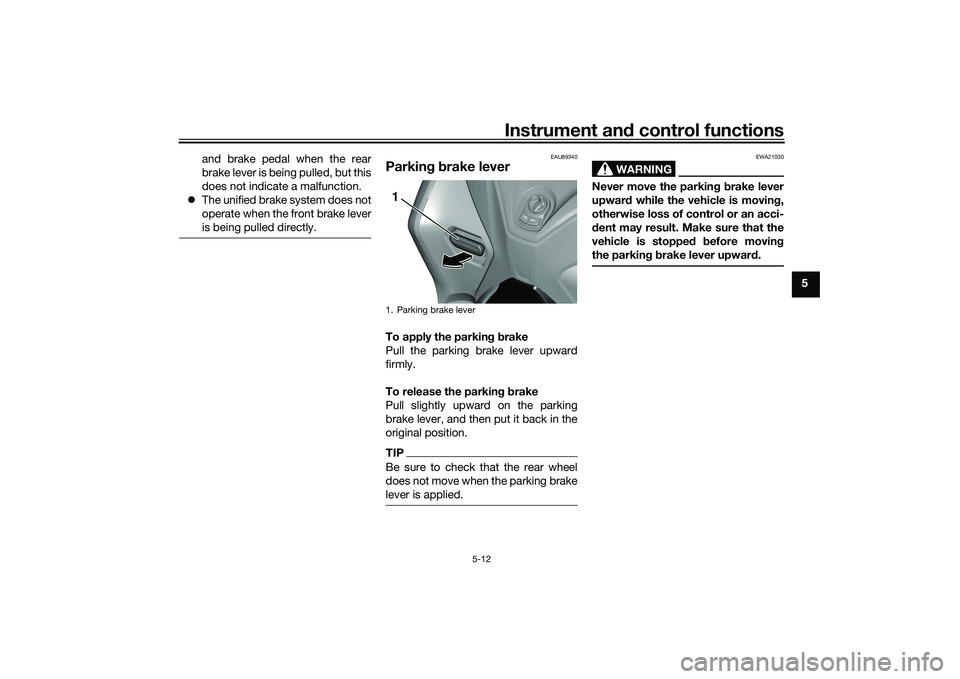
Parkin g b rake leverTo apply the parkin g b rake
Pull the parking brake lever upward
firmly.
To release the parkin g b rake
Pull slightly upward on the parking
brake lever, and then put it back in the
original position.TIPBe sure to check that the rear wheel
does not move when the parking brake
lever is applied.
WARNING
EWA21030
Never move the parkin g b rake lever
upwar d while the vehicle is movin g,
otherwise loss of control or an acci-
d ent may result. Make sure that the
vehicle is stopped before movin g
the parkin g b rake lever upwar d.
1. Parking brake lever1
UBEDE0E0.book Page 12 Thursday, October 1, 2020 1:04 PM
Page 42 of 112
Instrument and control functions
5-13
5
EAU84570
ABSThe anti-lock brake system (ABS) acts
on the front and rear brakes indepen-
dently.
WARNING
EWA16051
Always keep a sufficient d istance
from the vehicle ahead to match the
ri din g speed even with ABS.
The ABS performs best with
lon g b rakin g d istances.
On certain surfaces, such as
rou gh or g ravel roa ds, the b rak-
in g d istance may b e longer with
the ABS than without.How to operate the brakes
Operate the brake lever and brake
pedal the same as you would conven-
tional brakes. If wheel slip is detected
while braking, ABS will activate and a
pulsating sensation may be felt at the
brake lever or brake pedal. Continue to
apply the brakes and let the ABS work.
Do not pump the brakes as this will re-
duce braking effectiveness.
The ABS performs a self-check
when you first start off. During this
time a clicking noise from the hy-
draulic unit may be audible, and if
the brake lever or brake pedal is
applied a vibration can be felt, but
this is not a malfunction.
The brake system will revert to a
conventional brake system in case
of ABS malfunction.
NOTICE
ECA20100
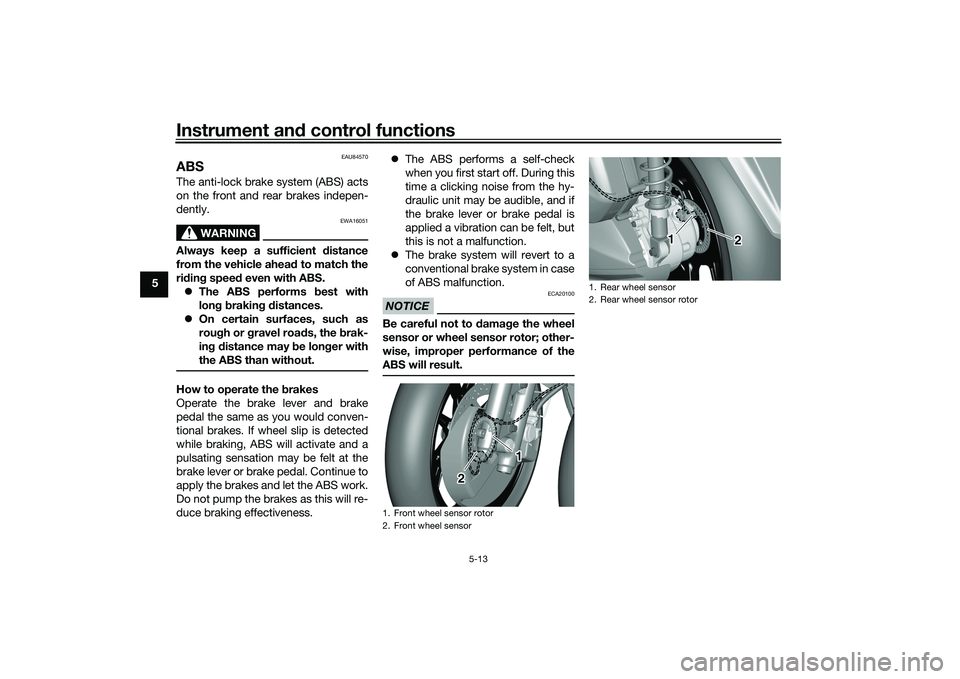
Be careful not to damag e the wheel
sensor or wheel sensor rotor; other-
wise, improper performance of the
ABS will result.1. Front wheel sensor rotor
2. Front wheel sensor
1
2
1. Rear wheel sensor
2. Rear wheel sensor rotor
1 2 2 2
UBEDE0E0.book Page 13 Thursday, October 1, 2020 1:04 PM
Page 43 of 112
Instrument and control functions
5-14
5
EAU91740
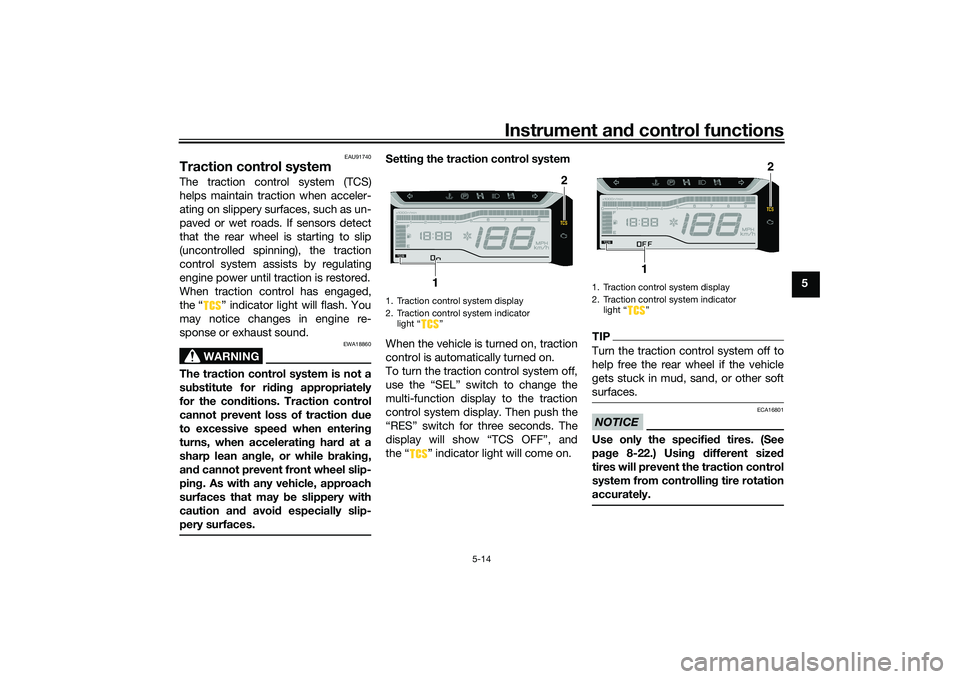
Traction control systemThe traction control system (TCS)
helps maintain traction when acceler-
ating on slippery surfaces, such as un-
paved or wet roads. If sensors detect
that the rear wheel is starting to slip
(uncontrolled spinning), the traction
control system assists by regulating
engine power until traction is restored.
When traction control has engaged,
the “ ” indicator light will flash. You
may notice changes in engine re-
sponse or exhaust sound.
WARNING
EWA18860
The traction control system is not a
su bstitute for ri din g appropriately
for the con ditions. Traction control
cannot prevent loss of traction d ue
to excessive spee d when enterin g
turns, when acceleratin g har d at a
sharp lean an gle, or while b raking,
an d cannot prevent front wheel slip-
pin g. As with any vehicle, approach
surfaces that may be slippery with
caution an d avoi d especially slip-
pery surfaces.
Settin g the traction control system
When the vehicle is turned on, traction
control is automatically turned on.
To turn the traction control system off,
use the “SEL” switch to change the
multi-function display to the traction
control system display. Then push the
“RES” switch for three seconds. The
display will show “TCS OFF”, and
the “ ” indicator light will come on.
TIPTurn the traction control system off to
help free the rear wheel if the vehicle
gets stuck in mud, sand, or other soft
surfaces.NOTICE
ECA16801
Use only the specifie d tires. (See
pa ge 8-22.) Usin g different size d
tires will prevent the traction control
system from controllin g tire rotation
accurately.
1. Traction control system display
2. Traction control system indicator light “ ”
2
1
1. Traction control system display
2. Traction control system indicator light Ž
2
1
UBEDE0E0.book Page 14 Thursday, October 1, 2020 1:04 PM
Page 45 of 112
Instrument and control functions
5-16
5
WARNING
EWA11092
Make sure that the fuel tank cap is
properly closed after filling fuel.
Leakin g fuel is a fire hazar d.
EAU13213
FuelMake sure there is sufficient gasoline in
the tank.
WARNING
EWA10882
Gasoline an d gasoline vapors are
extremely flammab le. To avoid fires
an d explosions an d to re duce the
risk of injury when refueling , follow
these instructions.1. Before refueling, turn off the en- gine and be sure that no one is sit-
ting on the vehicle. Never refuel
while smoking, or while in the vi-
cinity of sparks, open flames, or
other sources of ignition such as
the pilot lights of water heaters
and clothes dryers.
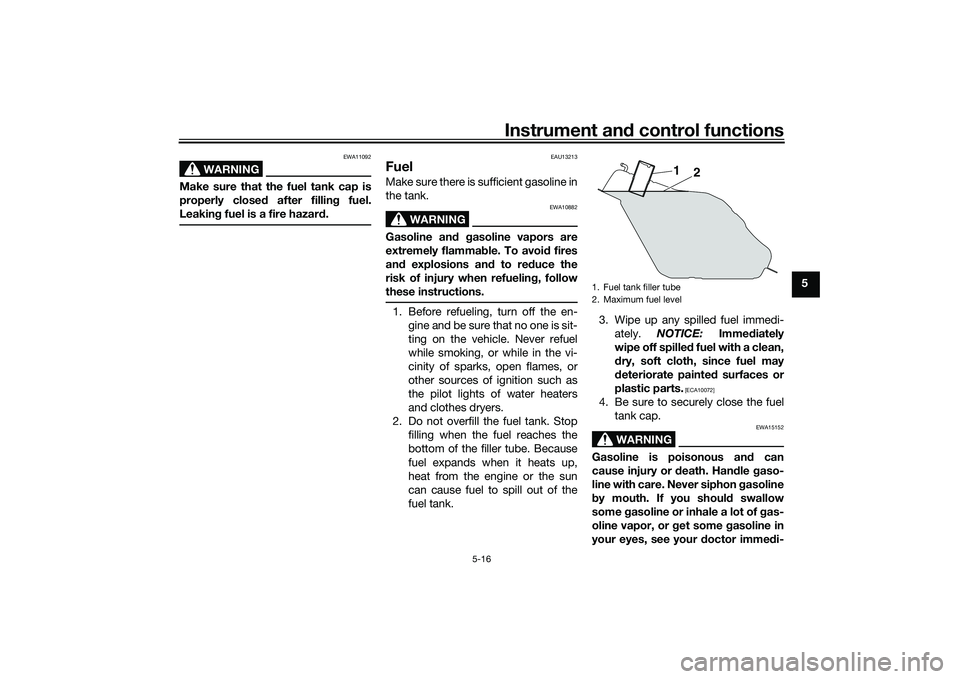
2. Do not overfill the fuel tank. Stop filling when the fuel reaches the
bottom of the filler tube. Because
fuel expands when it heats up,
heat from the engine or the sun
can cause fuel to spill out of the
fuel tank. 3. Wipe up any spilled fuel immedi-
ately. NOTICE: Immediately
wipe off spille d fuel with a clean,
d ry, soft cloth, since fuel may
d eteriorate painte d surfaces or
plastic parts.
[ECA10072]
4. Be sure to securely close the fuel tank cap.
WARNING
EWA15152
Gasoline is poisonous an d can
cause injury or death. Han dle gaso-
line with care. Never siphon gasoline
b y mouth. If you shoul d swallow
some gasoline or inhale a lot of g as-
oline vapor, or get some gasoline in
your eyes, see your doctor imme di-1. Fuel tank filler tube
2. Maximum fuel level
1
2
UBEDE0E0.book Page 16 Thursday, October 1, 2020 1:04 PM