clock YAMAHA TRICITY 300 2021 Owners Manual
[x] Cancel search | Manufacturer: YAMAHA, Model Year: 2021, Model line: TRICITY 300, Model: YAMAHA TRICITY 300 2021Pages: 112, PDF Size: 15.18 MB
Page 32 of 112
Instrument and control functions
5-3
5 The indicator light comes on when the
standing assist is engaged.
TIPWhen the vehicle is turned on, the light
will come on for a few seconds, and
then go off. If the light does not come
on, have a Yamaha dealer check the
vehicle.
EAU89262
Stan
din g assist warnin g lig ht “ ”
This warning light comes on if a prob-
lem is detected in the standing assist.
If this occurs, have a Yamaha dealer
check the system.TIP Depending on the problem, the
engine speed may be limited and
the vehicle cannot be driven nor-
mally.
When the vehicle is turned on, the
light will come on for a few sec-
onds, and then go off. If the light
does not come on, or if the light
remains on, have a Yamaha dealer
check the vehicle.
EAU78083
Smart key system in dicator
li g ht “ ”
This indicator light will flash when com-
munication between the vehicle and
smart key takes place and when cer-
tain smart key system operations are
carried out.
The indicator light may also flash when
there is an error in the smart key sys-
tem.TIPWhen the vehicle is turned on, the light
should come on for a few seconds and
then go off. If the light does not come
on, or if the light remains on, have a
Yamaha dealer check the vehicle.
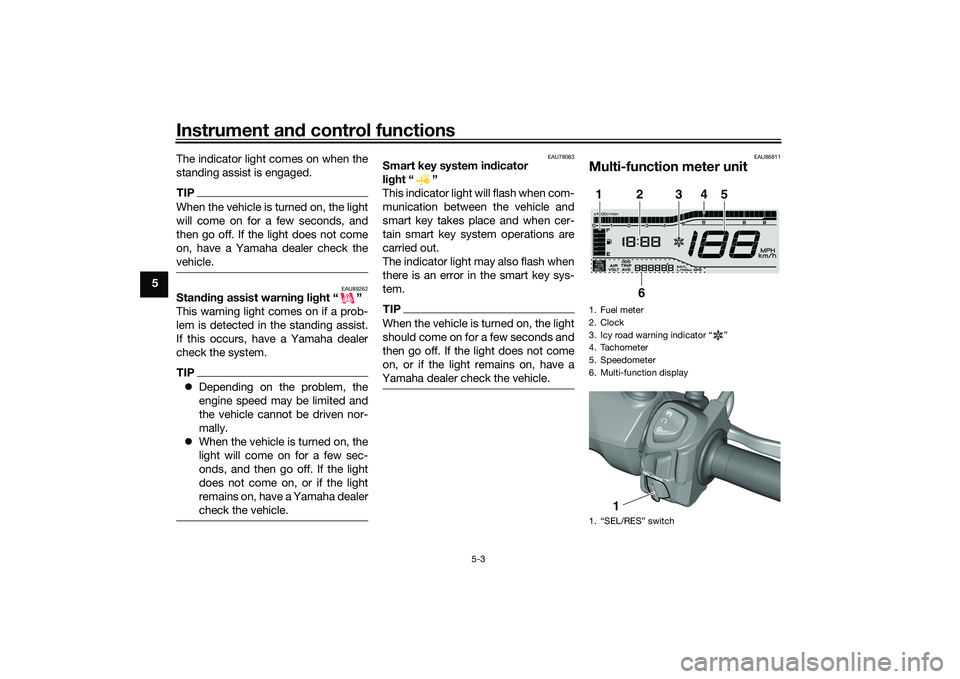
EAU86811
Multi-function meter unit1. Fuel meter
2. Clock
3. Icy road warning indicator “ ”
4. Tachometer
5. Speedometer
6. Multi-function display
1. “SEL/RES” switch1
2
3
4
5
6
1
UBEDE0E0.book Page 3 Thursday, October 1, 2020 1:04 PM
Page 34 of 112
Instrument and control functions
5-5
5
EAU89330
Clock
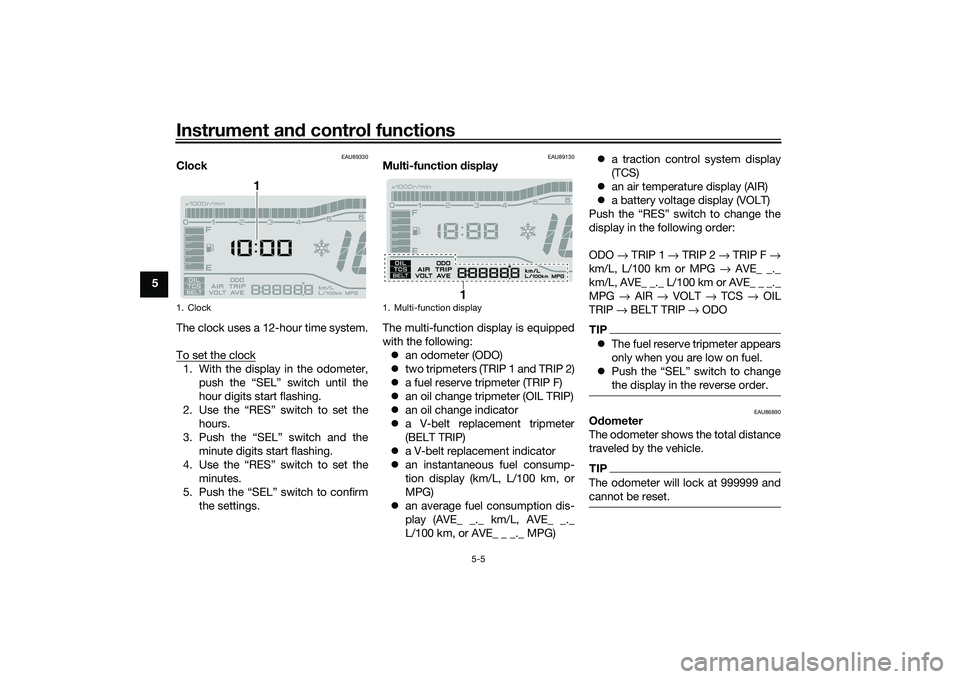
The clock uses a 12-hour time system.
To set the clock1. With the display in the odometer,
push the “SEL” switch until the
hour digits start flashing.
2. Use the “RES” switch to set the hours.
3. Push the “SEL” switch and the minute digits start flashing.
4. Use the “RES” switch to set the minutes.
5. Push the “SEL” switch to confirm the settings.
EAU89130
Multi-function display
The multi-function display is equipped
with the following: an odometer (ODO)
two tripmeters (TRIP 1 and TRIP 2)
a fuel reserve tripmeter (TRIP F)
an oil change tripmeter (OIL TRIP)
an oil change indicator
a V-belt replacement tripmeter
(BELT TRIP)
a V-belt replacement indicator
an instantaneous fuel consump-
tion display (km/L, L/100 km, or
MPG)
an average fuel consumption dis-
play (AVE_ _._ km/L, AVE_ _._
L/100 km, or AVE_ _ _._ MPG)
a traction control system display
(TCS)
an air temperature display (AIR)
a battery voltage display (VOLT)
Push the “RES” switch to change the
display in the following order:
ODO → TRIP 1 → TRIP 2 → TRIP F →
km/L, L/100 km or MPG → AVE_ _._
km/L, AVE_ _._ L/100 km or AVE_ _ _._
MPG → AIR → VOLT → TCS → OIL
TRIP → BELT TRIP → ODO
TIP The fuel reserve tripmeter appears
only when you are low on fuel.
Push the “SEL” switch to change
the display in the reverse order.
EAU86890
Odometer
The odometer shows the total distance
traveled by the vehicle.TIPThe odometer will lock at 999999 and
cannot be reset.
1. Clock
1
1. Multi-function display
1
UBEDE0E0.book Page 5 Thursday, October 1, 2020 1:04 PM
Page 44 of 112
Instrument and control functions
5-15
5 Resetting
the traction control sys-
tem
The traction control system will auto-
matically disable under certain condi-
tions; such as when a sensor fault is
detected, or when only one wheel is al-
lowed to rotate for more than a few
seconds. Should this happen,
the “ ” indicator light will come on.
TIPWhen the vehicle is on the centerstand,
do not rev the engine for an extended
period of time. Otherwise, the traction
control system will automatically dis-
able and need to be reset.If the traction control system automat-
ically disables, reset it by riding under
normal conditions.TIPIf the Ž indicator light remains on
after resetting, the vehicle may still be
ridden; however, have a Yamaha deal-
er check the vehicle as soon as possi-
ble.
EAU89040
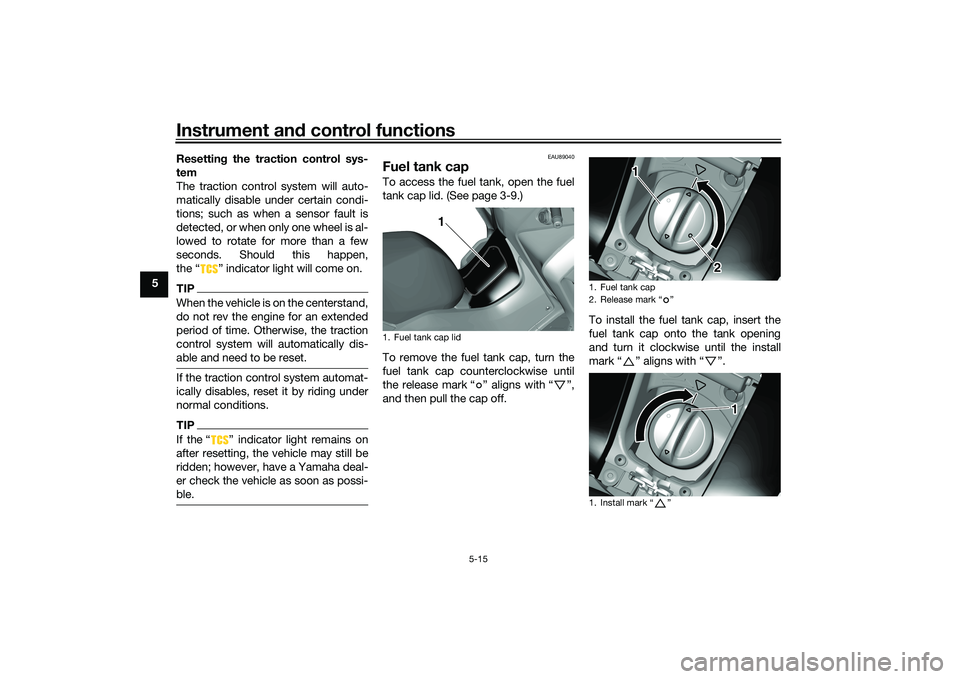
Fuel tank capTo access the fuel tank, open the fuel
tank cap lid. (See page 3-9.)
To remove the fuel tank cap, turn the
fuel tank cap counterclockwise until
the release mark “ ” aligns with “ ”,
and then pull the cap off. To install the fuel tank cap, insert the
fuel tank cap onto the tank opening
and turn it clockwise until the install
mark“” aligns with“”.1. Fuel tank cap lid
1
1. Fuel tank cap
2. Release mark Ž
1. Install mark Ž
1
2
1
UBEDE0E0.book Page 15 Thursday, October 1, 2020 1:04 PM
Page 48 of 112
Instrument and control functions
5-19
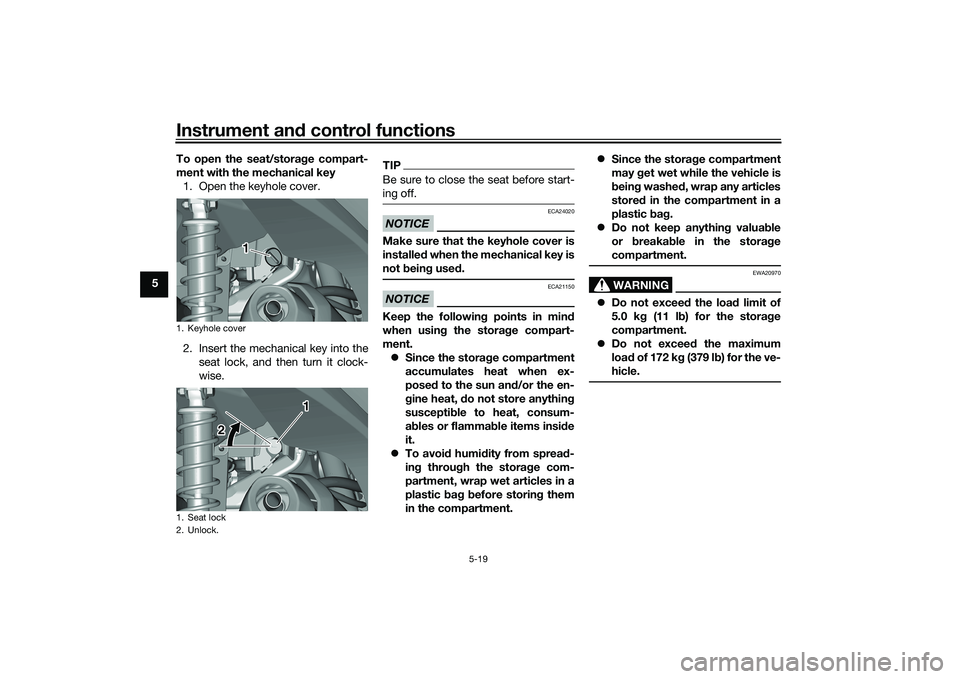
5 To open the seat/storag
e compart-
ment with the mechanical key 1. Open the keyhole cover.
2. Insert the mechanical key into the seat lock, and then turn it clock-
wise.
TIPBe sure to close the seat before start-
ing off.NOTICE
ECA24020
Make sure that the keyhole cover is
installe d when the mechanical key is
not bein g use d.NOTICE
ECA21150
Keep the following points in mind
when usin g the stora ge compart-
ment. Since the storag e compartment
accumulates heat when ex-
posed to the sun an d/or the en-
g ine heat, do not store anythin g
suscepti ble to heat, consum-
a b les or flamma ble items insi de
it.
To avoi d humi dity from sprea d-
in g throug h the stora ge com-
partment, wrap wet articles in a
plastic bag b efore storin g them
in the compartment.
Since the storag e compartment
may get wet while the vehicle is
b ein g washe d, wrap any articles
stored in the compartment in a
plastic bag .
Do not keep anythin g valua ble
or breakab le in the stora ge
compartment.
WARNING
EWA20970
Do not exceed the load limit of
5.0 k g (11 l b) for the stora ge
compartment.
Do not exceed the maximum
loa d of 172 k g (379 lb ) for the ve-
hicle.
1. Keyhole cover
1. Seat lock
2. Unlock.
1 1
1
2
UBEDE0E0.book Page 19 Thursday, October 1, 2020 1:04 PM
Page 93 of 112
Periodic maintenance an d a djustment
8-35
8
EAUN2261
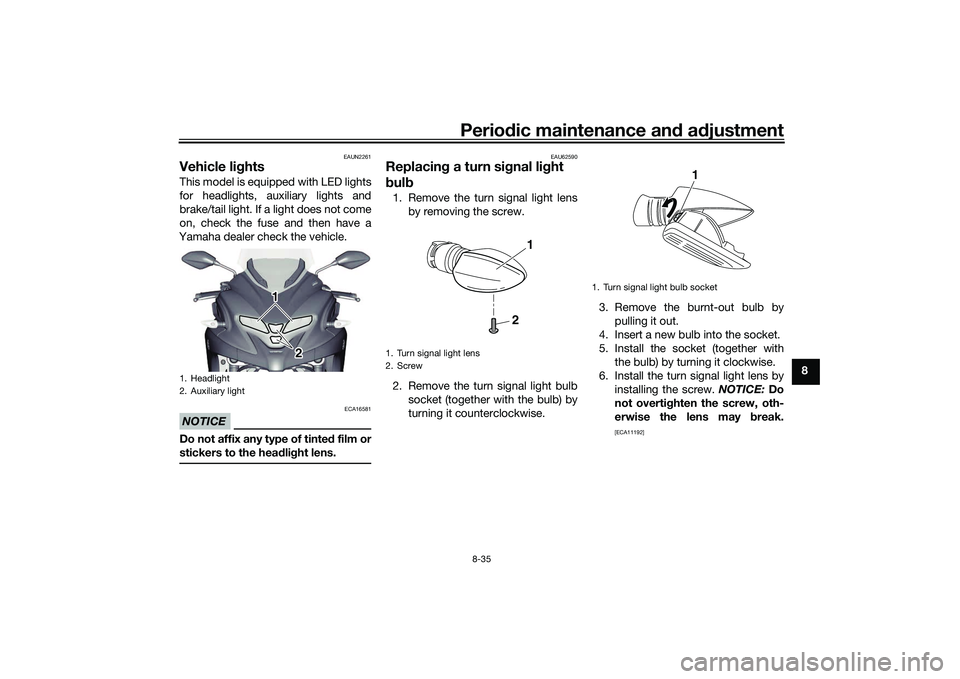
Vehicle li ghtsThis model is equipped with LED lights
for headlights, auxiliary lights and
brake/tail light. If a light does not come
on, check the fuse and then have a
Yamaha dealer check the vehicle.NOTICE
ECA16581
Do not affix any type of tinte d film or
stickers to the head lig ht lens.
EAU62590
Replacin g a turn sig nal light
b ul b1. Remove the turn signal light lens
by removing the screw.
2. Remove the turn signal light bulb socket (together with the bulb) by
turning it counterclockwise. 3. Remove the burnt-out bulb by
pulling it out.
4. Insert a new bulb into the socket.
5. Install the socket (together with the bulb) by turning it clockwise.
6. Install the turn signal light lens by installing the screw. NOTICE: Do
not overti ghten the screw, oth-
erwise the lens may break.
[ECA11192]
1. Headlight
2. Auxiliary light
1 1 1
2 2
1. Turn signal light lens
2. Screw
2
1
1. Turn signal light bulb socket
1
UBEDE0E0.book Page 35 Thursday, October 1, 2020 1:04 PM
Page 97 of 112
Periodic maintenance an d a djustment
8-39
8
EAU86420
En gine overheatin g
WARNING
EWAT1041
Do not remove the ra diator cap when the en gine an d ra diator are hot. Scal din g hot flui d an d steam may be
b lown out un der pressure, which coul d cause serious injury. Be sure to wait until the en gine has coole d.
Place a thick ra g, like a towel, over the ra diator cap, an d then slowly rotate the cap counterclockwise to the
d etent to allow any resi dual pressure to escape. When the hissin g soun d has stopped , press down on the cap
while turnin g it counterclockwise, an d then remove the cap.TIPIf coolant is not available, tap water can be temporarily used instead, provided that it is changed to the recommended cool-
ant as soon as possible.
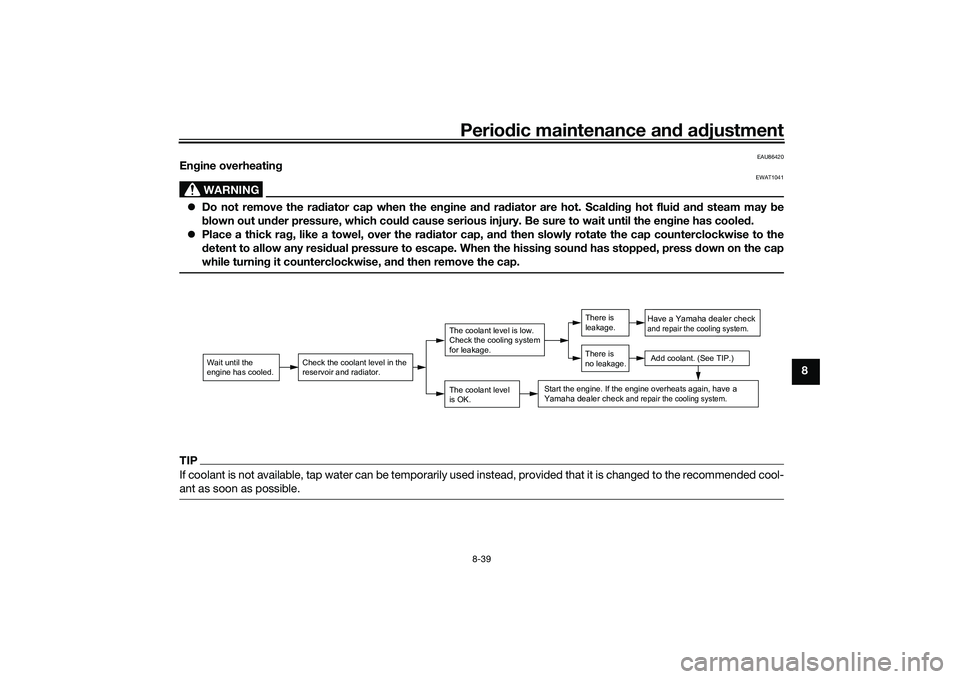
Wait until the
engine has cooled.
Check the coolant level in the
reservoir and radiator.
The coolant level
is OK.The coolant level is low.
Check the cooling system
for leakage.
Have a Yamaha dealer checkand repair the cooling system.Add coolant. (See TIP.)
Start the engine. If the engine overheats again,
have a
Yamaha dealer check
and repair the cooling system.
There is
leakage.
There is
no leakage.
UBEDE0E0.book Page 39 Thursday, October 1, 2020 1:04 PM
Page 109 of 112
12-1
12
Index
AABS....................................................... 5-13
ABS warning light ................................... 5-2
Acceleration and deceleration ................ 7-3
Air filter and V-belt case air filter
elements ............................................. 8-17
Air temperature display .......................... 5-8
Auxiliary DC jack .................................. 5-20BBattery .................................................. 8-32
Brake fluid, changing............................ 8-27
Brake fluid level, checking.................... 8-26
Brake lever, front .................................. 5-10
Brake lever, rear ................................... 5-11
Brake levers, lubricating ....................... 8-28
Brake pedal .......................................... 5-11
Brake pedal, checking and lubricating........................................... 8-29
Braking ................................................... 7-3CCables, checking and lubricating ......... 8-28
Canister ................................................ 8-11
Care ........................................................ 9-1
Catalytic converter ............................... 5-18
Centerstand and sidestand, checking and lubricating ................................... 8-29
Clock ...................................................... 5-5
Coolant ................................................. 8-15
Coolant temperature warning light ......... 5-1DData recording, vehicle......................... 11-2
Diagnostic connector ........................... 11-2
Dimmer/Pass switch............................... 5-9
Display units, switching .......................... 5-4
EEmergency mode ................................. 8-40
Engine break-in ...................................... 7-1
Engine oil and oil filter element ............ 8-12
Engine overheating .............................. 8-39
Engine serial number ........................... 11-1FFinal transmission oil............................ 8-14
Front and rear brake pads, checking ... 8-25
Front brake lever free play, checking ... 8-24
Front fork, checking ............................. 8-30
Fuel ...................................................... 5-16
Fuel consumption, tips for reducing ...... 7-4
Fuel meter .............................................. 5-4
Fuel tank cap........................................ 5-15
Fuel tank overflow hose ....................... 5-18
Fuses, replacing ................................... 8-33HHandlebar switches ............................... 5-9
Hazard switch ...................................... 5-10
High beam indicator light ....................... 5-1
Horn switch ............................................ 5-9IIdentification numbers ......................... 11-1
Ignition circuit cut-off system .............. 5-22
Indicator lights and warning lights ......... 5-1KKey, handling of smart and mechanical keys...................................................... 3-3LLicense plate light bulb, replacing ....... 8-36MMain switch ............................................ 3-7
Maintenance and lubrication, periodic... 8-4 Maintenance, emission control
system .................................................. 8-3
Malfunction indicator light (MIL) ............. 5-1
Matte color, caution................................ 9-1
Model label ........................................... 11-1
Multi-function display ............................. 5-5
Multi-function meter unit ........................ 5-3
OOperating range of the smart key system .................................................. 3-2PPanel, removing and installing ................ 8-9
Parking.................................................... 7-4
Parking brake, checking ....................... 8-25
Parking brake indicator light ................... 5-1
Parking brake lever ............................... 5-12
Part locations.......................................... 2-1RRear brake lever free play, checking .... 8-24SSafe-riding points ................................... 1-5
Safety information................................... 1-1
SEL/RES switch .................................... 5-10
Shock absorber assemblies, adjusting ............................................. 5-20
Sidestand.............................................. 5-21
Smart key................................................ 3-4
Smart key battery, replacing................... 3-6
Smart key system ................................... 3-1
Smart key system indicator light ............ 5-3
Smart key system, troubleshooting ...... 8-37
Spark plug, checking ............................ 8-10
Specifications ....................................... 10-1
Speedometer .......................................... 5-4
UBEDE0E0.book Page 1 Thursday, October 1, 2020 1:04 PM