warning light YAMAHA TRICITY 300 2021 Owners Manual
[x] Cancel search | Manufacturer: YAMAHA, Model Year: 2021, Model line: TRICITY 300, Model: YAMAHA TRICITY 300 2021Pages: 112, PDF Size: 15.18 MB
Page 6 of 112
Table of contentsSafety information ............................ 1-1
Further safe-riding points ............... 1-5
Description ....................................... 2-1
Left view ......................................... 2-1
Right view ....................................... 2-2
Controls and instruments ............... 2-3
Smart key system ........................... 3-1
Smart key system ........................... 3-1
Operating range of the smart key system......................................... 3-2
Handling of the smart key and mechanical keys ......................... 3-3
Smart key ....................................... 3-4
Replacing the smart key battery..... 3-6
Main switch .................................... 3-7
Stan din g assist ................................. 4-1
Standing assist ............................... 4-1
Instrument an d control functions ... 5-1
Indicator lights and warning
lights............................................ 5-1
Multi-function meter unit ................ 5-3
Handlebar switches ........................ 5-9
Front brake lever .......................... 5-10
Brake pedal .................................. 5-11
Rear brake lever ........................... 5-11
Parking brake lever ....................... 5-12
ABS .............................................. 5-13 Traction control system ................ 5-14
Fuel tank cap ................................ 5-15
Fuel ............................................... 5-16
Fuel tank overflow hose ................ 5-18
Catalytic converter ........................ 5-18
Storage compartment ................... 5-18
Adjusting the shock absorber
assemblies ................................. 5-20
Auxiliary DC jack ........................... 5-20
Sidestand ...................................... 5-21
Ignition circuit cut-off system ....... 5-22
For your safety – pre-operation
checks ............................................... 6-1
Operation an d important ri din g
points ................................................. 7-1
Engine break-in ............................... 7-1
Starting the engine .......................... 7-2
Starting off ...................................... 7-3
Acceleration and deceleration ........ 7-3
Braking ............................................ 7-3
Tips for reducing fuel consumption ................................ 7-4
Parking ............................................ 7-4
Perio dic maintenance an d
a d justment ........................................ 8-1
Tool kit ............................................ 8-2
Periodic maintenance charts .......... 8-3 Periodic maintenance chart for the
emission control system ............. 8-3
General maintenance and lubrication chart .......................... 8-4
Removing and installing the
panel............................................ 8-9
Checking the spark plug............... 8-10
Canister ........................................ 8-11
Engine oil and oil filter element..... 8-12
Why Yamalube.............................. 8-14
Final transmission oil .................... 8-14
Coolant ......................................... 8-15
Air filter and V-belt case air filter elements .................................... 8-17
Checking the throttle grip free play ............................................ 8-21
Valve clearance............................. 8-21
Tires .............................................. 8-22
Cast wheels .................................. 8-23
Checking the front brake lever
free play..................................... 8-24
Checking the rear brake lever free play..................................... 8-24
Checking the parking brake ......... 8-25
Checking the front and rear brake pads ................................ 8-25
Checking the brake fluid level ...... 8-26
Changing the brake fluid .............. 8-27
Checking the V-belt ...................... 8-27
Checking and lubricating the cables ........................................ 8-28UBEDE0E0.book Page 1 Thursday, October 1, 2020 1:04 PM
Page 20 of 112
Smart key system
3-4
3
Keep the smart key away from
stron g ma gnetic fiel ds an d
ma gnetic o bjects such as key
hol ders, TVs, an d computers.
Keep the smart key away from
electric me dical equipment.
Do not allow oils, polishin g
a g ents, fuel, or any stron g
chemicals to come in contact
with the smart key. The smart
key body may become discol-
ore d or cracked .
TIPThe smart key battery life is ap-
proximately two years, but this
may vary according to operating
conditions.
Replace the smart key battery
when the smart key system indi-
cator light flashes for 20 seconds
when the vehicle is turned on, or
when the smart key indicator light
does not come on when the smart
key button is pushed. (See page
3-6.) After changing the smart key
battery, if the smart key system still does not operate, check the
vehicle battery and then have a
Yamaha dealer check the vehicle.
If the smart key continually re-
ceives radio waves, the smart key
battery will discharge quickly. (For
example, when placed in the vicin-
ity of electrical products such as
televisions, radios, or computers.)
You can register up to six smart
keys for the same vehicle. See a
Yamaha dealer regarding spare
smart keys.
If a smart key is lost, contact a
Yamaha dealer immediately to
prevent the vehicle from being
stolen.
EAU89111
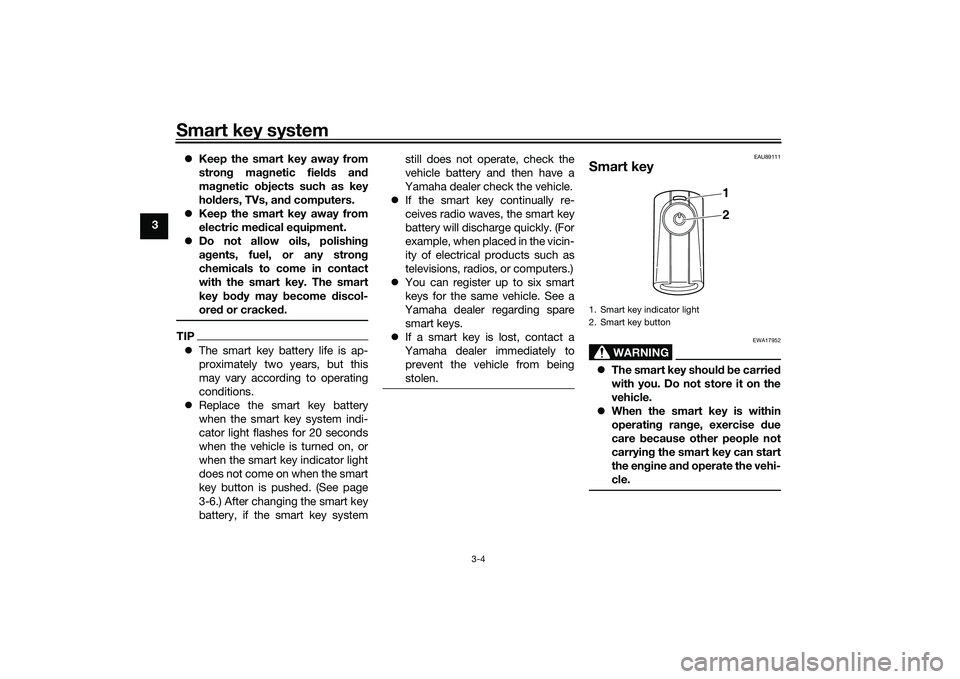
Smart key
WARNING
EWA17952
The smart key shoul d b e carrie d
with you. Do not store it on the
vehicle.
When the smart key is within
operatin g ran ge, exercise due
care because other people not
carryin g the smart key can start
the en gine an d operate the vehi-
cle.1. Smart key indicator light
2. Smart key button
1
2
UBEDE0E0.book Page 4 Thursday, October 1, 2020 1:04 PM
Page 22 of 112
Smart key system
3-6
3
EAU76483
Replacing the smart key bat-
teryReplace the battery in the following sit-
uations.
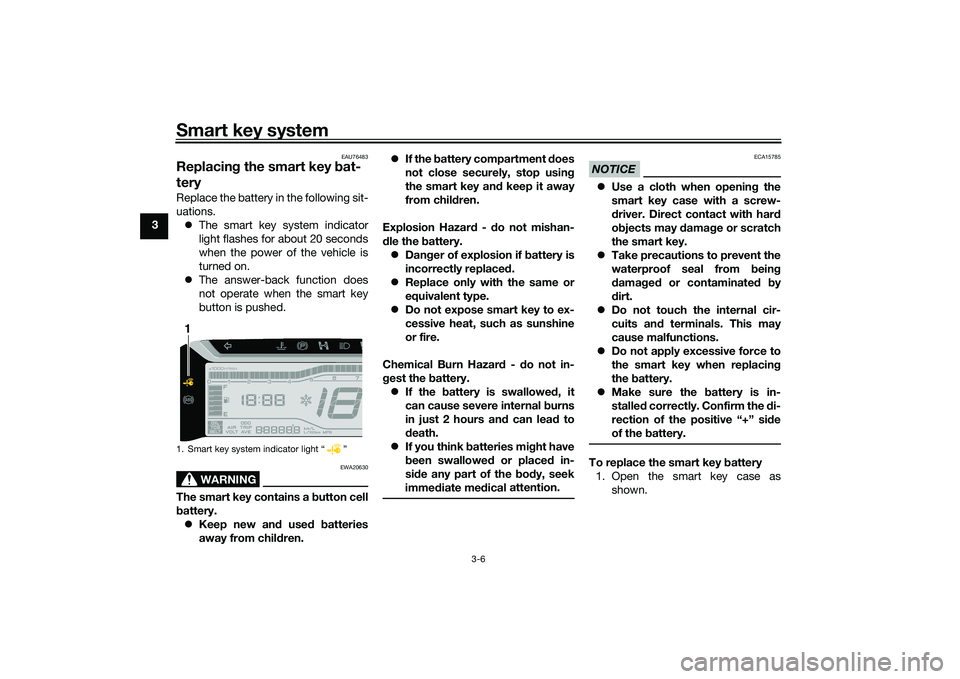
The smart key system indicator
light flashes for about 20 seconds
when the power of the vehicle is
turned on.
The answer-back function does
not operate when the smart key
button is pushed.
WARNING
EWA20630
The smart key contains a button cell
b attery.
Keep new an d use d b atteries
away from chil dren.
If the b attery compartment d oes
not close securely, stop usin g
the smart key an d keep it away
from chil dren.
Explosion Hazar d - d o not mishan-
d le the battery.
Dan ger of explosion if battery is
incorrectly replace d.
Replace only with the same or
equivalent type.
Do not expose smart key to ex-
cessive heat, such as sunshine
or fire.
Chemical Burn Hazar d - do not in-
g est the battery.
If the battery is swallowed , it
can cause severe internal burns
in just 2 hours an d can lea d to
d eath.
If you think batteries mi ght have
b een swallowed or placed in-
si de any part of the body, seek
imme diate me dical attention.
NOTICE
ECA15785
Use a cloth when openin g the
smart key case with a screw-
d river. Direct contact with har d
o bjects may d amage or scratch
the smart key.
Take precautions to prevent the
waterproof seal from bein g
d amag ed or contaminate d by
d irt.
Do not touch the internal cir-
cuits an d terminals. This may
cause malfunctions.
Do not apply excessive force to
the smart key when replacin g
the battery.
Make sure the battery is in-
stalle d correctly. Confirm the di-
rection of the positive “+” si de
of the battery.To replace the smart key battery
1. Open the smart key case as shown.
1. Smart key system indicator light “ ”1
UBEDE0E0.book Page 6 Thursday, October 1, 2020 1:04 PM
Page 24 of 112
Smart key system
3-8
3and confirmation with the smart key
has taken place, the main switch can
be turned while the smart key system
indicator light is on (approximately 4
seconds).
WARNING
EWA18720
Never turn the main switch to
“OFF”, “ ”, or “OPEN” while the ve-
hicle is movin
g. Otherwise the elec-
trical systems will b e switched off,
which may result in loss of control or
an acci dent.TIPDo not push the main switch knob re-
peatedly or turn the main switch back
and forth beyond normal use. Other-
wise, to protect the main switch from
damage, the smart key system will
temporarily disable and the smart key
system indicator light will flash. If this
occurs, wait until the indicator light
stops flashing before operating the
main switch again.The main switch positions are de-
scribed below.
EAU76502
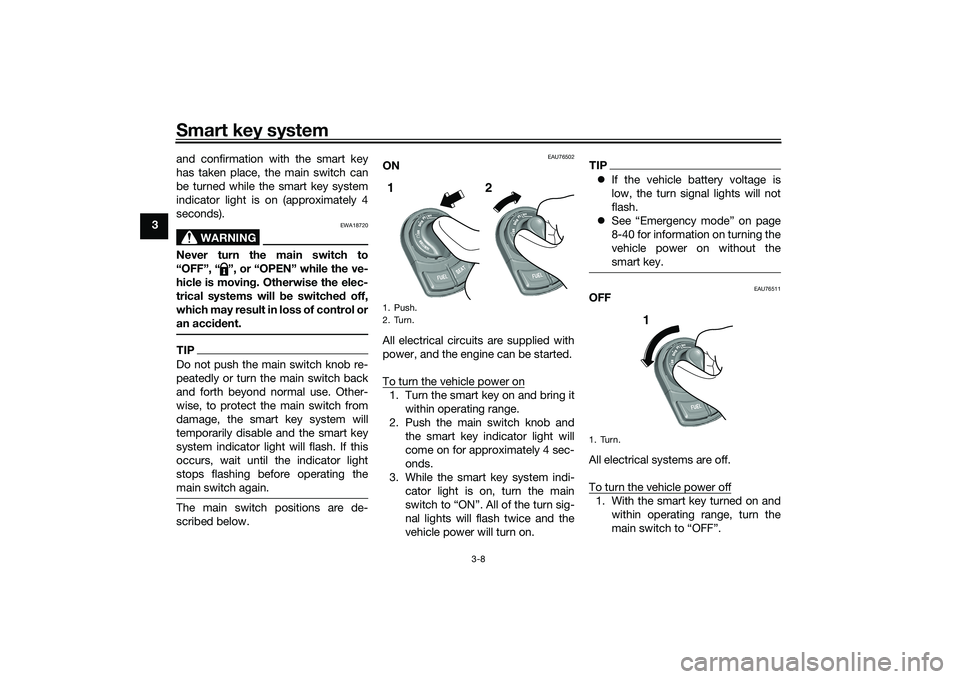
ON
All electrical circuits are supplied with
power, and the engine can be started.
To turn the vehicle power on1. Turn the smart key on and bring it
within operating range.
2. Push the main switch knob and the smart key indicator light will
come on for approximately 4 sec-
onds.
3. While the smart key system indi- cator light is on, turn the main
switch to “ON”. All of the turn sig-
nal lights will flash twice and the
vehicle power will turn on.
TIPIf the vehicle battery voltage is
low, the turn signal lights will not
flash.
See “Emergency mode” on page
8-40 for information on turning the
vehicle power on without the
smart key.
EAU76511
OFF
All electrical systems are off.
To turn the vehicle power off1. With the smart key turned on and
within operating range, turn the
main switch to “OFF”.
1. Push.
2. Turn.1 2
1. Turn.
1
UBEDE0E0.book Page 8 Thursday, October 1, 2020 1:04 PM
Page 28 of 112
Standin g assist
4-1
4
EAU89245
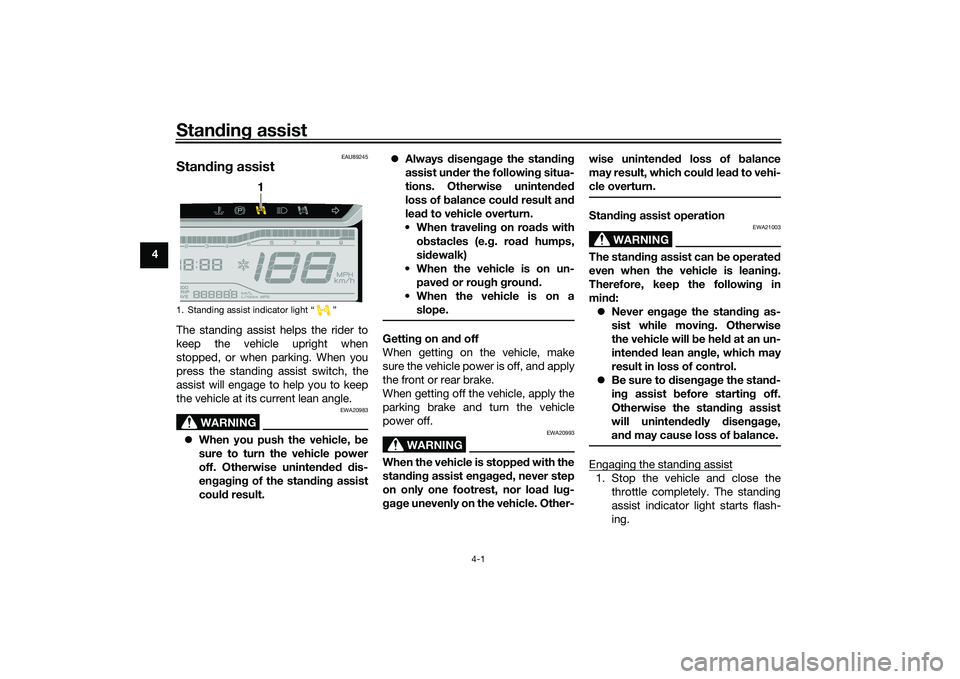
Stan din g assistThe standing assist helps the rider to
keep the vehicle upright when
stopped, or when parking. When you
press the standing assist switch, the
assist will engage to help you to keep
the vehicle at its current lean angle.
WARNING
EWA20983
When you push the vehicle, b e
sure to turn the vehicle power
off. Otherwise uninten ded d is-
en gag in g of the stan din g assist
coul d result.
Always disen gag e the stan din g
assist un der the followin g situa-
tions. Otherwise uninten ded
loss of b alance coul d result an d
lea d to vehicle overturn.
When travelin g on roa ds with
o bstacles (e. g. roa d humps,
si dewalk)
When the vehicle is on un- pave d or rou gh groun d.
When the vehicle is on a slope.
Gettin g on an d off
When getting on the vehicle, make
sure the vehicle power is off, and apply
the front or rear brake.
When getting off the vehicle, apply the
parking brake and turn the vehicle
power off.
WARNING
EWA20993
When the vehicle is stoppe d with the
stan din g assist en gag ed , never step
on only one footrest, nor load lug-
g ag e unevenly on the vehicle. Other- wise uninten
ded loss of b alance
may result, which coul d lea d to vehi-
cle overturn.
Stan din g assist operation
WARNING
EWA21003
The stan din g assist can b e operated
even when the vehicle is leanin g.
Therefore, keep the followin g in
mind :
Never en gag e the stan din g as-
sist while movin g. Otherwise
the vehicle will be hel d at an un-
inten ded lean an gle, which may
result in loss of control.
Be sure to disen gag e the stan d-
in g assist b efore startin g off.
Otherwise the stan din g assist
will uninten ded ly disen gag e,
an d may cause loss of b alance.Engaging the standing assist1. Stop the vehicle and close the
throttle completely. The standing
assist indicator light starts flash-
ing.
1. Standing assist indicator light “ ”
1
UBEDE0E0.book Page 1 Thursday, October 1, 2020 1:04 PM
Page 29 of 112
Standin g assist
4-2
4
2. Press the standing assist switch
once.
3. The standing assist indicator light comes on and the beeper sounds
once. The assist is now engaged.
En gag in g con ditions of the stan din g
assist
The standing assist can be engaged
when the following conditions are met: Vehicle speed is 10 km/h (6 mi/h)
or less with vehicle power on
Engine speed is 2000 r/min or less
Throttle grip is in fully closed posi-
tion with engine running
Standing assist warning light is off
Standing assist switch is on
NOTICE
ECA26993
If the vehicle battery volta ge is low,
the stan din g assist may hol d at its
current position even if the switch is
operated . To prevent this from oc-
currin g, avoi d improper use such as
the followin g:
Pushin g the en gine start switch
an d the stan din g assist switch
at the same time.
Operatin g the stan din g assist
repeated ly when the en gine is
not runnin g.
Disengaging the standing assist1. Stop the vehicle and hold it up-
right.
2. Press the standing assist switch twice.
3. The standing assist indicator light flashes, and the beeper sounds
twice. The assist is now disen-
gaged.
Automatic disen gag in g con ditions
of the stan din g assist
The standing assist disengages auto-
matically when one of the following
conditions is detected. Vehicle speed is over 10 km/h (6
mi/h) with vehicle power on
Engine speed is over 2300 r/min
Throttle grip is turned with engine
running
WARNING
EWA21013
Do not race the en gine when
stoppe d an d the stan din g assist
is en gag ed . Otherwise the stan
din g assist will disen gag e
an d may cause a loss of bal-
ance.
Do not coast with the vehicle
power off. Otherwise, if you turn
the vehicle power on while the
vehicle is coastin g, the stan din g
assist may disen gag e, which
coul d cause a loss of balance.
UBEDE0E0.book Page 2 Thursday, October 1, 2020 1:04 PM
Page 30 of 112
Instrument and control functions
5-1
5
EAU4939P
In dicator li ghts an d warnin g
li g hts
EAU88900
Turn si gnal in dicator li ghts “ ”
an d“”
Each indicator light will flash when its
corresponding turn signal lights are
flashing.
EAU88910
Hi gh beam in dicator li ght “ ”
This indicator light comes on when the
high beam of the headlight is switched
on.
EAU89121
Parkin g b rake in dicator li ght “ ”
This indicator light comes on when the
parking brake is applied.
EAU88880
Coolant temperature warnin g
li g ht “ ”
This warning light comes on when the
engine is overheating. If this occurs,
stop the engine immediately and allow
the engine to cool. (See page 8-39.)
For vehicles with a radiator fan, the ra-
diator fan(s) automatically switch on or
off according to the coolant tempera-
ture.
TIPWhen the vehicle is turned on, the light
will come on for a few seconds, and
then go off. If the light does not come
on, or if the light remains on, have a
Yamaha dealer check the vehicle.NOTICE
ECA10022
Do not continue to operate the en-
g ine if it is overheatin g.
EAU88711
Malfunction in dicator li ght
(MIL) “ ”
This light comes on or flashes if a prob-
lem is detected in the engine or other
vehicle control system. If this occurs,
have a Yamaha dealer check the on-
board diagnostic system. The electri-
cal circuit of the warning light can be
checked by vehicle power on. The light
should come on for a few seconds,
and then go off. If the light does not
come on initially when the vehicle pow-
er on, or if the light remains on, have a
Yamaha dealer check the vehicle.
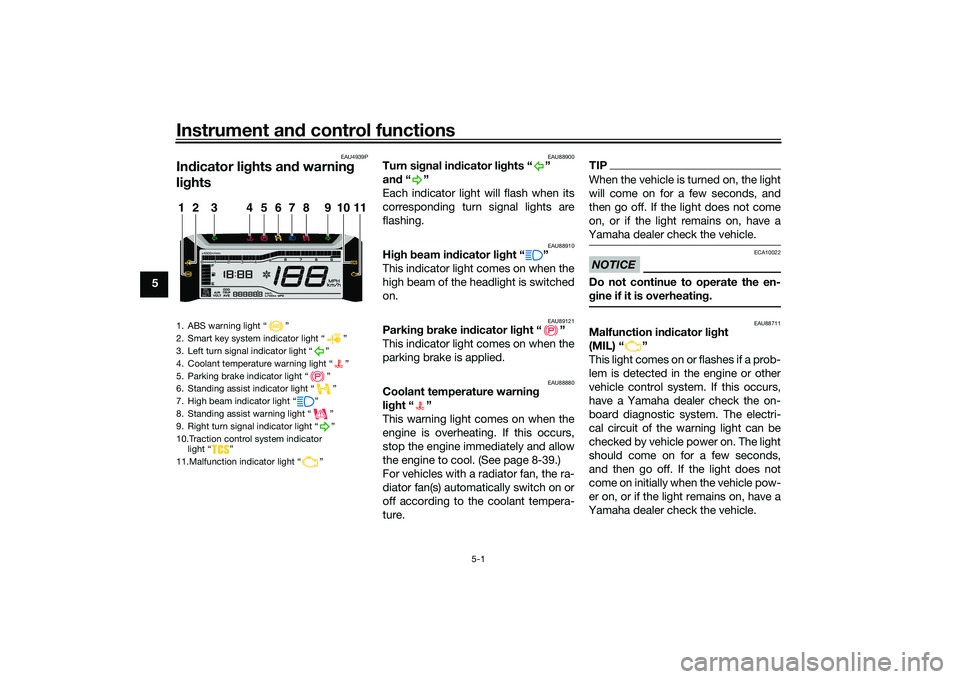
1. ABS warning light “ ”
2. Smart key system indicator light “ ”
3. Left turn signal indicator light “ ”
4. Coolant temperature warning light “ ”
5. Parking brake indicator light “ ”
6. Standing assist indicator light “ ”
7. High beam indicator light “ ”
8. Standing assist warning light “ ”
9. Right turn signal indicator light “ ”
10.Traction control system indicator light “ ”
11.Malfunction indicator light “ ”1
11
2
3
4
5
6
7
8
9
10
UBEDE0E0.book Page 1 Thursday, October 1, 2020 1:04 PM
Page 31 of 112
Instrument and control functions
5-2
5
NOTICE
ECA26820
If the MIL starts flashin g, re duce en-
g ine spee d to prevent exhaust sys-
tem damag e.TIPThe engine is sensitively controlled for
the on-board diagnostic system to de-
tect deterioration and malfunction of
the emission control system. Due to
this specification, the MIL may come
on or flash for vehicle modifications,
lack of maintenance, or excessive or
improper use of the vehicle. To prevent
this, observe these precautions.
Do not attempt to modify the soft-
ware of the engine control unit.
Do not add any electrical acces-
sories that interfere with engine
control.
Do not use aftermarket accesso-
ries or parts such as suspension,
spark plugs, injectors, exhaust
system, etc.
Do not change drivetrain specifi-
cations (chain, sprockets, wheels,
tires, etc.).
Do not remove or alter the O2 sen-
sor, air induction system, or ex-
haust parts (catalysts or EXUP,
etc.).
Maintain proper V-belt and drive
belt (if equipped).
Maintain correct tire pressure.
Do not operate the vehicle in an
extreme manner. For example, re-
peated or excessive opening and
closing of the throttle, racing,
burnouts, wheelies, etc.
EAU88890
ABS warnin g lig ht “ ”
This warning light comes on when the
vehicle is first turned on, and goes off
after starting riding. If the warning light
comes on while riding, the anti-lock
brake system may not work correctly.
WARNING
EWA16043
If the ABS warnin g li ght does not
turn off after reachin g 10 km/h (6
mi/h), or if the warnin g li ght comes
on while ri din g:
Use extra caution to avoi d pos-
si ble wheel lock durin g emer-
g ency brakin g.
Have a Yamaha dealer check
the vehicle as soon as possi ble.
TIPThe ABS warning light may come on
while revving the engine with the vehi-
cle on its centerstand, but this does
not indicate a malfunction.
EAU88930
Traction control system in dicator
li g ht “ ”
This indicator light will flash when trac-
tion control has engaged.
If the traction control system is turned
off, this indicator light will come on.
(See page 5-14.)TIPWhen the vehicle is turned on, the light
should come on for a few seconds and
then go off. If the light does not come
on, or if the light remains on, have a
Yamaha dealer check vehicle.
EAU89252
Stan din g assist in dicator li ght “ ”
This indicator light flashes when the
standing assist can be used.
UBEDE0E0.book Page 2 Thursday, October 1, 2020 1:04 PM
Page 32 of 112
Instrument and control functions
5-3
5 The indicator light comes on when the
standing assist is engaged.
TIPWhen the vehicle is turned on, the light
will come on for a few seconds, and
then go off. If the light does not come
on, have a Yamaha dealer check the
vehicle.
EAU89262
Stan
din g assist warnin g lig ht “ ”
This warning light comes on if a prob-
lem is detected in the standing assist.
If this occurs, have a Yamaha dealer
check the system.TIP Depending on the problem, the
engine speed may be limited and
the vehicle cannot be driven nor-
mally.
When the vehicle is turned on, the
light will come on for a few sec-
onds, and then go off. If the light
does not come on, or if the light
remains on, have a Yamaha dealer
check the vehicle.
EAU78083
Smart key system in dicator
li g ht “ ”
This indicator light will flash when com-
munication between the vehicle and
smart key takes place and when cer-
tain smart key system operations are
carried out.
The indicator light may also flash when
there is an error in the smart key sys-
tem.TIPWhen the vehicle is turned on, the light
should come on for a few seconds and
then go off. If the light does not come
on, or if the light remains on, have a
Yamaha dealer check the vehicle.
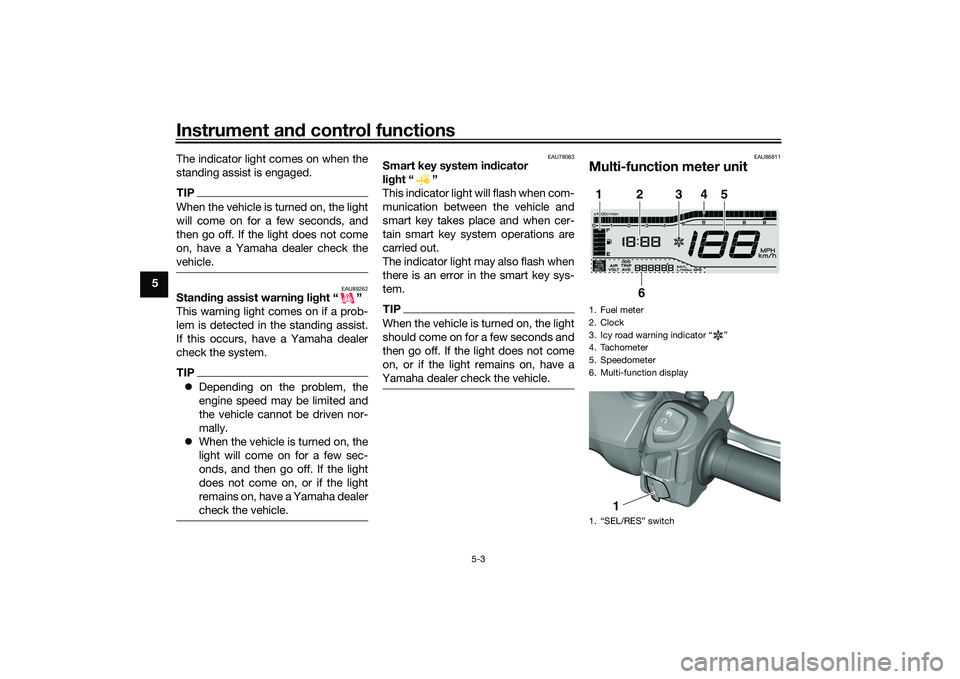
EAU86811
Multi-function meter unit1. Fuel meter
2. Clock
3. Icy road warning indicator “ ”
4. Tachometer
5. Speedometer
6. Multi-function display
1. “SEL/RES” switch1
2
3
4
5
6
1
UBEDE0E0.book Page 3 Thursday, October 1, 2020 1:04 PM
Page 41 of 112
Instrument and control functions
5-12
5
and brake pedal when the rear
brake lever is being pulled, but this
does not indicate a malfunction.
The unified brake system does not
operate when the front brake lever
is being pulled directly.
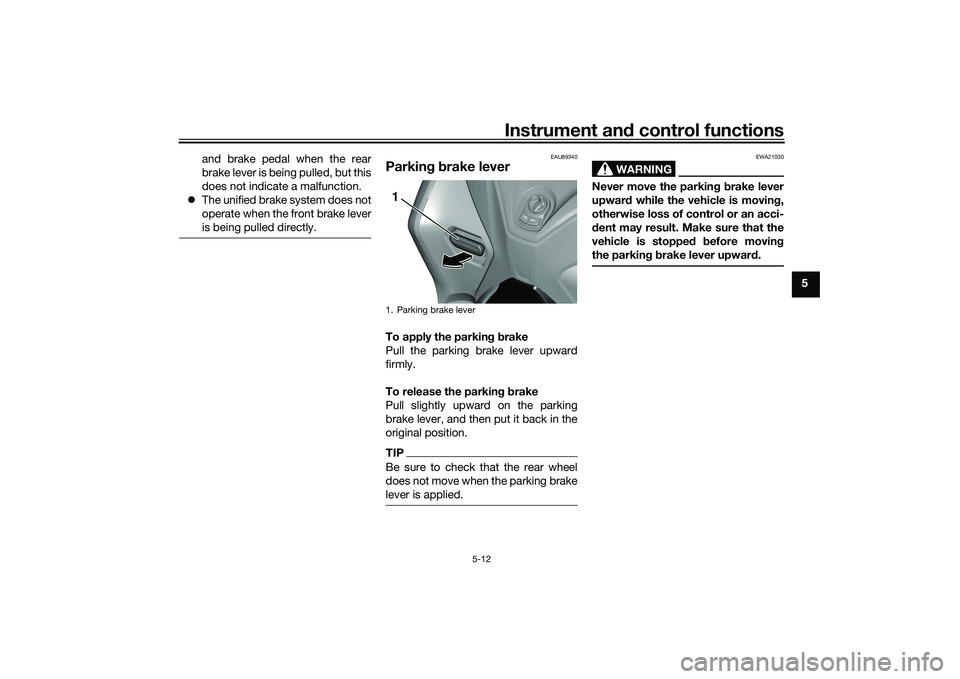
EAU89340
Parkin g b rake leverTo apply the parkin g b rake
Pull the parking brake lever upward
firmly.
To release the parkin g b rake
Pull slightly upward on the parking
brake lever, and then put it back in the
original position.TIPBe sure to check that the rear wheel
does not move when the parking brake
lever is applied.
WARNING
EWA21030
Never move the parkin g b rake lever
upwar d while the vehicle is movin g,
otherwise loss of control or an acci-
d ent may result. Make sure that the
vehicle is stopped before movin g
the parkin g b rake lever upwar d.
1. Parking brake lever1
UBEDE0E0.book Page 12 Thursday, October 1, 2020 1:04 PM