lock YAMAHA WR 250F 2014 Owner's Guide
[x] Cancel search | Manufacturer: YAMAHA, Model Year: 2014, Model line: WR 250F, Model: YAMAHA WR 250F 2014Pages: 230, PDF Size: 13.01 MB
Page 118 of 230
5-17
CAMSHAFTS
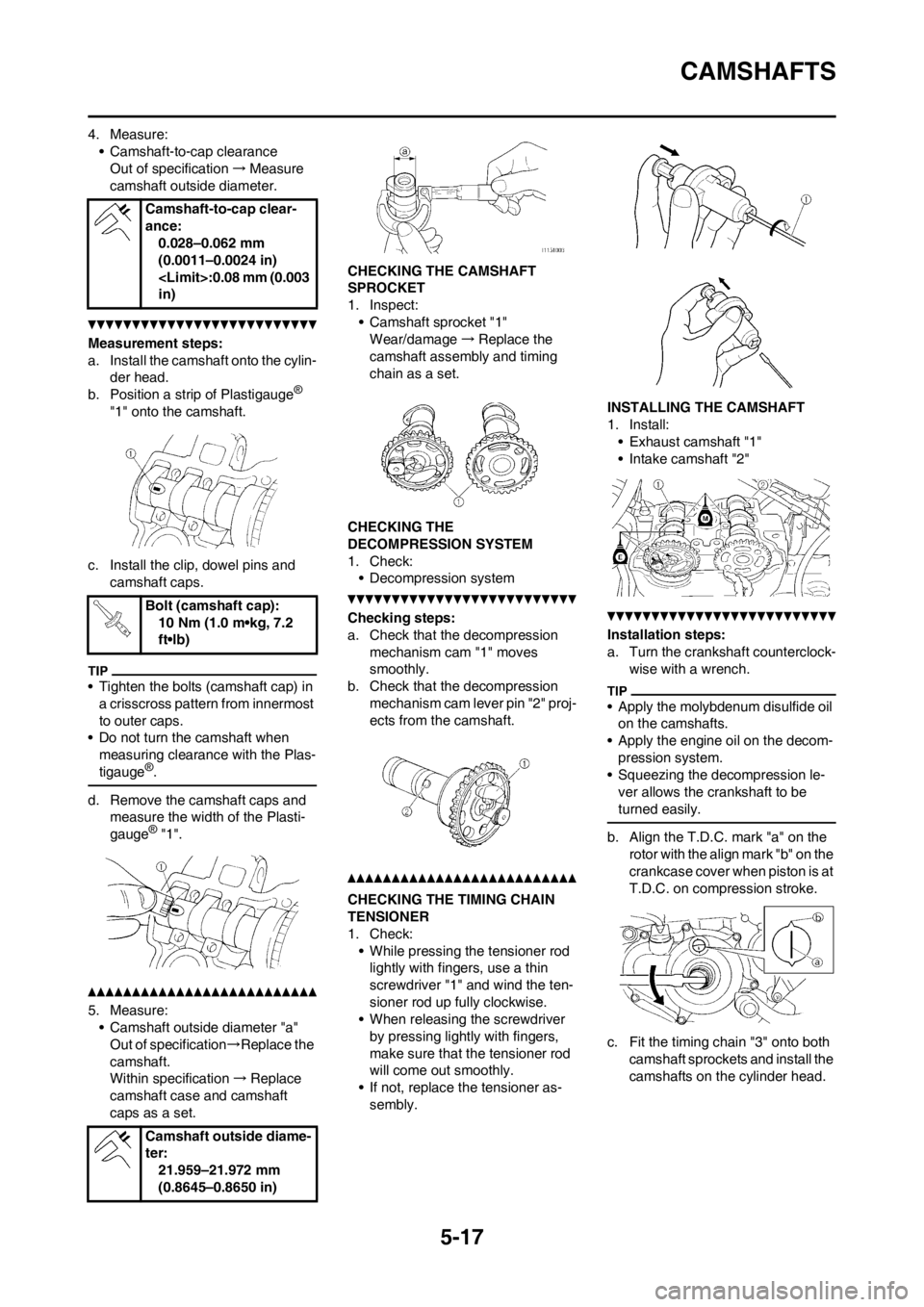
4. Measure:
• Camshaft-to-cap clearance
Out of specification→Measure
camshaft outside diameter.
Measurement steps:
a. Install the camshaft onto the cylin-
der head.
b. Position a strip of Plastigauge
®
"1" onto the camshaft.
c. Install the clip, dowel pins and
camshaft caps.
• Tighten the bolts (camshaft cap) in
a crisscross pattern from innermost
to outer caps.
• Do not turn the camshaft when
measuring clearance with the Plas-
tigauge
®.
d. Remove the camshaft caps and
measure the width of the Plasti-
gauge
® "1".
5. Measure:
• Camshaft outside diameter "a"
Out of specification→Replace the
camshaft.
Within specification→Replace
camshaft case and camshaft
caps as a set.CHECKING THE CAMSHAFT
SPROCKET
1. Inspect:
• Camshaft sprocket "1"
Wear/damage→Replace the
camshaft assembly and timing
chain as a set.
CHECKING THE
DECOMPRESSION SYSTEM
1. Check:
• Decompression system
Checking steps:
a. Check that the decompression
mechanism cam "1" moves
smoothly.
b. Check that the decompression
mechanism cam lever pin "2" proj-
ects from the camshaft.
CHECKING THE TIMING CHAIN
TENSIONER
1. Check:
• While pressing the tensioner rod
lightly with fingers, use a thin
screwdriver "1" and wind the ten-
sioner rod up fully clockwise.
• When releasing the screwdriver
by pressing lightly with fingers,
make sure that the tensioner rod
will come out smoothly.
• If not, replace the tensioner as-
sembly.INSTALLING THE CAMSHAFT
1. Install:
• Exhaust camshaft "1"
• Intake camshaft "2"
Installation steps:
a. Turn the crankshaft counterclock-
wise with a wrench.
• Apply the molybdenum disulfide oil
on the camshafts.
• Apply the engine oil on the decom-
pression system.
• Squeezing the decompression le-
ver allows the crankshaft to be
turned easily.
b. Align the T.D.C. mark "a" on the
rotor with the align mark "b" on the
crankcase cover when piston is at
T.D.C. on compression stroke.
c. Fit the timing chain "3" onto both
camshaft sprockets and install the
camshafts on the cylinder head. Camshaft-to-cap clear-
ance:
0.028–0.062 mm
(0.0011–0.0024 in)
in)
Bolt (camshaft cap):
10 Nm (1.0 m•kg, 7.2
ft•lb)
Camshaft outside diame-
ter:
21.959–21.972 mm
(0.8645–0.8650 in)
Page 119 of 230
5-18
CAMSHAFTS
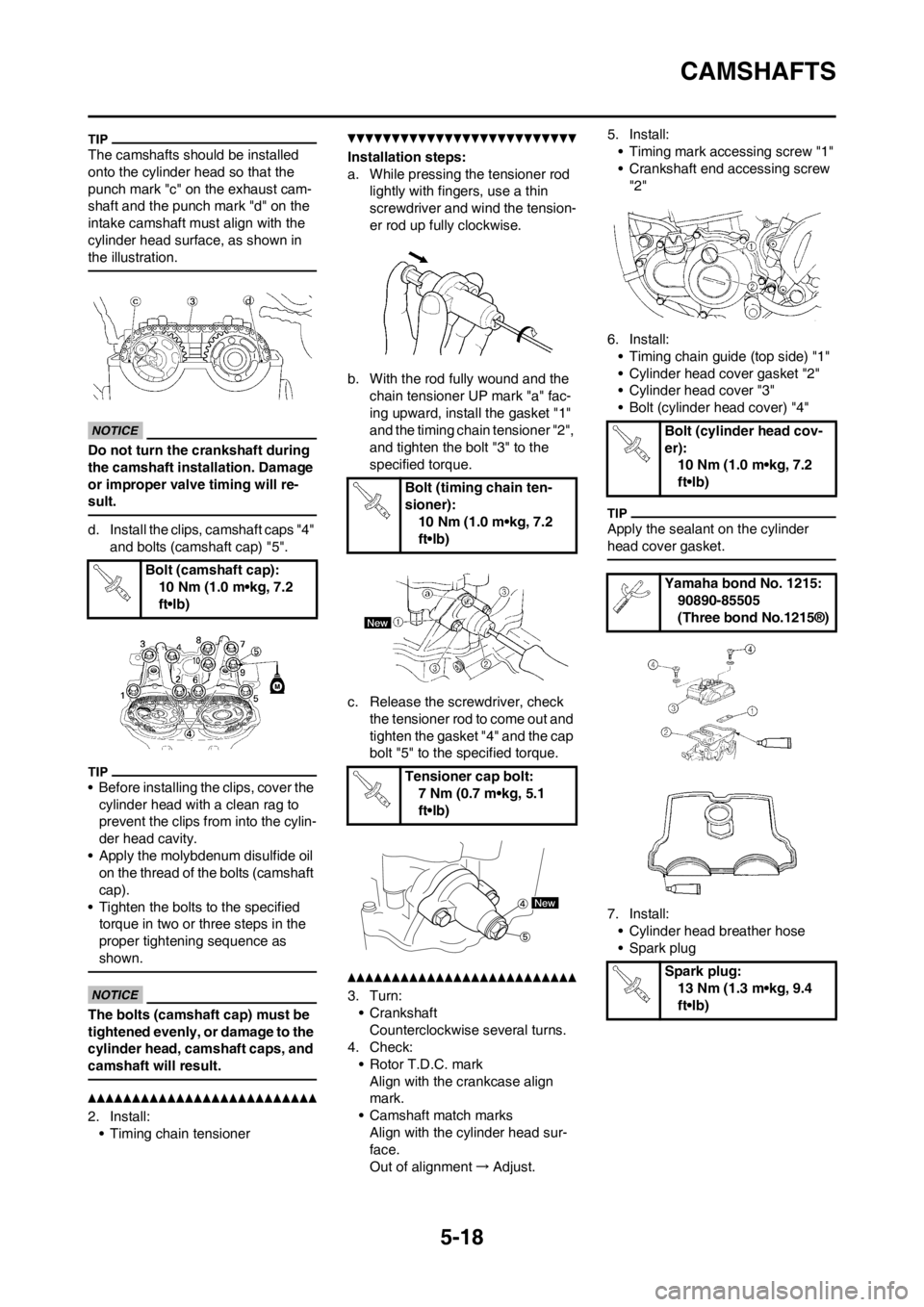
The camshafts should be installed
onto the cylinder head so that the
punch mark "c" on the exhaust cam-
shaft and the punch mark "d" on the
intake camshaft must align with the
cylinder head surface, as shown in
the illustration.
Do not turn the crankshaft during
the camshaft installation. Damage
or improper valve timing will re-
sult.
d. Install the clips, camshaft caps "4"
and bolts (camshaft cap) "5".
• Before installing the clips, cover the
cylinder head with a clean rag to
prevent the clips from into the cylin-
der head cavity.
• Apply the molybdenum disulfide oil
on the thread of the bolts (camshaft
cap).
• Tighten the bolts to the specified
torque in two or three steps in the
proper tightening sequence as
shown.
The bolts (camshaft cap) must be
tightened evenly, or damage to the
cylinder head, camshaft caps, and
camshaft will result.
2. Install:
• Timing chain tensioner
Installation steps:
a. While pressing the tensioner rod
lightly with fingers, use a thin
screwdriver and wind the tension-
er rod up fully clockwise.
b. With the rod fully wound and the
chain tensioner UP mark "a" fac-
ing upward, install the gasket "1"
and the timing chain tensioner "2",
and tighten the bolt "3" to the
specified torque.
c. Release the screwdriver, check
the tensioner rod to come out and
tighten the gasket "4" and the cap
bolt "5" to the specified torque.
3. Turn:
• Crankshaft
Counterclockwise several turns.
4. Check:
• Rotor T.D.C. mark
Align with the crankcase align
mark.
• Camshaft match marks
Align with the cylinder head sur-
face.
Out of alignment→Adjust.5. Install:
• Timing mark accessing screw "1"
• Crankshaft end accessing screw
"2"
6. Install:
• Timing chain guide (top side) "1"
• Cylinder head cover gasket "2"
• Cylinder head cover "3"
• Bolt (cylinder head cover) "4"
Apply the sealant on the cylinder
head cover gasket.
7. Install:
• Cylinder head breather hose
• Spark plug Bolt (camshaft cap):
10 Nm (1.0 m•kg, 7.2
ft•lb)
Bolt (timing chain ten-
sioner):
10 Nm (1.0 m•kg, 7.2
ft•lb)
Tensioner cap bolt:
7 Nm (0.7 m•kg, 5.1
ft•lb)
Bolt (cylinder head cov-
er):
10 Nm (1.0 m•kg, 7.2
ft•lb)
Yamaha bond No. 1215:
90890-85505
(Three bond No.1215®)
Spark plug:
13 Nm (1.3 m•kg, 9.4
ft•lb)
Page 131 of 230
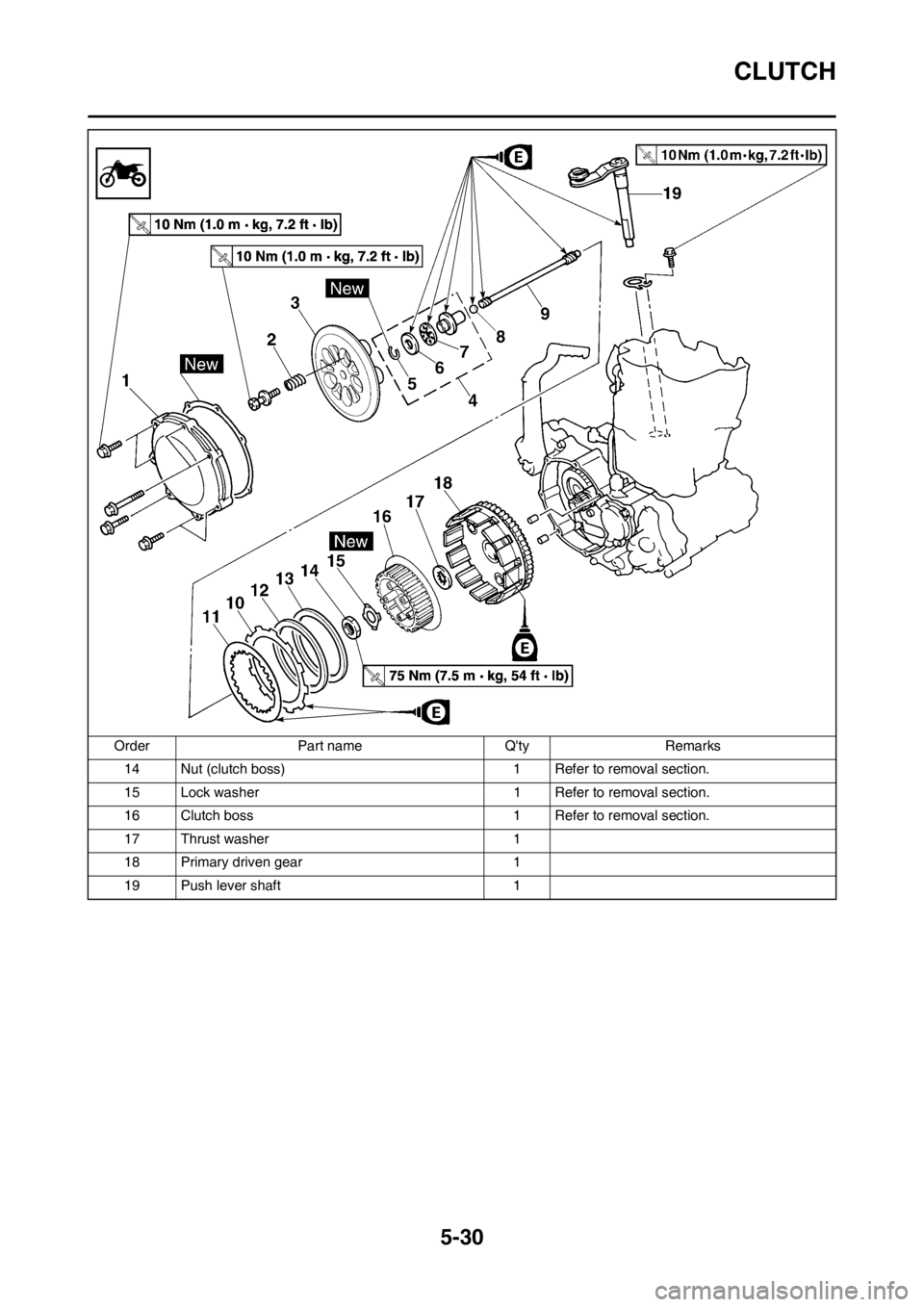
5-30
CLUTCH
14 Nut (clutch boss) 1 Refer to removal section.
15 Lock washer 1 Refer to removal section.
16 Clutch boss 1 Refer to removal section.
17 Thrust washer 1
18 Primary driven gear 1
19 Push lever shaft 1 Order Part name Q'ty Remarks
Page 132 of 230
5-31
CLUTCH
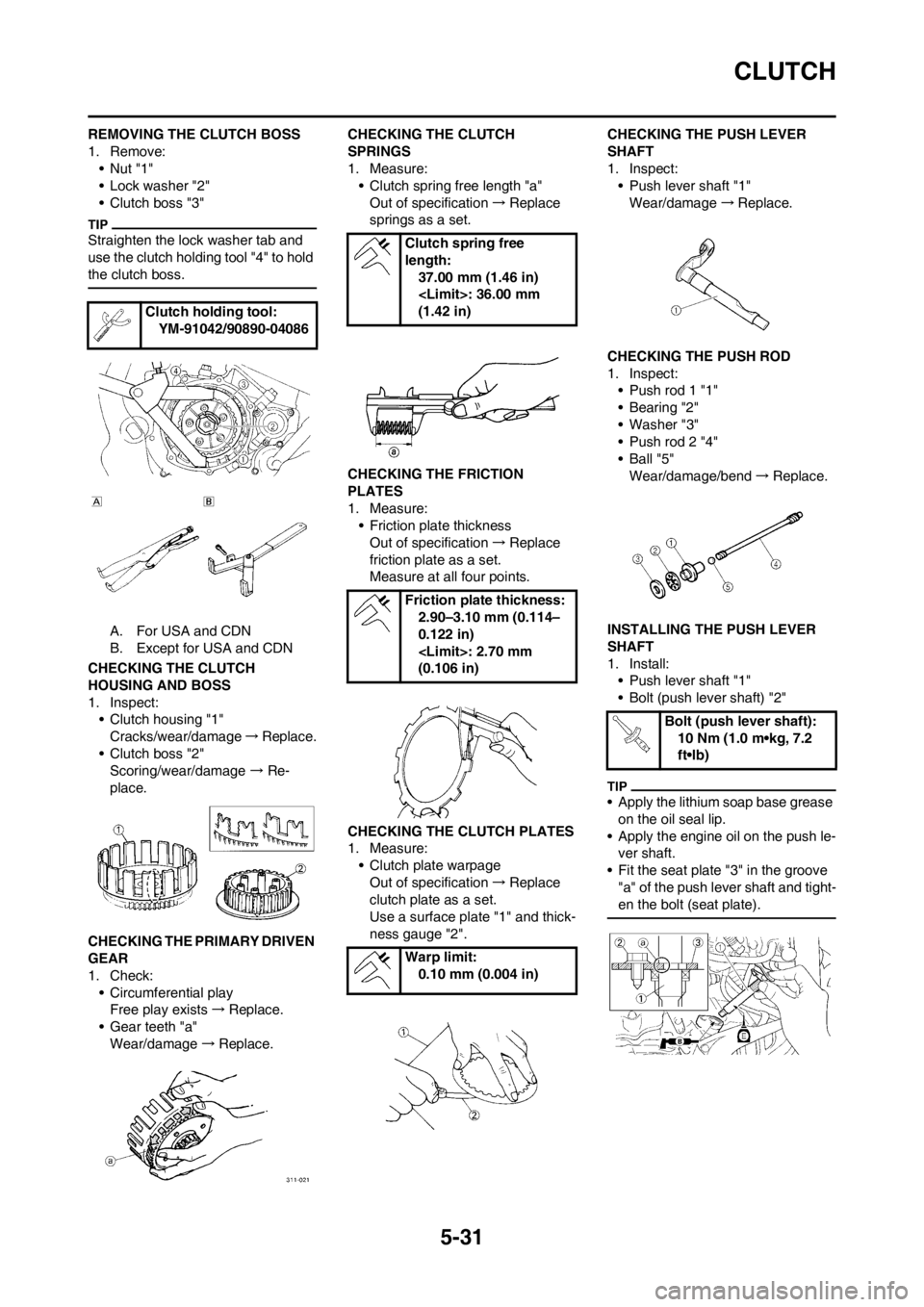
REMOVING THE CLUTCH BOSS
1. Remove:
•Nut "1"
• Lock washer "2"
• Clutch boss "3"
Straighten the lock washer tab and
use the clutch holding tool "4" to hold
the clutch boss.
A. For USA and CDN
B. Except for USA and CDN
CHECKING THE CLUTCH
HOUSING AND BOSS
1. Inspect:
• Clutch housing "1"
Cracks/wear/damage→Replace.
• Clutch boss "2"
Scoring/wear/damage → Re-
place.
CHECKING THE PRIMARY DRIVEN
GEAR
1. Check:
• Circumferential play
Free play exists→Replace.
• Gear teeth "a"
Wear/damage→Replace.CHECKING THE CLUTCH
SPRINGS
1. Measure:
• Clutch spring free length "a"
Out of specification→Replace
springs as a set.
CHECKING THE FRICTION
PLATES
1. Measure:
• Friction plate thickness
Out of specification→Replace
friction plate as a set.
Measure at all four points.
CHECKING THE CLUTCH PLATES
1. Measure:
• Clutch plate warpage
Out of specification→Replace
clutch plate as a set.
Use a surface plate "1" and thick-
ness gauge "2".CHECKING THE PUSH LEVER
SHAFT
1. Inspect:
• Push lever shaft "1"
Wear/damage→Replace.
CHECKING THE PUSH ROD
1. Inspect:
• Push rod 1 "1"
• Bearing "2"
• Washer "3"
• Push rod 2 "4"
•Ball "5"
Wear/damage/bend→Replace.
INSTALLING THE PUSH LEVER
SHAFT
1. Install:
• Push lever shaft "1"
• Bolt (push lever shaft) "2"
• Apply the lithium soap base grease
on the oil seal lip.
• Apply the engine oil on the push le-
ver shaft.
• Fit the seat plate "3" in the groove
"a" of the push lever shaft and tight-
en the bolt (seat plate).
Clutch holding tool:
YM-91042/90890-04086
Clutch spring free
length:
37.00 mm (1.46 in)
(1.42 in)
Friction plate thickness:
2.90–3.10 mm (0.114–
0.122 in)
(0.106 in)
Warp limit:
0.10 mm (0.004 in)
Bolt (push lever shaft):
10 Nm (1.0 m•kg, 7.2
ft•lb)
Page 133 of 230
5-32
CLUTCH
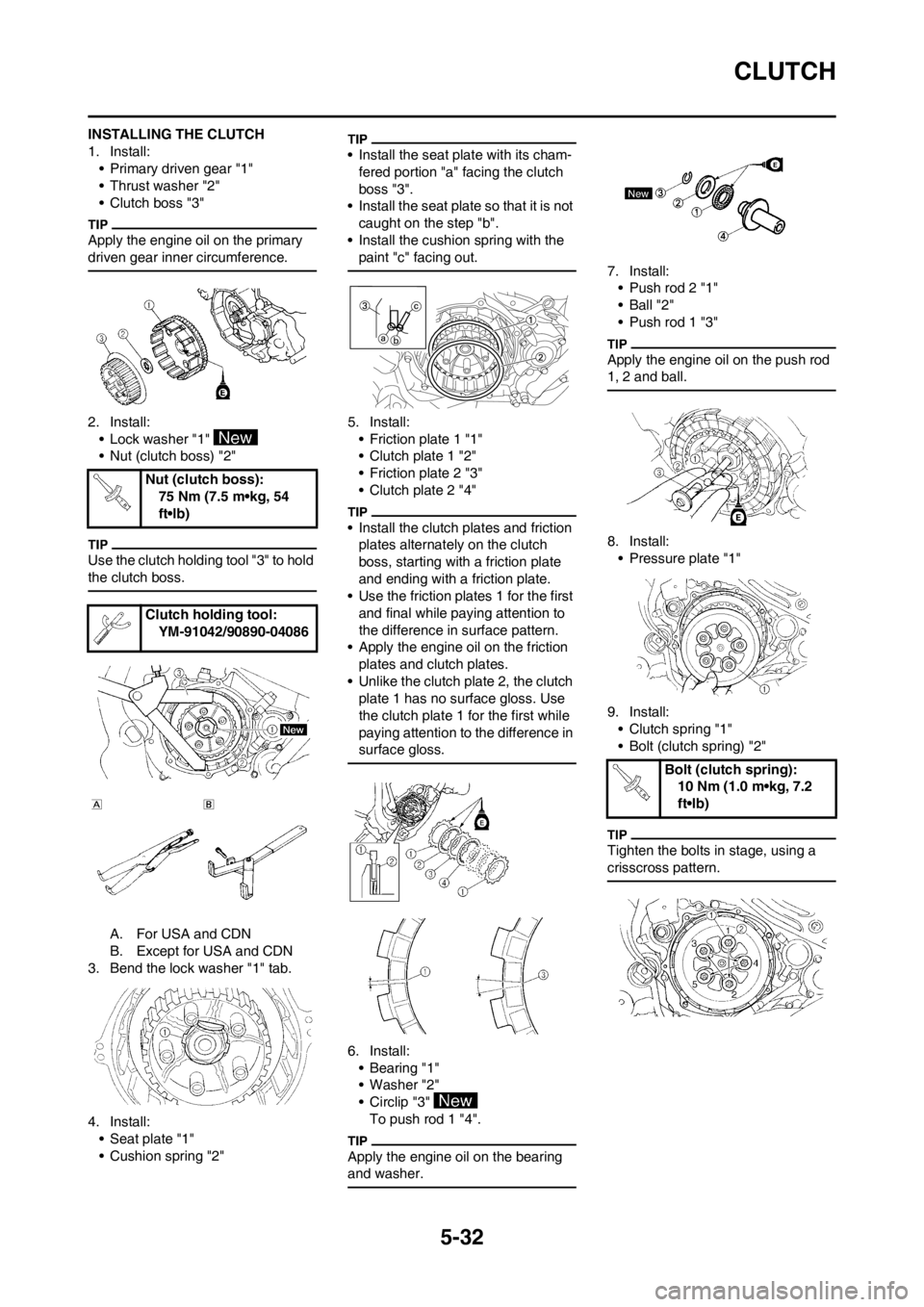
INSTALLING THE CLUTCH
1. Install:
• Primary driven gear "1"
• Thrust washer "2"
• Clutch boss "3"
Apply the engine oil on the primary
driven gear inner circumference.
2. Install:
• Lock washer "1"
• Nut (clutch boss) "2"
Use the clutch holding tool "3" to hold
the clutch boss.
A. For USA and CDN
B. Except for USA and CDN
3. Bend the lock washer "1" tab.
4. Install:
• Seat plate "1"
• Cushion spring "2"
• Install the seat plate with its cham-
fered portion "a" facing the clutch
boss "3".
• Install the seat plate so that it is not
caught on the step "b".
• Install the cushion spring with the
paint "c" facing out.
5. Install:
• Friction plate 1 "1"
• Clutch plate 1 "2"
• Friction plate 2 "3"
• Clutch plate 2 "4"
• Install the clutch plates and friction
plates alternately on the clutch
boss, starting with a friction plate
and ending with a friction plate.
• Use the friction plates 1 for the first
and final while paying attention to
the difference in surface pattern.
• Apply the engine oil on the friction
plates and clutch plates.
• Unlike the clutch plate 2, the clutch
plate 1 has no surface gloss. Use
the clutch plate 1 for the first while
paying attention to the difference in
surface gloss.
6. Install:
•Bearing "1"
• Washer "2"
• Circlip "3"
To push rod 1 "4".
Apply the engine oil on the bearing
and washer.
7. Install:
• Push rod 2 "1"
•Ball "2"
• Push rod 1 "3"
Apply the engine oil on the push rod
1, 2 and ball.
8. Install:
• Pressure plate "1"
9. Install:
• Clutch spring "1"
• Bolt (clutch spring) "2"
Tighten the bolts in stage, using a
crisscross pattern.
Nut (clutch boss):
75 Nm (7.5 m•kg, 54
ft•lb)
Clutch holding tool:
YM-91042/90890-04086
Bolt (clutch spring):
10 Nm (1.0 m•kg, 7.2
ft•lb)
Page 140 of 230
5-39
BALANCER
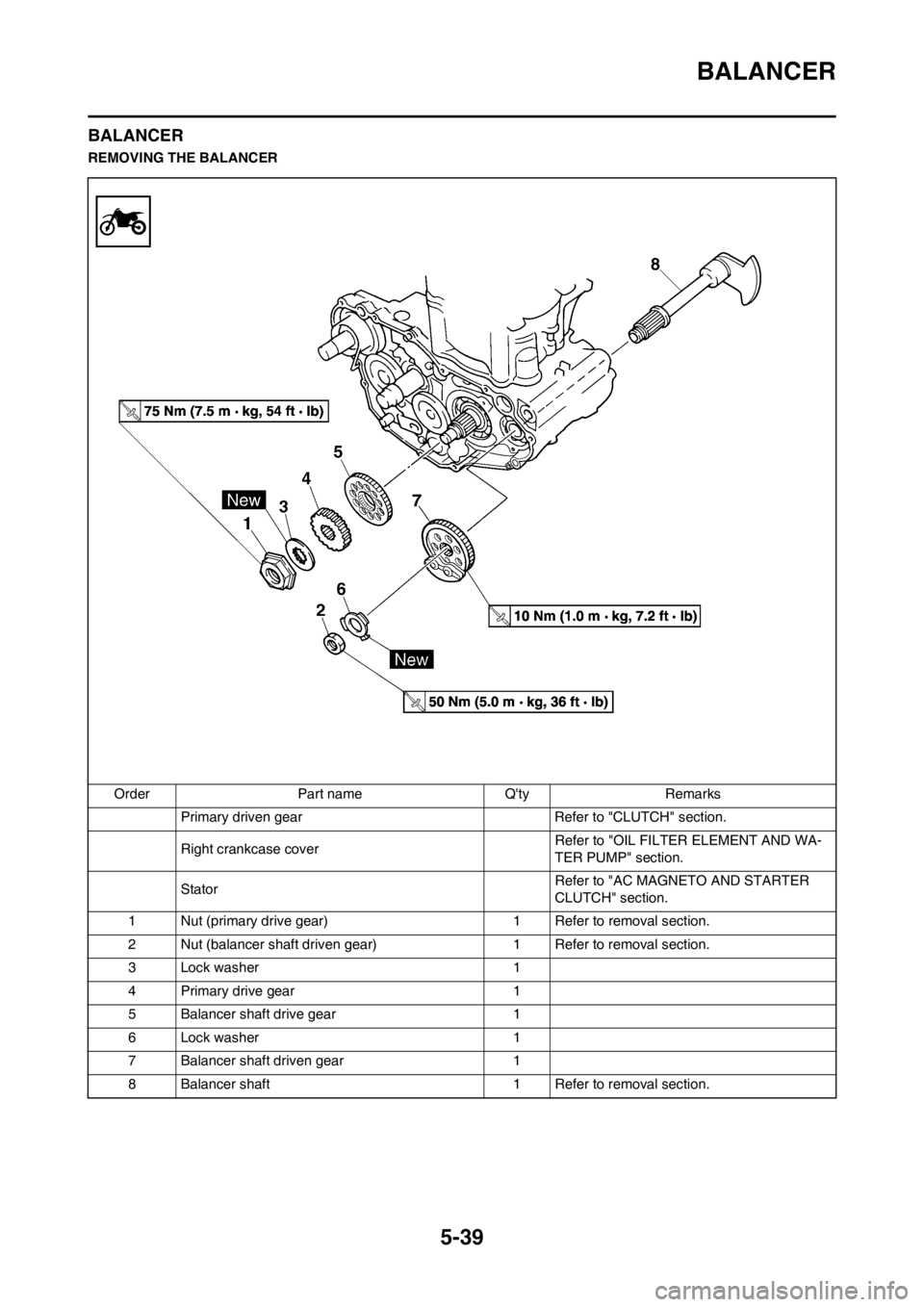
BALANCER
REMOVING THE BALANCER
Order Part name Q'ty Remarks
Primary driven gear Refer to "CLUTCH" section.
Right crankcase cover Refer to "OIL FILTER ELEMENT AND WA-
TER PUMP" section.
Stator Refer to "AC MAGNETO AND STARTER
CLUTCH" section.
1 Nut (primary drive gear) 1 Refer to removal section.
2 Nut (balancer shaft driven gear) 1 Refer to removal section.
3 Lock washer 1
4 Primary drive gear 1
5 Balancer shaft drive gear 1
6 Lock washer 1
7 Balancer shaft driven gear 1
8 Balancer shaft 1 Refer to removal section.
Page 141 of 230
5-40
BALANCER
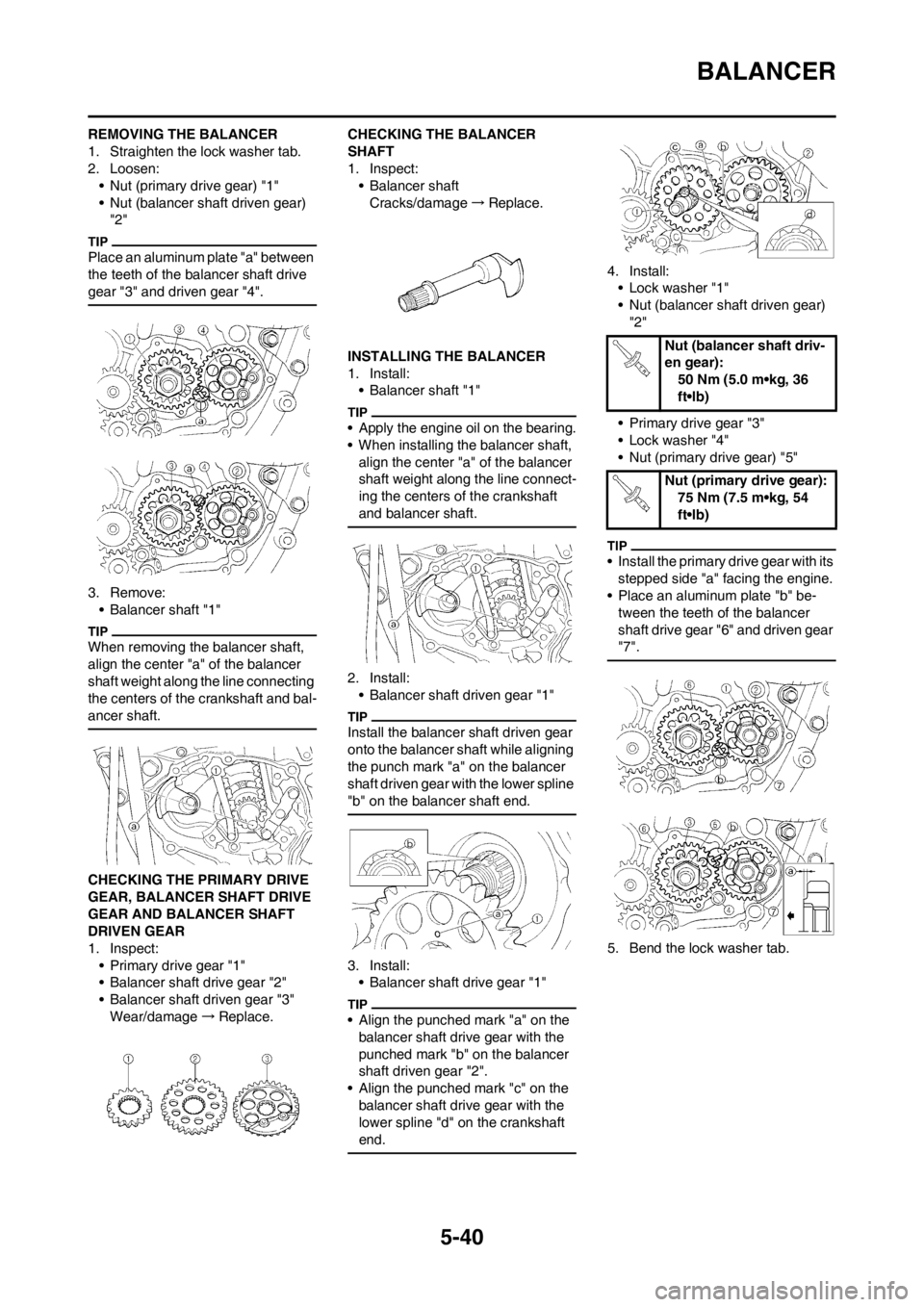
REMOVING THE BALANCER
1. Straighten the lock washer tab.
2. Loosen:
• Nut (primary drive gear) "1"
• Nut (balancer shaft driven gear)
"2"
Place an aluminum plate "a" between
the teeth of the balancer shaft drive
gear "3" and driven gear "4".
3. Remove:
• Balancer shaft "1"
When removing the balancer shaft,
align the center "a" of the balancer
shaft weight along the line connecting
the centers of the crankshaft and bal-
ancer shaft.
CHECKING THE PRIMARY DRIVE
GEAR, BALANCER SHAFT DRIVE
GEAR AND BALANCER SHAFT
DRIVEN GEAR
1. Inspect:
• Primary drive gear "1"
• Balancer shaft drive gear "2"
• Balancer shaft driven gear "3"
Wear/damage→Replace.CHECKING THE BALANCER
SHAFT
1. Inspect:
• Balancer shaft
Cracks/damage→Replace.
INSTALLING THE BALANCER
1. Install:
• Balancer shaft "1"
• Apply the engine oil on the bearing.
• When installing the balancer shaft,
align the center "a" of the balancer
shaft weight along the line connect-
ing the centers of the crankshaft
and balancer shaft.
2. Install:
• Balancer shaft driven gear "1"
Install the balancer shaft driven gear
onto the balancer shaft while aligning
the punch mark "a" on the balancer
shaft driven gear with the lower spline
"b" on the balancer shaft end.
3. Install:
• Balancer shaft drive gear "1"
• Align the punched mark "a" on the
balancer shaft drive gear with the
punched mark "b" on the balancer
shaft driven gear "2".
• Align the punched mark "c" on the
balancer shaft drive gear with the
lower spline "d" on the crankshaft
end.
4. Install:
• Lock washer "1"
• Nut (balancer shaft driven gear)
"2"
• Primary drive gear "3"
• Lock washer "4"
• Nut (primary drive gear) "5"
• Install the primary drive gear with its
stepped side "a" facing the engine.
• Place an aluminum plate "b" be-
tween the teeth of the balancer
shaft drive gear "6" and driven gear
"7".
5. Bend the lock washer tab.
Nut (balancer shaft driv-
en gear):
50 Nm (5.0 m•kg, 36
ft•lb)
Nut (primary drive gear):
75 Nm (7.5 m•kg, 54
ft•lb)
Page 147 of 230
5-46
KICK SHAFT AND SHIFT SHAFT
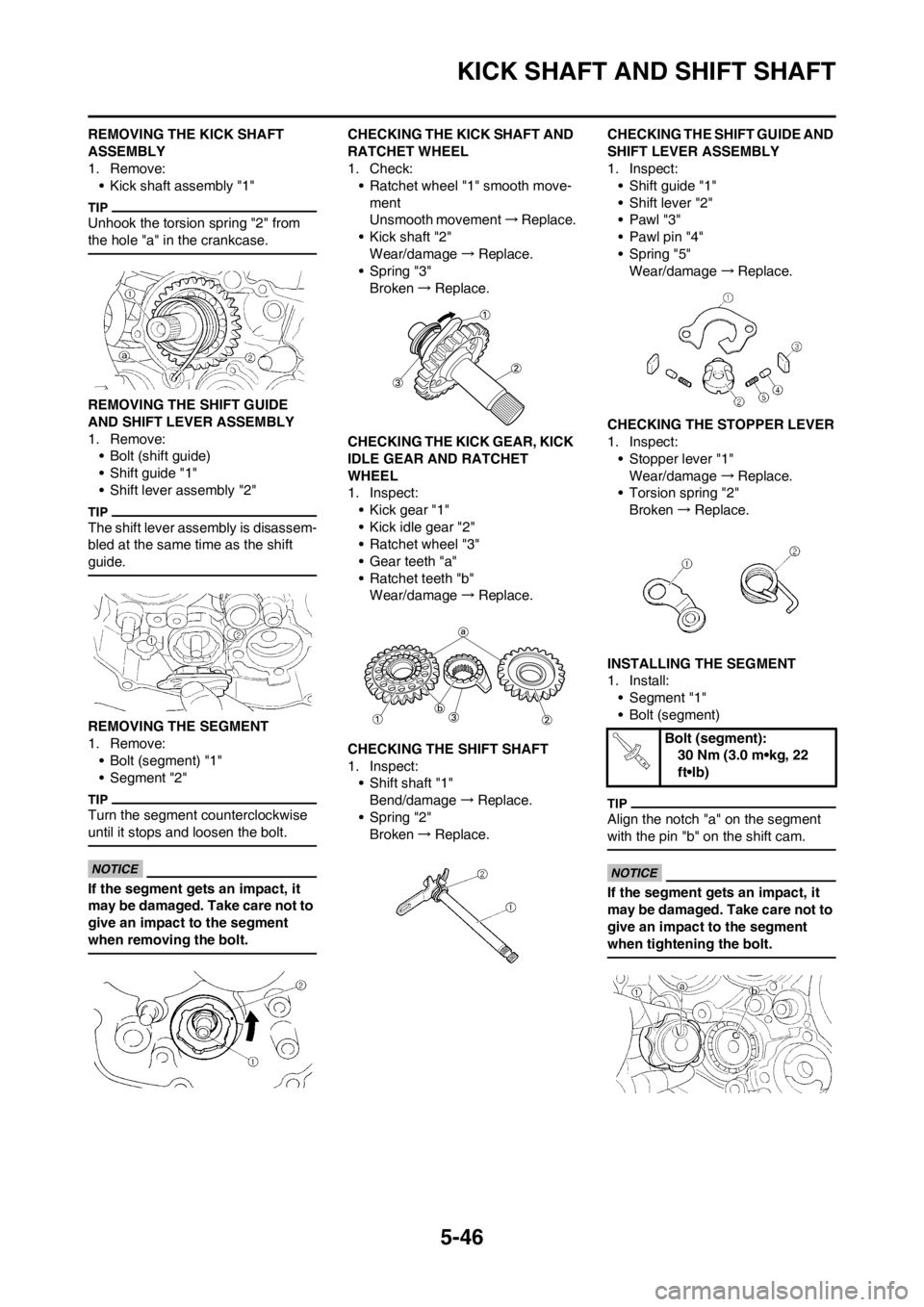
REMOVING THE KICK SHAFT
ASSEMBLY
1. Remove:
• Kick shaft assembly "1"
Unhook the torsion spring "2" from
the hole "a" in the crankcase.
REMOVING THE SHIFT GUIDE
AND SHIFT LEVER ASSEMBLY
1. Remove:
• Bolt (shift guide)
• Shift guide "1"
• Shift lever assembly "2"
The shift lever assembly is disassem-
bled at the same time as the shift
guide.
REMOVING THE SEGMENT
1. Remove:
• Bolt (segment) "1"
• Segment "2"
Turn the segment counterclockwise
until it stops and loosen the bolt.
If the segment gets an impact, it
may be damaged. Take care not to
give an impact to the segment
when removing the bolt.
CHECKING THE KICK SHAFT AND
RATCHET WHEEL
1. Check:
• Ratchet wheel "1" smooth move-
ment
Unsmooth movement→Replace.
• Kick shaft "2"
Wear/damage→Replace.
• Spring "3"
Broken→Replace.
CHECKING THE KICK GEAR, KICK
IDLE GEAR AND RATCHET
WHEEL
1. Inspect:
• Kick gear "1"
• Kick idle gear "2"
• Ratchet wheel "3"
• Gear teeth "a"
• Ratchet teeth "b"
Wear/damage→Replace.
CHECKING THE SHIFT SHAFT
1. Inspect:
• Shift shaft "1"
Bend/damage→Replace.
• Spring "2"
Broken→Replace.CHECKING THE SHIFT GUIDE AND
SHIFT LEVER ASSEMBLY
1. Inspect:
• Shift guide "1"
• Shift lever "2"
•Pawl "3"
• Pawl pin "4"
• Spring "5"
Wear/damage→Replace.
CHECKING THE STOPPER LEVER
1. Inspect:
• Stopper lever "1"
Wear/damage→Replace.
• Torsion spring "2"
Broken→Replace.
INSTALLING THE SEGMENT
1. Install:
• Segment "1"
• Bolt (segment)
Align the notch "a" on the segment
with the pin "b" on the shift cam.
If the segment gets an impact, it
may be damaged. Take care not to
give an impact to the segment
when tightening the bolt.
Bolt (segment):
30 Nm (3.0 m•kg, 22
ft•lb)
Page 149 of 230
5-48
KICK SHAFT AND SHIFT SHAFT
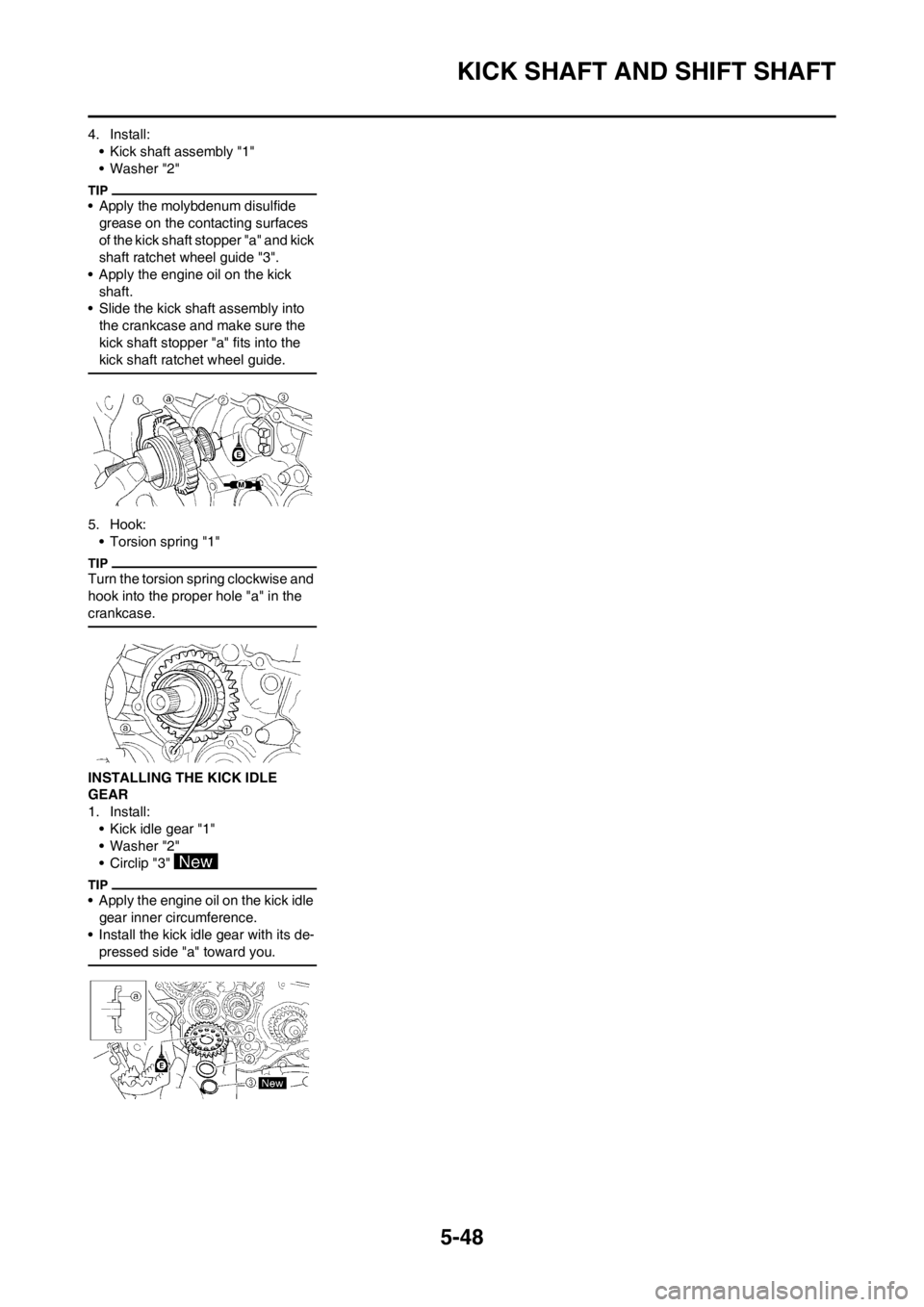
4. Install:
• Kick shaft assembly "1"
• Washer "2"
• Apply the molybdenum disulfide
grease on the contacting surfaces
of the kick shaft stopper "a" and kick
shaft ratchet wheel guide "3".
• Apply the engine oil on the kick
shaft.
• Slide the kick shaft assembly into
the crankcase and make sure the
kick shaft stopper "a" fits into the
kick shaft ratchet wheel guide.
5. Hook:
• Torsion spring "1"
Turn the torsion spring clockwise and
hook into the proper hole "a" in the
crankcase.
INSTALLING THE KICK IDLE
GEAR
1. Install:
• Kick idle gear "1"
• Washer "2"
• Circlip "3"
• Apply the engine oil on the kick idle
gear inner circumference.
• Install the kick idle gear with its de-
pressed side "a" toward you.
Page 152 of 230
5-51
AC MAGNETO AND STARTER CLUTCH
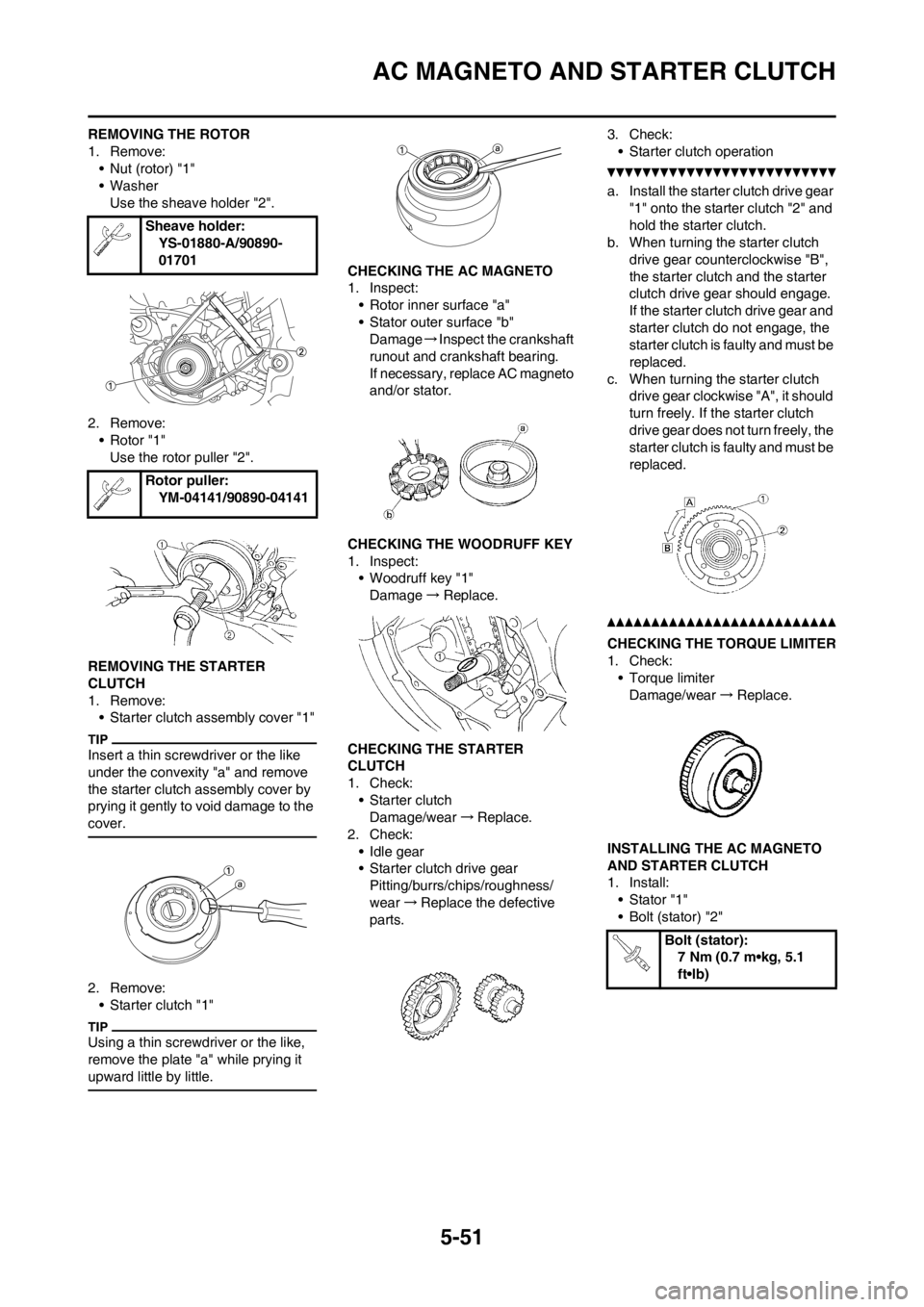
REMOVING THE ROTOR
1. Remove:
• Nut (rotor) "1"
• Washer
Use the sheave holder "2".
2. Remove:
• Rotor "1"
Use the rotor puller "2".
REMOVING THE STARTER
CLUTCH
1. Remove:
• Starter clutch assembly cover "1"
Insert a thin screwdriver or the like
under the convexity "a" and remove
the starter clutch assembly cover by
prying it gently to void damage to the
cover.
2. Remove:
• Starter clutch "1"
Using a thin screwdriver or the like,
remove the plate "a" while prying it
upward little by little.
CHECKING THE AC MAGNETO
1. Inspect:
• Rotor inner surface "a"
• Stator outer surface "b"
Damage→Inspect the crankshaft
runout and crankshaft bearing.
If necessary, replace AC magneto
and/or stator.
CHECKING THE WOODRUFF KEY
1. Inspect:
• Woodruff key "1"
Damage→Replace.
CHECKING THE STARTER
CLUTCH
1. Check:
• Starter clutch
Damage/wear→Replace.
2. Check:
• Idle gear
• Starter clutch drive gear
Pitting/burrs/chips/roughness/
wear→Replace the defective
parts.3. Check:
• Starter clutch operation
a. Install the starter clutch drive gear
"1" onto the starter clutch "2" and
hold the starter clutch.
b. When turning the starter clutch
drive gear counterclockwise "B",
the starter clutch and the starter
clutch drive gear should engage.
If the starter clutch drive gear and
starter clutch do not engage, the
starter clutch is faulty and must be
replaced.
c. When turning the starter clutch
drive gear clockwise "A", it should
turn freely. If the starter clutch
drive gear does not turn freely, the
starter clutch is faulty and must be
replaced.
CHECKING THE TORQUE LIMITER
1. Check:
• Torque limiter
Damage/wear→Replace.
INSTALLING THE AC MAGNETO
AND STARTER CLUTCH
1. Install:
• Stator "1"
• Bolt (stator) "2" Sheave holder:
YS-01880-A/90890-
01701
Rotor puller:
YM-04141/90890-04141
Bolt (stator):
7 Nm (0.7 m•kg, 5.1
ft•lb)