light YAMAHA XMAX 125 2022 User Guide
[x] Cancel search | Manufacturer: YAMAHA, Model Year: 2022, Model line: XMAX 125, Model: YAMAHA XMAX 125 2022Pages: 118, PDF Size: 13.61 MB
Page 31 of 118
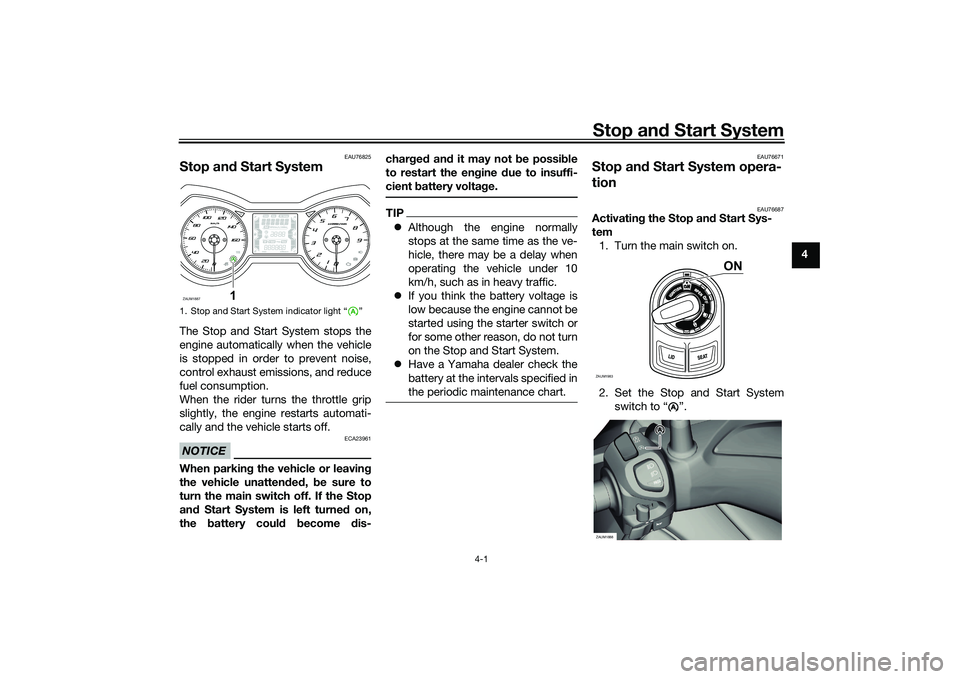
Stop and Start System
4-1
4
EAU76825
Stop an d Start SystemThe Stop and Start System stops the
engine automatically when the vehicle
is stopped in order to prevent noise,
control exhaust emissions, and reduce
fuel consumption.
When the rider turns the throttle grip
slightly, the engine restarts automati-
cally and the vehicle starts off.NOTICE
ECA23961
When parkin g the vehicle or leavin g
the vehicle unatten ded , be sure to
turn the main switch off. If the Stop
an d Start System is left turne d on,
the battery could become dis- char
ged an d it may not be possi ble
to restart the en gine due to insuffi-
cient battery volta ge.
TIP Although the engine normally
stops at the same time as the ve-
hicle, there may be a delay when
operating the vehicle under 10
km/h, such as in heavy traffic.
If you think the battery voltage is
low because the engine cannot be
started using the starter switch or
for some other reason, do not turn
on the Stop and Start System.
Have a Yamaha dealer check the
battery at the intervals specified in
the periodic maintenance chart.
EAU76671
Stop an d Start System opera-
tion
EAU76687
Activatin g the Stop an d Start Sys-
tem 1. Turn the main switch on.
2. Set the Stop and Start System switch to “ ”.
1. Stop and Start System indicator light “ ”ZAUM1887
1
ZAUM1983
ON
A
AA
ZAUM1888
UB9YE1E0.book Page 1 Tuesday, October 12, 2021 2:29 PM
Page 32 of 118

Stop and Start System
4-2
4 3. The Stop and Start System acti-
vates and the indicator light
comes on when the following con-
ditions are met: The Stop and Start System
switch is set to “ ”.
After the engine was warmed
up, the engine was left idling
for a certain period.
The vehicle has traveled at a
speed of 10 km/h or higher.
4. To turn off the Stop and Start Sys- tem, set the Stop and Start Sys-
tem switch to “ ”.
TIPTo preserve battery power, the
Stop and Start System may not
activate.
If the Stop and Start System does
not activate, have a Yamaha deal-
er check the battery.
EAU76832
Stop the en gine
The engine will stop automatically
when the following conditions are met: The Stop and Start System switch
is set to “ ”.
The “ ” indicator light on the
multi-function meter is on.
The vehicle is stopped with the
throttle grip fully returned. At this time, the “ ” indicator light
starts flashing to indicate that the en-
gine is currently stopped by the Stop
and Start System.
EAU76704
Restart the en
gine
If the throttle grip is turned while the
Stop and Start System indicator light is
flashing, the engine will automatically
restart and the “ ” indicator light will
stop flashing.
1. Stop and Start System indicator light “ ”
A
ZAUM1889
1
A
AAAA
A
ZAUM1890
AA
A
1. On
2. Flashing
A
1
2
A
UB9YE1E0.book Page 2 Tuesday, October 12, 2021 2:29 PM
Page 35 of 118
Instrument and control functions
5-1
5
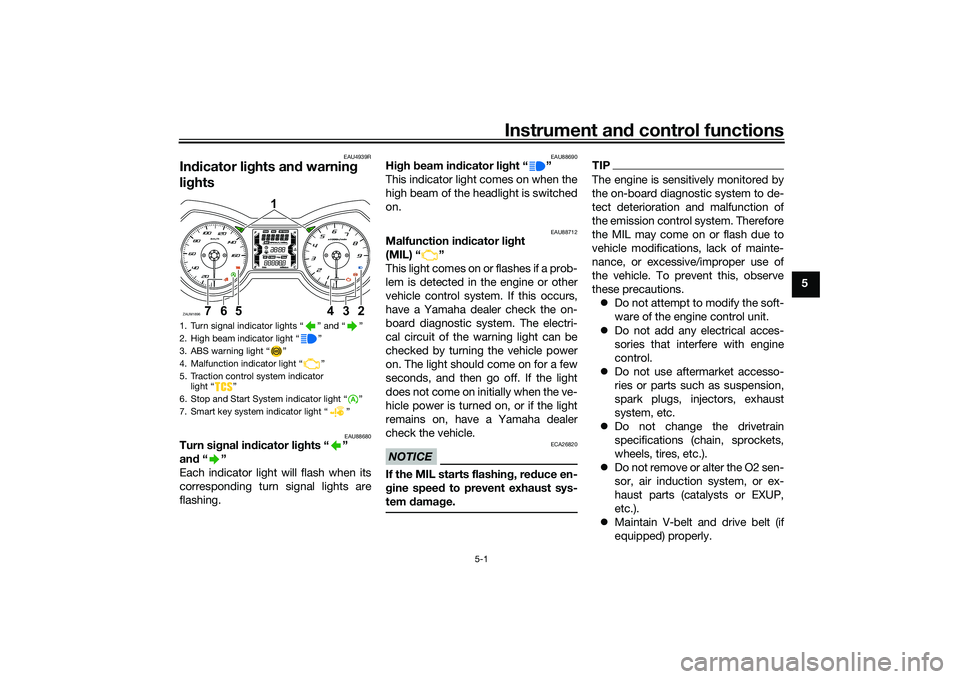
EAU4939R
In dicator lig hts and warning
lig hts
EAU88680
Turn si gnal in dicator li ghts “ ”
an d“”
Each indicator light will flash when its
corresponding turn signal lights are
flashing.
EAU88690
Hi gh beam in dicator li ght “ ”
This indicator light comes on when the
high beam of the headlight is switched
on.
EAU88712
Malfunction in dicator li ght
(MIL) “ ”
This light comes on or flashes if a prob-
lem is detected in the engine or other
vehicle control system. If this occurs,
have a Yamaha dealer check the on-
board diagnostic system. The electri-
cal circuit of the warning light can be
checked by turning the vehicle power
on. The light should come on for a few
seconds, and then go off. If the light
does not come on initially when the ve-
hicle power is turned on, or if the light
remains on, have a Yamaha dealer
check the vehicle.NOTICE
ECA26820
If the MIL starts flashin g, re duce en-
g ine spee d to prevent exhaust sys-
tem damag e.
TIPThe engine is sensitively monitored by
the on-board diagnostic system to de-
tect deterioration and malfunction of
the emission control system. Therefore
the MIL may come on or flash due to
vehicle modifications, lack of mainte-
nance, or excessive/improper use of
the vehicle. To prevent this, observe
these precautions.
Do not attempt to modify the soft-
ware of the engine control unit.
Do not add any electrical acces-
sories that interfere with engine
control.
Do not use aftermarket accesso-
ries or parts such as suspension,
spark plugs, injectors, exhaust
system, etc.
Do not change the drivetrain
specifications (chain, sprockets,
wheels, tires, etc.).
Do not remove or alter the O2 sen-
sor, air induction system, or ex-
haust parts (catalysts or EXUP,
etc.).
Maintain V-belt and drive belt (if
equipped) properly.
1. Turn signal indicator lights “ ” and “ ”
2. High beam indicator light “ ”
3. ABS warning light “ ”
4. Malfunction indicator light “ ”
5. Traction control system indicator
light “ ”
6. Stop and Start System indicator light “ ”
7. Smart key system indicator light “ ”ZAUM1896
1
234
567
UB9YE1E0.book Page 1 Tuesday, October 12, 2021 2:29 PM
Page 36 of 118
Instrument and control functions
5-2
5
Maintain correct tire pressure.
Do not operate the vehicle in an
extreme manner. For example, re-
peated or excessive opening and
closing of the throttle, racing,
burnouts, wheelies, etc.
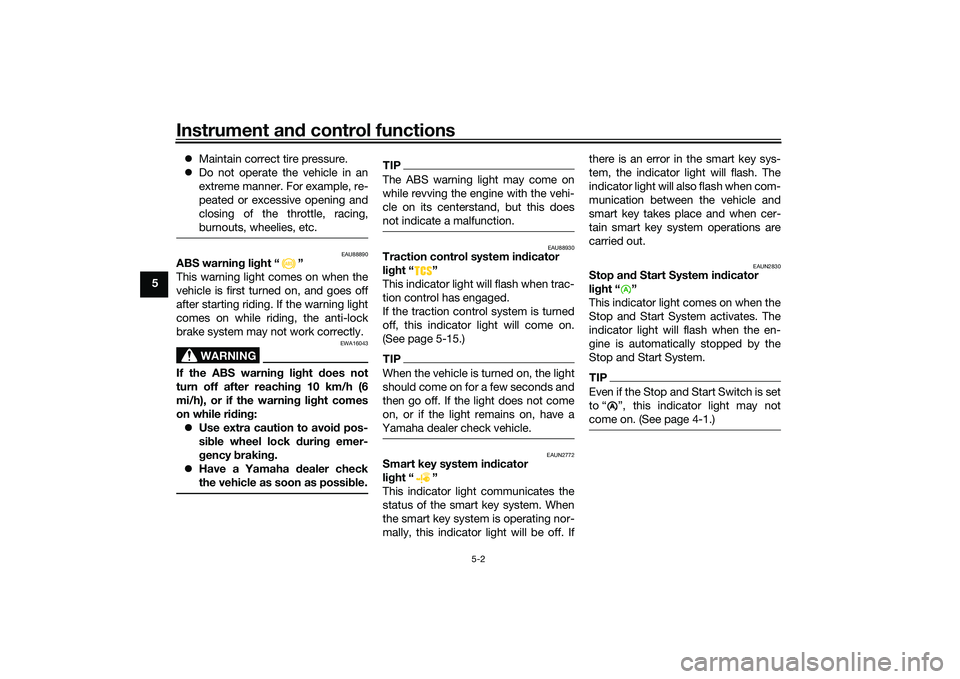
EAU88890
ABS warnin g li ght “ ”
This warning light comes on when the
vehicle is first turned on, and goes off
after starting riding. If the warning light
comes on while riding, the anti-lock
brake system may not work correctly.
WARNING
EWA16043
If the ABS warnin g lig ht does not
turn off after reachin g 10 km/h (6
mi/h), or if the warnin g li ght comes
on while ri din g:
Use extra caution to avoi d pos-
si ble wheel lock d uring emer-
g ency brakin g.
Have a Yamaha dealer check
the vehicle as soon as possi ble.
TIPThe ABS warning light may come on
while revving the engine with the vehi-
cle on its centerstand, but this does
not indicate a malfunction.
EAU88930
Traction control system in dicator
li g ht “ ”
This indicator light will flash when trac-
tion control has engaged.
If the traction control system is turned
off, this indicator light will come on.
(See page 5-15.)TIPWhen the vehicle is turned on, the light
should come on for a few seconds and
then go off. If the light does not come
on, or if the light remains on, have a
Yamaha dealer check vehicle.
EAUN2772
Smart key system in dicator
li g ht “ ”
This indicator light communicates the
status of the smart key system. When
the smart key system is operating nor-
mally, this indicator light will be off. If there is an error in the smart key sys-
tem, the indicator light will flash. The
indicator light will also flash when com-
munication between the vehicle and
smart key takes place and when cer-
tain smart key system operations are
carried out.
EAUN2830
Stop an
d Start System in dicator
li g ht “ ”
This indicator light comes on when the
Stop and Start System activates. The
indicator light will flash when the en-
gine is automatically stopped by the
Stop and Start System.TIPEven if the Stop and Start Switch is set
to “ ”, this indicator light may not
come on. (See page 4-1.)
A
UB9YE1E0.book Page 2 Tuesday, October 12, 2021 2:29 PM
Page 46 of 118
Instrument and control functions
5-12
5 “OIL SERV”: Appears when the oil
change indicator “OIL” starts flashing.
If “OIL SERV” is displayed, change the
engine oil, and then reset the oil
change indicator and oil change trip-
meter.
“V-BELT SERV”: Appears when the V-
belt replacement indicator “V-Belt”
starts flashing. If “V-BELT SERV” is
displayed, replace the V-belt, and then
reset the V-belt replacement indicator
and V-belt replacement tripmeter.
When there are two or more warnings,
the warning messages are displayed in
the following order:
L FUEL →
H TEMP → ICE → OIL SERV
→ VBELT SERV → L FUEL
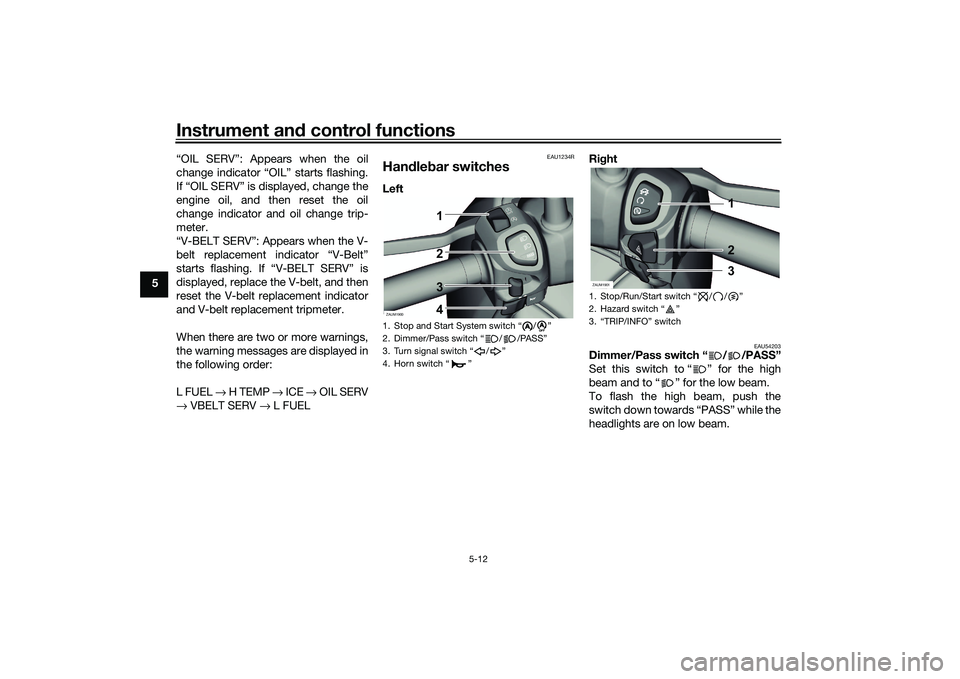
EAU1234R
Han dle bar switchesLeft Ri
ght
EAU54203
Dimmer/Pass switch “ / /PASS”
Set this switch to “ ” for the high
beam and to “ ” for the low beam.
To flash the high beam, push the
switch down towards “PASS” while the
headlights are on low beam.
1. Stop and Start System switch “ / ”
2. Dimmer/Pass switch “ / /PASS”
3. Turn signal switch “ / ”
4. Horn switch “ ”ZAUM1900
1
3
4 2
A
A
1. Stop/Run/Start switch “ / / ”
2. Hazard switch “ ”
3. “TRIP/INFO” switchZAUM1901
1
2
3
UB9YE1E0.book Page 12 Tuesday, October 12, 2021 2:29 PM
Page 47 of 118

Instrument and control functions
5-13
5
EAU12461
Turn si gnal switch “ / ”
To signal a right-hand turn, push this
switch to “ ”. To signal a left-hand
turn, push this switch to “ ”. When
released, the switch returns to the cen-
ter position. To cancel the turn signal
lights, push the switch in after it has re-
turned to the center position.
EAU12501
Horn switch “ ”
Press this switch to sound the horn.
EAU54213
Stop/Run/Start switch “ / / ”
To crank the engine with the starter,
set this switch to “ ”, and then push
the switch down towards “ ”. See
page 7-2 for starting instructions prior
to starting the engine.
Set this switch to “ ” to stop the en-
gine in case of an emergency, such as
when the vehicle overturns or when the
throttle cable is stuck.
EAU78190
Hazar d switch “ ”
With the main switch in the “ON”
or “ ” position, use this switch to turn
on the hazard lights (simultaneous
flashing of all turn signal lights).
The hazard lights are used in case of an
emergency or to warn other drivers
when your vehicle is stopped where it
might be a traffic hazard.NOTICE
ECA10062
Do not use the hazar d lig hts for an
exten ded len gth of time with the en-
g ine not runnin g, otherwise the bat-
tery may d ischarge.
EAU78491
“TRIP/INFO” switch
T h i s s w i t c h i s u s e d t o m a k e s e t t i n g a n d
display changes in the multi-function
meter unit. See page 5-4 for more in-
formation.
To use the “TRIP” switch, move the
“TRIP/INFO” switch in direction (a). To
use the “INFO” switch, move the
“TRIP/INFO” switch in direction (b).
EAU76391
Stop an d Start System
switch “ / ”
To turn on the Stop and Start System,
set the switch to “ ”. To turn off the
Stop and Start System, set this switch
to “ ”. 1. “TRIP/INFO” switchZAUM1899
(b)
(a)
1
A
A
A
A
UB9YE1E0.book Page 13 Tuesday, October 12, 2021 2:29 PM
Page 49 of 118
Instrument and control functions
5-15
5
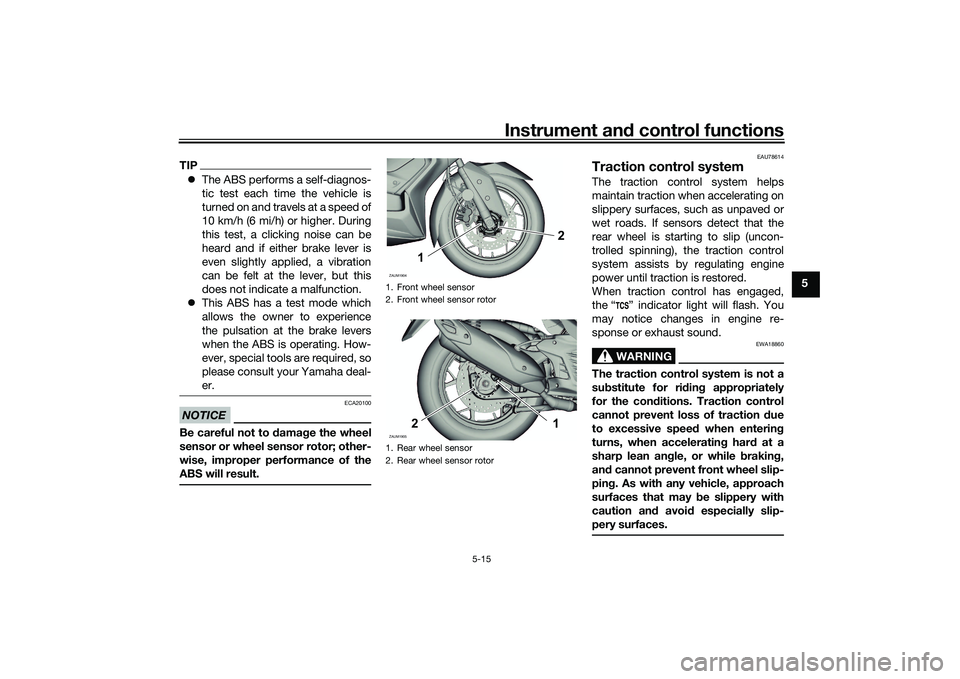
TIP The ABS performs a self-diagnos-
tic test each time the vehicle is
turned on and travels at a speed of
10 km/h (6 mi/h) or higher. During
this test, a clicking noise can be
heard and if either brake lever is
even slightly applied, a vibration
can be felt at the lever, but this
does not indicate a malfunction.
This ABS has a test mode which
allows the owner to experience
the pulsation at the brake levers
when the ABS is operating. How-
ever, special tools are required, so
please consult your Yamaha deal-
er.NOTICE
ECA20100
Be careful not to d amage the wheel
sensor or wheel sensor rotor; other-
wise, improper performance of the
ABS will result.
EAU78614
Traction control systemThe traction control system helps
maintain traction when accelerating on
slippery surfaces, such as unpaved or
wet roads. If sensors detect that the
rear wheel is starting to slip (uncon-
trolled spinning), the traction control
system assists by regulating engine
power until traction is restored.
When traction control has engaged,
the “ ” indicator light will flash. You
may notice changes in engine re-
sponse or exhaust sound.
WARNING
EWA18860
The traction control system is not a
su bstitute for ri din g appropriately
for the con ditions. Traction control
cannot prevent loss of traction d ue
to excessive spee d when enterin g
turns, when acceleratin g har d at a
sharp lean an gle, or while brakin g,
an d cannot prevent front wheel slip-
pin g. As with any vehicle, approach
surfaces that may be slippery with
caution an d avoi d especially slip-
pery surfaces.
1. Front wheel sensor
2. Front wheel sensor rotor
1. Rear wheel sensor
2. Rear wheel sensor rotorZAUM1904
2
1
ZAUM1905ZAUM1905
21
UB9YE1E0.book Page 15 Tuesday, October 12, 2021 2:29 PM
Page 50 of 118
Instrument and control functions
5-16
5 Setting
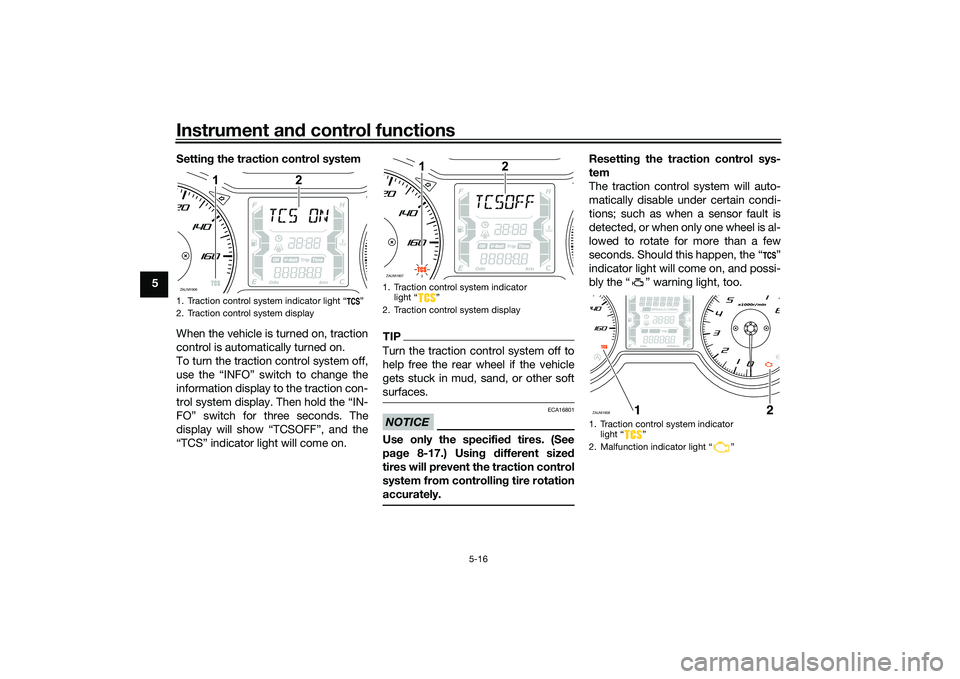
the traction control system
When the vehicle is turned on, traction
control is automatically turned on.
To turn the traction control system off,
use the “INFO” switch to change the
information display to the traction con-
trol system display. Then hold the “IN-
FO” switch for three seconds. The
display will show “TCSOFF”, and the
“TCS” indicator light will come on.
TIPTurn the traction control system off to
help free the rear wheel if the vehicle
gets stuck in mud, sand, or other soft
surfaces.NOTICE
ECA16801
Use only the specifie d tires. (See
pa ge 8-17.) Usin g different size d
tires will prevent the traction control
system from controllin g tire rotation
accurately.
Resettin g the traction control sys-
tem
The traction control system will auto-
matically disable under certain condi-
tions; such as when a sensor fault is
detected, or when only one wheel is al-
lowed to rotate for more than a few
seconds. Should this happen, the “ ”
indicator light will come on, and possi-
bly the “ ” warning light, too.
1. Traction control system indicator light “ ”
2. Traction control system displayZAUM1906
1
2
1. Traction control system indicator light “ ”
2. Traction control system displayZAUM1907
1
2
1. Traction control system indicator light “ ”
2. Malfunction indicator light “ ”ZAUM1908
UB9YE1E0.book Page 16 Tuesday, October 12, 2021 2:29 PM
Page 51 of 118
Instrument and control functions
5-17
5
TIPWhen the vehicle is on the centerstand,
do not rev the engine for an extended
period of time. Otherwise, the traction
control system will automatically dis-
able and need to be reset.If the traction control system automat-
ically disables, try resetting it as fol-
lows.
1. Stop the vehicle and turn it off completely.
2. Wait a few seconds and then turn the vehicle power on.
3. The “ ” indicator light should turn off and the system be en-
abled.TIPIf the “ ” indicator light remains on af-
ter resetting, the vehicle may still be
ridden; however, have a Yamaha deal-
er check the vehicle as soon as possi-
ble.4. Have a Yamaha dealer check thevehicle and turn off the “ ”
warning light.
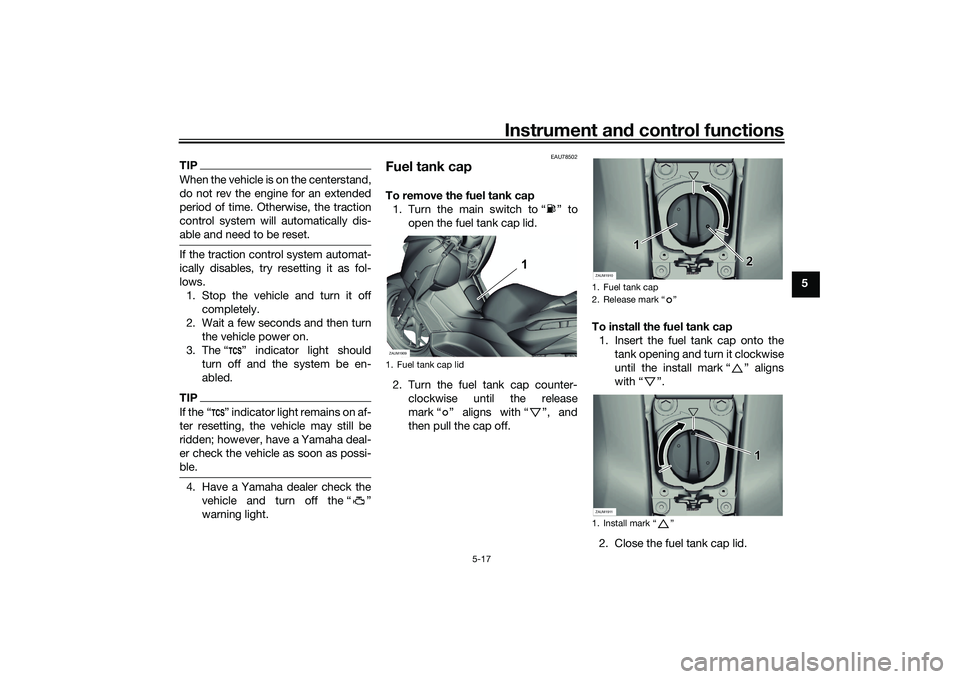
EAU78502
Fuel tank capTo remove the fuel tank cap1. Turn the main switch to “ ” to open the fuel tank cap lid.
2. Turn the fuel tank cap counter- clockwise until the release
mark “ ” aligns with “ ”, and
then pull the cap off. To install the fuel tank cap
1. Insert the fuel tank cap onto the tank opening and turn it clockwise
until the install mark “ ” aligns
with “ ”.
2. Close the fuel tank cap lid.1. Fuel tank cap lidZAUM1909
1
1. Fuel tank cap
2. Release mark “ ”
1. Install mark “ ”ZAUM1910
2
1
ZAUM1911
1
UB9YE1E0.book Page 17 Tuesday, October 12, 2021 2:29 PM
Page 52 of 118
Instrument and control functions
5-18
5
WARNING
EWA11092
Make sure that the fuel tank cap is
properly close d after fillin g fuel.
Leakin g fuel is a fire hazar d.
EAU13213
FuelMake sure there is sufficient gasoline in
the tank.
WARNING
EWA10882
Gasoline an d g asoline vapors are
extremely flamma ble. To avoi d fires
an d explosions an d to re duce the
risk of injury when refuelin g, follow
these instructions.1. Before refueling, turn off the en- gine and be sure that no one is sit-
ting on the vehicle. Never refuel
while smoking, or while in the vi-
cinity of sparks, open flames, or
other sources of ignition such as
the pilot lights of water heaters
and clothes dryers.
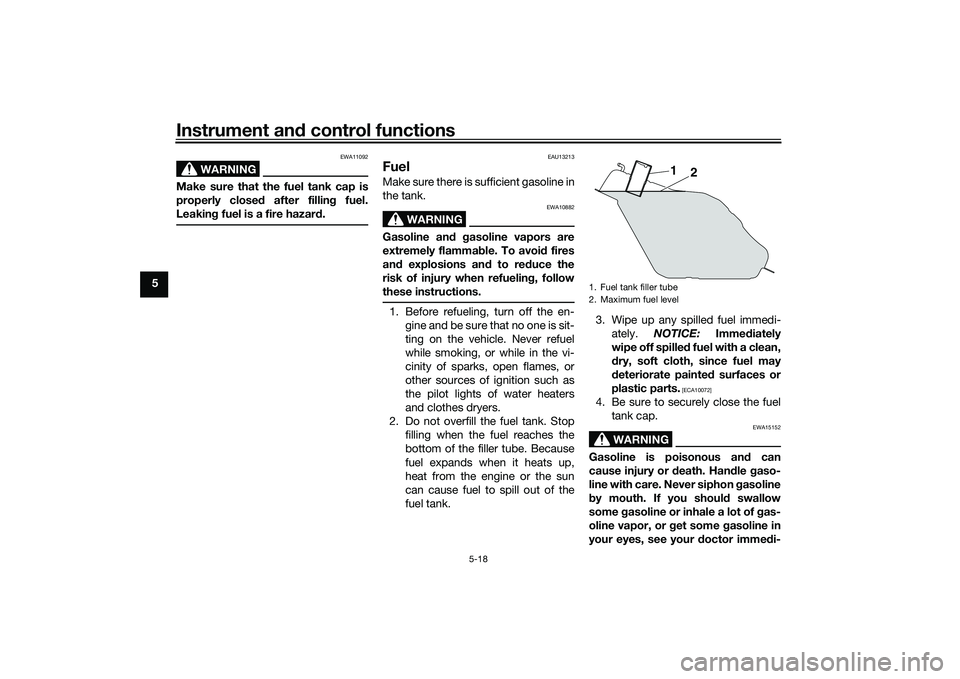
2. Do not overfill the fuel tank. Stop filling when the fuel reaches the
bottom of the filler tube. Because
fuel expands when it heats up,
heat from the engine or the sun
can cause fuel to spill out of the
fuel tank. 3. Wipe up any spilled fuel immedi-
ately. NOTICE: Immediately
wipe off spille d fuel with a clean,
d ry, soft cloth, since fuel may
d eteriorate painted surfaces or
plastic parts.
[ECA10072]
4. Be sure to securely close the fuel tank cap.
WARNING
EWA15152
Gasoline is poisonous an d can
cause injury or death. Han dle gaso-
line with care. Never siphon gasoline
b y mouth. If you shoul d swallow
some gasoline or inhale a lot of g as-
oline vapor, or g et some gasoline in
your eyes, see your doctor imme di-1. Fuel tank filler tube
2. Maximum fuel level
1
2
UB9YE1E0.book Page 18 Tuesday, October 12, 2021 2:29 PM