rest Acura MDX 2007 Navigation Manual
[x] Cancel search | Manufacturer: ACURA, Model Year: 2007, Model line: MDX, Model: Acura MDX 2007Pages: 166, PDF Size: 4.21 MB
Page 31 of 166
30Navigation System
If the system does not find an exact
match, select LIST when you finish
entering the name of the city. Most of
the cities and towns for that state are
listed.
Listings of cities and towns in the non-
detailed coverage area may have an
asterisk “*” next to their names. If you
select one, no detailed street data is
available, and an address cannot be
entered. Try entering the street first, and
then select the city if available.
Select View Dest. Map and use the
Interface Dial to select an icon,
approximate area, or street you wish to
choose as your destination. Otherwise, a
central location of the city will be
selected. If you select a point of interest
(POI) or road in an unverified area, you
may or may not have routing in these
areas. See Map Overview on page 6.Selecting the Street
By Voice Control:
After you have selected the city, or if
you say “Street” on the Find address
by screen, the display changes to the
Say street name screen. Say the street
name and the searching will begin.
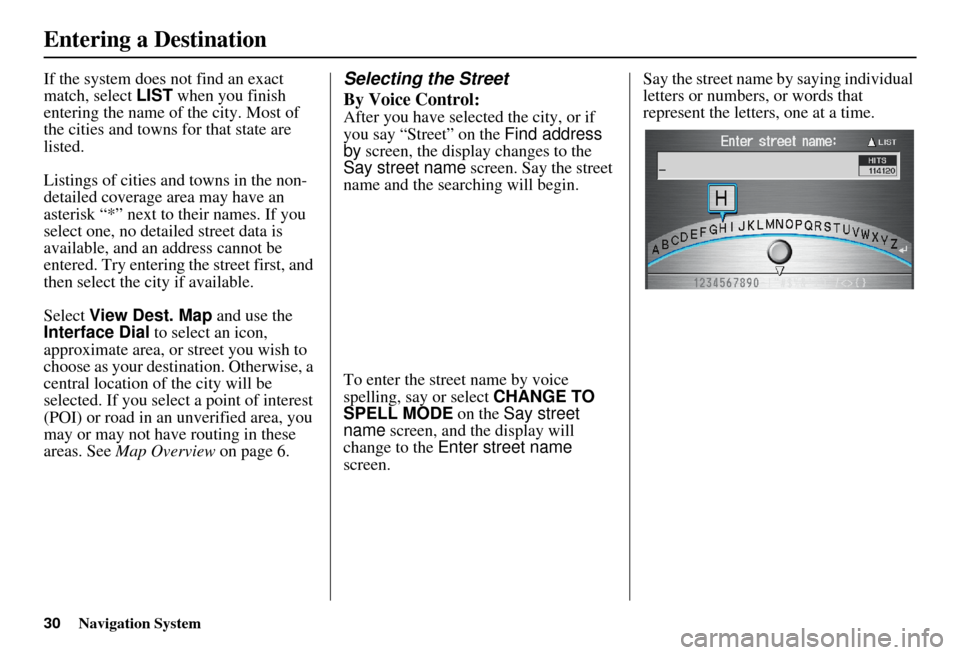
To enter the street name by voice
spelling, say or select CHANGE TO
SPELL MODE on the Say street
name screen, and the display will
change to the Enter street name
screen. Say the street name by saying individual
letters or numbers, or words that
represent the letters, one at a time.
Entering a Destination
Page 33 of 166

32Navigation System
Entering the Street Number
After you have completed the street
name, the display changes to the Enter
street number screen. Use the voice
control system and say the address
number as a continuous string of
numbers. For example, the address 1527
should be spoken as “One, five, two,
seven.” You can also use the Interface
Dial to enter the street number.
If you try to enter a number outside that
range using the voi ce control system,
you will hear beeps. The system
displays the acceptable address range.
If you did not select a city in the
beginning, the street name you selected
might appear in more than one city. The
system will give you a list of cities that
the street appears in. Select the desired
city from the list. The system then
displays the Calculate route to screen
(see Driving to Your Destination on
page 50). Tip:
If the particular address you want
cannot be found, select
Map Input on
the Enter destination by screen and
use the Interface Dial to select the
appropriate location on the map (see By
Map Input on page 45).
Select View Dest. Map and use the
Interface Dial to select an icon,
approximate area, or street you wish to
choose as your destination. Otherwise, a
central location of the street will be
selected. If you select a point of interest
(POI) or road in an unverified area, you
may or may not have routing in these
areas. See Map Overview on page 6.
By Address Book
This selection allows you to choose a
personal address entr y for a destination.
After you select Address Book from
the Enter destination by screen, the
display changes to:
If you have entered a PIN Number in
Setup, the system prompts you to enter
your PIN.
The system then disp lays a list of the
places entered in your personal Address
Book. You can sort the displayed
addresses by Category: ALL,
BUSINESS, PERSONAL, or by other
categories you may create.
Entering a Destination
Page 34 of 166
Navigation System33
Scroll through the list to find your
desired destination. After you select it,
the system then displays the Calculate
route to screen (see Driving to Your
Destination on page 50).
Adding Addresses to the
Personal Address Book
There are two ways to enter addresses to
the personal Address Book:
Entering them in the personal
Address Book feature in Setup (See
page 85).
Adding them in the Address Book directly from the Calculate route to
screen (See page 50).
NOTE:
Destinations chosen from the Address Book do not show up in Previous
Destinations.
Prior to departure, you can set areas to avoid. The system then includes
them in its calculations for the
destination you have entered. See
Edit Avoid Area on page 96.
For information on the available voice commands, see Voice
Command Index on page 140.
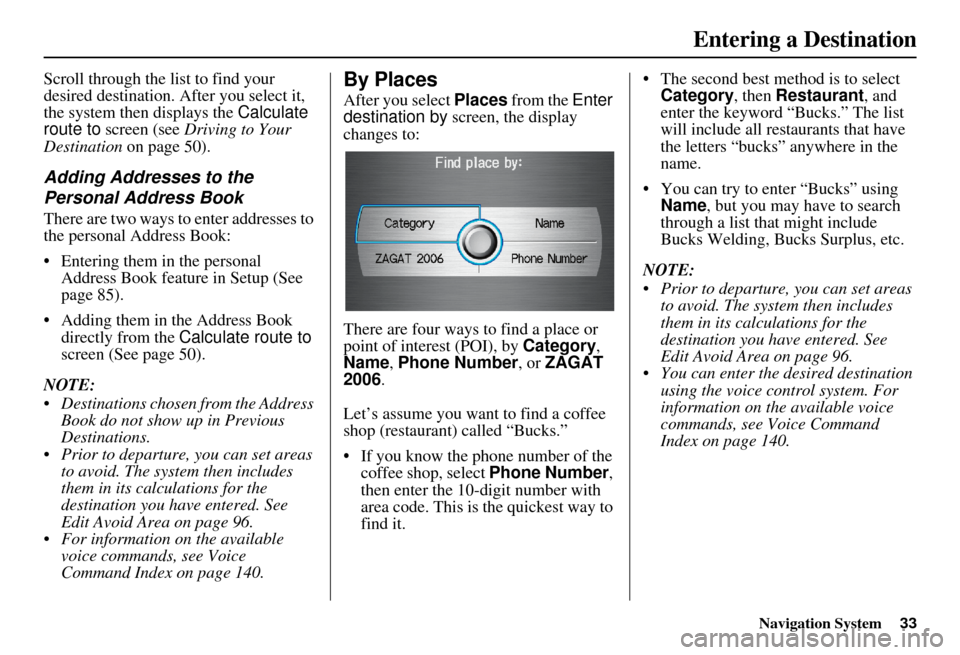
By Places
After you select Places from the Enter
destination by screen, the display
changes to:
There are four ways to find a place or
point of interest (POI), by Category,
Name , Phone Number , or ZAGAT
2006 .
Let’s assume you want to find a coffee
shop (restaurant) called “Bucks.”
If you know the phone number of the coffee shop, select Phone Number,
then enter the 10-digit number with
area code. This is the quickest way to
find it. The second best method is to select
Category , then Restaurant , and
enter the keyword “Bucks.” The list
will include all restaurants that have
the letters “bucks” anywhere in the
name.
You can try to enter “Bucks” using Name , but you may have to search
through a list that might include
Bucks Welding, Bu cks Surplus, etc.
NOTE:
Prior to departure, you can set areas to avoid. The system then includes
them in its calculations for the
destination you have entered. See
Edit Avoid Area on page 96.
You can enter the desired destination using the voice control system. For
information on the available voice
commands, see Voice Command
Index on page 140.
Entering a Destination
Page 35 of 166

34Navigation System
Finding the Place by Category
The Category option gives you a list of
categories or types of businesses to
select from with the following screen:
Tip:
If you are not sure of the spelling of a
place, the best way to find it is to use the
keyword search. Select Category,
choose a category and subcategory
from the menus, then select Place
Name by Keyword , and enter the
partial name. Auto Service
The subcategories are: Acura Dealers,
Honda Dealers, Gas Stations, etc.
Banking
The subcategories are: ATM, Bank, etc.
Community
The subcategories are:
City Hall, Civic/
Community Center, Convention/
Exhibition Center, Court House, Higher
Education, Library, Post Office, and
School, etc.
Emergency
The subcategories are: Hospital, Police
Station, Roadside Assistance, etc.
Lodging
The subcategories are: Bed & Breakfast,
Hotel/Motel, etc.
Leisure
The subcategories are: Amusement
Park, Golf Course, Historical
Monument, Marina, Movie Theater,
Museum, Park/Recreation Area,
Performing Arts, Sports Complex, and
Tourist Attraction. Restaurant
This category is broken down into types
of food, giving you a selection by each
type: All Types, American, French,
Japanese, etc.
The ZAGAT SURVEY for some
restaurants is availa
ble in the system.
See the Information screen, “Key to
Zagat Ratings” for an explanation of
these ratings (see page 79).
On the Select a place screen,
restaurants with a Zagat Rating have a
“Z” icon at the end of the line. To list
only restaurants with Zagat Reviews,
say or select ZAGAT 2006.
You can view the complete Zagat
Review for a selected restaurant by
selecting the “Z” icon.
Entering a Destination
Page 36 of 166

Navigation System35
By voice, select the “Z” icon by saying
“Zagat list number X” (where x is the
line number 1-3). Alternately use the
Interface Dial to first select the line
item, and push the dial to the right to
view the survey.
Say “Read List” or move the Interface
Dial right, and the review will be read to
you. Say OK or push in on the
Interface Dial to display the
Calculate route to screen. See Key to
Zagat Ratings on page 79 for details on
the key to ratings.
Tip:
When trying to find a specific
restaurant, select the category “All
Types.” Some restaurants may be
miscategorized. Shopping (Retail)
The subcategories are: All Shopping,
Accessories/Jewellery, Auto Parts &
Electronics, Books/Music/Video,
Clothing, Groceries, Home
Improvement, Mall/Department Store,
Office Supplies/El
ectronics, Pharmacy/
Drug Store, Pet Food/Supplies, Sewing/
Linen, Shoes/Bags, Sporting Goods, and
Toys/Arts/Crafts.
Tip:
When trying to find a specific shopping
store, select the category “All
Shopping.” Some stores may not be in
the right category.
Travel
The subcategories are: Airport,
Automobile Club, Be d & Breakfast, Bus
Station, Camping, Commuter Rail
Station, Ferry Terminal, Hotel/Motel,
Named Place, Park & Ride, Parking
Garage/House, Parking Lot, Rental Car
Agency, Resort, Rest Area, Ski Area,
Tourist Attraction, Tourist Information,
Train Station, Travel Agency, Track
Stop/Plaza. Advanced (Wholesale and Misc.
Retail)
If you do not find the category or
subcategory you need in the other
options, you can find the categories with
a keyword. When you select this option,
the display changes to the
Enter
keyword for category screen. Enter the
keyword using the Interface Dial.
When the system finds the categories
with the keyword you entered, the
display changes to the Select a
category screen. Select the desired
category.
Entering a Destination
Page 38 of 166

Navigation System37
Sort by Distance to Travel
When you select this option, the system
gives you a list of all the places in the
subcategory. This list is arranged by
distance from your current location,
with the closest at the top of the list.
The distance and direction to the
destination at the top of the list are
shown in the screen. The distance
shown is straight line distance (as the
crow flies), not driving distance. Say or
select the number (1-4) of the desired
destination from the list.
Once you select a place, the system then
displays the Calculate route to screen
(see Driving to Your Destination on
page 50).
City Vicinity
The system allows you to find points of
interest in the vicinity of the city you
entered. When you select this option,
the display changes to Enter city name
screen. Enter the name of the city using
the Interface Dial . If the system does
not find an exact match, select LIST
when you finish entering the name of
the city. Select a desired city from the
list.
Once you have selected the city, the
display changes to Enter a place name
screen. Enter the name of the place
using the Interface Dial .
Once you select a place, the system then
displays the Calculate route to screen
(see Driving to Your Destination on
page 50).
Place Name
When you select this option, the display
changes to Enter a place name screen.
Enter your selection using the
Interface Dial .
Once you select a place, the system then
displays the Calculate route to screen
(see Driving to Your Destination on
page 50).
Entering a Destination
Page 39 of 166
38Navigation System
Finding the Place by Name
The Name option allows you to enter
the name of a business, and then shows
you a list of businesses with the same or
similar names to select from. Use the
name option only if you know the exact
spelling of the place. If unsure, use the
Category option.
Finding the Place by Phone
Number
The Phone Number option allows
you to select a destination by its
telephone number. Only telephone
numbers stored in the system under the
Places (of business) option are
recognized. The system does not contain
residential telephone numbers, or
numbers you may have entered in your
personal Address Book.
Tip:
If you know the phone number of a point
of interest (POI), its uniqueness makes it
the fastest entry method. When using the
voice control system, the entry should be
spoken as a continuous string of
numbers. For example, the telephone
number (310) 555-4000 should be
spoken as “Three, one, zero, five, five,
five, four, zero, zero, zero.”
Finding the Place by Zagat 2006
The ZAGAT 2006 option allows you to
find a restaurant by the Zagat Rating
information.
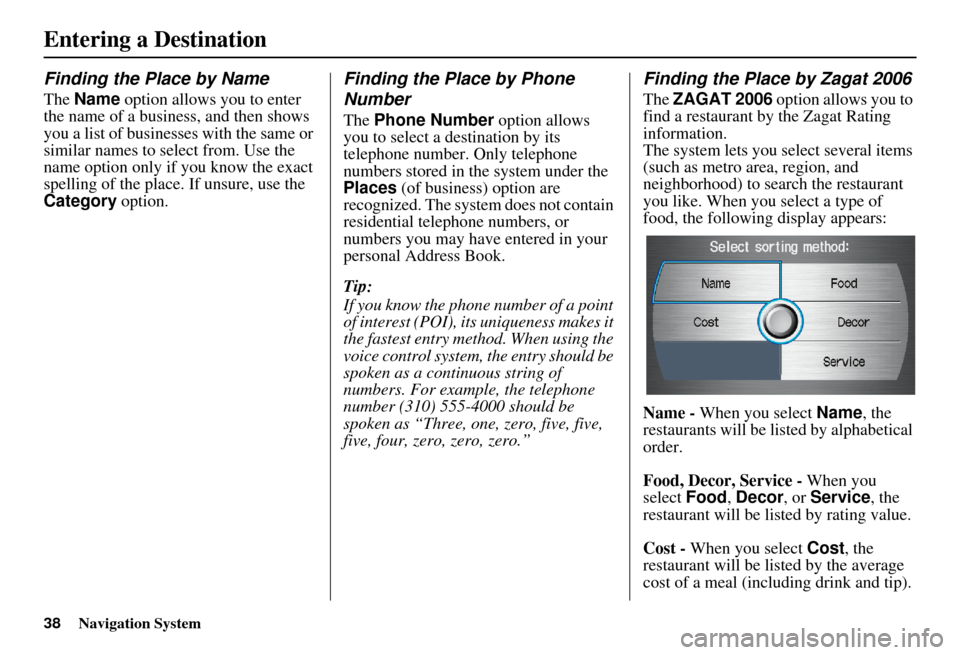
The system lets you select several items
(such as metro area, region, and
neighborhood) to sear ch the restaurant
you like. When you select a type of
food, the following display appears:
Name - When you select Name, the
restaurants will be listed by alphabetical
order.
Food, Decor, Service - When you
select Food, Decor, or Service, the
restaurant will be listed by rating value.
Cost - When you select Cost, the
restaurant will be listed by the average
cost of a meal (including drink and tip).
Entering a Destination
Page 40 of 166

Navigation System39
When you select a sorting method, the
list of restaurants will appear.
You can see the survey for a listed item
by moving the dial to the right, or by
saying “Zagat list number X” (where X
is the number 1-3).
Once you select a restaurant, the system
then displays the Calculate route to
screen (see Driving to Your Destination
on page 50).
NOTE
See Key to Zagat Ratings on page 79 for
details on the key to ratings.By Intersection
After you select Intersection from the
Enter destination by screen, the
display changes to:
Tip:
When entering an address, it is usually
easier to enter the street first. A city or
cities that the street appears in will be
displayed. For your convenience, you
do not have to enter both city and street. NOTE:
If you find that your city is not listed,
it may be part of a larger
metropolitan area. Try entering the
street first.
Prior to departure, you can set areas to avoid. The system then includes
them in its calculations for the
destination you have entered. See
Edit Avoid Area on page 96.
Selecting the State or Province
The state you are in is displayed at the
top of the screen. If your desired
destination is in another state, select
CHANGE STATE by moving the
Interface Dial down.
The display then changes to the Select
a state screen. Use the voice control
system and say the name of the state, or
rotate the Interface Dial knob to
select the state.
Entering a Destination
Page 42 of 166

Navigation System41
By Interface Dial:
Select City, and the display then
changes to the Enter city name screen.
Use the Interface Dial to enter the
name of the city.
The system will display a list of city
names, with the closest match to the
name you entered at the top of the list.
Select the number (1 -6) of the desired
city from the list. If the system does not find an exact
match, select
LIST when you finish
entering the name of the city. Most of
the cities and towns for that state are
listed.
Listings of cities and towns in the non-
detailed coverage area may have an
asterisk “*” next to their names. If you
select one, no detail street data is
available, and an address cannot be
entered. See Map Coverage on
page 118.
Select View Dest. Map and use the
Interface Dial to select an icon,
approximate area, or street you wish to
choose as your destination. Otherwise, a
central location of the city will be
selected. If you select a point of interest
(POI) or road in an unverified area, you
may or may not have routing in these
areas. See Map Overview on page 6
Selecting the Street
By Voice Control:
After you have selected the city, or if
you say “Street” on the Find
intersection by screen, the display
changes to the Say street name screen.
Say the street name and the searching
will begin.
To enter the street name by voice
spelling, say or select CHANGE TO
SPELL MODE on the Say street
name screen, and the display will
change to the Enter street name
screen.
Entering a Destination
Page 44 of 166

Navigation System43
The system will display a list of street
names, with the closest match to the
name you entered at the top of the list.
Select the number (1-6) of the desired
street from the list.
After you have completed the first street
name, the display changes to the Enter
intersecting street screen.
Enter the name of the other intersecting
street by saying the item number, or
selecting the item number using the
Interface Dial . If you did not select a city in the
beginning, and the intersection appears
in more than one city, you will see the
Select a city screen. The system will
give you a list of cities that the
intersection appears in. Select the
desired city from the list. If more than
one intersection appears in the city,
select the desired intersection from the
Select an intersection
screen. The
system then displays the Calculate
route to screen (see Driving to Your
Destination on page 50).
Tip:
If the particular intersection you want
cannot be found, select Map Input and
use the Interface Dial to select the
appropriate location on the map (see By
Map Input on page 45). Select
View Dest. Map and use the
Interface Dial to select an icon,
approximate area, or street you wish to
choose as your destination. Otherwise, a
central location of the street will be
selected. If you select a point of interest
(POI) or road in an unverified area, you
may or may not have routing in these
areas. See Map Overview on page 6.
Entering a Destination