rest Acura MDX 2007 Navigation Manual
[x] Cancel search | Manufacturer: ACURA, Model Year: 2007, Model line: MDX, Model: Acura MDX 2007Pages: 166, PDF Size: 4.21 MB
Page 51 of 166

50Navigation System
Driving to Your Destination
Driving to Your Destination
A route typically has 3 phases.
Initial route calculation (Calculate
route to screen) (see page 50)
Change the route while on route (see page 70).
Resume the route when restarting the engine (see page 75).
Calculate Route to Screen
Say or select OK. The system calculates
the route using the method shown on the
screen (see Map Screen on page 53).
NOTE:
Prior to departure, you can set areas to avoid. The system then includes
them in its calculations for the
destination you have entered. See
Edit Avoid Area on page 96.
For information on the available voice commands, see Voice
Command Index on page 140 Further selections from the
Calculate
route to screen include:
ADD TO Address Book
Allows you to add the destination to
your Address Book. See By Address
Book on page 32.
NOTE:
If the button is grayed out, the
destination is already in your Address
Book.
ADD TO Today’s Destinations
Allows you to add the destination to
your Today’s Destination list. See By
Today’s Destinations on page 47.
NOTE:
If the button is grayed out, the Today’s
Destination list is already full (5
destinations have been stored).
CALL
Dials the number on the screen when
available. See HandsFreeLink™ on
page 18.
Page 55 of 166
54Navigation System
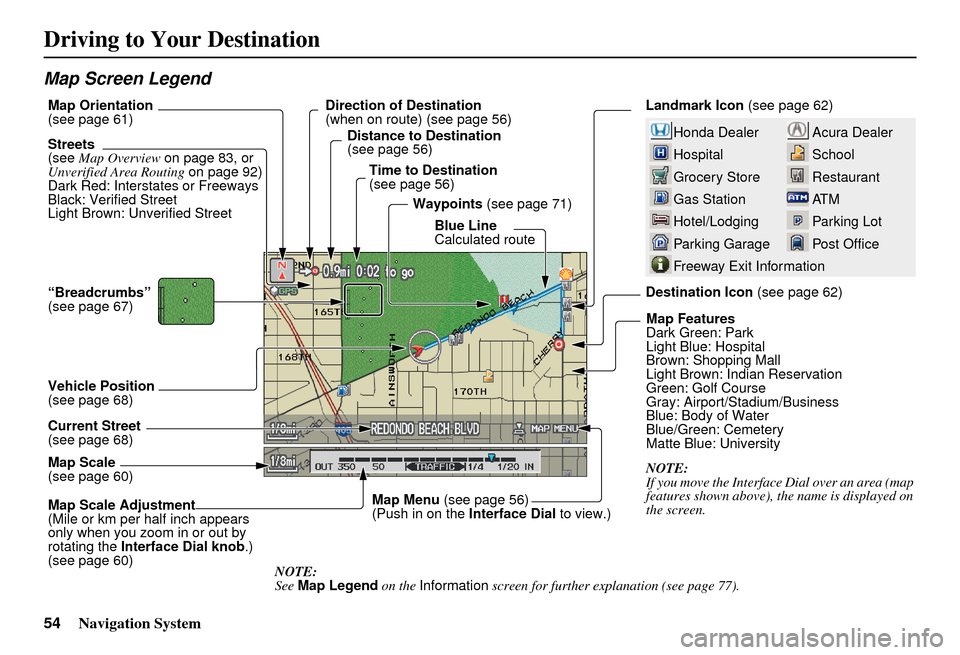
Map Screen Legend
Acura Dealer
School
Restaurant
AT M
Parking Lot
Post OfficeHonda Dealer
Hospital
Grocery Store
Gas Station
Hotel/Lodging
Parking Garage
Freeway Exit Information
Landmark Icon (see page 62)
Destination Icon (see page 62)
Map Features
Dark Green: Park
Light Blue: Hospital
Brown: Shopping Mall
Light Brown: Indian Reservation
Green: Golf Course
Gray: Airport/Stadium/Business
Blue: Body of Water
Blue/Green: Cemetery
Matte Blue: University
NOTE:
If you move the Interface Dial over an area (map
features shown above), the name is displayed on
the screen.
Map Scale Adjustment
(Mile or km per half inch appears
only when you zoom in or out by
rotating the
Interface Dial knob .)
(see page 60) NOTE:
See Map Legend on the Information screen for further explanation (see page 77).
Map Scale
(see page 60) Current Street
(see page 68) Vehicle Position
(see page 68) “Breadcrumbs”
(see page 67) Streets
(see
Map Overview on page 83, or
Unverified Area Routing on page 92)
Dark Red: Interstates or Freeways
Black: Verified Street
Light Brown: Unverified Street Direction of Destination
(when on route) (see page 56)
Map Orientation
(see page 61)
Distance to Destination
(see page 56)
Time to Destination
(see page 56) Waypoints (see page 71)
Blue Line
Calculated route
Map Menu (see page 56)
(Push in on the Interface Dial to view.)
Driving to Your Destination
Page 57 of 166
56Navigation System
Distance and Time to
Destination
When you select a destination, the
distance to the destination is the actual
road distance of the calculated route,
and “not as the crow flies.” When
viewing a list of destinations (points of
interest), such as restaurants, the
distance is “as the crow flies” (see Sort
by Distance to Travel on page 37).
The displayed time to destination may
differ from the actual travel time
because the time is calculated based on
the posted road speed data and your
current speed. If part of your route
includes unverified roads, the “distance”
and “time to go” fo r that portion is
estimated using 25 mph as an average
speed.
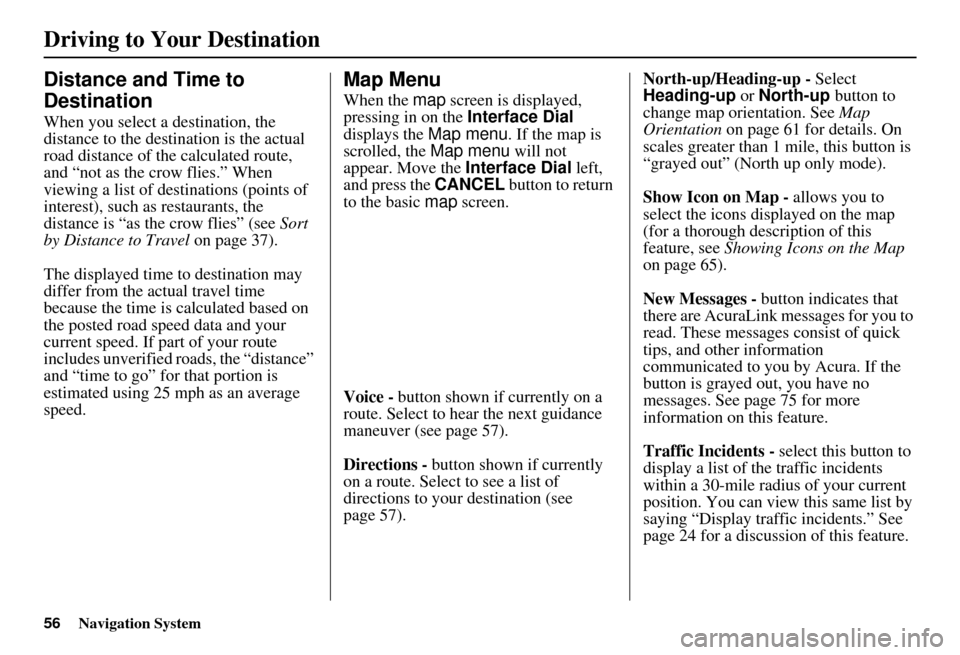
Map Menu
When the map screen is displayed,
pressing in on the Interface Dial
displays the Map menu. If the map is
scrolled, the Map menu will not
appear. Move the Interface Dial left,
and press the CANCEL button to return
to the basic map screen.
Voice - button shown if currently on a
route. Select to hear the next guidance
maneuver (see page 57).
Directions - button shown if currently
on a route. Select to see a list of
directions to your destination (see
page 57). North-up/Heading-up -
Select
Heading-up or North-up button to
change map orientation. See Map
Orientation on page 61 for details. On
scales greater than 1 mile, this button is
“grayed out” (North up only mode).
Show Icon on Map - allows you to
select the icons displayed on the map
(for a thorough description of this
feature, see Showing Icons on the Map
on page 65).
New Messages - button indicates that
there are AcuraLink messages for you to
read. These messages consist of quick
tips, and other information
communicated to you by Acura. If the
button is grayed out, you have no
messages. See page 75 for more
information on this feature.
Traffic Incidents - select this button to
display a list of the traffic incidents
within a 30-mile radius of your current
position. You can view this same list by
saying “Display traffic incidents.” See
page 24 for a discussion of this feature.
Driving to Your Destination
Page 63 of 166
62Navigation System
Destination Icon
The destination icon only shows the
approximate location of the destination.
This occurs because a city block can
have as many as 100 possible addresses
(for example, the 1400 block is followed
by the 1500 block.) Since most cities
use only a portion of the 100 possible
addresses (for example, in the 1400
block, the addresses may only go up to
1425 before the 1500 block starts).
Therefore, the address 1425 will be
shown a quarter of the way down the
block by the system instead of near the
end of the block where the destination is
actually located.
Tip:
When on a route, you can view a map
showing your destination. Using voice
control, say “Display destination map.”
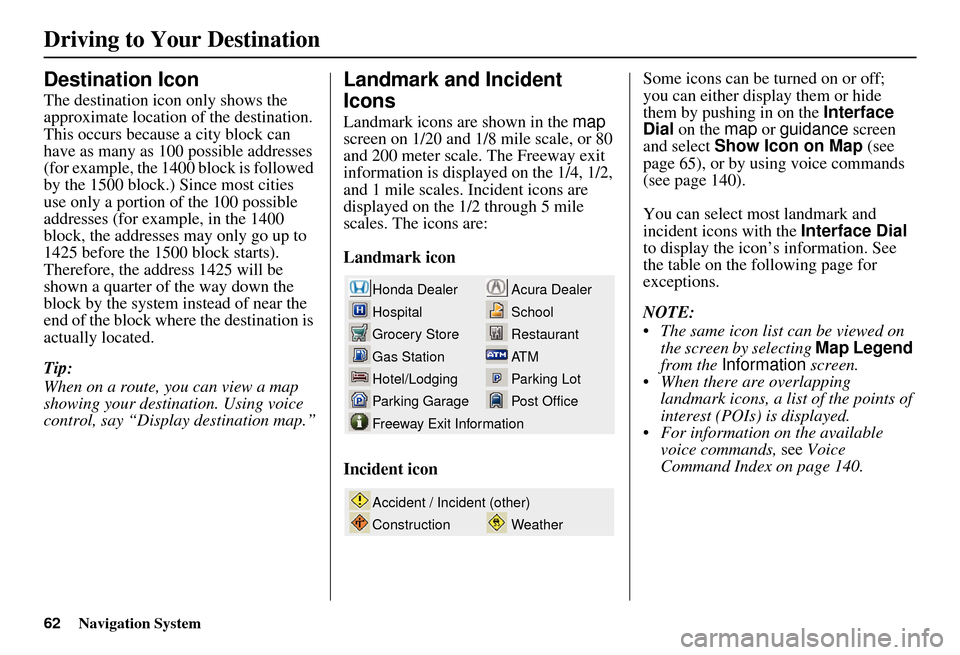
Landmark and Incident
Icons
Landmark icons are shown in the map
screen on 1/20 and 1/8 mile scale, or 80
and 200 meter scale. The Freeway exit
information is displayed on the 1/4, 1/2,
and 1 mile scales. Incident icons are
displayed on the 1/2 through 5 mile
scales. The icons are:
Landmark icon
Incident icon Some icons can be turned on or off;
you can either display them or hide
them by pushing in on the
Interface
Dial on the map or guidance screen
and select Show Icon on Map (see
page 65), or by using voice commands
(see page 140).
You can select most landmark and
incident icons with the Interface Dial
to display the icon’s information. See
the table on the following page for
exceptions.
NOTE:
The same icon list can be viewed on the screen by selecting Map Legend
from the Information screen.
When there are overlapping landmark icons, a list of the points of
interest (POIs) is displayed.
For information on the available voice commands, see Voice
Command Index on page 140.
Acura Dealer
School
Restaurant
AT M
Parking Lot
Post OfficeHonda Dealer
Hospital
Grocery Store
Gas Station
Hotel/Lodging
Parking Garage
Freeway Exit Information
Weather
Accident / Incident (other)
Construction
Driving to Your Destination
Page 64 of 166

Navigation System63
Driving to Your Destination
For some icons you can choose either to show or hide them on th e map, while others like Acura Dealers, are always shown. The
table below shows the features for each icon type. Some Points of Interest (POIs) like Police Stations are not shown as an icon ,
but you can still locate the near est one with the voice command, “Find nearest Police station.”
Landmark icon
POI type Icon can be
manually
displayedIcon can be
manually
hiddenIcon
selection by
voiceIcon can be selected as
a destination on the
map
screen with the
Interface Dial POI can be found on
the
map screen using
voice command
“Find...”
Honda/Acura dealer Ye s, always No No Yes Yes
Hospital Yes Yes Yes Yes Yes
School Yes Yes Yes Yes Yes
ATM Yes Yes Yes Yes Yes
Gas station *1 Yes Yes Yes Yes Yes
Restaurants *2 Yes Yes Yes Yes Yes
Post office Yes Yes Yes Yes Yes
Grocery store Yes Yes Yes Yes Yes
Hotel/ Lodging Yes Yes Yes Yes Yes
Police station No icon No icon No No Yes
Shopping, Tourist attraction, Bank No icon No icon No NoYes
Parking garage Yes Yes Yes Yes Yes
Parking lot Yes Yes Yes Yes Yes
Freeway exit information Yes Yes Yes Yes (choose POI) No
Page 65 of 166

64Navigation System
Incident icon
*1. When gas station icons are selected for view on the map, some icons are shown as “brand icons.”
*2. When selecting Restaurant on the Select category for icon settings screen (see Icon Options on page 65), specialty types
of restaurants, like Chinese or Italian, can be individually displayed or hidden. See Show Icon on Map on page 139. Also see
the Voice Command Index on page 140 for the “Display,” “Hide,” and “Find” commands.
*3. You can display the nearest traffic incide nts by saying, “Display traffic incidents.”
POI typeIcon can be
manually
displayedIcon can be
manually
hiddenIcon
selection by
voiceIcon can be selected as
a destination on the
map
screen with the
Interface Dial POI can be found on
the
map screen using
voice command
“Find...”
Traffic Speed Yes Yes Yes No No
Traffic Incident Yes Yes Yes No Yes *3
Driving to Your Destination
Page 66 of 166
Navigation System65
Driving to Your Destination
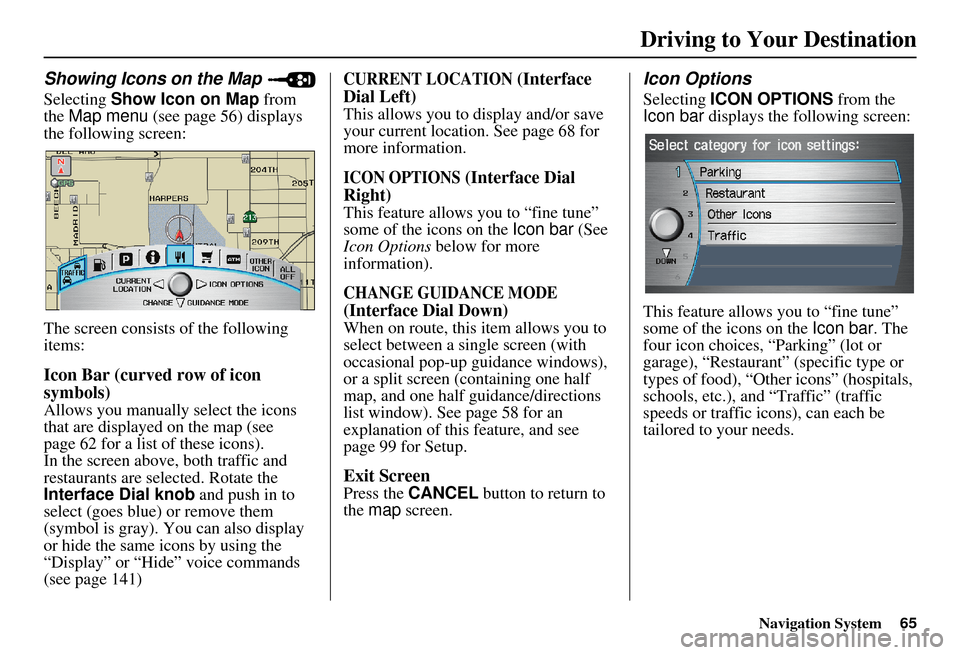
Showing Icons on the Map
Selecting Show Icon on Map from
the Map menu (see page 56) displays
the following screen:
The screen consists of the following
items:
Icon Bar (curved row of icon
symbols)
Allows you manually select the icons
that are displayed on the map (see
page 62 for a list of these icons).
In the screen above, both traffic and
restaurants are selected. Rotate the
Interface Dial knob and push in to
select (goes blue) or remove them
(symbol is gray). You can also display
or hide the same icons by using the
“Display” or “Hide” voice commands
(see page 141)
CURRENT LOCATION (Interface
Dial Left)
This allows you to display and/or save
your current location. See page 68 for
more information.
ICON OPTIONS (Interface Dial
Right)
This feature allows you to “fine tune”
some of the icons on the Icon bar (See
Icon Options below for more
information).
CHANGE GUIDANCE MODE
(Interface Dial Down)
When on route, this item allows you to
select between a single screen (with
occasional pop-up guidance windows),
or a split screen (containing one half
map, and one half guidance/directions
list window). See page 58 for an
explanation of this feature, and see
page 99 for Setup.
Exit Screen
Press the CANCEL button to return to
the map screen.
Icon Options
Selecting ICON OPTIONS from the
Icon bar displays the following screen:
This feature allows you to “fine tune”
some of the icons on the Icon bar. The
four icon choices, “Parking” (lot or
garage), “Restaurant” (specific type or
types of food), “Other icons” (hospitals,
schools, etc.), and “Traffic” (traffic
speeds or traffic icons), can each be
tailored to your needs.
Page 71 of 166
70Navigation System
Changing the Route
While on route, you may wish to alter
your route, add an interim “Waypoint”
(pit stop), choose a different destination,
or cancel your current destination.
To change your present route, you can
do any of the following:
Say “Menu,” or press the MENU button
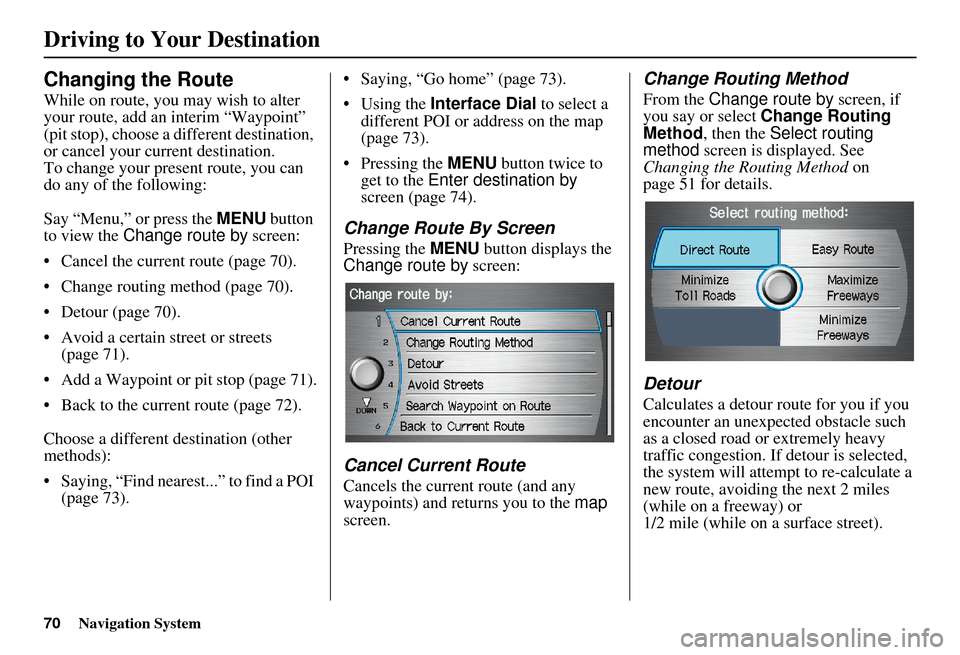
to view the Change route by screen:
Cancel the current route (page 70).
Change routing method (page 70).
Detour (page 70).
Avoid a certain street or streets (page 71).
Add a Waypoint or pit stop (page 71).
Back to the current route (page 72).
Choose a different destination (other
methods):
Saying, “Find nearest...” to find a POI (page 73). Saying, “Go home” (page 73).
Using the
Interface Dial to select a
different POI or address on the map
(page 73).
Pressing the MENU button twice to get to the Enter destination by
screen (page 74).
Change Route By Screen
Pressing the MENU button displays the
Change route by screen:
Cancel Current Route
Cancels the current route (and any
waypoints) and returns you to the map
screen.
Change Routing Method
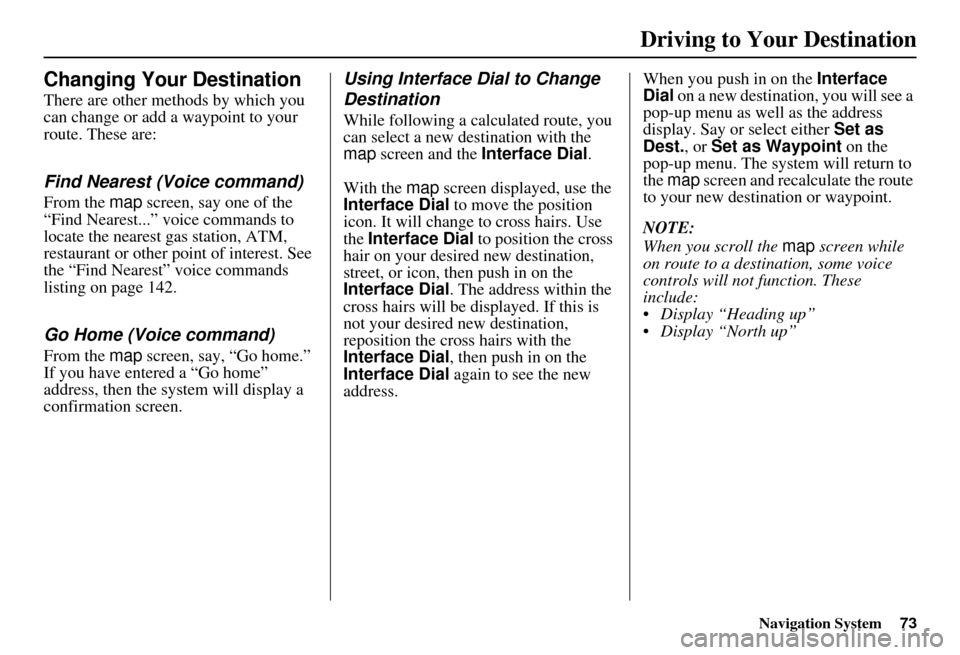
From the Change route by screen, if
you say or select Change Routing
Method , then the Select routing
method screen is displayed. See
Changing the Routing Method on
page 51 for details.
Detour
Calculates a detour route for you if you
encounter an unexp ected obstacle such
as a closed road or extremely heavy
traffic congestion. If detour is selected,
the system will attempt to re-calculate a
new route, avoiding the next 2 miles
(while on a freeway) or
1/2 mile (while on a surface street).
Driving to Your Destination
Page 74 of 166
Navigation System73
Driving to Your Destination
Changing Your Destination
There are other methods by which you
can change or add a waypoint to your
route. These are:
Find Nearest (Voice command)
From the map screen, say one of the
“Find Nearest...” voice commands to
locate the nearest gas station, ATM,
restaurant or other point of interest. See
the “Find Nearest” voice commands
listing on page 142.
Go Home (Voice command)
From the map screen, say, “Go home.”
If you have entered a “Go home”
address, then the system will display a
confirmation screen.
Using Interface Dial to Change
Destination
While following a calculated route, you
can select a new destination with the
map screen and the Interface Dial .
With the map screen displayed, use the
Interface Dial to move the position
icon. It will change to cross hairs. Use
the Interface Dial to position the cross
hair on your desired new destination,
street, or icon, then push in on the
Interface Dial . The address within the
cross hairs will be displayed. If this is
not your desired new destination,
reposition the cross hairs with the
Interface Dial , then push in on the
Interface Dial again to see the new
address. When you push in on the
Interface
Dial on a new destination, you will see a
pop-up menu as well as the address
display. Say or select either Set as
Dest. , or Set as Waypoint on the
pop-up menu. The syst em will return to
the map screen and recalculate the route
to your new destination or waypoint.
NOTE:
When you scroll the map screen while
on route to a destination, some voice
controls will not function. These
include:
Display “Heading up”
Display “North up”
Page 75 of 166

74Navigation System
Entering a Destination from the
Menu Screen (while on route)
If you say “Menu” or press the MENU
button twice, the sy stem displays the
Enter destination by screen. Follow
the procedure described in Entering a
Destination , which begins on page 27.
After selecting OK to the Calculate
route to screen, your new location can
be used either as a waypoint or as a
replacement destination.
Continue Trip Screen
If you restart the vehicle, without having
completed your prior trip, you will see
the following screen:
To continue to your destination or other waypoints, say or select OK.
To cancel your destination, press the CANCEL button or the NAVI
BACK button on the steering wheel,
or using the voice control system, say
“Cancel” or “Back.”
If you wish to change the routing method, say or select CHANGE
METHOD by moving the Interface
Dial down. For additional information on
changing the routing method, see
Changing the Routing Method on
page 51.
Driving to Your Destination