rest Acura MDX 2007 Navigation Manual
[x] Cancel search | Manufacturer: ACURA, Model Year: 2007, Model line: MDX, Model: Acura MDX 2007Pages: 166, PDF Size: 4.21 MB
Page 143 of 166

142Navigation System
Voice Command Index
Hide: (hide the selected icon from the
screen)
ATM
gas station
restaurant
post office
grocery store
lodging (hotel, motel)
parking garage
parking lot
school
hospital
freeway exit information
Traffic (hides both traffic icons
and speed flow. See page 22)
Traffic speeds (hides the traffic
flow bands alongside the road.
See page 22)
Traffic icons (hides the traffic
icons. See page 22)Find Place Commands
The system accepts these commands on
a map/guidance screen.
Find nearest: (find the nearest
selection)
ACURA dealers
HONDA dealers
gas station
hydrogen station
ATM
bank
post office
hospital
police station
hotel
tourist attraction
shopping (all shopping types)
parking garage
parking lot
other car dealers
auto parts & electronics
auto repair & maintenance
car wash & detailing
motorcycle dealers
roadside assistance
check cashing currency exchange
veterinarian
business
civic center
convention center
library
school
city hall
court house
higher education
amusement park
golf course
historical monument
marina
movie theater
museum
park
performing arts
sports complex
bed & breakfast
accessory store
book store
clothing store
grocery store
home improvement store
mall
Page 144 of 166
Navigation System143
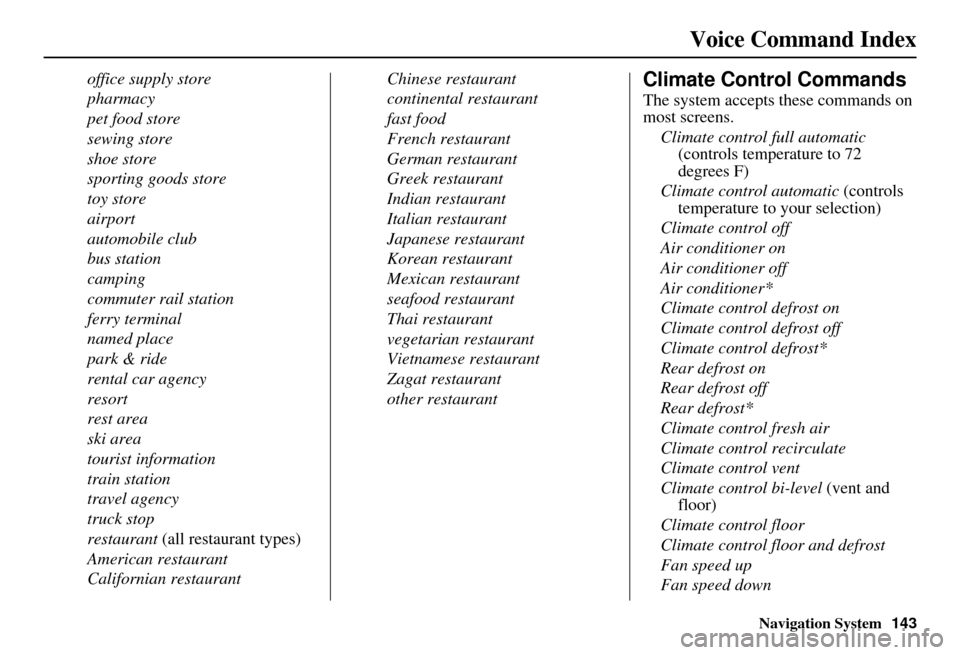
Voice Command Index
office supply store
pharmacy
pet food store
sewing store
shoe store
sporting goods store
toy store
airport
automobile club
bus station
camping
commuter rail station
ferry terminal
named place
park & ride
rental car agency
resort
rest area
ski area
tourist information
train station
travel agency
truck stop
restaurant (all restaurant types)
American restaurant
Californian restaurant Chinese restaurant
continental restaurant
fast food
French restaurant
German restaurant
Greek restaurant
Indian restaurant
Italian restaurant
Japanese restaurant
Korean restaurant
Mexican restaurant
seafood restaurant
Thai restaurant
vegetarian restaurant
Vietnamese restaurant
Zagat restaurant
other restaurantClimate Control Commands
The system accepts these commands on
most screens.
Climate control full automatic (controls temperature to 72
degrees F)
Climate control automatic (controls
temperature to your selection)
Climate control off
Air conditioner on
Air conditioner off
Air conditioner*
Climate control defrost on
Climate control defrost off
Climate control defrost*
Rear defrost on
Rear defrost off
Rear defrost*
Climate control fresh air
Climate control recirculate
Climate control vent
Climate control bi-level (vent and
floor)
Climate control floor
Climate control floor and defrost
Fan speed up
Fan speed down
Page 163 of 166

162Navigation System
Index
O
Off-road Tracking
...................67, 101
On-Screen Commands...................155
On-Screen Spelling Assist.............156
P
PC Card
........................................117
Personal Information.......................84
Phone Number..........................33, 38
PIN Number...................................88
Place Name..............................36, 37
Place Name by Keyword.................36
Places.................................27, 33, 86
Previous Destinations..........27, 44, 86
R
Radio Voice Commands
................145
Read List..................................35, 77
Rear CD Voice Commands............150
Rear DVD Voice Commands.........151
Rear MP3/WMA Voice Commands151
Rear Radio Voice Commands........150
Rear Single CD Voice Commands..152
Rear Single DVD Voice Commands
.................................153
Rear Single MP3/WMA Voice Commands
................................ 153
Rear View Camera................. 12, 107
Recalculation........................... 67, 91
Reporting Errors.......................... 114
Rerouting...................................... 91
Restaurant..................................... 34
Roadside Assistance....................... 81
Route.......................... 50, 53, 67, 70
Routing & Guidance....................... 91
Routing Method............................. 51
S
Save Current Location
.................... 68
Schedule........................................ 78
Screen........................................... 12
Search Waypoint on Route.............. 71
Security Code.............................. 109
Selecting the City..................... 28, 40
Selecting the State.................... 28, 39
Selecting the Street................... 30, 41
SET UP button............................... 10
Setup Screen (first) Commands..... 155
Shopping....................................... 35
Show Icon on Map......................... 62
Single CD Voice Commands........ 147
Single DVD Voice Commands...... 148
Single MP3/WMA Voice Commands
................................ 149
Sort by Distance to Travel............... 37
Split Screen Guidance.................... 58
State.................................. 28, 39, 46
Street....................................... 30, 41
Switching Display Mode............... 104
System Controls............................. 10
System Function Diagram............... 26
System Information...................... 107
System Initialization..................... 109
System Limitations....................... 111
System Set-up................................ 82
System Start-up.............................. 17
T
Temperature Voice Commands
..... 144
Time Adjustment......................... 101
Today’s Destination List................. 48
Today’s Destinations................ 27, 47
Traffic Display Legend................... 22
Traffic Flow................................... 23
Traffic Incident........................ 24, 64
Traffic Speed................................. 64
Travel............................................ 35
Troubleshooting........................... 136
Page 166 of 166

Navigation System165
the SOFTWARE after the date you obtain
your initial copy of the SOFTWARE
(“Supplemental Components”).
If ALPINE ELEC
TRONICS,INC.,
provides or makes available to you
Supplemental Components and no other
EULA terms are provided along with the
Supplemental Components, then the
terms of this EULA shall apply.
If MS, Microsoft Corporation or their affiliates make av ailable Supplemental
Components, and no other EULA terms
are provided, then the terms of this
EULA shall apply, except that the MS,
Microsoft Corporation or affiliate entity
providing the Supplemental
Component(s) shall be the licensor of the
Supplemental Component(s).
ALPINE ELECTRONICS,INC.,, MS,
Microsoft Corporation and their affiliates
reserve the right to di scontinue any Internet-
based services provided to you or made
available to you through the use of the
SOFTWARE. RECOVERY MEDIA.
If SOFTWARE is
provided by ALPINE
ELECTRONICS,INC., on separate media
and labeled “Recovery Media” you may use
the Recovery Media solely to restore or
reinstall the SOFTWARE originally
installed on the DEVICE.
SOFTWARE TRANSFER ALLOWED
BUT WITH RESTRICTIONS. You may
permanently transfer rights under this
EULA only as part of a permanent sale or
transfer of the Device, and only is the
recipient agrees to this EULA. If the
SOFTWARE is an upgrade, any transfer
must also include all prior versions of the
SOFTWARE.
EXPORT RESTRICTIONS. You
acknowledge that SOFTWARE is of US-
origin. You agree to comply with all
applicable international and national laws
that apply to the SOFTWARE, including the
U.S.Export Administra tion Regulations, as
well as end-user, end-use and
country destination restrictions issued by
U.S. and other governments.
For additional information on exporting the
SOFTWARE, see http://
www.microsoft.com/exporting/.