display Acura MDX 2016 Navigation Manual
[x] Cancel search | Manufacturer: ACURA, Model Year: 2016, Model line: MDX, Model: Acura MDX 2016Pages: 349, PDF Size: 14.87 MB
Page 249 of 349
248
XX
Text/E-mail Message
XDisplaying Messages
Bluetooth® HandsFreeLink®
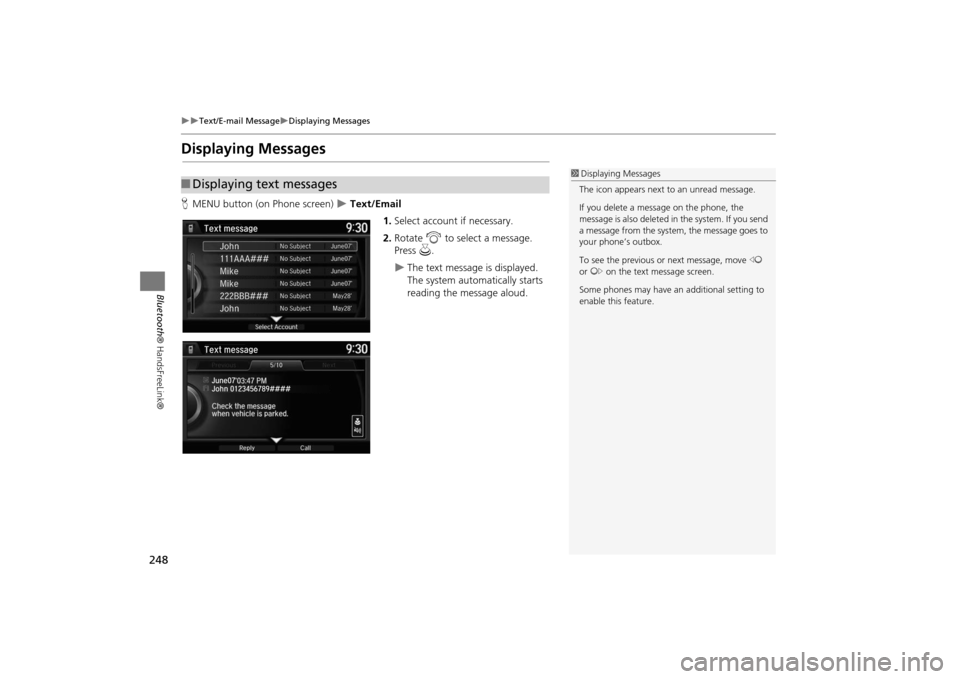
Displaying MessagesHMENU button (on Phone screen)
X Text/Email
1.Select account if necessary.
2. Rotate i to select a message.
Press u.
X
The text message is displayed.
The system automatically starts
reading the message aloud.
■Displaying text messages
1 Displaying Messages
The icon appears next to an unread message.
If you delete a message on the phone, the
message is also deleted in the system. If you send
a message from the system, the message goes to
your phone’s outbox.
To see the previous or next message, move w
or y on the text message screen.
Some phones may have an additional setting to
enable this feature.
MDX_KA-31TZ58200.book 248 ページ 2014年12月18日 木曜日 午後3時59分
Page 250 of 349
249
XX
Text/E-mail Message
XDisplaying Messages
Bluetooth® HandsFreeLink®
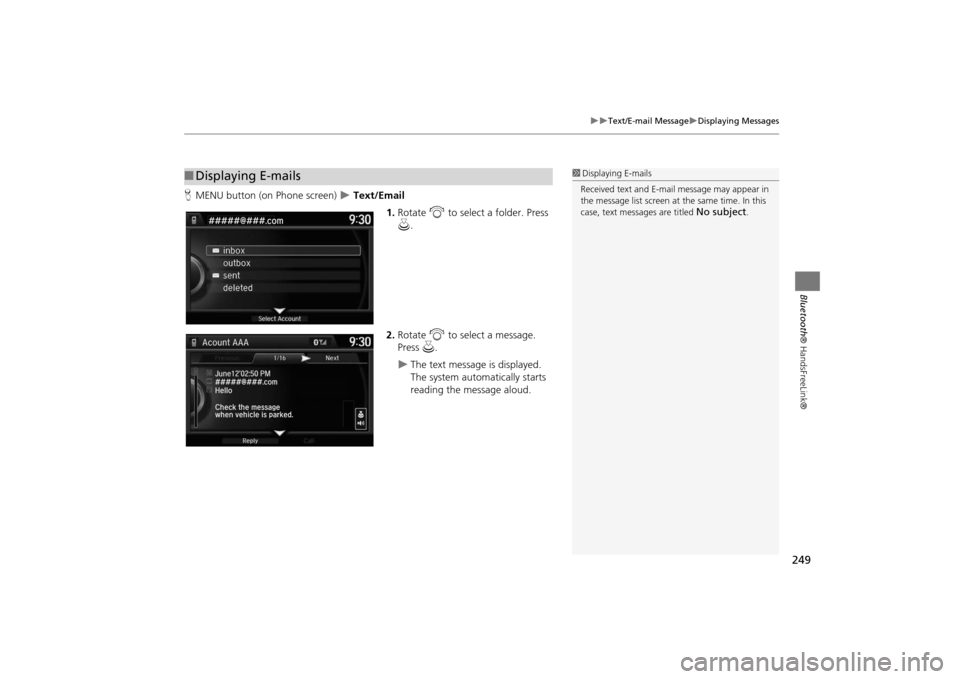
HMENU button (on Phone screen)
X Text/Email
1.Rotate i to select a folder. Press
u .
2. Rotate i to select a message.
Press u.
X
The text message is displayed.
The system automatically starts
reading the message aloud.
■Displaying E-mails
1 Displaying E-mails
Received text and E-mail message may appear in
the message list screen at the same time. In this
case, text messages are titled
No subject
.
MDX_KA-31TZ58200.book 249 ページ 2014年12月18日 木曜日 午後3時59分
Page 251 of 349
250
XX
Text/E-mail Message
XDisplaying Messages
Bluetooth® HandsFreeLink®
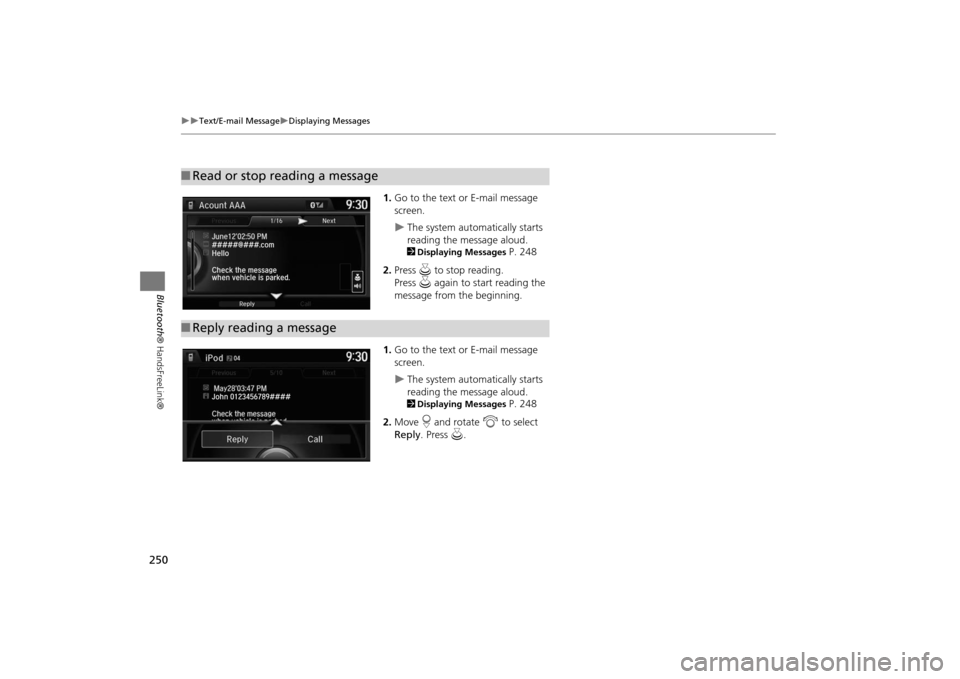
1.Go to the text or E-mail message
screen.X
The system automatically starts
reading the message aloud.2Displaying Messages
P. 248
2. Press u to stop reading.
Press u again to start reading the
message from the beginning.
1. Go to the text or E-mail message
screen.
X
The system automatically starts
reading the message aloud.2Displaying Messages
P. 248
2. Move r and rotate i to select
Reply . Press u .
■Read or stop reading a message■Reply reading a message
MDX_KA-31TZ58200.book 250 ページ 2014年12月18日 木曜日 午後3時59分
Page 252 of 349
251
XX
Text/E-mail Message
XDisplaying Messages
Bluetooth® HandsFreeLink®
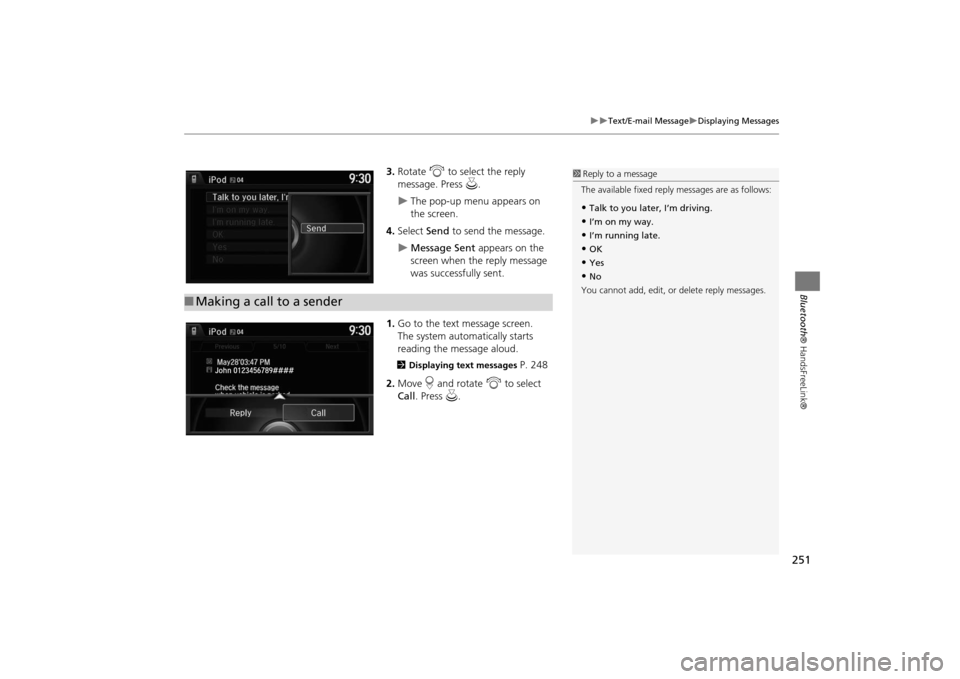
3.Rotate i to select the reply
message. Press u .X
The pop-up menu appears on
the screen.
4. Select Send to send the message.
X
Message Sent appears on the
screen when the reply message
was successfully sent.
1. Go to the text message screen.
The system automatically starts
reading the message aloud.
2 Displaying text messages
P. 248
2. Move r and rotate i to select
Call . Press u.
■Making a call to a sender
1 Reply to a message
The available fixed reply messages are as follows:•Talk to you later, I’m driving.•I’m on my way.•I’m running late.•OK•Yes•No
You cannot add, edit, or delete reply messages.
MDX_KA-31TZ58200.book 251 ページ 2014年12月18日 木曜日 午後3時59分
Page 255 of 349
254
XX
Text/E-mail Message
XHFL Menus
Bluetooth® HandsFreeLink®
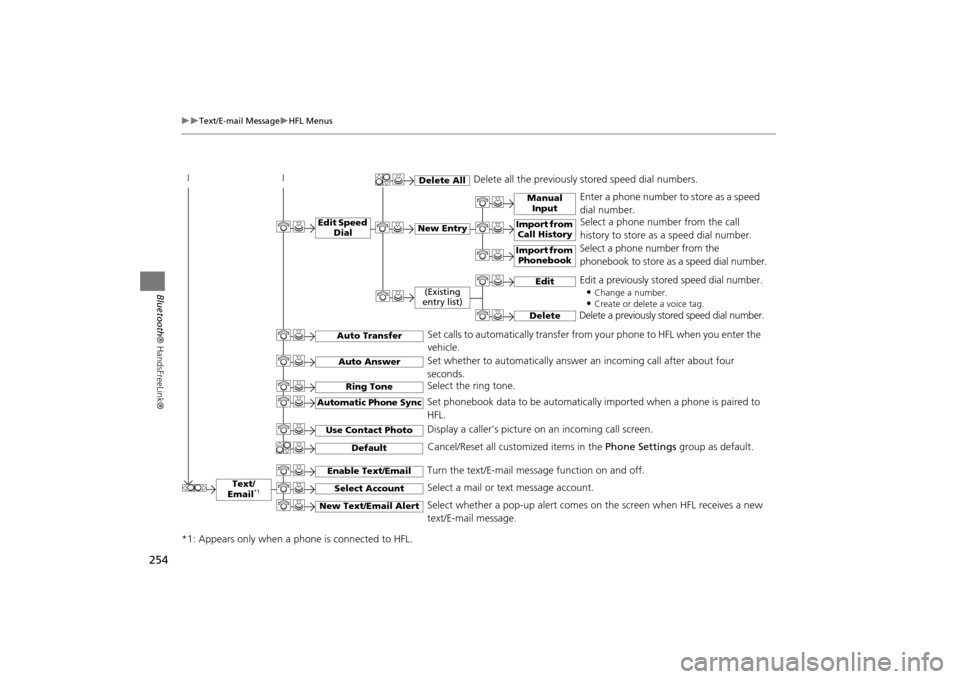
Text/
Email
*1
Manual Input
Edit Speed Dial
New Entry
Import from Call History
*1: Appears only when a phone is connected to HFL.
Import from Phonebook
Delete All
Delete all the previously stored speed dial numbers.
Select a phone number from the call
history to store as a speed dial number.
Select a phone number from the
phonebook to store as a speed dial number.
Enter a phone number to store as a speed
dial number.
Edit
Delete
(Existing
entry list)
Edit a previously stored speed dial number.
•
Change a number.•Create or delete a voice tag.
Delete a previously st ored speed dial number.
Set calls to automatically transfer from your phone to HFL when you enter the
vehicle.
Auto TransferAuto AnswerRing Tone
Set whether to automatically answer an incoming call after about four
seconds.
Select the ring tone.
Use Contact Photo
Set phonebook data to be automatically imported when a phone is paired to
HFL.
Display a caller’s picture on an incoming call screen.
Automatic Phone Sync
Select Account
Select a mail or text message account.
Enable Text/Email
Turn the text/E-mail message function on and off.
New Text/Email Alert
Select whether a pop-up alert comes on the screen when HFL receives a new
text/E-mail message.
Cancel/Reset all customized items in the Phone Settings group as default.
Default
MDX_KA-31TZ58200.book 254 ページ 2014年12月18日 木曜日 午後3時59分
Page 256 of 349
255
XX
Text/E-mail Message
XHFL Menus
Bluetooth® HandsFreeLink®
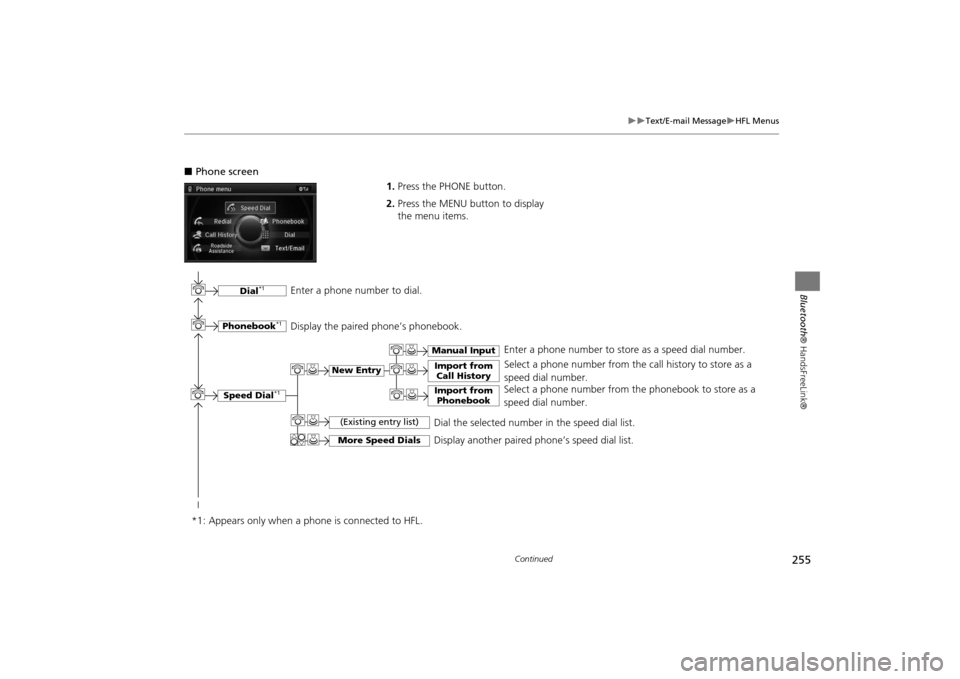
■Phone screen
1.Press the PHONE button.
2. Press the MENU button to display
the menu items.
Select a phone number from the call history to store as a
speed dial number.
Speed Dial
*1
Manual Input
New Entry
Import from
Call HistoryImport from Phonebook
Select a phone number from th e phonebook to store as a
speed dial number. Enter a phone number to store as a speed dial number.
More Speed Dials
Display another paired phone’s speed dial list.
*1: Appears only when a phone is connected to HFL.
(Existing entry list)
Dial the selected number in the speed dial list.
Phonebook
*1
Dial
*1
Display the paired phone’s phonebook. Enter a phone number to dial.
Continued
MDX_KA-31TZ58200.book 255 ページ 2014年12月18日 木曜日 午後3時59分
Page 257 of 349

256
XX
Text/E-mail Message
XHFL Menus
Bluetooth® HandsFreeLink®
Text/Email
*1,3
Message is
read aloud.
*2: Not available on all models
See the previous message.
(Read/Stop)PreviousNext
See the next message. System reads received message aloud, or stop message
from being read.
ReplyCall
Reply to a received message using one of six fixed phrases.
Make a call to the sender.
Select
Account
Select a message
and press .
Select a mail or text message account.
Redial
*1
Redial the last number dialed in the phone’s history.
Display the last 20 outgoing, incoming and missed calls.
Call History
*1
AllDialedReceived
Display the last 20 outgoing calls.
Display the last 20 incoming calls.
Missed
Display the last 20 missed calls.
Roadside Assistance
*1,2
Makes a call to the number for the Roadside Assistance service.
*1: Appears only when a phone is connected to HFL.
*3: This function is not available if your phone is not supported.
MDX_KA-31TZ58200.book 256 ページ 2014年12月18日 木曜日 午後3時59分
Page 259 of 349
258AcuraLink®
AcuraLink®Is a subscription-based service that provides convenient features such as voice
communication in case of emergency, online security, one-on-one operator
assistance, and the transmission of impo rtant messages regarding your vehicle’s
status.
For information on traffic re routing and traffic information updates, provided by the
AcuraLink® server.In Case of Emergency
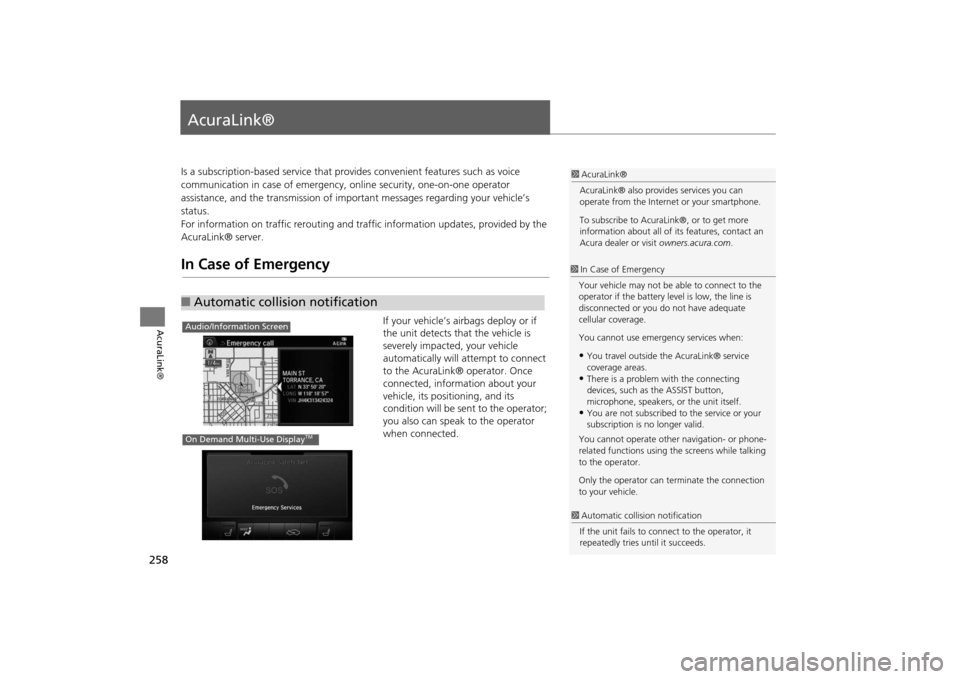
If your vehicle’s airbags deploy or if
the unit detects that the vehicle is
severely impacted, your vehicle
automatically will attempt to connect
to the AcuraLink® operator. Once
connected, information about your
vehicle, its positioning, and its
condition will be sent to the operator;
you also can speak to the operator
when connected.
■ Automatic collision notification
1 AcuraLink®
AcuraLink® also provid es services you can
operate from the Internet or your smartphone.
To subscribe to AcuraLink®, or to get more
information about all of its features, contact an
Acura dealer or visit owners.acura.com.1In Case of Emergency
Your vehicle may not be able to connect to the
operator if the battery level is low, the line is
disconnected or you do not have adequate
cellular coverage.
You cannot use emergency services when:•You travel outside the AcuraLink® service
coverage areas.•There is a problem with the connecting
devices, such as the ASSIST button,
microphone, speakers, or the unit itself.•You are not subscribed to the service or your
subscription is no longer valid.
You cannot operate othe r navigation- or phone-
related functions using the screens while talking
to the operator.
Only the operator can te rminate the connection
to your vehicle.
1 Automatic collis ion notification
If the unit fails to conne ct to the operator, it
repeatedly tries until it succeeds.
Audio/Information ScreenOn Demand Multi-Use Display
TM
MDX_KA-31TZ58200.book 258 ページ 2014年12月18日 木曜日 午後3時59分
Page 262 of 349
261
XX
AcuraLink®
XOperator Assistance
AcuraLink®
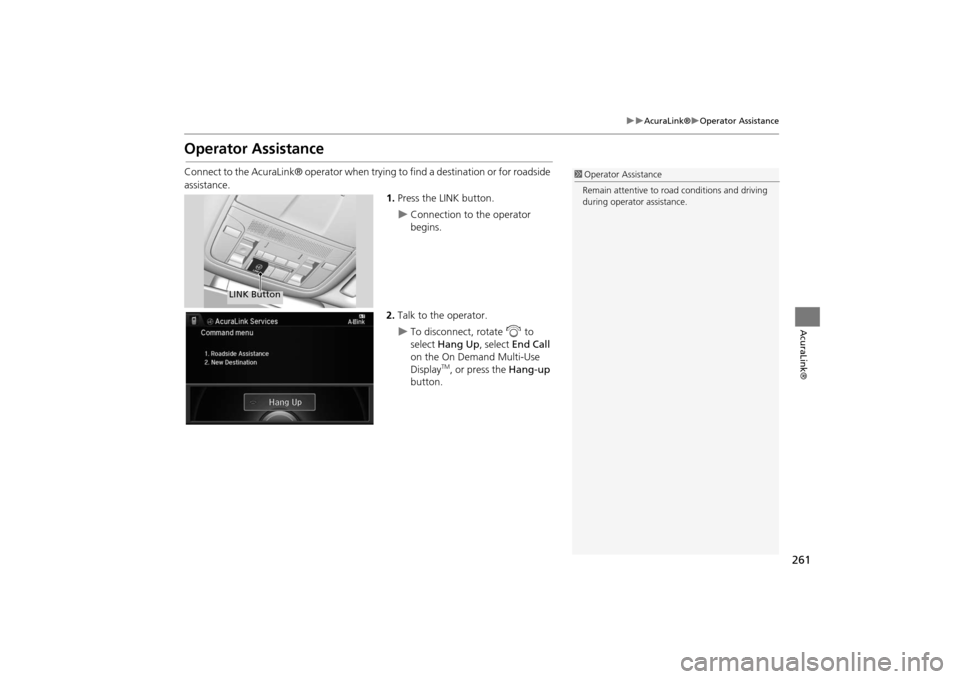
Operator AssistanceConnect to the AcuraLink® operator when trying to find a destination or for roadside
assistance.1.Press the LINK button.
X
Connection to the operator
begins.
2. Talk to the operator.
X
To disconnect, rotate i to
select Hang Up , select End Call
on the On Demand Multi-Use
Display
TM, or press the Hang-up
button.
1 Operator Assistance
Remain attentive to road conditions and driving
during operator assistance.
LINK Button
MDX_KA-31TZ58200.book 261 ページ 2014年12月18日 木曜日 午後3時59分
Page 264 of 349
263
XX
AcuraLink®
XAcuraLink® Message
AcuraLink®
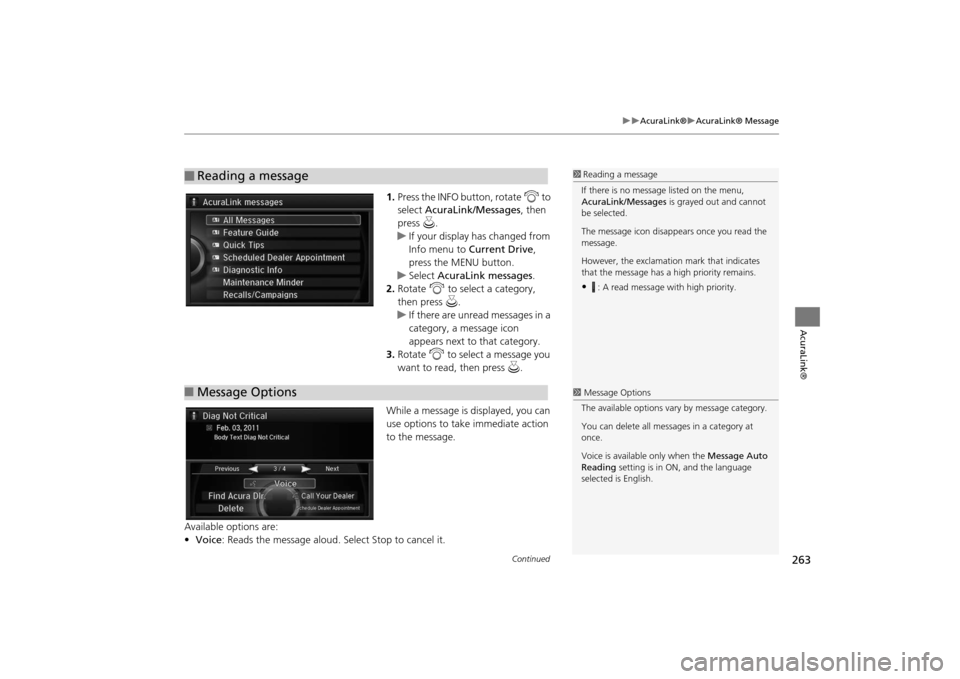
1.Press the INFO button, rotate i to
select AcuraLink/Messages , then
press u.X
If your display has changed from
Info menu to Current Drive ,
press the MENU button.
X
Select AcuraLink messages .
2. Rotate i to select a category,
then press u.
X
If there are unread messages in a
category, a message icon
appears next to that category.
3. Rotate i to select a message you
want to read, then press u.
While a message is displayed, you can
use options to take immediate action
to the message.
Available options are:
• Voice : Reads the message aloud. Select Stop to cancel it.
■
Reading a message
1Reading a message
If there is no message listed on the menu,
AcuraLink/Messages is grayed out and cannot
be selected.
The message icon disappears once you read the
message.
However, the exclamation mark that indicates
that the message has a high priority remains.•
: A read message with high priority.
■ Message Options
1 Message Options
The available options va ry by message category.
You can delete all mess ages in a category at
once.
Voice is available only when the Message Auto
Reading setting is in ON, and the language
selected is English.
Continued
MDX_KA-31TZ58200.book 263 ページ 2014年12月18日 木曜日 午後3時59分