dashboard ACURA NSX 1991 Service Owner's Manual
[x] Cancel search | Manufacturer: ACURA, Model Year: 1991, Model line: NSX, Model: ACURA NSX 1991Pages: 1640, PDF Size: 60.48 MB
Page 865 of 1640
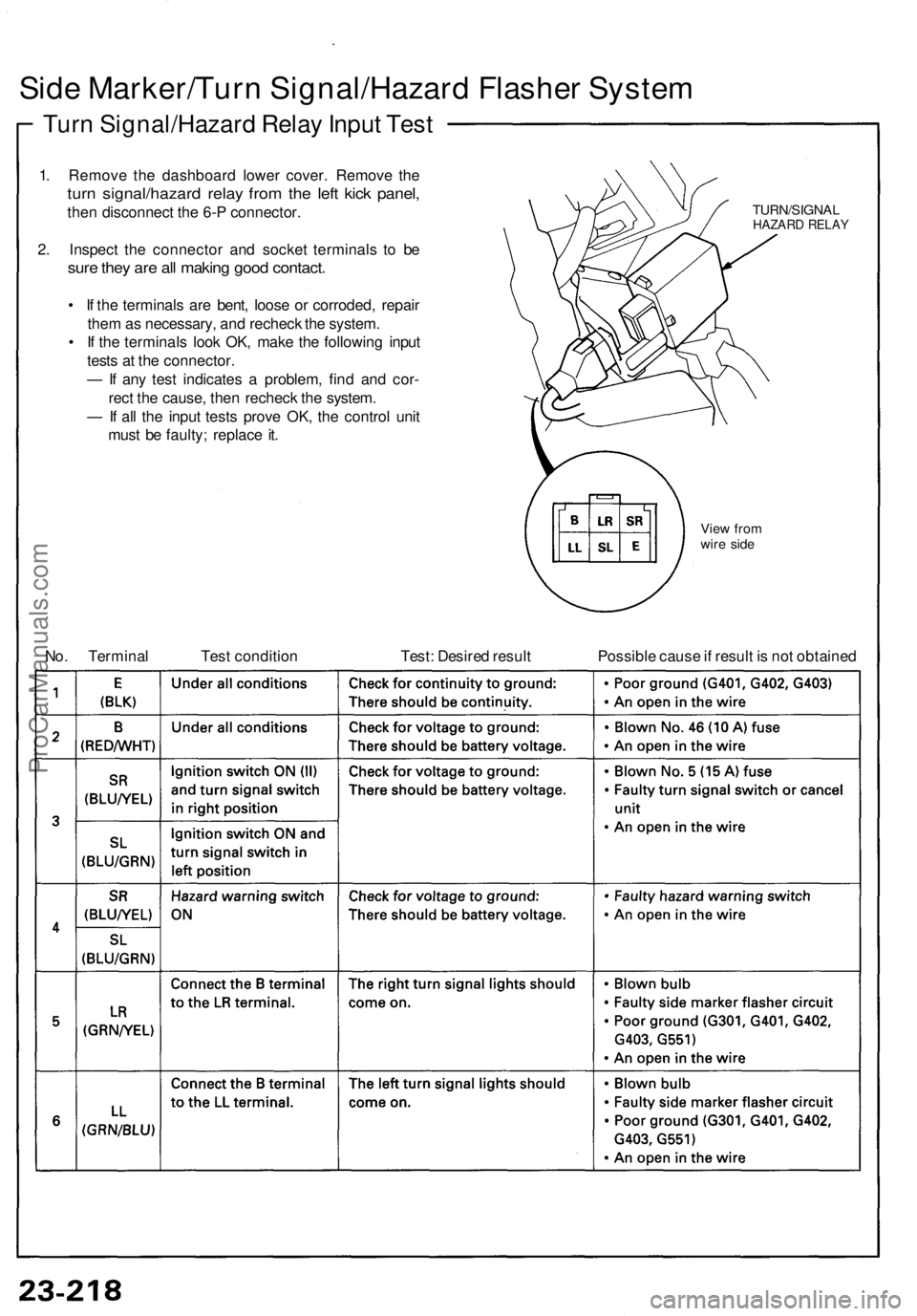
Side Marker/Turn Signal/Hazard Flasher System
Turn Signal/Hazard Relay Input Test
1. Remove the dashboard lower cover. Remove the
turn signal/hazard relay from the left kick panel,
then disconnect the 6-P connector.
2. Inspect the connector and socket terminals to be
sure they are all making good contact.
• If the terminals are bent, loose or corroded, repair
them as necessary, and recheck the system.
• If the terminals look OK, make the following input
tests at the connector.
— If any test indicates a problem, find and cor-
rect the cause, then recheck the system.
— If all the input tests prove OK, the control unit
must be faulty; replace it.
TURN/SIGNAL
HAZARD RELAY
View from
wire side
No. Terminal
Test condition
Test: Desired result
Possible cause if result is not obtainedProCarManuals.com
Page 872 of 1640
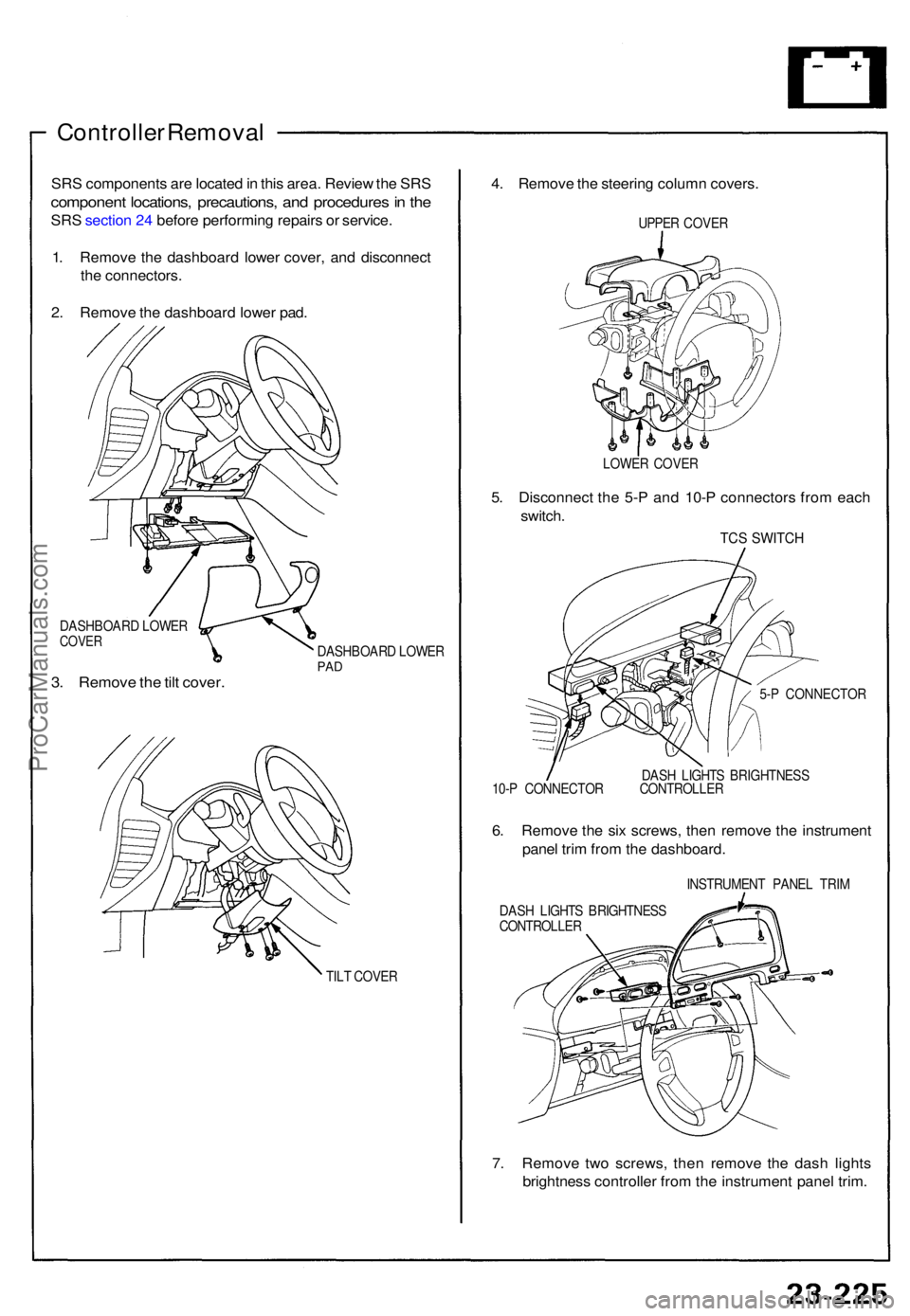
Controller Remova l
SRS component s ar e locate d in thi s area . Revie w th e SR S
componen t locations , precautions , an d procedure s in th e
SR S sectio n 24 befor e performin g repair s o r service .
1 . Remov e th e dashboar d lowe r cover , an d disconnec t
th e connectors .
2 . Remov e th e dashboar d lowe r pad .
DASHBOAR D LOWE RCOVER
3. Remov e th e til t cover .
DASHBOAR D LOWE RPAD
TIL T COVE R
4. Remov e th e steerin g colum n covers .
UPPER COVE R
LOWE R COVE R
5. Disconnec t th e 5- P an d 10- P connector s fro m eac h
switch .
TCS SWITC H
5-P CONNECTO R
DAS H LIGHT S BRIGHTNES S
10- P CONNECTO R CONTROLLE R
6. Remov e th e si x screws , the n remov e th e instrumen t
pane l tri m fro m th e dashboard .
INSTRUMEN T PANE L TRI M
DAS H LIGHT S BRIGHTNES S
CONTROLLE R
7. Remov e tw o screws , the n remov e th e das h light s
brightnes s controlle r fro m th e instrumen t pane l trim .
ProCarManuals.com
Page 875 of 1640
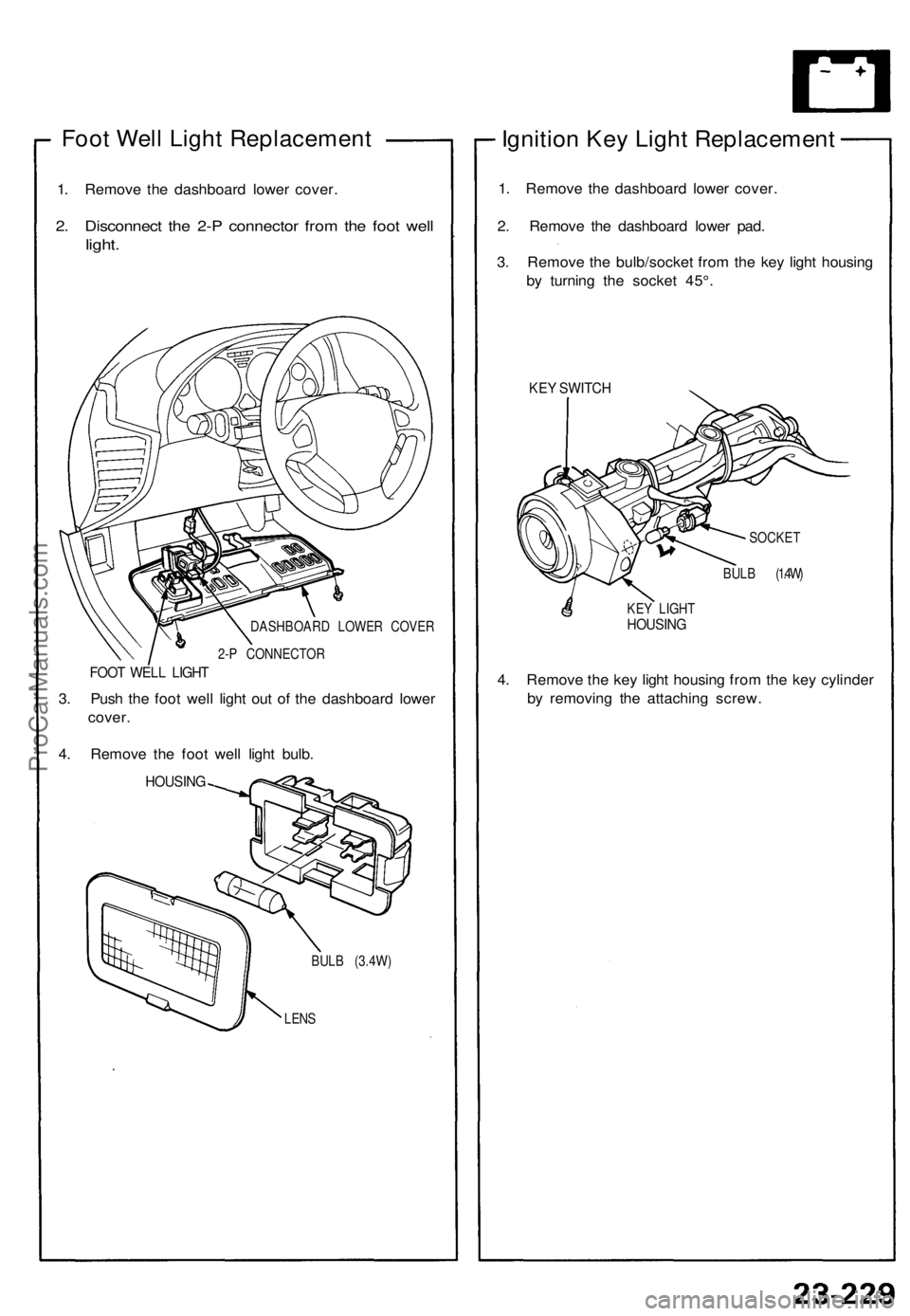
Foot Well Light Replacement
1. Remove the dashboard lower cover.
2. Disconnect the 2-P connector from the foot well
light.
DASHBOARD LOWER COVER
2-P CONNECTOR
FOOT WELL LIGHT
3. Push the foot well light out of the dashboard lower
cover.
4. Remove the foot well light bulb.
HOUSING
BULB (3.4W)
LENS
Ignition Key Light Replacement
1. Remove the dashboard lower cover.
2. Remove the dashboard lower pad.
3. Remove the bulb/socket from the key light housing
by turning the socket 45°.
KEY SWITCH
SOCKET
BULB (1.4W)
KEY LIGHT
HOUSING
4. Remove the key light housing from the key cylinder
by removing the attaching screw.ProCarManuals.com
Page 930 of 1640
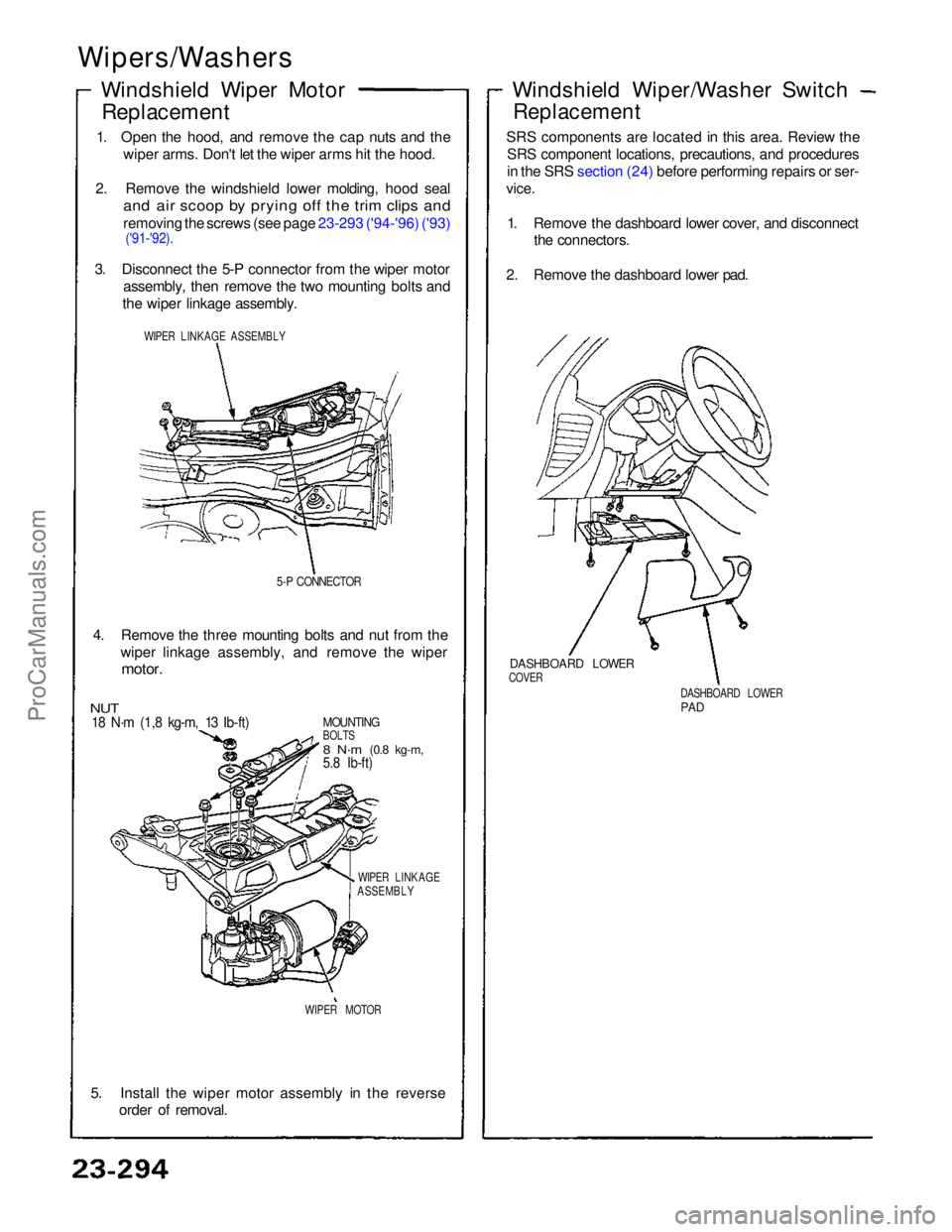
Wipers/Washers
Windshield Wiper MotorReplacement
1. Open the hood, and remove the cap nuts and the wiper arms. Don't let the wiper arms hit the hood.
2. Remove the windshield lower molding, hood seal
and air scoop by prying off the trim clips and
removing the screws (see page 23-293 ('94-'96) ('93)
('91-'92).
3. Disconnect the 5-P connector from the wiper motor assembly, then remove the two mounting bolts and
the wiper linkage assembly.
WIPER LINKAGE ASSEMBLY
5-P CONNECTOR
4. Remove the three mounting bolts and nut from the wiper linkage assembly, and remove the wiper
motor.
MOUNTING
BOLTS
8 N·m
(0.8 kg-m,
5.8 Ib-ft)
NUT
18 N·m (1,8 kg-m, 13 Ib-ft)
WIPER LINKAGE
ASSEMBLY
WIPER MOTOR
5. Install the wiper motor assembly in the reverse order of removal.
DASHBOARD LOWER
PAD
DASHBOARD LOWER
COVER
Windshield Wiper/Washer Switch
Replacement
SRS components are located in this area. Review the SRS component locations, precautions, and procedures
in the SRS section (24) before performing repairs or ser-
vice.
1. Remove the dashboard lower cover, and disconnect the connectors.
2. Remove the dashboard lower pad.ProCarManuals.com
Page 939 of 1640
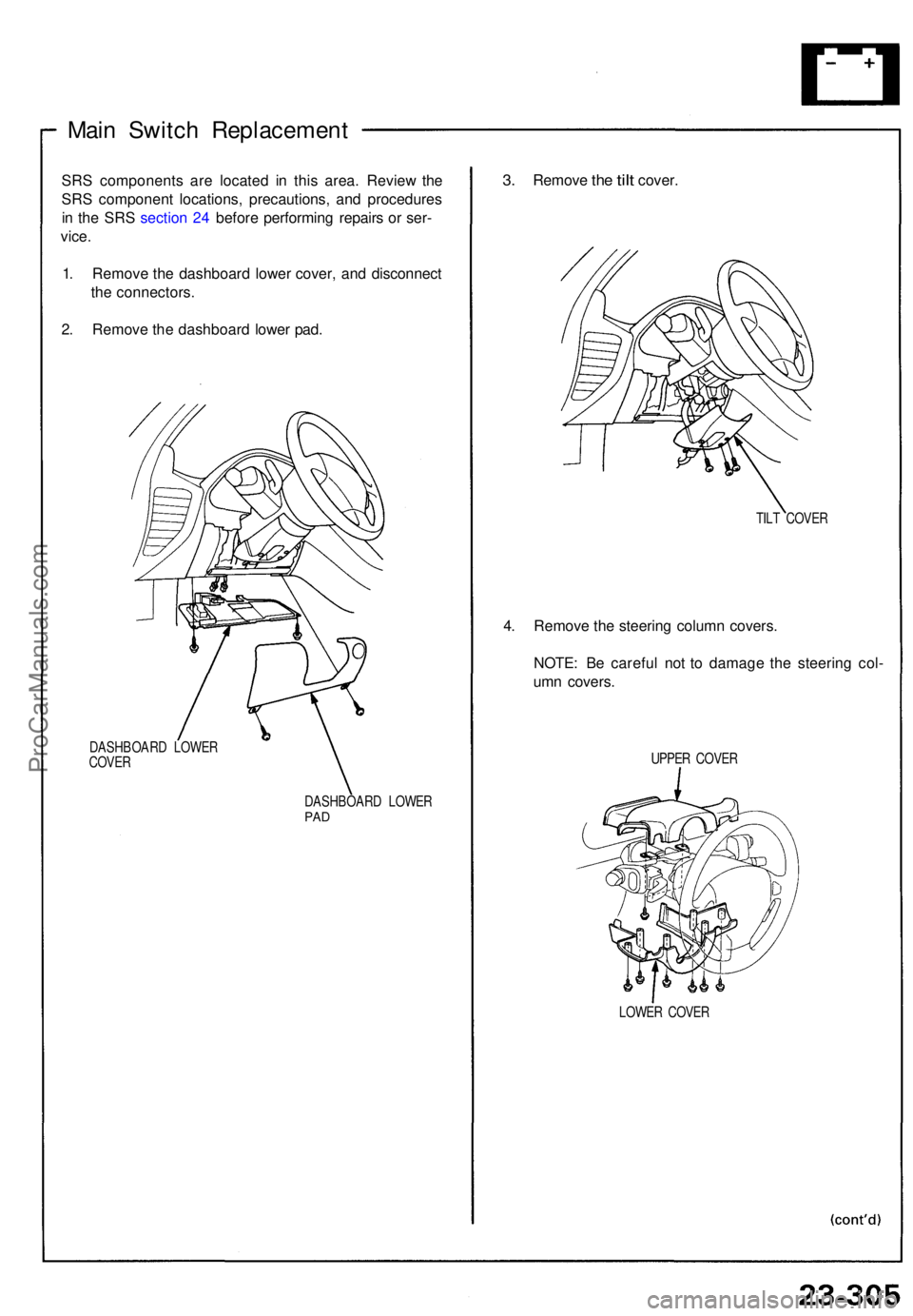
Main Switc h Replacemen t
SRS component s ar e locate d i n thi s area . Revie w th e
SR S componen t locations , precautions , an d procedure s
i n th e SR S sectio n 24 befor e performin g repair s o r ser -
vice .
1 . Remov e th e dashboar d lowe r cover , an d disconnec t
th e connectors .
2 . Remov e th e dashboar d lowe r pad .
DASHBOAR D LOWE R
COVE R
DASHBOARD LOWE R
PAD
3. Remov e the tilt cover .
TILT COVE R
4. Remov e th e steerin g colum n covers .
NOTE : B e carefu l no t t o damag e th e steerin g col -
um n covers .
UPPER COVE R
LOWE R COVE R
ProCarManuals.com
Page 1305 of 1640
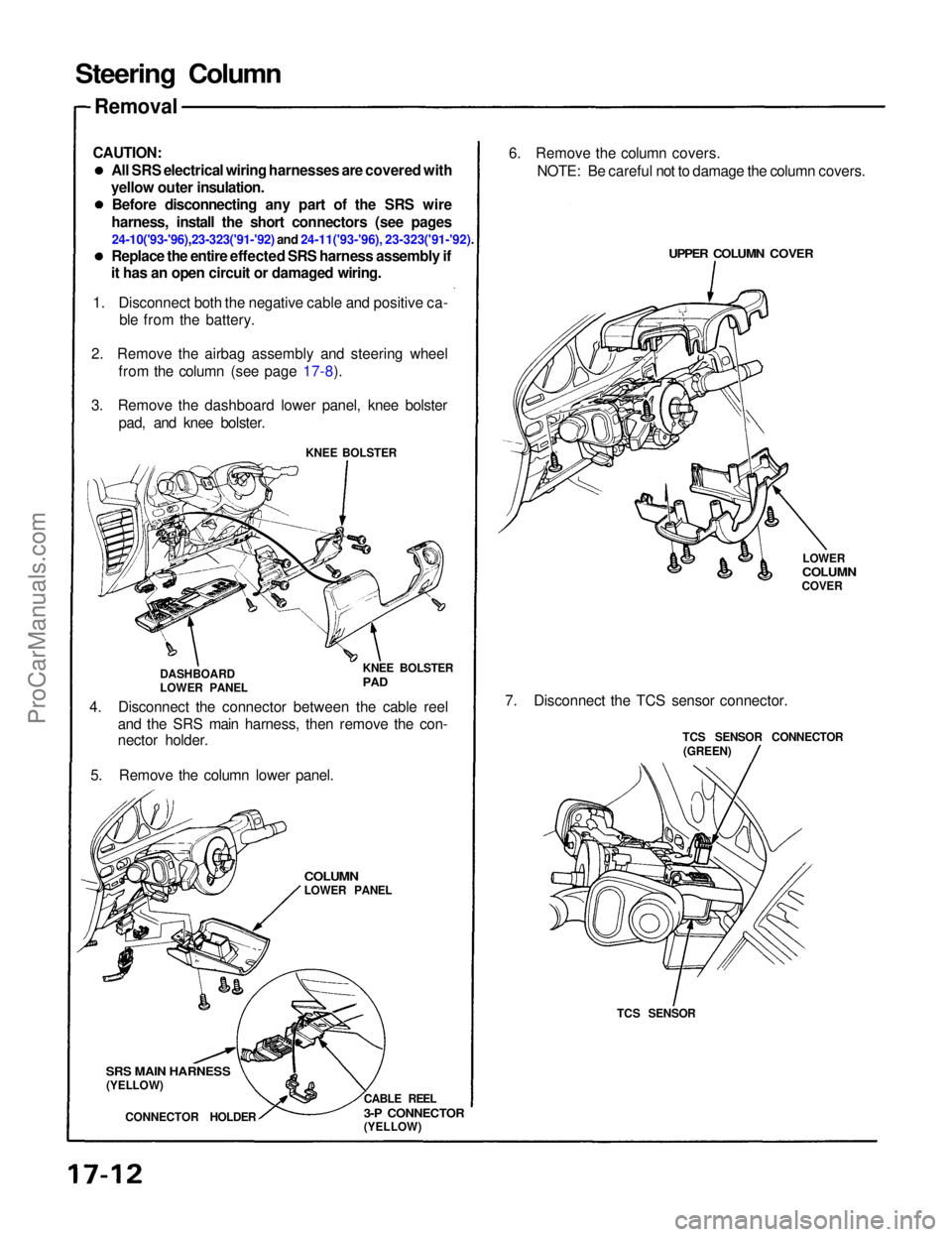
Steering Column
Removal
CAUTION: All SRS electrical wiring harnesses are covered with
yellow outer insulation. Before disconnecting any part of the SRS wire
harness, install the short connectors (see pages
24-10('93-'96),23-323('91-'92) and 24-11('93-'96), 23-323('91-'92).
Replace the entire effected SRS harness assembly if
it has an open circuit or damaged wiring.
1. Disconnect both the negative cable and positive ca- ble from the battery.
2. Remove the airbag assembly and steering wheel from the column (see page 17-8).
3. Remove the dashboard lower panel, knee bolster pad, and knee bolster.
KNEE BOLSTER
KNEE BOLSTER
PAD
DASHBOARD
LOWER PANEL
4. Disconnect the connector between the cable reel and the SRS main harness, then remove the con-
nector holder.
5. Remove the column lower panel.
COLUMN
LOWER PANEL
SRS MAIN HARNESS
(YELLOW)
CONNECTOR HOLDER CABLE REEL
3-P CONNECTOR
(YELLOW)6. Remove the column covers.
NOTE: Be careful not to damage the column covers.
UPPER COLUMN COVER
LOWER
COLUMN
COVER
7. Disconnect the TCS sensor connector. TCS SENSOR CONNECTOR
(GREEN)
TCS SENSORProCarManuals.com
Page 1310 of 1640
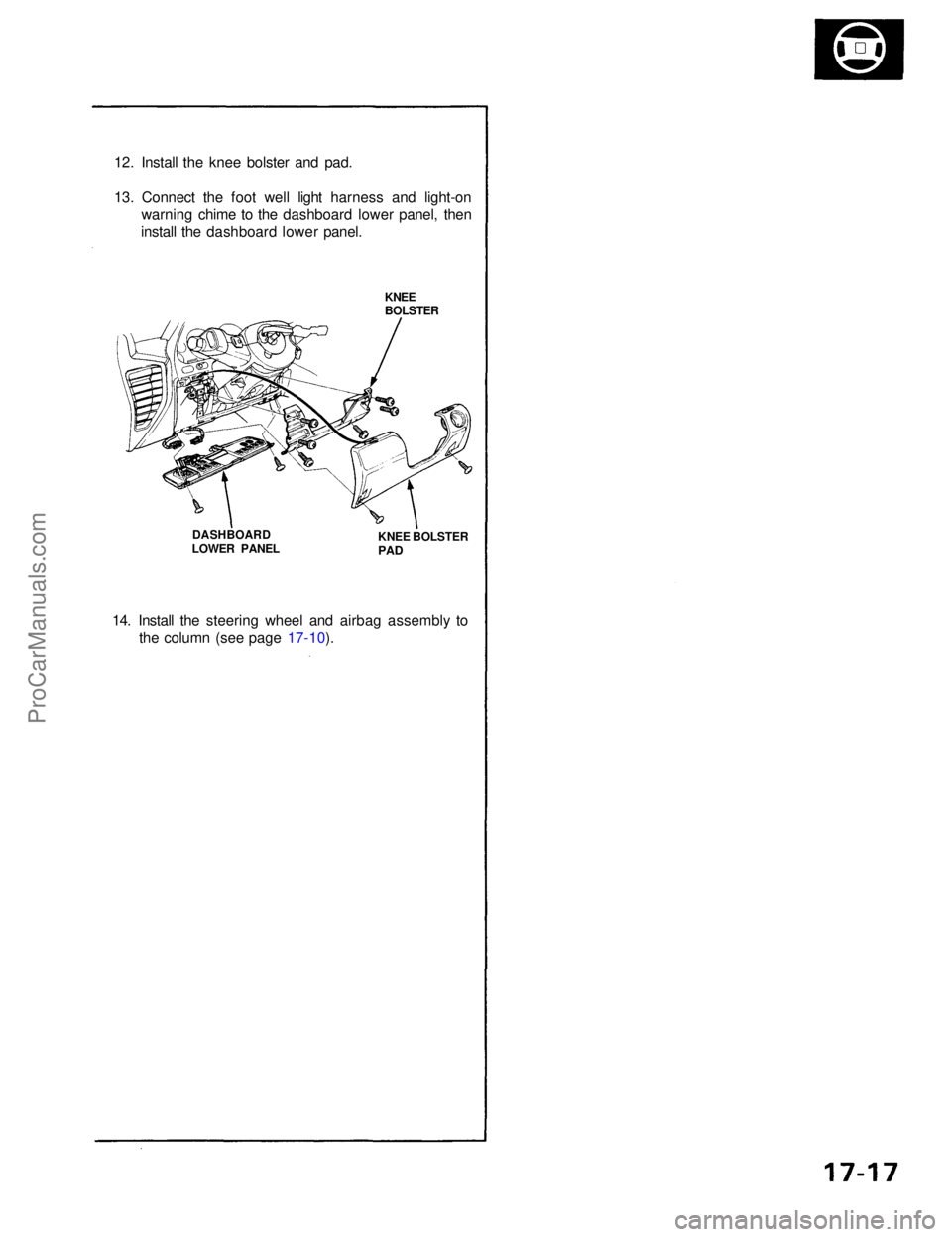
12. Install the knee bolster and pad.
13. Connect the foot well light harness and light-on
warning chime to the dashboard lower panel, then
install the dashboard lower panel.
KNEE
BOLSTER
KNEE BOLSTER
PAD
DASHBOARD
LOWER PANEL
14. Install the steering wheel and airbag assembly to the column (see page 17-10).ProCarManuals.com
Page 1350 of 1640
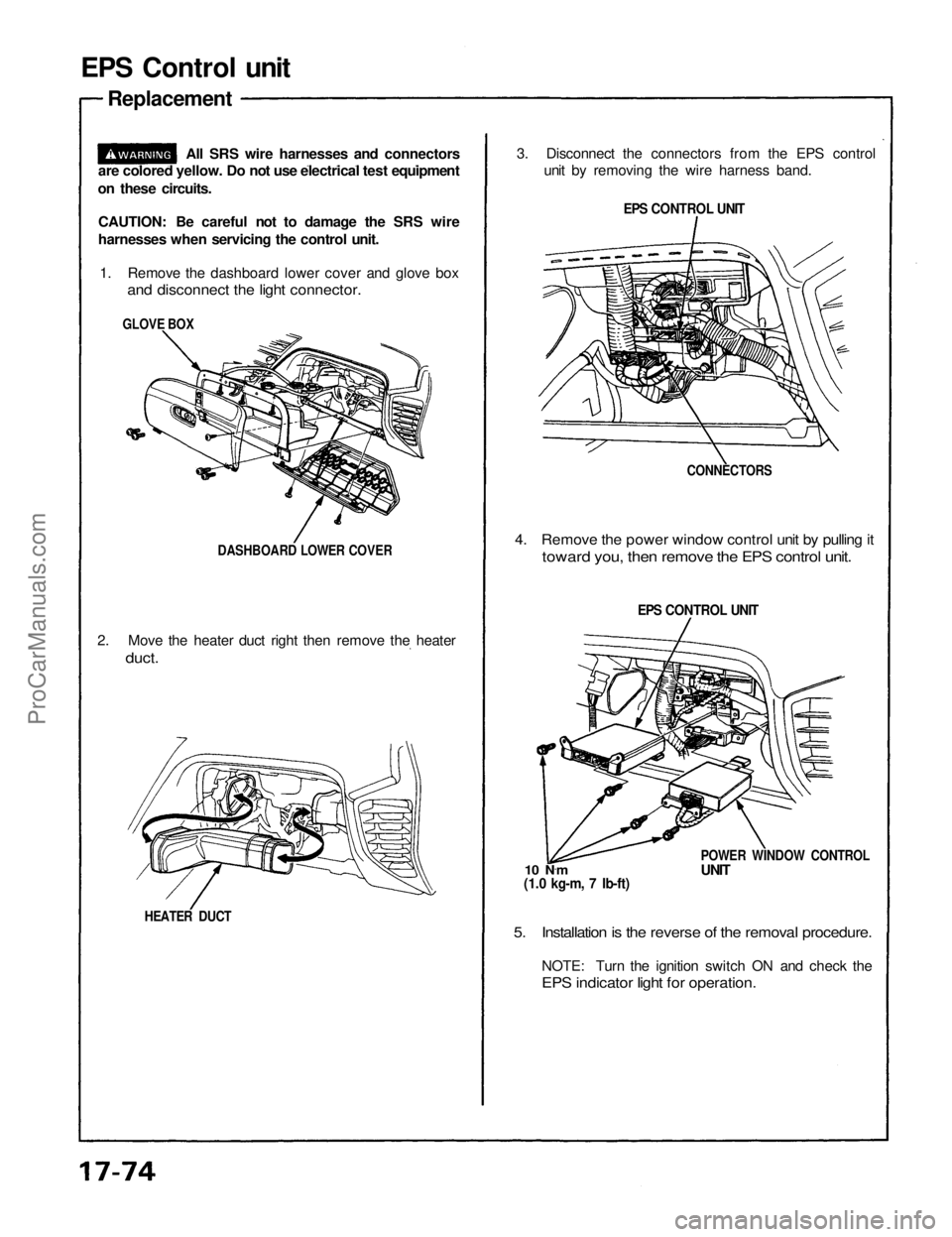
EPS Control unit
Replacement
CAUTION: Be careful not to damage the SRS wire
harnesses when servicing the control unit. 1. Remove the dashboard lower cover and glove box
and disconnect the light connector.
3. Disconnect the connectors from the EPS control
unit by removing the wire harness band.
EPS CONTROL UNIT
4. Remove the power window control unit by pulling it
toward you, then remove the EPS control unit.
5. Installation is the reverse of the removal procedure.
NOTE: Turn the ignition switch ON and check the
EPS indicator light for operation.
HEATER DUCT
2. Move the heater duct right then remove the heater
duct.
DASHBOARD LOWER COVER
GLOVE BOX
EPS CONTROL UNIT
POWER WINDOW CONTROL
UNIT
10 N ·
m
(1.0 kg-m, 7 Ib-ft)
All SRS wire harnesses and connectors
are colored yellow. Do not use electrical test equipment
on these circuits.
CONNECTORSProCarManuals.com
Page 1371 of 1640
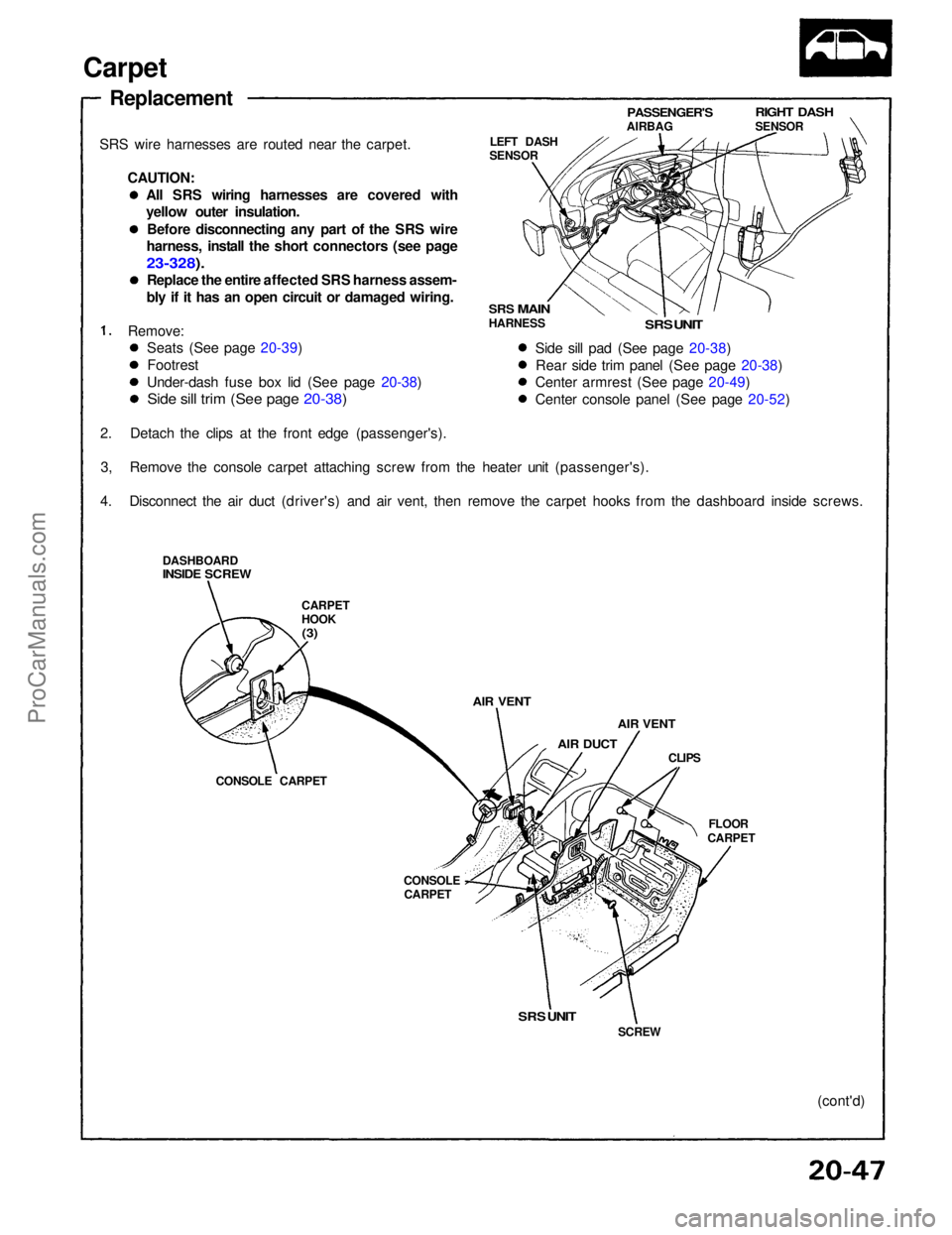
Carpet
Replacement
SRS wire harnesses are routed near the carpet. CAUTION:
Remove:
2. Detach the clips at the front edge (passenger's). 3, Remove the console carpet attaching screw from the heater unit (passenger's).
4. Disconnect the air duct (driver's) and air vent, then remove the carpet hooks from the dashboard inside screws.
DASHBOARD
INSIDE SCREW
CARPET
HOOK
(3)
AIR VENT
AIR DUCT
AIR VENT
CLIPS
FLOOR
CARPET
CONSOLE
CARPET
CONSOLE CARPET LEFT DASH
SENSOR
PASSENGER'S
AIRBAG
RIGHT DASH
SENSOR
SRS
MAIN
HARNESS
SRS UNIT
Side sill pad (See page 20-38) Rear side trim panel (See page 20-38)
Center armrest (See page 20-49)
Center console panel (See page 20-52)
SRS UNIT
SCREW
(cont'd)
Seats (See page 20-39)
Footrest
Under-dash fuse box lid (See page 20-38)
Side sill trim (See page 20-38)
All SRS wiring harnesses are covered with
yellow outer insulation.
Before disconnecting any part of the SRS wire
harness, install the short connectors (see page
23-328).
Replace the entire affected SRS harness assem-
bly if it has an open circuit or damaged wiring.ProCarManuals.com
Page 1373 of 1640
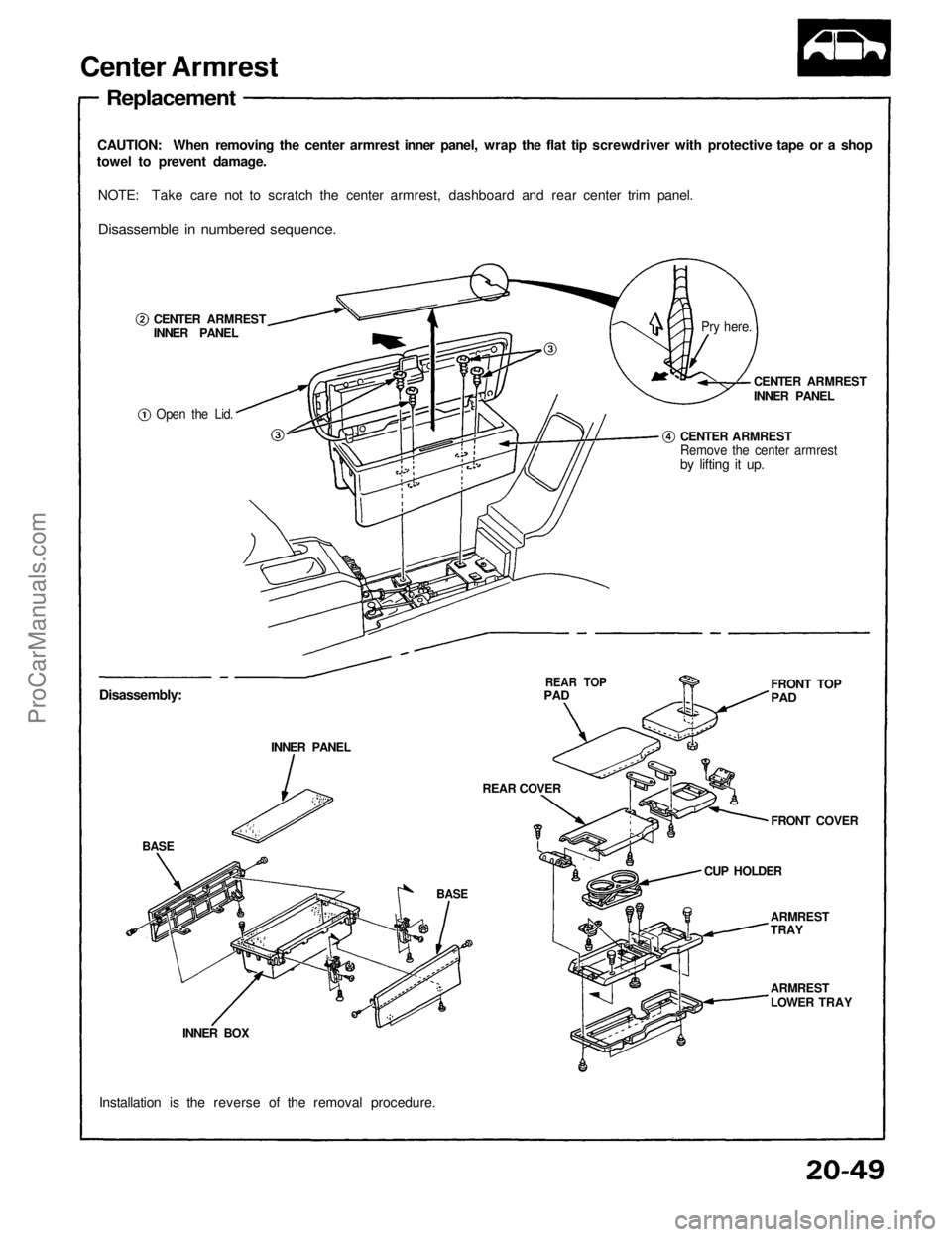
Center Armrest
Replacement
CAUTION: When removing the center armrest inner panel, wrap the flat tip screwdriver with protective tape or a shop
towel to prevent damage.
NOTE: Take care not to scratch the center armrest, dashboard and rear center trim panel.
Disassemble in numbered sequence.
CENTER ARMREST
INNER PANEL
Open the Lid.
CENTER ARMREST
INNER PANEL
CENTER ARMREST
Remove the center armrest
by lifting it up.
Disassembly: INNER PANEL
BASE
BASE
INNER BOX
Installation is the reverse of the removal procedure.
REAR TOP
PAD
REAR COVER FRONT TOP
PAD
FRONT COVER
CUP HOLDER ARMREST
TRAY
ARMREST
LOWER TRAY
Pry here.ProCarManuals.com