dashboard ACURA NSX 1991 Service User Guide
[x] Cancel search | Manufacturer: ACURA, Model Year: 1991, Model line: NSX, Model: ACURA NSX 1991Pages: 1640, PDF Size: 60.48 MB
Page 699 of 1640
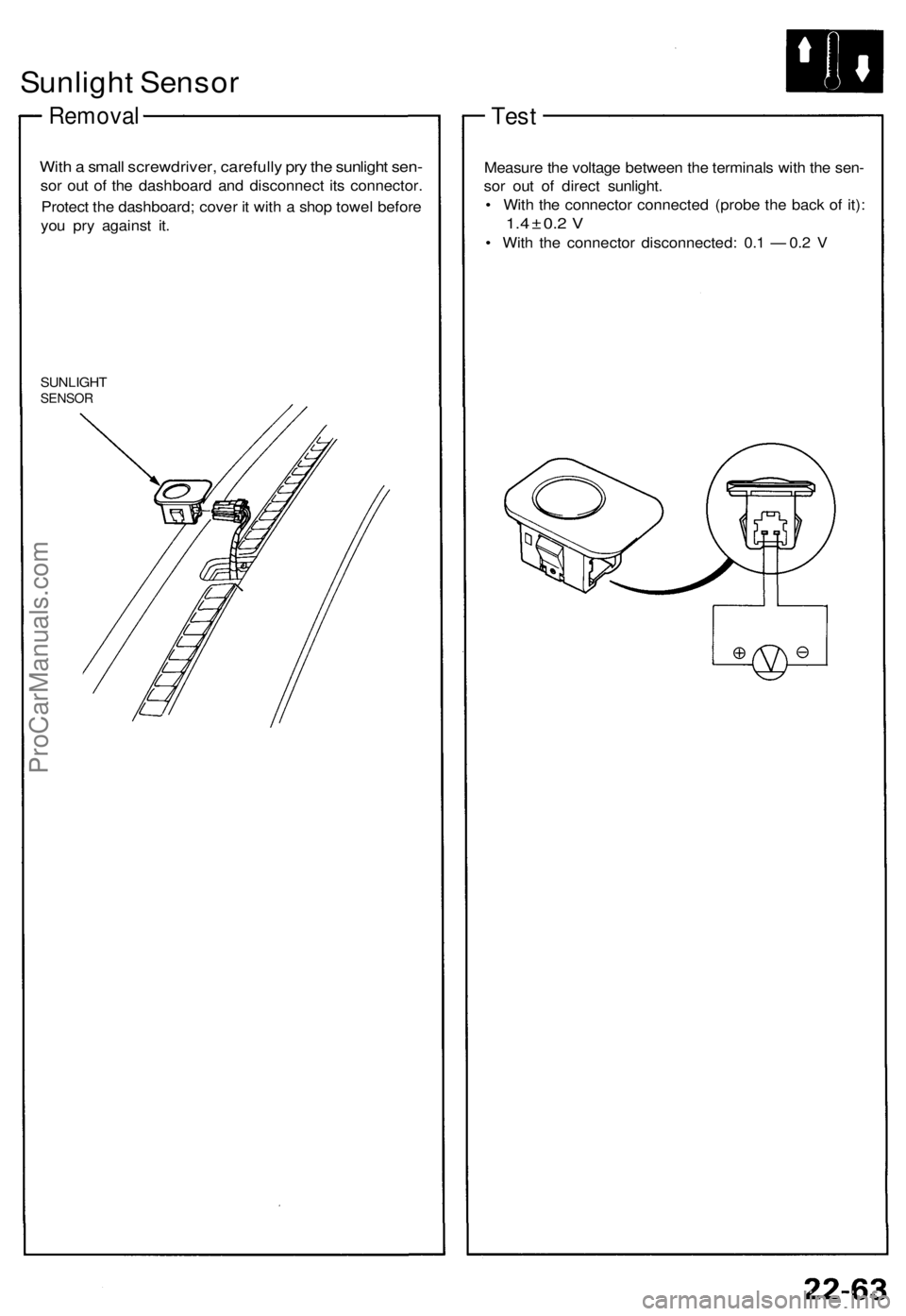
Sunlight Sensor
Removal
With a small screwdriver, carefully pry the sunlight sen-
sor out of the dashboard and disconnect its connector.
Protect the dashboard; cover it with a shop towel before
you pry against it.
SUNLIGHT
SENSOR
Test
Measure the voltage between the terminals with the sen-
sor out of direct sunlight.
• With the connector connected (probe the back of it):
1.4 ± 0.2 V
• With the connector disconnected: 0.1 — 0.2 VProCarManuals.com
Page 709 of 1640
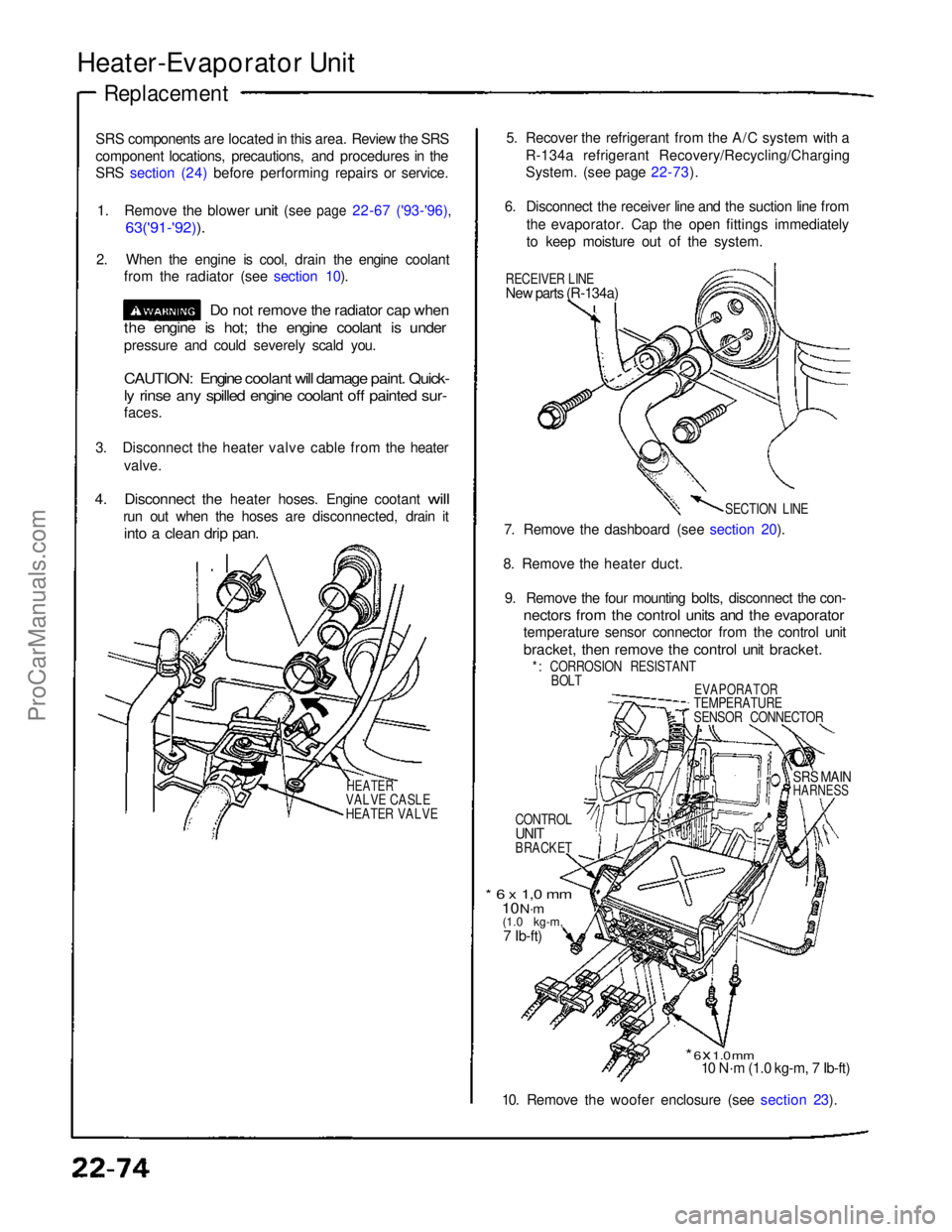
Heater-Evaporator Unit
Replacement
SRS components are located in this area. Review the SRS
component locations, precautions, and procedures in the
SRS section (24) before performing repairs or service.
1.
Remove
the
blower
unit
(see
page
22-67 ('93-'96),
63('91-'92)).
2. When the engine is cool, drain the engine coolant from the radiator (see section 10).
Do not remove the radiator cap when
the engine is hot; the engine coolant is under
pressure and could severely scald you.
CAUTION: Engine coolant will damage paint. Quick-
ly rinse any spilled engine coolant off painted sur-
faces.
3. Disconnect the heater valve cable from the heater valve.
4.
Disconnect
the
heater hoses. Engine cootant
will
run out when the hoses are disconnected, drain it
into a clean drip pan.
HEATER
VALVE CASLE
HEATER VALVE
5. Recover the refrigerant from the A/C system with a
R-134a refrigerant Recovery/Recycling/Charging
System. (see page 22-73).
6. Disconnect the receiver line and the suction line from the evaporator. Cap the open fittings immediately
to keep moisture out of the system.
RECEIVER LINE
New parts (R-134a)
SECTION LINE
7. Remove the dashboard (see section 20).
8. Remove the heater duct. 9. Remove the four mounting bolts, disconnect the con-
nectors from the control units and the evaporator
temperature sensor connector from the control unit
bracket, then remove the control unit bracket.
*: CORROSION RESISTANT BOLT
EVAPORATOR
TEMPERATURE
SENSOR CONNECTOR
CONTROL
UNIT
BRACKET
SRS MAIN
HARNESS
* 6 x 1,0 mm
10 N·m
(1.0 kg-m,
7 Ib-ft)
* 6 x 1.0 mm
10 N·m (1.0 kg-m, 7 Ib-ft)
10. Remove the woofer enclosure (see section 23).ProCarManuals.com
Page 733 of 1640
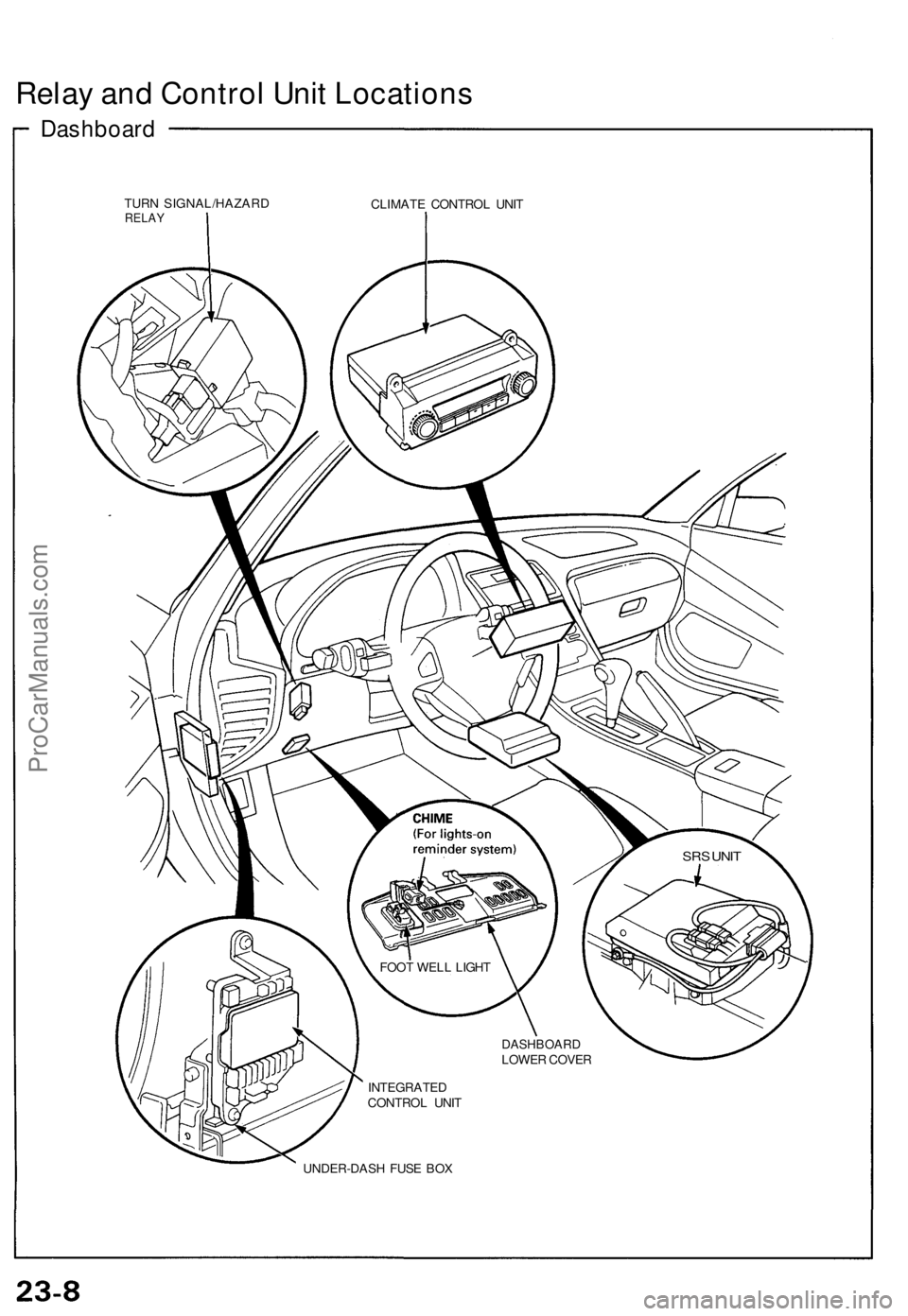
Relay and Control Unit Locations
Dashboard
TURN SIGNAL/HAZARD
RELAY
CLIMATE CONTROL UNIT
UNDER-DASH FUSE BOX
FOOT WELL LIGHT
DASHBOARD
LOWER COVER
INTEGRATED
CONTROL UNIT
SRS UNITProCarManuals.com
Page 734 of 1640
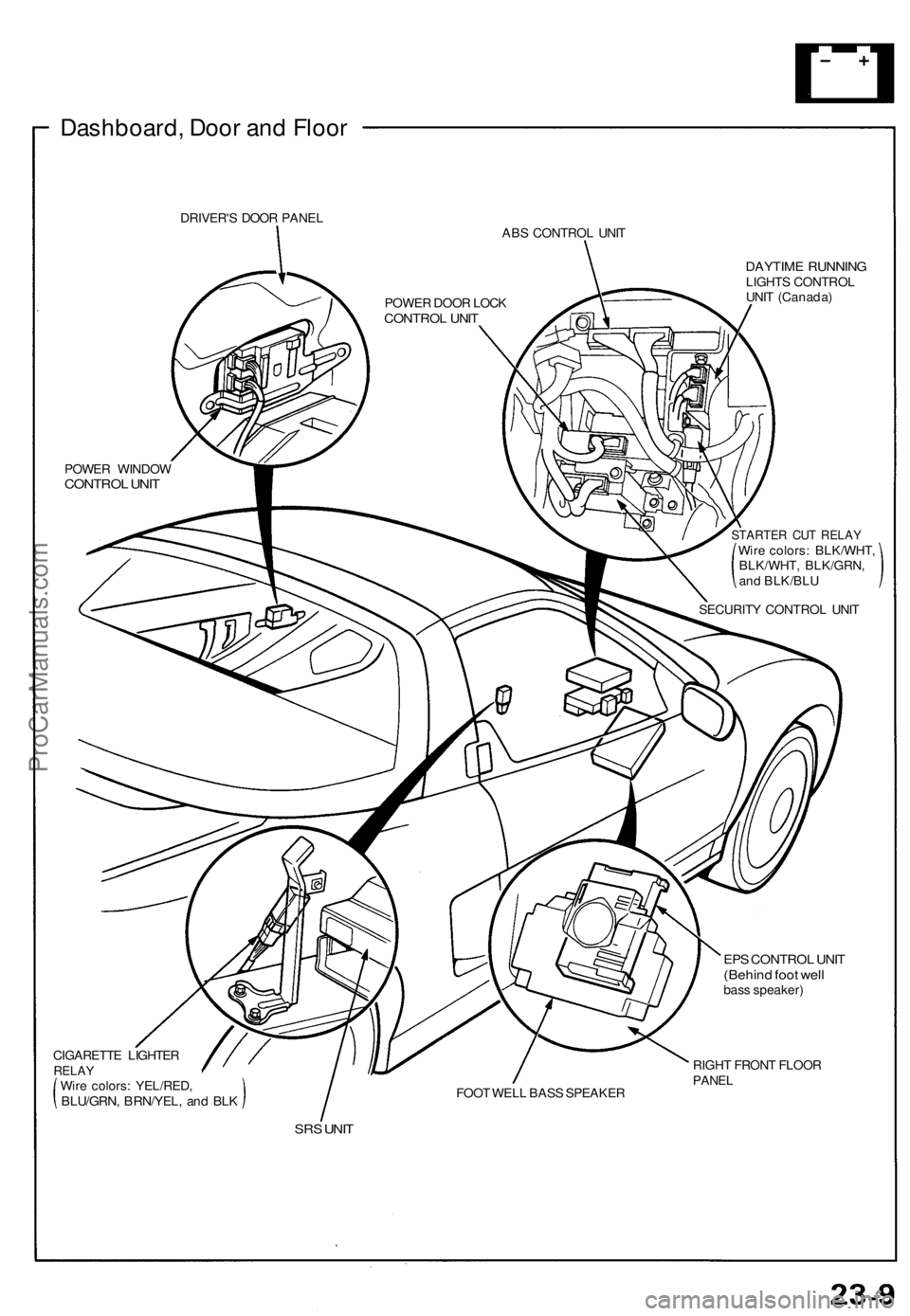
Dashboard, Door and Floor
DRIVER'S DOOR PANEL
ABS CONTROL UNIT
DAYTIME RUNNING
LIGHTS CONTROL
UNIT (Canada)
POWER WINDOW
CONTROL UNIT
STARTER CUT RELAY
Wire colors: BLK/WHT,
BLK/WHT, BLK/GRN,
and BLK/BLU
SECURITY CONTROL UNIT
CIGARETTE LIGHTER
RELAY
Wire colors: YEL/RED,
BLU/GRN, BRN/YEL, and BLK
FOOT WELL BASS SPEAKER
EPS CONTROL UNIT
(Behind foot well
bass speaker)
RIGHT FRONT FLOOR
PANEL
SRS UNIT
POWER DOOR LOCK
CONTROL UNITProCarManuals.com
Page 787 of 1640
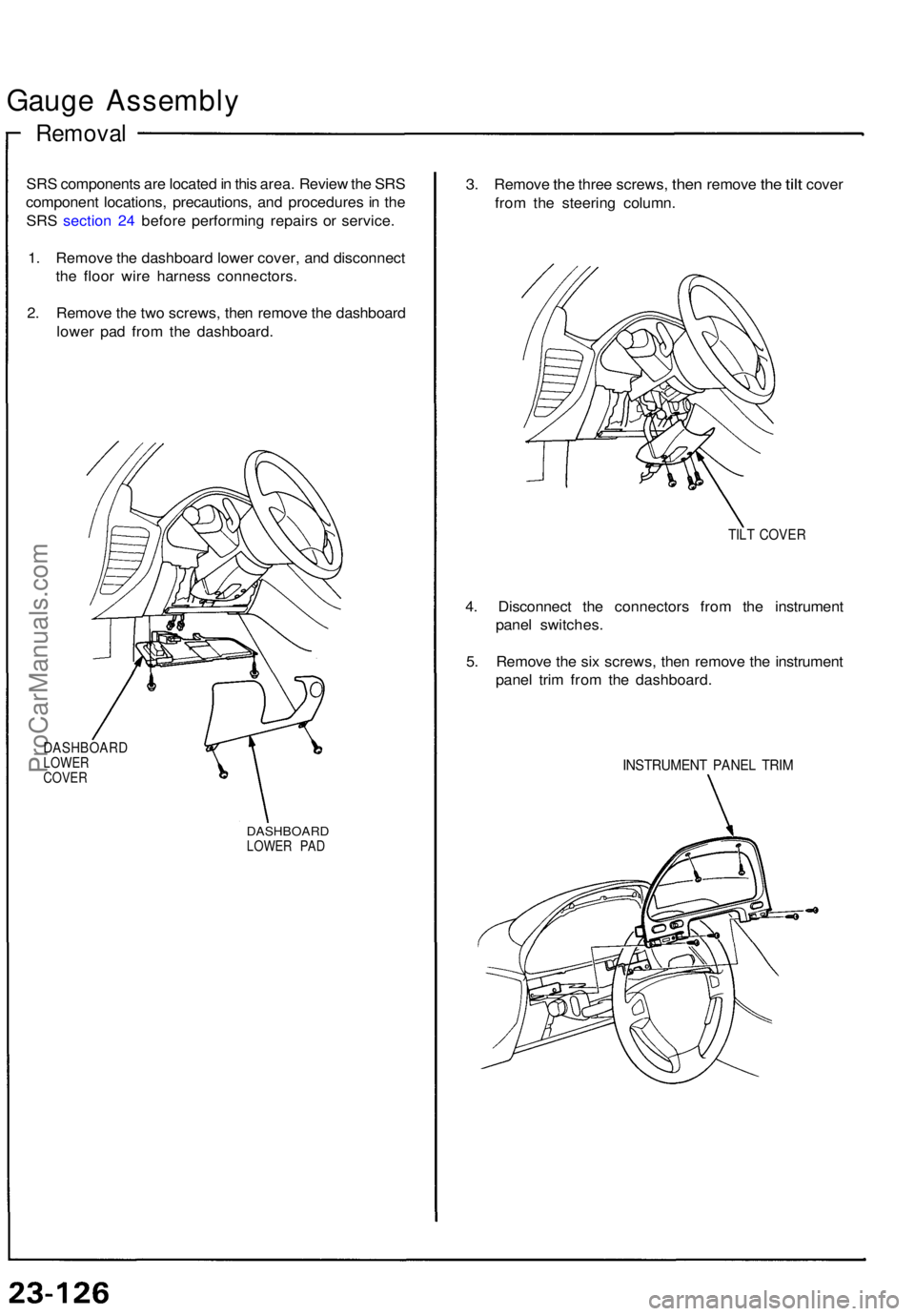
Gauge Assembl y
Removal
SRS component s ar e locate d in thi s area . Revie w th e SR S
componen t locations , precautions , an d procedure s i n th e
SR S sectio n 24 befor e performin g repair s o r service .
1 . Remov e th e dashboar d lowe r cover , an d disconnec t
th e floo r wir e harnes s connectors .
2 . Remov e th e tw o screws , the n remov e th e dashboar d
lowe r pa d fro m th e dashboard .
DASHBOAR DLOWER
COVE R
DASHBOAR DLOWER PA D
3. Remov e the thre e screws , then remov e the tilt cove r
fro m th e steerin g column .
TILT COVE R
4. Disconnec t th e connector s fro m th e instrumen t
pane l switches .
5 . Remov e th e si x screws , the n remov e th e instrumen t
pane l tri m fro m th e dashboard .
INSTRUMEN T PANE L TRI M
ProCarManuals.com
Page 803 of 1640
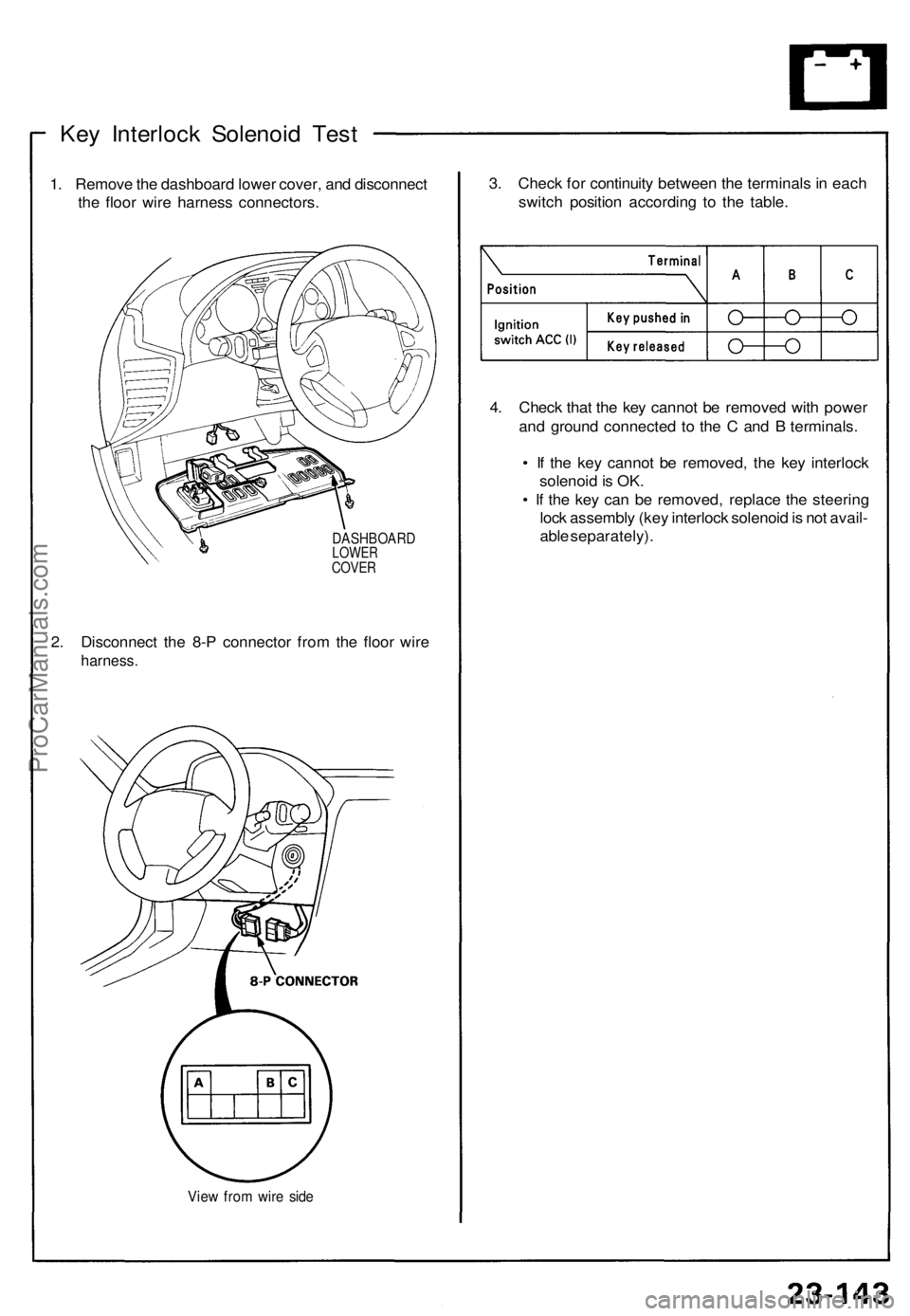
Key Interloc k Solenoi d Tes t
1. Remov e th e dashboard lower cover , an d disconnec t
th e floo r wir e harnes s connectors .
DASHBOAR DLOWERCOVER
2. Disconnec t th e 8- P connecto r fro m th e floo r wir e
harness .
View fro m wir e sid e
3. Chec k fo r continuit y betwee n th e terminal s in eac h
switc h positio n accordin g t o th e table.
4 . Chec k tha t th e ke y canno t b e remove d wit h powe r
an d groun d connecte d t o th e C an d B terminals .
• I f th e ke y canno t b e removed , th e ke y interloc k
solenoi d is OK .
• I f th e ke y ca n b e removed , replac e th e steerin g
loc k assembl y (ke y interloc k solenoi d is no t avail -
abl e separately) .
ProCarManuals.com
Page 806 of 1640
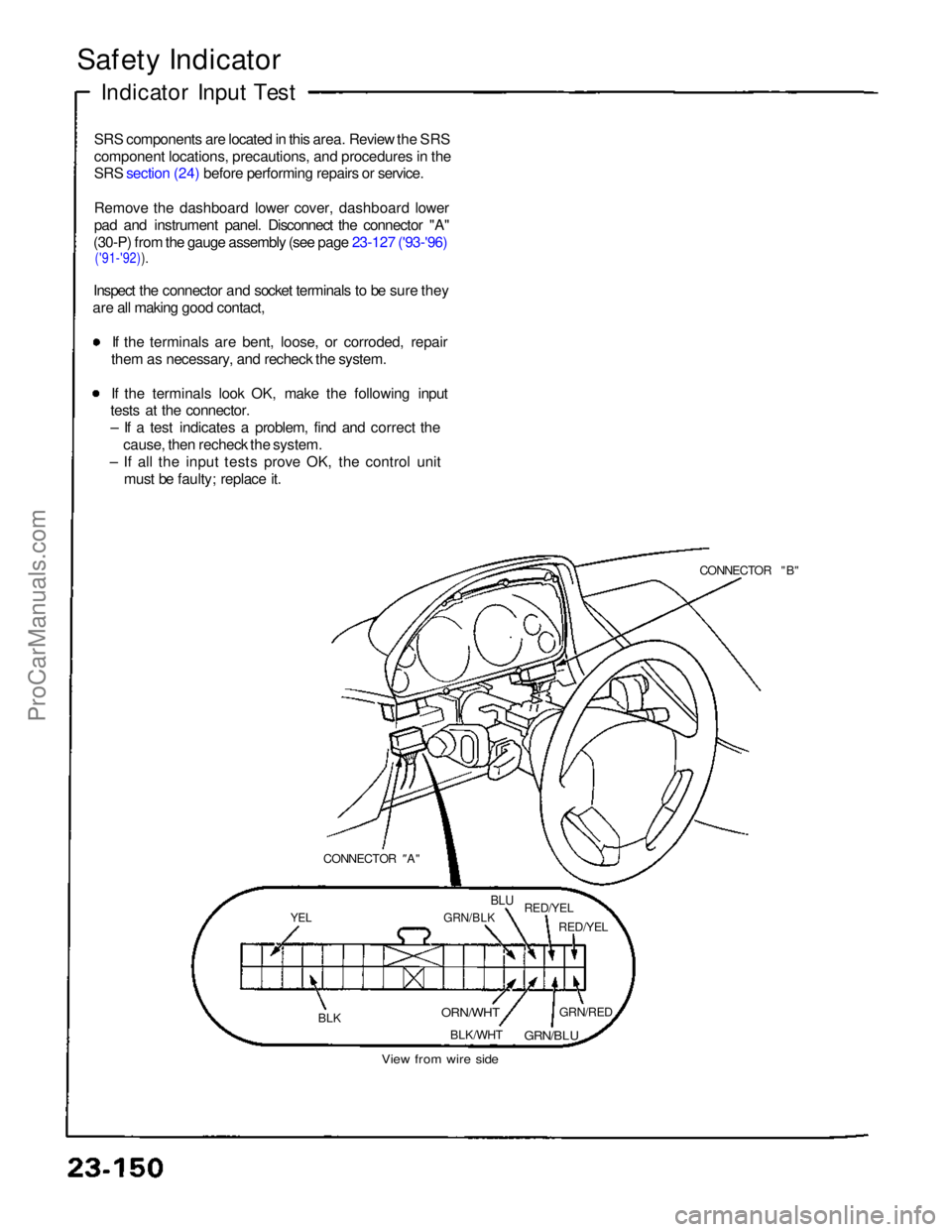
Safety Indicator
Indicator Input Test
SRS components are located in this area. Review the SRS
component locations, precautions, and procedures in the
SRS section (24) before performing repairs or service.
Remove the dashboard lower cover, dashboard lower
pad and instrument panel. Disconnect the connector "A"
(30-P) from the gauge assembly (see page 23-127 ('93-'96)
('91-'92)).
Inspect the connector and socket terminals to be sure they
are all making good contact,
If the terminals are bent, loose, or corroded, repair
them as necessary, and recheck the system. If the terminals look OK, make the following input
tests at the connector.
– If a test indicates a problem, find and correct the
cause, then recheck the system.
– If all the input tests prove OK, the control unit must be faulty; replace it.
CONNECTOR "B"
CONNECTOR "
A"
YEL
GRN/BLK
BLU
RED/YEL
RED/YEL
BLK
ORN/WHT
BLK/WHT GRN/RED
GRN/BLU
View from wire sideProCarManuals.com
Page 813 of 1640
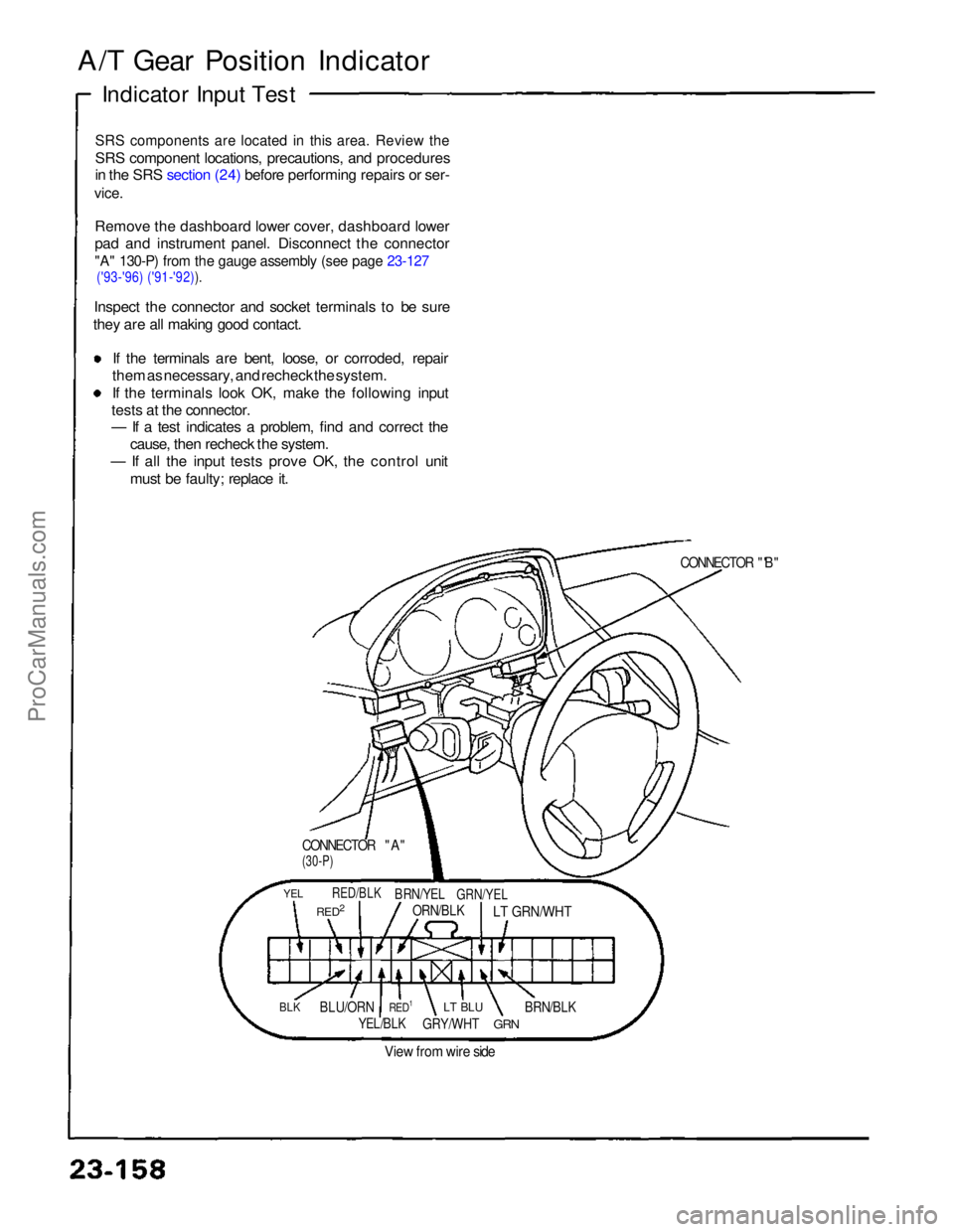
A/T Gear Position Indicator
Indicator Input Test
SRS components are located in this area. Review the
SRS component locations, precautions, and procedures
in the SRS section (24) before performing repairs or ser-
vice.
Remove the dashboard lower cover, dashboard lower
pad and instrument panel. Disconnect the connector
"A" 130-P) from the gauge assembly (see page 23-127
('93-'96) ('91-'92)).
Inspect the connector and socket terminals to be sure
they are all making good contact.
If the terminals are bent, loose, or corroded, repair
them as necessary, and recheck the system. If the terminals look OK, make the following input
tests at the connector.
— If a test indicates a problem, find and correct the cause, then recheck the system.
— If all the input tests prove OK, the control unit
must be faulty; replace it.
CONNECTOR "A"
(30-P)
CONNECTOR "'B"
YEL
RED2
RED/BLK
BRN/YEL
ORN/BLK
GRN/YEL
LT GRN/WHT
BLK
BLU/ORN
RED1
YEL/BLK
LT BLU
GRY/WHT
GRN
BRN/BLK
View from wire sideProCarManuals.com
Page 823 of 1640
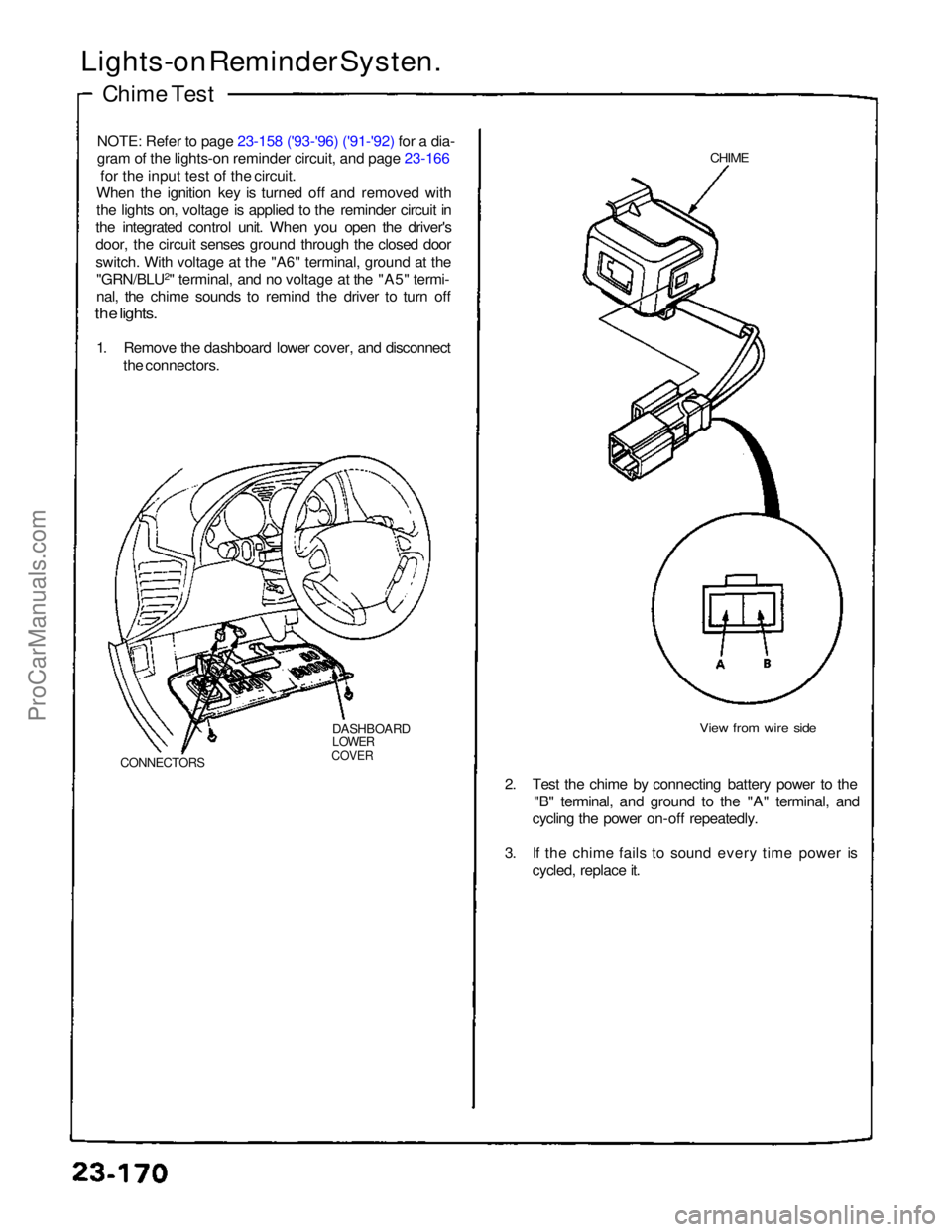
Lights-on Reminder Systen.
Chime Test
NOTE: Refer to page 23-158 ('93-'96) ('91-'92) for a dia-
gram of the lights-o
n
reminder circuit, and page 23-166
for the input test of the circuit.
When the ignition key is turned off and removed with
the lights on, voltage is applied to the reminder circuit in
the integrated control unit. When you open the driver's
door, the circuit senses ground through the closed door
switch. With voltage at the "A6" terminal, ground at the "GRN/BLU 2
" terminal, and no voltage at the "A5" termi-
nal, the chime sounds to remind the driver to turn off
the lights.
1. Remove the dashboard lower cover, and disconnect the connectors.
DASHBOARD
LOWER
COVER
CONNECTORS
CHIME
View from wire side
2. Test the chime by connecting battery power to the "B" terminal, and ground to the "A" terminal, and
cycling the power on-off repeatedly.
3. If the chime fails to sound every time power is cycled, replace it.ProCarManuals.com
Page 834 of 1640
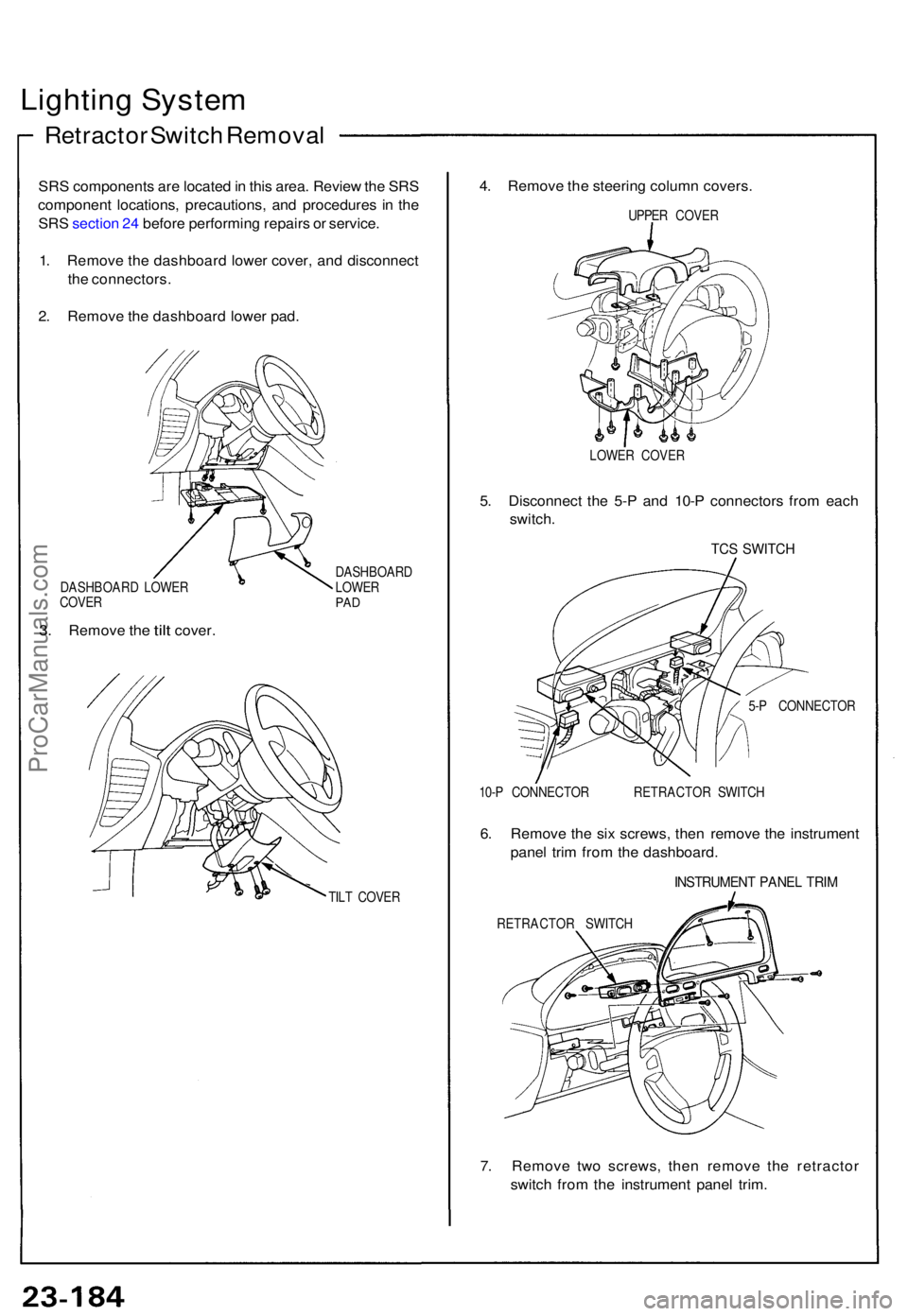
Lighting Syste m
Retracto r Switc h Remova l
SRS component s ar e locate d in thi s area . Revie w th e SR S
componen t locations , precautions , an d procedure s i n th e
SR S sectio n 24 befor e performin g repair s o r service .
1 . Remov e th e dashboar d lowe r cover , an d disconnec t
th e connectors .
2 . Remov e th e dashboar d lowe r pad .
DASHBOAR D LOWE R
COVE R
3. Remov e the tilt cover .
DASHBOAR D
LOWE R
PAD
TIL T COVE R
4. Remov e th e steerin g colum n covers .
UPPER COVE R
LOWE R COVE R
5. Disconnec t th e 5- P an d 10- P connector s fro m eac h
switch .
TCS SWITC H
5-P CONNECTO R
10- P CONNECTO R RETRACTO R SWITC H
6. Remov e th e si x screws, then remov e th e instrumen t
pane l tri m fro m th e dashboard .
INSTRUMEN T PANE L TRI M
RETRACTO R SWITC H
7. Remov e tw o screws , the n remov e th e retracto r
switc h fro m th e instrumen t pane l trim .
ProCarManuals.com