dashboard ACURA NSX 1991 Service Service Manual
[x] Cancel search | Manufacturer: ACURA, Model Year: 1991, Model line: NSX, Model: ACURA NSX 1991Pages: 1640, PDF Size: 60.48 MB
Page 1391 of 1640
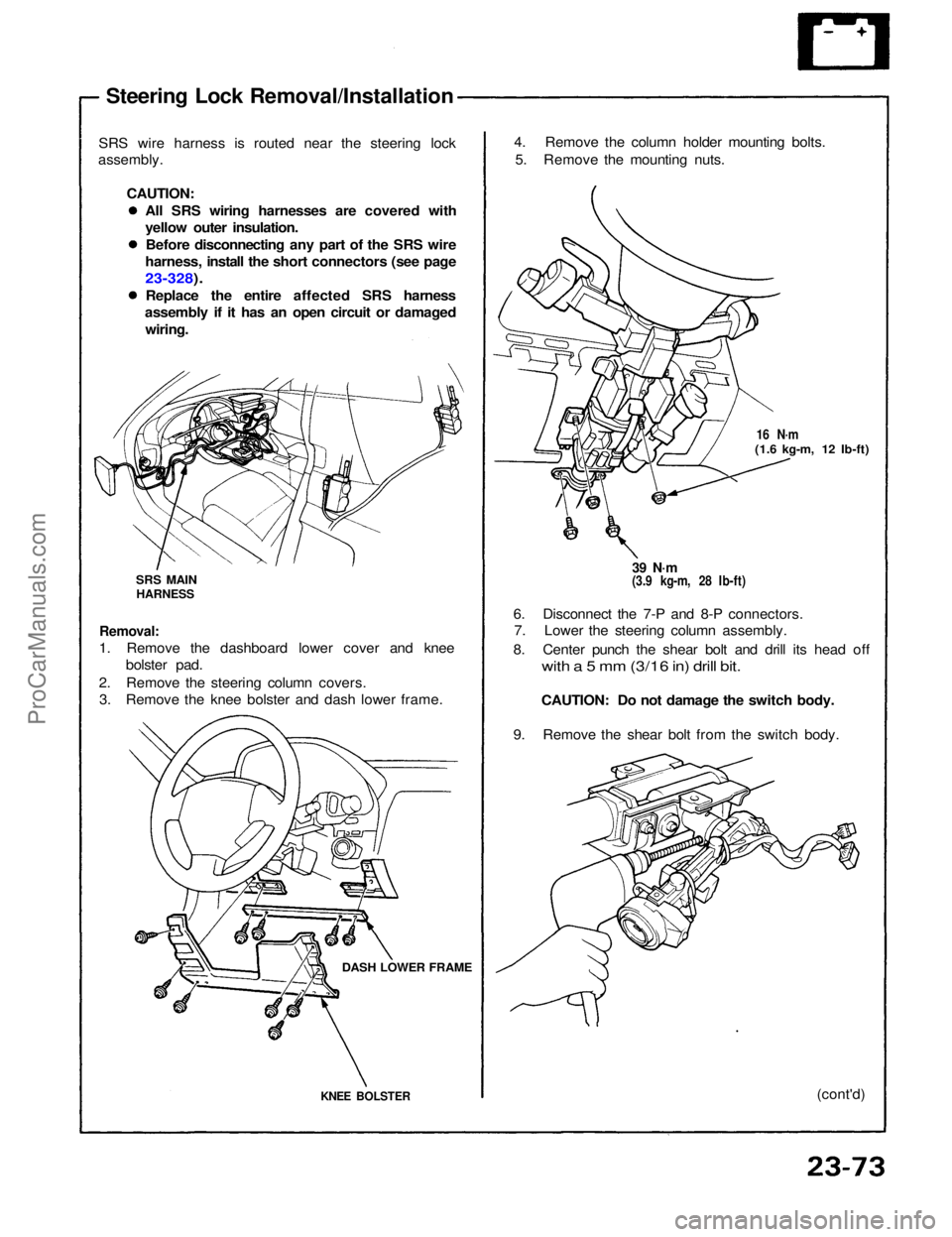
Steering Lock Removal/Installation
SRS wire harness is routed near the steering lock
assembly.
CAUTION:All SRS wiring harnesses are covered with
yellow outer insulation.Before disconnecting any part of the SRS wire
harness, install the short connectors (see page
23-328).
Replace the entire affected SRS harness
assembly if it has an open circuit or damaged
wiring. 4. Remove the column holder mounting bolts.
5. Remove the mounting nuts.
39 N·m
(3.9 kg-m, 28 Ib-ft)
16 N·m
(1.6 kg-m, 12 Ib-ft)
6. Disconnect the 7-P and 8-P connectors. 7. Lower the steering column assembly.
8. Center punch the shear bolt and drill its head off
with a 5 mm (3/16 in) drill bit.
CAUTION: Do not damage the switch body.
9. Remove the shear bolt from the switch body.
(cont'd)
Removal:
1. Remove the dashboard lower cover and knee bolster pad.
2. Remove the steering column covers. 3. Remove the knee bolster and dash lower frame.
KNEE BOLSTER
DASH LOWER FRAME
SRS MAIN
HARNESSProCarManuals.com
Page 1406 of 1640
— If all the input tests prove OK, the control unit must
CAUTION:
All SRS wiring harnesses are covered with yellow out-
er insulation.
Before disconnecting any part of the SRS wire hap
ness, install the short connectors (see page 24-10('93-'96))
Replace the entire affected SRS harness assembly if
it has an open circuit or damaged wiring.
Afte
r
installing the gauge assembly, recheck the oper-
ation of the SRS indicator light.
Remove the dashboard lower cover, center panel and
instrument panel. Disconnect the connector "B"
OOP) from the gauge assembly (see page 23-127).
Inspect the connector terminals to be sure they are
all making good contact.
I
f
the terminals are bent, loose, or corroded, repair
them as necessary, and recheck the system.
If the terminals look OK, make the following input tests
at the connector.
— If a test indicates a problem, find and correct the cause, then recheck the system.
be faulty; replace it.
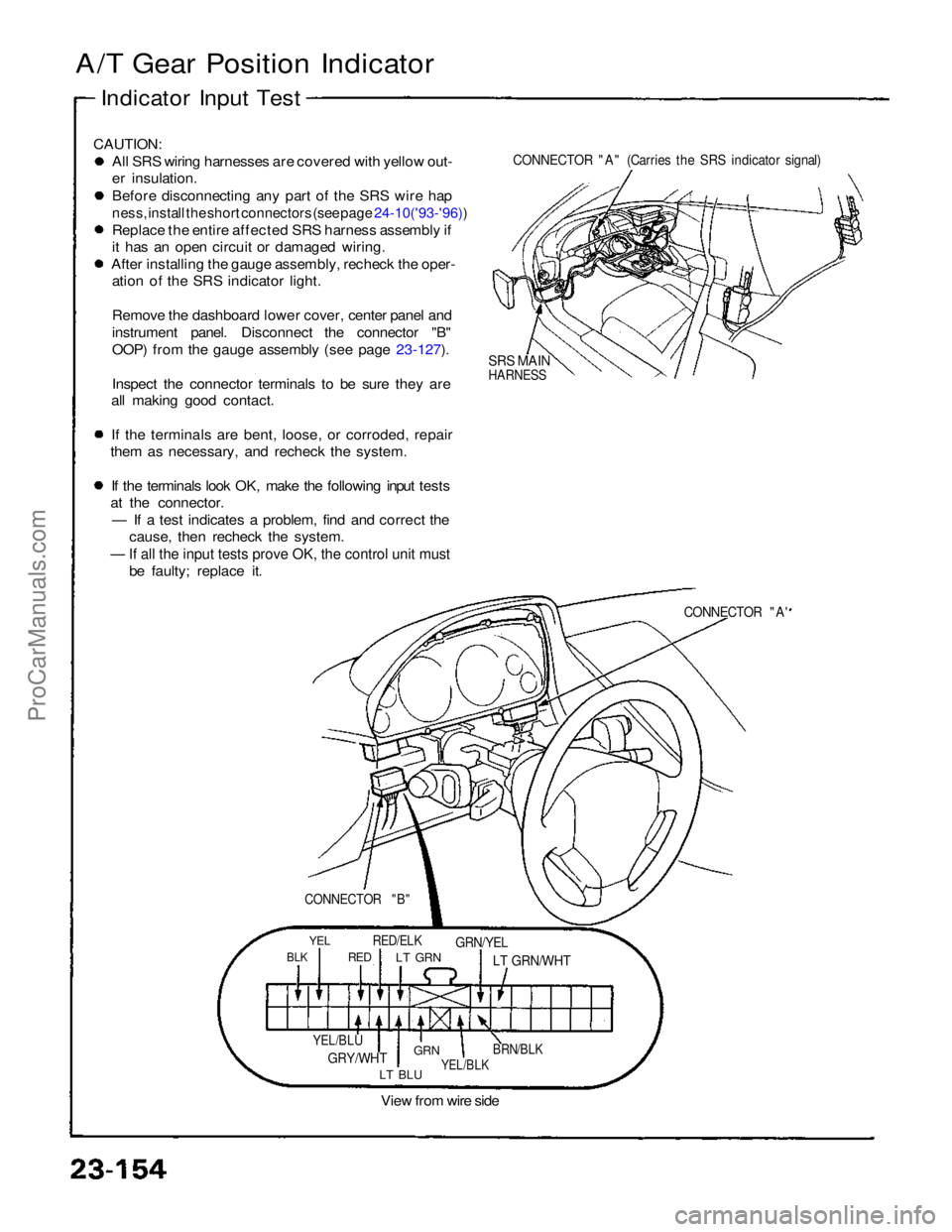
CONNECTOR "A" (Carries the SRS indicator signal)
SRS MAIN
HARNESS
CONNECTOR "A'
YEL
RED/ELK
GRN/YEL
LT BLU
View from wire side
CONNECTOR "B"
BLK
RED
LT GRN
LT GRN/WHT
YEL/BLU
GRY/WHT
GRN
YEL/BLK
BRN/BLK
A/T Gear Position Indicator
Indicator Input TestProCarManuals.com
Page 1414 of 1640
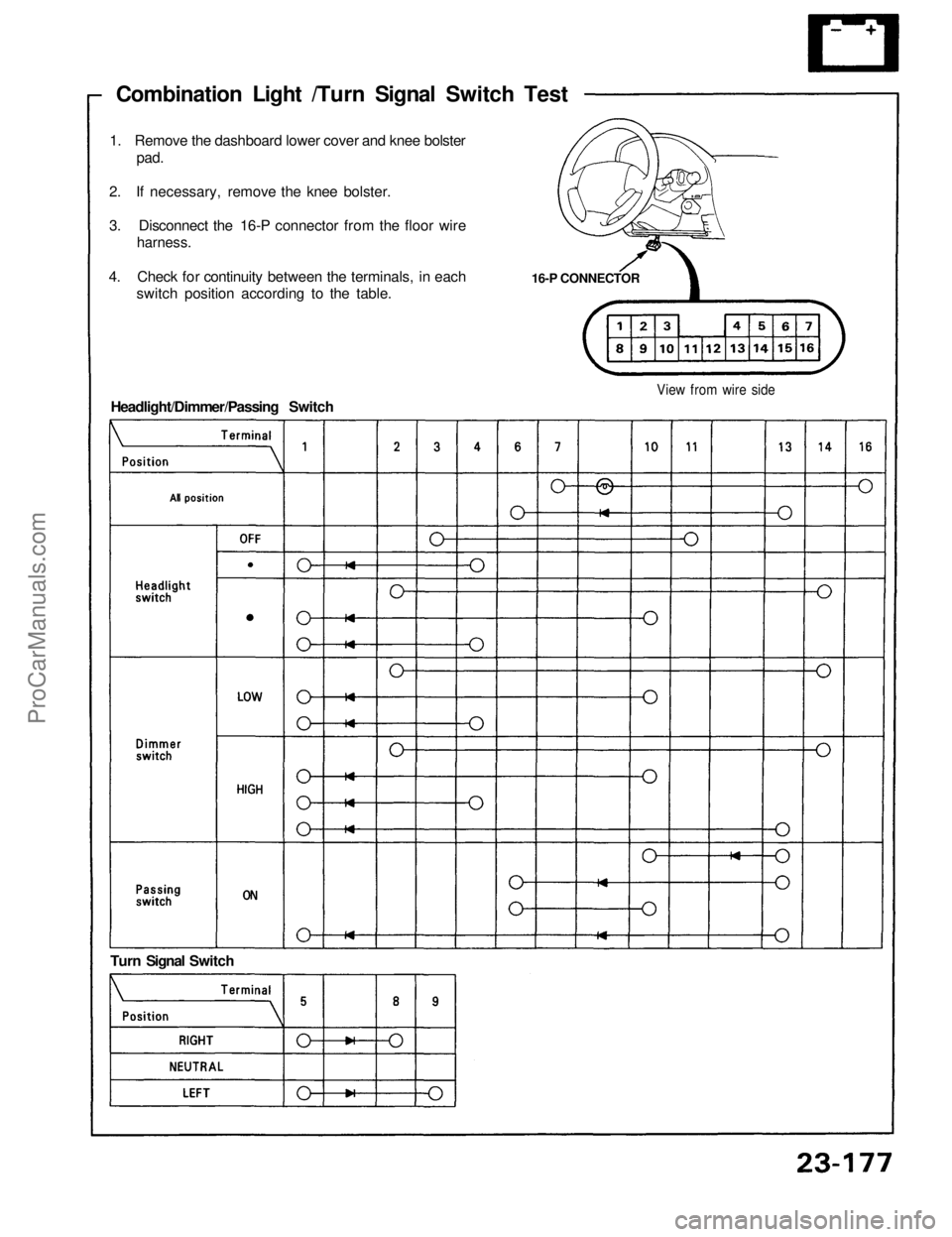
Combination Light /Turn Signal Switch Test
16-P CONNECTOR
1. Remove the dashboard lower cover and knee bolster
pad.
2. If necessary, remove the knee bolster.
3. Disconnect the 16-P connector from the floor wire
harness.
4. Check for continuity between the terminals, in each
switch position according to the table.
View from wire side
Turn Signal Switch
Headlight/Dimmer/Passing SwitchProCarManuals.com
Page 1418 of 1640
Side Marker/Turn Signal/Hazard Flash System
Turn Signal/Hazard Relay Input Test
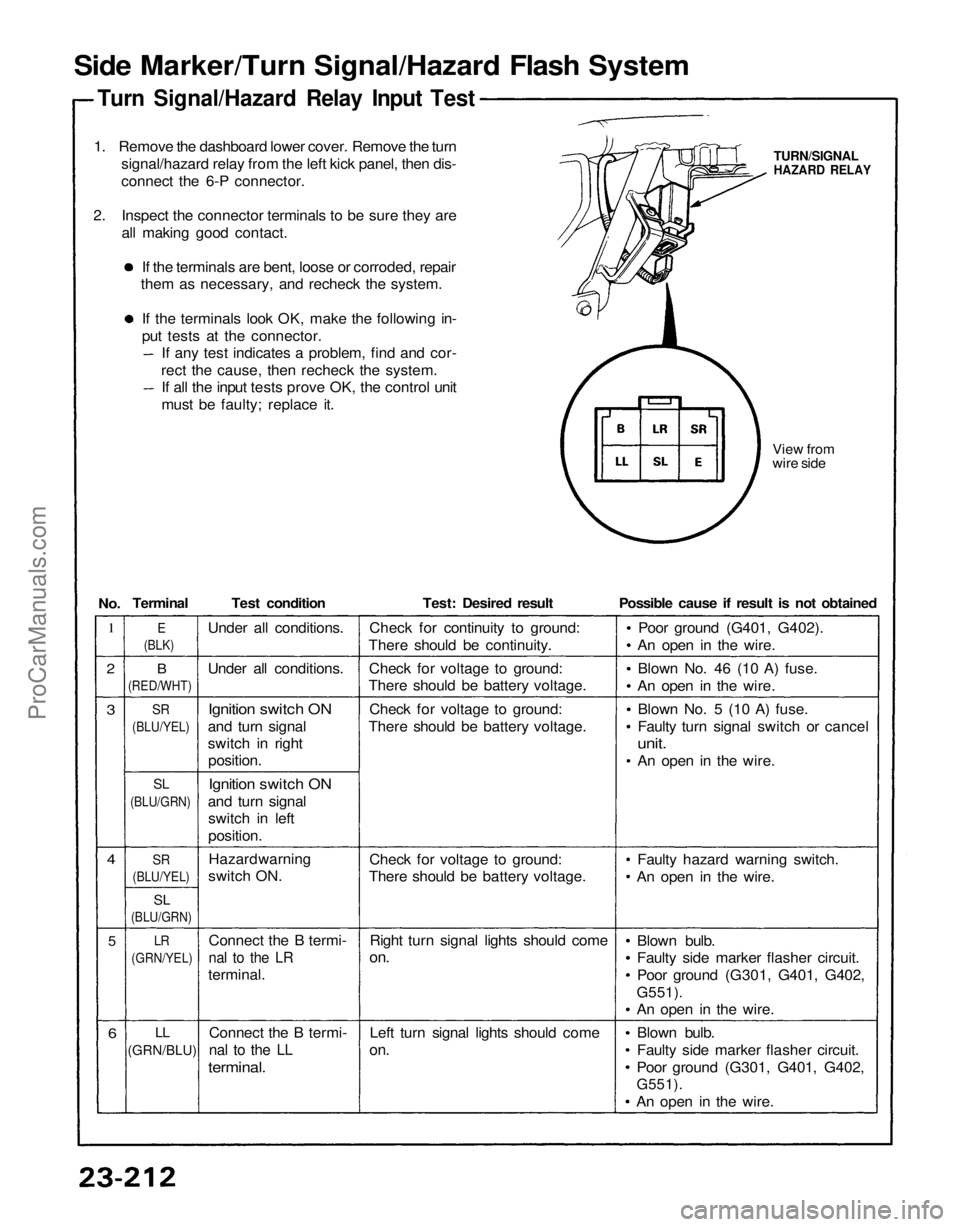
1. Remove the dashboard lower cover. Remove the turn signal/hazard relay from the left kick panel, then dis-
connect the 6-P connector.
2. Inspect the connector terminals to be sure they are all making good contact.
If the terminals are bent, loose or corroded, repair
them as necessary, and recheck the system.
If the terminals look OK, make the following in-
put tests at the connector. If any test indicates a problem, find and cor-
rect the cause, then recheck the system. If all the input tests prove OK, the control unit
must be faulty; replace it.
View from
wire side
TURN/SIGNAL
HAZARD RELAY
1
2
3
4
5
6
B
(RED/WHT)
SR
(BLU/YEL)
SL
(BLU/GRN)
SR
(BLU/YEL)
SL
(BLU/GRN)
LR
(GRN/YEL)
LL
(GRN/BLU)
Test condition
Under all conditions.
Ignition switch ON
and turn signal
switch in right position.
Ignition switch ON
and turn signal switch in left
position.
Connect the B termi-
nal to the LR
terminal.
Connect the B termi-
nal to the LL
terminal.
Test: Desired result
Check for continuity to ground:
There should be continuity.
Check for voltage to ground:
There should be battery voltage.
Check for voltage to ground:
There should be battery voltage.
Check for voltage to ground:
There should be battery voltage.
Right turn signal lights should come
on.
Left turn signal lights should come
on.
Possible cause if result is not obtained
Poor ground (G401, G402).
An open in the wire.
Blown No. 46 (10 A) fuse.
An open in the wire.
Blown No. 5 (10 A) fuse.
Faulty turn signal switch or cancel
unit.
An open in the wire.
Faulty hazard warning switch.
An open in the wire.
Blown bulb.
Faulty side marker flasher circuit.
Poor ground (G301, G401, G402,
G551).
An open in the wire.
Blown bulb.
Faulty side marker flasher circuit.
Poor ground (G301, G401, G402,
G551).
An open in the wire.
E
(BLK)
Terminal
No.
Under all conditions.
Hazard warning
switch ON.ProCarManuals.com
Page 1420 of 1640
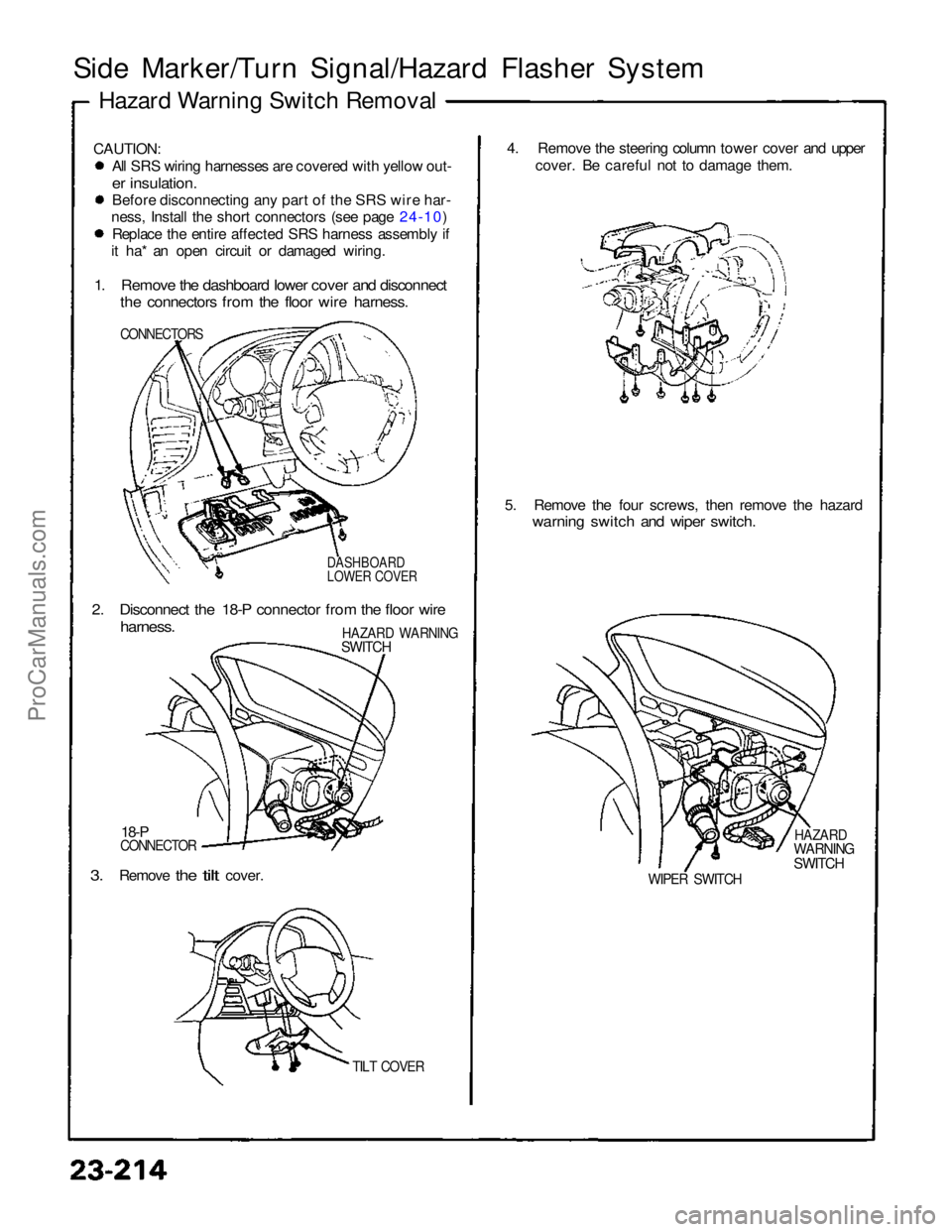
Side Marker/Turn Signal/Hazard Flasher System
Hazard Warning Switch Removal
CAUTION: All SRS wiring harnesses are covered with yellow out-
er insulation.
Before disconnecting any part of the SRS wire har-
ness, Install the short connectors (see page 24-10) Replace the entire affected SRS harness assembly if
it ha* an open circuit or damaged wiring.
1. Remove the dashboard lower cover and disconnect
the connectors from the floor wire harness.
CONNECTORS
DASHBOARD
LOWER COVER
2. Disconnect the 18-P connector from the floor wire
harness.
HAZARD WARNING
SWITCH
18-P
CONNECTOR
3.
Remove
the
tilt
cover.
TILT COVER
4. Remove the steering column tower cover and upper
cover. Be careful not to damage them.
5. Remove the four screws, then remove the hazard
warning switch and wiper switch.
HAZARD
WARNING
SWITCH
WIPER SWITCHProCarManuals.com
Page 1421 of 1640
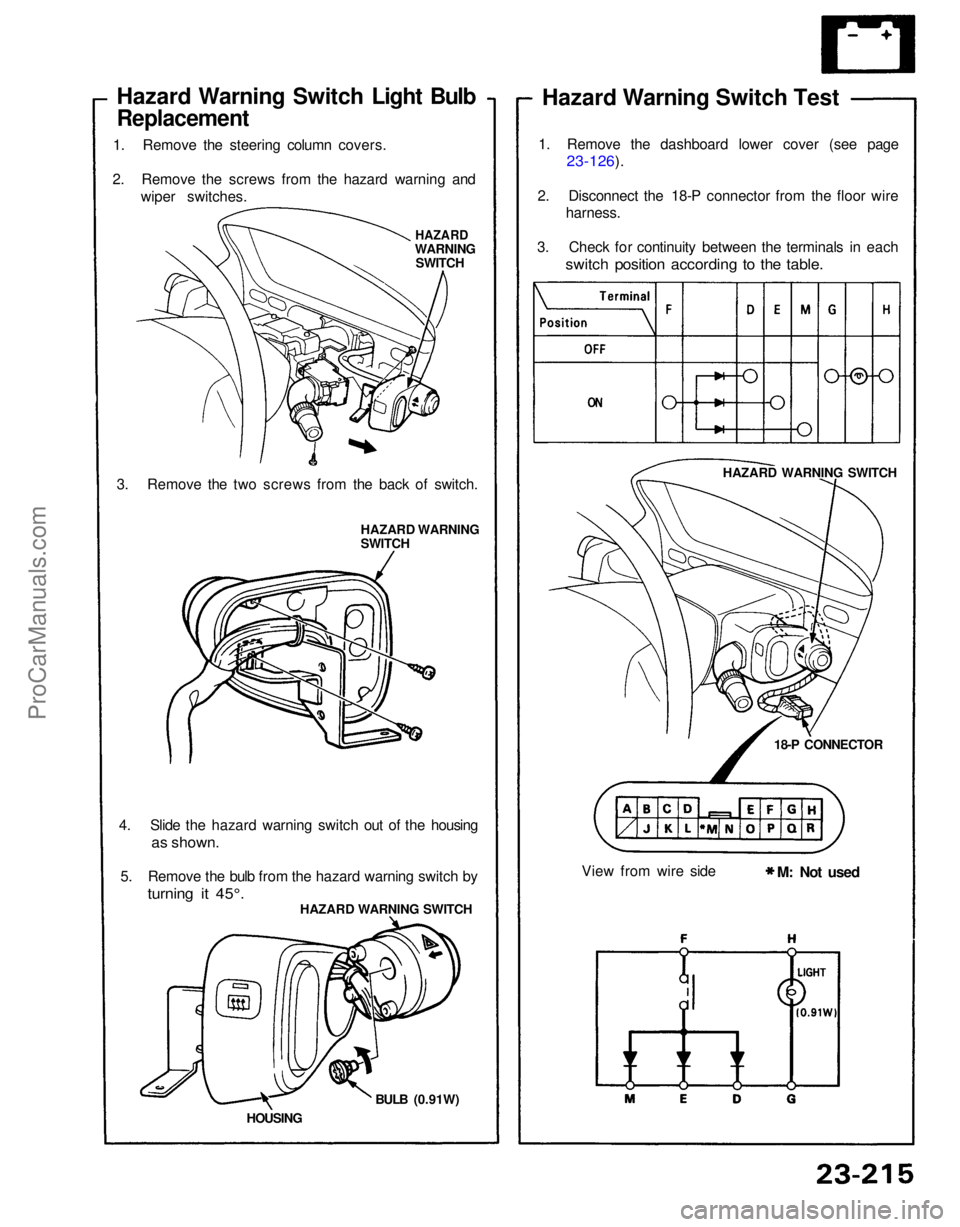
Hazard Warning Switch Light Bulb
Replacement
1. Remove the steering column covers.
2. Remove the screws from the hazard warning and wiper switches.
HAZARD
WARNING SWITCH
3. Remove the two screws from the back of switch. HAZARD WARNING
SWITCH
4. Slide the hazard warning switch out of the housing
as shown.
5. Remove the bulb from the hazard warning switch by
turning it 45°.
HAZARD WARNING SWITCH
HOUSING BULB (0.91W) Hazard Warning Switch Test
1. Remove the dashboard lower cover (see page
23-126).
2. Disconnect the 18-P connector from the floor wire harness.
3. Check for continuity between the terminals in each
switch position according to the table.
HAZARD WARNING SWITCH
18-P CONNECTOR
View from wire side M: Not usedProCarManuals.com
Page 1430 of 1640
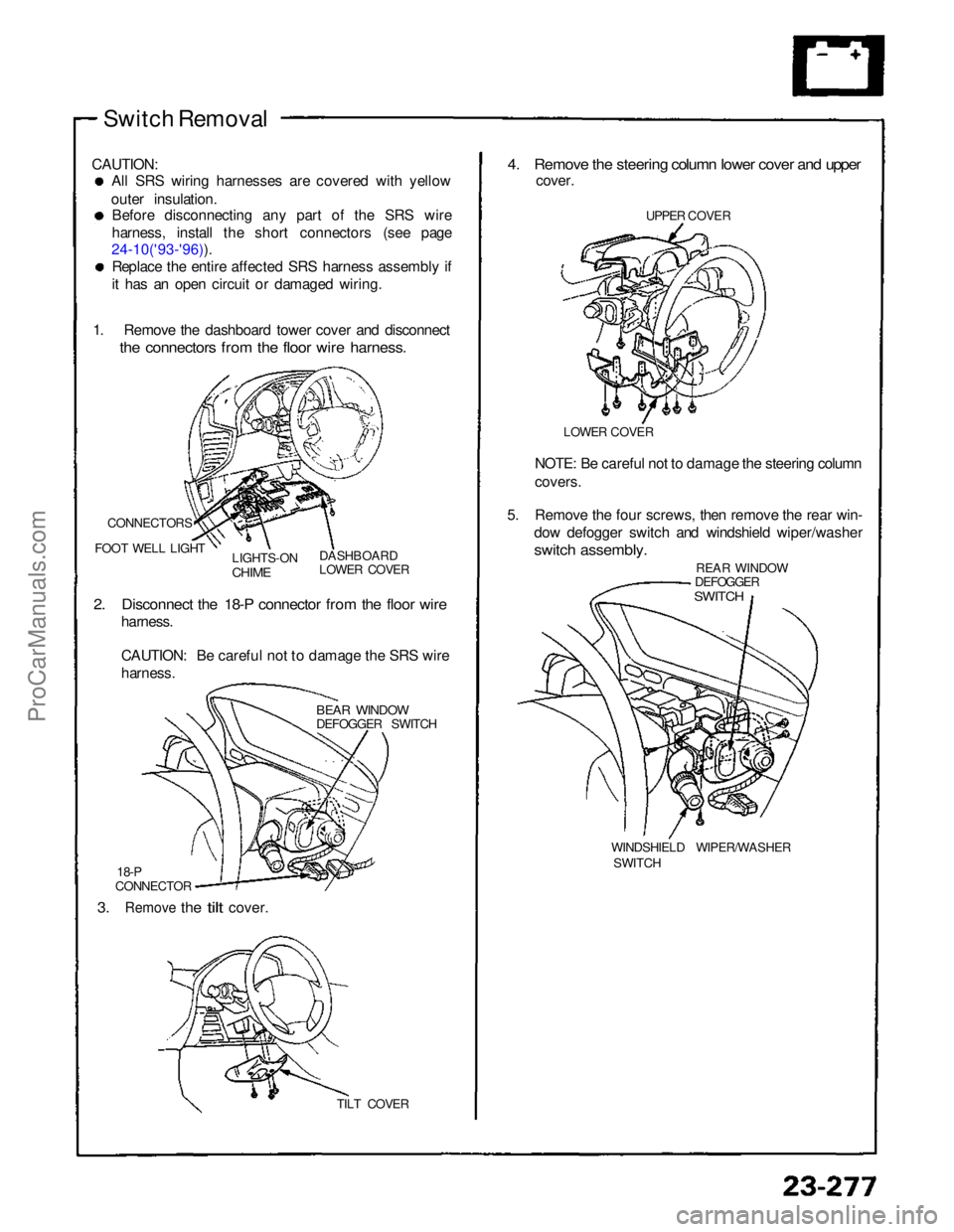
Switch Removal
CAUTION: All SRS wiring harnesses are covered with yellow
outer insulation. Before disconnecting any part of the SRS wire
harness, install the short connectors (see page
24-10('93-'96)). Replace the entire affected SRS harness assembly if
it has an open circuit or damaged wiring.
1. Remove the dashboard tower cover and disconnect
the connectors from the floor wire harness.
CONNECTORS
FOOT WELL LIGHT LIGHTS-ON
CHIME
DASHBOARD
LOWER COVER
2. Disconnect the 18-P connector from the floor wire
harness.
CAUTION: Be careful not to damage the SRS wire
harness.
BEAR WINDOW
DEFOGGER SWITCH
18-P
CONNECTOR
3.
Remove
the
tilt
cover.
TILT COVER
4. Remove the steering column lower cover and upper
cover.
UPPER COVER
LOWER COVER
NOTE: Be careful not to damage the steering column
covers.
5. Remove the four screws, then remove the rear win- dow defogger switch and windshield wiper/washer
switch assembly.
REAR WINDOW
DEFOGGER
SWITCH
WINDSHIELD WIPER/WASHER SWITCHProCarManuals.com
Page 1432 of 1640
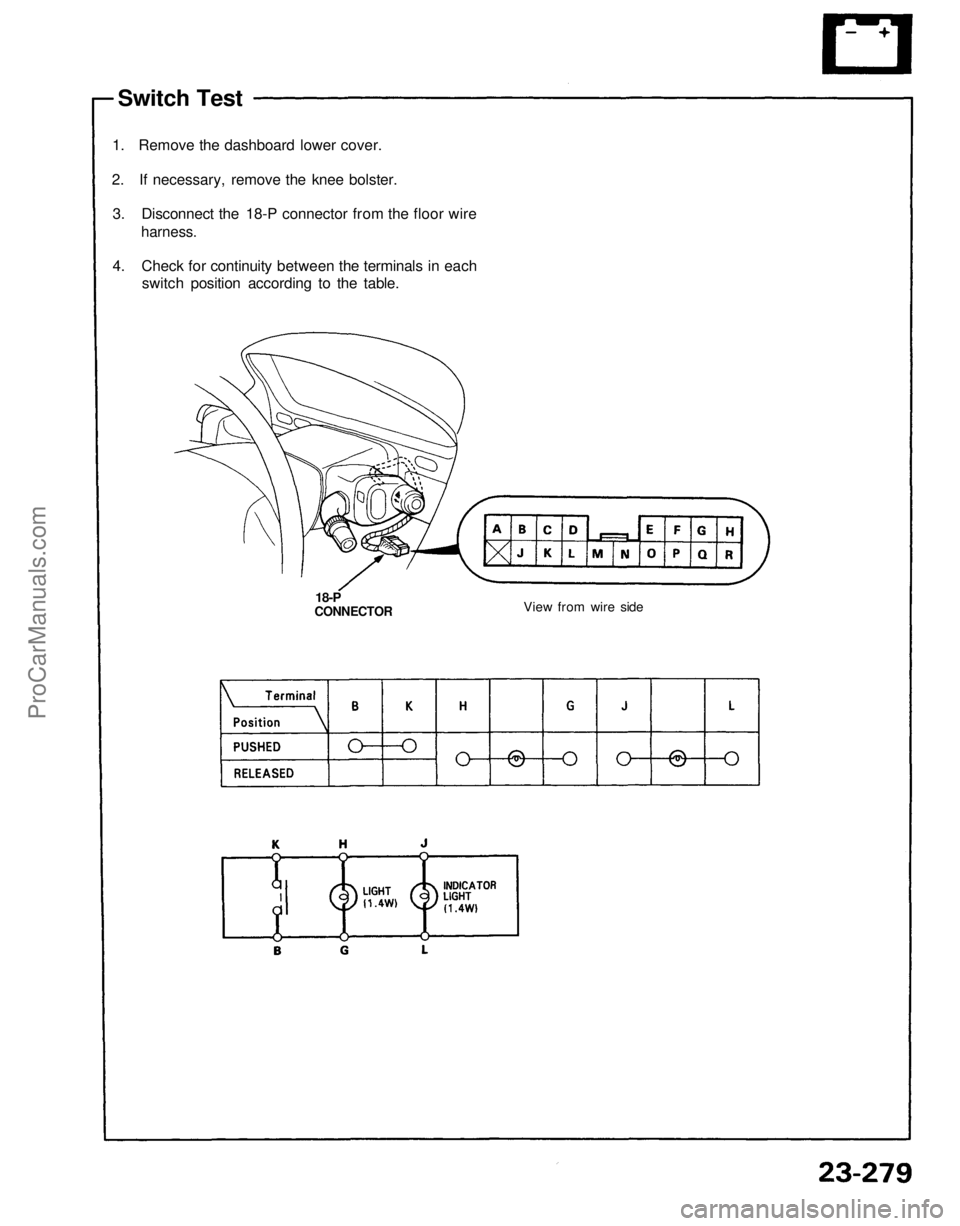
Switch Test
1. Remove the dashboard lower cover.
2. If necessary, remove the knee bolster.
3. Disconnect the 18-P connector from the floor wire
harness.
4. Check for continuity between the terminals in each
switch position according to the table.
18-P
CONNECTOR
View from wire sideProCarManuals.com
Page 1434 of 1640
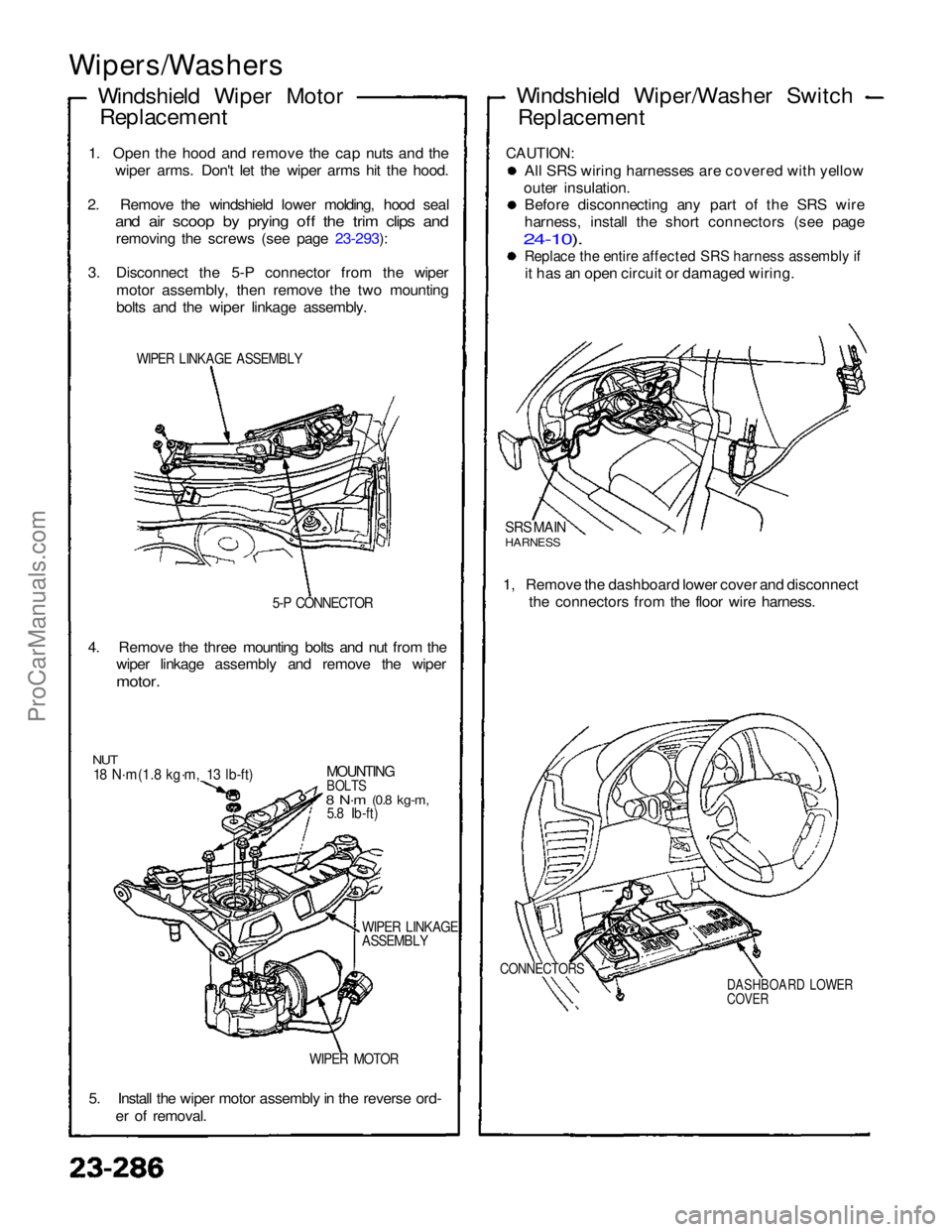
Wipers/Washers
Windshield Wiper MotorReplacement
1. Open the hood and remove the cap nuts and the wiper arms. Don't let the wiper arms hit the hood.
2. Remove the windshield lower molding, hood seal
and air scoop by prying off the trim clips and
removing the screws (see page 23-293):
3. Disconnect the 5-P connector from the wiper motor assembly, then remove the two mounting
bolts and the wiper linkage assembly.
WIPER LINKAGE ASSEMBLY
5-P CONNECTOR
4. Remove the three mounting bolts and nut from the wiper linkage assembly and remove the wiper
motor.
NUT
18 N·m(1.8 kg·m, 13 lb-ft)
MOUNTING
BOLTS
8 N·m
(0.8 kg-m,
5.8 Ib-ft)
WIPER LINKAGE
ASSEMBLY
WIPER MOTOR
5. Install the wiper motor assembly in the reverse ord- er of removal. Windshield Wiper/Washer Switch
Replacement
CAUTION:
All SRS wiring harnesses are covered with yellow
outer insulation. Before disconnecting any part of the SRS wire
harness, install the short connectors (see page
24-10).
Replace the entire affected SRS harness assembly if
it has an open circuit or damaged wiring.
SRS MAIN
HARNESS
1, Remove the dashboard lower cover and disconnect the connectors from the floor wire harness.
CONNECTORS
DASHBOARD LOWER
COVERProCarManuals.com
Page 1436 of 1640
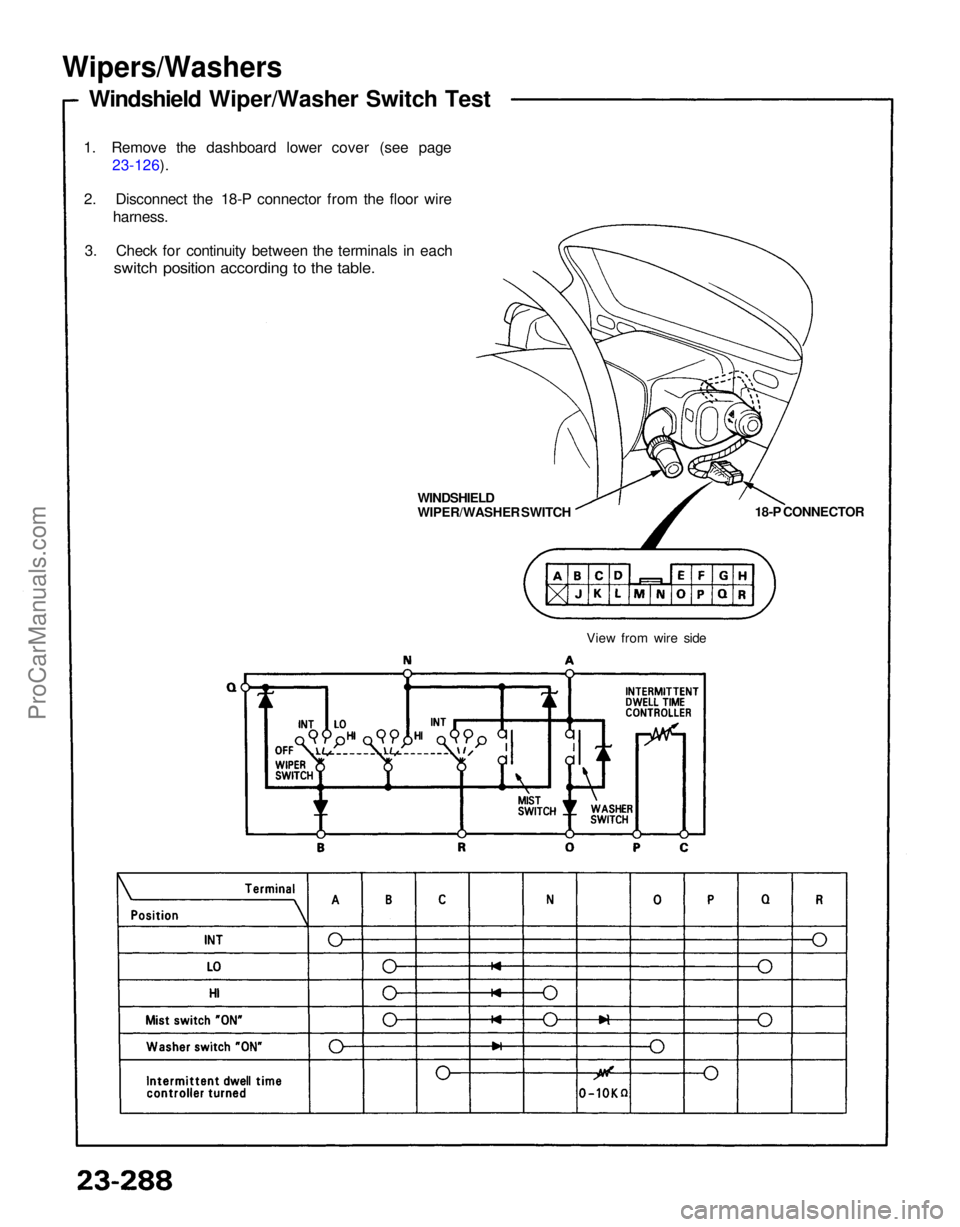
Wipers/Washers
Windshield Wiper/Washer Switch Test
1. Remove the dashboard lower cover (see page 23-126).
2. Disconnect the 18-P connector from the floor wire harness.
3. Check for continuity between the terminals in each
switch position according to the table.
18-P CONNECTOR
WINDSHIELD
WIPER/WASHER SWITCH
View from wire sideProCarManuals.com