reset ACURA NSX 1997 Service Repair Manual
[x] Cancel search | Manufacturer: ACURA, Model Year: 1997, Model line: NSX, Model: ACURA NSX 1997Pages: 1503, PDF Size: 57.08 MB
Page 33 of 1503
Troubleshooting Procedure s
Checking th e Diagnosti c Troubl e Cod e (DTC )
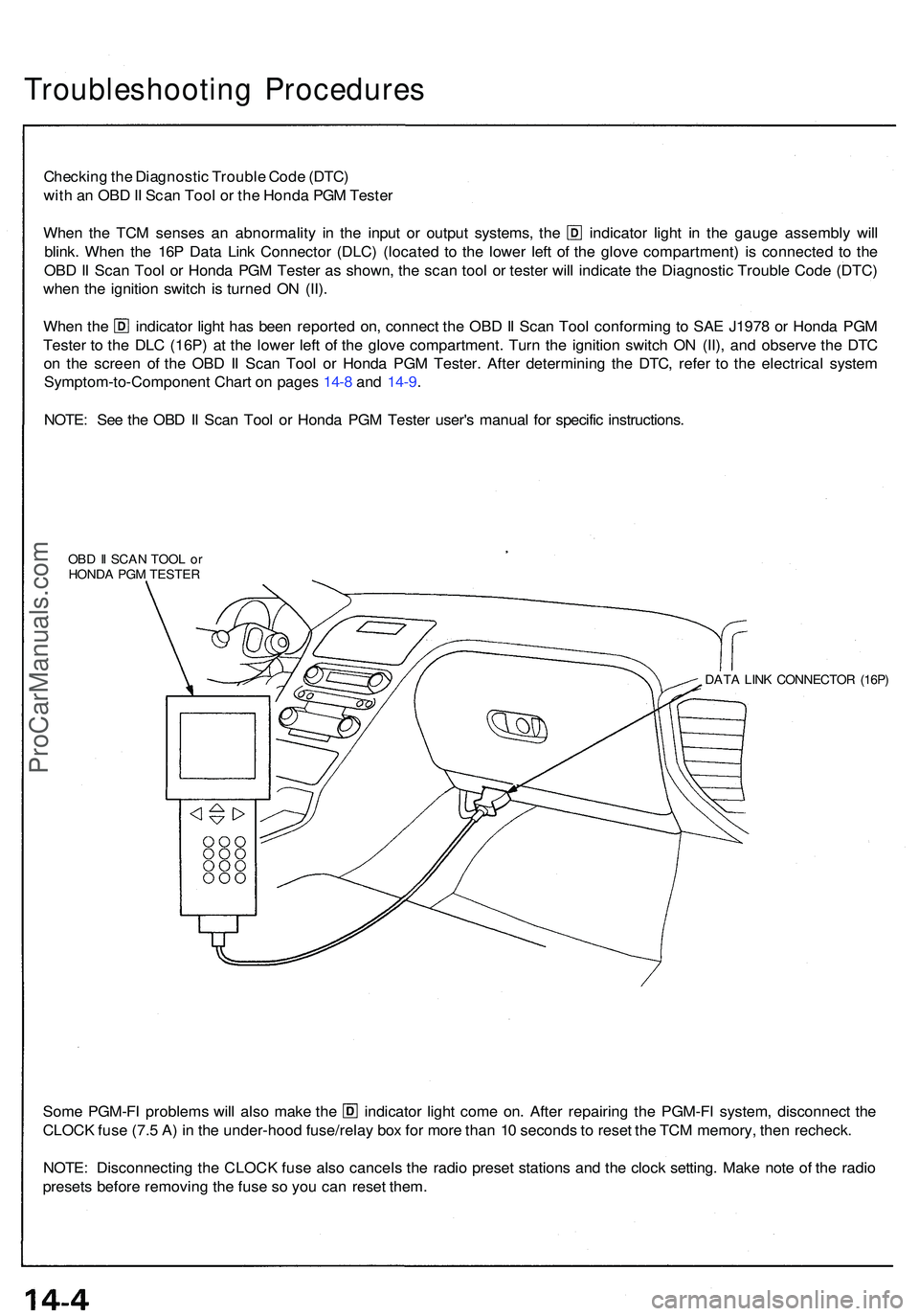
wit h a n OB D II Sca n Too l o r th e Hond a PG M Teste r
When th e TC M sense s a n abnormalit y i n th e inpu t o r outpu t systems , th e indicato r ligh t i n th e gaug e assembl y wil l
blink . Whe n th e 16 P Dat a Lin k Connecto r (DLC ) (locate d t o th e lowe r lef t o f th e glov e compartment ) i s connecte d t o th e
OB D II Sca n Too l o r Hond a PG M Teste r a s shown , th e sca n too l o r teste r wil l indicat e th e Diagnosti c Troubl e Cod e (DTC )
whe n th e ignitio n switc h i s turne d O N (II) .
Whe n th e indicato r ligh t ha s bee n reporte d on , connec t th e OB D II Sca n Too l conformin g t o SA E J197 8 o r Hond a PG M
Teste r t o th e DL C (16P ) a t th e lowe r lef t o f th e glov e compartment . Tur n th e ignitio n switc h O N (II) , an d observ e th e DT C
o n th e scree n o f th e OB D II Sca n Too l o r Hond a PG M Tester . Afte r determinin g th e DTC , refe r t o th e electrica l syste m
Symptom-to-Componen t Char t o n page s 14- 8 an d 14-9 .
NOTE : Se e th e OB D II Sca n Too l o r Hond a PG M Teste r user' s manua l fo r specifi c instructions .
OBD II SCA N TOO L o r
HOND A PG M TESTE R
DATA LIN K CONNECTO R (16P )
Some PGM-F I problem s wil l als o mak e th e indicato r ligh t com e on . Afte r repairin g th e PGM-F I system , disconnec t th e
CLOC K fus e (7. 5 A ) i n th e under-hoo d fuse/rela y bo x fo r mor e tha n 1 0 second s t o rese t th e TC M memory , the n recheck .
NOTE : Disconnectin g th e CLOC K fus e als o cancel s th e radi o prese t station s an d th e cloc k setting . Mak e not e o f th e radi o
preset s befor e removin g th e fus e s o yo u ca n rese t them .
ProCarManuals.com
Page 34 of 1503
Checking th e Diagnosti c Troubl e Cod e (DTC )
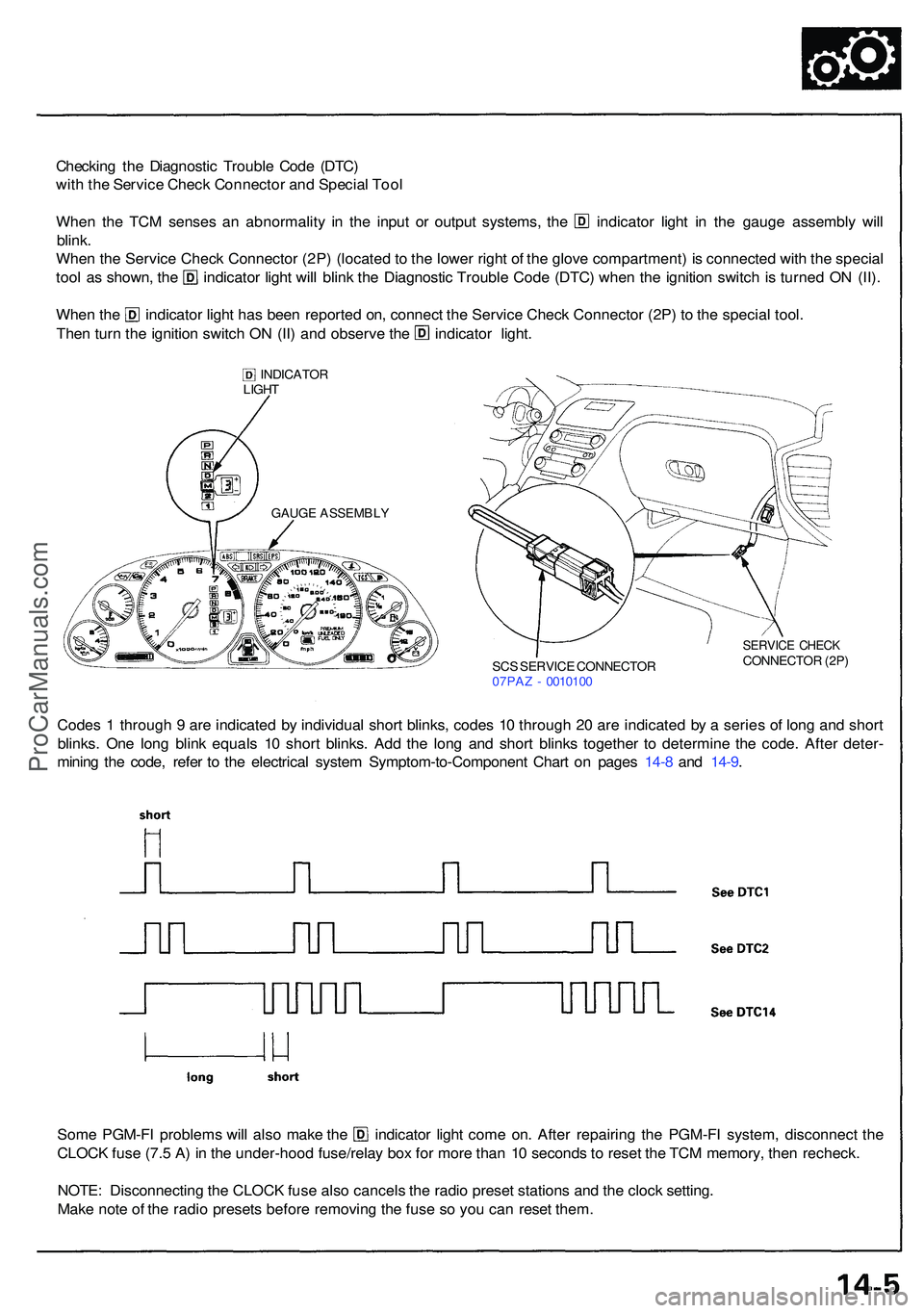
wit h th e Servic e Chec k Connecto r an d Specia l Too l
Whe n th e TC M sense s a n abnormalit y i n th e inpu t o r outpu t systems , th e indicato r ligh t i n th e gaug e assembl y wil l
blink .
Whe n th e Servic e Chec k Connecto r (2P ) (locate d to th e lowe r righ t o f th e glov e compartment ) i s connecte d wit h th e specia l
tool a s shown , th e indicato r ligh t wil l blin k th e Diagnosti c Troubl e Cod e (DTC ) whe n th e ignitio n switc h i s turne d O N (II) .
Whe n th e indicato r ligh t ha s bee n reporte d on , connec t th e Servic e Chec k Connecto r (2P ) t o th e specia l tool .
Then tur n th e ignitio n switc h O N (II ) an d observ e th e indicato r light .
INDICATO R
LIGH T
SCS SERVIC E CONNECTO R
07PA Z - 001010 0
SERVIC E CHEC KCONNECTO R (2P )
Code s 1 throug h 9 ar e indicate d b y individua l shor t blinks , code s 1 0 throug h 2 0 ar e indicate d b y a serie s o f lon g an d shor t
blinks . On e lon g blin k equal s 1 0 shor t blinks . Ad d th e lon g an d shor t blink s togethe r t o determin e th e code . Afte r deter -
minin g th e code , refe r t o th e electrica l syste m Symptom-to-Componen t Char t o n page s 14-8 an d 14-9 .
Som e PGM-F I problem s wil l als o mak e th e indicato r ligh t com e on . Afte r repairin g th e PGM-F I system , disconnec t th e
CLOC K fus e (7. 5 A ) i n th e under-hoo d fuse/rela y bo x fo r mor e tha n 1 0 second s t o rese t th e TC M memory , the n recheck .
NOTE : Disconnectin g th e CLOC K fus e als o cancel s th e radi o prese t station s an d th e cloc k setting .
Mak e not e o f th e radi o preset s befor e removin g th e fus e s o yo u ca n rese t them .
GAUG E ASSEMBL Y
ProCarManuals.com
Page 36 of 1503
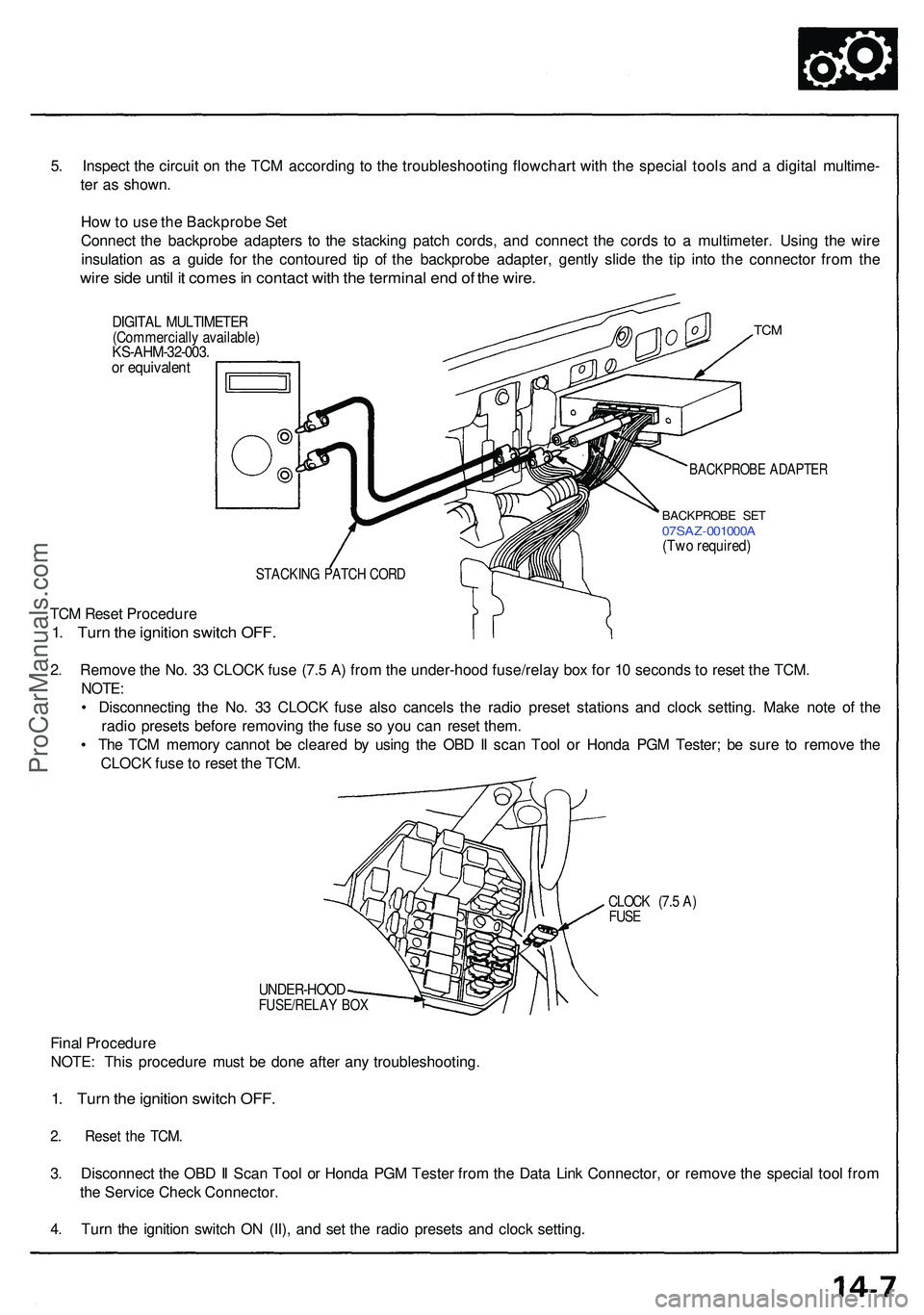
5. Inspec t th e circui t o n th e TC M accordin g t o th e troubleshootin g flowchar t wit h th e specia l tool s an d a digita l multime -
te r a s shown .
Ho w to us e th e Backprob e Se t
Connec t th e backprob e adapter s t o th e stackin g patc h cords , an d connec t th e cord s t o a multimeter . Usin g th e wir e
insulatio n a s a guid e fo r th e contoure d ti p o f th e backprob e adapter , gentl y slid e th e ti p int o th e connecto r fro m th e
wire sid e unti l i t come s in contac t wit h th e termina l en d o f th e wire .
DIGITA L MULTIMETE R(Commerciall y available )KS-AHM-32-003 .or equivalen t
TCM
BACKPROB E ADAPTE R
BACKPROB E SE T07SA Z-001000 A(Two required )
STACKIN G PATC H COR D
TCM Rese t Procedur e
1. Tur n th e ignitio n switc h OFF .
2. Remov e th e No . 3 3 CLOC K fus e (7. 5 A ) fro m th e under-hoo d fuse/rela y bo x fo r 1 0 second s t o rese t th e TCM .
NOTE :
• Disconnectin g th e No . 3 3 CLOC K fus e als o cancel s th e radi o prese t station s an d cloc k setting . Mak e not e o f th e
radi o preset s befor e removin g th e fus e s o yo u ca n rese t them .
• Th e TC M memor y canno t b e cleare d b y usin g th e OB D II sca n Too l o r Hond a PG M Tester ; b e sur e t o remov e th e
CLOC K fus e to rese t th e TCM .
CLOC K (7. 5 A )FUS E
UNDER-HOO DFUSE/RELAY BO X
Fina l Procedur e
NOTE : Thi s procedur e mus t b e don e afte r an y troubleshooting .
1. Tur n th e ignitio n switc h OFF .
2. Rese t th e TCM .
3. Disconnec t th e OB D II Sca n Too l o r Hond a PG M Teste r fro m th e Dat a Lin k Connector , o r remov e th e specia l too l fro m
th e Servic e Chec k Connector .
4 . Tur n th e ignitio n switc h O N (II) , an d se t th e radi o preset s an d cloc k setting .
ProCarManuals.com
Page 130 of 1503
II. Engine Control Module (ECM) Reset Procedure
Either of the following actions, will reset the ECM.
• Using the OBD II scan tool or Honda PGM Tester to clear the ECM's memory.
NOTE: See the OBD II scan tool or Honda PGM Tester user's manuals for specific operating instructions.
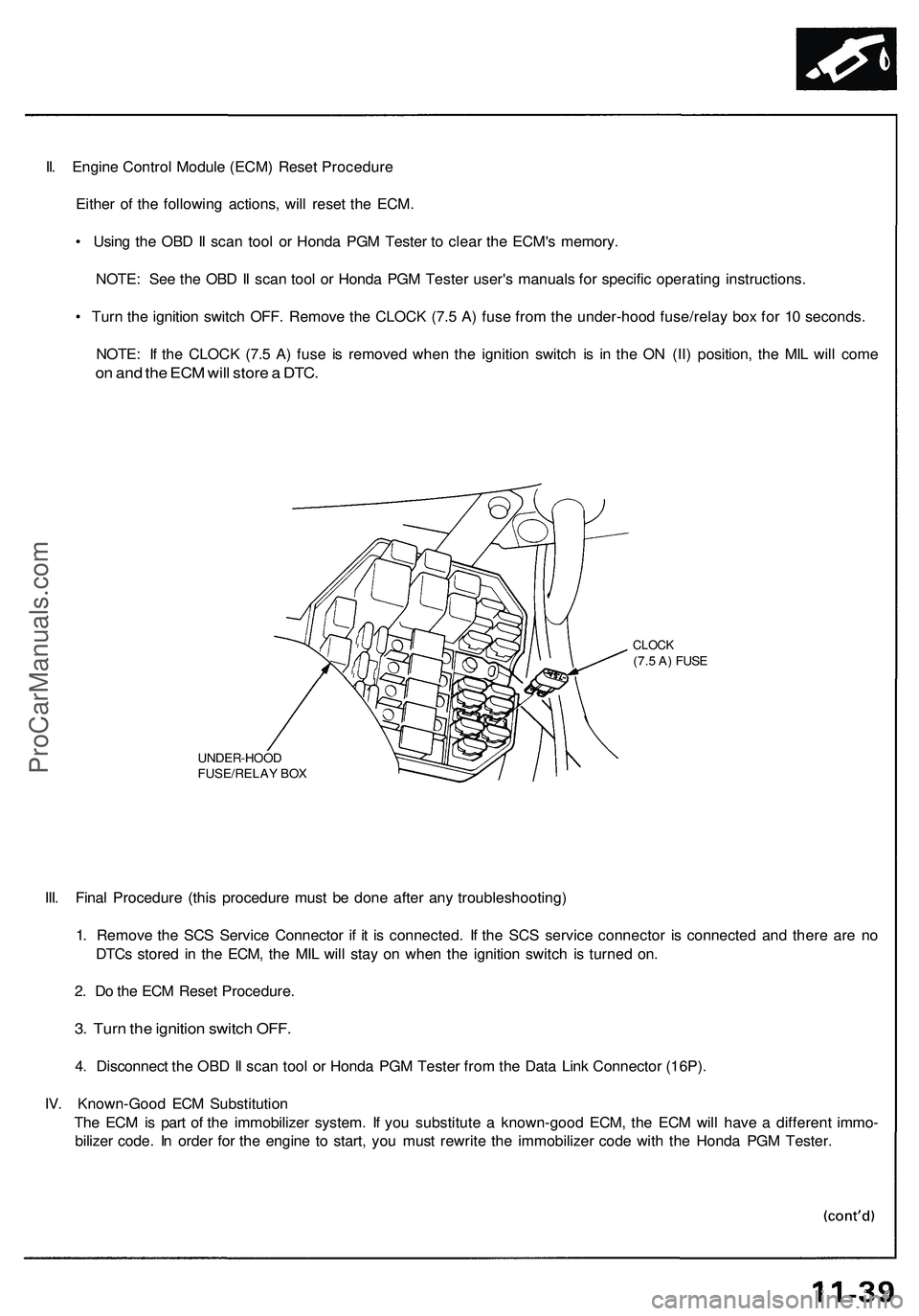
• Turn the ignition switch OFF. Remove the CLOCK (7.5 A) fuse from the under-hood fuse/relay box for 10 seconds.
NOTE: If the CLOCK (7.5 A) fuse is removed when the ignition switch is in the ON (II) position, the MIL will come
on and the ECM will store a DTC.
UNDER-HOOD
FUSE/RELAY BOX
CLOCK
(7.5 A) FUSE
III. Final Procedure (this procedure must be done after any troubleshooting)
1. Remove the SCS Service Connector if it is connected. If the SCS service connector is connected and there are no
DTCs stored in the ECM, the MIL will stay on when the ignition switch is turned on.
2. Do the ECM Reset Procedure.
3. Turn the ignition switch OFF.
4. Disconnect the OBD II scan tool or Honda PGM Tester from the Data Link Connector (16P).
IV. Known-Good ECM Substitution
The ECM is part of the immobilizer system. If you substitute a known-good ECM, the ECM will have a different immo-
bilizer code. In order for the engine to start, you must rewrite the immobilizer code with the Honda PGM Tester.ProCarManuals.com
Page 270 of 1503
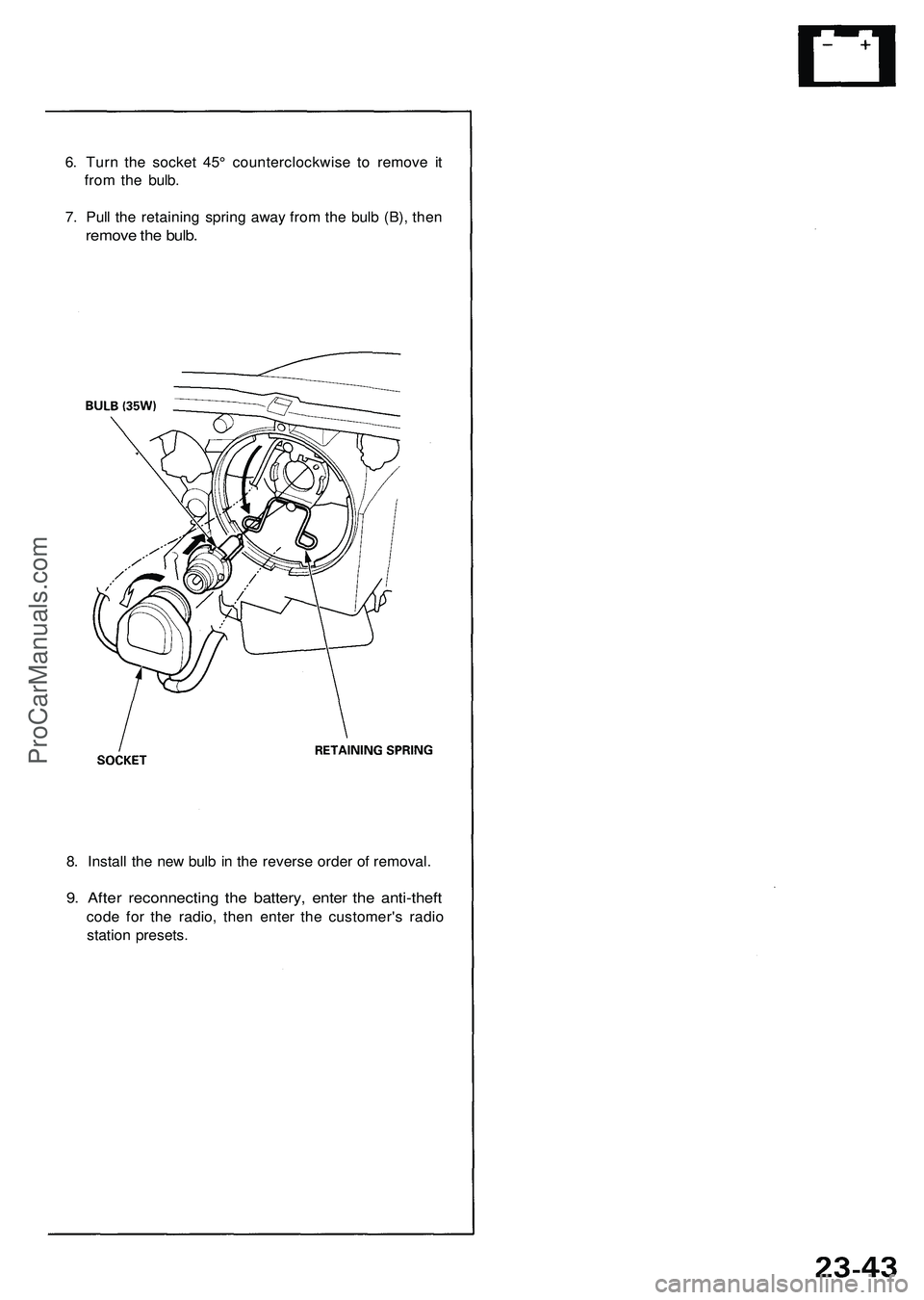
6. Turn the socket 45° counterclockwise to remove it
from the bulb.
7. Pull the retaining spring away from the bulb (B), then
remove the bulb.
8. Install the new bulb in the reverse order of removal.
9. After reconnecting the battery, enter the anti-theft
code for the radio, then enter the customer's radio
station presets.ProCarManuals.com
Page 359 of 1503
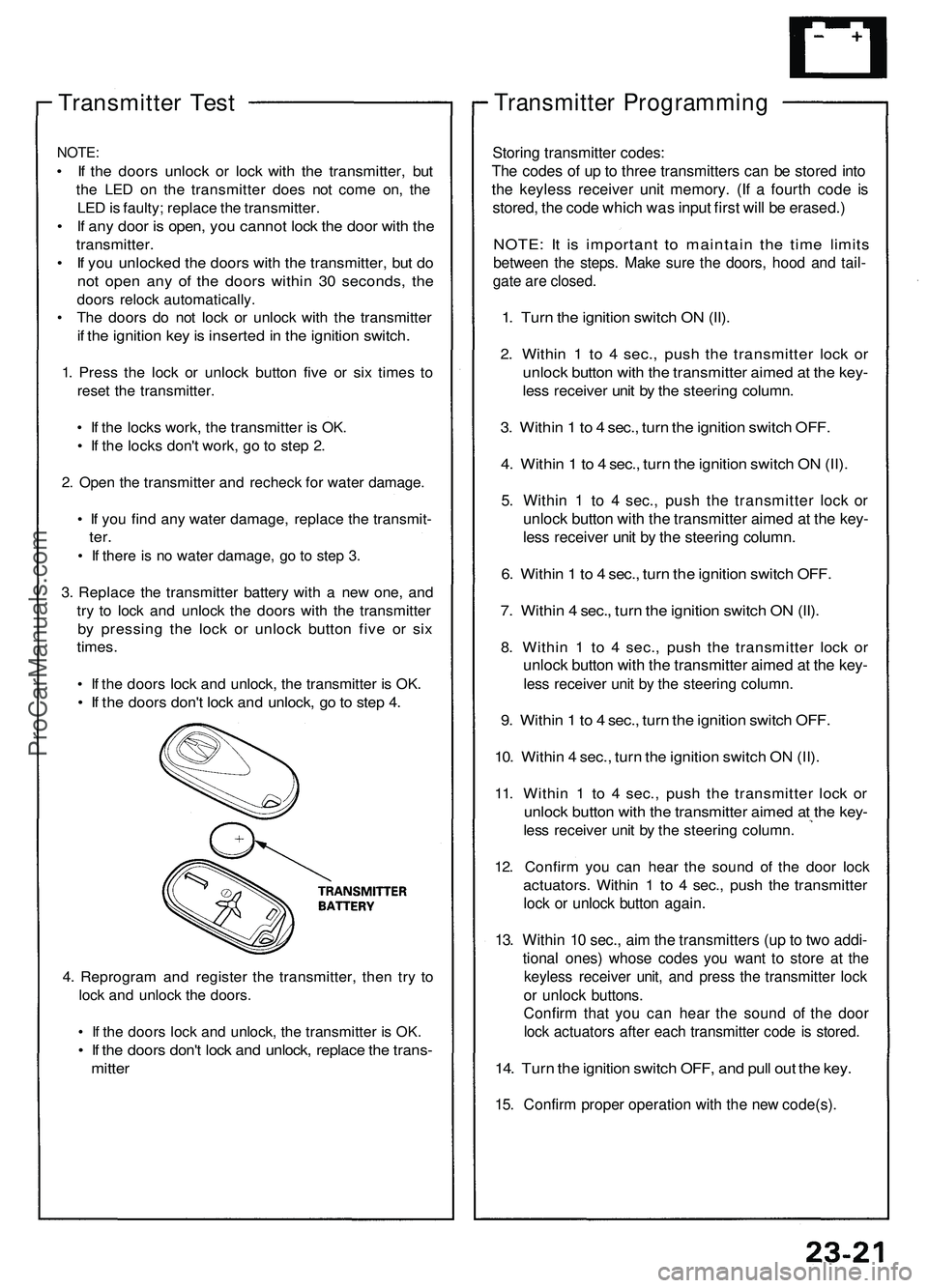
Transmitter Test
NOTE:
• If the doors unlock or lock with the transmitter, but
the LED on the transmitter does not come on, the
LED is faulty; replace the transmitter.
• If any door is open, you cannot lock the door with the
transmitter.
• If you unlocked the doors with the transmitter, but do
not open any of the doors within 30 seconds, the
doors relock automatically.
• The doors do not lock or unlock with the transmitter
if the ignition key is inserted in the ignition switch.
1. Press the lock or unlock button five or six times to
reset the transmitter.
• If the locks work, the transmitter is OK.
• If the locks don't work, go to step 2.
2. Open the transmitter and recheck for water damage.
• If you find any water damage, replace the transmit-
ter.
• If there is no water damage, go to step 3.
3. Replace the transmitter battery with a new one, and
try to lock and unlock the doors with the transmitter
by pressing the lock or unlock button five or six
times.
• If the doors lock and unlock, the transmitter is OK.
• If the doors don't lock and unlock, go to step 4.
4. Reprogram and register the transmitter, then try to
lock and unlock the doors.
• If the doors lock and unlock, the transmitter is OK.
• If the doors don't lock and unlock, replace the trans-
mitter
Transmitter Programming
Storing transmitter codes:
The codes of up to three transmitters can be stored into
the keyless receiver unit memory. (If a fourth code is
stored, the code which was input first will be erased.)
NOTE: It is important to maintain the time limits
between the steps. Make sure the doors, hood and tail-
gate are closed.
1. Turn the ignition switch ON (II).
2. Within 1 to 4 sec., push the transmitter lock or
unlock button with the transmitter aimed at the key-
less receiver unit by the steering column.
3. Within 1 to 4 sec., turn the ignition switch OFF.
4. Within 1 to 4 sec., turn the ignition switch ON (II).
5. Within 1 to 4 sec., push the transmitter lock or
unlock button with the transmitter aimed at the key-
less receiver unit by the steering column.
6. Within 1 to 4 sec., turn the ignition switch OFF.
7. Within 4 sec., turn the ignition switch ON (II).
8. Within 1 to 4 sec., push the transmitter lock or
unlock button with the transmitter aimed at the key-
less receiver unit by the steering column.
9. Within 1 to 4 sec., turn the ignition switch OFF.
10. Within 4 sec., turn the ignition switch ON (II).
11. Within 1 to 4 sec., push the transmitter lock or
unlock button with the transmitter aimed at the key-
less receiver unit by the steering column.
12. Confirm you can hear the sound of the door lock
actuators. Within 1 to 4 sec., push the transmitter
lock or unlock button again.
13. Within 10 sec., aim the transmitters (up to two addi-
tional ones) whose codes you want to store at the
keyless receiver unit, and press the transmitter lock
or unlock buttons.
Confirm that you can hear the sound of the door
lock actuators after each transmitter code is stored.
14. Turn the ignition switch OFF, and pull out the key.
15. Confirm proper operation with the new code(s).ProCarManuals.com
Page 467 of 1503
Cylinder Heads
Installation (cont'd)
Rear:
8 x
1.25
mm
22 N-m (2.2 kgf-m,
16 Ibf-ft)
REAR PRIMARY
HEATED OXYGEN SENSOR
(REAR PRIMARY HO2S)
44 N-m (4.5 kgf-m,
33 Ibf-ft)
Be careful not to damage.
GASKET
Replace.
REAR EXHAUST
MANIFOLD
EXHAUST
MANIFOLD
COVER
SELF-LOCKING NUT
8 x
1.25
mm
30 N-m (3.1 kgf-m,
22 Ibf-ft)
Replace.
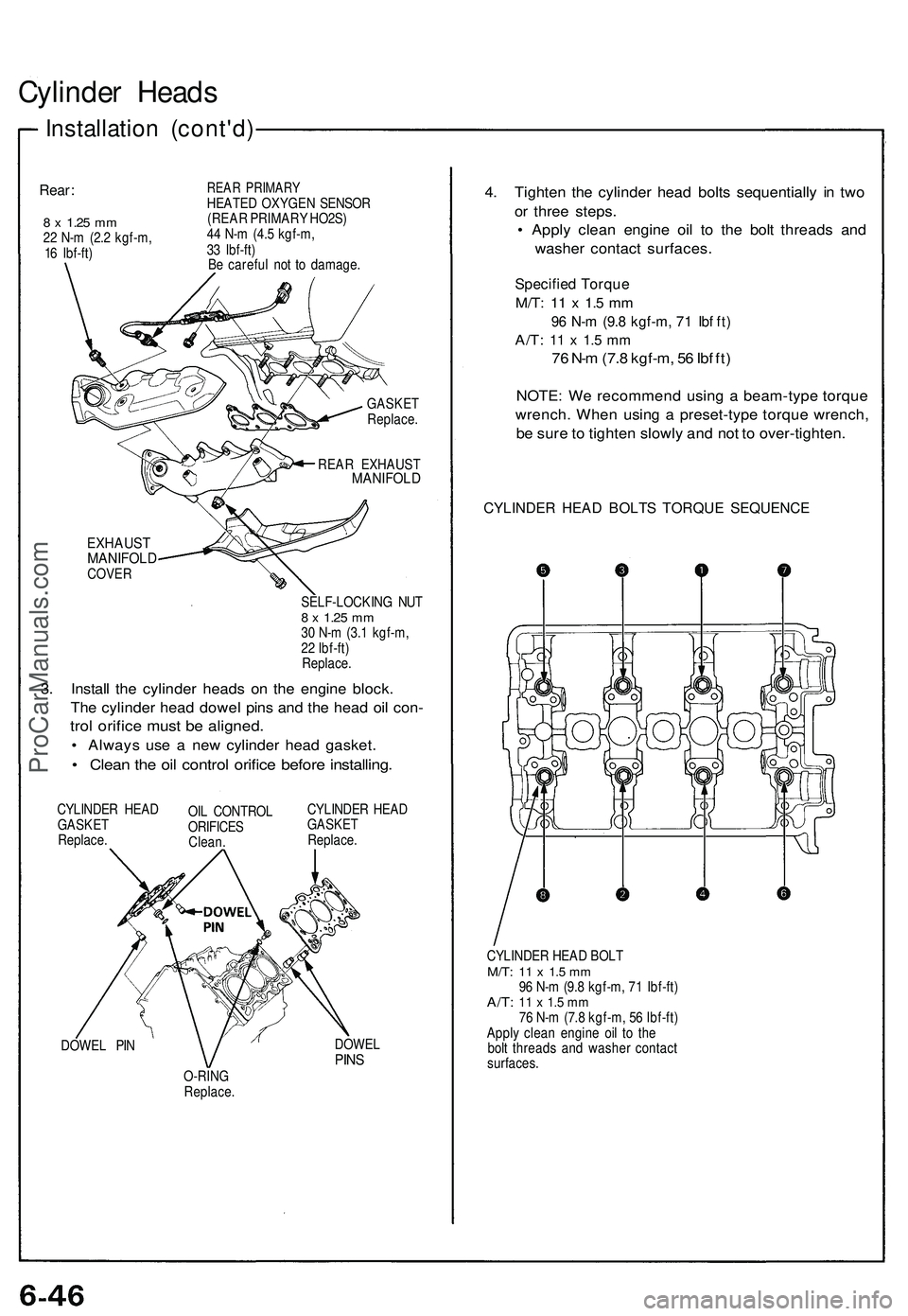
3. Install the cylinder heads on the engine block.
The cylinder head dowel pins and the head oil con-
trol orifice must be aligned.
• Always use a new cylinder head gasket.
• Clean the oil control orifice before installing.
CYLINDER HEAD
GASKET
Replace.
OIL CONTROL
ORIFICES
Clean.
CYLINDER HEAD
GASKET
Replace.
DOWEL PIN
DOWEL
PINS
O-RING
Replace.
4. Tighten the cylinder head bolts sequentially in two
or three steps.
• Apply clean engine oil to the bolt threads and
washer contact surfaces.
Specified Torque
M/T:
11 x 1.5 mm
96 N-m (9.8 kgf-m, 71 Ibf ft)
A/T:
11 x 1.5 mm
76 N-m (7.8 kgf-m, 56 Ibf ft)
NOTE: We recommend using a beam-type torque
wrench. When using a preset-type torque wrench,
be sure to tighten slowly and not to over-tighten.
CYLINDER HEAD BOLTS TORQUE SEQUENCE
CYLINDER HEAD BOLT
M/T:
11 x 1.5 mm
96 N-m (9.8 kgf-m, 71 Ibf-ft)
A/T:
11 x 1.5 mm
76 N-m (7.8 kgf-m, 56 Ibf-ft)
Apply clean engine oil to the
bolt threads and washer contact
surfaces.ProCarManuals.com
Page 565 of 1503
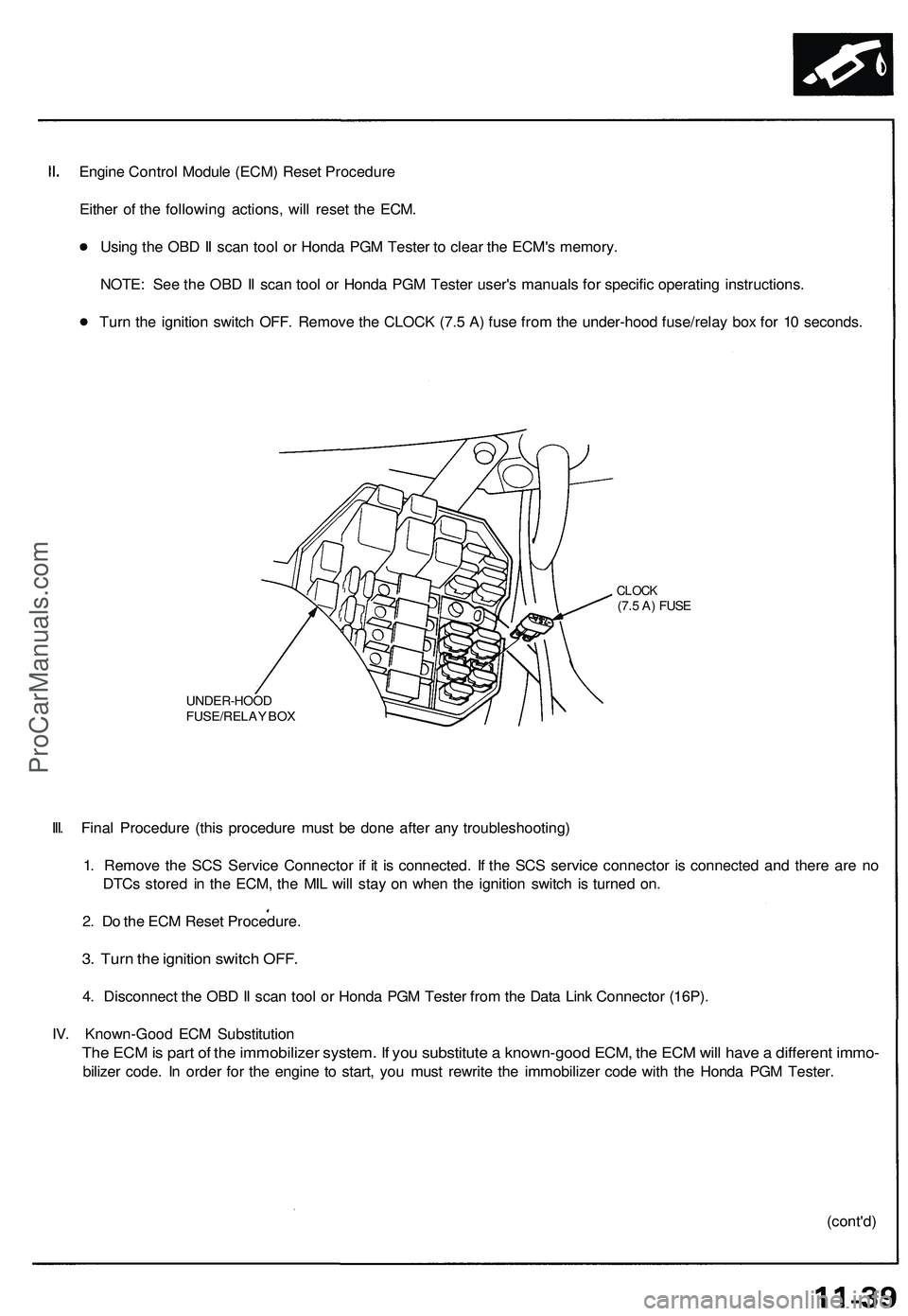
Engine Control Module (ECM) Reset Procedure
Either of the following actions, will reset the ECM.
Using the OBD II scan tool or Honda PGM Tester to clear the ECM's memory.
NOTE: See the OBD II scan tool or Honda PGM Tester user's manuals for specific operating instructions.
Turn the ignition switch OFF. Remove the CLOCK (7.5 A) fuse from the under-hood fuse/relay box for 10 seconds.
UNDER-HOOD
FUSE/RELAY BOX
CLOCK
(7.5 A) FUSE
III. Final Procedure (this procedure must be done after any troubleshooting)
1. Remove the SCS Service Connector if it is connected. If the SCS service connector is connected and there are no
DTCs stored in the ECM, the MIL will stay on when the ignition switch is turned on.
2. Do the ECM Reset Procedure.
3. Turn the ignition switch OFF.
4. Disconnect the OBD II scan tool or Honda PGM Tester from the Data Link Connector (16P).
IV. Known-Good ECM Substitution
The ECM is part of the immobilizer system. If you substitute a known-good ECM, the ECM will have a different immo-
bilizer code. In order for the engine to start, you must rewrite the immobilizer code with the Honda PGM Tester.
(cont'd)ProCarManuals.com
Page 574 of 1503
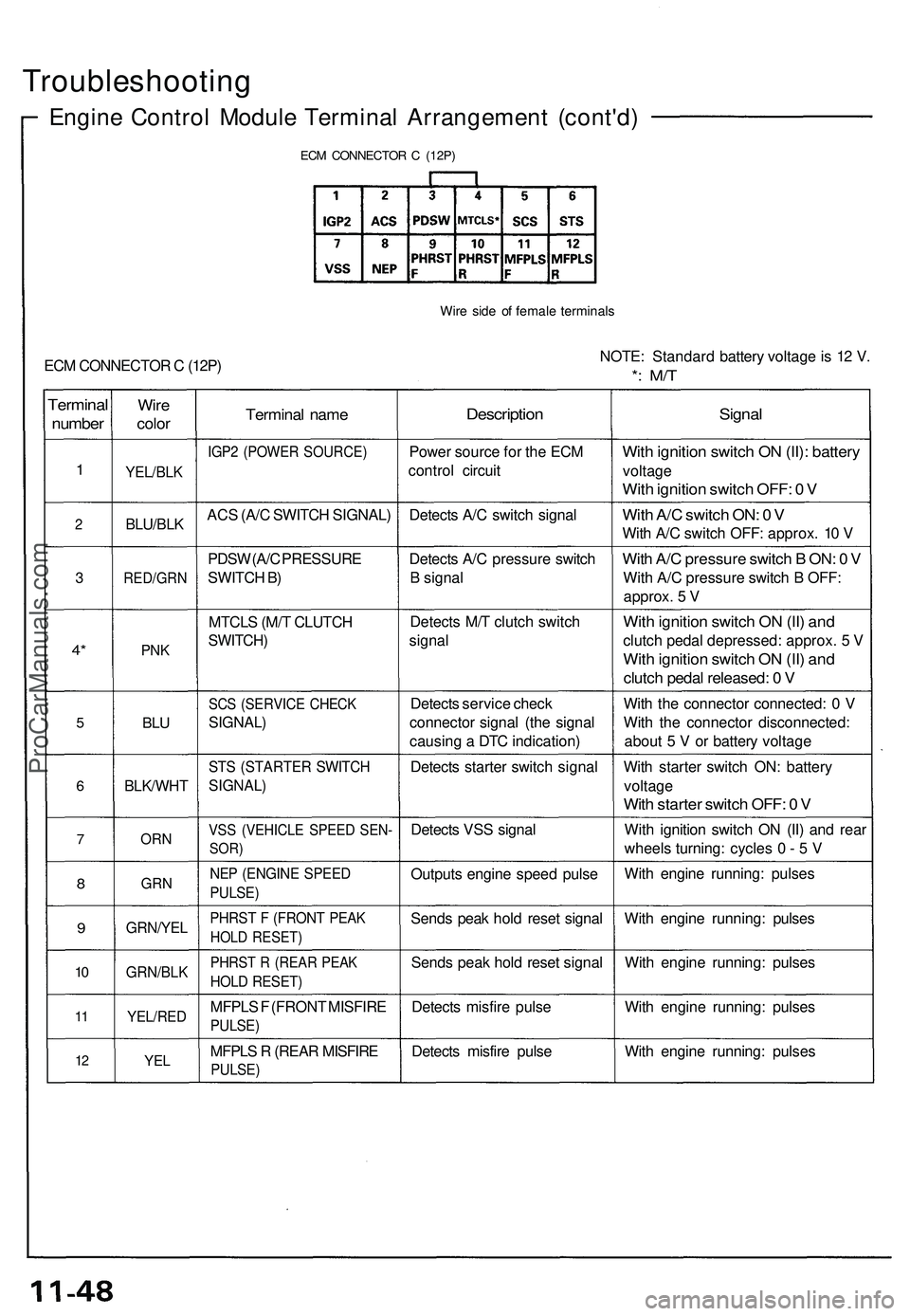
Troubleshooting
Engine Contro l Modul e Termina l Arrangemen t (cont'd )
ECM CONNECTO R C (12P )
Wire sid e o f femal e terminal s
ECM CONNECTO R C (12P ) NOTE
: Standar d batter y voltag e is 1 2 V .*: M/ T
Termina l
number
1
2
3
4*
5
6
7
8
9
10
1 1
1 2
Wir e
colo r
YEL/BL K
BLU/BLK
RED/GR N
PNK
BLU
BLK/WH T
ORN
GR N
GRN/YE L
GRN/BLK
YEL/RED
YEL
Termina l nam e
IGP2 (POWE R SOURCE )
ACS (A/ C SWITC H SIGNAL )
PDS W (A/ C PRESSUR E
SWITC H B )
MTCL S (M/ T CLUTC H
SWITCH )
SCS (SERVIC E CHEC K
SIGNAL )
STS (STARTE R SWITC H
SIGNAL )
VSS (VEHICL E SPEE D SEN -
SOR)
NEP (ENGIN E SPEE D
PULSE )
PHRST F (FRON T PEA K
HOLD RESET )
PHRST R (REA R PEA K
HOLD RESET )
MFPLS F (FRON T MISFIR E
PULSE)
MFPLS R (REA R MISFIR E
PULSE)
Descriptio n
Power sourc e fo r th e EC M
contro l circui t
Detect s A/ C switc h signa l
Detect s A/ C pressur e switc h
B signa l
Detect s M/ T clutc h switc h
signa l
Detect s servic e chec k
connecto r signa l (th e signa l
causin g a DT C indication )
Detect s starte r switc h signa l
Detect s VS S signa l
Output s engin e spee d puls e
Send s pea k hol d rese t signa l
Send s pea k hol d rese t signa l
Detect s misfir e puls e
Detect s misfir e puls e
Signa l
With ignitio n switc h O N (II) : batter y
voltage
With ignitio n switc h OFF : 0 V
Wit h A/ C switc h ON : 0 V
Wit h A/ C switc h OFF : approx . 1 0 V
Wit h A/ C pressur e switc h B ON : 0 V
Wit h A/ C pressur e switc h B OFF :
approx . 5 V
Wit h ignitio n switc h O N (II ) an d
clutc h peda l depressed : approx . 5 V
Wit h ignitio n switc h O N (II ) an d
clutc h peda l released : 0 V
Wit h th e connecto r connected : 0 V
Wit h th e connecto r disconnected :
abou t 5 V or batter y voltag e
Wit h starte r switc h ON : batter y
voltag e
With starte r switc h OFF : 0 V
Wit h ignitio n switc h O N (II ) an d rea r
wheel s turning : cycle s 0 - 5 V
Wit h engin e running : pulse s
Wit h engin e running : pulse s
Wit h engin e running : pulse s
Wit h engin e running : pulse s
Wit h engin e running : pulse s
ProCarManuals.com
Page 584 of 1503
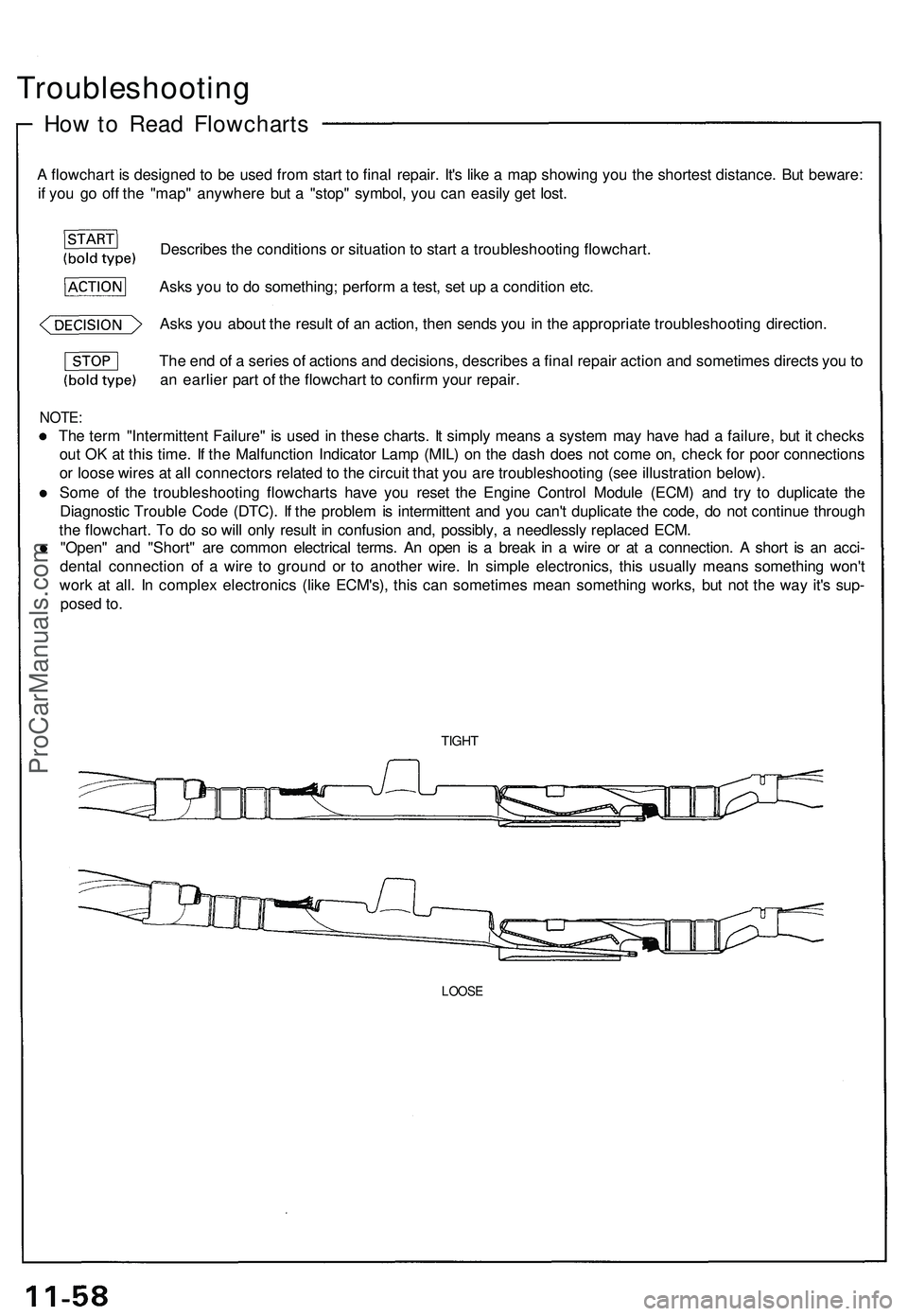
Troubleshooting
How to Read Flowcharts
A flowchart is designed to be used from start to final repair. It's like a map showing you the shortest distance. But beware:
if you go off the "map" anywhere but a "stop" symbol, you can easily get lost.
Describes the conditions or situation to start a troubleshooting flowchart.
Asks you to do something; perform a test, set up a condition etc.
Asks you about the result of an action, then sends you in the appropriate troubleshooting direction.
NOTE:
The term "Intermittent Failure" is used in these charts. It simply means a system may have had a failure, but it checks
out OK at this time. If the Malfunction Indicator Lamp (MIL) on the dash does not come on, check for poor connections
or loose wires at all connectors related to the circuit that you are troubleshooting (see illustration below).
Some of the troubleshooting flowcharts have you reset the Engine Control Module (ECM) and try to duplicate the
Diagnostic Trouble Code (DTC). If the problem is intermittent and you can't duplicate the code, do not continue through
the flowchart. To do so will only result in confusion and, possibly, a needlessly replaced ECM.
"Open" and "Short" are common electrical terms. An open is a break in a wire or at a connection. A short is an acci-
dental connection of a wire to ground or to another wire. In simple electronics, this usually means something won't
work at all. In complex electronics (like ECM's), this can sometimes mean something works, but not the way it's sup-
posed to.
TIGHT
LOOSE
The end of a series of actions and decisions, describes a final repair action and sometimes directs you to
an earlier part of the flowchart to confirm your repair.ProCarManuals.com