page 61 Acura RDX 2012 Manual PDF
[x] Cancel search | Manufacturer: ACURA, Model Year: 2012, Model line: RDX, Model: Acura RDX 2012Pages: 518, PDF Size: 26.43 MB
Page 154 of 518

This heated mirror function has a
timer (see page 121 ).Driving Position Memory System
Your vehicle has a memory feature
for the driver's seat and outside
mirror positions.
Seat, except for power lumbar, and
outside mirror positions, can be
stored in separate memories. You
select a memorized position by
pushing the appropriate button or
using the appropriate remote
transmitter (Memory 1 or Memory
2).Storing a Driving Position in
Memory
Store a driving position only when
the vehicle is parked.
1. Turn the ignition switch to the ON
(II) position. You cannot add a new
driving position to the memory
unless the ignition switch is in the
ON (II) position. You can recall a
memorized position with the
ignition switch in any position.
2. Adjust the seat to a comfortable position (see page 134).
Adjust the outside mirrors for best
visibility (see page 146).Mirrors, Driving Position Memory System14811/06/16 17:42:51 12 ACURA RDX MMC North America Owner's M 50 31STK650 enu
Page 156 of 518

To stop the system's automatic
adjustment, do any of these actions:●Press any button on the control
panel: SET, 1, or 2.●Push any of the adjustment
switches for the seat.●Shift out of Park.●Adjust the outside mirrors.
If desired, you can use the
adjustment switches to change the
positions of the seat or outside
mirrors after they are in their
memorized positions. If you change
the memorized position, the indicator
in the memory button will go out. To
keep this driving position for later
use, you must store it in the driving
position memory. Parking Brake
To apply the parking brake, push the
pedal down with your foot. To
release it, push on the pedal again.
The parking brake indicator on the
instrument panel should go out when
the parking brake is fully released
(see page 67).
Driving the vehicle with the parking
brake applied can damage the rear
brakes and axles. A beeper will sound if
the vehicle is driven with the parking
brake on.
You will also see a
‘‘RELEASE
PARKING BRAKE ’’message on the
multi-information display (see page
79).
Push
PARKING BRAKE PEDAL
Driving Position Memory System, Parking Brake15011/06/16 17:42:51 12 ACURA RDX MMC North America Owner's M 50 31STK650 enu
Page 158 of 518

In the door activated position, both
front and rear ceiling lights come on
when you:●Open any door.●Remove the key from the ignition
switch.●Unlock the doors with the key,
lock tab on the driver's door,
master door lock switch, or remote
transmitter.
After all doors are closed tightly, the
light(s) dims slightly, then fades out
in about 30 seconds. If you do not open any door after
unlocking the driver's door or
removing the key from the ignition
switch, the light(s) fade out in about
30 seconds. If you leave any door
open without the key in the ignition
switch, the light(s) will go off after 3
minutes.
To change the
‘‘INTERIOR LIGHT
DIMMING TIME ’’setting, see page
98. Individual Map Lights
You can use the front ceiling lights
whenever the lights are off.
To turn a light on or off, push its
lens.
LENSES
Interior Lights15211/06/16 17:42:51 12 ACURA RDX MMC North America Owner's M 50 31STK650 enu
Page 159 of 518

Courtesy LightsThe courtesy lights in the ceiling
console come on when the parking
lights are turned on. You can adjust
their brightness by turning the
select/reset knob on the instrument
panel.
In addition to the courtesy lights on
the ceiling, the driver's and front
passenger's ambient foot lights come
on.The courtesy light in each front door
comes on when the door is opened,
and goes out when the door is
closed.
Your vehicle also has a courtesy light
in the ignition switch. This light
comes on when you:
●Open any door.●Unlock the driver's door.●Remove the key from the ignition
switch.
After all doors are closed tightly, the
light fades out in about 30 seconds.
To change the ‘‘INTERIOR LIGHT
DIMMING TIME ’’setting, see page
98. Cargo Area Light
The cargo area light has a two
position switch. In the OFF (right)
position, the light does not come on.
In the ON (left) position, the light
comes on when you open the
tailgate.
COURTESY LIGHTS
ON
OFF
Interior Lights
153
Instruments and Controls
11/06/16 17:42:51 12 ACURA RDX MMC North America Owner's M 50 31STK650 enu
Page 171 of 518

Proper use of the climate control
system can make the interior dry and
comfortable, and keep the windows
clear for best visibility.
For the climate control system to
provide heating and cooling, the
engine must be running.
You can adjust the temperatures of
the driver's side and the passenger's
side independently (see page 169).
Voice Control SystemOn models with navigation systemThe climate control system can also
be operated by voice control. See the
navigation system manual for
complete details.Using Automatic Climate Control
The automatic climate control system
adjusts the fan speed and airflow
levels to maintain the interior
temperature you select.
On models with navigation systemIn AUTO mode, the vehicle's interior
temperature is independently
regulated for the driver and
passenger, based on inputs from
sunlight and temperature sensors
(see page 171). If one side of the
vehicle is getting too much sun, the
system lowers the temperature only
on that side.
1. Press the AUTO button. The
indicator in the button comes on. 2. Set the desired temperature by
pushing the driver's side
temperature control buttons (
or
). The selected temperature will
show in the display.
When you push the passenger's side
temperature control buttons, the
indicator in the DUAL button comes
on and the driver's side and
passenger's side temperature can be
controlled independently (see page
169).
The system automatically selects the
proper mix of conditioned and/or
heated air that will, as quickly as
possible, raise or lower the interior
temperature to your preference.
CONTINUED
Climate Control System
165
Features
11/06/16 17:42:51 12 ACURA RDX MMC North America Owner's M 50 31STK650 enu
Page 172 of 518

When you set the temperature to its
lowest limit (
) or its highest
limit (
), the system runs at full
cooling or heating only. It does not
regulate the interior temperature.
In cold weather, the fan will not come
on automatically until the heater
starts to develop warm air. Semi-automatic Operation
You can manually select various
functions of the climate control
system when it is in the AUTO mode.
All other features remain
automatically controlled.
Fan Control
Select the fan speed by pressing the
fan control buttons (
or
).
The fan speed is represented by
vertical bars in the display.
Temperature Control
To adjust the desired temperature,
push the temperature control buttons
(
or
). Dual Button
Press the DUAL button to select dual
temperature control mode (see page
169). The indicator in the DUAL
button comes on.
When you press the DUAL button
again (indicator turns off), both sides
adjust to the driver's side
temperature.
Air Conditioning (A/C) Button
Press the A/C button to turn the air
conditioning on and off. You will see
A/C ON or A/C OFF in the display.
When you turn the A/C off, the
system cannot regulate the inside
temperature if you set the
temperature control below the
outside temperature.
Climate Control System16611/06/16 17:42:51 12 ACURA RDX MMC North America Owner's M 50 31STK650 enu
Page 173 of 518
Recirculation ButtonWhen the indicator in the button is
on, air from the vehicle's interior is
sent through the system again.
When the indicator is off, air is
brought in from the outside of the
vehicle (fresh air mode).
The outside air intakes for the
climate control system are at the
base of the windshield. Keep this
area clear of leaves and other debris.
The system should be left in fresh air
mode under almost all conditions.
Keeping the system in recirculation
mode, particularly with the A/C off,
can cause the windows to fog up.
Switch to recirculation mode when
driving through dusty or smoky
conditions, then return to fresh air
mode.Windshield Defroster Button
This button turns the windshield
defroster on and off.
When you push this button, air flows
from the defroster vents at the base
of the windshield, and the system
automatically switches to fresh air
mode and turns on the A/C. When
the indicator in the button is on, the
passenger's temperature cannot be
set separately from the driver's.
Rear Window Defogger
Button
This button turns the rear window
defogger on and off. Pushing this
button also turns the mirror heaters
on and off (see page 121).
CONTINUED
Climate Control System
167
Features
11/06/16 17:42:51 12 ACURA RDX MMC North America Owner's M 50 31STK650 enu
Page 178 of 518
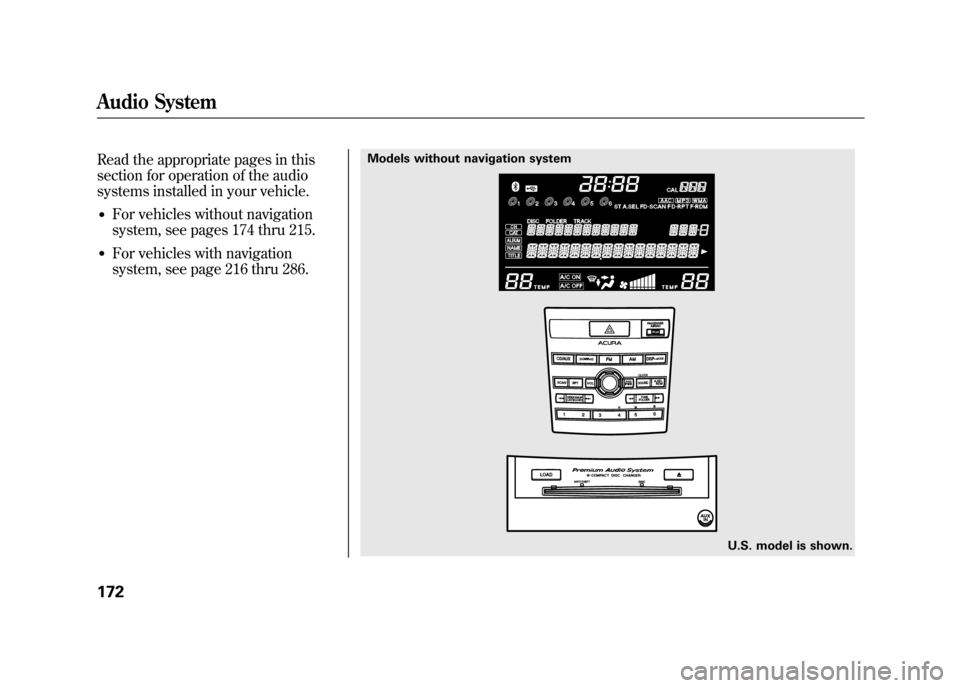
Read the appropriate pages in this
section for operation of the audio
systems installed in your vehicle.●For vehicles without navigation
system, see pages 174 thru 215.●For vehicles with navigation
system, see page 216 thru 286.
Models without navigation systemU.S. model is shown.
Audio System17211/06/16 17:42:51 12 ACURA RDX MMC North America Owner's M 50 31STK650 enu
Page 180 of 518

To Play the Radio
The ignition switch must be in the
ACCESSORY (I) or the ON (II)
position. Turn the system on by
pushing the PWR/VOL knob, or the
AM or FM button. Adjust the volume
by turning the PWR/VOL knob.
The band and frequency that the
radio was last tuned to is displayed.
To change bands, press the AM or
FM button. On the FM band,‘‘ST ’’
will be shown on the center display if
the station is broadcasting in stereo.
Stereo reproduction on AM is not
available.
XM Radio information is available on
page 179.
SCAN
INDICATOR
A.SEL
INDICATOR
AM BUTTON A.SEL/RDM BUTTON
TUNE/FOLDER BAR
PWR/VOL KNOB
PRESET BARS
U.S. model is shown. SEEK/SKIP BAR
SCAN BUTTON
FM BUTTON STEREO
INDICATOR
Playing the FM/AM Radio (Models without navigation system)17411/06/16 17:42:51 12 ACURA RDX MMC North America Owner's M 50 31STK650 enu
Page 182 of 518

AUTO SELECT-If you are
traveling and can no longer receive
your preset stations, you can use the
auto select feature to find stations in
the local area.
To activate it, press the A.SEL/RDM
button. ‘‘A.SEL ’’will flash on the
center display, and the system will go
into scan mode for several seconds.
It stores the frequencies of six AM
and twelve FM stations in the preset
bars (1 -6).
You will see ‘‘0’’ displayed if auto
select cannot find a strong station for
every preset bar. If you do not like the stations auto
select has stored, you can store other
frequencies on the preset bars.
To turn off auto select,
press the
A.SEL/RDM button. This restores
the presets you originally set. Radio Frequencies and Reception
For information on AM/FM radio
frequencies and reception, see page
287.
Adjusting the Sound
For information, see page 177.
Playing the FM/AM Radio (Models without navigation system)17611/06/16 17:42:51 12 ACURA RDX MMC North America Owner's M 50 31STK650 enu