page 61 Acura RDX 2012 Manual Online
[x] Cancel search | Manufacturer: ACURA, Model Year: 2012, Model line: RDX, Model: Acura RDX 2012Pages: 518, PDF Size: 26.43 MB
Page 184 of 518

SUBWOOFER-Use the
SUBWOOFER mode to adjust the
strength of the sound from the
subwoofer speaker. Turn the PWR/
VOL knob to the desired level (- 6to
+ 6). Even if the adjustment level
reaches -6, the subwoofer is not
turned off. Speed-sensitive volume
compensation (SVC)
-The SVC
mode controls the volume based on
vehicle speed. The faster you go, the
louder the audio volume becomes.
As you slow down, the audio volume
decreases.
The SVC has four modes: SVC OFF,
SVC LOW, SVC MID, and SVC
HIGH. Turn the PWR/VOL knob to
adjust the setting to your liking. Audio System Lighting
You can use the instrument panel
brightness control knob to adjust the
illumination of the audio system (see
page 120). The audio system
illuminates when the parking lights
are on, even if the system is turned
off.Playing the FM/AM Radio (Models without navigation system)17811/06/16 17:42:51 12 ACURA RDX MMC North America Owner's M 50 31STK650 enu
Page 187 of 518

Preset-You can store up to 12
preset channels using each side of
the preset bar. Each side of the bar
stores one channel from the XM1
band and one channel from the XM2
band.
To store a channel:
1. Press the
button. Either
XM1 or XM2 will be shown on the
center display.
2. Use the tune, seek, or scan function to tune to a desired
channel.
In category mode, only channels
within that category can be
selected. In channel mode, all
channels can be selected. 3. Pick a preset number for the
channel you want to store. Press
and hold the appropriate side of
the preset bar until you hear a
beep.
4. Repeat steps 2 and 3 to store the first six channels.
5. Press the
button again. The
other XM band will be shown.
Store the next six channels by
repeating steps 2 and 3.
Once a channel is stored, press and
release the proper side of the preset
bar to tune to it.
Adjusting the Sound
For information, see page 177.
XM Radio Reception
For information, see page 182. XM Radio Display Messages
‘‘
LOADING ’’- XM is loading the
audio or program information.
‘‘ OFF AIR ’’- The channel currently
selected is no longer broadcasting.
CONTINUED
Playing the XM
®Radio (Models without navigation system)
181
Features
11/06/16 17:42:51 12 ACURA RDX MMC North America Owner's M 50 31STK650 enu
Page 193 of 518
Your audio system has an in-dash CD
changer that holds up to six CDs,
providing several hours of
continuous entertainment. You
operate this CD changer with the
same controls used for the radio.
To load CDs or operate the CD
changer, the ignition switch must be
in the ACCESSORY (I) or ON (II)
position.
The disc changer can play these disc
formats:●CD (CD-DA)●CD-R/RW
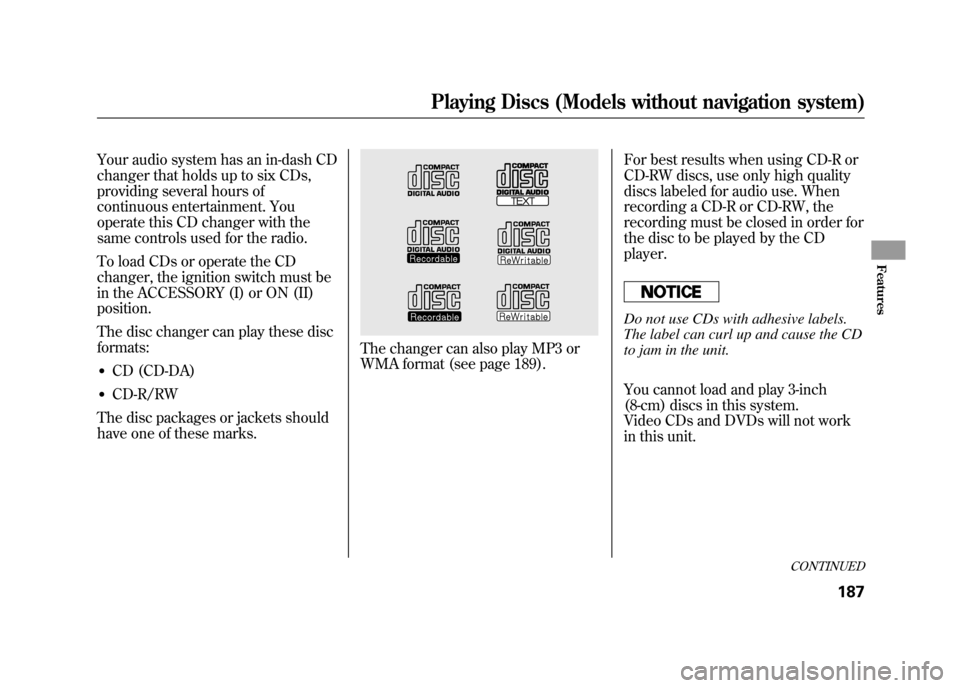
The disc packages or jackets should
have one of these marks.
The changer can also play MP3 or
WMA format (see page 189). For best results when using CD-R or
CD-RW discs, use only high quality
discs labeled for audio use. When
recording a CD-R or CD-RW, the
recording must be closed in order for
the disc to be played by the CD
player.
Do not use CDs with adhesive labels.
The label can curl up and cause the CD
to jam in the unit.
You cannot load and play 3-inch
(8-cm) discs in this system.
Video CDs and DVDs will not work
in this unit.
CONTINUED
Playing Discs (Models without navigation system)
187
Features
11/06/16 17:42:51 12 ACURA RDX MMC North America Owner's M 50 31STK650 enu
Page 200 of 518

To Pause a Disc
To pause a disc, press the
corresponding number of the current
disc on the appropriate side of the
preset bars. To play the disc again,
press the preset bar again.
To Stop Playing a Disc
If you turn the system off while a CD
is playing, either with the PWR/VOL
knob or by turning off the ignition
switch, the disc will stay in the drive.
When you turn the system back on,
the CD will begin playing where it
left off.
To take the system out of CD mode,
press the AM or FM, CD/AUX, or
button. To return to CD mode,
press the CD/AUX button. The
system will continue at the same
point that it left off. Removing CDs from the Changer
To remove the disc that is currently
playing, press and release the eject
(
) button. You will see
‘‘EJECT ’’
on the center display. When you
remove the disc from the slot, the
system begins the load sequence so
you can load another disc in that
position. If you do not load another
CD within 10 seconds, the system
selects the previous mode (AM,
FM1, FM2, or XM).
If you do not remove the CD from
the slot, the system will reload the
CD after 10 seconds and put the CD
changer in pause mode. To begin
playing the CD, press the CD/AUX
button.
To remove a different CD from the
changer, select it with the
appropriate side of the preset bar.
When that CD begins playing, press
the eject button. Press and hold the eject button until
you hear a beep to remove all the
discs from the changer.
You can also eject discs when the
ignition switch is off by pressing the
eject button. The disc that was last
selected is ejected first. You can eject
the rest of the discs one at a time.
Protecting Discs
For information on how to handle
and protect compact discs, see page
257.
Disc Changer Error Messages
For information, see page 195.
Adjusting the Sound
For information, see page 177.
Playing Discs (Models without navigation system)19411/06/16 17:42:51 12 ACURA RDX MMC North America Owner's M 50 31STK650 enu
Page 201 of 518

If you see an error message in the
display while playing a CD, find the
cause in the chart to the right. If you
cannot clear the error message, take
the vehicle to your dealer.Error
Message Cause
Solution
FOCUS Error Press the EJECT button, and pull out the disc.
Make sure it is inserted correctly in the disc
changer.
Make sure the disc is not scratched or damaged.
For more information, see page 258.
Mechanical Error Press the EJECT button, and pull out the disc.
Check the disc for damage or deformation. For
more information, see page 258.
If the disc cannot be pulled out, or the error
message does not disappear after the disc is
ejected, see your dealer.
High Temperature Will disappear when the temperature returns to
normal.
Check Disc Press the EJECT button, and pull out the disc.
Make sure a playable disc is in the CD changer
(see page 187).
Check Disc and Changer
Error Press the EJECT button, and pull out the disc.
Check the disc for damage or deformation.
For more information, see page 258.
If the disc cannot be pulled out, or the error
message does not disappear after the disc is
ejected, see your dealer.
CONTINUED
Disc Changer Error Messages (Models without navigation system)
195
Features
11/06/16 17:42:51 12 ACURA RDX MMC North America Owner's M 50 31STK650 enu
Page 202 of 518

The chart on the right explains the
error messages you may see in the
display while playing a disc.
If you see an error message in the
display while playing a disc, press
the eject button. After ejecting the
disc, check it for damage or
deformation. If there is no damage,
insert the disc again.
For the additional information on
damaged discs, see page 258.
The audio system will try to play the
disc. If there is still a problem, the
error message will reappear. Press
the eject button, and pull out the
disc.
Insert a different disc. If the new disc
plays, there is a problem with the
first disc. If the error message cycle
repeats and you cannot clear it, take
your vehicle to a dealer.Error
Message Cause Solution
FORMAT
Track/File format not
supported Current track will be skipped. The next
supported track or file plays automatically.
BAD DISC
PLEASE CHECK OWNER'SMANUAL
PUSH EJECT Mechanical error
Press the EJECT button, and pull out the disc(s).
Check the disc for serious damage, signs of
deformation, excessive scratches, and/or dirt
(see page 258.)
Insert the disc again. If the code does not
disappear, or the disc(s) cannot be removed,
consult your dealer. Do not try to force the disc
out of the player.
BAD DISC
PLEASE CHECK OWNER'SMANUAL Servo error
Disc Changer Error Messages (Models without navigation system)19611/06/16 17:42:51 12 ACURA RDX MMC North America Owner's M 50 31STK650 enu
Page 208 of 518

To Stop Playing Your iPod
To play the radio, press the AM/FM,
or
button. Press the CD/AUX
button to switch between disc (if a
disc is loaded),
Bluetooth
®Audio,
and the iPod.
Disconnecting an iPodYou can disconnect the iPod at any
time when you see the ‘‘OK to
disconnect ’’message
ᤳin the iPod
display. Always make sure you see
the ‘‘OK to disconnect ’’message in
the iPod display before you
disconnect it. Make sure to follow
the iPod's instructions on how to
disconnect the dock connector from
the USB adapter cable.
ᤳ : The displayed message may
vary on the model or version.
On some models, there is no
message to disconnect. If you reconnect the same iPod, the
system may begin playing where it
left off, depending on what mode the
iPod is in when it is reconnected.
iPod Error Messages
For information, see page 203.
Playing an iPod
®(Models without navigation system)
20211/06/16 17:42:51 12 ACURA RDX MMC North America Owner's M 50 31STK650 enu
Page 209 of 518

If you see an error message in the
center display while playing an iPod,
find the solution in the chart to the
right. If you cannot clear the error
message, take your vehicle to your
dealer.Error Message
Cause Solution
USB ERRORUSB ROM error There is a problem with the USB adapter
unit.
BAD USB DEVICE PLEASE CHECK OWNERSMANUAL Abnormal power
source Appears when the overcurrent protection
feature of the system stops supplying
power to USB because an incompatible
device is connected. Disconnect the
device. Then, turn the audio system off,
and turn it on again. Do not reconnect the
device that caused the error.
NO SONG No files in iPod Appears when the iPod is empty. Store
some files in the iPod.
UNSUPPORTED VER. Use of unsupported
iPod Appears when an unsupported iPod is
connected. See page 198 for specification
information on iPods. If it appears when a
supported iPod is connected, update the
iPod software to the newer version.
CONNECT RETRY Recognition failure of
iPod Appears when the system does not
acknowledge the iPod. Reconnect the
iPod.
iPod
®Error Messages (Models without navigation system)
203
Features
11/06/16 17:42:51 12 ACURA RDX MMC North America Owner's M 50 31STK650 enu
Page 216 of 518

Each time you press and release the
SCAN button, the mode changes
from file scan to folder scan, then to
normal play.To Stop Playing a USB Flash
Memory Device
To play the radio, press the FM, AM
or
button. Press the CD/AUX
button to switch between disc (if a
disc is loaded) and
Bluetooth
®Audio.
You can also press the MODE button
on the steering wheel to change
modes.
If you reconnect the same USB flash
memory device, the system will
begin playing where it left off.
Disconnecting a USB Flash Memory DeviceYou can disconnect the USB flash
memory device at any time even if
the USB mode is selected on the
audio system. Always follow the USB
flash memory device's instructions
when you remove it.
When you disconnect the USB flash
memory device while it is playing,
the center display shows ‘‘USB NO
DATA. ’’
If you reconnect the same USB flash
memory device, the system will
begin playing where it left off.
USB Flash Memory Device Error
Messages
For information, see page 211.
Playing a USB Flash Memory Device (Models without navigation system)21011/06/16 17:42:51 12 ACURA RDX MMC North America Owner's M 50 31STK650 enu
Page 217 of 518

If you see an error message in the
center display while playing a USB
flash memory device, find the
solution in the chart to the right. If
you cannot clear the error message,
take your vehicle to your dealer.Error Message
Cause Solution
USB ERRORUSB ROM error There is a problem with the USB adapter
unit.
BAD USB DEVICE
PLEASE CHECK OWNERS
MANUAL Abnormal power
source Appears when the overcurrent protection
feature of the system stops supplying
power to USB because an incompatible
device is connected. Disconnect the
device. Then, turn the audio system off,
and turn it on again. Do not reconnect the
device that caused the error.
UNPLAYABLE FILE Use of unsupported
files Appears when the files in the USB flash
memory device are DRM or an
unsupported format. This error message
appears for a few seconds, then plays the
next song.
NO SONG No files in USB flash
memory device Appears when the USB flash memory
device is empty or there are no MP3,
WMA, or AAC files in the USB flash
memory device. Save some MP3, WMA,
or AAC files in the USB flash memory
device.
UNSUPPORTED Use of unsupported
USB flash memory
device Appears when an unsupported device is
connected. See page 205 for information
on USB flash memory devices. If it appears
when the supported device is connected,
reconnect the device.
USB Flash Memory Device Error Messages (Models without navigation system)
211
Features
11/06/16 17:42:51 12 ACURA RDX MMC North America Owner's M 50 31STK650 enu