page 61 Acura RDX 2012 Owner's Manual
[x] Cancel search | Manufacturer: ACURA, Model Year: 2012, Model line: RDX, Model: Acura RDX 2012Pages: 518, PDF Size: 26.43 MB
Page 316 of 518

How to Use HFL
The ignition switch must be in the ACCESSORY (I) or ON (II) position.
‘‘Pair ’’
‘‘ Phone Setup ’’
Press HFL
Talk button ‘‘
Edit ’’
‘‘ Delete ’’
‘‘ List ’’
‘‘ Status ’’
‘‘ Next Phone ’’
‘‘ Set Pairing
Code ’’
‘‘ Call ’’or ‘‘Dial ’’ ‘‘ 123-555- # # # # ’’
‘‘ Jim Smith ’’Pair a phone to the system (See page 313)
Edit the name of a paired phone (See page 314)
Delete a paired phone from the system (See page 314)
Hear a list of all phones paired to the system (See page 314) Hear which paired phone is currently linked to the system
(See page 315) Search for another previously paired phone to link to (See page 315)
Set the pairing code to a ‘‘Fixed ’’or ‘‘Random ’’number (See page 315)
Press and release the HFL Talk button each time you give a command. Enter desired phone number (See page 316)
Once a phonebook entry is stored, you can say a name here.
(See page 316)
Bluetooth
®HandsFreeLink
®
31011/06/16 17:42:51 12 ACURA RDX MMC North America Owner's M 50 31STK650 enu
Page 317 of 518

Press HFL
Talk button‘‘
Redial ’’
‘‘ Transfer’’
‘‘ Mute ’’
‘‘ Send ’’
‘‘Store ’’
‘‘ Edit ’’
‘‘ Delete ’’
‘‘ Receive
Contact ’’
‘‘ List ’’
‘‘
Phonebook ’’
Press and release the HFL Talk button each time you give a command. Redial the last number called (See page 317)
Transfer a call from HFL to your phone, or from your phone to HFL (See page 320)
Mute your voice to the person at the other end of the call (See page 320)
Send numbers or names during a call (See page 321)
Store a phonebook entry (See page 321)
Edit the number of an existing phonebook entry (See page 322)Delete a phonebook entry (See page 322)
If your phone supports this function, use this to transfer contacts from
your phone to HFL (See page 323)
Hear a list of all stored phonebook entries (See page 322)
CONTINUED
Bluetooth
®HandsFreeLink
®
311
Features
11/06/16 17:42:51 12 ACURA RDX MMC North America Owner's M 50 31STK650 enu
Page 318 of 518
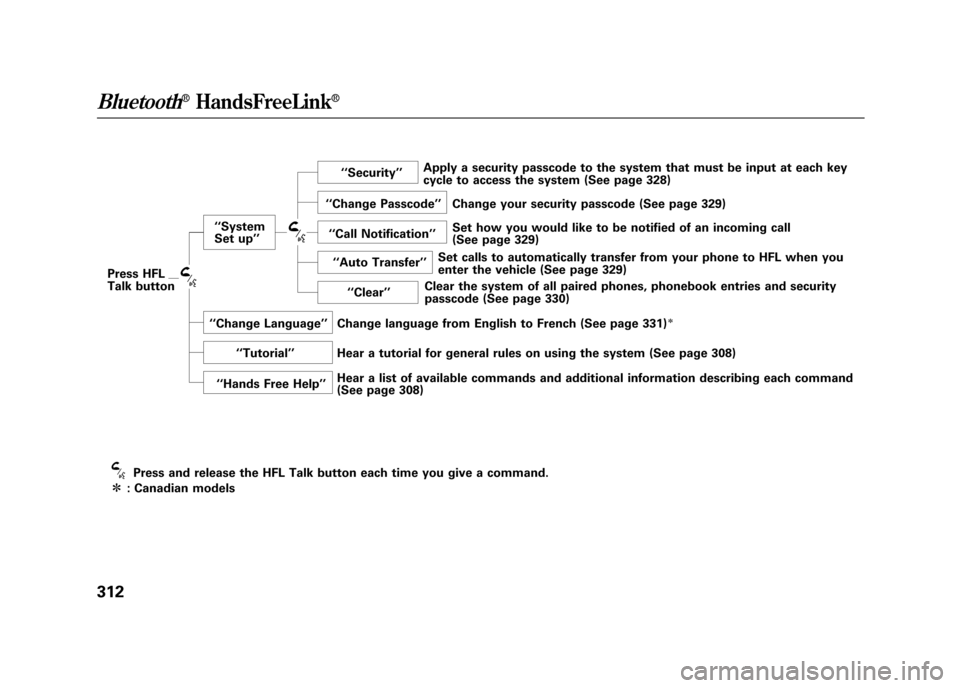
Press HFL
Talk button‘‘
System
Set up ’’ ‘‘
Security ’’
‘‘ Change Passcode ’’
‘‘ Call Notification ’’
‘‘ Auto Transfer ’’
‘‘ Clear ’’
‘‘ Change Language ’’
‘‘ Tutorial ’’
‘‘ Hands Free Help ’’
Press and release the HFL Talk button each time you give a command.
ᤳ : Canadian models Apply a security passcode to the system that must be input at each key
cycle to access the system (See page 328)
Change your security passcode (See page 329)
Set how you would like to be notified of an incoming call
(See page 329)
Set calls to automatically transfer from your phone to HFL when you
enter the vehicle (See page 329)
Clear the system of all paired phones, phonebook entries and security
passcode (See page 330)
Change language from English to French (See page 331)
ᤳ
Hear a tutorial for general rules on using the system (See page 308)
Hear a list of available commands and additional information describing each command
(See page 308)
Bluetooth
®HandsFreeLink
®
31211/06/16 17:42:51 12 ACURA RDX MMC North America Owner's M 50 31STK650 enu
Page 324 of 518

4. Select a phonebook you want tochoose a phone number from.
If the phonebook you select is PIN
protected, you will need to enter
the PIN to access it. See page 326
for more information.
To search for a specific name in
the phonebook, enter the keyword
for either the first or last name.
To display all names in the
phonebook, select the ‘‘List ’’
option.
5. Select the name. All the phone numbers stored for that name will
be listed.
6. Select the phone number and push the interface selector, HFL begins
dialing.
Bluetooth
®HandsFreeLink
®
31811/06/16 17:42:51 12 ACURA RDX MMC North America Owner's M 50 31STK650 enu
Page 331 of 518

Select a person from the list. Up to
three category icons are displayed in
the left side of the list:
These category icons indicate how
many numbers are stored for the
name. If a name has more than three
category icons,‘‘… ’’is displayed.
Select the person's number you want
to call, and press the HFL Talk
button.
Preference
Home
Cell phone
Work
Pager
Car
Voice
Other Fax
CONTINUED
Bluetooth
®HandsFreeLink
®
325
Features
11/06/16 17:42:51 12 ACURA RDX MMC North America Owner's M 50 31STK650 enu
Page 334 of 518

System Setup
This command group allows you to
change or customize HFL basic
settings.
To set a 4-digit passcode to lock theHFL system for security purposes:Press and release the HFL Talk
button before a command.
1. Say ‘‘System setup .’’
2. Say ‘‘Security ’’after the prompts.
3. Follow the HFL prompts and say the 4-digit passcode you want to
set.
4. Follow the HFL prompts to confirm the number. NOTE
: Once a passcode is set, you
will need to enter it to use HFL each
time you start the vehicle. If you
forget the code, your dealer will have
to reset it for you, or you will have to
clear the entire system (see page
330).
Bluetooth
®HandsFreeLink
®
32811/06/16 17:42:51 12 ACURA RDX MMC North America Owner's M 50 31STK650 enu
Page 340 of 518
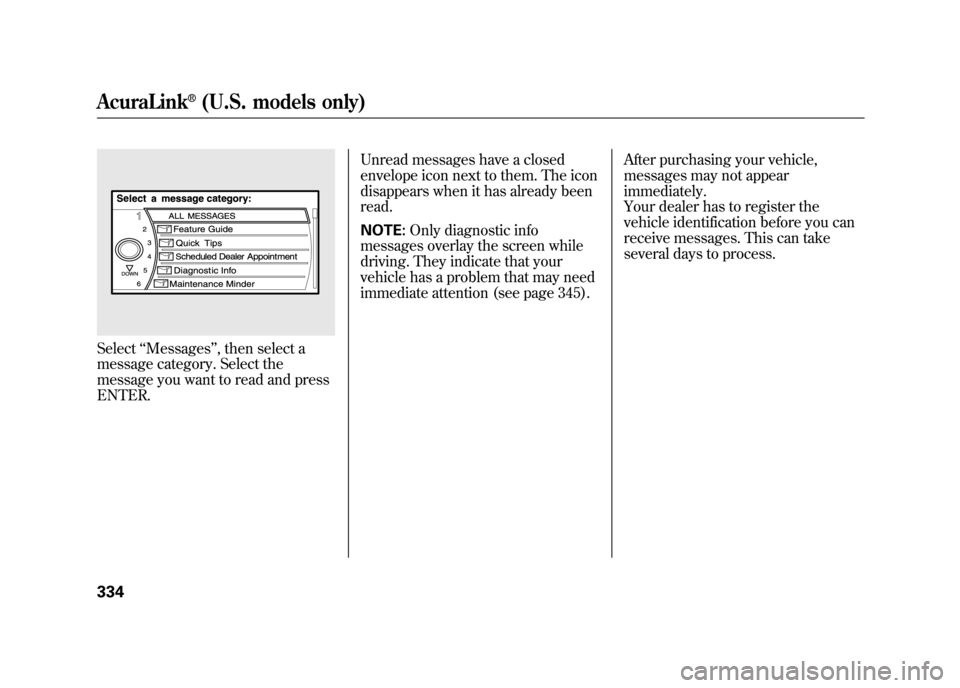
Select‘‘Messages ’’, then select a
message category. Select the
message you want to read and press
ENTER. Unread messages have a closed
envelope icon next to them. The icon
disappears when it has already been
read.
NOTE:
Only diagnostic info
messages overlay the screen while
driving. They indicate that your
vehicle has a problem that may need
immediate attention (see page 345). After purchasing your vehicle,
messages may not appear
immediately.
Your dealer has to register the
vehicle identification before you can
receive messages. This can take
several days to process.AcuraLink
®(U.S. models only)
33411/06/16 17:42:51 12 ACURA RDX MMC North America Owner's M 50 31STK650 enu
Page 342 of 518

Delete-Select this option to delete
the current message.
Voice -Select this option to hear a
voice read the entire message. This
gives you more information than the
screen can display at one time. When
you select the Voice option, it
changes to a Stop Reading option.
Select the option again to stop the
voice.
Call -Select this button to call a
phone number embedded in the
message. When you select Call,theBluetooth
®HandsFreeLink
®(HFL)
dials the number for you.
To make a call, your
Bluetooth
®
compatible phone must be paired to
your vehicle's HandsFreeLink
system, have its power on, and be
inside the vehicle (see page 313). Find Nearest Acura Dealer
-
Select this option to find the nearest
Acura dealer using the navigation
system.
Call Your Acura Dealer -Select
this button to call the Acura dealer
you purchased your vehicle from.
AcuraLink also directs you to this
dealer so you can schedule a
maintenance appointment or receive
information about a message. If you
visit another dealer for service two
times within a 14-month period,
AcuraLink will reset to call that
dealer.
Diagnostic Info -Select this
button to get more information about
the current diagnostic message. To
use this option, your cell phone must
be linked to the HFL and have a
compatible data service available.
Access the Owner Link website to
find out which data services are
currently compatible with AcuraLink. Message Preferences
To set your AcuraLink preferences
(the types of messages you want to
receive, if any), visit the My Acura
website at
www.owners.acura.com
If you do not have internet access,
call Acura Client Relations at
(800) 382-2238; they can set your
message preferences for you.
AcuraLink
®(U.S. models only)
33611/06/16 17:42:51 12 ACURA RDX MMC North America Owner's M 50 31STK650 enu
Page 346 of 518

You can use the following message
options:●Make an appointment from the
schedule at the dealer.●Reschedule the appointment with
the dealer.●Call your dealer for an
appointment.●Find the nearest dealer.
Automated AppointmentYou can make an appointment with
your dealer through AcuraLink when
you receive a Maintenance Minder
message.
To use the automated appointment
function, you should visit the Owner
Link website at
www.owners.acura.
com,
register some required settings,
and complete the Phone-Data
Connection set-up (see page 337).
YourBluetooth
®compatible phone
should also be paired and linked to
your vehicle's
Bluetooth
®HFL (see
page 313).
When you see the Maintenance
Minder message on the multi-
information display, you will also
receive a message in the navigation
screen. To open the message, press
ENTER. Select ‘‘New Messages, ’’
then press ENTER. You will see the
list of all messages. The most recent
message is listed at the top.
AcuraLink
®(U.S. models only)
34011/06/16 17:42:51 12 ACURA RDX MMC North America Owner's M 50 31STK650 enu
Page 351 of 518

Diagnostic Info
When an indicator comes on or a
message is displayed on the Multi-
Information Display (MID),
AcuraLink can provide information
about the cause of the indicator or
message and the recommended
action to address it. This helps you
handle the problem as it occurs,
preventing or limiting costly repairs.
The AcuraLink system cannot
determine some mechanical
problems (such as squeaks or
rattles) that are not triggered by the
diagnostic indicator monitors.
A diagnostic message is generated if
any of the instrument panel
indicators stay on when they should
go off. For more information on the
instrument panel indicators, see page
63.
When an instrument panel indicator
comes on or a message is displayed
on the MID, AcuraLink immediately
notifies you with the message,
‘‘Check more information. ’’If you do
not want the information right away,
select the Check Later option. If you
want the information now, select the
Check Now option. (If the navigation
screen is not active, you must select
OK from the navigation disclaimer
screen before you can check the
information.) Depending on the severity of the
problem, the message will let you
know if you should see your dealer
immediately or if you can wait a
while.
CONTINUED
AcuraLink
®(U.S. models only)
345
Features
11/06/16 17:42:51 12 ACURA RDX MMC North America Owner's M 50 31STK650 enu