check Acura RDX 2013 Owner's Guide
[x] Cancel search | Manufacturer: ACURA, Model Year: 2013, Model line: RDX, Model: Acura RDX 2013Pages: 364, PDF Size: 12.54 MB
Page 71 of 364
70
uuIndicators u
Instrument Panel
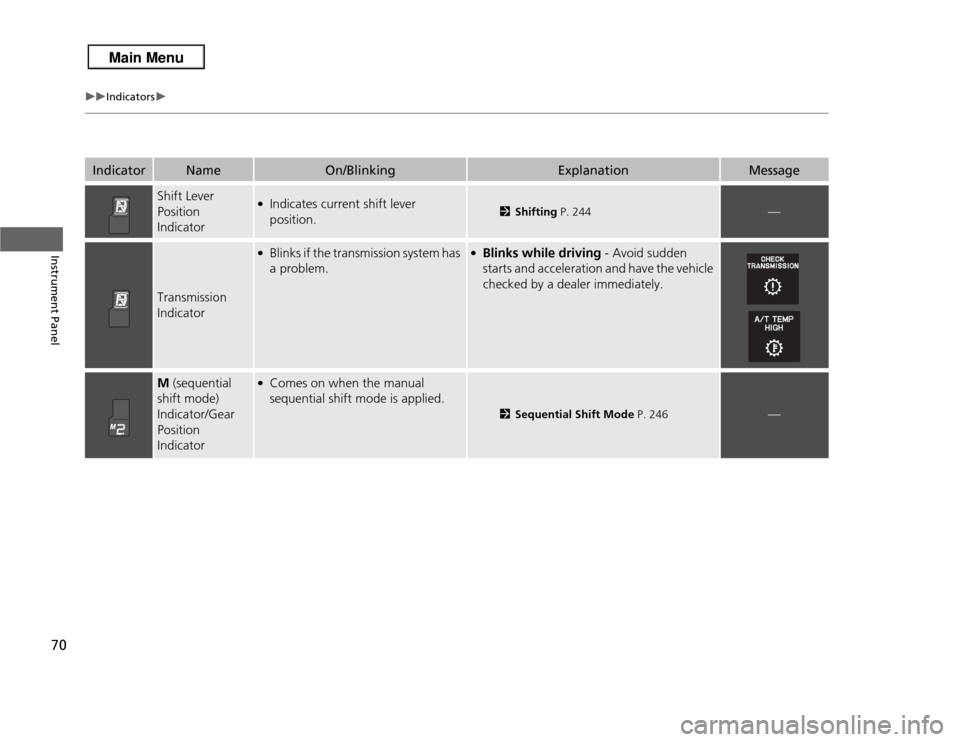
Indicator
Name
On/Blinking
Explanation
Message
Shift Lever
Position
Indicator
●Indicates current shift lever
position.
2Shifting P. 244
—
Transmission
Indicator
●Blinks if the transmission system has
a problem.
●Blinks while driving - Avoid sudden
starts and acceleration and have the vehicle
checked by a dealer immediately.
M (sequential
shift mode)
Indicator/Gear
Position
Indicator
●Comes on when the manual
sequential shift mode is applied.
2 Sequential Shift Mode P. 246
—
Page 72 of 364
71
uuIndicators u
Continued
Instrument Panel
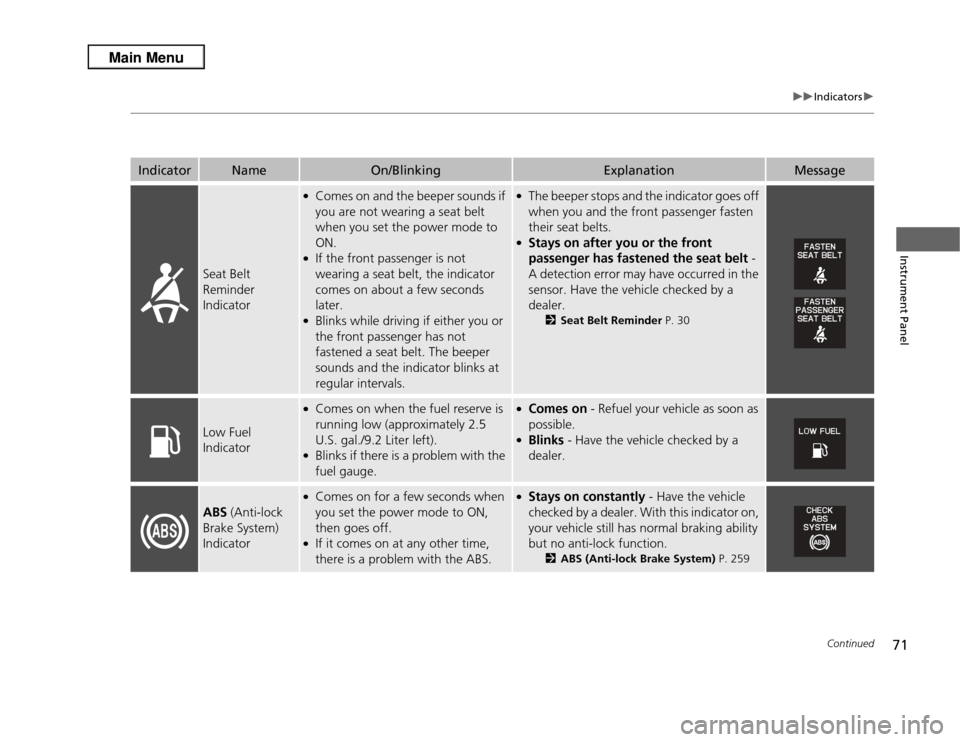
Indicator
Name
On/Blinking
Explanation
Message
Seat Belt
Reminder
Indicator
●Comes on and the beeper sounds if
you are not wearing a seat belt
when you set the power mode to
ON.●If the front passenger is not
wearing a seat belt, the indicator
comes on about a few seconds
later.●Blinks while driving if either you or
the front passenger has not
fastened a seat belt. The beeper
sounds and the indicator blinks at
regular intervals.
●The beeper stops and the indicator goes off
when you and the front passenger fasten
their seat belts.●Stays on after you or the front
passenger has fastened the seat belt -
A detection error may have occurred in the
sensor. Have the vehicle checked by a
dealer.
2 Seat Belt Reminder P. 30
Low Fuel
Indicator
●Comes on when the fuel reserve is
running low (approximately 2.5
U.S. gal./9.2 Liter left).●Blinks if there is a problem with the
fuel gauge.
●Comes on - Refuel your vehicle as soon as
possible.●Blinks - Have the vehicle checked by a
dealer.
ABS (Anti-lock
Brake System)
Indicator
●Comes on for a few seconds when
you set the power mode to ON,
then goes off.●If it comes on at any other time,
there is a problem with the ABS.
●Stays on constantly - Have the vehicle
checked by a dealer. With this indicator on,
your vehicle still has normal braking ability
but no anti-lock function.
2 ABS (Anti-lock Brake System) P. 259
Page 73 of 364
72
uuIndicators u
Instrument Panel
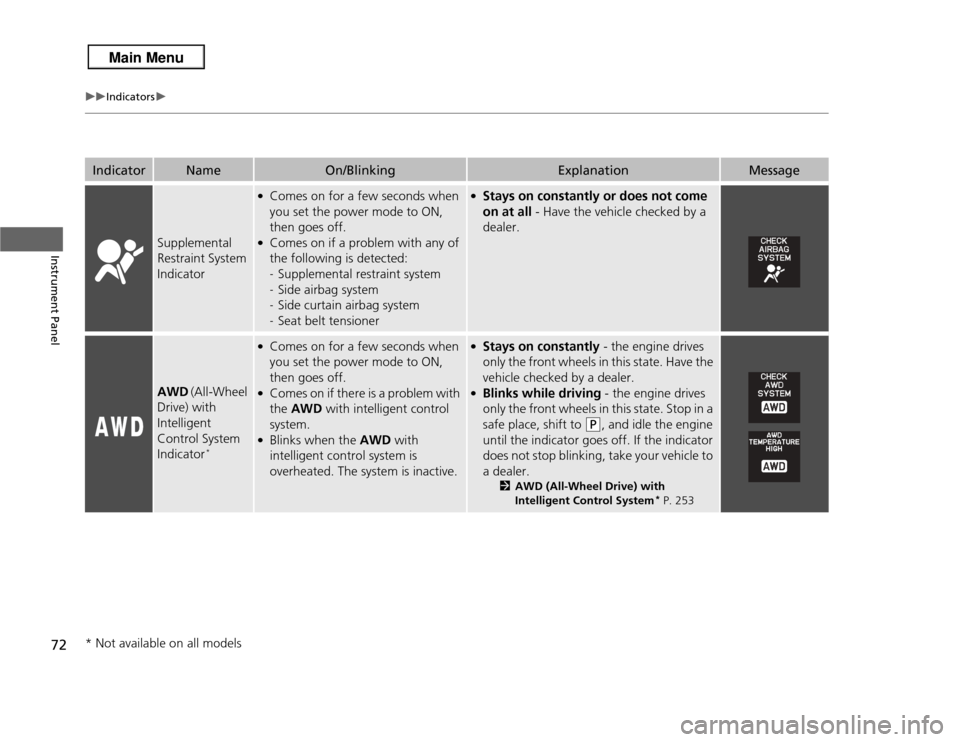
Indicator
Name
On/Blinking
Explanation
Message
Supplemental
Restraint System
Indicator
●Comes on for a few seconds when
you set the power mode to ON,
then goes off.●Comes on if a problem with any of
the following is detected:
-Supplemental restraint system
- Side airbag system
- Side curtain airbag system
- Seat belt tensioner
●Stays on constantly or does not come
on at all - Have the vehicle checked by a
dealer.
AWD (All-Wheel
Drive) with
Intelligent
Control System
Indicator
*
●Comes on for a few seconds when
you set the power mode to ON,
then goes off.●Comes on if there is a problem with
the AWD with intelligent control
system.●Blinks when the AWD with
intelligent control system is
overheated. The system is inactive.
●Stays on constantly - the engine drives
only the front wheels in this state. Have the
vehicle checked by a dealer.●Blinks while driving - the engine drives
only the front wheels in this state. Stop in a
safe place, shift to
(P
, and idle the engine
until the indicator goes off. If the indicator
does not stop blinking, take your vehicle to
a dealer.
2 AWD (All-Wheel Drive) with
Intelligent Control System
* P. 253
* Not available on all models
Page 74 of 364
73
uuIndicators u
Continued
Instrument Panel
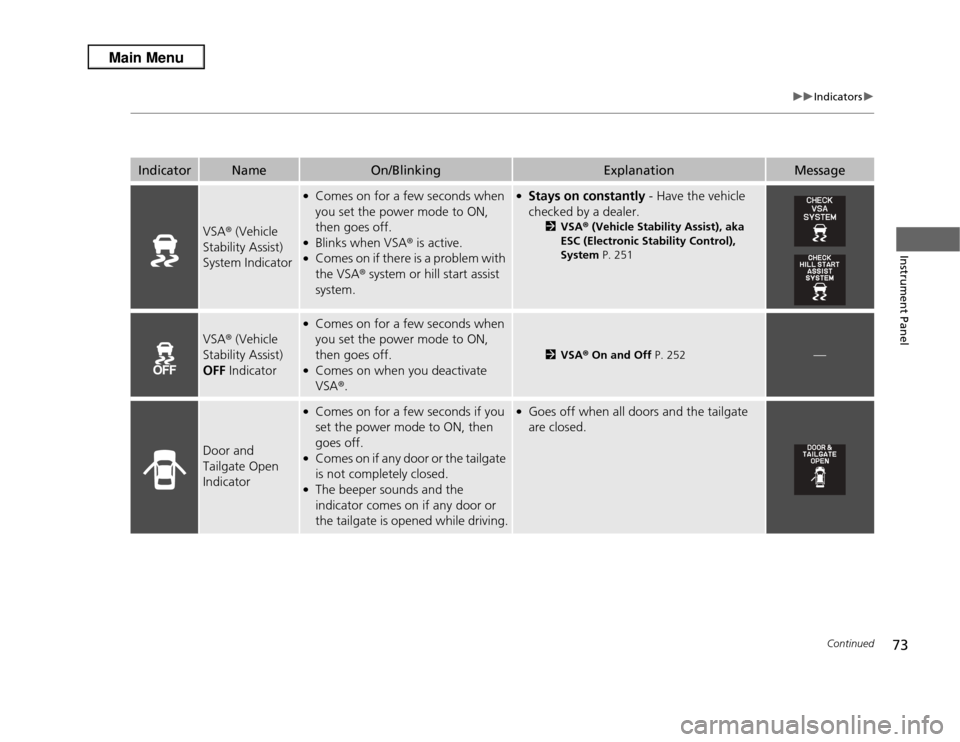
Indicator
Name
On/Blinking
Explanation
Message
VSA® (Vehicle
Stability Assist)
System Indicator
●Comes on for a few seconds when
you set the power mode to ON,
then goes off.●Blinks when VSA ® is active.●Comes on if there is a problem with
the VSA® system or hill start assist
system.
●Stays on constantly - Have the vehicle
checked by a dealer.
2 VSA ® (Vehicle Stability Assist), aka
ESC (Electronic Stability Control),
System P. 251
VSA® (Vehicle
Stability Assist)
OFF Indicator
●Comes on for a few seconds when
you set the power mode to ON,
then goes off.●Comes on when you deactivate
VSA®.
2 VSA ® On and Off P. 252
—
Door and
Tailgate Open
Indicator
●Comes on for a few seconds if you
set the power mode to ON, then
goes off.●Comes on if any door or the tailgate
is not completely closed.●The beeper sounds and the
indicator comes on if any door or
the tailgate is opened while driving.
●Goes off when all doors and the tailgate
are closed.
Page 75 of 364
74
uuIndicators u
Instrument Panel
Indicator
Name
On/Blinking
Explanation
Message
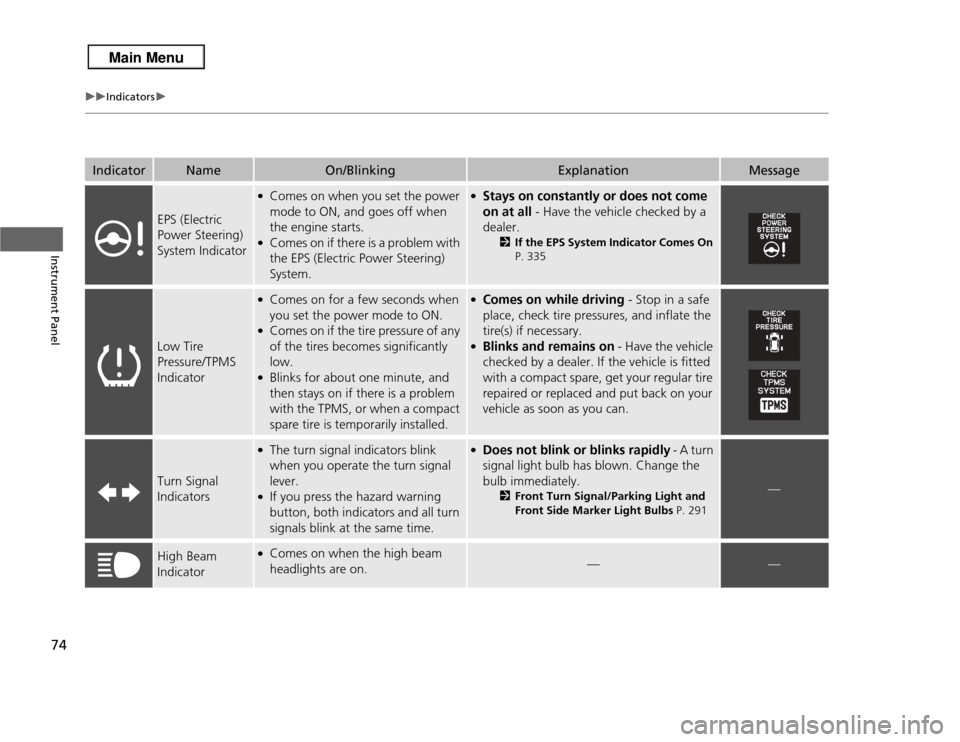
EPS (Electric
Power Steering)
System Indicator
●Comes on when you set the power
mode to ON, and goes off when
the engine starts.●Comes on if there is a problem with
the EPS (Electric Power Steering)
System.
●Stays on constantly or does not come
on at all - Have the vehicle checked by a
dealer.
2If the EPS System Indicator Comes On
P. 335
Low Tire
Pressure/TPMS
Indicator
●Comes on for a few seconds when
you set the power mode to ON.●Comes on if the tire pressure of any
of the tires becomes significantly
low.●Blinks for about one minute, and
then stays on if there is a problem
with the TPMS, or when a compact
spare tire is temporarily installed.
●Comes on while driving - Stop in a safe
place, check tire pressures, and inflate the
tire(s) if necessary.●Blinks and remains on - Have the vehicle
checked by a dealer. If the vehicle is fitted
with a compact spare, get your regular tire
repaired or replaced and put back on your
vehicle as soon as you can.
Turn Signal
Indicators
●The turn signal indicators blink
when you operate the turn signal
lever.●If you press the hazard warning
button, both indicators and all turn
signals blink at the same time.
●Does not blink or blinks rapidly - A turn
signal light bulb has blown. Change the
bulb immediately.
2 Front Turn Signal/Parking Light and
Front Side Marker Light Bulbs P. 291
—
High Beam
Indicator
●Comes on when the high beam
headlights are on.
—
—
Page 76 of 364
75
uuIndicators u
Continued
Instrument Panel
Indicator
Name
On/Blinking
Explanation
Message
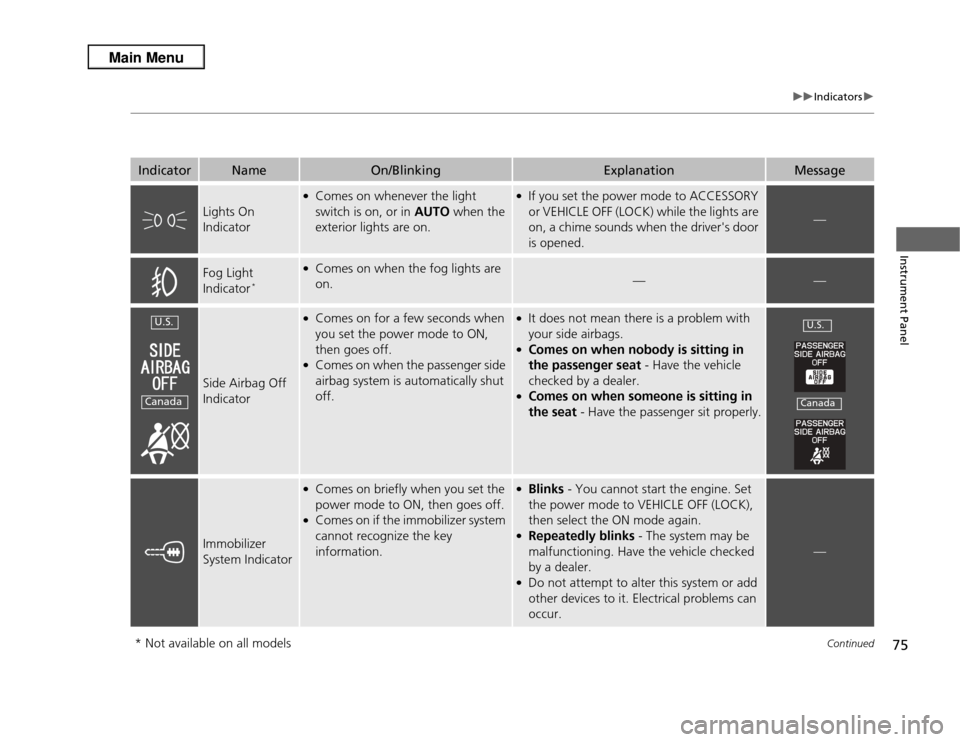
Lights On
Indicator
●Comes on whenever the light
switch is on, or in AUTO when the
exterior lights are on.
●If you set the power mode to ACCESSORY
or VEHICLE OFF (LOCK) while the lights are
on, a chime sounds when the driver's door
is opened.
—
Fog Light
Indicator
*
●Comes on when the fog lights are
on.
—
—
Side Airbag Off
Indicator
●Comes on for a few seconds when
you set the power mode to ON,
then goes off.●Comes on when the passenger side
airbag system is automatically shut
off.
●It does not mean there is a problem with
your side airbags.●Comes on when nobody is sitting in
the passenger seat - Have the vehicle
checked by a dealer.●Comes on when someone is sitting in
the seat - Have the passenger sit properly.
Immobilizer
System Indicator
●Comes on briefly when you set the
power mode to ON, then goes off.●Comes on if the immobilizer system
cannot recognize the key
information.
●Blinks - You cannot start the engine. Set
the power mode to VEHICLE OFF (LOCK),
then select the ON mode again.●Repeatedly blinks - The system may be
malfunctioning. Have the vehicle checked
by a dealer.●Do not attempt to alter this system or add
other devices to it. Electrical problems can
occur.
—
U.S.Canada
U.S.Canada
* Not available on all models
Page 78 of 364
77
uuIndicators u
Instrument Panel
Indicator
Name
On/Blinking
Explanation
Message
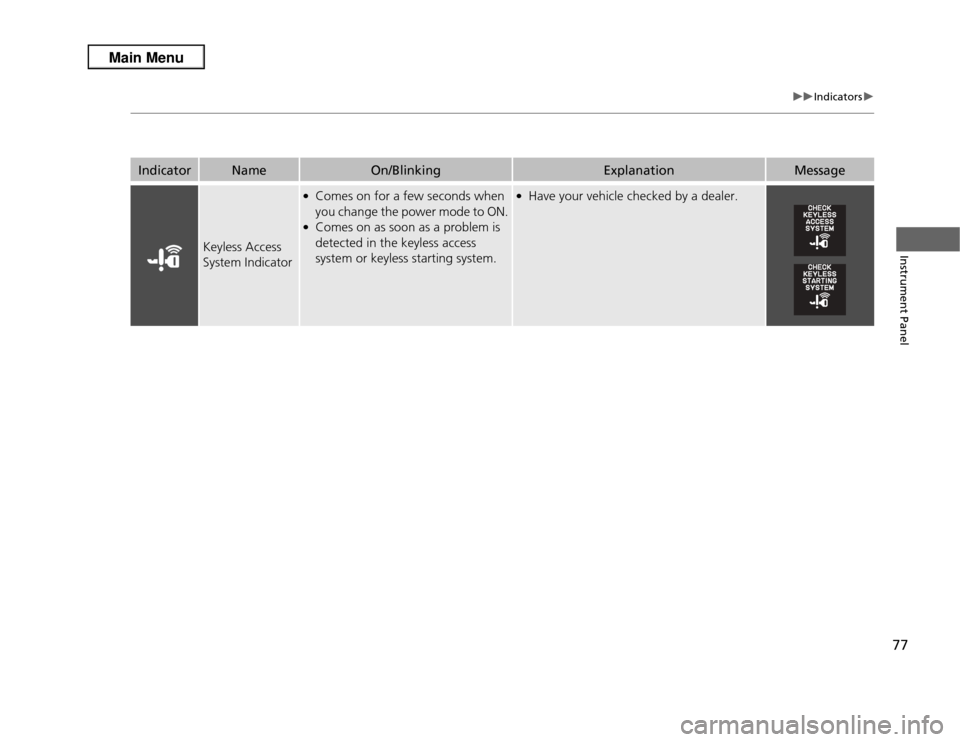
Keyless Access
System Indicator
●Comes on for a few seconds when
you change the power mode to ON.●Comes on as soon as a problem is
detected in the keyless access
system or keyless starting system.
●Have your vehicle checked by a dealer.
Page 80 of 364
79
uuIndicators uMulti-Information Display Warning and Information Messages
Continued
Instrument Panel
Message
Condition
Explanation
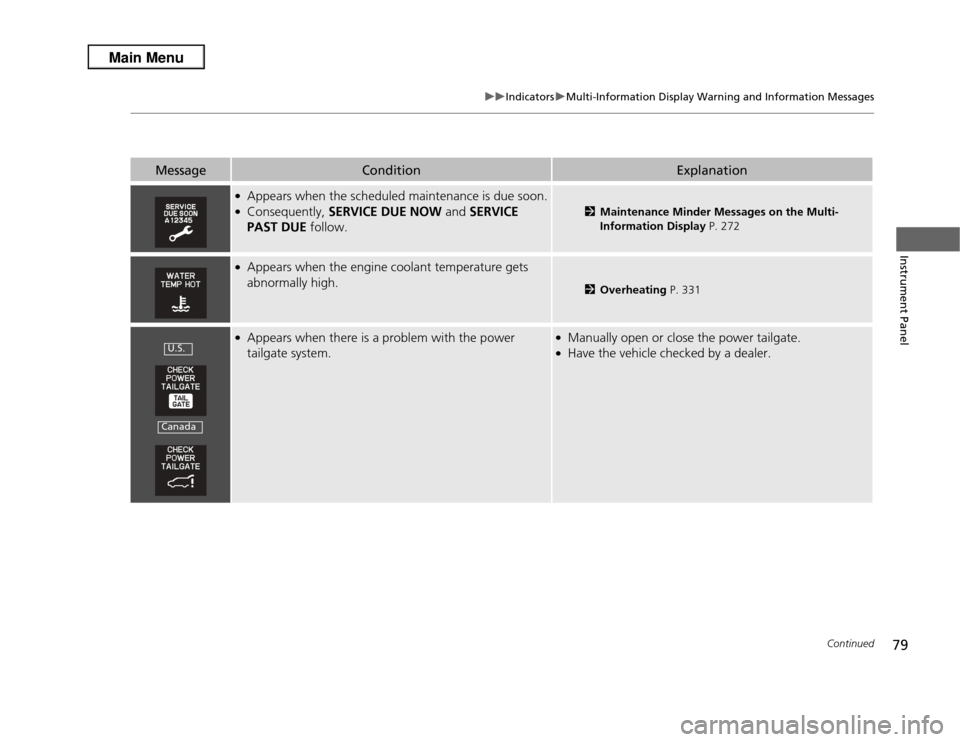
●Appears when the scheduled maintenance is due soon.●Consequently, SERVICE DUE NOW and SERVICE
PAST DUE follow.
2Maintenance Minder Messages on the Multi-
Information Display P. 272
●Appears when the engine coolant temperature gets
abnormally high.
2Overheating P. 331
●Appears when there is a problem with the power
tailgate system.
●Manually open or close the power tailgate.●Have the vehicle checked by a dealer.
U.S.Canada
Page 81 of 364
80
uuIndicators uMulti-Information Display Warning and Information Messages
Instrument Panel
Message
Condition
Explanation
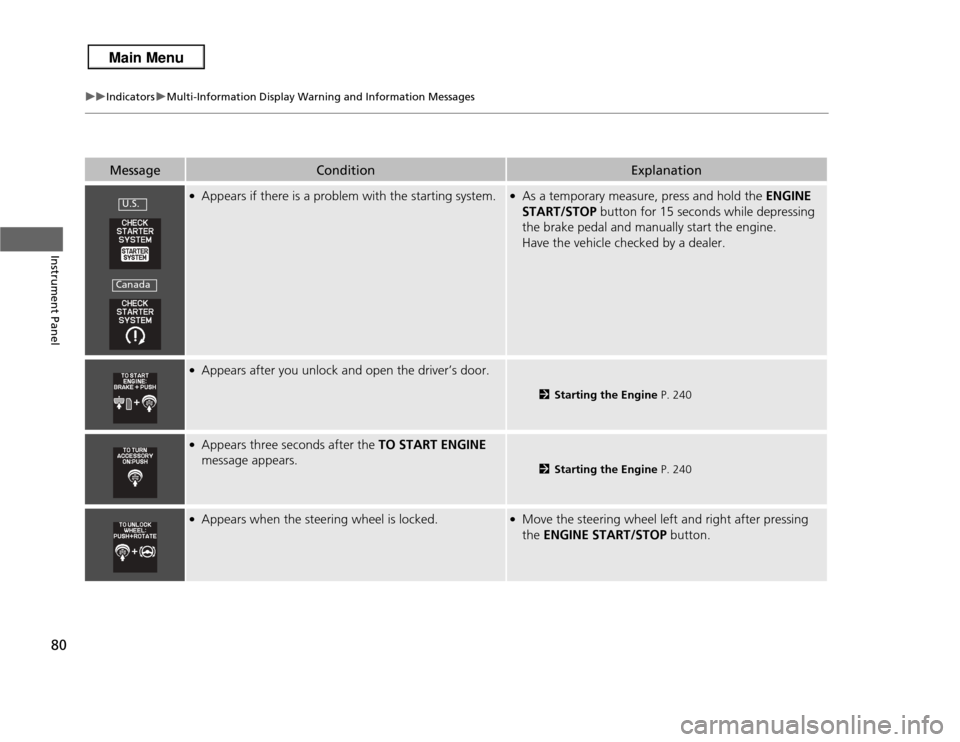
●Appears if there is a problem with the starting system.
●As a temporary measure, press and hold the ENGINE
START/STOP button for 15 seconds while depressing
the brake pedal and manually start the engine.
Have the vehicle checked by a dealer.
●Appears after you unlock and open the driver’s door.
2 Starting the Engine P. 240
●Appears three seconds after the TO START ENGINE
message appears.
2 Starting the Engine P. 240
●Appears when the steering wheel is locked.
●Move the steering wheel left and right after pressing
the ENGINE START/STOP button.
U.S.Canada
Page 136 of 364
135
uuAdjusting the Mirrors uPower Door Mirrors
Controls
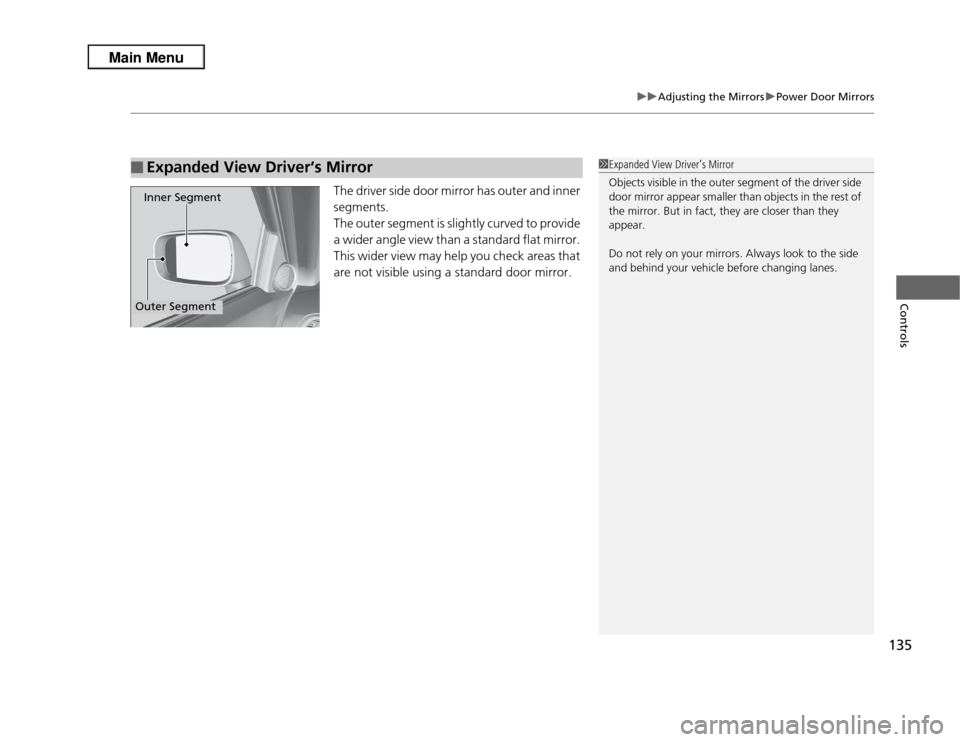
The driver side door mirror has outer and inner
segments.
The outer segment is slightly curved to provide
a wider angle view than a standard flat mirror.
This wider view may help you check areas that
are not visible using a standard door mirror.
■
Expanded View Driver’s MirrorInner SegmentOuter Segment
1Expanded View Driver’s Mirror
Objects visible in the outer segment of the driver side
door mirror appear smaller than objects in the rest of
the mirror. But in fact, they are closer than they
appear.
Do not rely on your mirrors. Always look to the side
and behind your vehicle before changing lanes.