map Acura RDX 2016 Navigation Manual
[x] Cancel search | Manufacturer: ACURA, Model Year: 2016, Model line: RDX, Model: Acura RDX 2016Pages: 363, PDF Size: 17.77 MB
Page 58 of 363
57
uuRouting uUnverified Routing
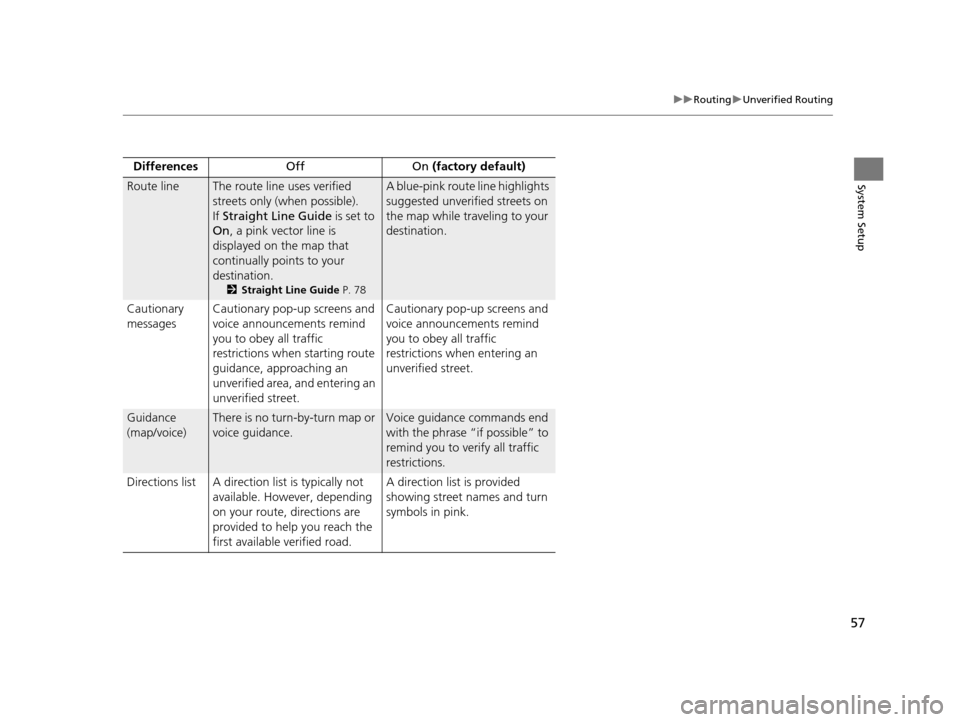
System SetupRoute lineThe route line uses verified
streets only (when possible).
If Straight Line Guide is set to
On , a pink vector line is
displayed on the map that
continually points to your
destination.
2 Straight Line Guide P. 78
A blue-pink route line highlights
suggested unverified streets on
the map while traveling to your
destination.
Cautionary
messages Cautionary pop-up screens and
voice announcements remind
you to obey all traffic
restrictions when
starting route
guidance, approaching an
unverified area, and entering an
unverified street. Cautionary pop-up screens and
voice announcements remind
you to obey all traffic
restrictions when entering an
unverified street.
Guidance
(map/voice)There is no turn-by-turn map or
voice guidance.Voice guidance commands end
with the phrase “if possible” to
remind you to verify all traffic
restrictions.
Directions list A direction list is typically not available. However, depending
on your route, directions are
provided to help you reach the
first available verified road. A direction list is provided
showing street names and turn
symbols in pink.
Differences
Off On (factory default)
16 ACURA RDX NAVI-31TX48300.book 57 ページ 2015年3月6日 金曜日 午後1時26分
Page 61 of 363
60
uuRouting uAvoided Area
System Setup
Avoided Area
H SETTINGS buttonuNavi Settings uRouting uAvoided Area
Specify up to five areas to avoid (e.g., road construction, closures), if possible, when
the system calculates routes to your destination.
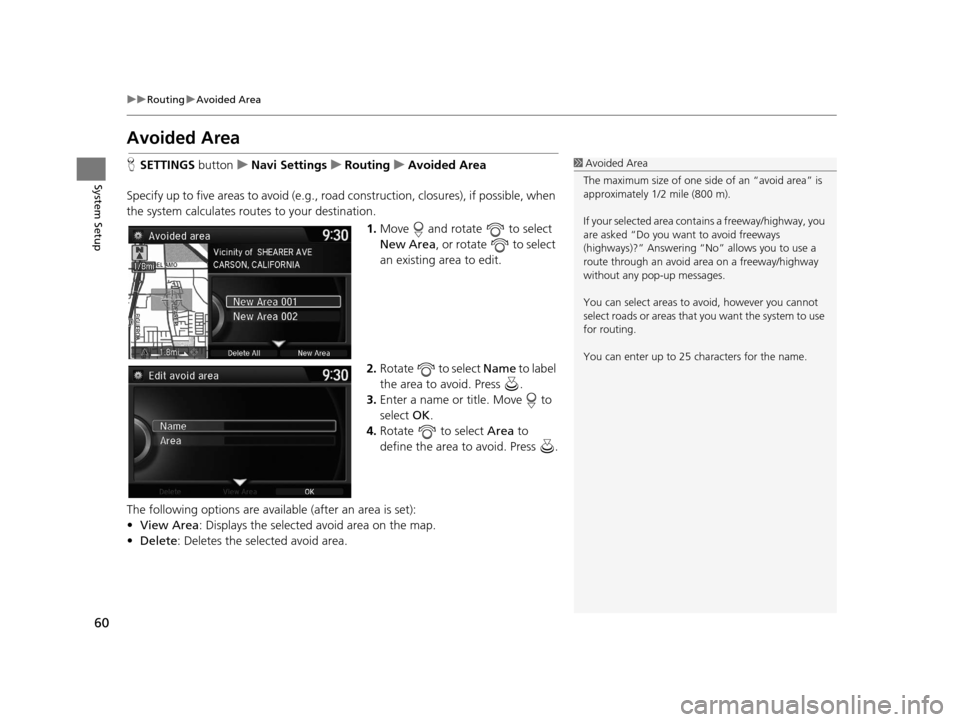
1.Move and rotate to select
New Area , or rotate to select
an existing area to edit.
2. Rotate to select Name to label
the area to avoid. Press .
3. Enter a name or title. Move to
select OK.
4. Rotate to select Area to
define the area to avoid. Press .
The following options are available (after an area is set):
• View Area : Displays the selected avoid area on the map.
• Delete: Deletes the selected avoid area.1Avoided Area
The maximum size of one side of an “avoid area” is
approximately 1/2 mile (800 m).
If your selected area contains a freeway/highway, you
are asked “Do you want to avoid freeways
(highways)?” Answering “No” allows you to use a
route through an avoid ar ea on a freeway/highway
without any pop-up messages.
You can select areas to avoid, however you cannot
select roads or areas that you want the system to use
for routing.
You can enter up to 25 ch aracters for the name.
16 ACURA RDX NAVI-31TX48300.book 60 ページ 2015年3月6日 金曜日 午後1時26分
Page 62 of 363
61
uuRouting uAvoided Area
System Setup
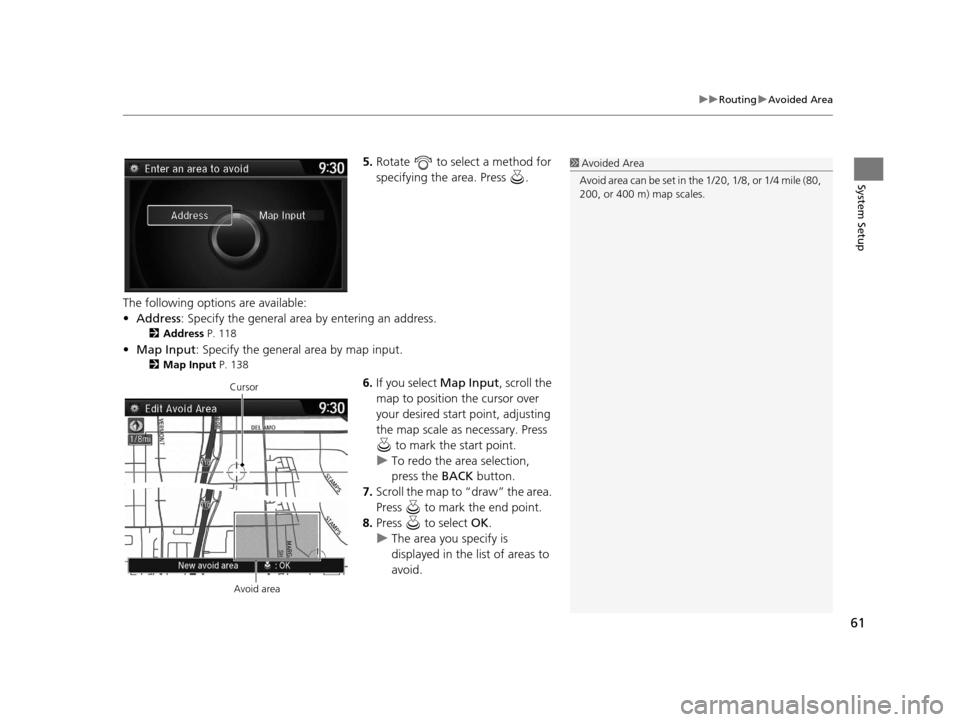
5. Rotate to select a method for
specifying the area. Press .
The following options are available:
• Address : Specify the general area by entering an address.
2Address P. 118
•Map Input : Specify the general area by map input.
2Map Input P. 138
6.If you select Map Input, scroll the
map to position the cursor over
your desired start point, adjusting
the map scale as necessary. Press to mark the start point.
u To redo the area selection,
press the BACK button.
7. Scroll the map to “draw” the area.
Press to mark the end point.
8. Press to select OK.
u The area you specify is
displayed in the list of areas to
avoid.
1Avoided Area
Avoid area can be set in the 1/20, 1/8, or 1/4 mile (80,
200, or 400 m) map scales.
Cursor
Avoid area
16 ACURA RDX NAVI-31TX48300.book 61 ページ 2015年3月6日 金曜日 午後1時26分
Page 63 of 363

62
System Setup
Guidance
HSETTINGS buttonuNavi Settings uGuidance
Choose various settings that determine th e navigation system functionality during
route guidance.
Rotate to select an item. Press .
The following items are available:
• Guidance Mode : Sets whether to display only the map screen or a split map-
guidance screen.
2 Guidance Mode P. 63
•Street Name Guidance (U.S. models): Sets whether to read out the street
names during voice guidance.
2 Street Name Guidance P. 65
•Non-map Screens : Sets whether the guidance screen interrupts the screen
display.
2 Non-map Screens P. 66
•Guidance Point : Sets whether to display the guidance information to the
destination or the next waypoint.
2 Guidance Point P. 67
•Estimated Time : Sets whether to display the remaining time or arrival time to
the guidance point.
2 Estimated Time P. 68
16 ACURA RDX NAVI-31TX48300.book 62 ページ 2015年3月6日 金曜日 午後1時26分
Page 64 of 363
63
uuGuidance uGuidance Mode
Continued
System Setup
Guidance Mode
H SETTINGS button uNavi Settings uGuidance uGuidance mode
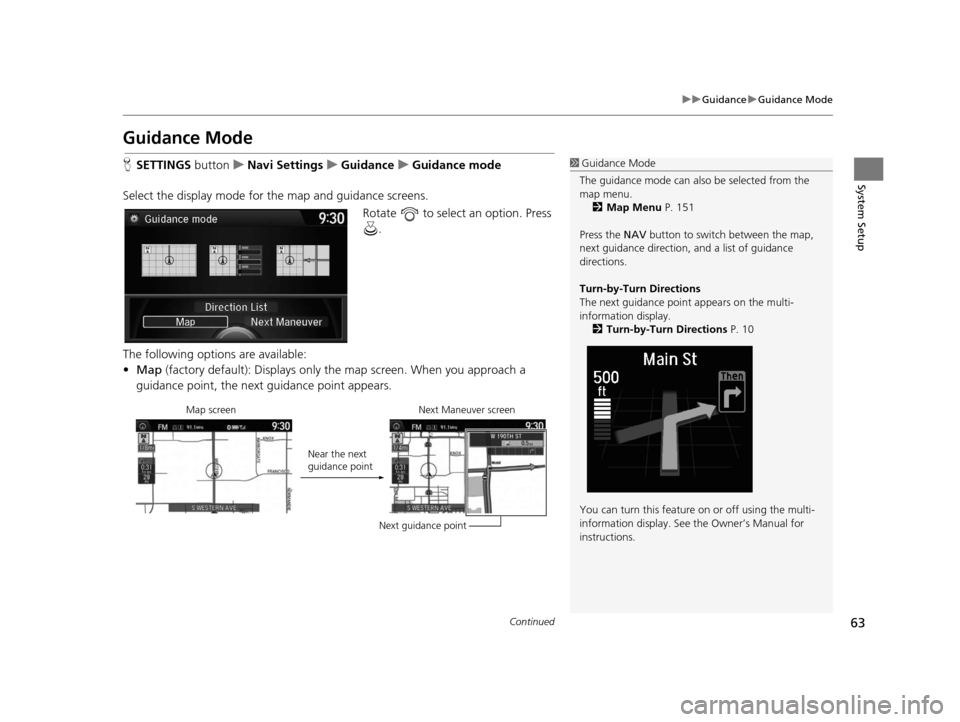
Select the display mode for the map and guidance screens. Rotate to select an option. Press .
The following options are available:
• Map (factory default): Displays only th e map screen. When you approach a
guidance point, the next guidance point appears.1 Guidance Mode
The guidance mode can also be selected from the
map menu. 2 Map Menu P. 151
Press the NAV button to switch between the map,
next guidance direction, and a list of guidance
directions.
Turn-by-Turn Directions
The next guidance point appears on the multi-
information display.
2 Turn-by-Turn Directions P. 10
You can turn this feature on or off using the multi-
information display. See the Owner’s Manual for
instructions.
Map screen Near the next
guidance pointNext Maneuver screen
Next guidance point
16 ACURA RDX NAVI-31TX48300.book 63 ページ 2015年3月6日 金曜日 午後1時26分
Page 65 of 363
64
uuGuidance uGuidance Mode
System Setup
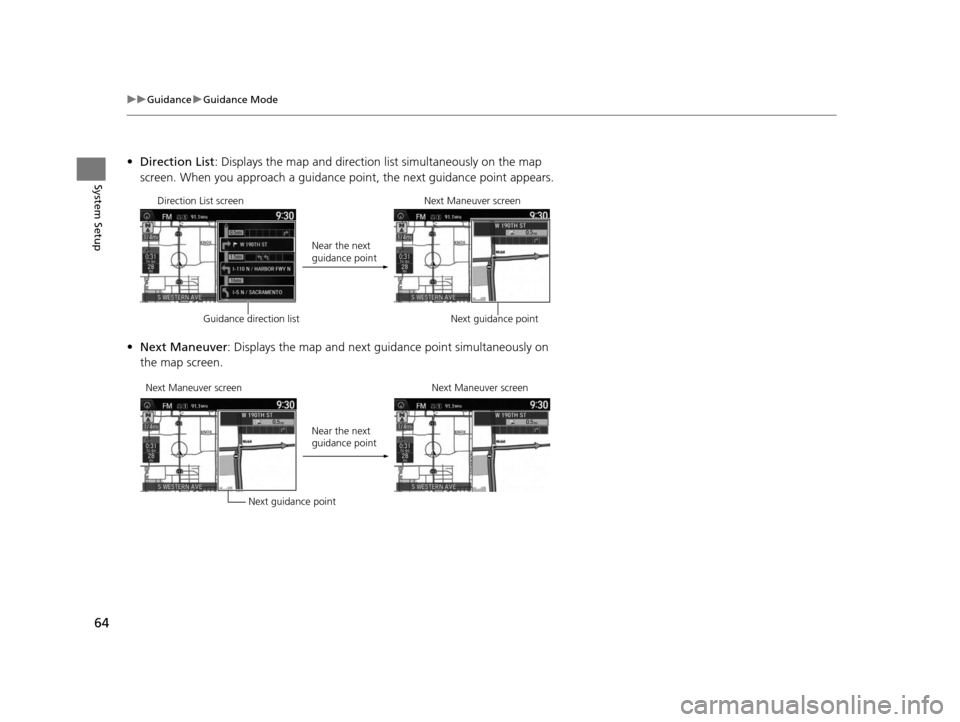
• Direction List : Displays the map and direction list simultaneously on the map
screen. When you approach a guidance point, the next guidance point appears.
• Next Maneuver : Displays the map and next guidance point simultaneously on
the map screen.
Direction List screen
Guidance direction list Near the next
guidance point
Next Maneuver screen
Next guidance point
Next Maneuver screen Next guidance pointNear the next
guidance point
Next Maneuver screen
16 ACURA RDX NAVI-31TX48300.book 64 ページ 2015年3月6日 金曜日 午後1時26分
Page 67 of 363

66
uuGuidance uNon-map Screens
System Setup
Non-map Screens
H SETTINGS buttonuNavi Settings uGuidance uNon-map Screens
The navigation system temporarily interrupts the screen display to view the guidance
screen as you approach a guidance point. Rotate to select an option. Press .
The following options are available:
• On : The guidance screen interrupts other mode screens (e.g., audio, phone, etc,
except the rear view camera mode).
• Off (factory default): Disables the feature.
16 ACURA RDX NAVI-31TX48300.book 66 ページ 2015年3月6日 金曜日 午後1時26分
Page 68 of 363
67
uuGuidance uGuidance Point
System Setup
Guidance Point
H SETTINGS button uNavi Settings uGuidance uGuidance Point
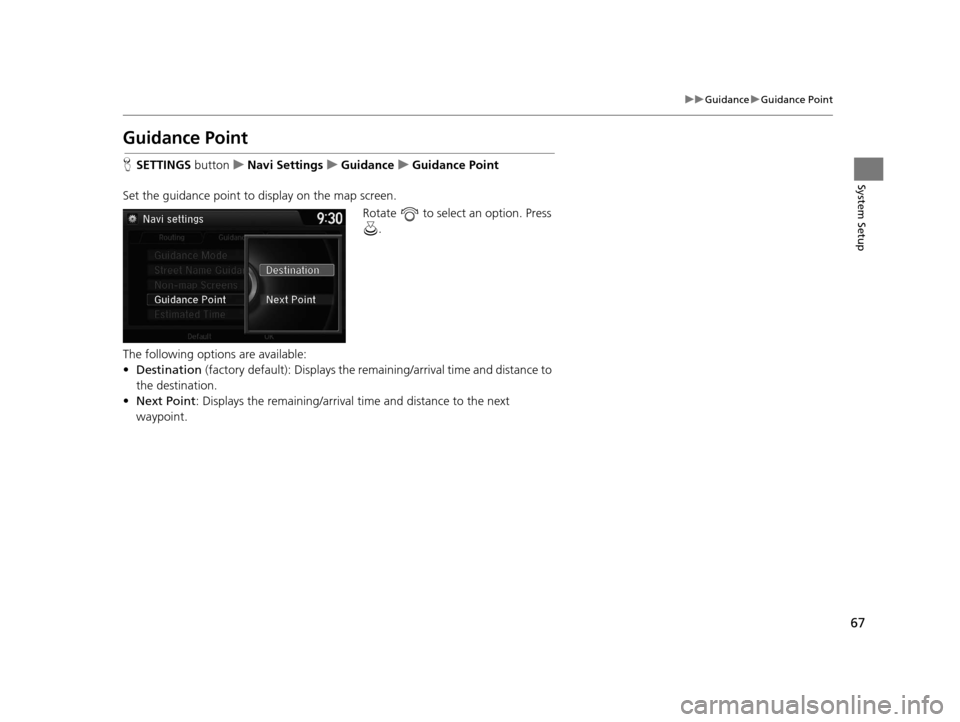
Set the guidance point to display on the map screen. Rotate to select an option. Press .
The following options are available:
• Destination (factory default): Disp lays the remaining/arriva l time and distance to
the destination.
• Next Point : Displays the remaining/arrival time and distance to the next
waypoint.
16 ACURA RDX NAVI-31TX48300.book 67 ページ 2015年3月6日 金曜日 午後1時26分
Page 70 of 363
69Continued
System Setup
Map
HSETTINGS button uNavi Settings uMap
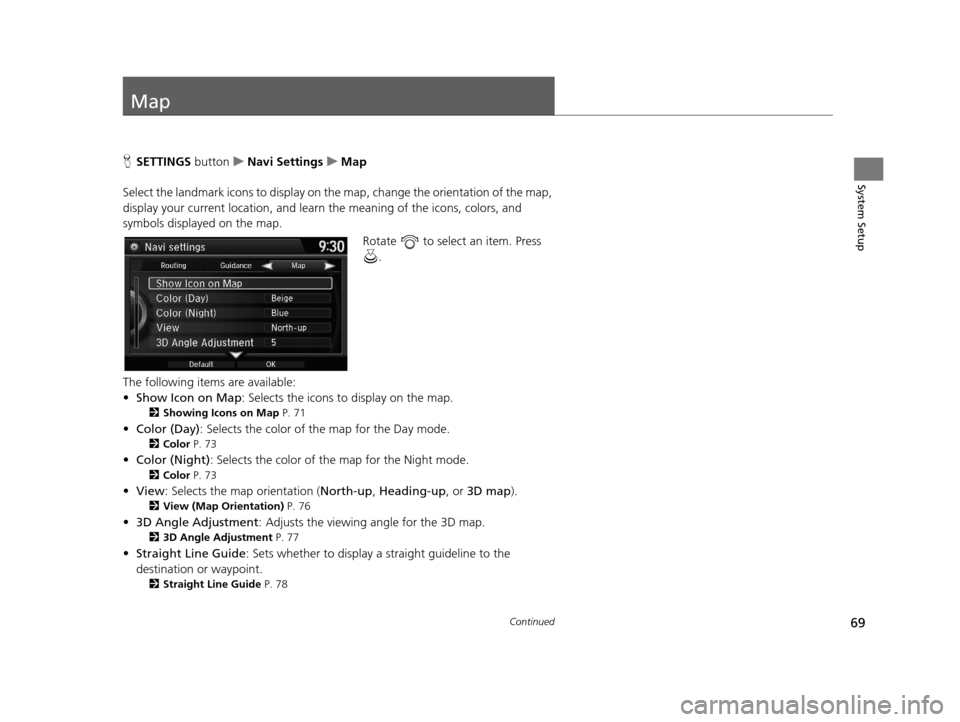
Select the landmark icons to display on the map, change the orientation of the map,
display your current location, and learn the meaning of the icons, colors, and
symbols displayed on the map. Rotate to select an item. Press .
The following items are available:
• Show Icon on Map : Selects the icons to display on the map.
2Showing Icons on Map P. 71
•Color (Day) : Selects the color of the map for the Day mode.
2Color P. 73
•Color (Night) : Selects the color of the map for the Night mode.
2Color P. 73
•View : Selects the map orientation ( North-up, Heading-up , or 3D map).
2View (Map Orientation) P. 76
•3D Angle Adjustment : Adjusts the viewing angle for the 3D map.
23D Angle Adjustment P. 77
•Straight Line Guide : Sets whether to display a straight guideline to the
destination or waypoint.
2 Straight Line Guide P. 78
16 ACURA RDX NAVI-31TX48300.book 69 ページ 2015年3月6日 金曜日 午後1時26分
Page 71 of 363
70
uuMap u
System Setup
•Current Location : Displays and saves your current location.
2Current Location P. 79
•Map Legend : Displays an overview of the map features.
2Map Legend P. 80
•Display Tracking : Sets whether to display the tracking dots on the map.
2Display Tracking P. 84
•Delete Tracking : Deletes the tracking dots on the map.
2Deleting Tracking Dots P. 85
•Correct Vehicle Position : Adjusts the position of the vehicle on the map.
2Correct Vehicle Position P. 86
•System Device Information : Views database, software, device, and vehicle
identification information.
2 System Device Information P. 314
•Map Data Update : Checks the map data update status when updating the map
database.
2 Map Data Update P. 314
16 ACURA RDX NAVI-31TX48300.book 70 ページ 2015年3月6日 金曜日 午後1時26分