map Acura RDX 2016 Navigation Manual
[x] Cancel search | Manufacturer: ACURA, Model Year: 2016, Model line: RDX, Model: Acura RDX 2016Pages: 363, PDF Size: 17.77 MB
Page 82 of 363
Continued81
uuMap uMap Legend
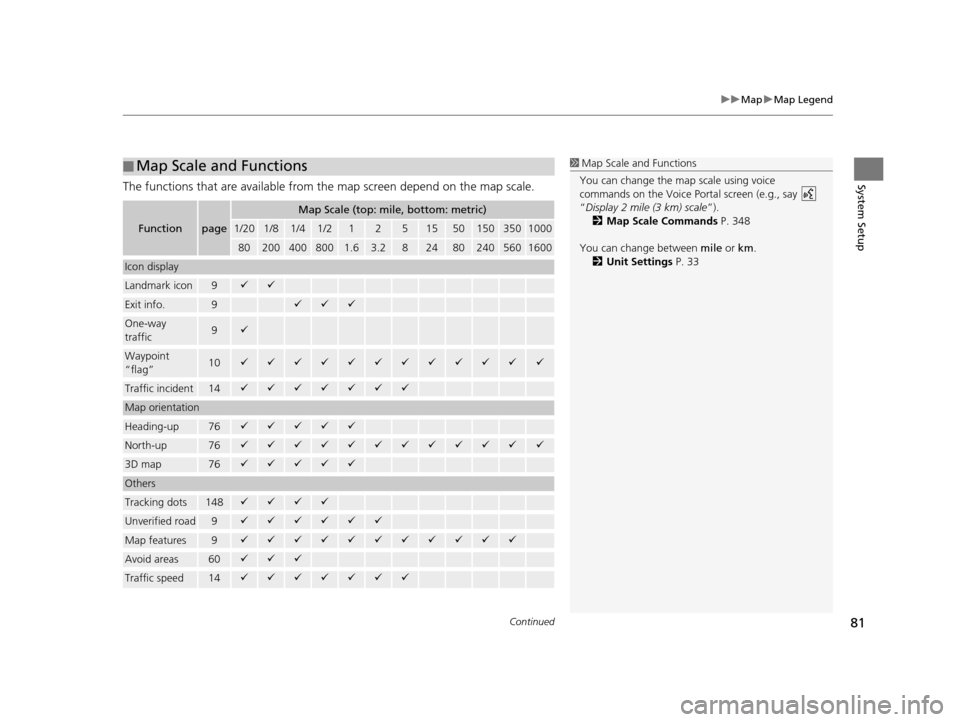
System SetupThe functions that are available from the map screen depend on the map scale.
■Map Scale and Functions
Functionpage
Map Scale (top: mile, bottom: metric)
1/201/81/41/212515501503501000
802004008001.63.2824802405601600
Icon display
Landmark icon9
Exit info.9
One-way
traffic9
Waypoint
“flag”10
Traffic incident14
Map orientation
Heading-up76
North-up76
3D map76
Others
Tracking dots148
Unverified road9
Map features9
Avoid areas60
Traffic speed14
1
Map Scale and Functions
You can change the map scale using voice
commands on the Voice Portal screen (e.g., say
“Display 2 mile (3 km) scale ”).
2 Map Scale Commands P. 348
You can change between mile or km.
2 Unit Settings P. 33
16 ACURA RDX NAVI-31TX48300.book 81 ページ 2015年3月6日 金曜日 午後1時26分
Page 83 of 363
uuMap uMap Legend
82
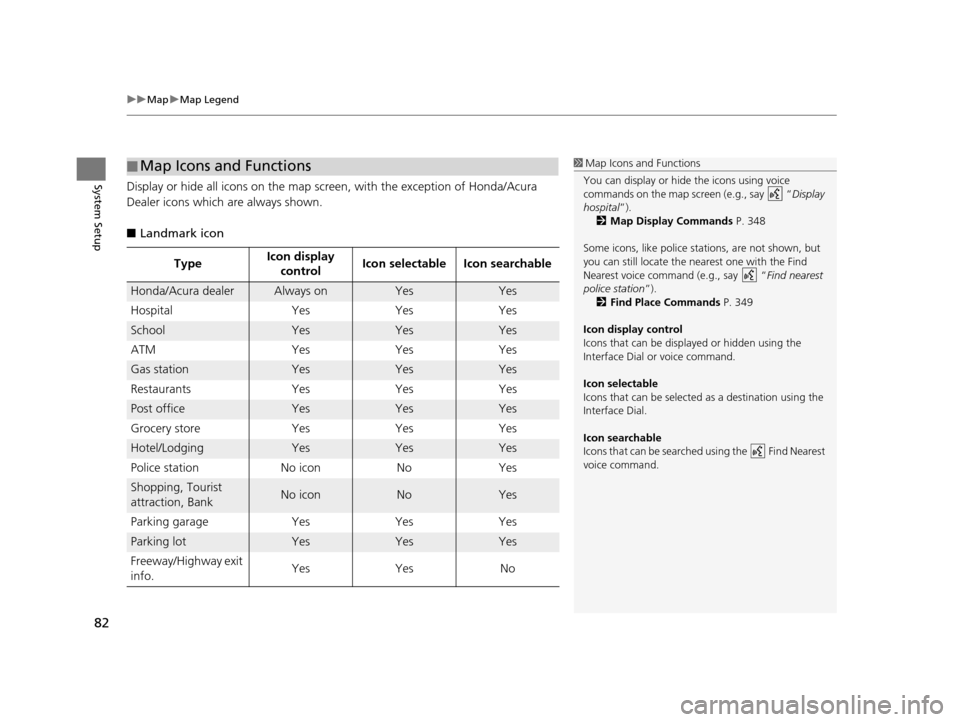
System SetupDisplay or hide all icons on the map screen, with the exception of Honda/Acura
Dealer icons which are always shown.
■ Landmark icon
■Map Icons and Functions
Type Icon display
control Icon selectable Icon searchable
Honda/Acura dealerAlways onYesYes
Hospital Yes Yes Yes
SchoolYesYesYes
ATM Yes Yes Yes
Gas stationYesYesYes
Restaurants Yes Yes Yes
Post officeYesYesYes
Grocery store Yes Yes Yes
Hotel/LodgingYesYesYes
Police station No icon No Yes
Shopping, Tourist
attraction, BankNo iconNoYes
Parking garage Yes Yes Yes
Parking lotYesYesYes
Freeway/Highway exit
info. Yes Yes No
1
Map Icons and Functions
You can display or hide the icons using voice
commands on the map screen (e.g., say “ Display
hospital ”).
2 Map Display Commands P. 348
Some icons, like police stat ions, are not shown, but
you can still locate the nearest one with the Find
Nearest voice command (e.g., say “ Find nearest
police station ”).
2 Find Place Commands P. 349
Icon display control
Icons that can be displa yed or hidden using the
Interface Dial or voice command.
Icon selectable
Icons that can be selected as a destination using the
Interface Dial.
Icon searchable
Icons that can be searched using the Find Nearest
voice command.
16 ACURA RDX NAVI-31TX48300.book 82 ページ 2015年3月6日 金曜日 午後1時26分
Page 84 of 363
83
uuMap uMap Legend
System Setup
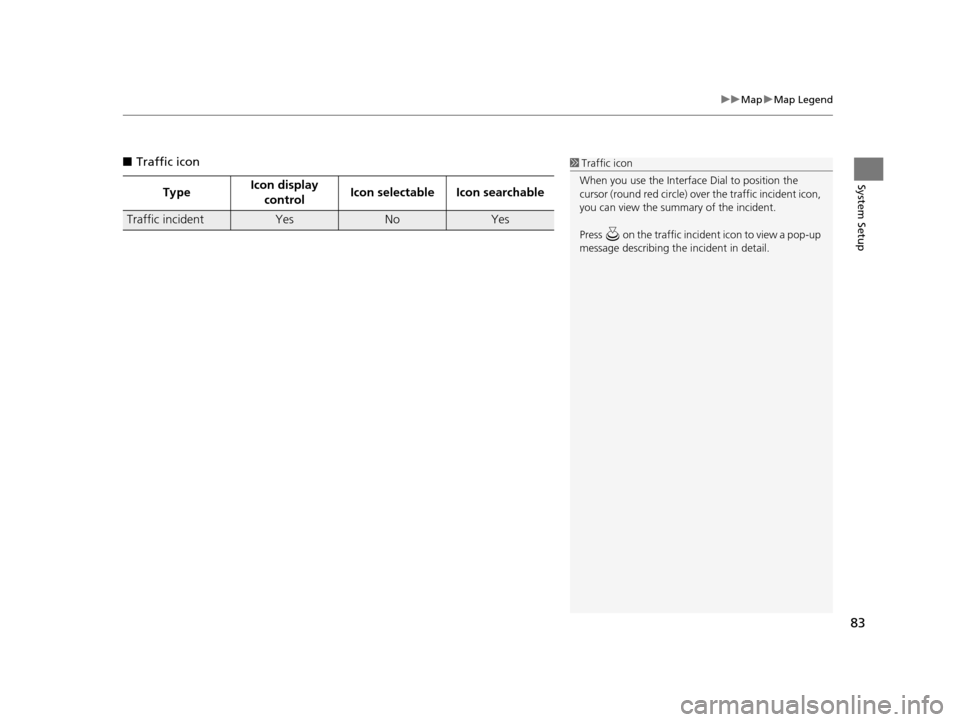
■ Traffic icon
Type Icon display
control Icon selectable Icon searchable
Traffic incidentYesNoYes
1
Traffic icon
When you use the Interface Dial to position the
cursor (round red circle) over the traffic incident icon,
you can view the summary of the incident.
Press on the traffic inci dent icon to view a pop-up
message describing the incident in detail.
16 ACURA RDX NAVI-31TX48300.book 83 ページ 2015年3月6日 金曜日 午後1時26分
Page 85 of 363
84
uuMap uDisplay Tracking
System Setup
Display Tracking
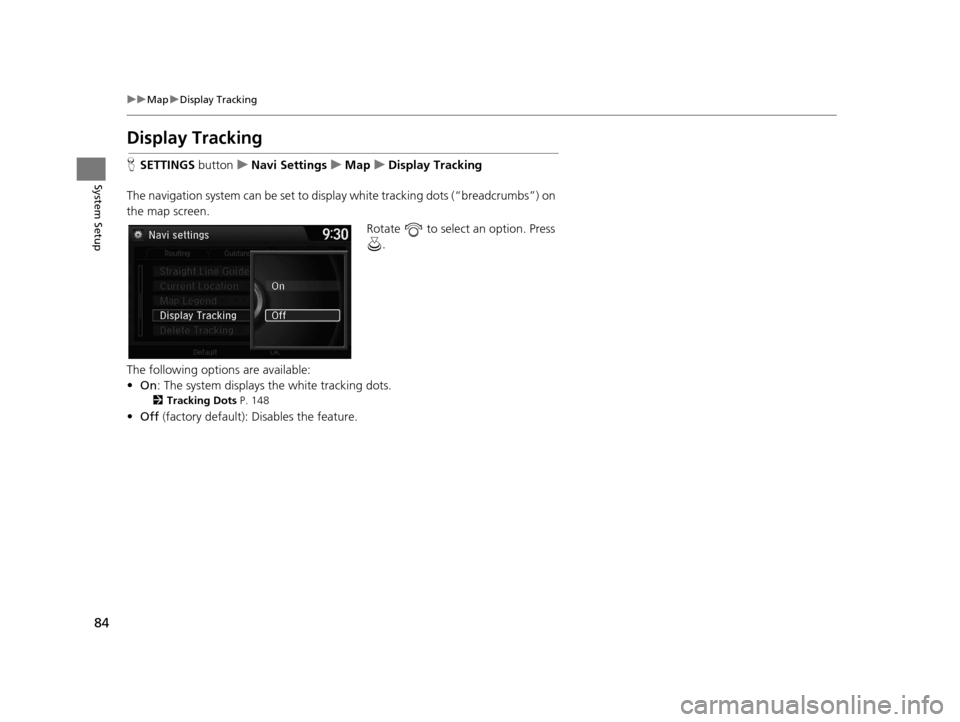
H SETTINGS buttonuNavi Settings uMap uDisplay Tracking
The navigation system can be set to display white tracking dots (“breadcrumbs”) on
the map screen. Rotate to select an option. Press .
The following options are available:
• On : The system displays the white tracking dots.
2Tracking Dots P. 148
•Off (factory default): Disables the feature.
16 ACURA RDX NAVI-31TX48300.book 84 ページ 2015年3月6日 金曜日 午後1時26分
Page 86 of 363
85
uuMap uDisplay Tracking
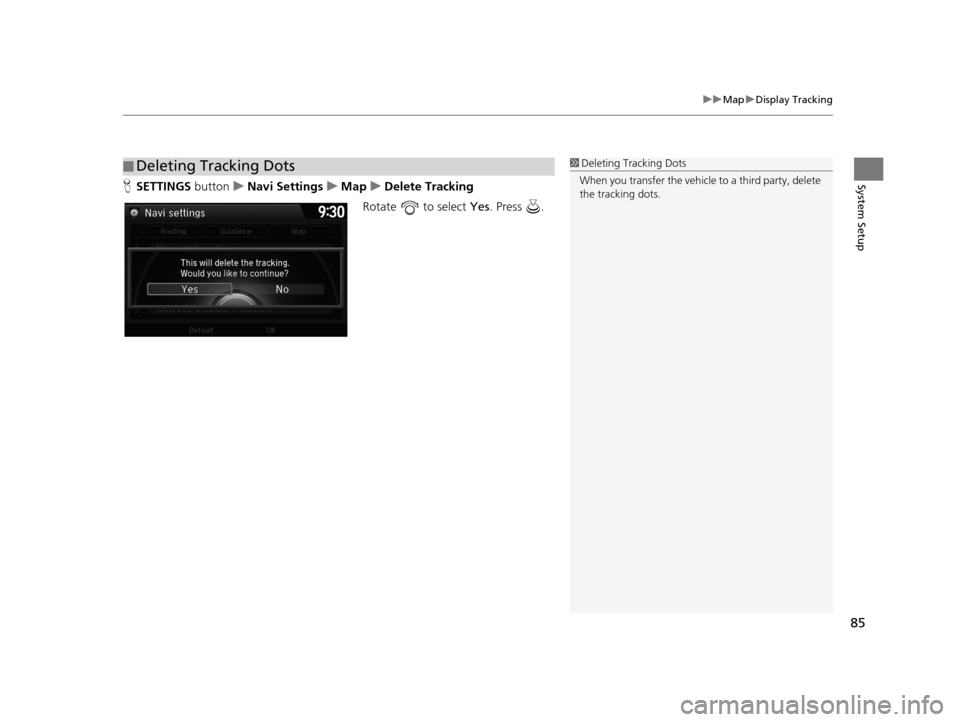
System SetupH SETTINGS button uNavi Settings uMap uDelete Tracking
Rotate to select Yes. Press .
■Deleting Tracking Dots1
Deleting Tracking Dots
When you transfer the vehicle to a third party, delete
the tracking dots.
16 ACURA RDX NAVI-31TX48300.book 85 ページ 2015年3月6日 金曜日 午後1時26分
Page 87 of 363

86
uuMap uCorrect Vehicle Position
System Setup
Correct Vehicle Position
H SETTINGS buttonuNavi Settings uMap uCorrect Vehicle Position
Manually adjust the current position of the vehicle as displayed on the map screen if
the position appears to be incorrect. 1.Put the vehicle in Park.
2. Rotate to select Correct
Vehicle Position . Press .
3. Scroll the map to position the
cursor over at your correct
position. Press .
4. Rotate to position the
arrowhead in the correct direction
the vehicle is facing.
5. Press to select OK.1Correct Vehicle Position
An apparent position error can occur where
buildings, tunnels, and other objects block or reflect
the GPS signals, forcing the system to use “dead
reckoning” to determine your location and direction.
Using this function to adju st vehicle position is not
recommended. When the system reacquires a GPS
signal, it will automaticall y place the vehicle in the
correct location.
If you continually have to adjust the vehicle position,
you may have problems with the GPS reception or
there may be database errors. 2 System Limitations P. 336
16 ACURA RDX NAVI-31TX48300.book 86 ページ 2015年3月6日 金曜日 午後1時26分
Page 93 of 363
92
uuCustomized Features u
System Setup
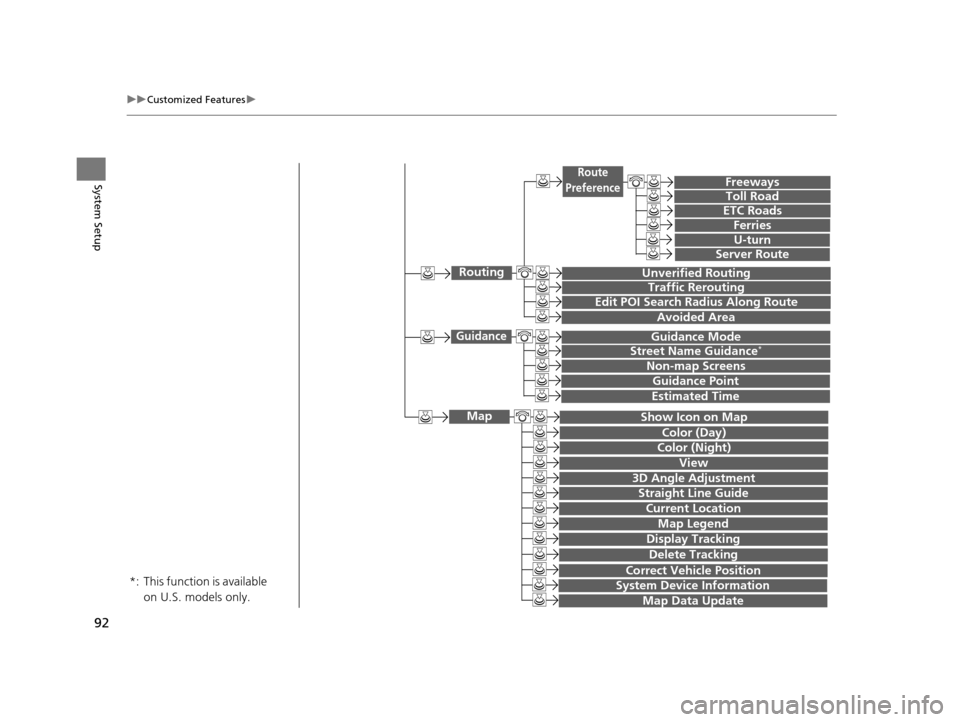
Show Icon on Map
Color (Day)
Color (Night)
Map
View
3D Angle Adjustment
Straight Line Guide
Current Location
This function is available
on U.S. models only.
*:
Map Legend
Display Tracking
Delete Tracking
Correct Vehicle Position
System Device Information
Map Data Update
Unverified Routing
Traffic Rerouting
Edit POI Search Radius Along Route
Routing
Avoided Area
Freeways
Toll Road
ETC Roads
Route
Preference
Ferries
U-turn
Server Route
Guidance Mode
Street Name Guidance*
Non-map Screens
Guidance
Guidance Point
Estimated Time
16 ACURA RDX NAVI-31TX48300.book 92 ページ 2015年3月6日 金曜日 午後1時26分
Page 99 of 363
98
uuCustomized Features u
System Setup
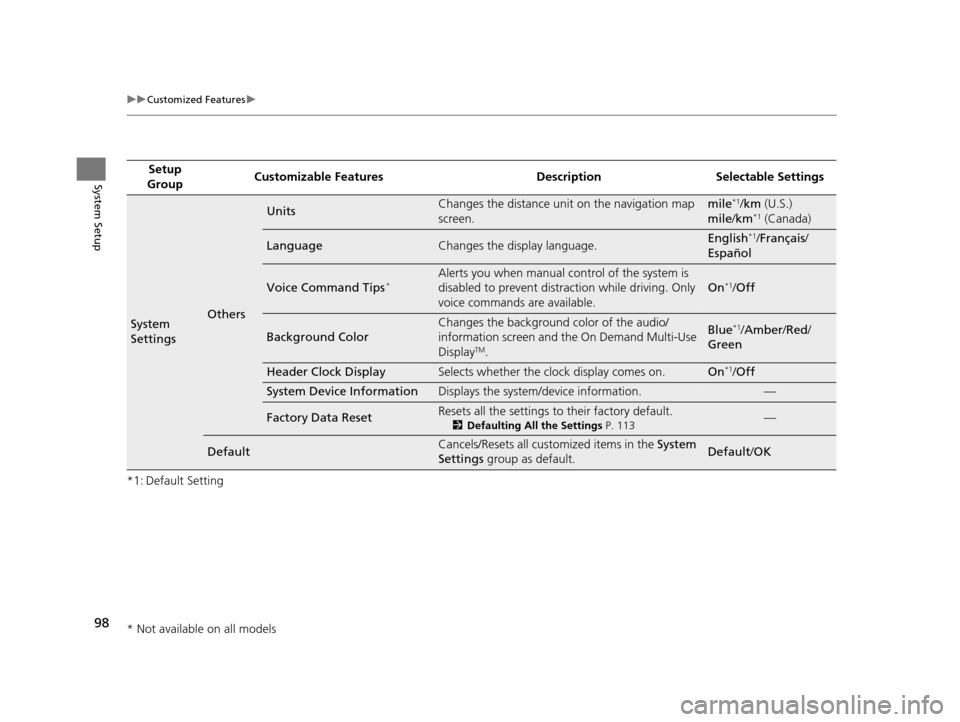
*1: Default SettingSetup
Group Customizable Features Desc
ription Selectable Settings
System
SettingsOthers
UnitsChanges the distance unit on the navigation map
screen.mile*1/km (U.S.)
mile /km*1 (Canada)
LanguageChanges the display language.English*1/Français /
Español
Voice Command Tips*Alerts you when manual control of the system is
disabled to prevent distraction while driving. Only
voice commands are available.
On*1/ Off
Background Color
Changes the background color of the audio/
information screen and the On Demand Multi-Use
Display
TM.
Blue*1/Amber /Red /
Green
Header Clock DisplaySelects whether the clock display comes on.On*1/ Off
System Device InformationDisplays the system /device information.—
Factory Data ResetResets all the settings to their factory default.
2Defaulting All the Settings P. 113—
DefaultCancels/Resets all customized items in the System
Settings group as default.Default/ OK
* Not available on all models
16 ACURA RDX NAVI-31TX48300.book 98 ページ 2015年3月6日 金曜日 午後1時26分
Page 106 of 363
105
uuCustomized Features u
Continued
System Setup
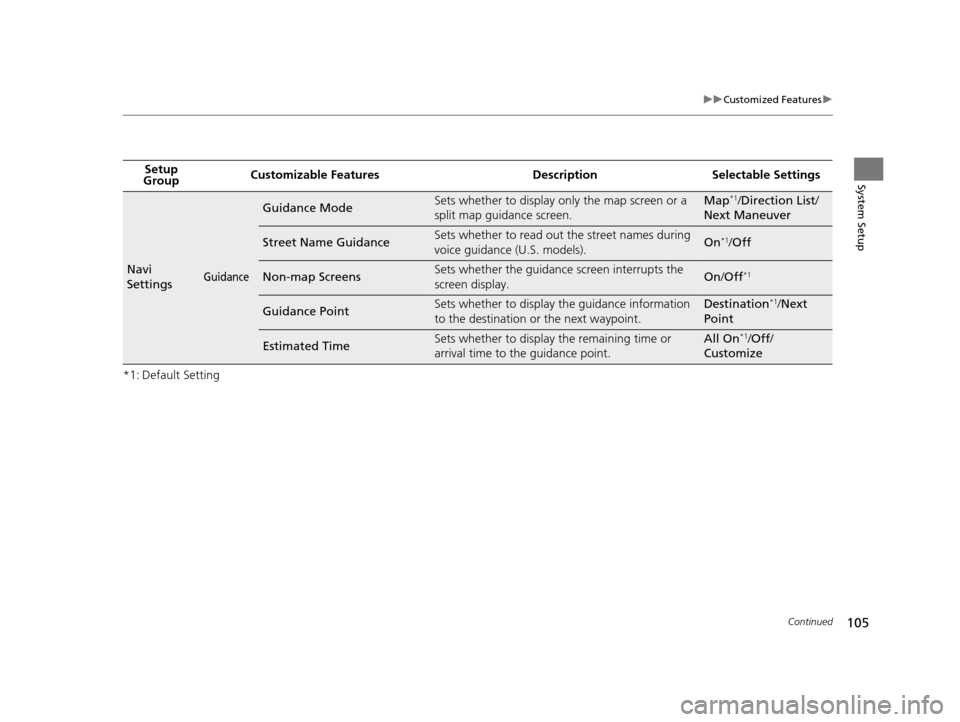
*1: Default SettingSetup
Group Customizable Features Desc
ription Selectable Settings
Navi
SettingsGuidance
Guidance ModeSets whether to display only the map screen or a
split map guidance screen.Map*1/Direction List /
Next Maneuver
Street Name GuidanceSets whether to read out the street names during
voice guidance (U.S. models).On*1/ Off
Non-map ScreensSets whether the guidance screen interrupts the
screen display.On /Off*1
Guidance PointSets whether to display the guidance information
to the destination or the next waypoint.Destination*1/Next
Point
Estimated TimeSets whether to display the remaining time or
arrival time to the guidance point.All On*1/ Off /
Customize
16 ACURA RDX NAVI-31TX48300.book 105 ページ 2015年3月6日 金曜日 午後1時26分
Page 107 of 363
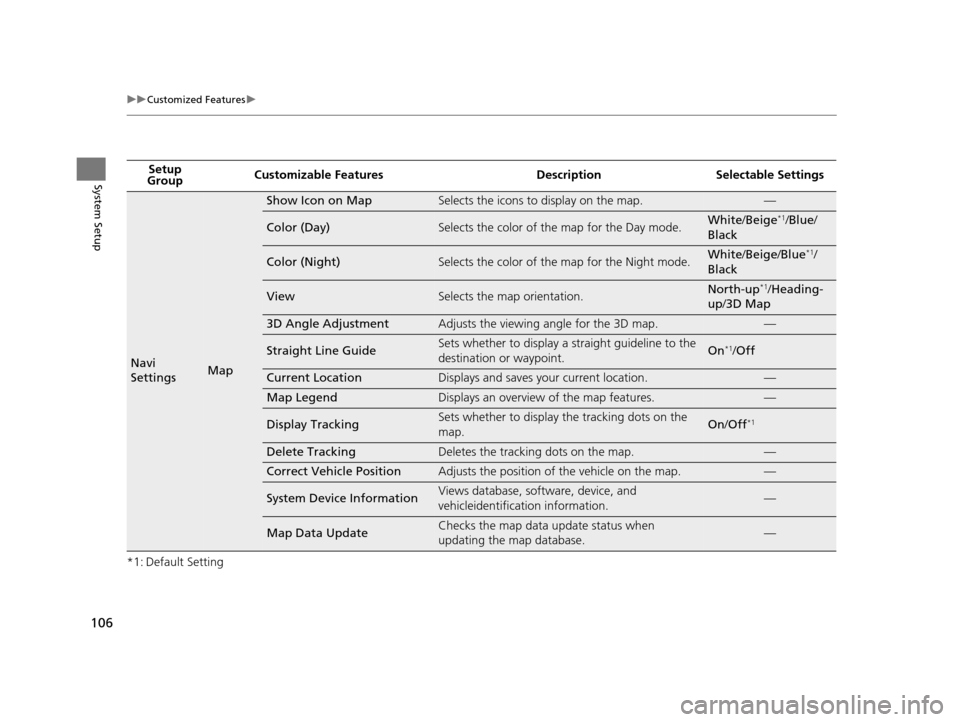
106
uuCustomized Features u
System Setup
*1: Default SettingSetup
Group Customizable Features Desc
ription Selectable Settings
Navi
SettingsMap
Show Icon on MapSelects the icons to display on the map.—
Color (Day)Selects the color of the map for the Day mode.White/Beige*1/Blue /
Black
Color (Night)Selects the color of the map for the Night mode.White /Beige /Blue*1/
Black
ViewSelects the map orientation.North-up*1/ Heading-
up /3D Map
3D Angle AdjustmentAdjusts the viewing angle for the 3D map.—
Straight Line GuideSets whether to display a s traight guideline to the
destination or waypoint.On*1/ Off
Current LocationDisplays and saves your current location.—
Map LegendDisplays an overview of the map features.—
Display TrackingSets whether to display the tracking dots on the
map.On/Off*1
Delete TrackingDeletes the tracking dots on the map.—
Correct Vehicle PositionAdjusts the position of the vehicle on the map.—
System Device InformationViews database, software, device, and
vehicleidentification information.—
Map Data UpdateChecks the map data update status when
updating the map database.—
16 ACURA RDX NAVI-31TX48300.book 106 ページ 2015年3月6日 金曜日 午後1時26分