Change Acura RDX 2019 Manual Online
[x] Cancel search | Manufacturer: ACURA, Model Year: 2019, Model line: RDX, Model: Acura RDX 2019Pages: 649, PDF Size: 33 MB
Page 349 of 649
348
uuCustomized Features u
Features
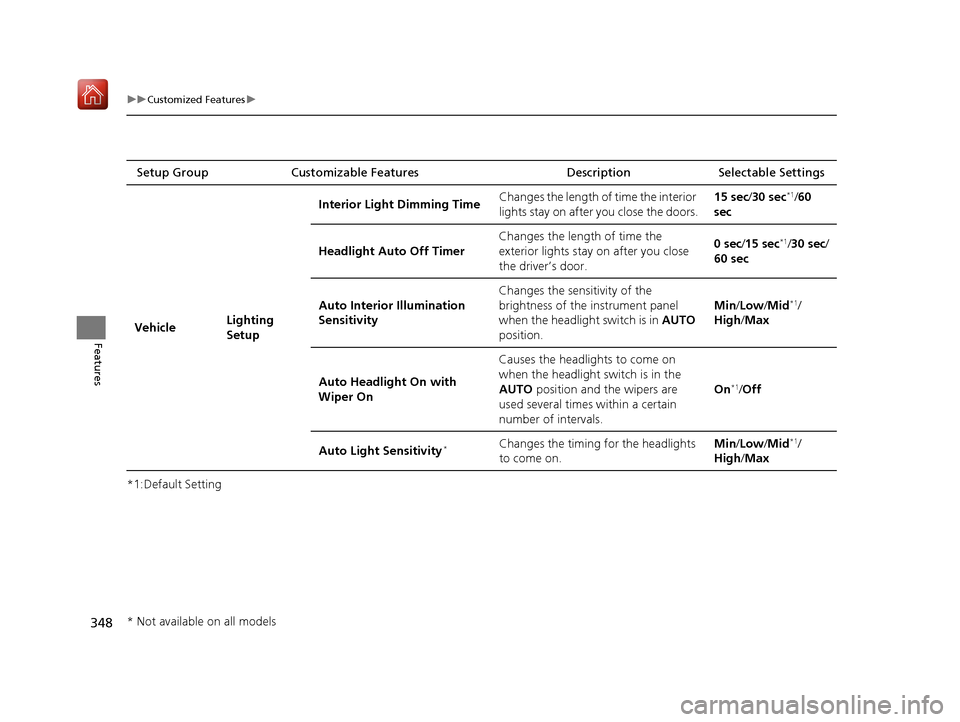
*1:Default SettingSetup Group Customizable Features
Description Selectable Settings
Vehicle Lighting
SetupInterior Ligh
t Dimming Time Changes the length of time the interior
lights stay on after you close the doors. 15 sec
/30 sec
*1/60
sec
Headlight Auto Off Timer Changes the length of time the
exterior lights stay on after you close
the driver’s door. 0 sec
/15 sec
*1/30 sec/
60 sec
Auto Interior Illumination
Sensitivity Changes the sensitivity of the
brightness of the instrument panel
when the headlight switch is in
AUTO
position. Min/
Low/ Mid
*1/
High /Max
Auto Headligh t On with
Wiper On Causes the headlights to come on
when the headlight switch is in the
AUTO
position and the wipers are
used several times within a certain
number of intervals. On
*1/
Off
Auto Light Sensitivity
*Changes the timing for the headlights
to come on. Min/
Low/ Mid*1/
High /Max
* Not available on all models
19 ACURA RDX-31TJB6000.book 348 ページ 2018年4月26日 木曜日 午後4時51分
Page 350 of 649

349
uuCustomized Features u
Continued
Features
*1:Default SettingSetup Group Customizable Features
Description Selectable Settings
Vehicle Door Setup Auto Door Lock
Changes the setting for the automatic
locking feature. Off
/With Vehicle
Speed
*1/ Shift from P
Auto Door Unlock Changes the setting for when the
doors unlock automatically. All Doors with
Driver’s Door
Opens
*1/
All Doors
with Shift to P /All
Doors with IGN Off /
Off
Key and Remote Unlock
Mode Sets up either the dr
iver’s door or all
doors to unlock on the first push of the
remote or built-in key. Driver Door
*1/
All
Doors
Keyless Lock Answer Back LOCK/UNLOCK- The exterior lights
flash.
LOCK (2nd push)- The beeper sounds. On
*1/
Off
Security Relock Timer Changes the time it takes for the doors
to relock and the security system to set
after you unlock the vehicle without
opening any door. 30 sec
*1/
60 sec/ 90
sec
Auto Folding Door Mirror
*
Changes the setting so that the mirrors
fold at the time the doors are locked
with the remote transmitter or keyless
access system. Auto Fold with
Keyless
*1/
Manual
Only
* Not available on all models
19 ACURA RDX-31TJB6000.book 349 ページ 2018年4月26日 木曜日 午後4時51分
Page 351 of 649

350
uuCustomized Features u
Features
*1:Default SettingSetup Group Customizable Features
Description Selectable Settings
Vehicle Power
Tailgate
SetupPower Tailgate Keyless Open
Mode
Changes the setting to enable the
power tailgate to be opened with the
keyless access remote at anytime or
only when the door
s are unlocked. Anytime
*1/
When
Unlocked
Power Tailgate Open by
Outer Handle Changes the setting to enable or
disable the power tailgate open
operation when the user presses the
outer handle of the power tailgate. Off (Manual only)
/
On (Power/
Manual)
*1
Hands Free Access Power
Tailgate*
Changes the setting to enable or
disable the power tailgate open
operation when a kicking motion
under the rear bumper is detected. On
*1/
Off
Maintenance
Information (Select Reset Items) Resets the Maintenance Minder
TM
display when you have performed the
maintenance service. —
Reset All Due
* Not available on all models
19 ACURA RDX-31TJB6000.book 350 ページ 2018年4月26日 木曜日 午後4時51分
Page 354 of 649
353
uuCustomized Features u
Features
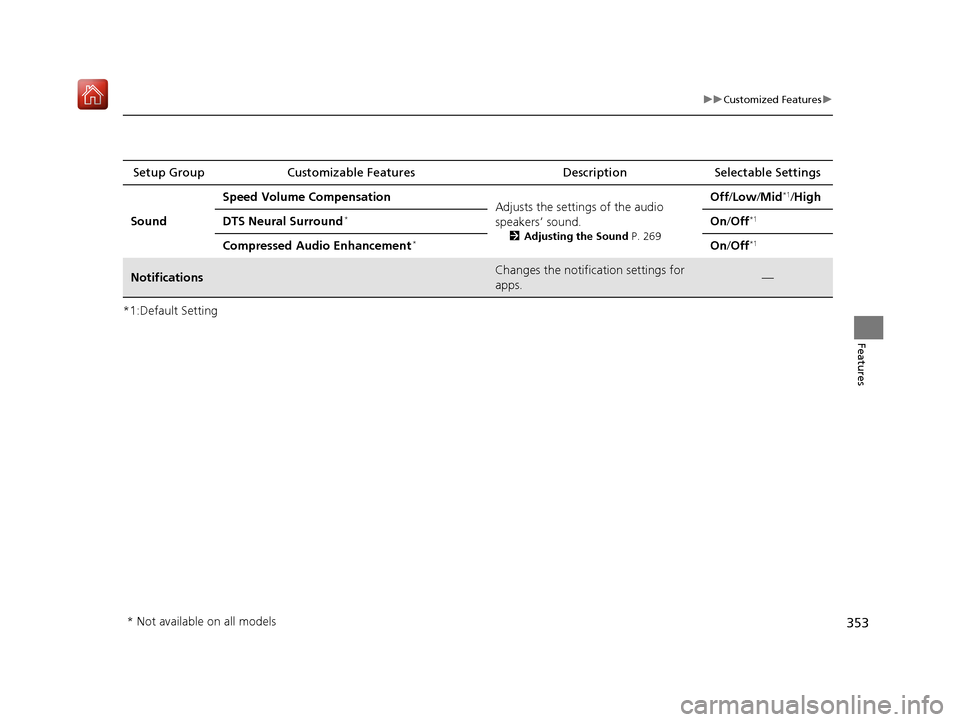
*1:Default SettingSetup Group Customizable Features
Description Selectable Settings
Sound Speed Volume Compensation
Adjusts the settings of the audio
speakers’ sound.
2Adjusting the Sound P. 269
Off /Low /Mid*1/High
DTS Neural Surround
*On /Off*1
Compressed Audio Enhancement*On /Off*1
NotificationsChanges the notification settings for
apps.—
* Not available on all models
19 ACURA RDX-31TJB6000.book 353 ページ 2018年4月26日 木曜日 午後4時51分
Page 358 of 649
357
uuHomeLink ® Universal Transceiver uTraining HomeLink
Features
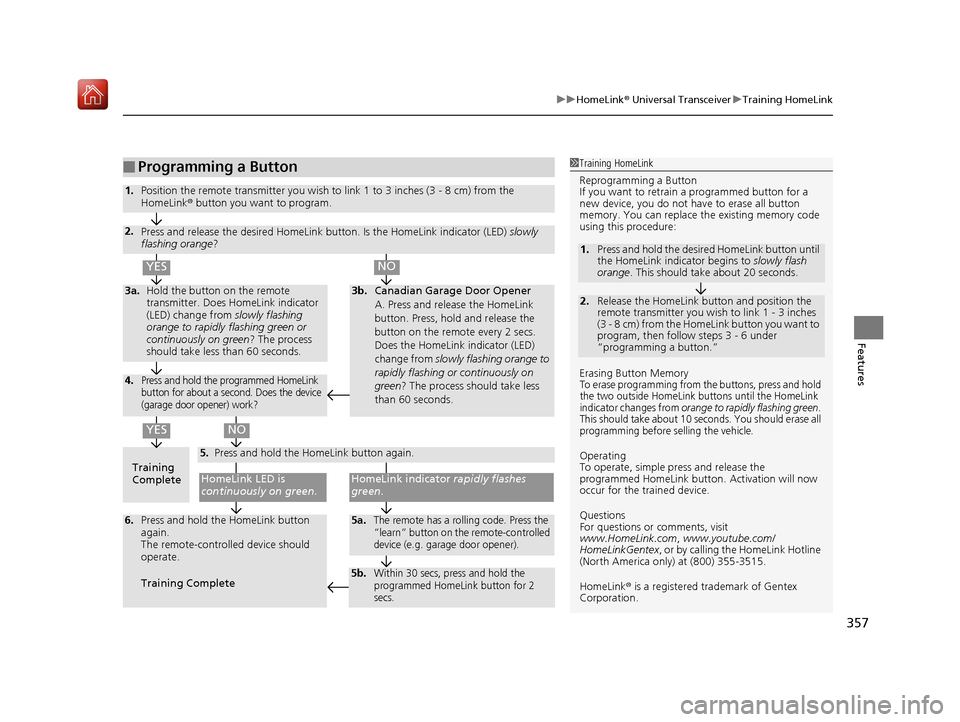
■Programming a Button1Training HomeLink
Reprogramming a Button
If you want to retrain a programmed button for a
new device, you do not ha ve to erase all button
memory. You can replace the existing memory code
using this procedure:
Erasing Button Memory
To erase programming from the buttons, press and hold
the two outside HomeLink buttons until the HomeLink
indicator changes from
orange to rapidly flashing green.
This should take about 10 seconds. You should erase all
programming before selling the vehicle.
Operating
To operate, simple pr ess and release the
programmed HomeLink butto n. Activation will now
occur for the trained device.
Questions
For questions or comments, visit
www.HomeLink.com, www.youtube.com/
HomeLinkGentex , or by calling the HomeLink Hotline
(North America only) at (800) 355-3515.
HomeLink® is a registered tra demark of Gentex
Corporation.
2.
1. Press and hold the desired HomeLink button until
the HomeLink indi
cator begins to slowly flash
orange . This should take about 20 seconds.
Release the HomeLink button and position the
remote transmitter you wish to link 1 - 3 inches
(3 - 8 cm) from the HomeLink button you want to
program, then follow steps 3 - 6 under
“programming a button.”
Training
CompleteHomeLink LED is
continuously on green .
YES
YES
1.Position the remote transmitter you wish to link 1 to 3 inches (3 - 8 cm) from the
HomeLink® button you want to program.
3b.Canadian Garage Door Opener
A. Press and release the HomeLink
button. Press, hold and release the
button on the remote every 2 secs.
Does the HomeLink indicator (LED)
change from slowly flashing orange to
rapidly flashing or continuously on
green ? The process should take less
than 60 seconds.
NO
2. Press and release the desired HomeLink but ton. Is the HomeLink indicator (LED) slowly
flashing orange ?
NO
3a.Hold the button on the remote
transmitter. Does HomeLink indicator
(LED) change from slowly flashing
orange to rapidly flashing green or
continuously on green ? The process
should take less than 60 seconds.
5. Press and hold the HomeLink button again.
HomeLink indicator rapidly flashes
green .
5a.The remote has a rolling code. Press the
“learn” button on the remote-controlled
device (e.g. garage door opener).6.Press and hold the HomeLink button
again.
The remote-controll ed device should
operate.
Training Complete
5b.Within 30 secs, press and hold the
programmed HomeLink button for 2
secs.
4.Press and hold the programmed HomeLink
button for about a second. Does the device
(garage door opener) work?
19 ACURA RDX-31TJB6000.book 357 ページ 2018年4月26日 木曜日 午後4時51分
Page 359 of 649
358
Features
Bluetooth® HandsFreeLink ®
Bluetooth® HandsFreeLink ® (HFL) allows you to place and receive phone calls using
your vehicle’s audio system, without handling your cell phone.
Using HFL
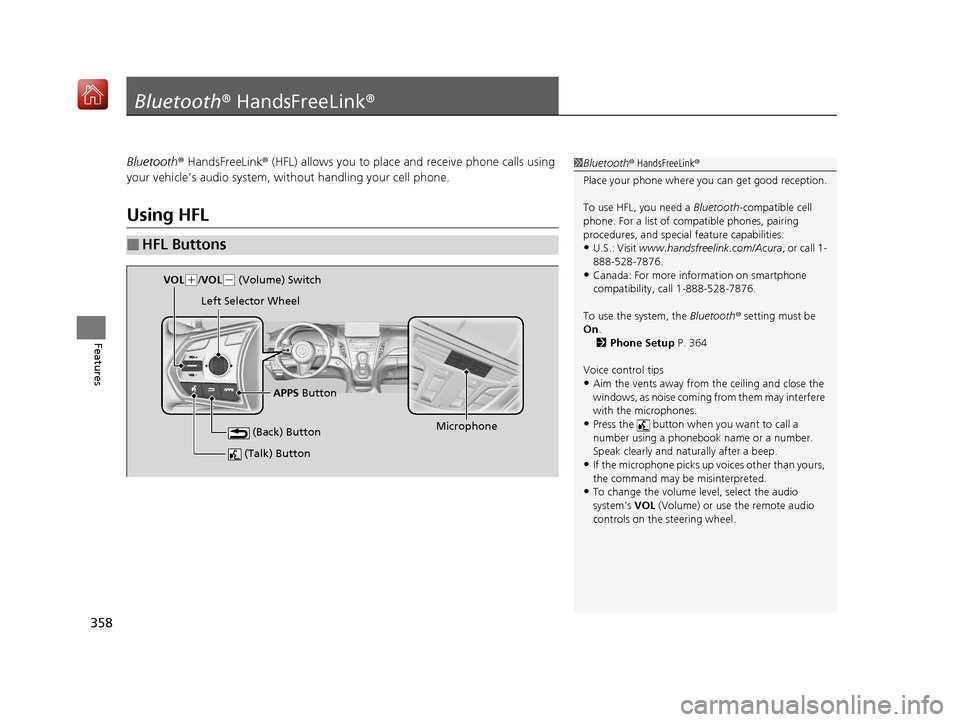
■HFL Buttons
1 Bluetooth ® HandsFreeLink ®
Place your phone where y ou can get good reception.
To use HFL, you need a Bluetooth-compatible cell
phone. For a list of compatible phones, pairing
procedures, and special feature capabilities:
•U.S.: Visit www.handsfreelink.com/Acura, or call 1-
888-528-7876.
•Canada: For more info rmation on smartphone
compatibility, call 1-888-528-7876.
To use the system, the Bluetooth® setting must be
On .
2 Phone Setup P. 364
Voice control tips
•Aim the vents away from the ceiling and close the
windows, as noise coming fr om them may interfere
with the microphones.
•Press the button when you want to call a
number using a phonebook name or a number.
Speak clearly and naturally after a beep.
•If the microphone picks up vo ices other than yours,
the command may be misinterpreted.
•To change the volume level, select the audio
system’s VOL (Volume) or use the remote audio
controls on the steering wheel.
(Talk) Button
Microphone
(Back) Button
VOL( +/VOL(- (Volume) Switch
Left Selector Wheel
APPS Button
19 ACURA RDX-31TJB6000.book 358 ページ 2018年4月26日 木曜日 午後4時51分
Page 364 of 649
363
uuBluetooth ® HandsFreeLink ®u HFL Menus
Continued
Features
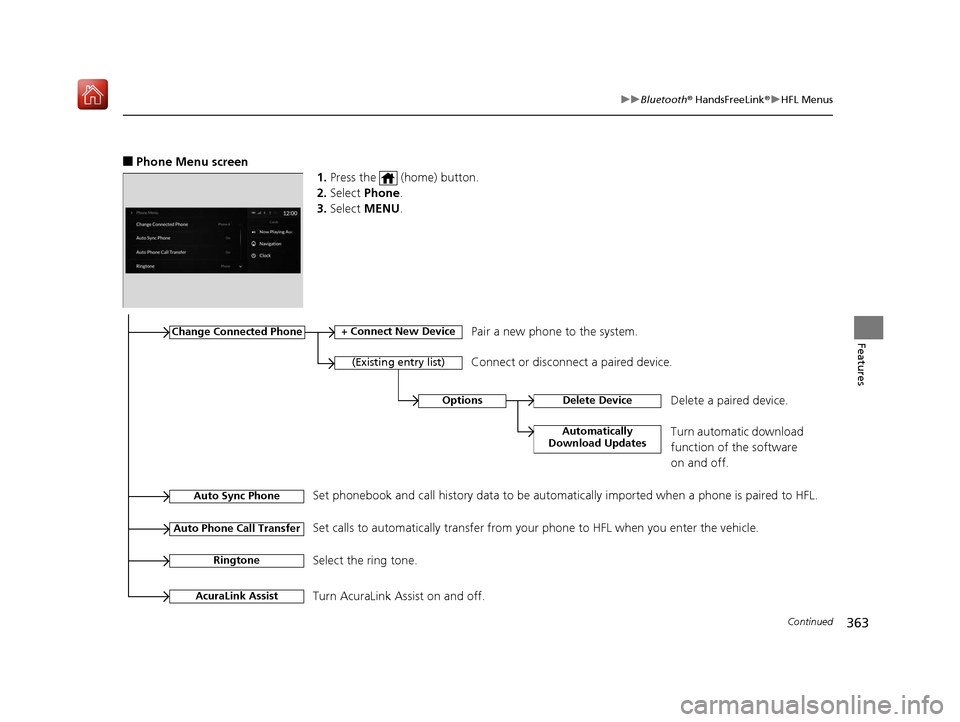
■Phone Menu screen
1.Press the (home) button.
2. Select Phone.
3. Select MENU .
Change Connected Phone
(Existing entry list)
+ Connect New DevicePair a new phone to the system.
Connect or disconnect a paired device.
RingtoneSelect the ring tone.
Auto Sync PhoneSet phonebook and call history data to be automatically imported when a phone is paired to HFL.
Auto Phone Call TransferSet calls to automatically transfer from your phone to HFL when you enter the vehicle.
AcuraLink AssistTurn AcuraLink Assist on and off.
OptionsDelete Device
Automatically
Download Updates
Delete a paired device.
Turn automatic download
function of the software
on and off.
19 ACURA RDX-31TJB6000.book 363 ページ 2018年4月26日 木曜日 午後4時51分
Page 366 of 649
Continued365
uuBluetooth ® HandsFreeLink ®u HFL Menus
Features
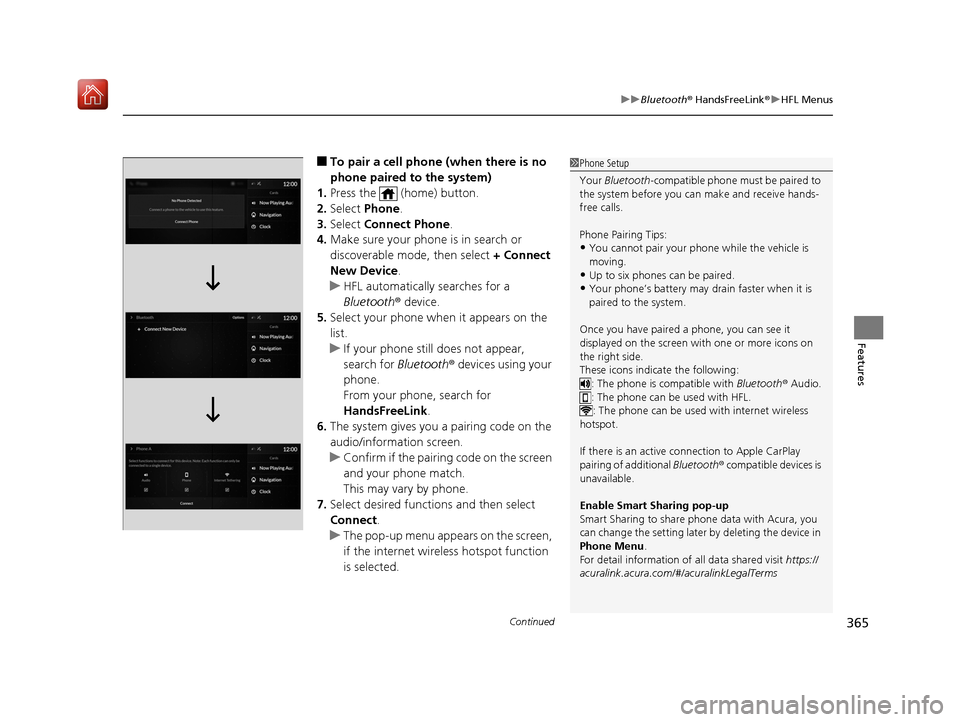
■To pair a cell phone (when there is no
phone paired to the system)
1. Press the (home) button.
2. Select Phone.
3. Select Connect Phone .
4. Make sure your phone is in search or
discoverable mode, then select + Connect
New Device .
u HFL automatically searches for a
Bluetooth ® device.
5. Select your phone when it appears on the
list.
u If your phone still does not appear,
search for Bluetooth® devices using your
phone.
From your phone, search for
HandsFreeLink .
6. The system gives you a pairing code on the
audio/information screen.
u Confirm if the pairing code on the screen
and your phone match.
This may vary by phone.
7. Select desired functions and then select
Connect .
u The pop-up menu appears on the screen,
if the internet wireless hotspot function
is selected.1Phone Setup
Your Bluetooth -compatible phone must be paired to
the system before you ca n make and receive hands-
free calls.
Phone Pairing Tips:
•You cannot pair your phone while the vehicle is
moving.
•Up to six phones can be paired.
•Your phone’s battery may dr ain faster when it is
paired to the system.
Once you have paired a phone, you can see it
displayed on the screen with one or more icons on
the right side.
These icons indicate the following: : The phone is compatible with Bluetooth ® Audio.
: The phone can be used with HFL.
: The phone can be used with internet wireless
hotspot.
If there is an active c onnection to Apple CarPlay
pairing of additional Bluetooth® compatible devices is
unavailable.
Enable Smart Sharing pop-up
Smart Sharing to share phone data with Acura, you
can change the setting later by deleting the device in
Phone Menu .
For detail information of all data shared visit https://
acuralink.acura.com/#/acuralinkLegalTerms
19 ACURA RDX-31TJB6000.book 365 ページ 2018年4月26日 木曜日 午後4時51分
Page 367 of 649
uuBluetooth ® HandsFreeLink ®u HFL Menus
366
Features
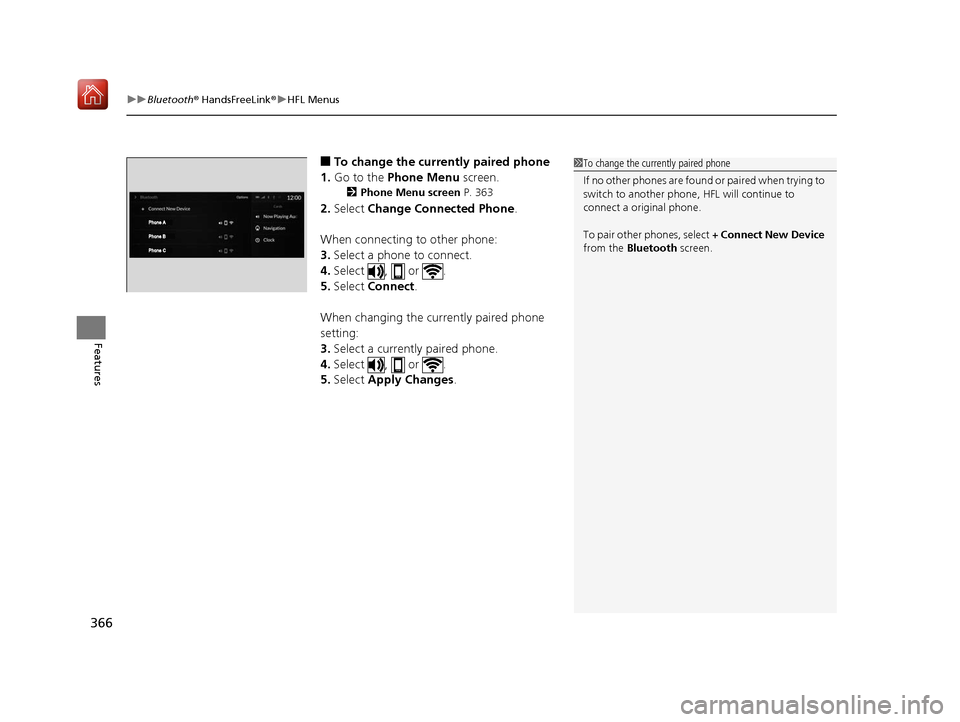
■To change the currently paired phone
1. Go to the Phone Menu screen.
2Phone Menu screen P. 363
2.Select Change Connected Phone .
When connecting to other phone:
3. Select a phone to connect.
4. Select , or .
5. Select Connect .
When changing the currently paired phone
setting:
3. Select a currently paired phone.
4. Select , or .
5. Select Apply Changes .
1To change the currently paired phone
If no other phones are found or paired when trying to
switch to another phone, HFL will continue to
connect a original phone.
To pair other phones, select + Connect New Device
from the Bluetooth screen.
19 ACURA RDX-31TJB6000.book 366 ページ 2018年4月26日 木曜日 午後4時51分
Page 368 of 649
Continued367
uuBluetooth ® HandsFreeLink ®u HFL Menus
Features
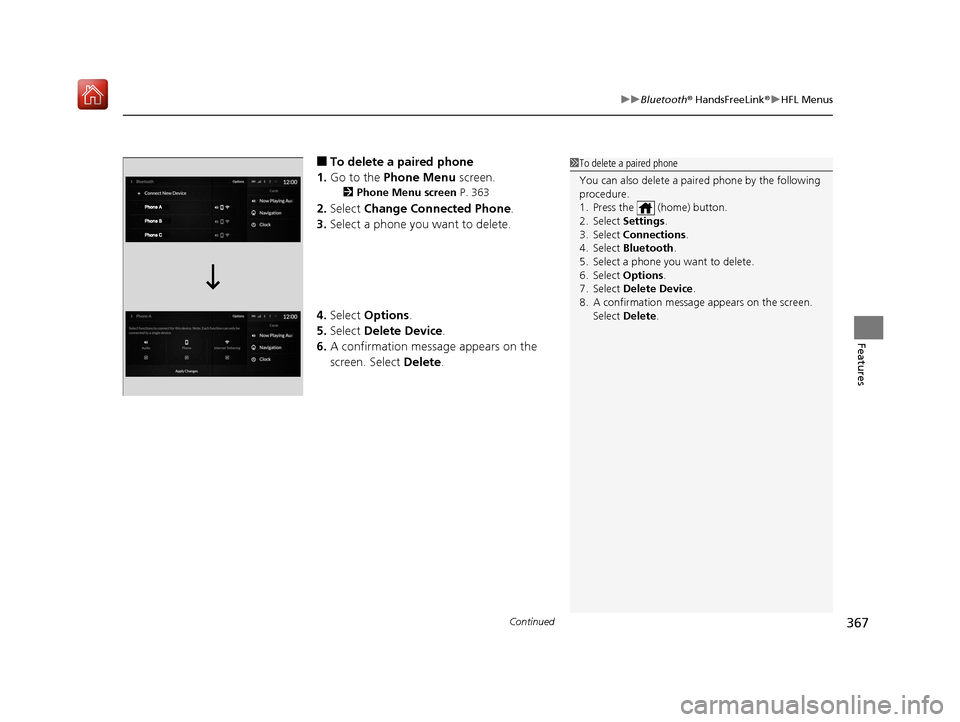
■To delete a paired phone
1. Go to the Phone Menu screen.
2Phone Menu screen P. 363
2.Select Change Connected Phone .
3. Select a phone you want to delete.
4. Select Options .
5. Select Delete Device .
6. A confirmation message appears on the
screen. Select Delete.
1To delete a paired phone
You can also delete a pair ed phone by the following
procedure.
1. Press the (home) button.
2. Select Settings .
3. Select Connections .
4. Select Bluetooth .
5. Select a phone you want to delete.
6. Select Options .
7. Select Delete Device .
8. A confirmation message appears on the screen.
Select Delete .
19 ACURA RDX-31TJB6000.book 367 ページ 2018年4月26日 木曜日 午後4時51分