Hold Acura RDX 2020 Manual Online
[x] Cancel search | Manufacturer: ACURA, Model Year: 2020, Model line: RDX, Model: Acura RDX 2020Pages: 657, PDF Size: 33.2 MB
Page 502 of 657
501Continued
Driving
Parking Your Vehicle
When Stopped
1.Depress the brake pedal firmly.
2. With the brake pedal depressed, press th e electric parking brake switch slowly,
but fully.
3. Change the shift position to
(P.
4. Turn off the engine.
u The Parking Brake and Brake System indicator (red) goes off in about 30
seconds.
1Parking Your Vehicle
Do not park your vehicle near flammable objects,
such as dry grass, oil, or timber.
Heat from the exhaust can cause a fire.
3WARNING
The vehicle can roll aw ay if left unattended
without confirming that Park is engaged.
A vehicle that rolls away could cause a crash
resulting in seriou s injury or death.
Always keep your foot on the brake pedal
until you have confirmed that
( P is shown
on the gear position indicator.
1 When Stopped
NOTICE
The following can dama ge the transmission:•Depressing the accelerator and brake pedals
simultaneously.
•Holding the vehicle in place when facing uphill by
depressing the accelerator pedal.
•Changing to ( P before the vehicle stops
completely.
20 ACURA RDX-31TJB6111.book 501 ページ 2020年2月11日 火曜日 午後2時6分
Page 507 of 657

uuParking Your Vehicle uParking Sensor System*
506
Driving
1. Make sure that the parking sensor system is not activated. Set the power mode to
VEHICLE OFF (LOCK).
2. Press and hold the parking sensor system button, and set the power mode to ON.
3. Keep pressing the button for 10 seconds. Release the button when the indicator
in the button flashes.
4. Press the button again. The indi cator in the button goes off.
u The beeper sounds twice. The re ar sensors are now turned off.
To turn the rear sensors on again, follow the above procedure. The beeper sounds
three times when the rear sensors come back on.
■Turning off All Rear Sensors1 Turning off All Rear Sensors
When you shift to
(R, the indicator in the parking
sensor system button blinks as a reminder that the
rear sensors have been turned off.
20 ACURA RDX-31TJB6111.book 506 ページ 2020年2月11日 火曜日 午後2時6分
Page 538 of 657
537
uuMaintenance MinderTMuTo Use Maintenance MinderTM
Maintenance
Reset the maintenance minder information display if you have performed the
maintenance service.
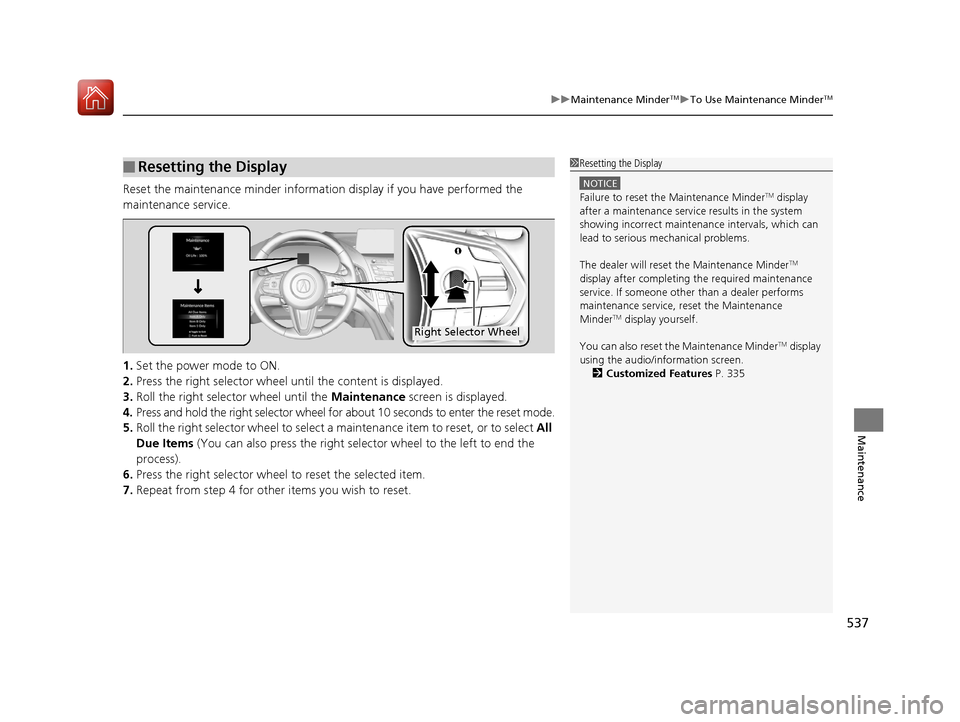
1. Set the power mode to ON.
2. Press the right selector wheel until the content is displayed.
3. Roll the right selector wheel until the Maintenance screen is displayed.
4. Press and hold the right selector wheel for about 10 seconds to enter the reset mode.
5. Roll the right selector wheel to select a ma intenance item to reset, or to select All
Due Items (You can also press the right selector wheel to the left to end the
process).
6. Press the right selector wheel to reset the selected item.
7. Repeat from step 4 for other items you wish to reset.
■Resetting the Display1Resetting the Display
NOTICE
Failure to reset the Maintenance MinderTM display
after a maintenance servic e results in the system
showing incorrect maintenance intervals, which can
lead to serious mechanical problems.
The dealer will reset the Maintenance Minder
TM
display after completing th e required maintenance
service. If someone other than a dealer performs
maintenance service, reset the Maintenance
Minder
TM display yourself.
You can also reset the Maintenance Minder
TM display
using the audio/information screen. 2 Customized Features P. 335
Right Selector Wheel
20 ACURA RDX-31TJB6111.book 537 ページ 2020年2月11日 火曜日 午後2時6分
Page 540 of 657
539
uuMaintenance Under the Hood uOpening the Hood
Maintenance
Opening the Hood
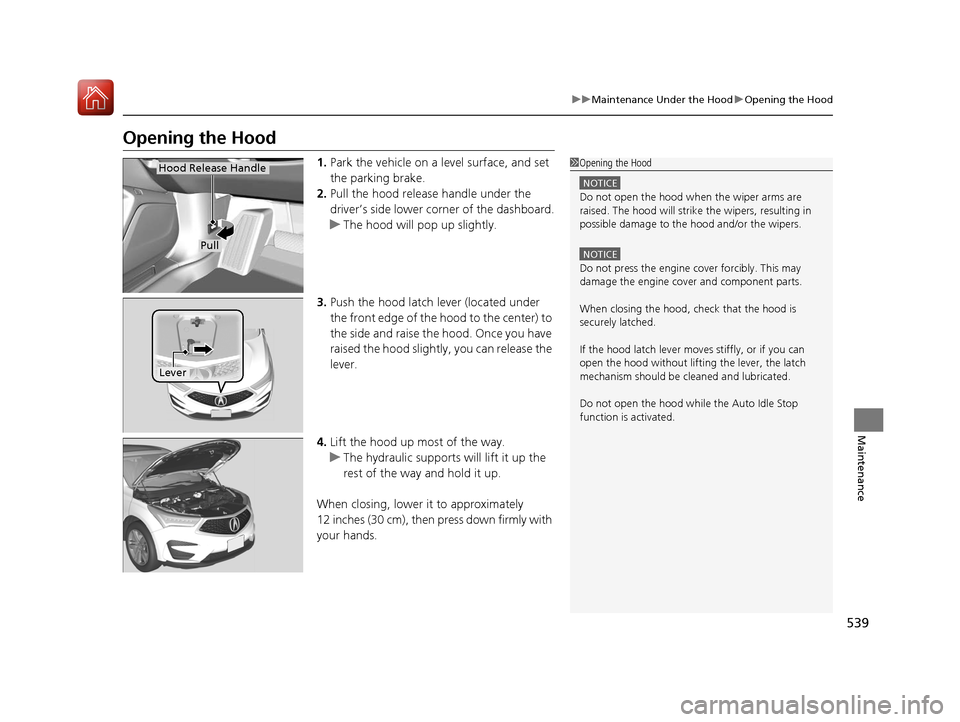
1. Park the vehicle on a level surface, and set
the parking brake.
2. Pull the hood release handle under the
driver’s side lower corner of the dashboard.
u The hood will pop up slightly.
3. Push the hood latch lever (located under
the front edge of the hood to the center) to
the side and raise the hood. Once you have
raised the hood slightly , you can release the
lever.
4. Lift the hood up most of the way.
u The hydraulic supports will lift it up the
rest of the way and hold it up.
When closing, lower it to approximately
12 inches (30 cm), then press down firmly with
your hands.1 Opening the Hood
NOTICE
Do not open the hood when the wiper arms are
raised. The hood will strike the wipers, resulting in
possible damage to the hood and/or the wipers.
NOTICE
Do not press the engine cover forcibly. This may
damage the engine cover and component parts.
When closing the hood, check that the hood is
securely latched.
If the hood latch lever moves stiffly, or if you can
open the hood without lifti ng the lever, the latch
mechanism should be cl eaned and lubricated.
Do not open the hood while the Auto Idle Stop
function is activated.
Hood Release Handle
Pull
Lever
20 ACURA RDX-31TJB6111.book 539 ページ 2020年2月11日 火曜日 午後2時6分
Page 556 of 657
555Continued
Maintenance
Checking and Maintaining Wiper Blades
Checking Wiper Blades
If the wiper blade rubber has deteriorated, it will leave streaks and the hard surfaces
of the blade may scratch the window glass.
Changing the Front Wiper Blade Rubber
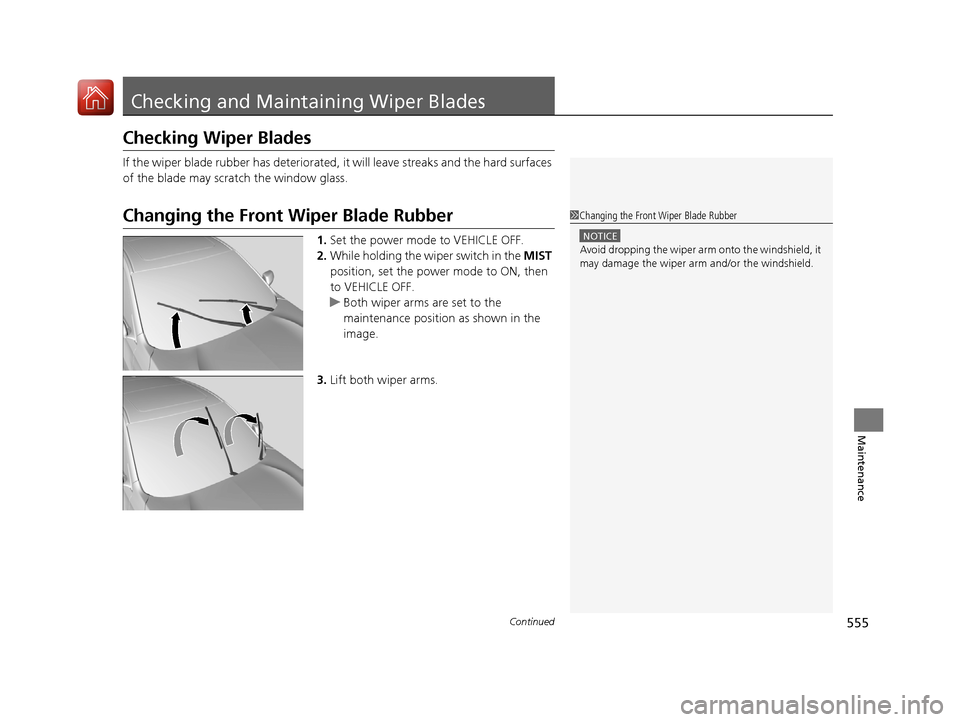
1.Set the power mode to VEHICLE OFF.
2. While holding the wiper switch in the MIST
position, set the power mode to ON, then
to VEHICLE OFF.
u Both wiper arms are set to the
maintenance position as shown in the
image.
3. Lift both wiper arms.
1Changing the Front Wiper Blade Rubber
NOTICE
Avoid dropping the wiper arm onto the windshield, it
may damage the wiper arm and/or the windshield.
20 ACURA RDX-31TJB6111.book 555 ページ 2020年2月11日 火曜日 午後2時6分
Page 557 of 657
556
uuChecking and Maintaining Wiper Blades uChanging the Front Wiper Blade Rubber
Maintenance
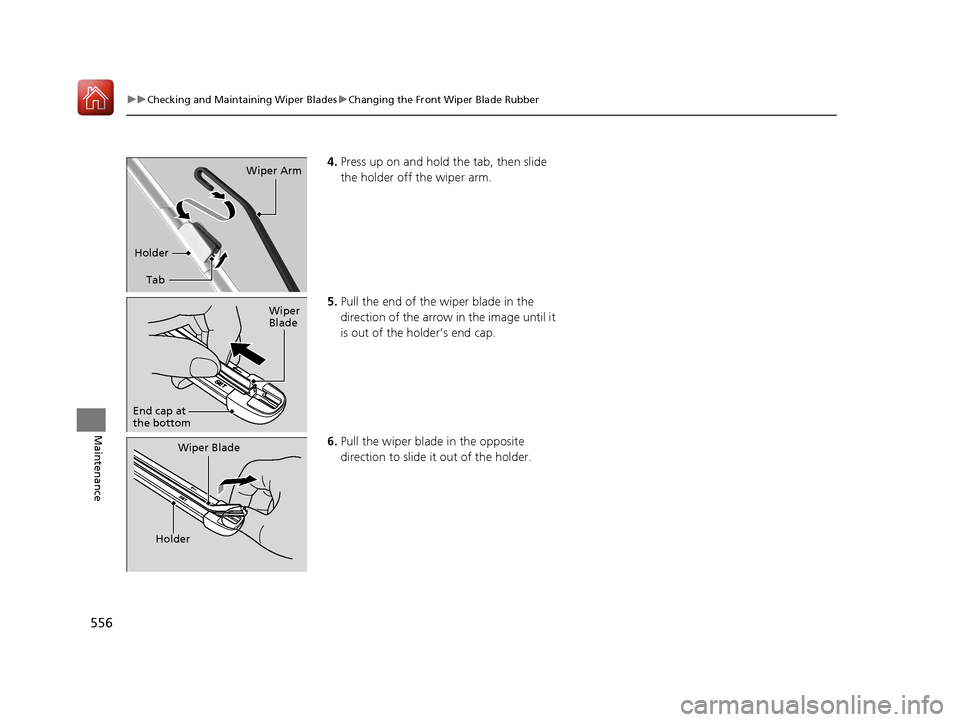
4. Press up on and hold the tab, then slide
the holder off the wiper arm.
5. Pull the end of the wiper blade in the
direction of the arrow in the image until it
is out of the holder’s end cap.
6. Pull the wiper blade in the opposite
direction to slide it out of the holder.
Tab
Holder
Wiper Arm
Wiper
Blade
End cap at
the bottom
Wiper Blade
Holder
20 ACURA RDX-31TJB6111.book 556 ページ 2020年2月11日 火曜日 午後2時6分
Page 558 of 657
557
uuChecking and Maintaining Wiper Blades uChanging the Front Wiper Blade Rubber
Maintenance
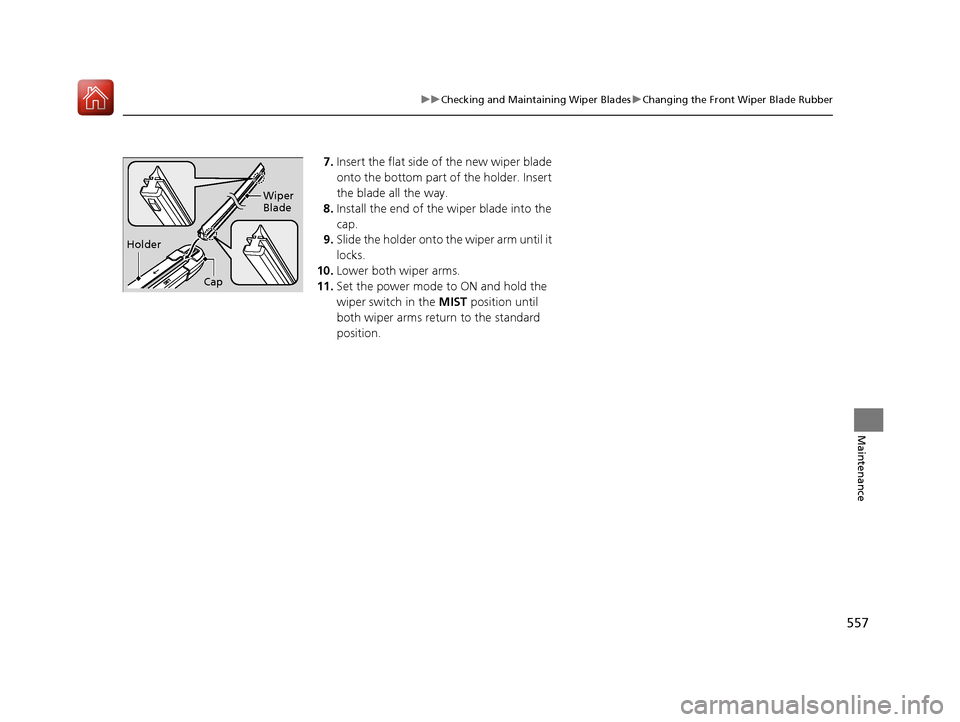
7. Insert the flat side of the new wiper blade
onto the bottom part of the holder. Insert
the blade all the way.
8. Install the end of the wiper blade into the
cap.
9. Slide the holder onto the wiper arm until it
locks.
10. Lower both wiper arms.
11. Set the power mode to ON and hold the
wiper switch in the MIST position until
both wiper arms return to the standard
position.
Holder Wiper
Blade
Cap
20 ACURA RDX-31TJB6111.book 557 ページ 2020年2月11日 火曜日 午後2時6分
Page 560 of 657
559
uuChecking and Maintaining Wiper Blades uChanging the Rear Wiper Blade Rubber
Maintenance
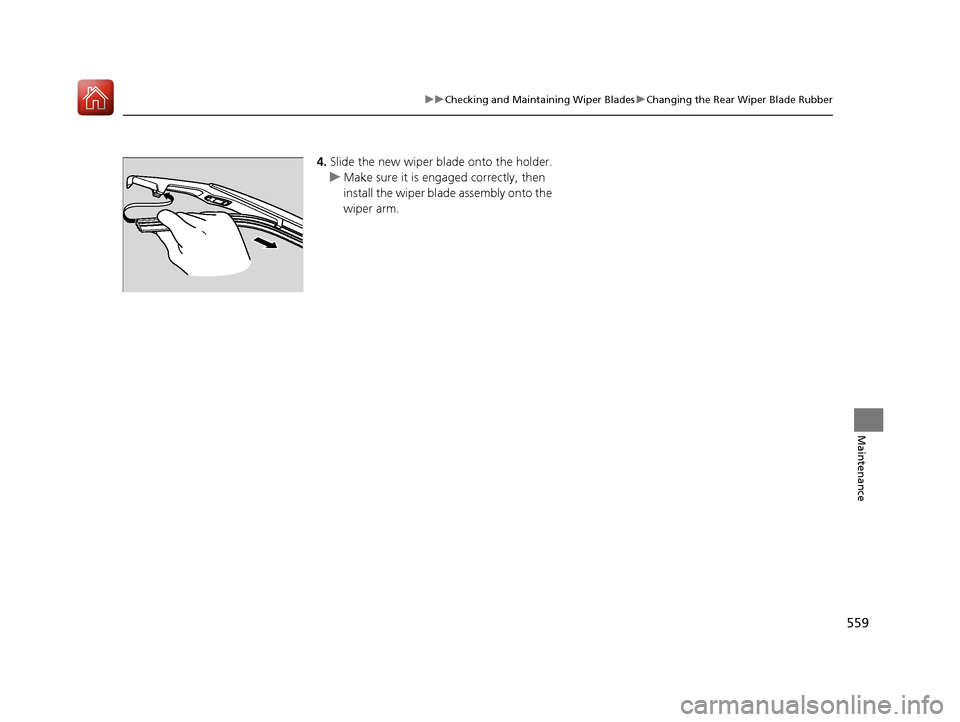
4. Slide the new wiper bl ade onto the holder.
u Make sure it is engaged correctly, then
install the wiper blade assembly onto the
wiper arm.
20 ACURA RDX-31TJB6111.book 559 ページ 2020年2月11日 火曜日 午後2時6分
Page 563 of 657
uuChecking and Maintaining Tires uTire Labeling
562
Maintenance
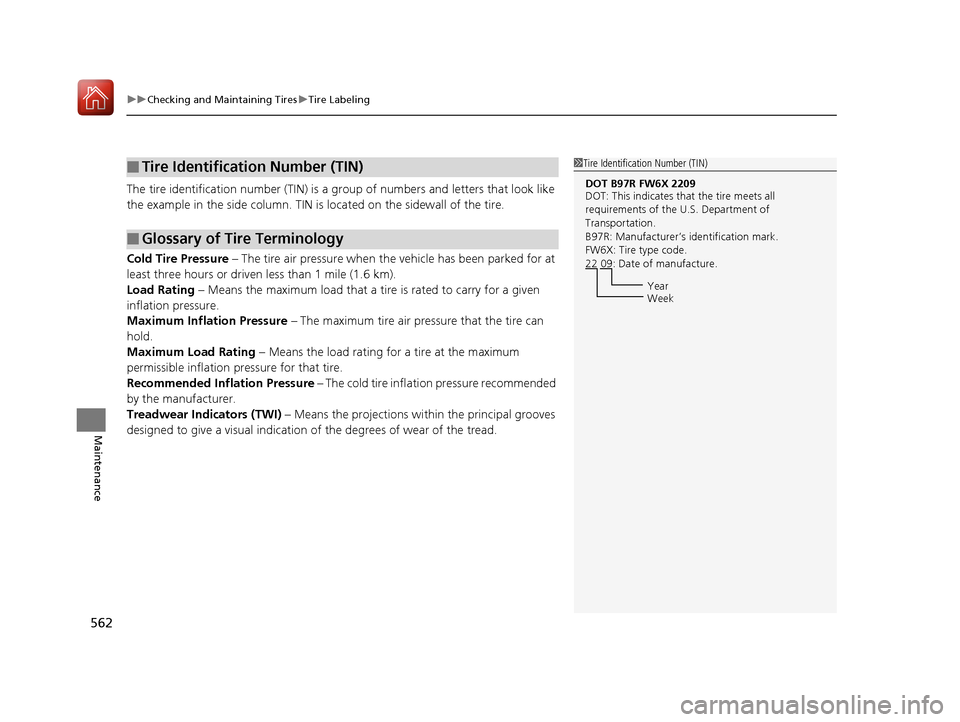
The tire identification number (TIN) is a gr oup of numbers and letters that look like
the example in the side co lumn. TIN is located on the sidewall of the tire.
Cold Tire Pressure – The tire air pressure when the vehicle has been parked for at
least three hours or driven less than 1 mile (1.6 km).
Load Rating – Means the maximum load that a ti re is rated to carry for a given
inflation pressure.
Maximum Inflation Pressure – The maximum tire air pressure that the tire can
hold.
Maximum Load Rating – Means the load rating for a tire at the maximum
permissible inflation pr essure for that tire.
Recommended Inflation Pressure – The cold tire inflation pressure recommended
by the manufacturer.
Treadwear Indicators (TWI) – Means the projections within the principal grooves
designed to give a visual indication of the degrees of wear of the tread.
■Tire Identification Number (TIN)
■Glossary of Tire Terminology
1 Tire Identification Number (TIN)
DOT B97R FW6X 2209
DOT: This indicates that the tire meets all
requirements of the U.S. Department of
Transportation.
B97R: Manufacturer’s identification mark.
FW6X: Tire type code.
22 09: Date of manufacture.
Year
Week
20 ACURA RDX-31TJB6111.book 562 ページ 2020年2月11日 火曜日 午後2時6分
Page 573 of 657

uuRemote Transmitter Care uReplacing the Button Battery
572
Maintenance
If the indicator does not come on when the button is pressed, replace the battery.
1.Remove the built-in key.
u As a convenience, lightly place masking
tape over the remote buttons to hold
them in place.
2. Remove the upper half of the cover by
carefully prying on the edge with a coin.
u Wrap a coin with a cloth to prevent
scratching the transmitter.
3. Press down on the center of the assembly
and remove the battery.
u When removing the button battery, be
careful not to touch parts around it.
4. Make sure to replace the battery with the
correct polarity.
Models with two-way keyless access remote1 Replacing the Button Battery
NOTICE
The Remote transmitter is equipped with two
batteries: A standard replaceable CR2032 coin
button battery and an in tegral non-replaceable
rechargeable battery. To prevent permanent damage
to the rechargeable battery, replace the CR2032
battery every three to four years.
Models with two-way keyless access remote
Battery type: CR2032
Battery
20 ACURA RDX-31TJB6111.book 572 ページ 2020年2月11日 火曜日 午後2時6分