clock ACURA TL 1995 Service User Guide
[x] Cancel search | Manufacturer: ACURA, Model Year: 1995, Model line: TL, Model: ACURA TL 1995Pages: 1771, PDF Size: 62.49 MB
Page 738 of 1771
Valve Clearanc e
Adjustmen t (cont'd )
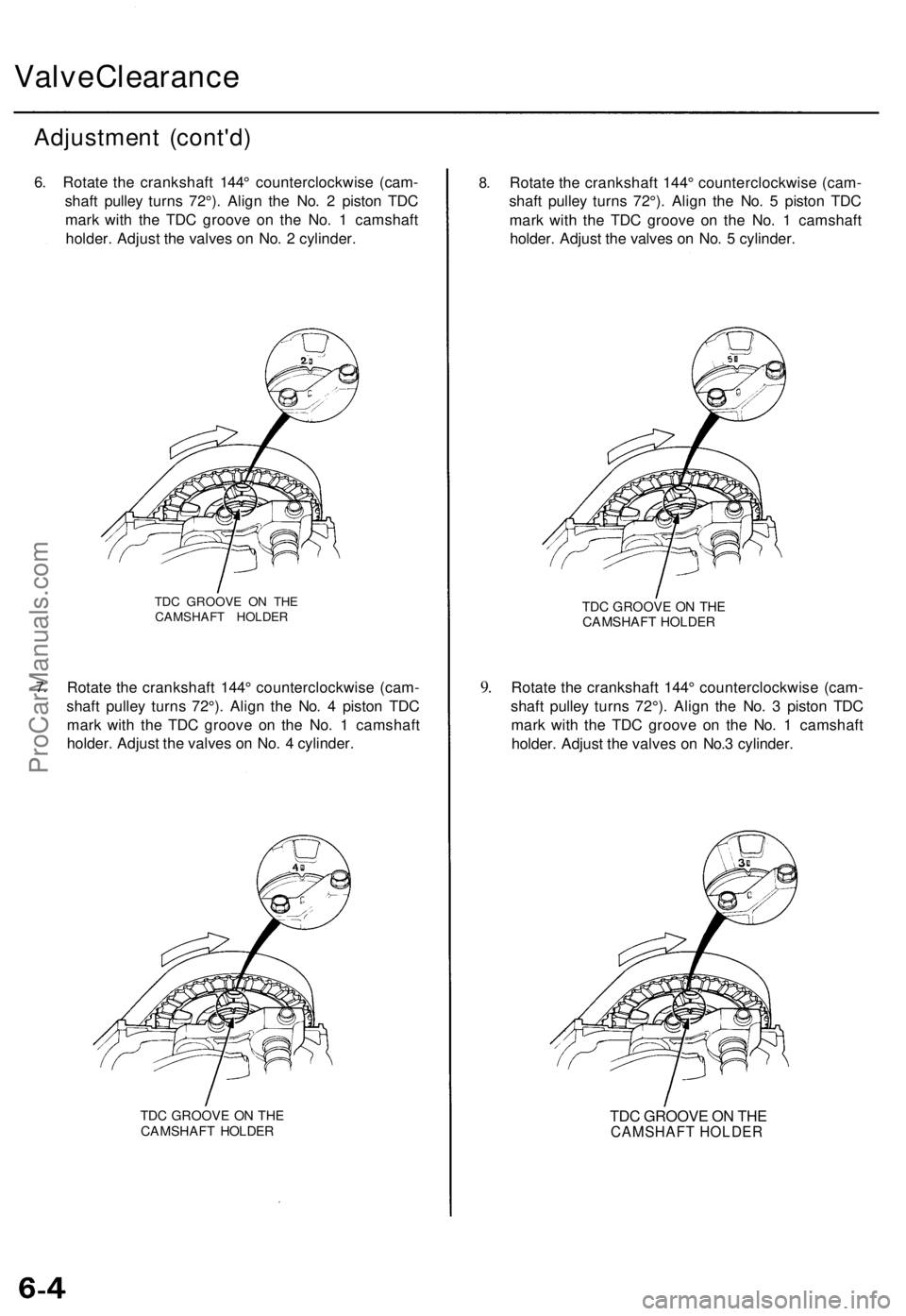
6. Rotat e th e crankshaf t 144 ° counterclockwis e (cam -
shaf t pulle y turn s 72°) . Alig n th e No . 2 pisto n TD C
mar k wit h th e TD C groov e o n th e No . 1 camshaf t
holder . Adjus t th e valve s o n No . 2 cylinder .
7.
TD C GROOV E O N TH ECAMSHAF T HOLDE R
Rotate th e crankshaf t 144 ° counterclockwis e (cam -
shaf t pulle y turn s 72°) . Alig n th e No . 4 pisto n TD C
mar k wit h th e TD C groov e o n th e No . 1 camshaf t
holder . Adjus t th e valve s o n No . 4 cylinder .
TDC GROOV E O N TH ECAMSHAF T HOLDE R
8.Rotat e th e crankshaf t 144 ° counterclockwis e (cam -
shaf t pulle y turn s 72°) . Alig n th e No . 5 pisto n TD C
mar k wit h th e TD C groov e o n th e No . 1 camshaf t
holder . Adjus t th e valve s o n No . 5 cylinder .
9.
TD C GROOV E O N TH ECAMSHAF T HOLDE R
Rotate th e crankshaf t 144 ° counterclockwis e (cam -
shaf t pulle y turn s 72°) . Alig n th e No . 3 pisto n TD C
mar k wit h th e TD C groov e o n th e No . 1 camshaf t
holder . Adjust the valve s o n No. 3 cylinder .
TDC GROOVE ON THE
CAMSHAFT HOLDER
ProCarManuals.com
Page 743 of 1771
Inspection
1. Remov e th e cylinde r hea d cover .
• Refe r t o page s 6-35 , 6-3 6 whe n installing .
2 . Remov e th e uppe r cove r (se e pag e 6-8 ).
3 . Inspec t th e timin g bel t fo r crack s an d oi l o r coolan t
soaking .
NOTE:
• Replac e th e bel t i f oi l o r coolan t soaked .
• Remov e an y oi l o r solven t tha t get s o n th e belt .
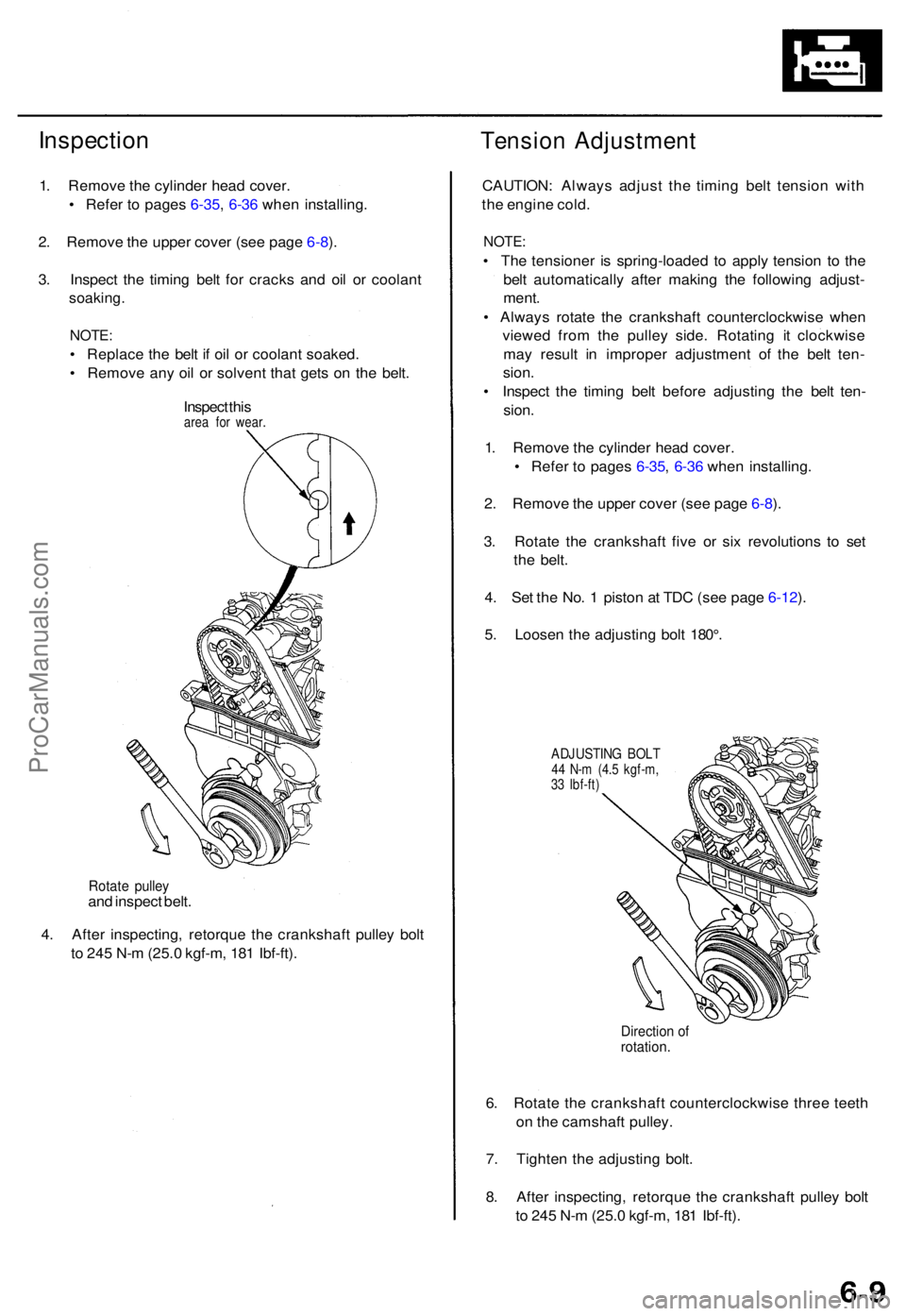
Inspec t thi s
are a fo r wear .
Tensio n Adjustmen t
Rotate pulle yand inspec t belt .
4 . Afte r inspecting , retorqu e th e crankshaf t pulle y bol t
t o 24 5 N- m (25. 0 kgf-m , 18 1 Ibf-ft) . CAUTION
: Alway s adjus t th e timin g bel t tensio n wit h
th e engin e cold .
NOTE :
• Th e tensione r i s spring-loade d t o appl y tensio n t o th e
bel t automaticall y afte r makin g th e followin g adjust -
ment .
• Alway s rotat e th e crankshaf t counterclockwis e whe n
viewe d fro m th e pulle y side . Rotatin g i t clockwis e
ma y resul t i n imprope r adjustmen t of the bel t ten -
sion .
• Inspec t th e timin g bel t befor e adjustin g th e bel t ten -
sion .
1 . Remov e th e cylinde r hea d cover .
• Refe r t o page s 6-35 , 6-3 6 whe n installing .
2 . Remov e th e uppe r cove r (se e pag e 6-8 ).
3 . Rotat e th e crankshaf t fiv e o r si x revolution s t o se t
th e belt .
4 . Se t th e No . 1 pisto n a t TD C (se e pag e 6-12 ).
5 . Loose n th e adjustin g bol t 180° .
ADJUSTIN G BOL T44 N- m (4. 5 kgf-m ,
3 3 Ibf-ft )
Directio n o frotation .
6. Rotat e th e crankshaf t counterclockwis e thre e teet h
o n th e camshaf t pulley .
7 . Tighte n th e adjustin g bolt .
8 . Afte r inspecting , retorqu e th e crankshaf t pulle y bol t
t o 24 5 N- m (25. 0 kgf-m , 18 1 Ibf-ft) .
ProCarManuals.com
Page 746 of 1771
Timing Bel t
Installatio n (cont'd )
6. Instal l th e crankshaf t pulley , the n tighte n th e pulle y
bol t (se e pag e 6-7 ).
7 . Rotat e th e crankshaf t pulle y abou t fiv e o r si x turn s
counterclockwis e s o tha t th e timin g bel t position s o n
th e pulleys .
8 . Adjus t th e timin g bel t tensio n (se e pag e 6-9 ).
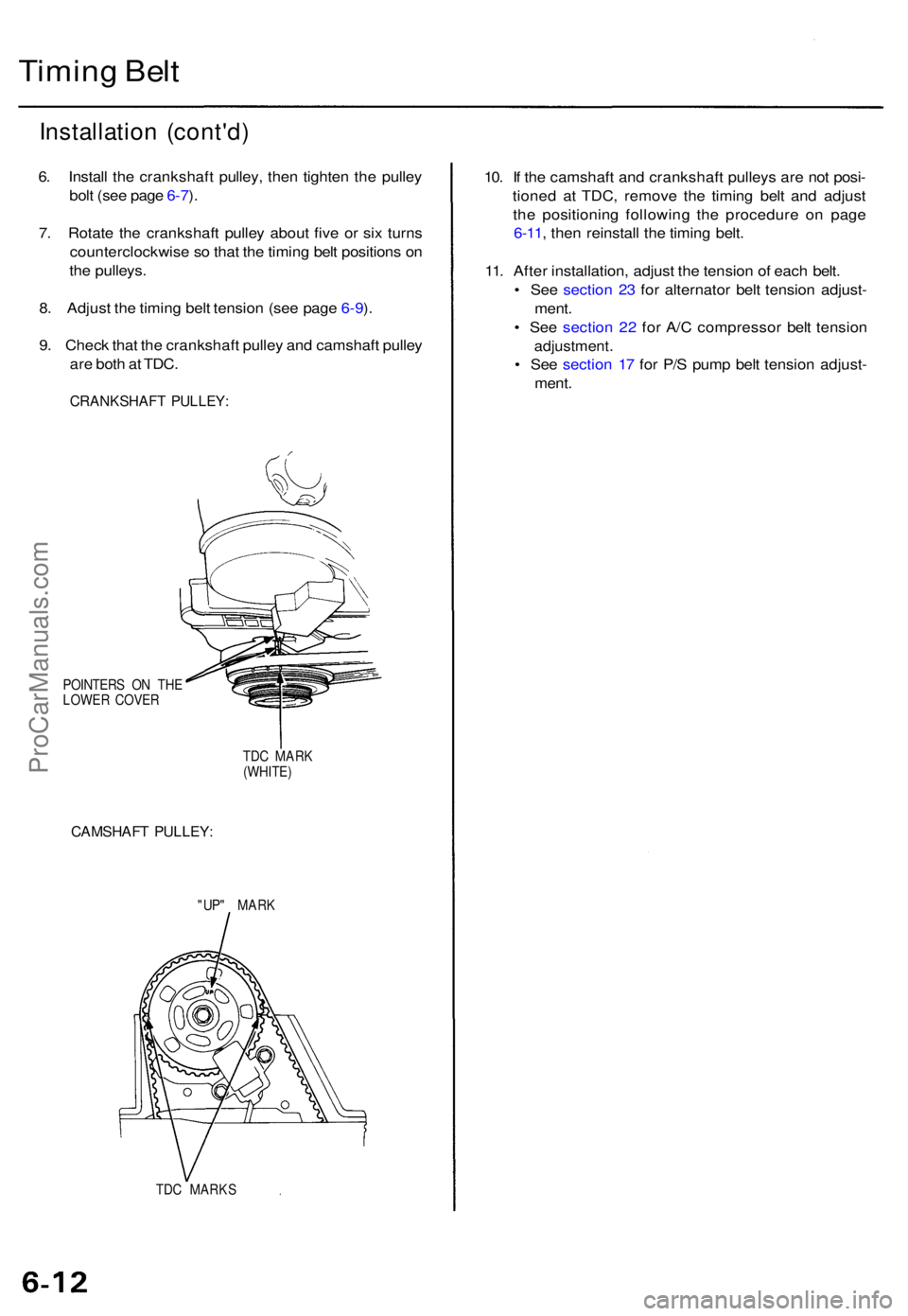
9 . Chec k tha t th e crankshaf t pulle y an d camshaf t pulle y
ar e bot h a t TDC .
CRANKSHAF T PULLEY :
POINTER S O N TH E
LOWE R COVE R
TDC MAR K
(WHITE )
CAMSHAF T PULLEY :
"UP" MAR K
TD C MARK S
10. I f th e camshaf t an d crankshaf t pulley s ar e no t posi -
tione d a t TDC , remov e th e timin g bel t an d adjus t
th e positionin g followin g th e procedur e o n pag e
6-11 , the n reinstal l th e timin g belt .
11 . Afte r installation , adjus t th e tensio n o f eac h belt .
• Se e sectio n 2 3 fo r alternato r bel t tensio n adjust -
ment .
• Se e sectio n 2 2 fo r A/ C compresso r bel t tensio n
adjustment .
• Se e sectio n 1 7 fo r P/ S pum p bel t tensio n adjust -
ment .
ProCarManuals.com
Page 767 of 1771
Valve Guide s
Reamin g
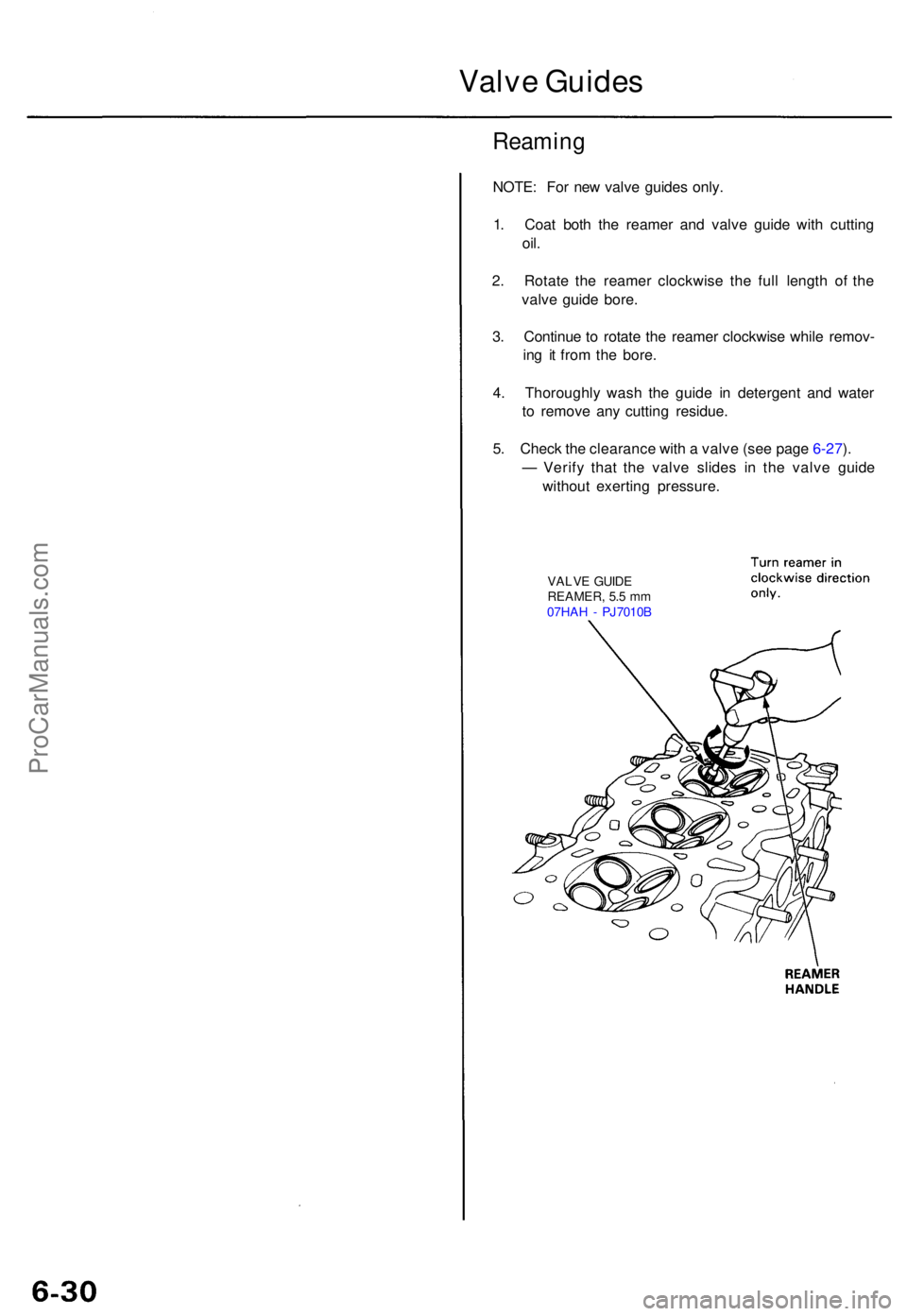
NOTE: Fo r ne w valv e guide s only .
1 . Coa t bot h th e reame r an d valv e guid e wit h cuttin g
oil.
2. Rotat e th e reame r clockwis e th e ful l lengt h o f th e
valv e guid e bore .
3 . Continu e t o rotat e th e reame r clockwis e whil e remov -
in g i t fro m th e bore .
4 . Thoroughl y was h th e guid e i n detergen t an d wate r
t o remov e an y cuttin g residue .
5 . Chec k th e clearanc e wit h a valv e (se e pag e 6-27 ).
— Verif y tha t th e valv e slide s i n th e valv e guid e
withou t exertin g pressure .
VALVE GUID E
REAMER , 5. 5 m m
07HA H - PJ7010 B
ProCarManuals.com
Page 799 of 1771
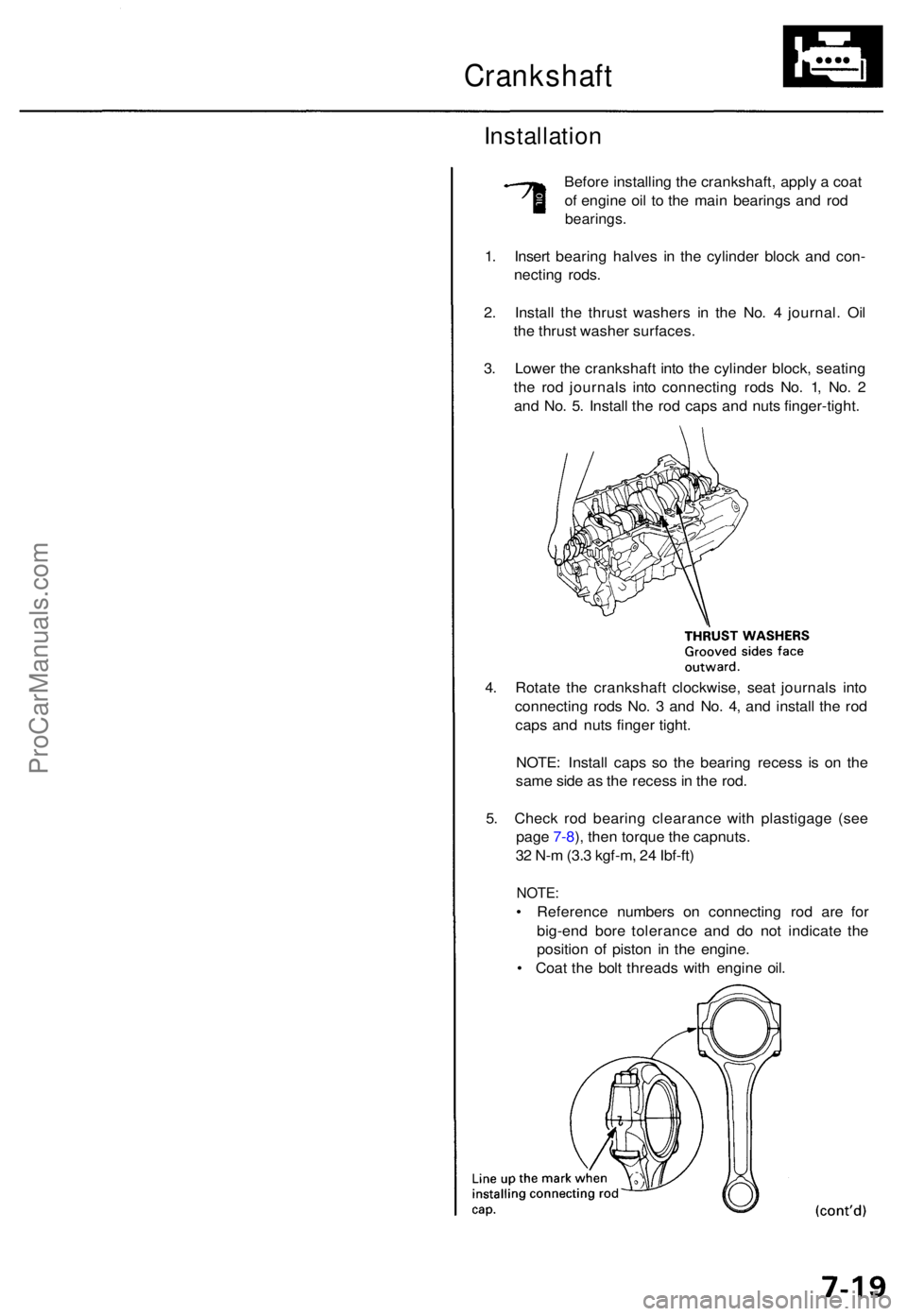
Crankshaft
Installation
Before installin g th e crankshaft , appl y a coa t
o f engin e oi l t o th e mai n bearing s an d ro d
bearings .
1. Inser t bearin g halve s i n th e cylinde r bloc k an d con -
nectin g rods .
2 . Instal l th e thrus t washer s i n th e No . 4 journal . Oi l
th e thrus t washe r surfaces .
3 . Lowe r th e crankshaf t int o th e cylinde r block , seatin g
th e ro d journal s int o connectin g rod s No . 1 , No . 2
an d No . 5 . Instal l th e ro d cap s an d nut s finger-tight .
4 . Rotat e th e crankshaf t clockwise , sea t journal s int o
connectin g rod s No . 3 an d No . 4 , an d instal l th e ro d
cap s an d nut s finge r tight .
NOTE : Instal l cap s s o th e bearin g reces s i s o n th e
sam e sid e a s th e reces s in th e rod .
5 . Chec k ro d bearin g clearanc e wit h plastigag e (se e
pag e 7-8 ), the n torqu e th e capnuts .
3 2 N- m (3. 3 kgf-m , 2 4 Ibf-ft )
NOTE :
• Referenc e number s o n connectin g ro d ar e fo r
big-en d bor e toleranc e an d d o no t indicat e th e
positio n o f pisto n i n th e engine .
• Coa t th e bol t thread s wit h engin e oil .
ProCarManuals.com
Page 809 of 1771
Oil Filte r
Replacemen t (cont'd )
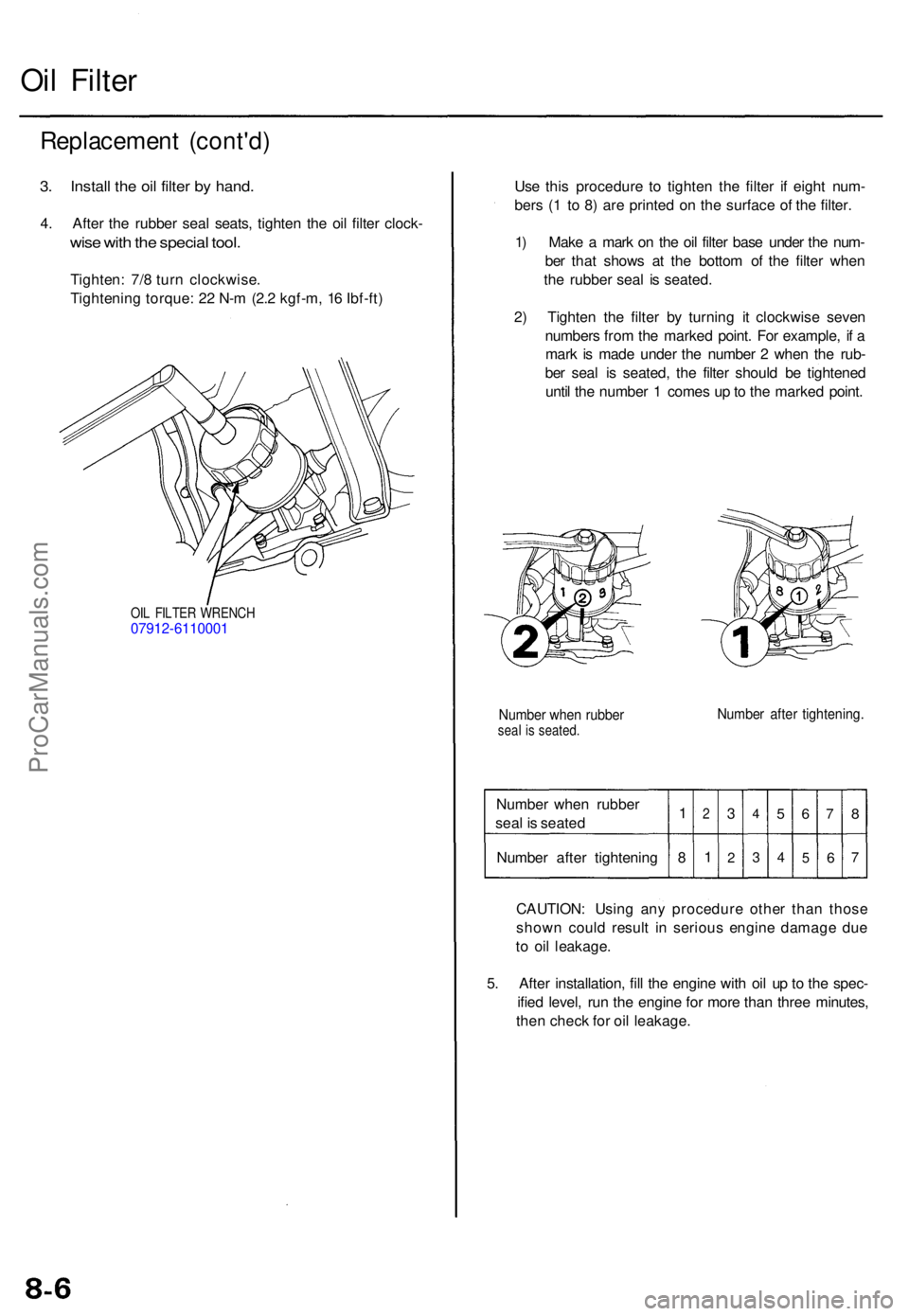
3. Instal l th e oi l filte r b y hand .
4. Afte r th e rubbe r sea l seats , tighte n th e oi l filte r clock -
wise wit h th e specia l tool .
Tighten : 7/ 8 tur n clockwise .
Tightenin g torque : 2 2 N- m (2. 2 kgf-m , 1 6 Ibf-ft )
OIL FILTE R WRENC H07912-611000 1
Use thi s procedur e t o tighte n th e filte r i f eigh t num -
ber s ( 1 t o 8 ) ar e printe d o n th e surfac e o f th e filter .
1 ) Mak e a mar k o n th e oi l filte r bas e unde r th e num -
be r tha t show s a t th e botto m o f th e filte r whe n
th e rubber seal i s seated .
2 ) Tighte n th e filte r b y turnin g i t clockwis e seve n
number s fro m th e marke d point . Fo r example , i f a
mar k i s mad e unde r th e numbe r 2 whe n th e rub -
be r sea l i s seated , th e filte r shoul d b e tightene d
unti l th e numbe r 1 come s u p to th e marke d point .
Numbe r whe n rubbe rseal i s seated .Number afte r tightening .
Number whe n rubbe r
sea l i s seate d
Numbe r afte r tightenin g1
8
2
1
3
2
4
3
5
4
6
5
7
6
8
7
CAUTION : Usin g an y procedur e othe r tha n thos e
show n coul d resul t i n seriou s engin e damag e du e
t o oi l leakage .
5 . Afte r installation , fil l th e engin e wit h oi l u p to th e spec -
ifie d level , ru n th e engin e fo r mor e tha n thre e minutes ,
the n chec k fo r oi l leakage .
ProCarManuals.com
Page 830 of 1771
Water Pum p
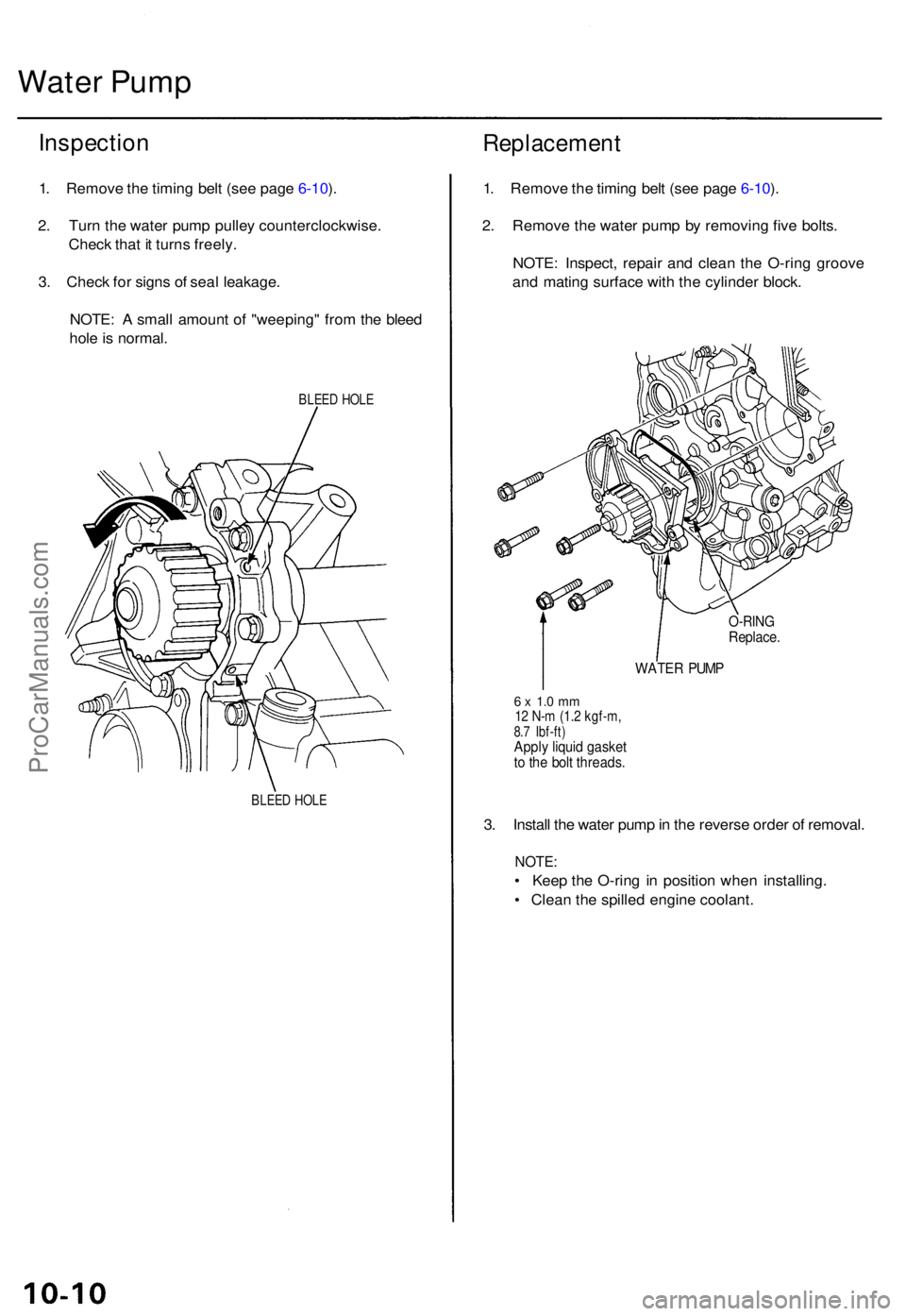
Inspectio n
1. Remov e th e timin g bel t (se e pag e 6-10 ).
2 . Tur n th e wate r pum p pulle y counterclockwise .
Chec k tha t i t turn s freely .
3 . Chec k fo r sign s o f sea l leakage .
NOTE : A smal l amoun t o f "weeping " fro m th e blee d
hol e is normal .
BLEED HOL E
BLEE D HOL E
Replacemen t
1. Remov e th e timin g bel t (se e pag e 6-10 ).
2 . Remov e th e wate r pum p b y removin g fiv e bolts .
NOTE : Inspect , repai r an d clea n th e O-rin g groov e
an d matin g surfac e wit h th e cylinde r block .
O-RIN GReplace .
WATER PUM P
6 x 1. 0 m m12 N- m (1. 2 kgf-m ,8.7 Ibf-ft )Apply liqui d gaske tto th e bol t threads .
3. Instal l th e wate r pum p in th e revers e orde r o f removal .
NOTE:
• Kee p th e O-rin g i n positio n whe n installing .
• Clea n th e spille d engin e coolant .
ProCarManuals.com
Page 975 of 1771
Troubleshooting Procedures
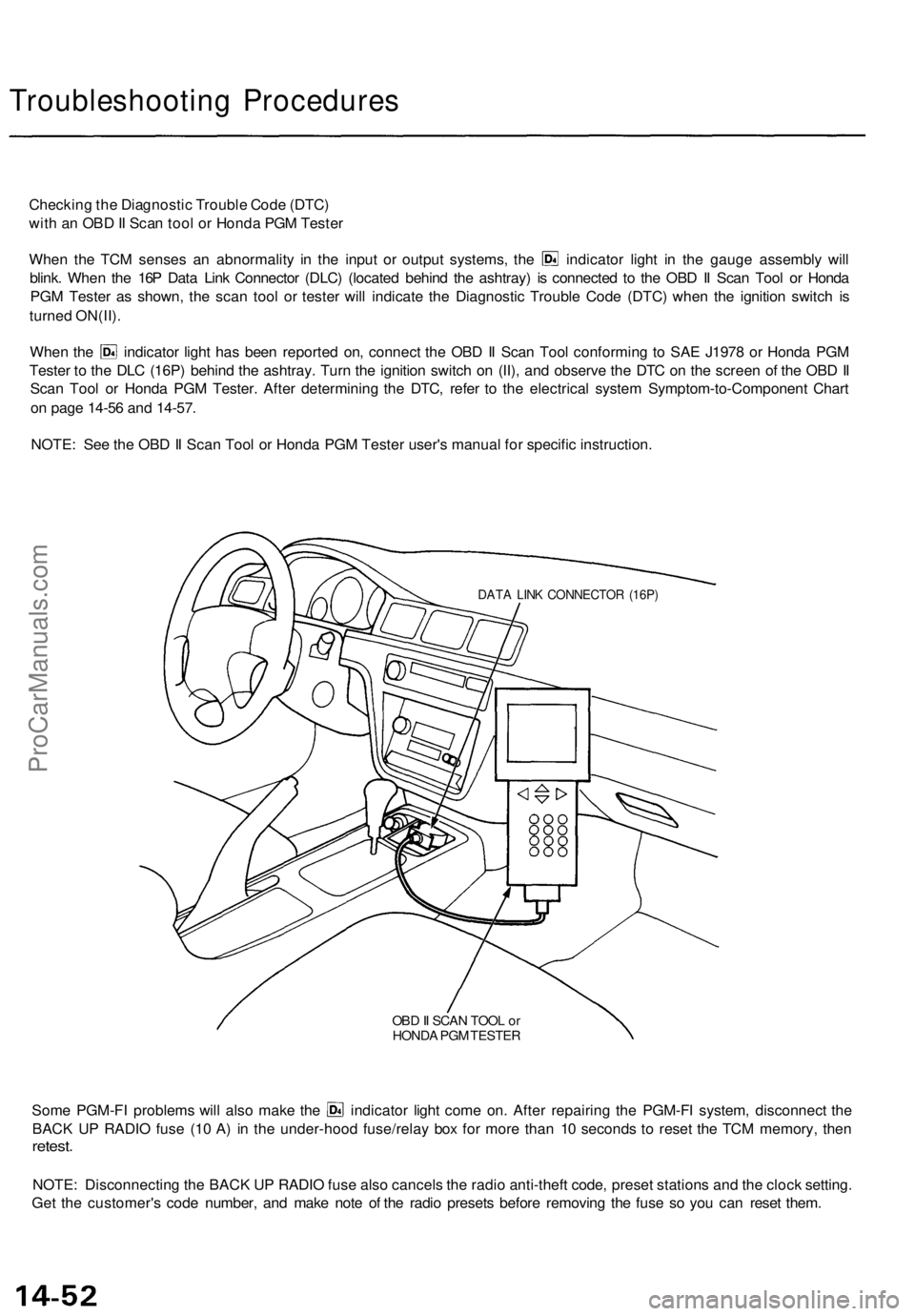
Checking the Diagnostic Trouble Code (DTC)
with an OBD II Scan tool or Honda PGM Tester
When the TCM senses an abnormality in the input or output systems, the indicator light in the gauge assembly will
blink. When the 16P Data Link Connector (DLC) (located behind the ashtray) is connected to the OBD II Scan Tool or Honda
PGM Tester as shown, the scan tool or tester will indicate the Diagnostic Trouble Code (DTC) when the ignition switch is
turned ON(II).
When the indicator light has been reported on, connect the OBD II Scan Tool conforming to SAE J1978 or Honda PGM
Tester to the DLC (16P) behind the ashtray. Turn the ignition switch on (II), and observe the DTC on the screen of the OBD II
Scan Tool or Honda PGM Tester. After determining the DTC, refer to the electrical system Symptom-to-Component Chart
on page 14-56 and 14-57.
NOTE: See the OBD II Scan Tool or Honda PGM Tester user's manual for specific instruction.
OBD II SCAN TOOL or
HONDA PGM TESTER
Some PGM-FI problems will also make the indicator light come on. After repairing the PGM-FI system, disconnect the
BACK UP RADIO fuse (10 A) in the under-hood fuse/relay box for more than 10 seconds to reset the TCM memory, then
retest.
NOTE: Disconnecting the BACK UP RADIO fuse also cancels the radio anti-theft code, preset stations and the clock setting.
Get the customer's code number, and make note of the radio presets before removing the fuse so you can reset them.
DATA LINK CONNECTOR (16P)ProCarManuals.com
Page 1172 of 1771
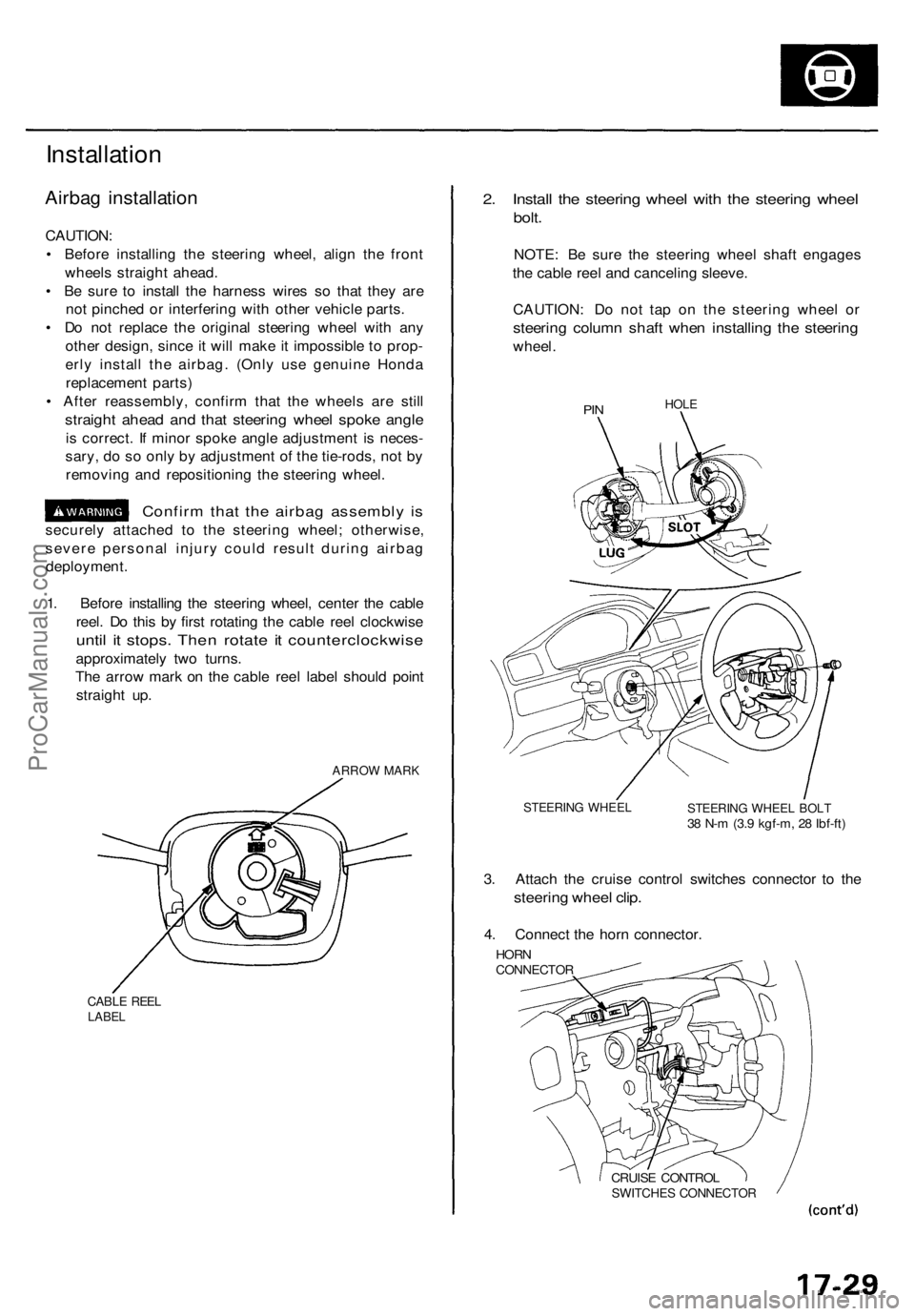
Installation
Airbag installation
CAUTION:
• Before installing the steering wheel, align the front
wheels straight ahead.
• Be sure to install the harness wires so that they are
not pinched or interfering with other vehicle parts.
• Do not replace the original steering wheel with any
other design, since it will make it impossible to prop-
erly install the airbag. (Only use genuine Honda
replacement parts)
• After reassembly, confirm that the wheels are still
straight ahead and that steering wheel spoke angle
is correct. If minor spoke angle adjustment is neces-
sary, do so only by adjustment of the tie-rods, not by
removing and repositioning the steering wheel.
Confirm that the airbag assembly is
securely attached to the steering wheel; otherwise,
severe personal injury could result during airbag
deployment.
1. Before installing the steering wheel, center the cable
reel. Do this by first rotating the cable reel clockwise
until it stops. Then rotate it counterclockwise
approximately two turns.
The arrow mark on the cable reel label should point
straight up.
ARROW MARK
CABLE REEL
LABEL
2. Install the steering wheel with the steering wheel
bolt.
NOTE: Be sure the steering wheel shaft engages
the cable reel and canceling sleeve.
CAUTION: Do not tap on the steering wheel or
steering column shaft when installing the steering
wheel.
PIN
HOLE
STEERING WHEEL
STEERING WHEEL BOLT
38 N-m (3.9 kgf-m, 28 Ibf-ft)
3. Attach the cruise control switches connector to the
steering wheel clip.
4. Connect the horn connector.
HORN
CONNECTOR
CRUISE CONTROL
SWITCHES CONNECTORProCarManuals.com
Page 1212 of 1771
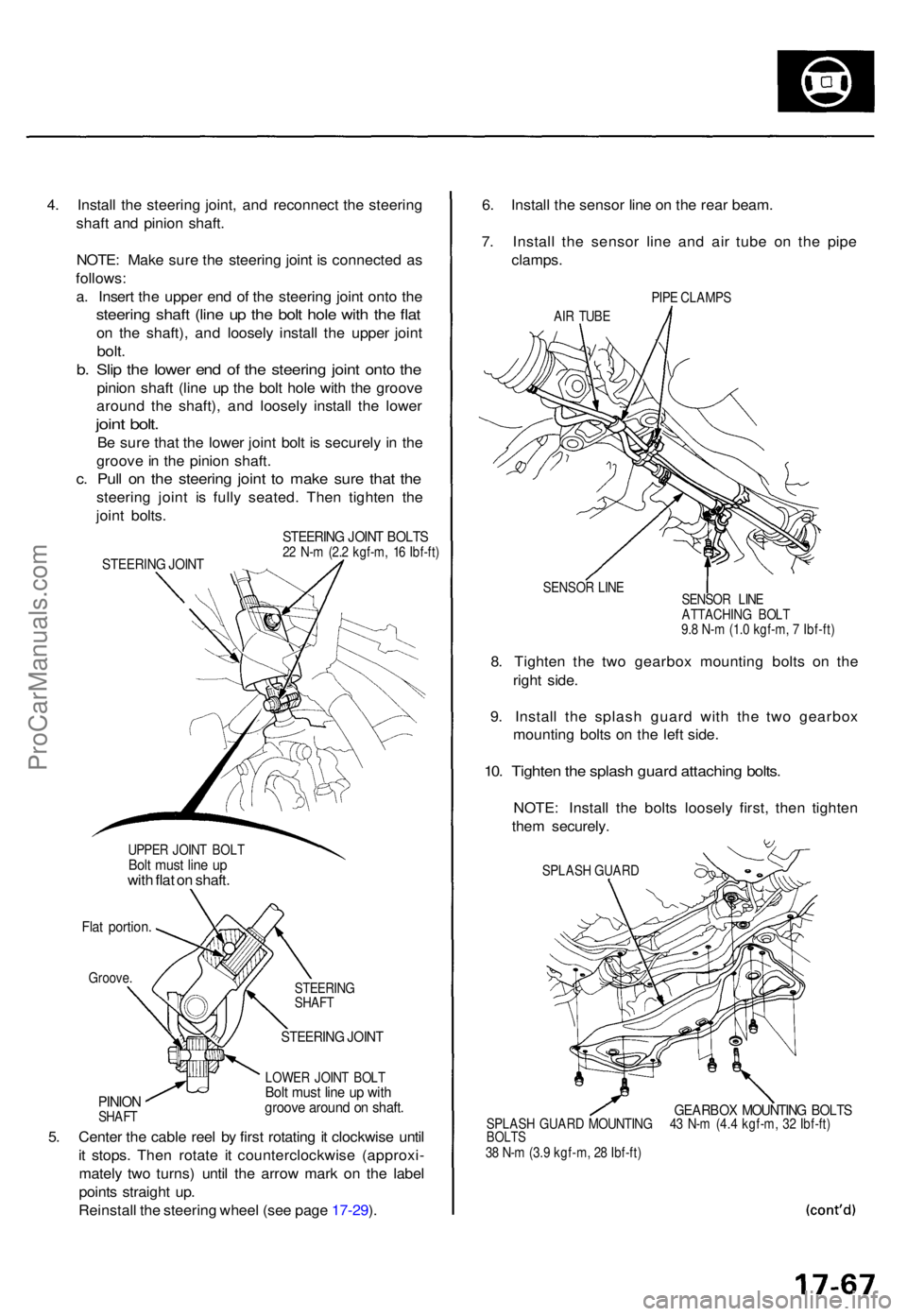
4. Instal l th e steerin g joint , an d reconnec t th e steerin g
shaf t an d pinio n shaft .
NOTE : Mak e sur e th e steerin g join t i s connecte d a s
follows :
a . Inser t th e uppe r en d o f th e steerin g join t ont o th e
steerin g shaf t (lin e u p th e bol t hol e wit h th e fla t
on th e shaft) , an d loosel y instal l th e uppe r join t
bolt.
b. Sli p th e lowe r en d o f th e steerin g join t ont o th e
pinio n shaf t (lin e u p th e bol t hol e wit h th e groov e
aroun d th e shaft) , an d loosel y instal l th e lowe r
joint bolt .
Be sur e tha t th e lowe r join t bol t i s securel y i n th e
groov e in th e pinio n shaft .
c. Pul l o n th e steerin g join t t o mak e sur e tha t th e
steerin g join t i s full y seated . The n tighte n th e
join t bolts .
UPPE R JOIN T BOL TBolt mus t lin e u pwit h fla t o n shaft .
Flat portion .
Groove.
PINIONSHAF T STEERIN
G
SHAF T
STEERIN G JOIN T
LOWE R JOIN T BOL TBolt mus t lin e u p wit hgroov e aroun d o n shaft .
5. Cente r th e cabl e ree l b y firs t rotatin g it clockwis e unti l
i t stops . The n rotat e i t counterclockwis e (approxi -
matel y tw o turns ) unti l th e arro w mar k o n th e labe l
point s straigh t up .
Reinstal l th e steerin g whee l (se e pag e 17-29 ). 6
. Instal l th e senso r lin e o n th e rea r beam .
7 . Instal l th e senso r lin e an d ai r tub e o n th e pip e
clamps .
PIPE CLAMP S
AI R TUB E
SENSO R LIN E
8. Tighte n th e tw o gearbo x mountin g bolt s o n th e
righ t side .
9 . Instal l th e splas h guar d wit h th e tw o gearbo x
mountin g bolt s o n th e lef t side .
10. Tighte n th e splas h guar d attachin g bolts .
NOTE : Instal l th e bolt s loosel y first , the n tighte n
the m securely .
SPLASH GUAR D
GEARBO X MOUNTIN G BOLT SSPLAS H GUAR D MOUNTIN G 4 3 N- m (4. 4 kgf-m , 3 2 Ibf-ft )BOLT S38 N- m (3. 9 kgf-m , 2 8 Ibf-ft )
STEERIN G JOIN T BOLT S22 N- m (2. 2 kgf-m , 1 6 Ibf-ft )STEERIN G JOIN T
SENSO R LIN E
ATTACHIN G BOL T
9. 8 N- m (1. 0 kgf-m , 7 Ibf-ft )
ProCarManuals.com