ECO mode Acura ZDX 2012 Owner's Manual
[x] Cancel search | Manufacturer: ACURA, Model Year: 2012, Model line: ZDX, Model: Acura ZDX 2012Pages: 645, PDF Size: 16.36 MB
Page 397 of 645
●When the ABS or VSA is activated.●When the VSA indicator comes on.
If ACC is canceled by any these
conditions, wait until the condition
improves, then press the RES/
ACCEL button to restore ACC.
When you do this, the vehicle will
resume its set cruising speed.
If you select the ACCESSORY or
VEHICLE OFF(LOCK) mode by
operating the engine start/stop
button (see page 194) after ACC
was automatically canceled, the set
speed is erased, and you must
enter it again (see page 386).ACC Indicator
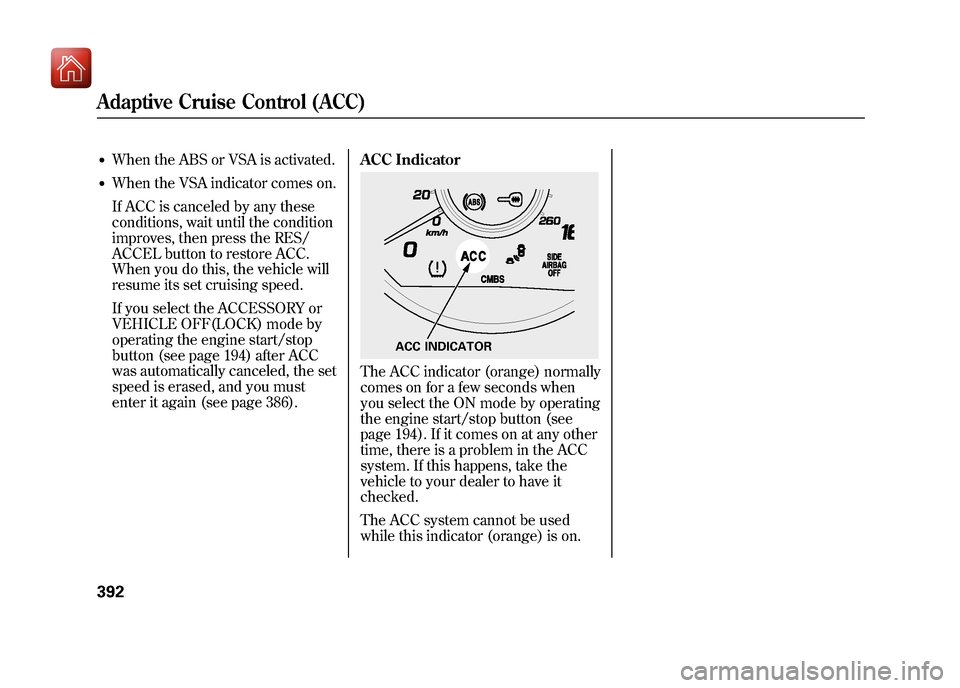
The ACC indicator (orange) normally
comes on for a few seconds when
you select the ON mode by operating
the engine start/stop button (see
page 194). If it comes on at any other
time, there is a problem in the ACC
system. If this happens, take the
vehicle to your dealer to have it
checked.
The ACC system cannot be used
while this indicator (orange) is on.
ACC INDICATOR
Adaptive Cruise Control (ACC)39209/10/28 17:15:37 10 ACURA ZDX KA KC New North America Own 50 31SZN600 enu
Page 400 of 645
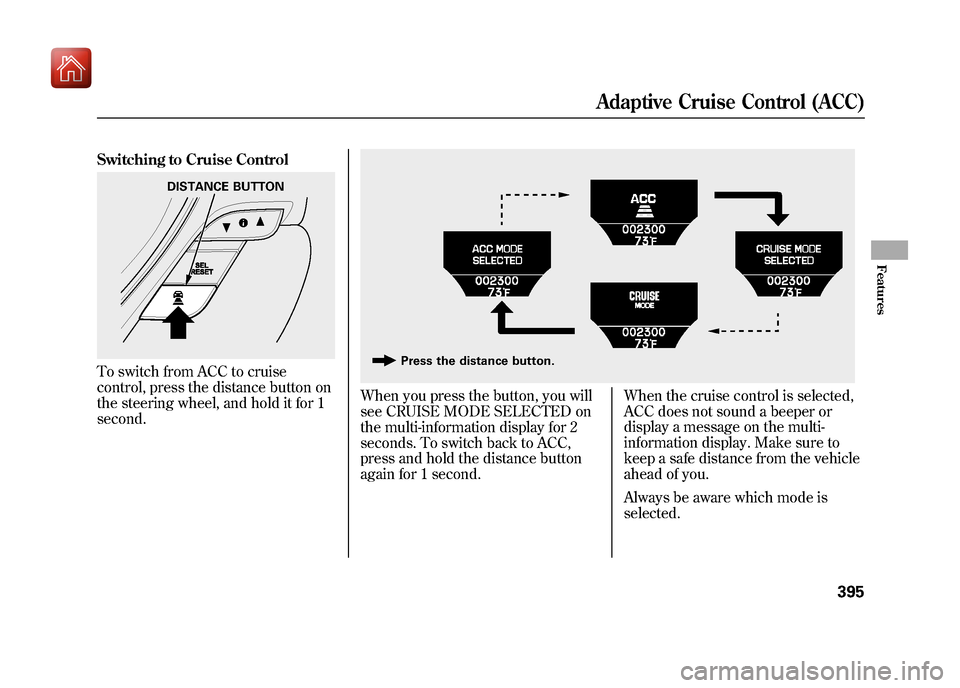
Switching to Cruise ControlTo switch from ACC to cruise
control, press the distance button on
the steering wheel, and hold it for 1
second.
When you press the button, you will
see CRUISE MODE SELECTED on
the multi-information display for 2
seconds. To switch back to ACC,
press and hold the distance button
again for 1 second.When the cruise control is selected,
ACC does not sound a beeper or
display a message on the multi-
information display. Make sure to
keep a safe distance from the vehicle
ahead of you.
Always be aware which mode is
selected.
DISTANCE BUTTON
Press the distance button.
Adaptive Cruise Control (ACC)
395
Features
09/10/28 17:15:37 10 ACURA ZDX KA KC New North America Own 50 31SZN600 enu
Page 415 of 645
Send Numbers or Names During
a Call
HFL allows you to send numbers or
names during a call. This is useful
when you call a menu-driven phone
system.To send a name or number during acall:Press and release the HFL Talk
button before a command.
1. Say ‘‘Send. ’’
2. Follow the HFL prompts and say the name or number you want to
send.
3. Follow the HFL prompts to send the tones and continue the call.
NOTE: To send a pound (#), say
‘‘ pound.’’ To send a star (*), say
‘‘ star. ’’ Phonebook
You can store up to 50 names with
their associated numbers in HFL.
The numbers you store cannot only
be phone numbers but other types,
such as account numbers or
passwords, which can be sent during
a menu-driven call.
To store a phonebook entry:Press and release the HFL Talk
button before a command.
1. Say
‘‘Phonebook. ’’
2. Say ‘‘Store ’’after the prompts.
3. Say a name you want to list as your phonebook entry.
4. Say the number you want to store for the name entry.
5. Follow the HFL prompts and say ‘‘Enter ’’to store the entry. NOTE:
●Avoid using duplicate name
entries.●Avoid using
‘‘home ’’as a name
entry.●It is easier for HFL to recognize a
multisyllabic or longer name. For
example, use ‘‘Peter’’ instead of
‘‘ Pete, ’’or ‘‘John Smith ’’instead of
‘‘ John. ’’
Bluetooth
®HandsFreeLink
®(Models without navigation system)
41009/10/28 17:15:37 10 ACURA ZDX KA KC New North America Own 50 31SZN600 enu
Page 430 of 645
Search for Next Connected PhoneTo change from the currently linked
phone to another paired phone,
select‘‘Search a Next Connected
Phone ’’on the Phone Setup screen.
HFL disconnects the linked phone
and starts searching for another
paired phone.
If no other paired phone is found,
HFL will automatically link the
previous phone.
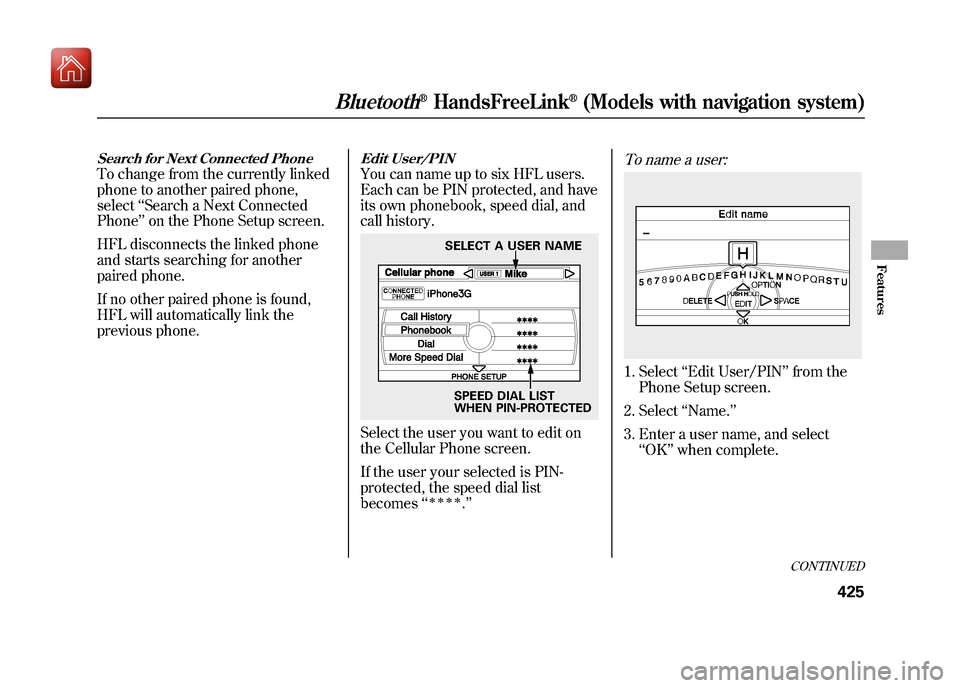
Edit User/PINYou can name up to six HFL users.
Each can be PIN protected, and have
its own phonebook, speed dial, and
call history.Select the user you want to edit on
the Cellular Phone screen.
If the user your selected is PIN-
protected, the speed dial list
becomes ‘‘
ꭧꭧꭧꭧ
.’’
To name a user:1. Select ‘‘Edit User/PIN ’’from the
Phone Setup screen.
2. Select ‘‘Name. ’’
3. Enter a user name, and select ‘‘OK ’’when complete.
SELECT A USER NAME
SPEED DIAL LIST
WHEN PIN-PROTECTED
CONTINUED
Bluetooth
®HandsFreeLink
®(Models with navigation system)
425
Features
09/10/28 17:15:37 10 ACURA ZDX KA KC New North America Own 50 31SZN600 enu
Page 434 of 645
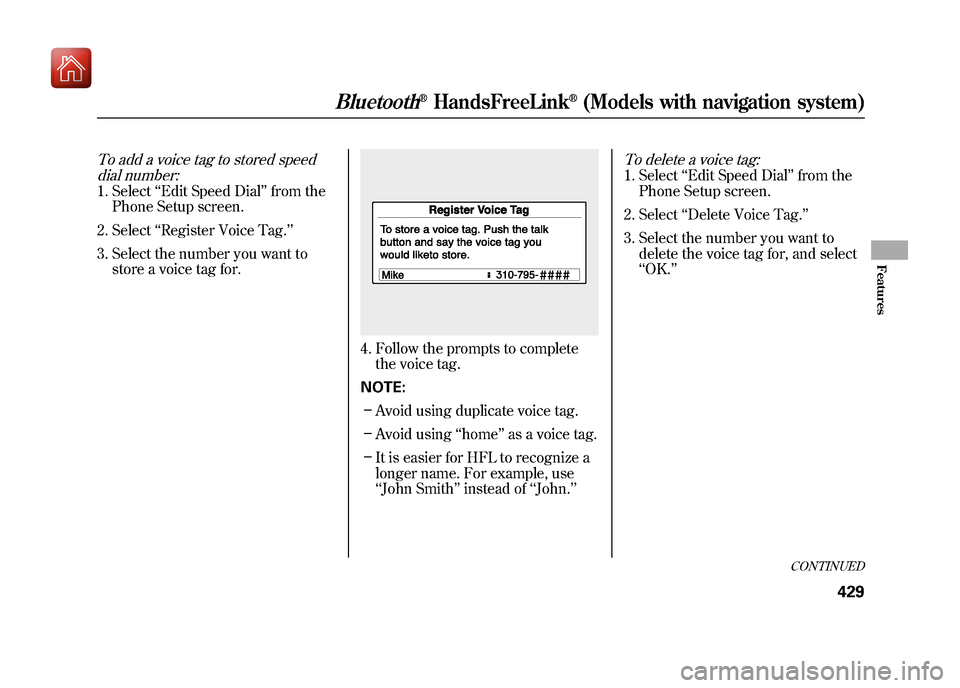
To add a voice tag to stored speeddial number:1. Select ‘‘Edit Speed Dial ’’from the
Phone Setup screen.
2. Select ‘‘Register Voice Tag.’’
3. Select the number you want to store a voice tag for.
4. Follow the prompts to completethe voice tag.
NOTE: – Avoid using duplicate voice tag.
– Avoid using ‘‘home ’’as a voice tag.
– It is easier for HFL to recognize a
longer name. For example, use
‘‘John Smith ’’instead of ‘‘John. ’’
To delete a voice tag:1. Select ‘‘Edit Speed Dial ’’from the
Phone Setup screen.
2. Select ‘‘Delete Voice Tag. ’’
3. Select the number you want to delete the voice tag for, and select
‘‘OK. ’’
CONTINUED
Bluetooth
®HandsFreeLink
®(Models with navigation system)
429
Features
09/10/28 17:15:37 10 ACURA ZDX KA KC New North America Own 50 31SZN600 enu
Page 451 of 645
Diagnostic Info
When an indicator comes on or a
message is displayed on the Multi-
Information Display (MID),
AcuraLink can provide information
about the cause of the indicator or
message and the recommended
action to address it. This helps you
handle the problem as it occurs,
preventing or limiting costly repairs.
The AcuraLink system cannot
determine some mechanical
problems (such as squeaks or
rattles) that are not triggered by the
diagnostic indicator monitors.
For more information on the
instrument panel indicators, see page
64.
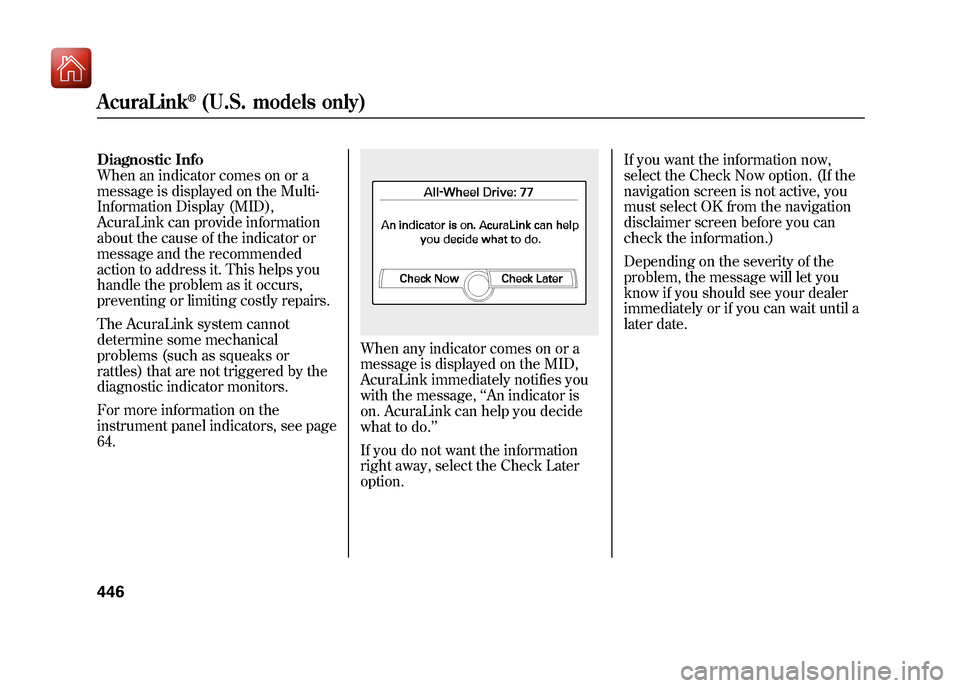
When any indicator comes on or a
message is displayed on the MID,
AcuraLink immediately notifies you
with the message,‘‘An indicator is
on. AcuraLink can help you decide
what to do. ’’
If you do not want the information
right away, select the Check Later
option. If you want the information now,
select the Check Now option. (If the
navigation screen is not active, you
must select OK from the navigation
disclaimer screen before you can
check the information.)
Depending on the severity of the
problem, the message will let you
know if you should see your dealer
immediately or if you can wait until a
later date.
AcuraLink
®(U.S. models only)
44609/10/28 17:15:37 10 ACURA ZDX KA KC New North America Own 50 31SZN600 enu
Page 466 of 645
Fuel Economy Factors
The following factors can lower your
vehicle's fuel economy:●Aggressive driving (hard
acceleration and braking)●Excessive idling, accelerating and
braking in stop-and-go traffic●Cold engine operation (engines
are more efficient when warmed
up)●Driving with a heavy load or the air
conditioner running●Improperly inflated tiresImproving Fuel EconomyVehicle MaintenanceA properly maintained vehicle
maximizes fuel economy. Poor
maintenance can significantly reduce
fuel economy. Always maintain your
vehicle according to the maintenance
messages displayed on the information
display (seeOwner's Maintenance
Checks on page 541). For example:
●Use the recommended viscosity
motor oil, displaying the API
Certification Seal (see page 545).●Maintain proper tire inflation
-
An under-inflated tire increases
‘‘ rolling resistance, ’’which reduces
fuel economy.●Avoid carrying excess weight in
your vehicle -It puts a heavier
load on the engine, increasing fuel
consumption.●Keep your vehicle clean -In
particular, a build-up of snow or mud
on your vehicle's underside adds
weight and rolling resistance.
Frequent cleaning helps your fuel
economy.Drive Efficiently●Drive moderately -Rapid
acceleration, abrupt cornering, and
hard braking increase fuel
consumption.
●Observe the speed limit -
Aerodynamic drag has a big effect
on fuel economy at speeds above
45 mph (75 km/h). Reduce your
speed and you reduce the drag.
Trailers, car top carriers, roof
racks and bike racks are also big
contributors to increased drag.●Avoid excessive idling -Idling
results in 0 miles per gallon (0 kms
per liter).
CONTINUED
Fuel Economy
461
Before Driving
09/10/28 17:15:37 10 ACURA ZDX KA KC New North America Own 50 31SZN600 enu
Page 478 of 645
6. Check the adjustment of the insideand outside mirrors (see page
177).
7. Check the steering wheel adjustment (see page 145).
8. Make sure the doors and tailgate are securely closed and locked.
9. Fasten your seat belt. Check that your passengers have fastened
their seat belts (see page 16).
10. When you start the engine, check the gauges and indicators in the
instrument panel, and the
messages on the multi-information
display (see pages 63, 76 and 90). Starting the Engine
Your vehicle's starting system has an
auto control mode. When you turn
the ignition switch to the START (III)
position, this feature keeps the
engine's starter motor running until
the engine starts. Follow these
instructions to start the engine:
1. Apply the parking brake.
2. In cold weather, turn off all
electrical accessories to reduce the
drain on the battery.
3. Make sure the shift lever is in Park. Press on the brake pedal.
4. Without touching the accelerator pedal, turn the ignition switch to
the START (III) position, then
release the ignition switch. You do
not need to hold the ignition
switch in the START (III) position
to start the engine. The starter
motor can run for up to 9 seconds
to guarantee starting when the
outside temperature is very low. If you hold the ignition switch in
the START (III) position for more
than 7 seconds, the starter motor,
depending on the outside
temperature, runs for up to 25
seconds until the engine starts.
If the engine does not start, wait at
least 10 seconds before trying
again.
The immobilizer system protects your
vehicle from theft. If an improperly-
coded key (or other device) is used, the
engine's fuel system is disabled. For
more information, see page 149.
CONTINUED
Preparing to Drive, Starting the Engine (Models without Keyless Access System)
473
Driving
09/10/28 17:15:37 10 ACURA ZDX KA KC New North America Own 50 31SZN600 enu
Page 479 of 645
The engine is harder to start in cold
weather. Also, the thinner air found at
altitudes above 8,000 feet (2,400
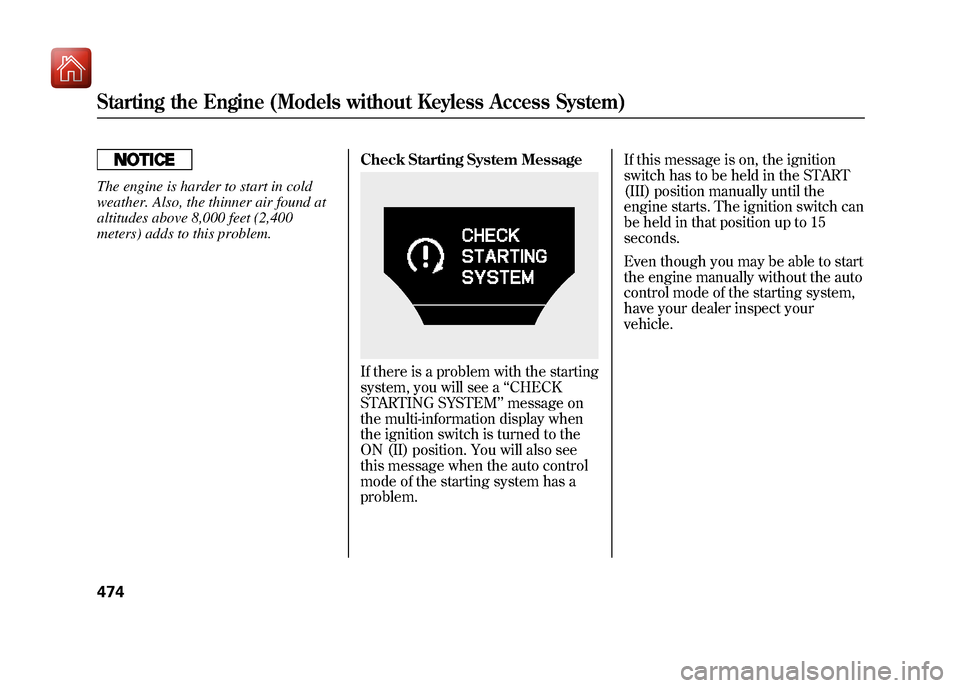
meters) adds to this problem.Check Starting System Message
If there is a problem with the starting
system, you will see a
‘‘CHECK
STARTING SYSTEM ’’message on
the multi-information display when
the ignition switch is turned to the
ON (II) position. You will also see
this message when the auto control
mode of the starting system has a
problem. If this message is on, the ignition
switch has to be held in the START
(III) position manually until the
engine starts. The ignition switch can
be held in that position up to 15
seconds.
Even though you may be able to start
the engine manually without the auto
control mode of the starting system,
have your dealer inspect your
vehicle.
Starting the Engine (Models without Keyless Access System)47409/10/28 17:15:37 10 ACURA ZDX KA KC New North America Own 50 31SZN600 enu
Page 480 of 645
Your vehicle's starting system has an
auto control mode. When you have
your keyless access remote and push
the engine start/stop button while
depressing the brake pedal, this
feature keeps the engine's starter
motor running until the engine
starts.
Follow these instructions to start the
engine:1. Apply the parking brake.
2. In cold weather, turn off all electrical accessories to reduce the
drain on the battery.
3. Make sure the shift lever is in Park. Press on the brake pedal.
In either of the following cases, you
should insert the keyless access
remote into the keyless remote slot.
For more information, see pages 202
and 203.●The keyless access remote system
main switch is off.
●The keyless access remote battery
becomes weak or dead.
4. Without touching the accelerator pedal, push and release the engine
start/stop button. You do not need
to hold the engine start/stop
button to start the engine. The
starter motor can run for up to 9
seconds to guarantee starting
when the outside temperature is
very low.
If you hold the engine start/stop
button for more than 7 seconds,
the starter motor, depending on
the outside temperature, runs for
up to 25 seconds until the engine
starts.
If the engine does not start, wait at
least 10 seconds before trying
again.
The immobilizer system protects your
vehicle from theft. If an improperly
coded keyless access remote (or other
device) is used, the engine's fuel system
is disabled. For more information, see
page 149.The engine is harder to start in cold
weather. Also, the thinner air found at
altitudes above 8,000 feet (2,400
meters) adds to this problem.
Starting the Engine (Models with Keyless Access System)
475
Driving
09/10/28 17:15:37 10 ACURA ZDX KA KC New North America Own 50 31SZN600 enu