ECO mode Acura ZDX 2012 Manual Online
[x] Cancel search | Manufacturer: ACURA, Model Year: 2012, Model line: ZDX, Model: Acura ZDX 2012Pages: 645, PDF Size: 16.36 MB
Page 287 of 645
Push the interface selector down to
display the AUDIO MENU. Turn the
interface dial to select A.SEL, then
press ENTER on the interface
selector. Turn the interface dial to
select ON, then press ENTER on the
interface selector. You will see A.SEL
on the display and the audio control
display (if selected), and the system
goes into auto select mode for
several seconds.
The system stores the frequencies of
six AM and twelve FM stations in the
preset buttons (icons).
You will see‘‘0’’ displayed if auto
select cannot find a strong station for
every preset button (icon).
If you do not like the stations auto
select has stored, you can store other
frequencies on the preset buttons
(icons) as previously described.
To cancel auto select,
select A.Sel on
the audio menu again and turn the
interface dial to select A.SEL OFF.
This restores the presets you
originally set.
For information on FM/AM radio
frequencies and reception, see page
369. Radio Data System (RDS)
On the FM band, you can select a
favorite station and display the
program service name according to
the information provided by the radio
data system (RDS) if the station has
the RDS information available.
RDS INFO DisplayThe RDS INFO display function
shows the name of the station you
are listening to. With the audio
system on and the FM band selected,
you can turn this function on or off.
Playing the AM/FM Radio (Models with navigation system)28209/10/28 17:15:37 10 ACURA ZDX KA KC New North America Own 50 31SZN600 enu
Page 289 of 645
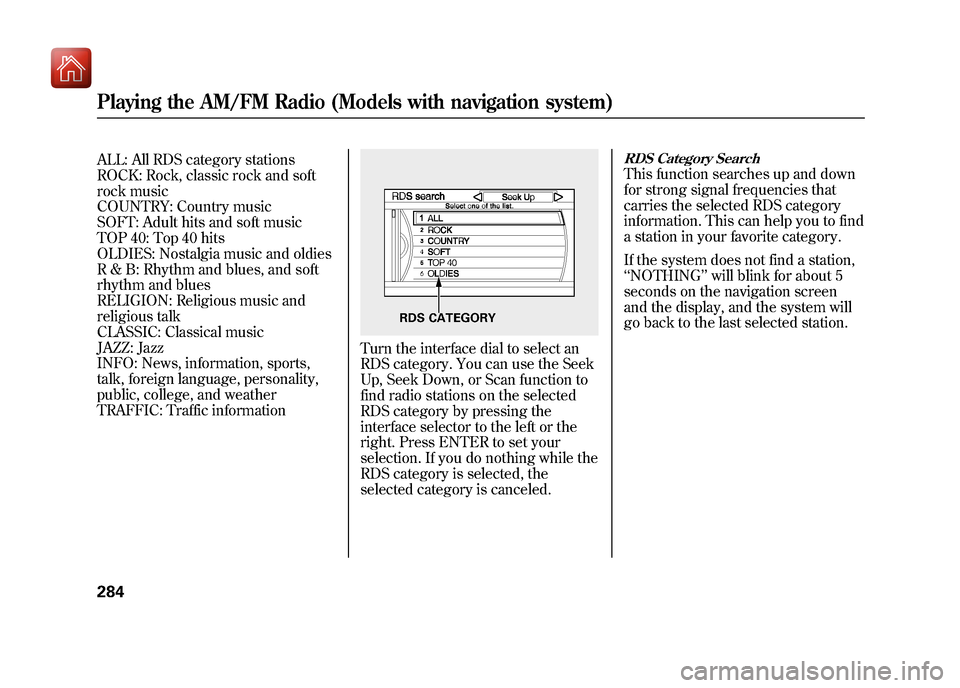
ALL: All RDS category stations
ROCK: Rock, classic rock and soft
rock music
COUNTRY: Country music
SOFT: Adult hits and soft music
TOP 40: Top 40 hits
OLDIES: Nostalgia music and oldies
R & B: Rhythm and blues, and soft
rhythm and blues
RELIGION: Religious music and
religious talk
CLASSIC: Classical music
JAZZ: Jazz
INFO: News, information, sports,
talk, foreign language, personality,
public, college, and weather
TRAFFIC: Traffic information
Turn the interface dial to select an
RDS category. You can use the Seek
Up, Seek Down, or Scan function to
find radio stations on the selected
RDS category by pressing the
interface selector to the left or the
right. Press ENTER to set your
selection. If you do nothing while the
RDS category is selected, the
selected category is canceled.
RDS Category SearchThis function searches up and down
for strong signal frequencies that
carries the selected RDS category
information. This can help you to find
a station in your favorite category.
If the system does not find a station,
‘‘NOTHING ’’will blink for about 5
seconds on the navigation screen
and the display, and the system will
go back to the last selected station.
RDS CATEGORY
Playing the AM/FM Radio (Models with navigation system)28409/10/28 17:15:37 10 ACURA ZDX KA KC New North America Own 50 31SZN600 enu
Page 290 of 645
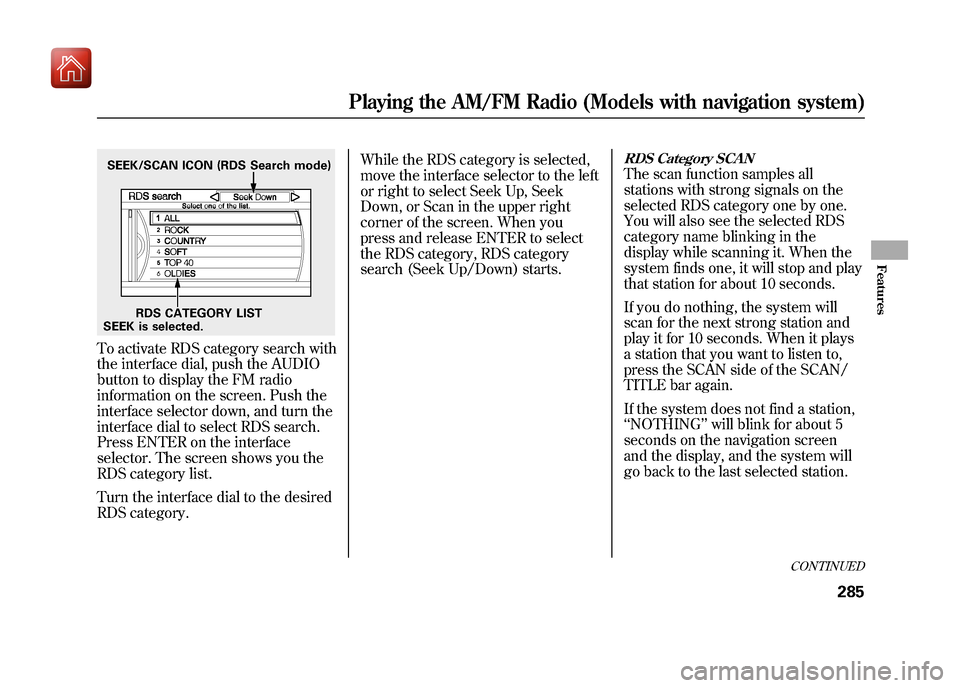
To activate RDS category search with
the interface dial, push the AUDIO
button to display the FM radio
information on the screen. Push the
interface selector down, and turn the
interface dial to select RDS search.
Press ENTER on the interface
selector. The screen shows you the
RDS category list.
Turn the interface dial to the desired
RDS category.While the RDS category is selected,
move the interface selector to the left
or right to select Seek Up, Seek
Down, or Scan in the upper right
corner of the screen. When you
press and release ENTER to select
the RDS category, RDS category
search (Seek Up/Down) starts.
RDS Category SCANThe scan function samples all
stations with strong signals on the
selected RDS category one by one.
You will also see the selected RDS
category name blinking in the
display while scanning it. When the
system finds one, it will stop and play
that station for about 10 seconds.
If you do nothing, the system will
scan for the next strong station and
play it for 10 seconds. When it plays
a station that you want to listen to,
press the SCAN side of the SCAN/
TITLE bar again.
If the system does not find a station,
‘‘
NOTHING ’’will blink for about 5
seconds on the navigation screen
and the display, and the system will
go back to the last selected station.
SEEK is selected. RDS CATEGORY LIST
SEEK/SCAN ICON (RDS Search mode)
CONTINUED
Playing the AM/FM Radio (Models with navigation system)
285
Features
09/10/28 17:15:37 10 ACURA ZDX KA KC New North America Own 50 31SZN600 enu
Page 293 of 645
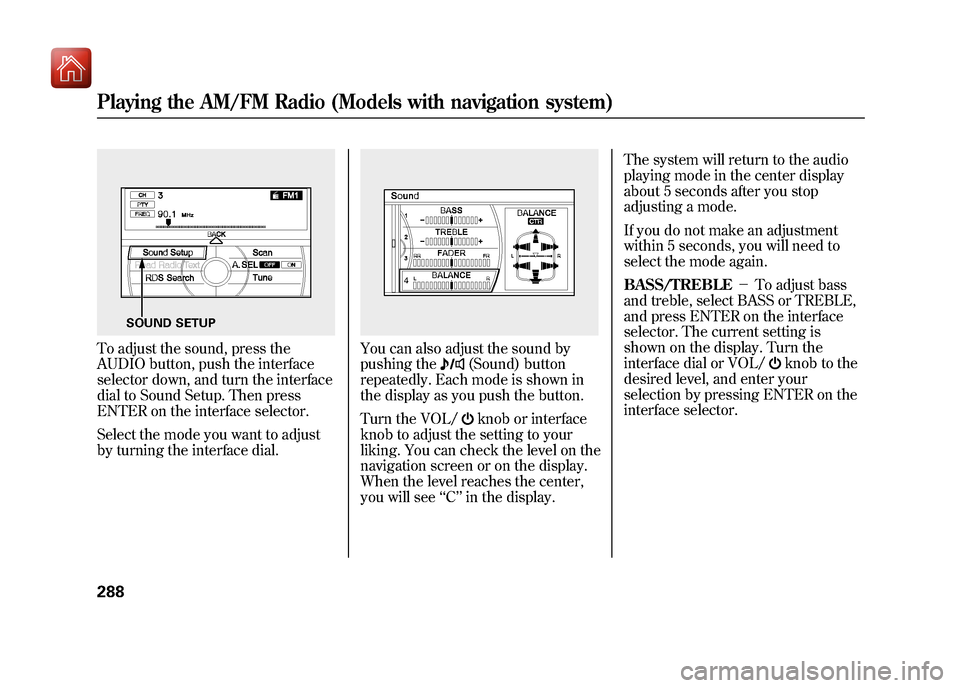
To adjust the sound, press the
AUDIO button, push the interface
selector down, and turn the interface
dial to Sound Setup. Then press
ENTER on the interface selector.
Select the mode you want to adjust
by turning the interface dial.
You can also adjust the sound by
pushing the
(Sound) button
repeatedly. Each mode is shown in
the display as you push the button.
Turn the VOL/knob or interface
knob to adjust the setting to your
liking. You can check the level on the
navigation screen or on the display.
When the level reaches the center,
you will see ‘‘C ’’in the display. The system will return to the audio
playing mode in the center display
about 5 seconds after you stop
adjusting a mode.
If you do not make an adjustment
within 5 seconds, you will need to
select the mode again.
BASS/TREBLE
-To adjust bass
and treble, select BASS or TREBLE,
and press ENTER on the interface
selector. The current setting is
shown on the display. Turn the
interface dial or VOL/
knob to the
desired level, and enter your
selection by pressing ENTER on the
interface selector.
SOUND SETUP
Playing the AM/FM Radio (Models with navigation system)28809/10/28 17:15:37 10 ACURA ZDX KA KC New North America Own 50 31SZN600 enu
Page 294 of 645
FADER/BALANCE-These
modes adjust the strength of the
sound coming from each speaker.
Fader adjusts the front-to-back
strength, while balance adjusts the
side-to-side strength. To adjust fader
and balance, select FADER or
BALANCE, then press ENTER on
the interface selector. The current
setting is shown on the screen. Turn
the interface dial or VOL/
knob to
the desired level, and enter your
selection by pressing ENTER on the
interface selector. To equalize the
fader or balance, turn the interface
dial or VOL/
knob until the marks
on the sound grid come to the center
of the adjustment bar.
If the fader adjustment is set to F9
(maximum front level), the
subwoofer is turned off.
If the fader is set to R9 (maximum
rear level), the center speaker is off. CENTER
-Adjusts the strength of
sound from the center speaker.
SUBWOOFER -To adjust the
strength of the sound from the
subwoofer speaker, select it and
press ENTER on the interface
selector. Turn the interface dial to
the desired level, and enter your
selection by pressing ENTER on the
interface selector.
Speed-sensitive Volume Compensation (SVC)The SVC mode controls the volume
based on vehicle speed. The faster
you go, the louder the audio volume
becomes. As you slow down, the
audio volume decreases.
The SVC has four modes: OFF,
LOW, MID, and HIGH. To change
the SVC mode, select SVC, then
press ENTER on the interface
selector. The current setting is
shown on the screen. Turn the
interface dial to the desired level, and
enter your selection by pressing
ENTER on the interface selector. If
you feel the sound is too loud,
choose low. If you feel the sound is
too quiet, choose high.
CONTINUED
Playing the AM/FM Radio (Models with navigation system)
289
Features
09/10/28 17:15:37 10 ACURA ZDX KA KC New North America Own 50 31SZN600 enu
Page 298 of 645
MODE-To switch between the
category mode and channel mode,
push the interface selector down to
display AUDIO MENU, then turn the
interface dial to select Mode, and
press ENTER on the interface
selector.
Turn the interface dial to select CH
or CAT, then press ENTER on the
interface selector. Move the interface
selector up to go back.
You can also switch the mode by
pressing the TITLE side of the
SCAN/TITLE bar for 3 seconds.
In the category mode, such as Jazz,
Rock, Classical, etc., you can
navigate through all of the channels
within that category. In the channel
mode, you can select all of the
available channels. Each time you press and release the
TITLE side of the bar, the display
changes in the following sequence:
CATEGORY NAME, NAME (artist
name), TITLE (music title), and
CHANNEL NAME (channel name).
On the screen, you will see the
selected CHANNEL (number),
CATEGORY, NAME (artist name),
and TITLE (music title).
You may experience periods when
XM Radio does not transmit the
artist's name and song title
information. If this happens, there is
nothing wrong with your system.
TUNE
-Press either side of the
TUNE bar to change channel
selections. Press the
side of the
bar for higher numbered channels
and the
side for lower numbered
channels. You can also change
channels with the interface selector. Push it down to select AUDIO
MENU. Then turn the interface dial
to select TUNE and press ENTER on
the interface selector. Turn the
interface dial to exit the tune mode
and press ENTER on the interface
dial.
CHANNEL LIST
-Push down the
interface selector to select AUDIO
MENU, then turn the interface dial
to select Channel List and press
ENTER on the selector. Turn the
interface dial to select a channel,
then press ENTER to set your
selection.
CATEGORY (- or+)- Press
either side of the bar to select
another category.
CONTINUED
Playing the XM
®Radio (Models with navigation system)
293
Features
09/10/28 17:15:37 10 ACURA ZDX KA KC New North America Own 50 31SZN600 enu
Page 299 of 645
SCAN-The scan function gives
you a sampling of all channels while
in the channel mode. In the category
mode, only the channels within that
category are scanned. To activate
SCAN, press the SCAN side of the
SCAN/TITLE bar. You will see
SCAN on the screen and display.
The system plays each channel in
numerical order for a few seconds,
then selects the next channel. When
you hear a channel you want to
continue listening to, press the
SCAN side of the bar to cancel.
CHANNEL SCAN -This function
samples all channels. Push down the
interface selector to select AUDIO
MENU, then turn the interface dial
to select Channel Scan and press
ENTER on the interface selector.
CATEGORY SCAN -This function
samples the stations in the selected
category. Push down the interface
selector to select AUDIO MENU,
then turn the interface dial to select
Category Scan and press ENTER on
the interface selector.
Preset -You can store up to 12
preset channels using the six preset
buttons. Each button stores one
channel from the XM1 band and one
channel from the XM2 band.
To store a channel:
1. Press the
button. Either
XM1 or XM2 will show on the
display.
2. Use the tune, channel list, or scan function to tune to a desired
channel.
Playing the XM
®Radio (Models with navigation system)
29409/10/28 17:15:37 10 ACURA ZDX KA KC New North America Own 50 31SZN600 enu
Page 302 of 645
There may be other geographic
situations that could affect XM Radio
reception.As required by the FCC:Changes or modifications not expressly
approved by the party responsible forcompliance could void the user's
authority to operate the equipment. Note Function
U.S. models onlyThis function stores the sound
content played on the selected XM
satellite radio station with the
channel, category, name, and title
information.
To activate this function, press and
hold the
button for about 3
seconds while a song or passage
which you want to store is playing.
You can record for up to 10 seconds.
To stop recording, press the AM/FM
button,button, or another
function button (DISC, HDD, USB/
AUX).
Once you store the recorded sound
file, you can replay it and confirm the
information. The system can store up
to 30 sound files. If you continue to
store more files, the oldest one will
be deleted each time you add new
file.
To replay and see the stored file,
press the AUDIO button to select the
audio display on the navigation
screen.
Push down the interface selector to
display the audio menu. Turn the
interface dial to select Note, then
press ENTER.
NOTE ICON
CONTINUED
Playing the XM
®Radio (Models with navigation system)
297
Features
09/10/28 17:15:37 10 ACURA ZDX KA KC New North America Own 50 31SZN600 enu
Page 303 of 645
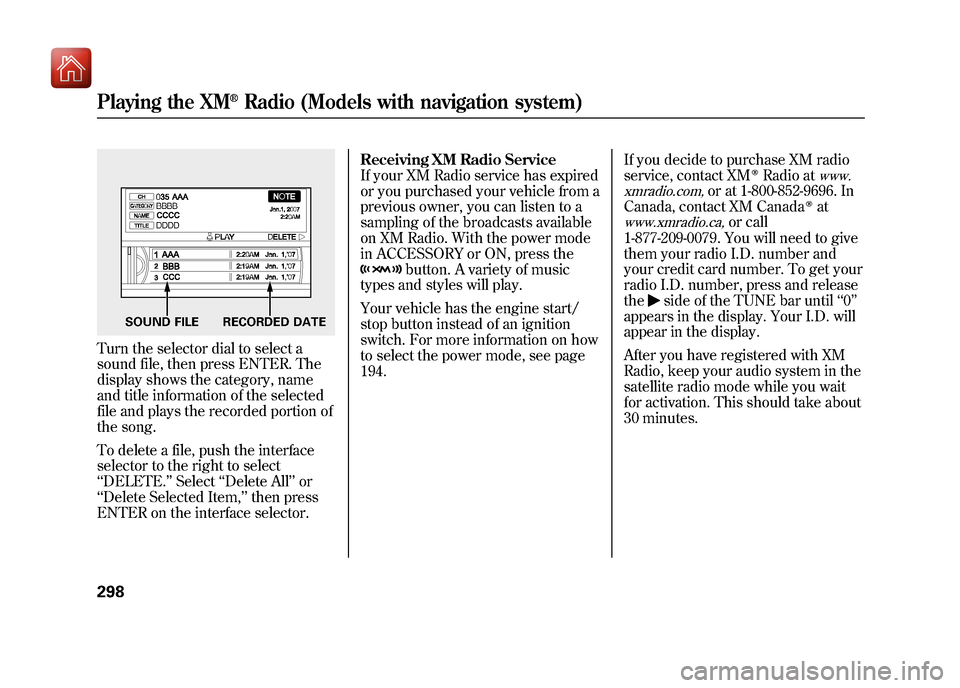
Turn the selector dial to select a
sound file, then press ENTER. The
display shows the category, name
and title information of the selected
file and plays the recorded portion of
the song.
To delete a file, push the interface
selector to the right to select
‘‘DELETE. ’’Select ‘‘Delete All ’’or
‘‘ Delete Selected Item, ’’then press
ENTER on the interface selector. Receiving XM Radio Service
If your XM Radio service has expired
or you purchased your vehicle from a
previous owner, you can listen to a
sampling of the broadcasts available
on XM Radio. With the power mode
in ACCESSORY or ON, press the
button. A variety of music
types and styles will play.
Your vehicle has the engine start/
stop button instead of an ignition
switch. For more information on how
to select the power mode, see page
194. If you decide to purchase XM radio
service, contact XM
ꭂRadio at
www.
xmradio.com,
or at 1-800-852-9696. In
Canada, contact XM Canada
ꭂat
www.xmradio.ca,
or call
1-877-209-0079. You will need to give
them your radio I.D. number and
your credit card number. To get your
radio I.D. number, press and release
the
side of the TUNE bar until ‘‘0’’
appears in the display. Your I.D. will
appear in the display.
After you have registered with XM
Radio, keep your audio system in the
satellite radio mode while you wait
for activation. This should take about
30 minutes.
SOUND FILE RECORDED DATE
Playing the XM
®Radio (Models with navigation system)
29809/10/28 17:15:37 10 ACURA ZDX KA KC New North America Own 50 31SZN600 enu
Page 307 of 645
It is possible to select up to 999 files
for inclusion in CD-Rs and CD-RWs,
and up to 3,500 files for inclusion in
DVD-Rs and DVD-RWs.Do not use discs with adhesive labels.
The label can curl up and cause the
disc to jam in the unit.
Manufactured under license under
U.S. Patentꭨ’s: 5,451,942; 5,956,674;
5,974,380; 5,978,762; 6,487,535 &
other U.S. and worldwide patents
issued & pending. DTS and DTS
Digital Surround are registered
trademarks and the DTS logos and
Symbol are trademarks of DTS, Inc.
© 1996-2008 DTS, Inc. All Rights
Reserved. To Load a Disc
Insert a disc about halfway into the
disc slot. The drive will pull the disc
in the rest of the way to play it. You
operate the disc player with the same
controls used for the radio. The
number of the current track is shown
in the display. When playing a disc in
MP3, WMA or AAC, the numbers of
the current folder and file are shown.
The system will continuously play a
disc until you change modes.
For information on how to handle
and protect compact discs, see page
365.
To Play a Disc
Select the disc player by pressing the
DISC button. The system will begin
playing the last selected track on the
disc. You will see the current track
position highlighted.
Title information will be displayed by
a list when the information is found
in the Gracenote
ꭂAlbum Info
(Gracenote
ꭂMedia Database) on the
built-in hard disk drive. When you
play a CD recorded with text data,
you will see the genre, artist name,
album and track name on the screen.
When you play MP3/WMA/AAC
discs, you will see the genre, artist
name, album name and track name
on the screen. If the disc was not
recorded with this information, it will
not be displayed.
Playing a Disc (Models with navigation system)30209/10/28 17:15:37 10 ACURA ZDX KA KC New North America Own 50 31SZN600 enu