ECO mode Acura ZDX 2012 Owner's Guide
[x] Cancel search | Manufacturer: ACURA, Model Year: 2012, Model line: ZDX, Model: Acura ZDX 2012Pages: 645, PDF Size: 16.36 MB
Page 147 of 645
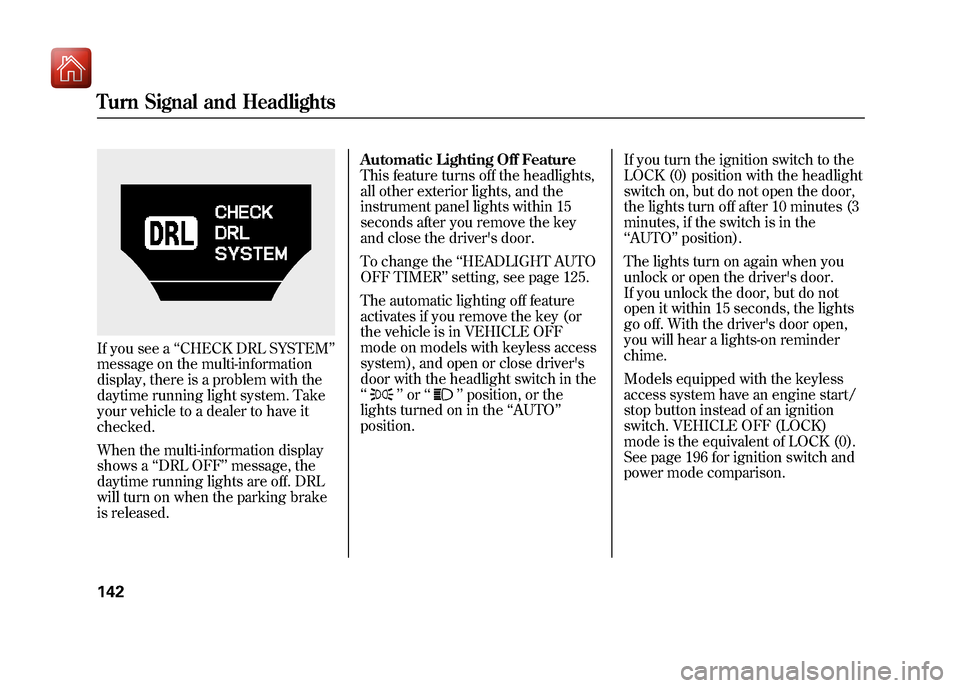
If you see a‘‘CHECK DRL SYSTEM ’’
message on the multi-information
display, there is a problem with the
daytime running light system. Take
your vehicle to a dealer to have it
checked.
When the multi-information display
shows a ‘‘DRL OFF ’’message, the
daytime running lights are off. DRL
will turn on when the parking brake
is released. Automatic Lighting Off Feature
This feature turns off the headlights,
all other exterior lights, and the
instrument panel lights within 15
seconds after you remove the key
and close the driver's door.
To change the
‘‘HEADLIGHT AUTO
OFF TIMER ’’setting, see page 125.
The automatic lighting off feature
activates if you remove the key (or
the vehicle is in VEHICLE OFF
mode on models with keyless access
system), and open or close driver's
door with the headlight switch in the
‘‘
’’ or ‘‘
’’position, or the
lights turned on in the ‘‘AUTO ’’
position. If you turn the ignition switch to the
LOCK (0) position with the headlight
switch on, but do not open the door,
the lights turn off after 10 minutes (3
minutes, if the switch is in the
‘‘
AUTO ’’position).
The lights turn on again when you
unlock or open the driver's door.
If you unlock the door, but do not
open it within 15 seconds, the lights
go off. With the driver's door open,
you will hear a lights-on reminder
chime.
Models equipped with the keyless
access system have an engine start/
stop button instead of an ignition
switch. VEHICLE OFF (LOCK)
mode is the equivalent of LOCK (0).
See page 196 for ignition switch and
power mode comparison.
Turn Signal and Headlights14209/10/28 17:15:37 10 ACURA ZDX KA KC New North America Own 50 31SZN600 enu
Page 149 of 645

Adjust the brightness of the
instrument panel by pressing the+
or - button. Press the +button to
increase the brightness and the -
button to decrease it. The brightness
can be set differently for when the
headlights are on, and when they are
off.
The level of brightness is shown on
the multi-information display while
you adjust it. It goes out 5 seconds
after you finish adjusting. To reduce glare at night, the
instrument panel illumination dims
when you turn the light switch to
or
. To cancel the glare reduction
function, set the brightness to the
highest level, then press the +
button. You will hear a beep when it
is canceled.
When the brightness reaches the
maximum level, ‘‘BRIGHTNESS
MAXIMUM LEVEL’’ appears on the
display.
You can customize when the glare
reduction function starts. To change
‘‘ AUTO INTERIOR
ILLUMINATION, ’’see page 111 for
more information.
+ BUTTON
-BUTTON
U.S. model is shown.
Instrument Panel Brightness14409/10/28 17:15:37 10 ACURA ZDX KA KC New North America Own 50 31SZN600 enu
Page 151 of 645
When you remove the key from the
ignition switch (or the vehicle is in
VEHICLE OFF mode on models with
keyless access system), the steering
wheel automatically moves fully up.
To change the‘‘AUTO TILT AND
TELESCOPE STEERING WHEEL ’’
setting, see page 116.
The steering wheel then returns to
its original position when you insert
the key back in the ignition switch
(or the vehicle is in ON mode on
models with keyless access system).
Steering wheel movement is also
controlled by the driving position
memory system (see page 180). If your vehicle's battery is
disconnected or goes dead, or the
fuse for the power tilt and telescopic
steering wheel is removed, the
power tilt and telescopic steering
wheel system needs to be reset when
you reconnect the battery or install
the fuse.
Insert the key into the ignition
switch, and remove it (or set the
power mode to VEHICLE OFF on
models with keyless access system).
The steering wheel automatically
moves fully up to let you know the
system is reset.Steering Wheel Adjustments14609/10/28 17:15:37 10 ACURA ZDX KA KC New North America Own 50 31SZN600 enu
Page 153 of 645
Always use the fully-extended key
when you insert it to the ignition
switch. If the key does not fully
extend, the immobilizer system may
not operate may prevent the engine
from starting.
The key may come in contact with
your finger while being retracted or
extended. Make sure your fingers do
not touch the pivot of the key when
retracting or extending the key.
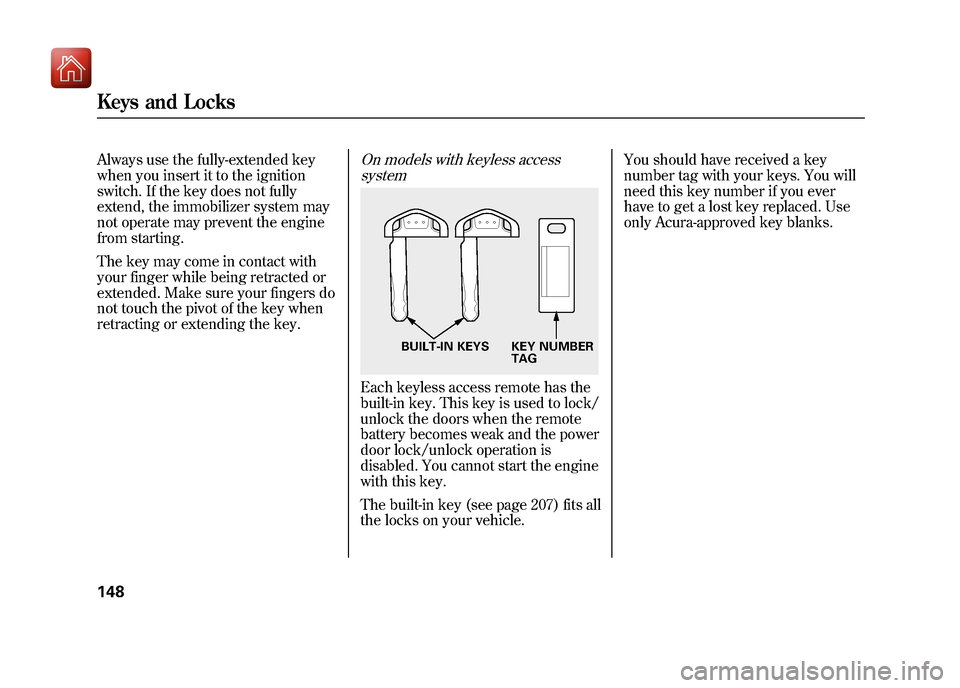
On models with keyless accesssystemEach keyless access remote has the
built-in key. This key is used to lock/
unlock the doors when the remote
battery becomes weak and the power
door lock/unlock operation is
disabled. You cannot start the engine
with this key.
The built-in key (see page 207) fits all
the locks on your vehicle. You should have received a key
number tag with your keys. You will
need this key number if you ever
have to get a lost key replaced. Use
only Acura-approved key blanks.
BUILT-IN KEYS KEY NUMBER
TAG
Keys and Locks14809/10/28 17:15:37 10 ACURA ZDX KA KC New North America Own 50 31SZN600 enu
Page 154 of 645
The Immobilizer System protects
your vehicle from theft. If an
improperly coded key (or other
device) is used, the engine's fuel
system is disabled.
When you turn the ignition switch to
the ON (II) position, the immobilizer
system indicator should come on
briefly, then go off. If the indicator
starts to blink, it means the system
does not recognize the coding of the
key. Turn the ignition switch to the
LOCK (0) position, remove the key,
reinsert it, and turn the ignition
switch to the ON (II) position again.
Models equipped with the keyless
access system have an engine start/
stop button instead of an ignition
switch. ON mode is the equivalent of
ON (II). See page 196 for ignition
switch and power mode comparison.The system may not recognize your
key's coding if another immobilizer
key or other metal object (i.e. key
chain) is near the ignition switch
when you insert the key.
If the system repeatedly does not
recognize the coding of your key,
contact your dealer.
Do not attempt to alter this system or
add other devices to it. Electrical
problems could result that may make
your vehicle inoperable.
If you have lost your key and you
cannot start the engine, contact your
dealer.
Always take the ignition key with you
whenever you leave the vehicle alone.
As required by the FCC:
This device complies with Part 15 of theFCC rules. Operation is subject to the
following two conditions: (1) This devicemay not cause harmful interference, and(2) this device must accept any
interference received, includinginterference that may cause undesiredoperation.
Changes or modifications not expresslyapproved by the party responsible for
compliance could void the user'sauthority to operate the equipment.
This device complies with IndustryCanada Standard RSS-210.
Operation is subject to the following twoconditions: (1) this device may not causeinterference, and (2) this device must
accept any interference that may causeundesired operation of the device.
Immobilizer System
149
Instruments and Controls
09/10/28 17:15:37 10 ACURA ZDX KA KC New North America Own 50 31SZN600 enu
Page 156 of 645
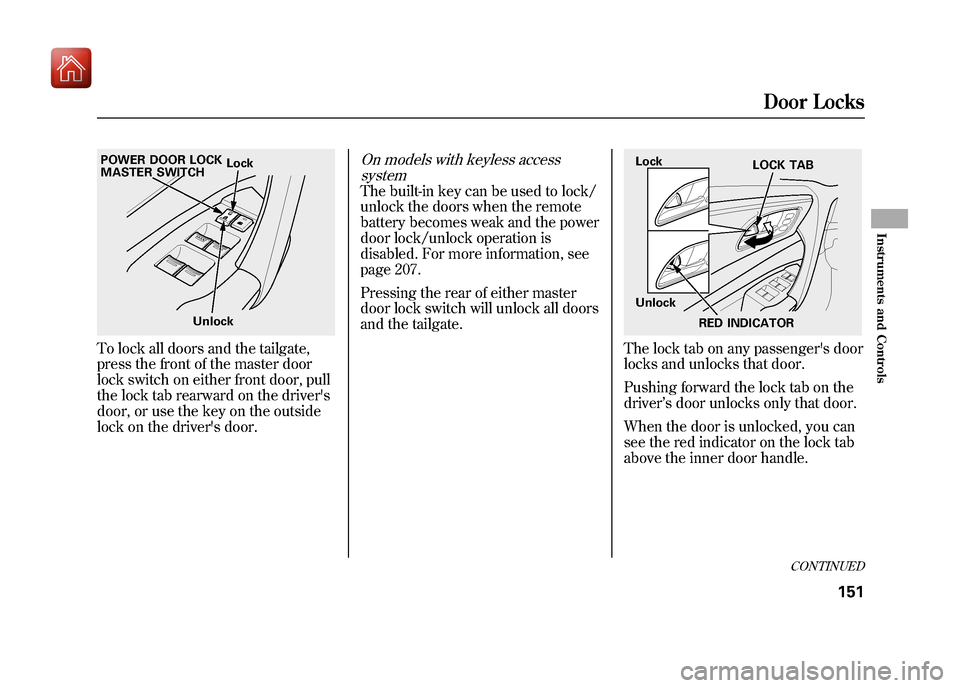
To lock all doors and the tailgate,
press the front of the master door
lock switch on either front door, pull
the lock tab rearward on the driver's
door, or use the key on the outside
lock on the driver's door.
On models with keyless accesssystemThe built-in key can be used to lock/
unlock the doors when the remote
battery becomes weak and the power
door lock/unlock operation is
disabled. For more information, see
page 207.
Pressing the rear of either master
door lock switch will unlock all doors
and the tailgate.
The lock tab on any passenger's door
locks and unlocks that door.
Pushing forward the lock tab on the
driver ’s door unlocks only that door.
When the door is unlocked, you can
see the red indicator on the lock tab
above the inner door handle.
Lock
Unlock
POWER DOOR LOCK
MASTER SWITCH
Lock
Unlock
LOCK TAB
RED INDICATOR
CONTINUED
Door Locks
151
Instruments and Controls
09/10/28 17:15:37 10 ACURA ZDX KA KC New North America Own 50 31SZN600 enu
Page 157 of 645
All doors and the tailgate can be
locked from the outside by using the
key in the driver's door lock. To
unlock only the driver's door, insert
the key, turn the key, and release it.
The remaining doors and the tailgate
unlock when you turn the key a
second time within a few seconds.
You can customize the door lock/
unlock settings (see page 128).
You can open or close the windows
and the panoramic glass roof by
using the key in the driver's door
(see page 173).
Locking and unlocking the driver's
door will also lock and unlock the
fuel fill door (see page 455).
To change the‘‘KEY AND REMOTE
UNLOCK MODE ’’setting, see page
132.
To lock any passenger's door when
getting out of the vehicle, pull the
lock tab rearward and close the door.
On models without keyless access systemTo lock the driver's door, remove the
key from the ignition switch, pull the
lock tab rearward or push the front of
the master switch, then close the
door.Default SettingWhen the vehicle speed reaches
about 10 mph (U.S.) or 15 km/h
(Canada) or more, all the doors lock
automatically.
When you shift to P after driving, the
driver's door unlocks.
Lockout PreventionOn models without keyless accesssystemWith any door and the tailgate open
and the key in the ignition, both
master door lock switches are
disabled. They are not disabled if all
the doors and the tailgate are closed.
If you try to lock an open driver's
door by pulling the lock tab rearward
the lock tab on the driver's door pops
out.
Door Locks15209/10/28 17:15:37 10 ACURA ZDX KA KC New North America Own 50 31SZN600 enu
Page 159 of 645
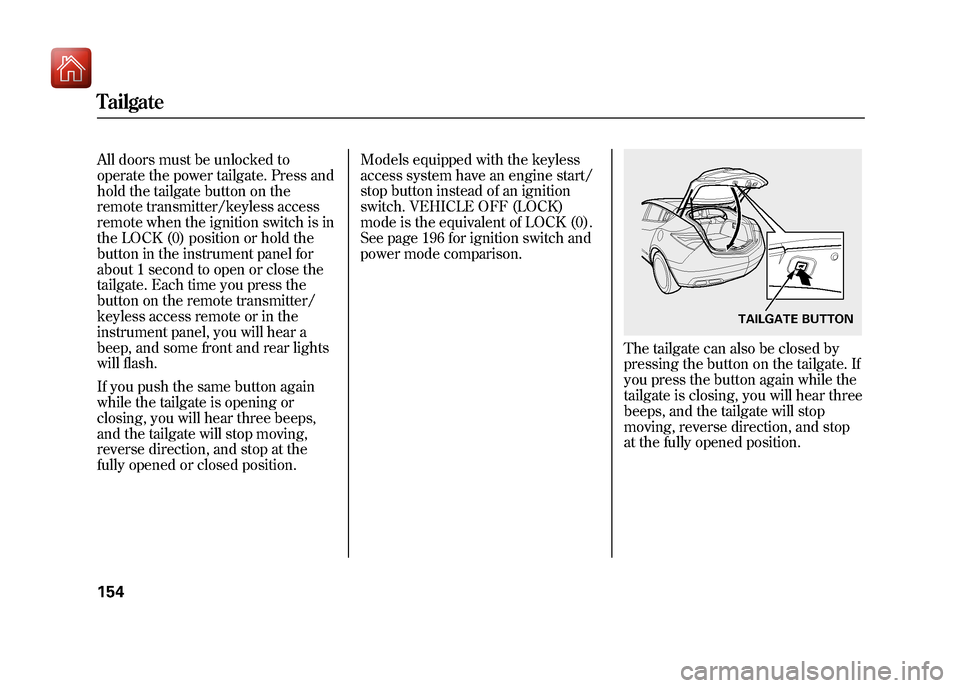
All doors must be unlocked to
operate the power tailgate. Press and
hold the tailgate button on the
remote transmitter/keyless access
remote when the ignition switch is in
the LOCK (0) position or hold the
button in the instrument panel for
about 1 second to open or close the
tailgate. Each time you press the
button on the remote transmitter/
keyless access remote or in the
instrument panel, you will hear a
beep, and some front and rear lights
will flash.
If you push the same button again
while the tailgate is opening or
closing, you will hear three beeps,
and the tailgate will stop moving,
reverse direction, and stop at the
fully opened or closed position.Models equipped with the keyless
access system have an engine start/
stop button instead of an ignition
switch. VEHICLE OFF (LOCK)
mode is the equivalent of LOCK (0).
See page 196 for ignition switch and
power mode comparison.
The tailgate can also be closed by
pressing the button on the tailgate. If
you press the button again while the
tailgate is closing, you will hear three
beeps, and the tailgate will stop
moving, reverse direction, and stop
at the fully opened position.
TAILGATE BUTTON
Tailgate15409/10/28 17:15:37 10 ACURA ZDX KA KC New North America Own 50 31SZN600 enu
Page 162 of 645

On models without keyless accesssystemLOCK -Press this button once to
lock all doors and the tailgate. Some
exterior lights will flash. When you
push LOCK twice within 5 seconds,
you will hear a beep to verify that the
doors and tailgate are locked and the
security system has set. This button
does not work if any door or tailgate
is open or if the key is in the ignition
switch. UNLOCK
-Press this button once
to unlock the driver's door (or all the
doors and the tailgate depending on
the door lock setting). Press it twice
to unlock the other doors and the
tailgate. Some exterior lights will
flash twice when you press the
button. If you do not open any door
or the tailgate within 30 seconds,
they will automatically relock and the
security system sets.
The door activated spotlights come
on when you press the UNLOCK
button if the door activated position
is selected by pressing the light
control button (DOOR). If you do not
open any door within 30 seconds (or
whatever setting of the interior light
dimming time is set to), the light(s)
will fade out. If you relock the doors
with the remote transmitter before 30
seconds have elapsed, the light(s)
will go off immediately. On the keyless lock
acknowledgment, you can deactivate
the beep on locking and flashing of
the lights (see page 133).
To change the lock/unlock setting
and the relock timer setting, refer to
the customized settings on page 128.
You can also open all power
windows, panoramic glass roof, and
sunshade from outside the vehicle
with the remote transmitter (see
page 172).
LED
UNLOCK
BUTTON LOCK
BUTTON
PANIC
BUTTON
TAILGATE
BUTTON
CONTINUED
Remote Transmitter
157
Instruments and Controls
09/10/28 17:15:37 10 ACURA ZDX KA KC New North America Own 50 31SZN600 enu
Page 163 of 645
TAILGATE-All doors must be
unlocked to operate the power
tailgate. Press and hold the
TAILGATE button to open or close
the power tailgate. When the tailgate
begins to move, you will hear a beep,
and some front and rear lights will
flash.
If you push the same button again
while the tailgate is opening or
closing, three beeps sound, the
tailgate stops moving, reverses
direction and stops in the fully
opened or fully closed position.
PANIC -Press and hold this
button for about 1 second to attract
attention; the horn will sound, and
the exterior lights will flash for about
30 seconds. To cancel panic mode,
press any other button on the remote
transmitter, or turn the ignition
switch to the ON (II) position. Panic
mode does not work when the key is
in the ignition switch.
Remote Transmitter Care●Avoid dropping or throwing the
transmitter.●Protect the transmitter from
extreme temperature.●Do not immerse the transmitter in
any liquid.●If you lose a transmitter, the
replacement needs to be
reprogramed by your dealer. Replacing the Transmitter Battery
If it takes several pushes on the
button to lock or unlock the doors
and the tailgate, replace the battery
as soon as possible.
Battery type: CR1616
Remote Transmitter15809/10/28 17:15:37 10 ACURA ZDX KA KC New North America Own 50 31SZN600 enu