ECO mode Acura ZDX 2012 Service Manual
[x] Cancel search | Manufacturer: ACURA, Model Year: 2012, Model line: ZDX, Model: Acura ZDX 2012Pages: 645, PDF Size: 16.36 MB
Page 176 of 645
Follow these precautions whenever
you use the seat heaters:●Use the HI setting only to heat the
seats quickly, because it draws
large amounts of current from the
battery.●If the engine is left idling for an
extended period, do not use the
seat heaters even on the LO
setting. It can weaken the battery,
causing hard starting.
A multi-information display message
may inform you when the battery
charge is getting low. See page 85 for
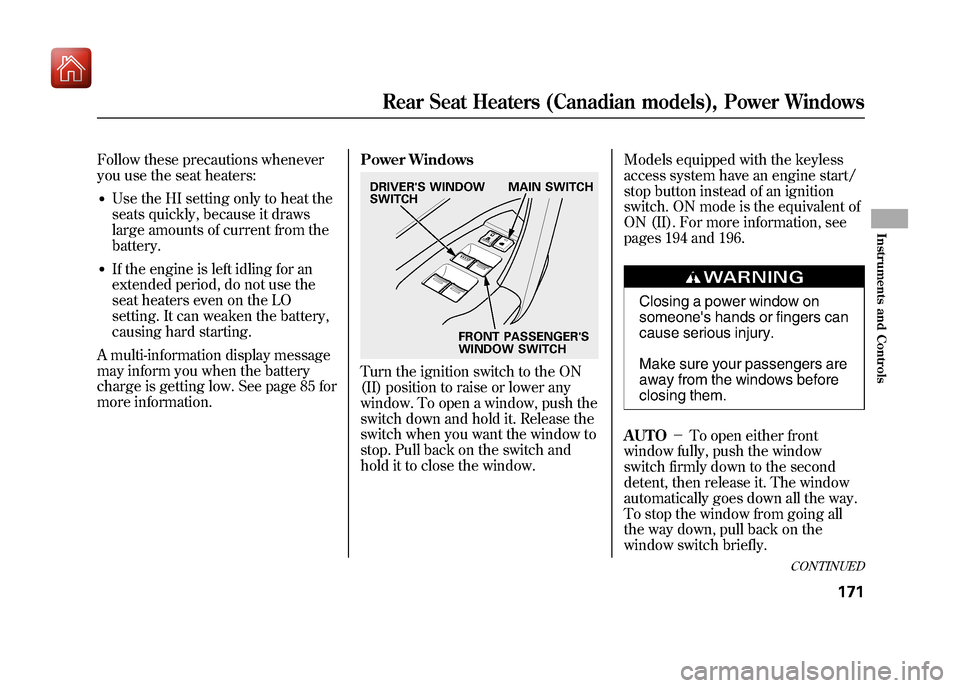
more information. Power Windows
Turn the ignition switch to the ON
(II) position to raise or lower any
window. To open a window, push the
switch down and hold it. Release the
switch when you want the window to
stop. Pull back on the switch and
hold it to close the window.Models equipped with the keyless
access system have an engine start/
stop button instead of an ignition
switch. ON mode is the equivalent of
ON (II). For more information, see
pages 194 and 196.
Closing a power window on
someone's hands or fingers can
cause serious injury.
Make sure your passengers are
away from the windows before
closing them.
AUTO -To open either front
window fully, push the window
switch firmly down to the second
detent, then release it. The window
automatically goes down all the way.
To stop the window from going all
the way down, pull back on the
window switch briefly.
DRIVER'S WINDOW
SWITCH MAIN SWITCH
FRONT PASSENGER'S
WINDOW SWITCH
CONTINUED
Rear Seat Heaters (Canadian models), Power Windows
171
Instruments and Controls
09/10/28 17:15:37 10 ACURA ZDX KA KC New North America Own 50 31SZN600 enu
Page 177 of 645
To close either front window fully,
pull back the window switch firmly to
the second detent, then release it.
The window automatically goes all
the way up. To stop the window from
going all the way up, push down on
the window switch briefly.
When you push the main switch in,
the switch is off, and the passengers'
windows cannot be raised or
lowered. To cancel this feature, push
on the switch again to get it to pop
out. Use the main switch when you
have children in the vehicle so they
do not injure themselves by
operating the windows
unintentionally.
The windows and the main switch
will operate for up to 10 minutes after
you turn off the ignition switch (set
VEHICLE OFF mode on models with
keyless access system). Opening
either front door cancels this
function.AUTO REVERSE
-If either front
window senses any obstacle while it
is closing automatically, it will
reverse direction and then stop. To
close the window, remove the
obstacle, then use the window switch
again.
Auto reverse stops sensing when the
window is almost closed. You should
always check that all passengers and
objects are away from the window
before closing it. Opening the Windows, Panoramic
Glass Roof, and Sunshades with
the Remote Transmitter/Keyless
Access Remote
You can open all of the windows,
panoramic glass roof, and sunshades
from outside with the remote
transmitter/keyless access remote.
1. Press the UNLOCK button once to
unlock the driver's door.
2. Press the UNLOCK button a second time, and hold it. All the
doors unlock, and all four
windows, panoramic glass roof,
and sunshades start to open. To
stop the windows and panoramic
glass roof, release the button.
The sunshades will not stop
opening and will continue moving
to the full open position.Power Windows17209/10/28 17:15:37 10 ACURA ZDX KA KC New North America Own 50 31SZN600 enu
Page 178 of 645

3. To open the windows andpanoramic glass roof further, press
the button again (within 20
seconds of step 1) and hold it. If
the windows and panoramic glass
roof stop before the desired
position, repeat steps 1 and 2.
You cannot close the windows,
panoramic glass roof, and sunshades
with the remote transmitter/keyless
access remote. Opening/Closing the Windows,
Panoramic Glass Roof, and
Sunshades with the Key or the
Built-in Key
You can open and close the windows,
panoramic glass roof, and sunshades
with the key in the driver's door lock.To open:
1. Insert the key in the driver's door
lock.
2. Turn the key clockwise, then release it.
3. Turn the key clockwise again, and hold it. All four windows,
panoramic glass roof, and
sunshades start to open. To stop
the windows and panoramic glass
roof release the key. The
sunshades will not stop opening
and will continue moving to the full
open position.
4. To open the windows and panoramic glass roof further, turn
and hold the key again (within 20
seconds of step 2).
Close Open
On models without keyless
access system
CONTINUED
Power Windows
173
Instruments and Controls
09/10/28 17:15:37 10 ACURA ZDX KA KC New North America Own 50 31SZN600 enu
Page 180 of 645
The panoramic glass roof can operate
only when the sunshades are fully
open.
The sunshades can be opened or
closed to adjust the amount of light
that enters the cabin.
The sunshades can operate only
when the panoramic glass roof is
fully closed.
The front and rear sunshades cannot
be operated individually.
Models equipped with the keyless
access system have an engine start/
stop button instead of an ignition
switch. ON mode is the equivalent of
ON (II). See page 196 for ignition
switch and power mode comparison.To tilt up the panoramic glass roof,
push on the center of the panoramic
glass roof switch. The sunshades will
open automatically and the
panoramic glass roof will start to tilt
up. To stop the panoramic glass roof
from tilting up fully, push the switch
briefly.
To open the panoramic glass roof or
the sunshades, pull back on the
switch and hold it. Release the switch
when the panoramic glass roof or the
sunshades reach the desired
position. To close the panoramic
glass roof or the sunshades, push the
switch forward and hold it. Release
the switch to stop the operation.
Opening or closing the
panoramic glass roof or
sunshades on someone's
hands or fingers can cause
serious injury.
Make sure all hands and fingers
are clear of the panoramic
glass roof and sunshades
before opening or closing it.
AUTO OPEN -To open the
panoramic glass roof or the
sunshades fully, pull back the switch
firmly to the second detent, then
release it. The sunshades will
automatically open all the way. Pull
the switch back firmly a second time,
then release it. The panoramic glass
roof will automatically open all the
way. To stop the panoramic glass
roof or the sunshades from opening,
push the switch briefly.
CONTINUED
Panoramic Glass Roof
175
Instruments and Controls
09/10/28 17:15:37 10 ACURA ZDX KA KC New North America Own 50 31SZN600 enu
Page 186 of 645
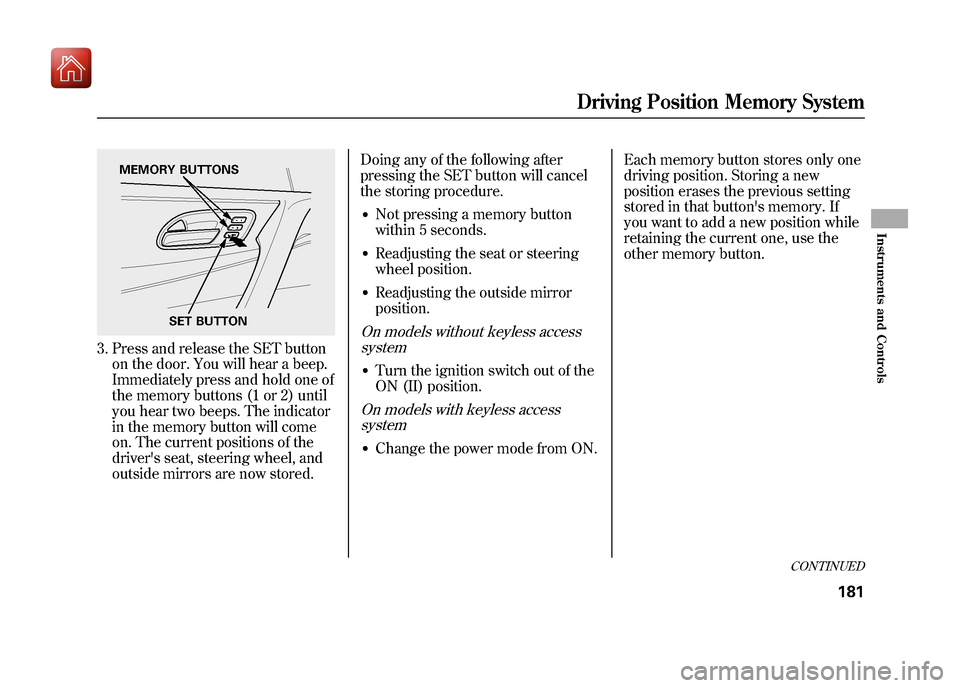
3. Press and release the SET buttonon the door. You will hear a beep.
Immediately press and hold one of
the memory buttons (1 or 2) until
you hear two beeps. The indicator
in the memory button will come
on. The current positions of the
driver's seat, steering wheel, and
outside mirrors are now stored. Doing any of the following after
pressing the SET button will cancel
the storing procedure.
●Not pressing a memory button
within 5 seconds.●Readjusting the seat or steering
wheel position.●Readjusting the outside mirror
position.On models without keyless access
system●Turn the ignition switch out of the
ON (II) position.On models with keyless accesssystem●Change the power mode from ON. Each memory button stores only one
driving position. Storing a new
position erases the previous setting
stored in that button's memory. If
you want to add a new position while
retaining the current one, use the
other memory button.
SET BUTTON
MEMORY BUTTONS
CONTINUED
Driving Position Memory System
181
Instruments and Controls
09/10/28 17:15:37 10 ACURA ZDX KA KC New North America Own 50 31SZN600 enu
Page 188 of 645
On models with navigation systemYour vehicle has a keyless access
system. This system allows you to
operate the vehicle without an
ignition key. When you carry the
remote with you, you can lock/
unlock the door(s), unlock the
tailgate, and start the engine.
The system may not work if:●The battery of the remote is weak.●There is strong electrical current
nearby.●You carry a cell phone, a laptop
computer, or other electrical
device near the remote.●The remote is covered by metal.●A vehicle is being operated with a
transmitter nearby.●When the remote battery is dead.●When the vehicle battery is dead.Each keyless access remote has the
built-in key. This key is used to lock/
unlock the doors when the remote
battery becomes weak and the power
door lock/unlock operation is
disabled. You cannot start the engine
with this key.
Make sure the driver always carries
the remote/built-in key set.
Protect the remote and the built-in
key from direct sunlight, high
temperature, and high humidity.
Do not drop the remote or the built-
in key, and do not set heavy objects
on them.
Keep the remote and the built-in key
away from liquids. If they get wet,
dry them immediately with a soft
cloth.
The built-in keys do not contain
batteries.
Always keep the remote and the
built-in key away from any magnetic
material.
You should have received a key
number tag with your built-in key.
You will need this key number if you
ever have to get a lost key replaced.
Use only Acura-approved key blanks.
CONTINUED
Keyless Access System
183
Instruments and Controls
09/10/28 17:15:37 10 ACURA ZDX KA KC New North America Own 50 31SZN600 enu
Page 192 of 645
When you lock the doors, some
exterior lights blink and the system
beeps once. If no exterior lights blink
and/or no beeper sounds, check to
see if the tailgate or hood is open.
To change the‘‘KEYLESS ACCESS
LIGHT FLASH ’’setting, see page
120.
To change the ‘‘KEYLESS ACCESS
BEEP ’’setting, see page 121.
Within 2 seconds of pressing the
door lock button to lock the doors or
locking the doors with remote, pull
the handle to make sure the doors
are actually locked. The door unlock
sensors will not operate for about 2
seconds after the doors are locked. The door lock button does not work
if:
●The remote is not within the
operating range.●Any door is open.●The power mode is not set to
VEHICLE OFF (LOCK).●The remote is in the keyless
access slot.●The remote is too close to the
vehicle.●The remote battery is dead.●The vehicle battery is dead.
Door Lock PreventionIf you open the driver's door, pull its
lock tab rearward on the door, and
shut it when the remote is inside the
vehicle, the driver's door will unlock.
Make sure you carry the remote with
you when you lock the doors.
This function is also activated on the
front passenger's door. If you open
the front passenger's door, and shut
it after pulling its lock tab rearward
when the remote is inside the
vehicle, all doors will unlock.
CONTINUED
Keyless Access System
187
Instruments and Controls
09/10/28 17:15:37 10 ACURA ZDX KA KC New North America Own 50 31SZN600 enu
Page 194 of 645
Before closing the tailgate, make
sure the remote is not inside the
vehicle.
If you close the tailgate when the
remote is inside the vehicle, and all
the doors are locked, the system
beeps, and all the doors unlock.
Keep the tailgate closed at all times
while driving to avoid damaging the
tailgate, and to prevent exhaust gas
from getting into the interior. See
Carbon Monoxide Hazardon page
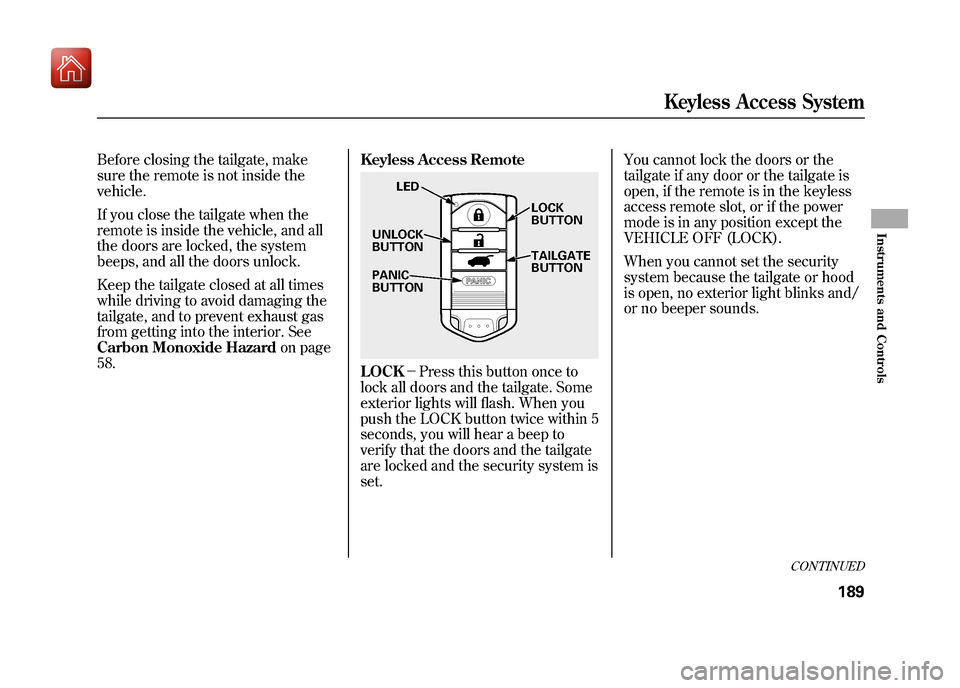
58. Keyless Access Remote
LOCK
-Press this button once to
lock all doors and the tailgate. Some
exterior lights will flash. When you
push the LOCK button twice within 5
seconds, you will hear a beep to
verify that the doors and the tailgate
are locked and the security system is
set. You cannot lock the doors or the
tailgate if any door or the tailgate is
open, if the remote is in the keyless
access remote slot, or if the power
mode is in any position except the
VEHICLE OFF (LOCK).
When you cannot set the security
system because the tailgate or hood
is open, no exterior light blinks and/
or no beeper sounds.
LED
UNLOCK
BUTTON
PANIC
BUTTON LOCK
BUTTON
TAILGATE
BUTTON
CONTINUED
Keyless Access System
189
Instruments and Controls
09/10/28 17:15:37 10 ACURA ZDX KA KC New North America Own 50 31SZN600 enu
Page 195 of 645
UNLOCK-Press this button once
to unlock the driver's door. Press it
twice to unlock the other doors.
Some exterior lights will flash twice
each time you press the button. The
door activated map lights (if the door
activated light switch is set) will
come on when you press the
UNLOCK button. If you do not open
any doors within 30 seconds, the
map lights fade out. If you relock the
doors with the remote before 30
seconds have elapsed, the lights will
go off immediately. To change the door unlock mode
setting, see page 132.
To change the
‘‘INTERIOR LIGHT
DIMMING TIME, ’’see page 124.
If you unlock the doors with the
remote, but do not open any doors
within 30 seconds, the doors
automatically relock and the security
system sets.
To change the ‘‘SECURITY RELOCK
TIMER ’’setting, see page 134.
To change the ‘‘KEYLESS LOCK
ACKNOWLEDGMENT ’’setting, see
page 133. TAILGATE
-All doors must be
unlocked to operate the power
tailgate. Press and hold the
TAILGATE button to open or close
the power tailgate. When the tailgate
begins to move, you will hear a beep,
and some front and rear lights will
flash.
If you push the same button again
while the tailgate is opening or
closing, three beeps sound, the
tailgate stops moving, reverses
direction and stops in the fully
opened or fully closed position.
PANIC -Press this button for about
2 seconds to attract attention: the
horn will sound and the exterior
lights will flash for about 30 seconds.
To cancel panic mode, press any
other button on the remote.Keyless Access System19009/10/28 17:15:37 10 ACURA ZDX KA KC New North America Own 50 31SZN600 enu
Page 202 of 645
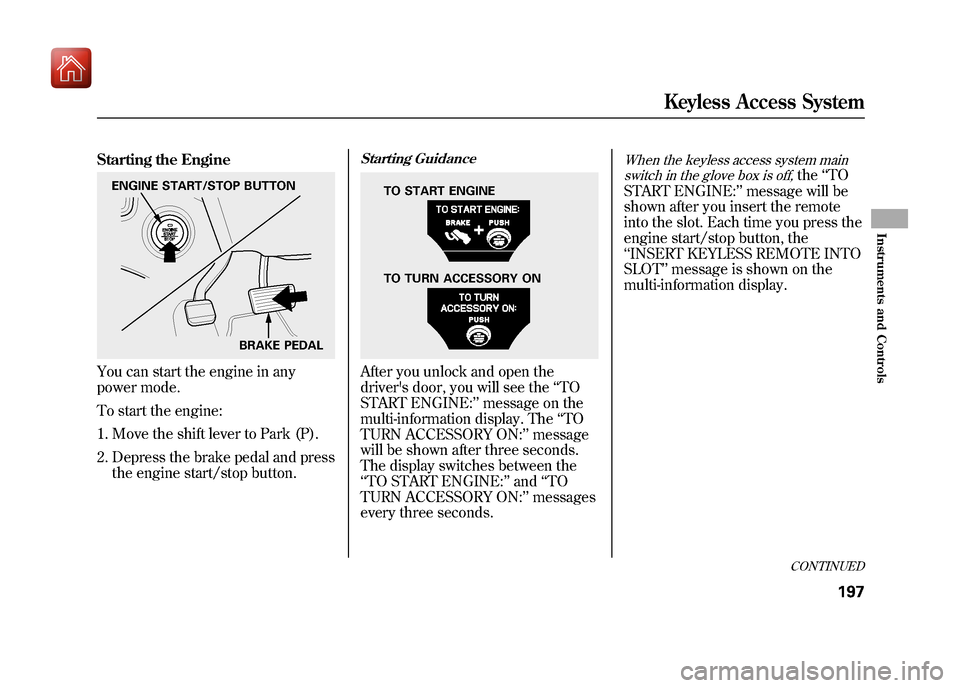
Starting the EngineYou can start the engine in any
power mode.
To start the engine:1. Move the shift lever to Park (P).
2. Depress the brake pedal and press the engine start/stop button.
Starting GuidanceAfter you unlock and open the
driver's door, you will see the ‘‘TO
START ENGINE: ’’message on the
multi-information display. The ‘‘TO
TURN ACCESSORY ON: ’’message
will be shown after three seconds.
The display switches between the
‘‘ TO START ENGINE: ’’and ‘‘TO
TURN ACCESSORY ON: ’’messages
every three seconds.
When the keyless access system main
switch in the glove box is off,
the ‘‘TO
START ENGINE: ’’message will be
shown after you insert the remote
into the slot. Each time you press the
engine start/stop button, the
‘‘ INSERT KEYLESS REMOTE INTO
SLOT ’’message is shown on the
multi-information display.
ENGINE START/STOP BUTTON
BRAKE PEDAL
TO TURN ACCESSORY ON TO START ENGINE
CONTINUED
Keyless Access System
197
Instruments and Controls
09/10/28 17:15:37 10 ACURA ZDX KA KC New North America Own 50 31SZN600 enu