ECO mode Acura ZDX 2012 Owner's Guide
[x] Cancel search | Manufacturer: ACURA, Model Year: 2012, Model line: ZDX, Model: Acura ZDX 2012Pages: 645, PDF Size: 16.36 MB
Page 93 of 645
INST. MPG (U.S. models)/INST. L/100 km (Canadian models)This shows your instant fuel
economy.
RANGEThis shows the estimated distance
you can travel on the fuel remaining
in the fuel tank. This distance is
estimated from the fuel economy you
received over the last several miles
(U.S.) or kilometers (Canada), so it
will vary with changes in speed,
traffic, etc.AVG. SPEED A/BThis shows the average speed you
are traveling in miles per hour (mph)
for U.S. models or kilometers per
hour (km/h) for Canadian models.
ELAPSED TIME A/BThis shows the time passed traveled
since you last reset it. When you turn
the ignition switch to the ON (II)
position, ELAPSED TIME A or B is
reset.
Models equipped with the keyless
access system have an engine start/
stop button instead of an ignition
switch. ON mode is the equivalent of
ON (II). See page 196 for ignition
switch and power mode comparison.
Multi-Information Display8809/10/28 17:15:37 10 ACURA ZDX KA KC New North America Own 50 31SZN600 enu
Page 99 of 645
Customize Settings
You can customize some vehicle
control settings.
To change the settings, the ignition
switch must be in the ON (II)
position, and the vehicle must be
stopped with the transmission in
Park.
If you turn the ignition switch to the
ACCESSORY (I) or the LOCK (0)
position, or move the shift lever out
of Park, the display will change to the
normal screen.
Models equipped with the keyless
access system have an engine start/
stop button instead of an ignition
switch. VEHICLE OFF (LOCK)
mode is the equivalent of LOCK (0),
ACCESSORY mode is the equivalent
of ACCESSORY (I), and ON mode is
the equivalent of ON (II).
For more information, see pages 194
and 196.You can customize some vehicle
control settings for
‘‘DRIVER 1’’ and
‘‘ DRIVER 2’’ separately. If ‘‘DRIVER
1’’ or‘‘DRIVER 2’’ is not displayed,
customizing is not possible.
To have the driver's ID detected,
make sure your remote transmitter/
keyless access remote is linked to
the system and the driver's door is
unlocked with a corresponding
remote transmitter/keyless access
remote.
If you try to enter the customizing
mode while the vehicle is moving,
you will see a ‘‘MUST STOP AND
SHIFT TO PARK TO CHANGE
SETTINGS ’’message and you cannot
change the settings. See page 160 to link your remote
transmitter/keyless access remote to
your vehicle.
If the remote transmitter is not
linked,
‘‘CUSTOMIZING NOT
AVAILABLE UNTIL LINKED TO
REMOTE ’’will be displayed, and you
cannot customize the settings.
If you use the key to unlock the
driver's door, the system cannot
recognize either ‘‘DRIVER 1’’ or
‘‘ DRIVER 2. ’’Multi-Information Display9409/10/28 17:15:37 10 ACURA ZDX KA KC New North America Own 50 31SZN600 enu
Page 101 of 645
Group SetupMenu Item DescriptionSetting OptionPage
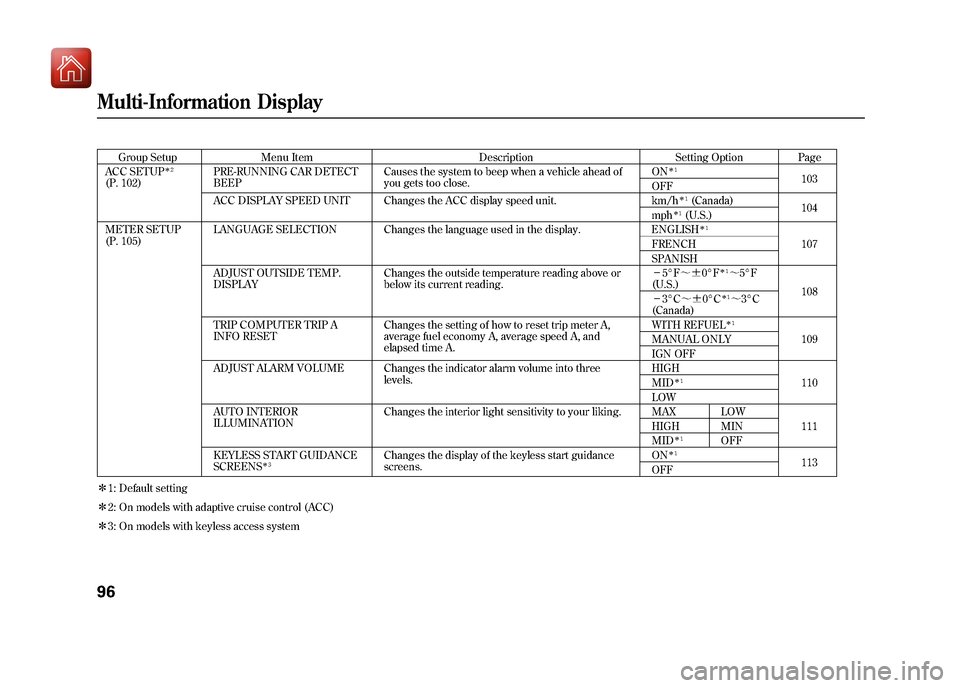
ACC SETUP
ꭧ 2
(P. 102) PRE-RUNNING CAR DETECT
BEEP Causes the system to beep when a vehicle ahead of
you gets too close. ON
ꭧ
1
103
OFF
ACC DISPLAY SPEED UNIT Changes the ACC display speed unit. km/h
ꭧ 1(Canada)
104
mph
ꭧ 1(U.S.)
METER SETUP
(P. 105) LANGUAGE SELECTION Changes the language used in the display. ENGLISHꭧ
1
107
FRENCH
SPANISH
ADJUST OUTSIDE TEMP.
DISPLAY Changes the outside temperature reading above or
below its current reading. -
5°F ~ꭗ 0°F
ꭧ1~5°F
(U.S.) 108
- 3°C ~ꭗ0°Cꭧ 1~3°C
(Canada)
TRIP COMPUTER TRIP A
INFO RESET Changes the setting of how to reset trip meter A,
average fuel economy A, average speed A, and
elapsed time A. WITH REFUELꭧ
1
109
MANUAL ONLY
IGN OFF
ADJUST ALARM VOLUME Changes the indicator alarm volume into three levels. HIGH
110
MID
ꭧ 1
LOW
AUTO INTERIOR
ILLUMINATION Changes the interior light sensitivity to your liking. MAX LOW
111
HIGH MIN
MID
ꭧ 1
OFF
KEYLESS START GUIDANCE
SCREENS
ꭧ 3
Changes the display of the keyless start guidance
screens. ON
ꭧ
1
113
OFF
ꭧ 1: Default setting
ꭧ 2: On models with adaptive cruise control (ACC)
ꭧ 3: On models with keyless access system
Multi-Information Display9609/10/28 17:15:37 10 ACURA ZDX KA KC New North America Own 50 31SZN600 enu
Page 102 of 645
Group SetupMenu Item DescriptionSetting OptionPage
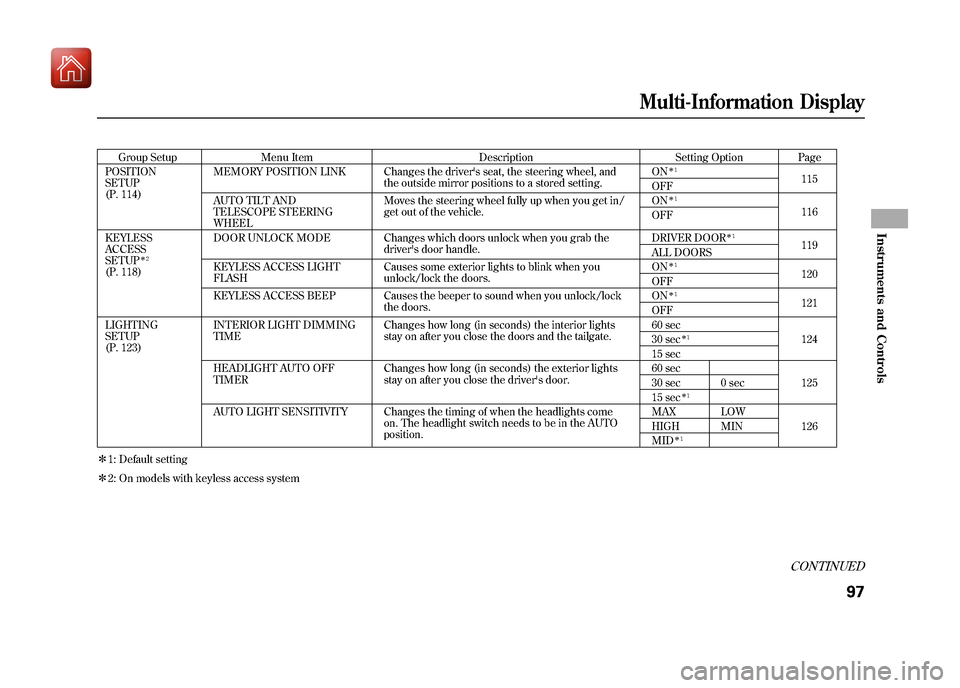
POSITION
SETUP
(P. 114) MEMORY POSITION LINK Changes the driver's seat, the steering wheel, and
the outside mirror positions to a stored setting. ON
ꭧ
1
115
OFF
AUTO TILT AND
TELESCOPE STEERING
WHEEL Moves the steering wheel fully up when you get in/
get out of the vehicle.
ON
ꭧ
1
116
OFF
KEYLESS
ACCESS
SETUP
ꭧ 2
(P. 118) DOOR UNLOCK MODE Changes which doors unlock when you grab the
driver's door handle. DRIVER DOOR
ꭧ
1
119
ALL DOORS
KEYLESS ACCESS LIGHT
FLASH Causes some exterior lights to blink when you
unlock/lock the doors. ON
ꭧ
1
120
OFF
KEYLESS ACCESS BEEP Causes the beeper to sound when you unlock/lock the doors. ON
ꭧ
1
121
OFF
LIGHTING
SETUP
(P. 123) INTERIOR LIGHT DIMMING
TIME
Changes how long (in seconds) the interior lights
stay on after you close the doors and the tailgate. 60 sec
124
30 sec
ꭧ 1
15 sec
HEADLIGHT AUTO OFF
TIMER Changes how long (in seconds) the exterior lights
stay on after you close the driver's door. 60 sec
125
30 sec 0 sec
15 sec
ꭧ 1
AUTO LIGHT SENSITIVITY Changes the timing of when the headlights come
on. The headlight switch needs to be in the AUTO
position. MAX LOW
126
HIGH MIN
MID
ꭧ 1
ꭧ 1: Default setting
ꭧ 2: On models with keyless access system
CONTINUED
Multi-Information Display
97
Instruments and Controls
09/10/28 17:15:37 10 ACURA ZDX KA KC New North America Own 50 31SZN600 enu
Page 103 of 645
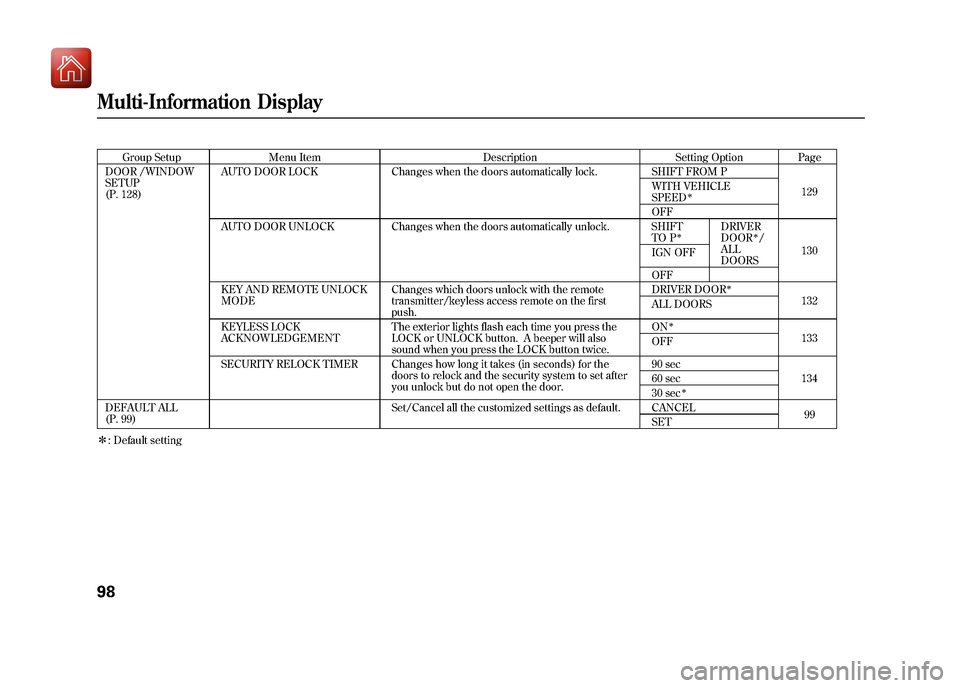
Group SetupMenu Item DescriptionSetting OptionPage
DOOR /WINDOW
SETUP
(P. 128) AUTO DOOR LOCK
Changes when the doors automatically lock. SHIFT FROM P
129
WITH VEHICLE
SPEED
ꭧ
OFF
AUTO DOOR UNLOCK Changes when the doors automatically unlock. SHIFT TO P
ꭧ
DRIVER
DOOR
ꭧ/
ALL
DOORS 130
IGN OFF
OFF
KEY AND REMOTE UNLOCK
MODE Changes which doors unlock with the remote
transmitter/keyless access remote on the first
push. DRIVER DOOR
ꭧ
132
ALL DOORS
KEYLESS LOCK
ACKNOWLEDGEMENT The exterior lights flash each time you press the
LOCK or UNLOCK button. A beeper will also
sound when you press the LOCK button twice. ON
ꭧ
133
OFF
SECURITY RELOCK TIMER Changes how long it takes (in seconds) for the doors to relock and the security system to set after
you unlock but do not open the door. 90 sec
134
60 sec
30 sec
ꭧ
DEFAULT ALL
(P. 99) Set/Cancel all the customized settings as default. CANCEL
99
SET
ꭧ : Default settingMulti-Information Display9809/10/28 17:15:37 10 ACURA ZDX KA KC New North America Own 50 31SZN600 enu
Page 104 of 645

DEFAULT ALLIf you want to set the default settings,
press the INFO (▲/▼ ) button to
select DEFAULT ALL, then press the
SEL/RESET button.
To set the default settings, press the
INFO (▲ /▼ ) button to select SET
then press the SEL/RESET button.
If you want to cancel DEFAULT ALL,
select CANCEL, then press the SEL/
RESET button. The screen goes back
to the previous display.
When DEFAULT ALL is set, you will
see the above display for several
seconds, then the screen returns to
the default all setting display.
If the setting is not successfully
completed, ‘‘FAILED ’’is shown for
several seconds, and then the screen
goes back to the normal message
mode. Repeat the same procedure to
select DEFAULT ALL.
CONTINUED
Multi-Information Display
99
Instruments and Controls
09/10/28 17:15:37 10 ACURA ZDX KA KC New North America Own 50 31SZN600 enu
Page 107 of 645

Adaptive Cruise Control SetupOn models with adaptive cruisecontrol (ACC)Here are the two custom settings for
adaptive cruise control (ACC):●PRE-RUNNING CAR DETECT
BEEP●ACC DISPLAY SPEED UNIT
While ‘‘ACC SETUP ’’is shown, press
the SEL/RESET button to enter the
customize mode.
Each time you press the INFO
(▲ /▼ ) button, the display changes
as shown in the illustration. Press the
INFO (▲ /▼ ) button until you see
the setting you want to customize,
then press the SEL/RESET button to
enter your selection.
: Press the INFO button ( ▲/▼ ).
: Press the SEL/RESET button.
Multi-Information Display10209/10/28 17:15:37 10 ACURA ZDX KA KC New North America Own 50 31SZN600 enu
Page 114 of 645
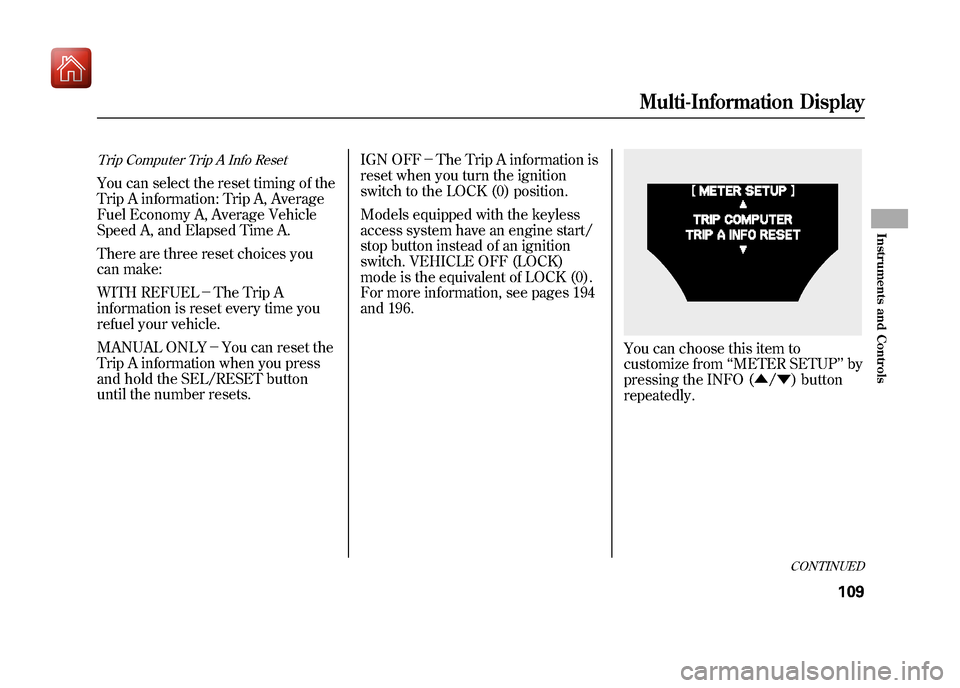
Trip Computer Trip A Info ResetYou can select the reset timing of the
Trip A information: Trip A, Average
Fuel Economy A, Average Vehicle
Speed A, and Elapsed Time A.
There are three reset choices you
can make:
WITH REFUEL-The Trip A
information is reset every time you
refuel your vehicle.
MANUAL ONLY -You can reset the
Trip A information when you press
and hold the SEL/RESET button
until the number resets. IGN OFF
-The Trip A information is
reset when you turn the ignition
switch to the LOCK (0) position.
Models equipped with the keyless
access system have an engine start/
stop button instead of an ignition
switch. VEHICLE OFF (LOCK)
mode is the equivalent of LOCK (0).
For more information, see pages 194
and 196.
You can choose this item to
customize from ‘‘METER SETUP ’’by
pressing the INFO (▲ /▼ ) button
repeatedly.
CONTINUED
Multi-Information Display
109
Instruments and Controls
09/10/28 17:15:37 10 ACURA ZDX KA KC New North America Own 50 31SZN600 enu
Page 138 of 645
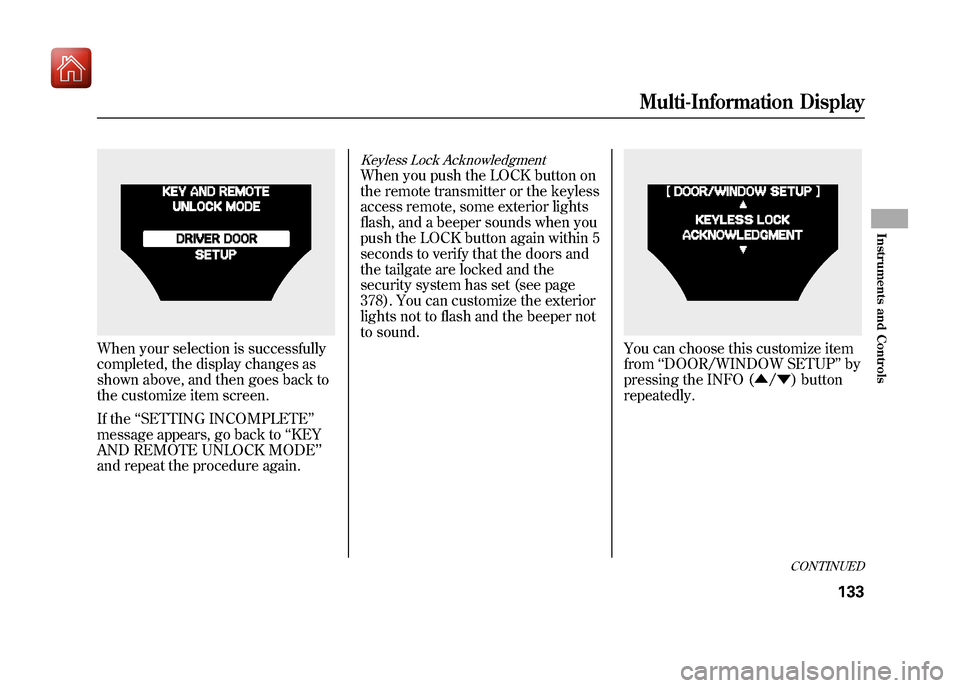
When your selection is successfully
completed, the display changes as
shown above, and then goes back to
the customize item screen.
If the‘‘SETTING INCOMPLETE ’’
message appears, go back to ‘‘KEY
AND REMOTE UNLOCK MODE’’
and repeat the procedure again.
Keyless Lock AcknowledgmentWhen you push the LOCK button on
the remote transmitter or the keyless
access remote, some exterior lights
flash, and a beeper sounds when you
push the LOCK button again within 5
seconds to verify that the doors and
the tailgate are locked and the
security system has set (see page
378). You can customize the exterior
lights not to flash and the beeper not
to sound.
You can choose this customize item
from ‘‘DOOR/WINDOW SETUP ’’by
pressing the INFO (▲ /▼ ) button
repeatedly.
CONTINUED
Multi-Information Display
133
Instruments and Controls
09/10/28 17:15:37 10 ACURA ZDX KA KC New North America Own 50 31SZN600 enu
Page 145 of 645
High Beams-To switch from low
beams to high beams, push the left
lever forward until you hear a click.
The blue high beam indicator will
come on (see page 71). Pull it back to
return to low beams. To flash the
high beams, pull the lever back
lightly, then release it. The high
beams stay on as long as you hold
the lever back. AUTO
-The automatic lighting
feature turns on the headlights and
all other exterior lights, when it
senses low ambient light.
To turn on automatic lighting, turn
the light switch to AUTO at any time.
The lights will come on automatically
when the outside light level becomes
low (at dusk, for example). The
lights on indicator comes on as a
reminder. The lights and indicator
will turn off automatically when the
system senses high ambient light.
The lights will remain on when you
turn off the ignition switch. They will
turn off automatically when you
remove the key and open the driver's
door. To turn them on again, either
turn the ignition switch to the ON
(II) position or turn the light switch
to the
position. Models equipped with the keyless
access system have an engine start/
stop button instead of an ignition
switch. ON Mode is the equivalent of
ON (II). See page 196 for ignition
switch and power mode comparison.
Even with the automatic lighting
feature turned on, we recommend
that you turn on the lights manually
when driving at night or in a dense
fog, or when you enter dark areas
such as long tunnels or parking
facilities.
To change the
‘‘AUTO LIGHT
SENSITIVITY ’’setting, see page 126.
Do not leave the light switch in
AUTO if you will not be driving the
vehicle for an extended period (a
week or more). You should also turn
off the lights if you plan to leave the
engine idling or off for a long time.
Turn Signal and Headlights14009/10/28 17:15:37 10 ACURA ZDX KA KC New North America Own 50 31SZN600 enu