lock Acura ZDX 2012 Owner's Guide
[x] Cancel search | Manufacturer: ACURA, Model Year: 2012, Model line: ZDX, Model: Acura ZDX 2012Pages: 370, PDF Size: 10.06 MB
Page 62 of 370
uuChild Safety uSafety of Infants and Small Children
60
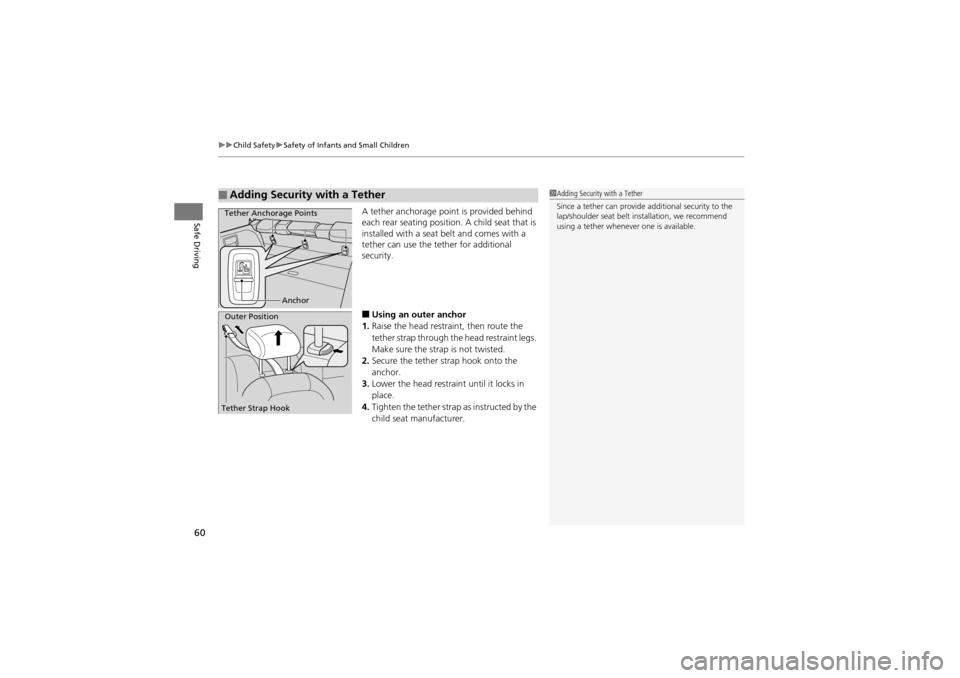
Safe DrivingA tether anchorage point is provided behind
each rear seating position. A child seat that is
installed with a seat belt and comes with a
tether can use the tether for additional
security.
■Using an outer anchor
1. Raise the head restra int, then route the
tether strap through th e head restraint legs.
Make sure the strap is not twisted.
2. Secure the tether strap hook onto the
anchor.
3. Lower the head restraint until it locks in
place.
4. Tighten the tether strap as instructed by the
child seat manufacturer.
■Adding Security with a Tether1Adding Security with a Tether
Since a tether can provide additional security to the
lap/shoulder seat belt in stallation, we recommend
using a tether whenever one is available.
Anchor
Tether Anchorage Points
Outer Position
Tether Strap Hook
Page 73 of 370
71
uuIndicators u
Continued
Instrument Panel
*1: Models with the keyless access system have an ENGINE START/STOP button instead of an ignition switch.
IndicatorNameOn/BlinkingExplanationMessage
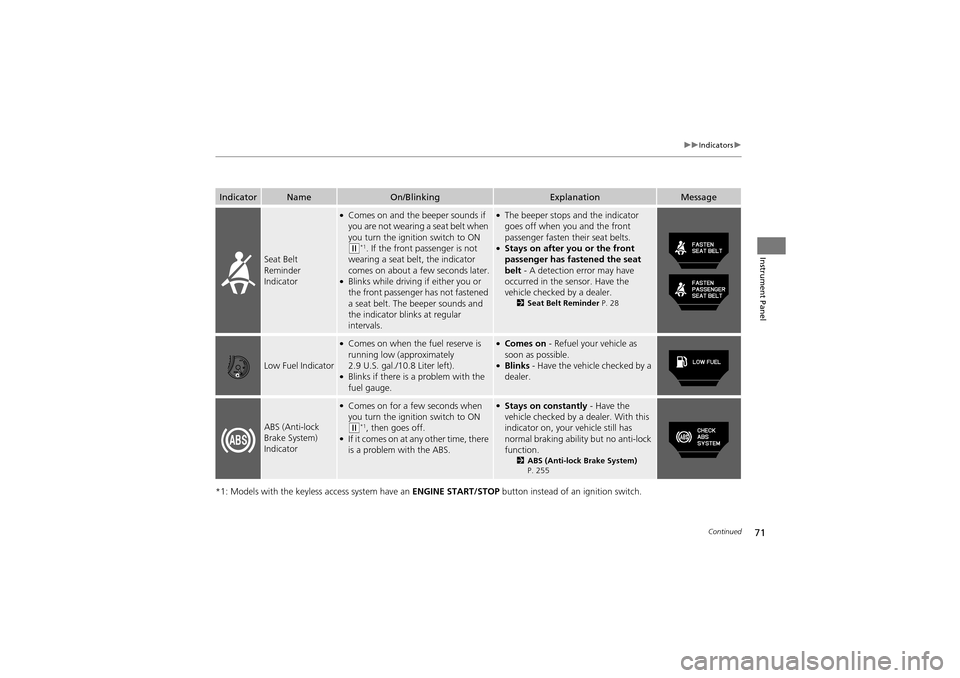
Seat Belt
Reminder
Indicator
●Comes on and the beeper sounds if
you are not wearing a seat belt when
you turn the ignition switch to ON
(w*1. If the front passenger is not
wearing a seat belt, the indicator
comes on about a few seconds later.
●Blinks while driving if either you or
the front passenger has not fastened
a seat belt. The beeper sounds and
the indicator blinks at regular
intervals.
●The beeper stops and the indicator
goes off when you and the front
passenger fasten their seat belts.
●Stays on after you or the front
passenger has fastened the seat
belt - A detection error may have
occurred in the sensor. Have the
vehicle checked by a dealer.
2 Seat Belt Reminder P. 28
Low Fuel Indicator
●Comes on when the fuel reserve is
running low (approximately
2.9 U.S. gal./10.8 Liter left).
●Blinks if there is a problem with the
fuel gauge.
●Comes on - Refuel your vehicle as
soon as possible.
●Blinks - Have the vehicle checked by a
dealer.
ABS (Anti-lock
Brake System)
Indicator
●Comes on for a fe w seconds when
you turn the igniti on switch to ON
(w*1, then goes off.●If it comes on at any other time, there
is a problem with the ABS.
●Stays on constantly - Have the
vehicle checked by a dealer. With this
indicator on, your vehicle still has
normal braking ability but no anti-lock
function.
2 ABS (Anti-lock Brake System)
P. 255
Page 78 of 370
76
uuIndicators u
Instrument Panel
*1: Models with the keyless access system have an ENGINE START/STOP button instead of an ignition switch.
IndicatorNameOn/BlinkingExplanationMessage
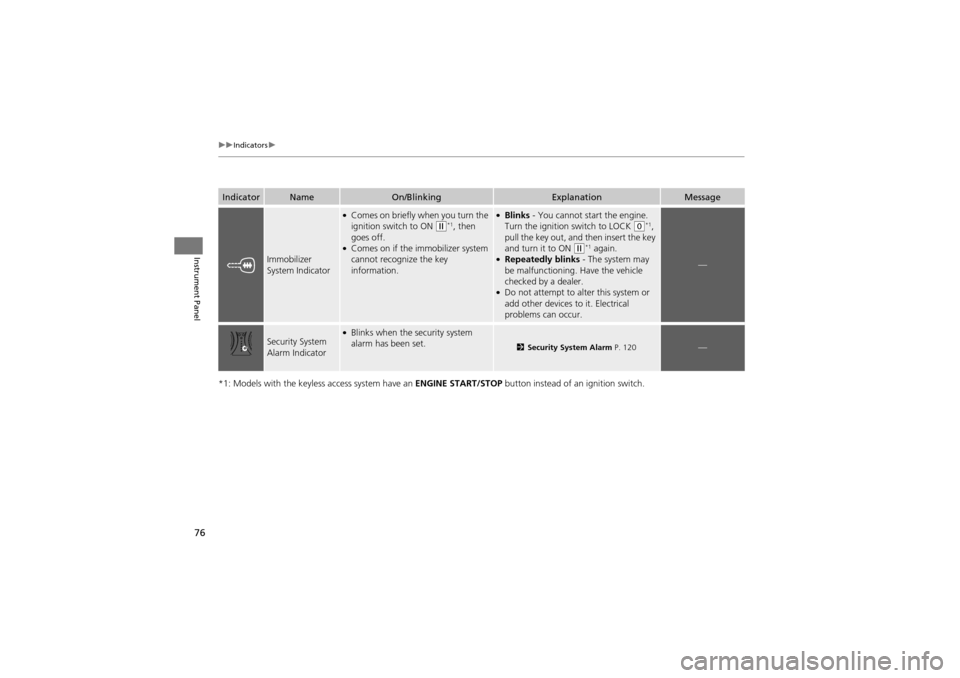
Immobilizer
System Indicator
●Comes on briefly when you turn the
ignition switch to ON (w*1, then
goes off.
●Comes on if the immobilizer system
cannot recognize the key
information.
●Blinks - You cannot start the engine.
Turn the ignition switch to LOCK (0*1,
pull the key out, and then insert the key
and turn it to ON
(w*1 again.●Repeatedly blinks - The system may
be malfunctioning. Have the vehicle
checked by a dealer.
●Do not attempt to alter this system or
add other devices to it. Electrical
problems can occur.
—
Security System
Alarm Indicator●Blinks when the security system
alarm has been set.
2 Security System Alarm P. 120—
Page 83 of 370
81
uuIndicators uMulti-Information Display Warning and Information Messages
Continued
Instrument Panel
*1: Models with the keyless access system have an ENGINE START/STOP button instead of an ignition switch.
MessageConditionExplanation
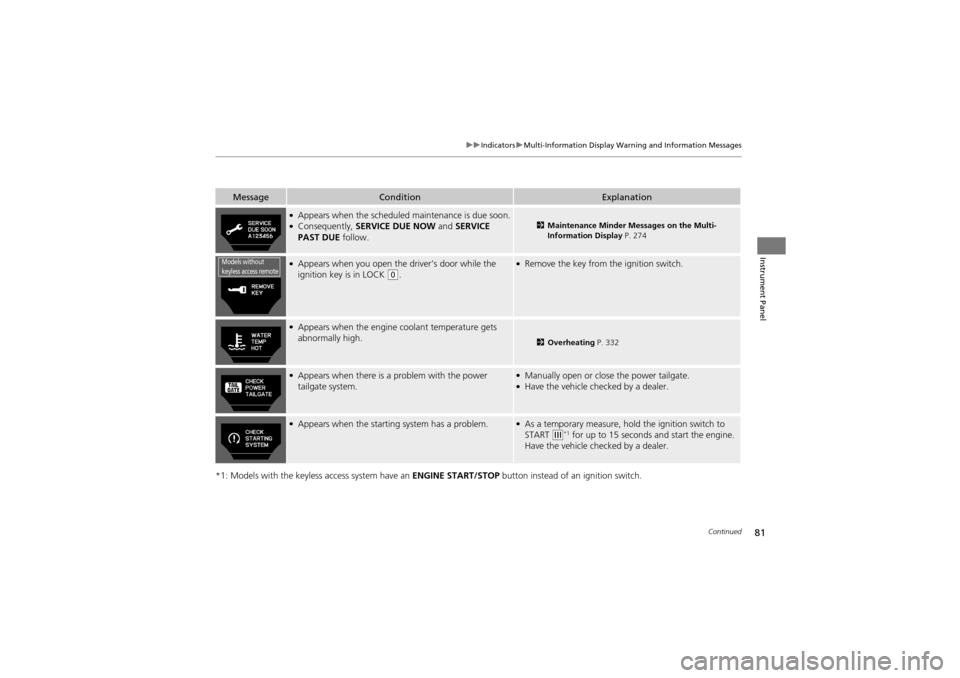
●Appears when the scheduled maintenance is due soon.●Consequently, SERVICE DUE NOW and SERVICE
PAST DUE follow.2Maintenance Minder Messages on the Multi-
Information Display P. 274
●Appears when you open the driver’s door while the
ignition key is in LOCK (0.
●Remove the key from the ignition switch.
●Appears when the engine coolant temperature gets
abnormally high.
2 Overheating P. 332
●Appears when there is a problem with the power
tailgate system.●Manually open or close the power tailgate.●Have the vehicle ch ecked by a dealer.
●Appears when the starting system has a problem.●As a temporary measure, hold the ignition switch to
START (e*1 for up to 15 seconds and start the engine.
Have the vehicle ch ecked by a dealer.
Models without
keyless access remote
Page 86 of 370
84
uuIndicators uMulti-Information Display Warning and Information Messages
Instrument Panel
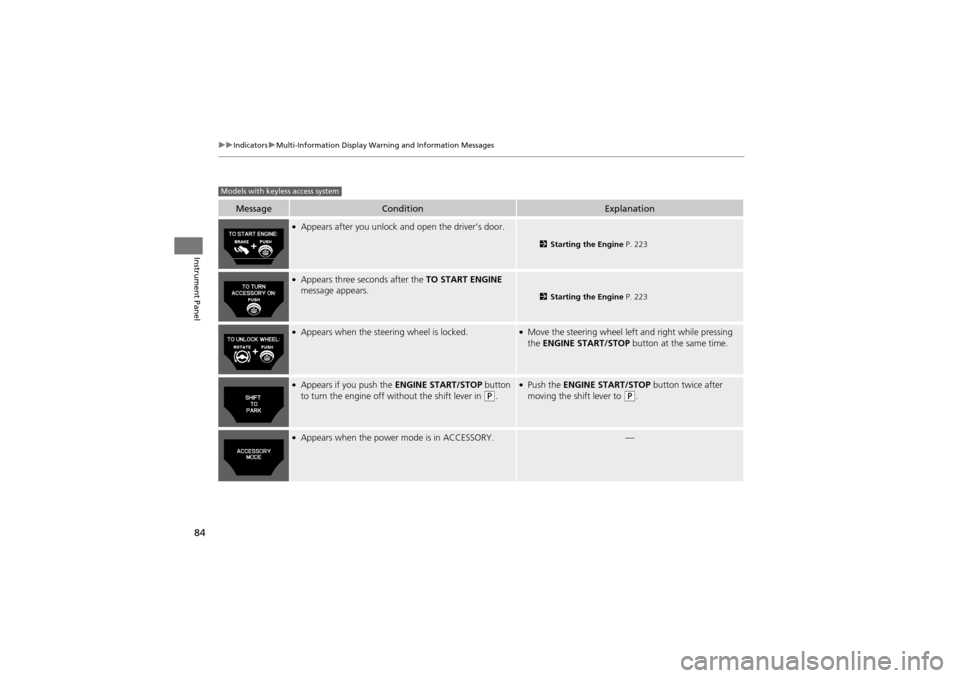
MessageConditionExplanation
●Appears after you unlock and open the driver’s door.
2 Starting the Engine P. 223
●Appears three seconds after the TO START ENGINE
message appears.
2 Starting the Engine P. 223
●Appears when the steering wheel is locked.●Move the steering wheel left and right while pressing
the ENGINE START/STOP button at the same time.
●Appears if you push the ENGINE START/STOP button
to turn the engine off without the shift lever in (P.
●Push the ENGINE START/STOP button twice after
moving the shift lever to (P.
●Appears when the power mode is in ACCESSORY.—
Models with keyless access system
Page 87 of 370
85
uuIndicators uMulti-Information Display Warning and Information Messages
Continued
Instrument Panel
MessageConditionExplanation
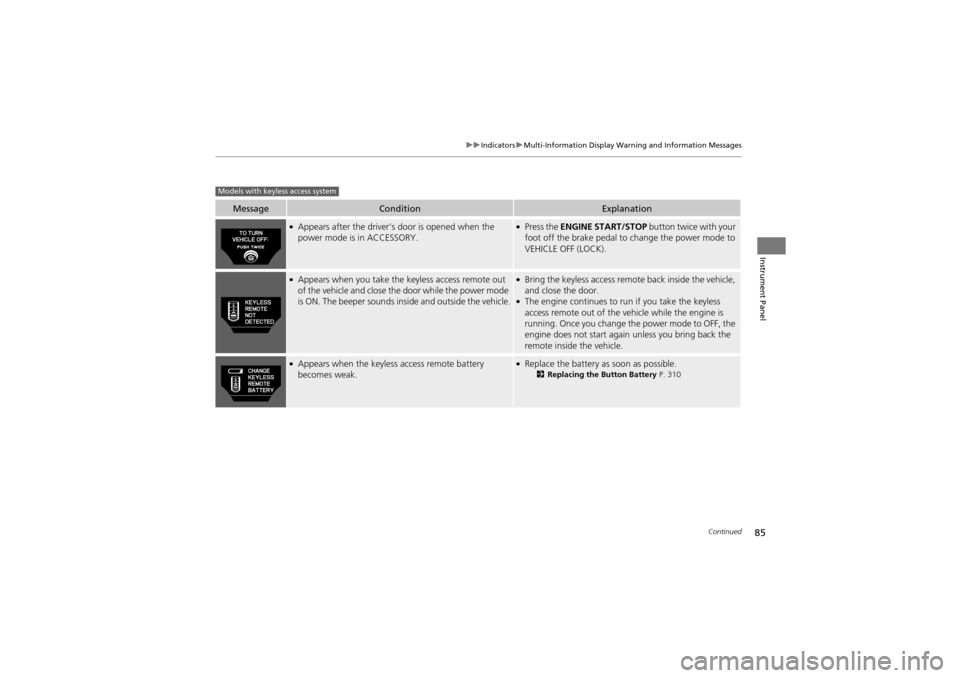
●Appears after the driver’s door is opened when the
power mode is in ACCESSORY.●Press the ENGINE START/STOP button twice with your
foot off the brake pedal to change the power mode to
VEHICLE OFF (LOCK).
●Appears when you take the keyless access remote out
of the vehicle and close the door while the power mode
is ON. The beeper sounds inside and outside the vehicle.●Bring the keyless access remote back inside the vehicle,
and close the door.
●The engine continues to run if you take the keyless
access remote out of the vehicle while the engine is
running. Once you change the power mode to OFF, the
engine does not start again unless you bring back the
remote inside the vehicle.
●Appears when the keyless access remote battery
becomes weak.●Replace the battery as soon as possible.2Replacing the Button Battery P. 310
Models with keyless access system
Page 96 of 370
uuGauges and Multi-Information Display uMulti-Information Display
94
Instrument Panel
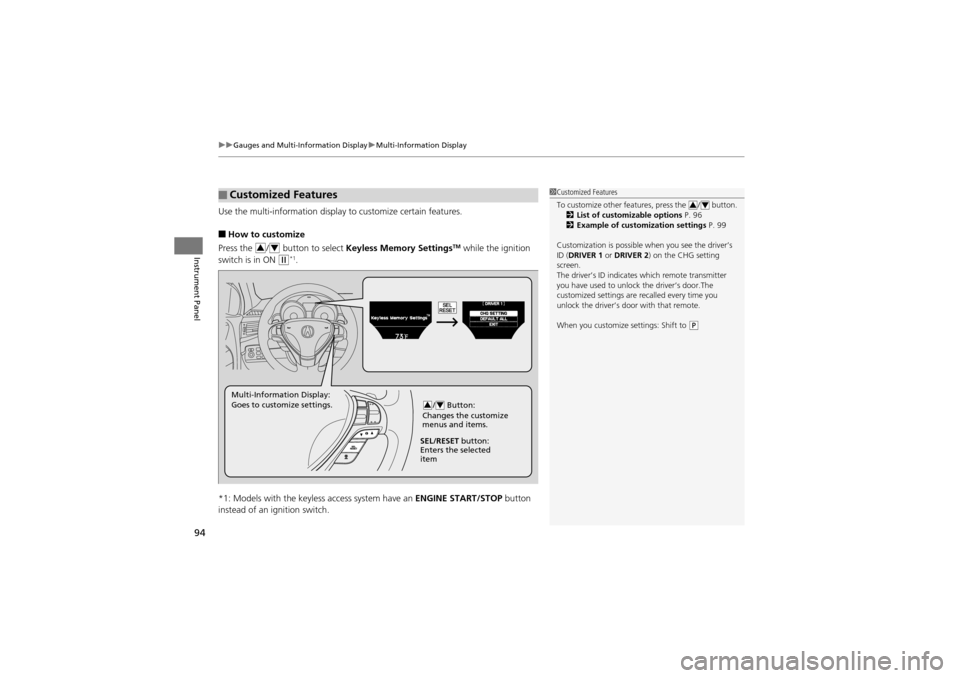
Use the multi-information display to customize certain features.
■How to customize
Press the / button to select Keyless Memory SettingsTM while the ignition
switch is in ON
w*1.
*1: Models with the keyless access system have an ENGINE START/STOP button
instead of an ignition switch.
■Customized Features1 Customized Features
To customize other features, press the / button.
2 List of customizable options P. 96
2 Example of customization settings P. 99
Customization is possible when you see the driver’s
ID (DRIVER 1 or DRIVER 2 ) on the CHG setting
screen.
The driver’s ID indicate s which remote transmitter
you have used to unlock the driver’s door.The
customized settings are recalled every time you
unlock the driver’s door with that remote.
When you customize settings: Shift to
(P
34
34
/ Button:
Changes the customize
menus and items.34Multi-Information Display:
Goes to customize settings.
SEL/RESET button:
Enters the selected
item
Page 97 of 370
95
uuGauges and Multi-Information Display uMulti-Information Display
Continued
Instrument Panel
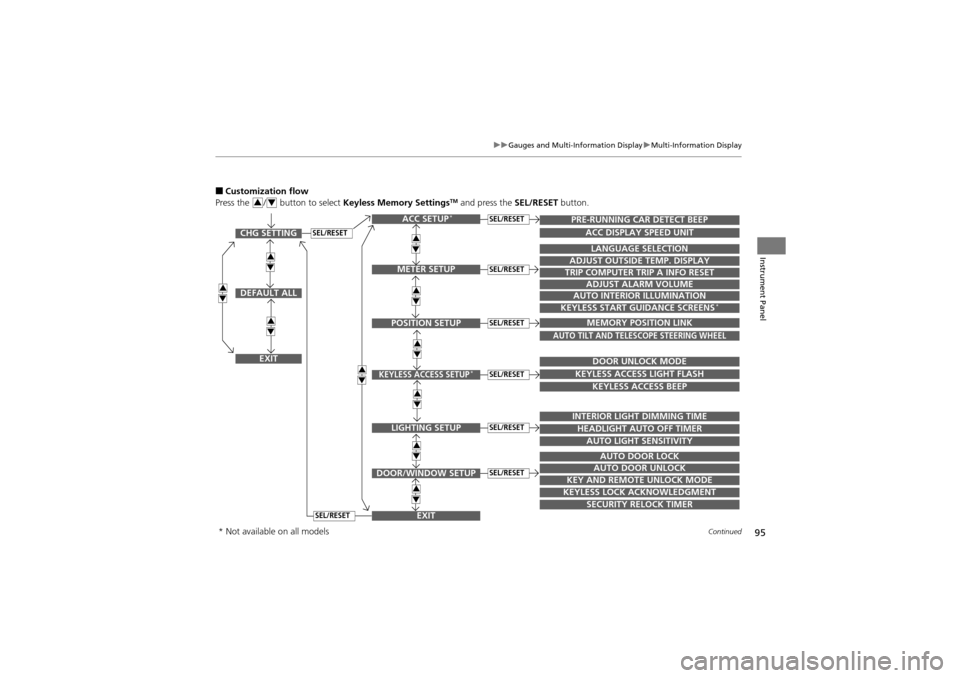
■Customization flow
Press the / button to select Keyless Memory SettingsTM and press the SEL/RESET button.34
SEL/RESETCHG SETTING
DEFAULT ALL
EXIT
ACC SETUP*
EXITSECURITY RELOCK TIMER
TRIP COMPUTER TRIP A INFO RESET
ADJUST ALARM VOLUME
AUTO INTERIOR ILLUMINATION
KEYLESS START GUIDANCE SCREENS*
LANGUAGE SELECTION
ADJUST OUTSIDE TEMP. DISPLAY
MEMORY POSITION LINK
AUTO TILT AND TELESCOPE STEERING WHEEL
DOOR UNLOCK MODE
KEYLESS ACCESS LIGHT FLASH
KEYLESS ACCESS BEEP
INTERIOR LIGHT DIMMING TIME
HEADLIGHT AUTO OFF TIMER
AUTO LIGHT SENSITIVITY
AUTO DOOR LOCK
AUTO DOOR UNLOCK
KEY AND REMOTE UNLOCK MODE
KEYLESS LOCK ACKNOWLEDGMENT
PRE-RUNNING CAR DETECT BEEP
ACC DISPLAY SPEED UNIT
34
34
34
34
34
34
34
34
34
34
METER SETUP
POSITION SETUP
KEYLESS ACCESS SETUP*
LIGHTING SETUP
DOOR/WINDOW SETUP
SEL/RESET
SEL/RESET
SEL/RESET
SEL/RESET
SEL/RESET
SEL/RESET
SEL/RESET
* Not available on all models
Page 99 of 370
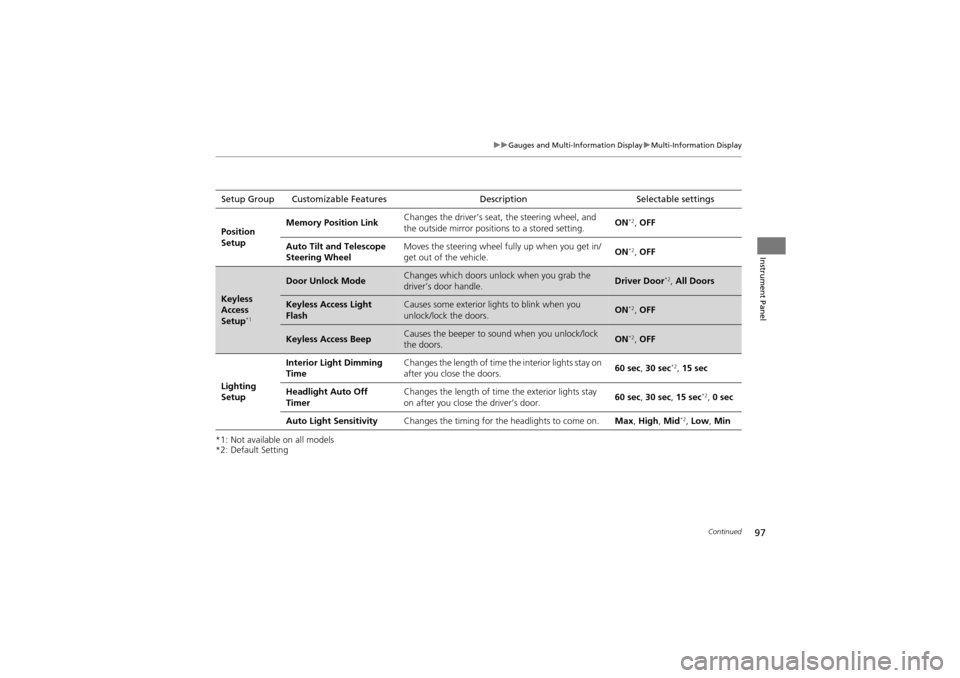
97
uuGauges and Multi-Information Display uMulti-Information Display
Continued
Instrument Panel
*1: Not available on all models
*2: Default SettingSetup Group Customizable Features
DescriptionSelectable settings
Position
Setup Memory Position Link
Changes the driver’s seat, the steering wheel, and
the outside mirror position
s to a stored setting. ON
*2,
OFF
Auto Tilt and Telescope
Steering Wheel Moves the steering wheel fu
lly up when you get in/
get out of the vehicle. ON
*2,
OFF
Keyless
Access
Setup
*1
Door Unlock ModeChanges which doors unlock when you grab the
driver’s door handle.Driver Door*2, All Doors
Keyless Access Light
FlashCauses some exterior li ghts to blink when you
unlock/lock the doors.ON*2, OFF
Keyless Access BeepCauses the beeper to s ound when you unlock/lock
the doors.ON*2, OFF
Lighting
Setup Interior Light Dimming
Time
Changes the length of time
the interior lights stay on
after you close the doors. 60 sec,
30 sec
*2, 15 sec
Headlight Auto Off
Timer Changes the length of time
the exterior lights stay
on after you close the driver’s door. 60 sec,
30 sec, 15 sec
*2, 0 sec
Auto Light Sensitivity Changes the timing for the headlights to come on. Max, High , Mid
*2, Low, Min
Page 100 of 370
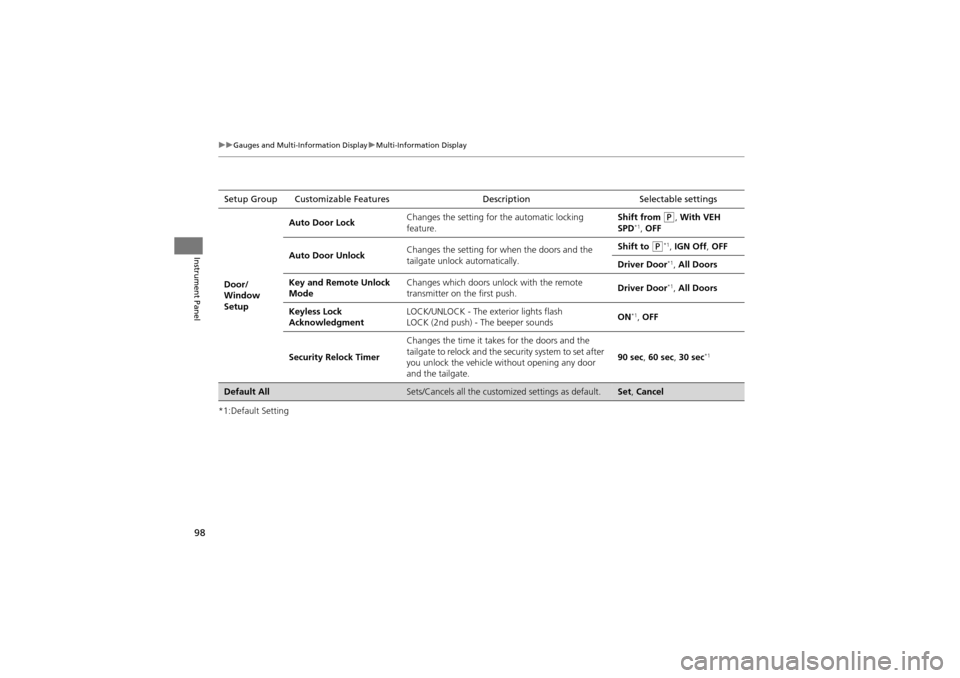
98
uuGauges and Multi-Information Display uMulti-Information Display
Instrument Panel
*1:Default SettingSetup Group Customizable Features
DescriptionSelectable settings
Door/
Window
Setup Auto Door Lock
Changes the setting for
the automatic locking
feature. Shift from
P, With VEH
SPD*1, OFF
Auto Door Unlock Changes the setting for wh
en the doors and the
tailgate unlock automatically. Shift to
P*1, IGN Off , OFF
Driver Door
*1, All Doors
Key and Remote Unlock
Mode Changes which doors unlock with the remote
transmitter on the first push.
Driver Door
*1,
All Doors
Keyless Lock
Acknowledgment LOCK/UNLOCK - The ex
terior lights flash
LOCK (2nd push) - The beeper sounds ON
*1,
OFF
Security Relock Timer Changes the time it takes for the doors and the
tailgate to relock and the security system to set after
you unlock the vehicle without opening any door
and the tailgate. 90 sec
, 60 sec , 30 sec
*1
Default AllSets/Cancels all the custom ized settings as default.Set, Cancel