light Acura ZDX 2012 Repair Manual
[x] Cancel search | Manufacturer: ACURA, Model Year: 2012, Model line: ZDX, Model: Acura ZDX 2012Pages: 370, PDF Size: 10.06 MB
Page 233 of 370
231
uuWhen Driving uShifting
Driving
■Second gear lock mode
If you pull the
+ paddle shifter while stopped or driv ing at 6 mph (10 km/h) or less,
the gear position will be locked in 2nd gear. This makes it easier to pull away on
slippery surfaces such as snow covered roads.
To cancel the 2nd gear lock mode, pull the paddle shifter, or move the shift lever
from
S to D.
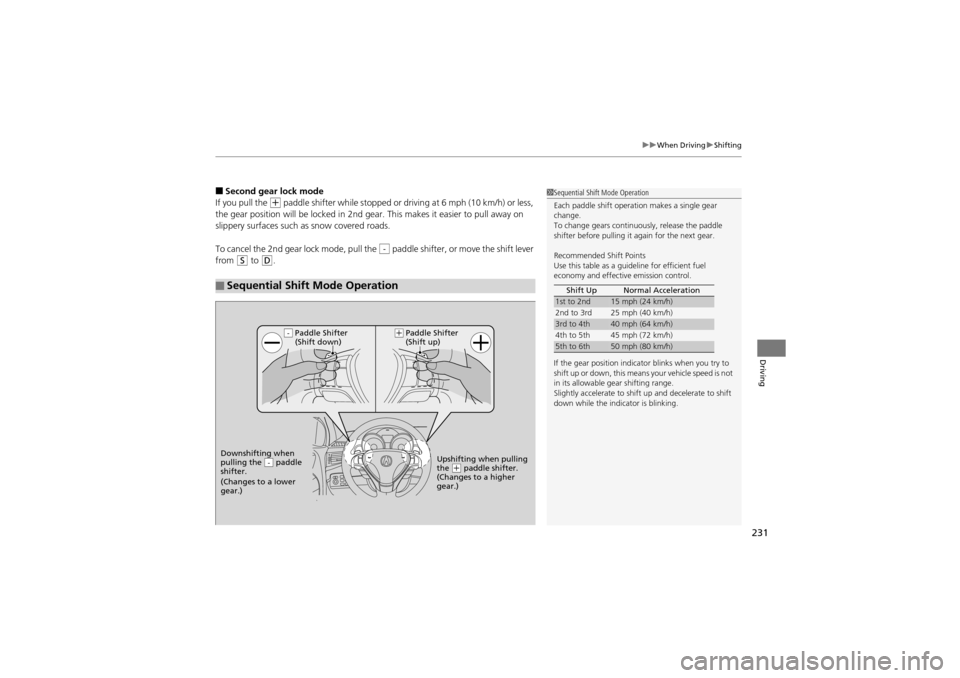
■Sequential Shift Mode Operation
-
1 Sequential Shift Mode Operation
Each paddle shift operat ion makes a single gear
change.
To change gears continuously, release the paddle
shifter before pulling it again for the next gear.
Recommended Shift Points
Use this table as a guideline for efficient fuel
economy and effective emission control.
If the gear position indicator blinks when you try to
shift up or down, this means your vehicle speed is not
in its allowable gear shifting range.
Slightly accelerate to shift up and decelerate to shift
down while the indicator is blinking. Shift Up Normal Acceleration
1st to 2nd15 mph (24 km/h)
2nd to 3rd 25 mph (40 km/h)
3rd to 4th40 mph (64 km/h)
4th to 5th 45 mph (72 km/h)
5th to 6th50 mph (80 km/h)
Paddle Shifter
(Shift down)
Downshifting when
pulling the paddle
shifter.
(Changes to a lower
gear.)
-Upshifting when pulling
the (+ paddle shifter.
(Changes to a higher
gear.)
-(+
Paddle Shifter
(Shift up)
Page 250 of 370
248
uuWhen Driving uTPMS (Tire Pressure Monitoring System)
Driving
TPMS (Tire Pressure Monitoring System)
Monitors the tire pressure while you are driving. If your vehicle’s tire pressure
becomes significantly low, the low tire pressure/TPMS indicator comes on and a
message appears on the mu lti-information display.
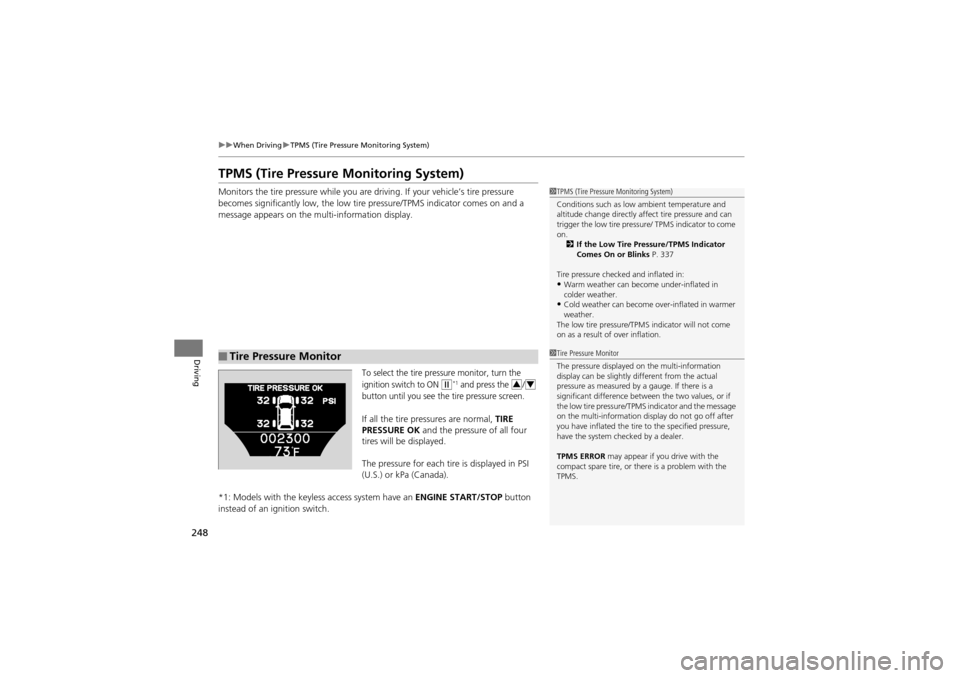
To select the tire pressure monitor, turn the
ignition switch to ON
w*1 and press the /
button until you see the tire pressure screen.
If all the tire pressures are normal, TIRE
PRESSURE OK and the pressure of all four
tires will be displayed.
The pressure for each tire is displayed in PSI
(U.S.) or kPa (Canada).
*1: Models with the keyless access system have an ENGINE START/STOP button
instead of an ignition switch.
■Tire Pressure Monitor
1 TPMS (Tire Pressure Monitoring System)
Conditions such as low ambient temperature and
altitude change directly affect tire pressure and can
trigger the low tire pressure / TPMS indicator to come
on. 2 If the Low Tire Pressure/TPMS Indicator
Comes On or Blinks P. 337
Tire pressure checked and inflated in:
•Warm weather can beco me under-inflated in
colder weather.
•Cold weather can become over-inflated in warmer
weather.
The low tire pressure/TPM S indicator will not come
on as a result of over inflation.
1 Tire Pressure Monitor
The pressure displayed on the multi-information
display can be slightly different from the actual
pressure as measured by a gauge. If there is a
significant difference between the two values, or if
the low tire pressure/TPMS indicator and the message
on the multi-information display do not go off after
you have inflated the tire to the specified pressure,
have the system checked by a dealer.
TPMS ERROR may appear if you drive with the
compact spare tire, or ther e is a problem with the
TPMS.
34
Page 256 of 370
uuBraking uBrake System
254
Driving
Your vehicle is equipped with disc brakes at all four wheels. A power assist helps
reduce the effort needed on the brake pedal. The brake assist system increases the
stopping force when you depress the brake pe dal hard in an emergency situation.
The anti-lock brake system (ABS) helps you re tain steering control when braking very
hard.
2 Brake Assist System P. 256
2 ABS (Anti-lock Brake System) P. 255
■Foot Brake1Foot Brake
Check the brakes after driv ing through deep water,
or if there is a buildup of road surface water. If
necessary, dry the brakes by lightly depressing the
pedal several times.
If you hear a continuous metallic friction sound when
applying the brakes, the brake pads need to be
replaced. Have the vehicl e checked by a dealer.
Constantly using the brak e pedal while going down a
long hill builds up heat, which reduces the brake
effectiveness. Apply engine braking by taking your
foot off the accelerator pedal and downshifting to a
lower gear.
Do not rest your foot on the brake pedal while
driving, as it will lightly apply the brakes and cause
them to lose effectiveness over time and reduce pad
life. It will also confuse drivers behind you.
Page 257 of 370
255
uuBraking uABS (Anti-lock Brake System)
Driving
ABS (Anti-lock Brake System)
Helps prevent the wheels from locking up, an d helps you retain steering control by
pumping the brakes rapidly, much faster than you.
The electronic brake distribution (EBD) sy stem, which is part of the ABS, also
balances the front-to-rear braking distri bution according to vehicle loading.
You should never pump th e brake pedal. Let the ABS work for you by always
keeping firm, steady pressure on the brake pedal. This is sometimes referred to as
“stomp and steer.”
■ABS operation
The brake pedal may pulsate slightly when the ABS is working. Keep holding the
pedal firmly down. On dry pavement, you will need to press on the brake pedal very
hard before the ABS activates. However, you may feel the ABS activate immediately
if you are trying to stop on snow or ice.
When the vehicle speed goes under 6 mph (10 km/h), the ABS stops.
■ABS1 ABS (Anti-lock Brake System)
NOTICEThe ABS may not function correctly if you use an
incorrect tire type and size.
When the ABS indicator comes on while driving,
there may be a problem with the system.
While normal braking is no t affected, there is a
possibility of the ABS not operating. Have the vehicle
checked by a dealer immediately.
The ABS does not reduce the ti me or distance it takes
to stop the vehicle. It only helps with steering control
during hard braking.
In the following cases, your vehicle may need more
stopping distance than a vehicle without the ABS:
•When driving on rough road surfaces, including
when driving on uneven surfaces, such as gravel or
snow.
•When tire chains are installed.
You may hear a motor sound coming from the
engine compartmen t while system checks are being
performed immediately after starting the engine or
while driving. This is normal.
Page 258 of 370
256
uuBraking uBrake Assist System
Driving
Brake Assist System
Designed to assist the driver by generating greater braking force when you depress
the brake pedal hard du ring emergency braking.
■Brake assist system operation
Press the brake pedal firmly for more powerful braking.
When brake assist operates, the pedal may wiggle slightly and an operating noise
may be heard. This is normal. Keep holding the brake pedal firmly down.
Page 260 of 370
258
uuBraking uCMBSTM (Collision Mitigation Braking SystemTM)*
Driving
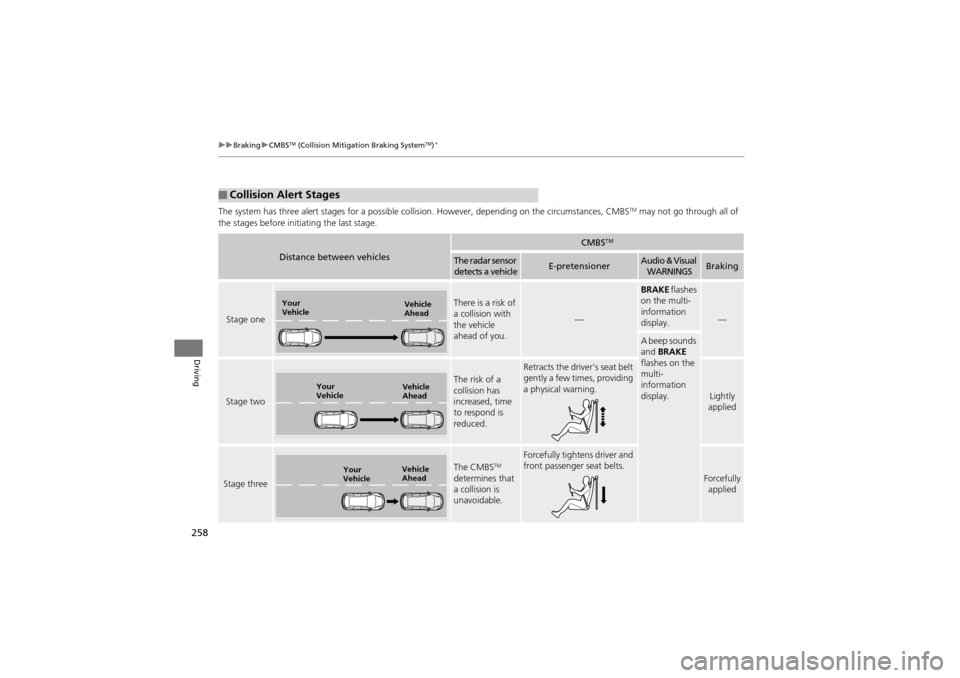
The system has three alert stages for a possible collis ion. However, depending on the circumstances, CMBSTM may not go through all of
the stages before init iating the last stage.
■Collision Alert Stages
Distance between vehicles
CMBSTM
The radar sensor
detects a vehicleE-pretensionerAudio & Visual WARNINGSBraking
Stage one
There is a risk of
a collision with
the vehicle
ahead of you.
—
BRAKE flashes
on the multi-
information
display.
—
A beep sounds
and BRAKE
flashes on the
multi-
information
display.
Stage two
The risk of a
collision has
increased, time
to respond is
reduced.
Retracts the driver’s seat belt
gently a few times, providing
a physical warning.
Lightly
applied
Stage three
The CMBSTM
determines that
a collision is
unavoidable.
Forcefully tightens driver and
front passenger seat belts.
Forcefully applied
Your
Vehicle Vehicle
Ahead
Your
VehicleVehicle
Ahead
Your
VehicleVehicle
Ahead
Page 264 of 370
262
Driving
Rearview Camera
About Your Rearview Camera
For models with the navigation system, see the Navigation System Manual.
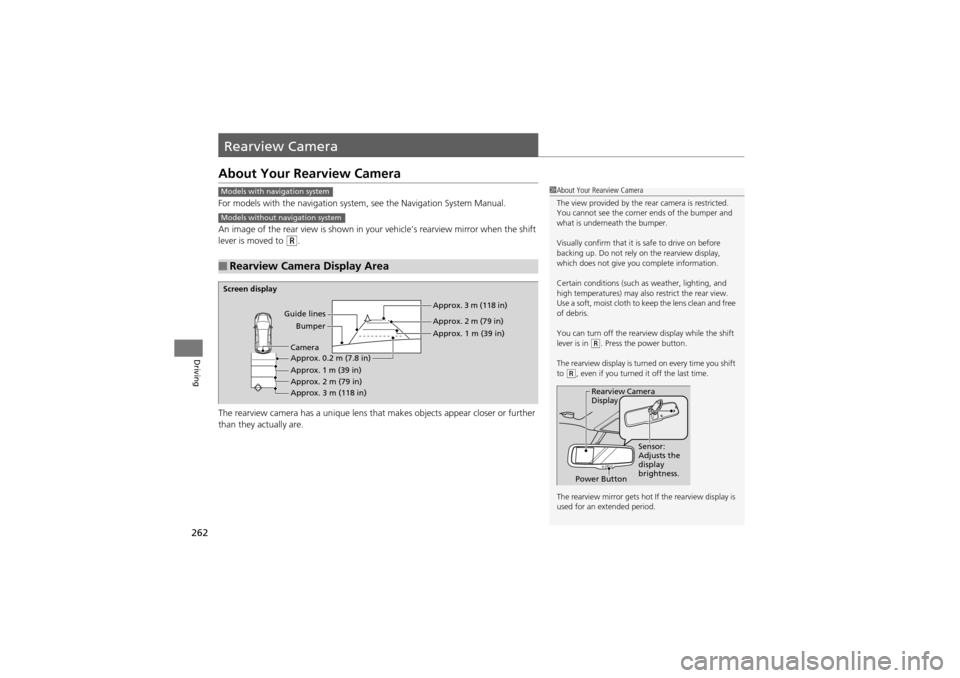
An image of the rear view is shown in your vehicle’s rearview mirror when the shift
lever is moved to
R.
The rearview camera has a unique lens that makes objects appear closer or further
than they actually are.
■Rearview Camera Display Area
Models with navigation system
Models without navigation system
1 About Your Rearview Camera
The view provided by the re ar camera is restricted.
You cannot see the corner ends of the bumper and
what is underneath the bumper.
Visually confirm that it is safe to drive on before
backing up. Do not rely on the rearview display,
which does not give you complete information.
Certain conditions (such as weather, lighting, and
high temperatures) may also restrict the rear view.
Use a soft, moist cloth to ke ep the lens clean and free
of debris.
You can turn off the rearview display while the shift
lever is in
(R. Press the power button.
The rearview display is turned on every time you shift
to
(R, even if you turned it off the last time.
The rearview mirror gets hot If the rearview display is
used for an extended period.
Rearview Camera
Display
Power Button Sensor:
Adjusts the
display
brightness.
Screen display
Guide linesBumper Approx. 3 m (118 in)
Approx. 2 m (79 in)
Approx. 1 m (39 in)
Approx. 0.2 m (7.8 in)
Approx. 1 m (39 in)
Approx. 2 m (79 in)
Approx. 3 m (118 in) Camera
Page 271 of 370
269
Maintenance
This chapter discusses basic maintenance.
Before Performing MaintenanceInspection and Mainte nance ............ 270
Safety When Performing Maintenance..... 271Parts and Fluids Used in Maintenance
Service ........................................... 272
Maintenance Minder
TM..................... 273
Maintenance Under the Hood
Maintenance Items Under the Hood ..... 277Opening the Hood ........................... 278
Engine Compartment Covers ........... 279
Recommended Engine Oi l ................ 280
Oil Check ......................................... 281
Adding Engine Oil ............................ 282
Changing the Engine Oil and Oil Filter ..... 283Engine Coolant ................................ 285
Transmission Fluid ............................ 287
Brake Fluid ....................................... 288
Power Steering Fluid Check.............. 289
Refilling Window Washer Fluid......... 290
Replacing Light Bulbs ....................... 291
Checking and Maintaining Wiper
Blades .......................................... 298
Checking and Maintaining Tires
Checking Tires ................................. 300
Tire and Loading Information Label ...... 301Tire Labeling .................................... 301
DOT Tire Quality Grading (U.S. Vehicles) ...... 303Wear Indicators ............................... 305
Tire Service Life ................................ 305
Tire and Wheel Replacement ........... 306
Tire Rotation .................................... 307
Winter Tires ..................................... 308
Battery ............................................... 309
Remote Transmitter Care ................. 310
Climate Control System Maintenance..... 312Cleaning
Interior Care .................................... 313
Exterior Care.................................... 315
Page 272 of 370
270
Maintenance
Before Performing Maintenance
Inspection and Maintenance
For your safety, perform all listed inspections and maintenance to keep your vehicle
in good condition. If you become aware of any abnormality (noise, smell, insufficient
brake fluid, oil residue on the ground, etc.), have your vehicle inspected by a dealer.
(Note, however, that service at a dealer is not mandatory to keep your warranties in
effect.) Refer to the separate maintenanc e booklet for detailed maintenance and
inspection information.
■Daily inspections
Perform inspections before long distance trips, when washing the vehicle, or when
refueling.
■Periodic inspections
• Check the automatic transmi ssion fluid level monthly.
2Automatic Tran smission Fluid P. 287
•Check the brake fluid level monthly.2 Brake Fluid P. 288
•Check the tire pressure monthly. Examin e the tread for wear and foreign objects.2Checking and Maintaining Tires P. 300
•Check the operation of th e exterior lights monthly.2Replacing Light Bulbs P. 291
•Check the condition of the wiper bl ades at least every six months.2Checking and Maintaining Wiper Blades P. 298
■Types of Inspection and Maintenance
1Inspection and Maintenance
Maintenance, replacement, or repair of
emissions contro l devices and systems may be
done by any automotive repair establishment or
individuals using parts that are “certified” to
EPA standards.
According to state and federal regulations, failure to
perform maintenance on the maintenance main
items marked with # will not void your emissions
warranties. However, all maintenance services should
be performed in accordance with the intervals
indicated by the multi-information display.
2 Maintenance Service Items P. 275
If you want to perform complex maintenance tasks
that require more skills an d tools, you can purchase a
subscription to the Serv ice Express website at
www.techinfo.honda.com .
2 Authorized Manuals P. 358
If you want to perform ma intenance yourself, make
sure that you have the nece ssary tools and skills first.
After performing ma intenance, update the records in
the separate maintenance booklet.
U.S. models
Page 280 of 370
278
uuMaintenance Under the Hood uOpening the Hood
Maintenance
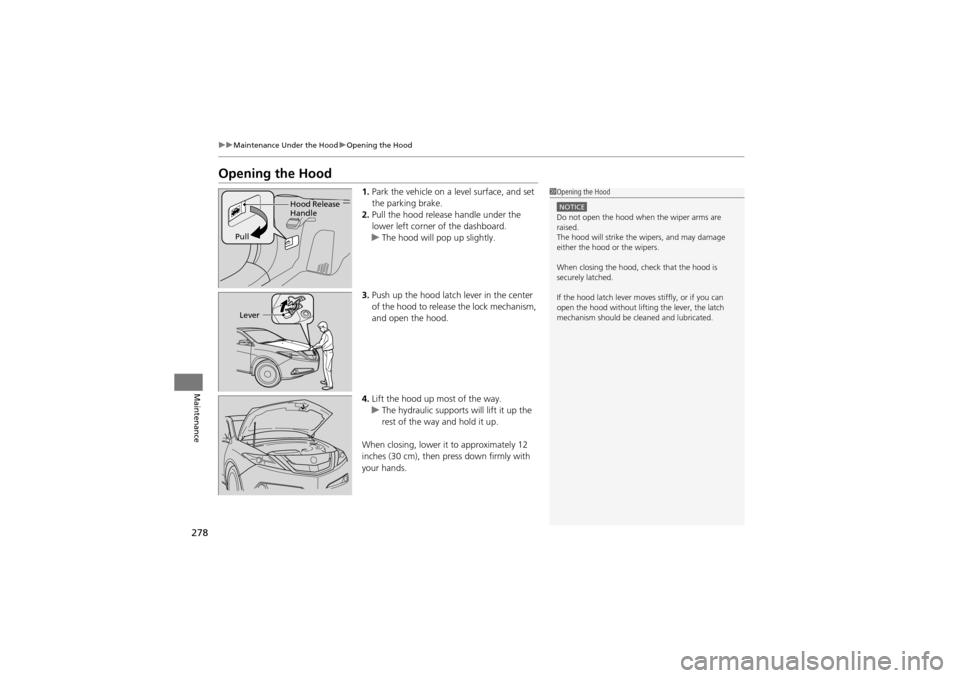
Opening the Hood
1. Park the vehicle on a level surface, and set
the parking brake.
2. Pull the hood release handle under the
lower left corner of the dashboard.
u The hood will pop up slightly.
3. Push up the hood latch lever in the center
of the hood to release the lock mechanism,
and open the hood.
4. Lift the hood up most of the way.
u The hydraulic supports will lift it up the
rest of the way and hold it up.
When closing, lower it to approximately 12
inches (30 cm), then press down firmly with
your hands.1 Opening the Hood
NOTICEDo not open the hood wh en the wiper arms are
raised.
The hood will strike the wipers, and may damage
either the hood or the wipers.
When closing the hood, check that the hood is
securely latched.
If the hood latch lever moves stiffly, or if you can
open the hood without lifting the lever, the latch
mechanism should be cl eaned and lubricated.
Hood Release
Handle
Pull
Lever