brake fluid Acura ZDX 2012 Owner's Manual
[x] Cancel search | Manufacturer: ACURA, Model Year: 2012, Model line: ZDX, Model: Acura ZDX 2012Pages: 370, PDF Size: 10.06 MB
Page 17 of 370
15
Quick Reference Guide
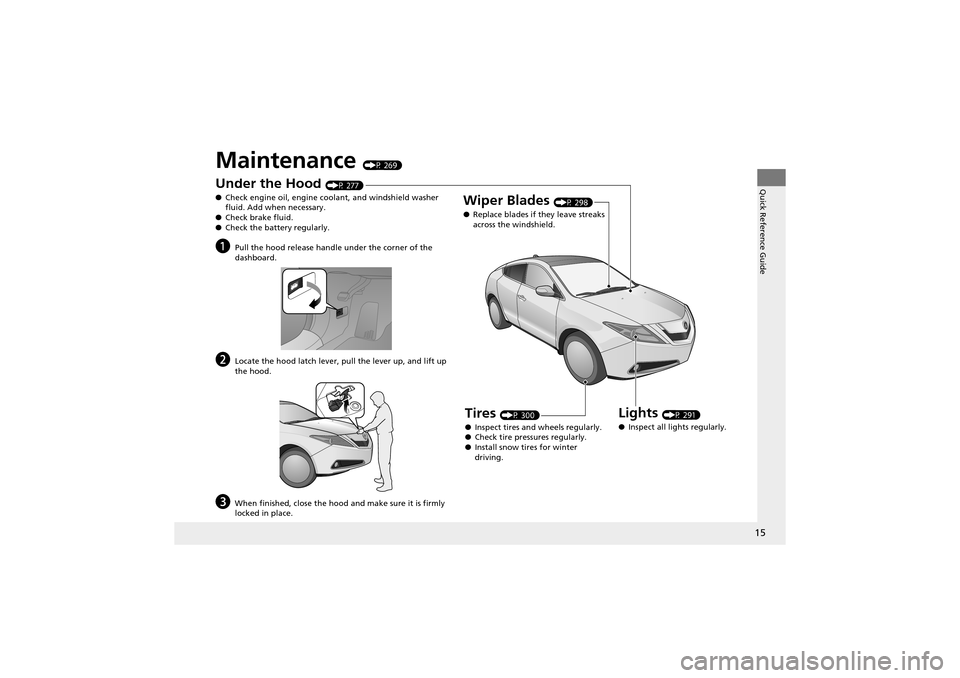
Maintenance (P 269)
Under the Hood (P 277)
● Check engine oil, engine coolant, and windshield washer
fluid. Add when necessary.
● Check brake fluid.
● Check the battery regularly.
aPull the hood release handle under the corner of the
dashboard.
bLocate the hood latch lever, pull the lever up, and lift up
the hood.
cWhen finished, close the hood and make sure it is firmly
locked in place.
Lights (P 291)
● Inspect all lights regularly.
Wiper Blades (P 298)
● Replace blades if they leave streaks
across the windshield.
Tires (P 300)
● Inspect tires and wheels regularly.
● Check tire pre ssures regularly.
● Install snow tires for winter
driving.
Page 70 of 370
68
Instrument Panel
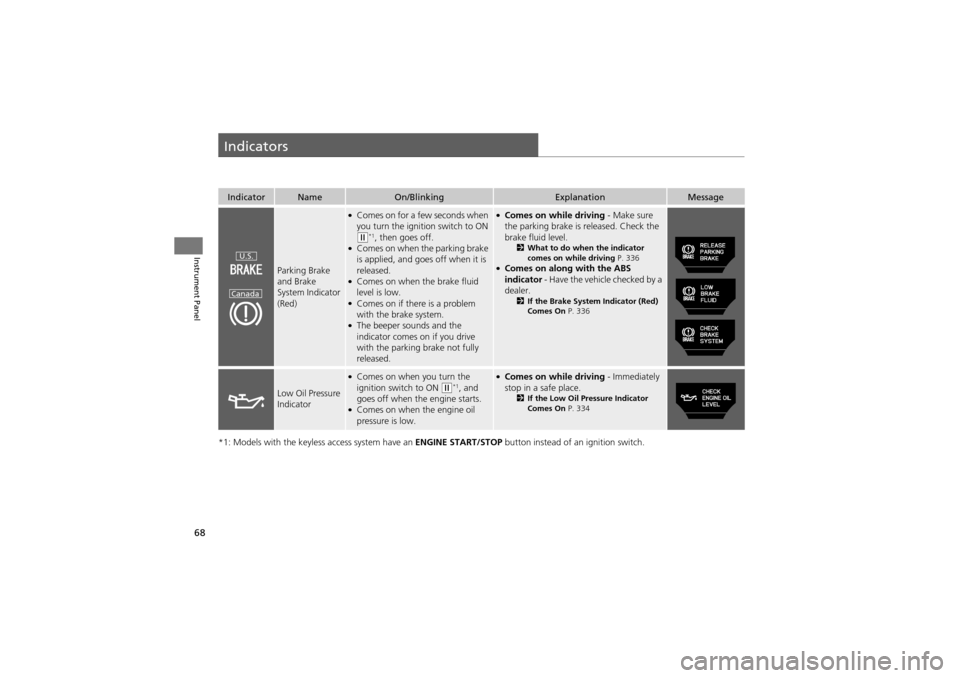
Indicators
*1: Models with the keyless access system have an ENGINE START/STOP button instead of an ignition switch.
IndicatorNameOn/BlinkingExplanationMessage
Parking Brake
and Brake
System Indicator
(Red)
●Comes on for a few seconds when
you turn the ignition switch to ON
(w*1, then goes off.●Comes on when the parking brake
is applied, and goes off when it is
released.
●Comes on when the brake fluid
level is low.
●Comes on if there is a problem
with the brake system.
●The beeper sounds and the
indicator comes on if you drive
with the parking brake not fully
released.
●Comes on while driving - Make sure
the parking brake is released. Check the
brake fluid level.
2 What to do when the indicator
comes on while driving P. 336
●Comes on along with the ABS
indicator - Have the vehicle checked by a
dealer.
2 If the Brake System Indicator (Red)
Comes On P. 336
Low Oil Pressure
Indicator
●Comes on when you turn the
ignition switch to ON (w*1, and
goes off when the engine starts.
●Comes on when the engine oil
pressure is low.
●Comes on while driving - Immediately
stop in a safe place.
2 If the Low Oil Pressure Indicator
Comes On P. 334
U.S.
Canada
Page 228 of 370
226
uuWhen Driving uPrecautions While Driving
Driving
Precautions While Driving
Utility vehicles have a significantly higher rollover rate than other types of vehicles.
To prevent rollovers or loss of control:
• Take corners at slower speeds than you would with a passenger vehicle.
• Avoid sharp turns and abrupt maneuvers whenever possible.
• Do not modify your vehicle in any way th at you would raise the center of gravity.
• Do not carry heavy cargo on the roof.
Avoid driving in deep water and on flooded roads. This can damage the engine or
cause electrical component failure.
If there is a strong impact with something under the vehicl e, stop in a safe location.
Check the underside of the vehicl e for damage or any fluid leaks.
■Driving Guidelines for Your Utility Vehicle
■In Rain
■Other Precautions
1Precautions While Driving
NOTICEDo not operate the shift lever while pressing the
accelerator pedal. You could damage the
transmission.
If the ignition switch is turned to ACCESSORY
(q or
LOCK (0*1 while driving, the engine will shut down
and all steering and brake power assist functions will
stop, making it difficult to control the vehicle.
Do not put the shift lever in
( N, as you will lose
engine braking (and acce leration) performance.
During the first 600 mile s (1,000 km) of operation,
avoid sudden acceleration or full throttle operation so
as not to damage the engine or powertrain.
Avoid hard braking for the first 200 miles (300 km).
You should also follow this when the brake pads are
replaced.
1 Driving Guidelines for Your Utility Vehicle
Failure to operate your vehi cle correctly might result
in a crash or a roll over.
2 Important Handling Information P. 24
2 Off-Highway Driving Guidelines P. 220
*1: Models with the keyles s access system have an
ENGINE START/STOP button instead of an ignition
switch.
Page 271 of 370
269
Maintenance
This chapter discusses basic maintenance.
Before Performing MaintenanceInspection and Mainte nance ............ 270
Safety When Performing Maintenance..... 271Parts and Fluids Used in Maintenance
Service ........................................... 272
Maintenance Minder
TM..................... 273
Maintenance Under the Hood
Maintenance Items Under the Hood ..... 277Opening the Hood ........................... 278
Engine Compartment Covers ........... 279
Recommended Engine Oi l ................ 280
Oil Check ......................................... 281
Adding Engine Oil ............................ 282
Changing the Engine Oil and Oil Filter ..... 283Engine Coolant ................................ 285
Transmission Fluid ............................ 287
Brake Fluid ....................................... 288
Power Steering Fluid Check.............. 289
Refilling Window Washer Fluid......... 290
Replacing Light Bulbs ....................... 291
Checking and Maintaining Wiper
Blades .......................................... 298
Checking and Maintaining Tires
Checking Tires ................................. 300
Tire and Loading Information Label ...... 301Tire Labeling .................................... 301
DOT Tire Quality Grading (U.S. Vehicles) ...... 303Wear Indicators ............................... 305
Tire Service Life ................................ 305
Tire and Wheel Replacement ........... 306
Tire Rotation .................................... 307
Winter Tires ..................................... 308
Battery ............................................... 309
Remote Transmitter Care ................. 310
Climate Control System Maintenance..... 312Cleaning
Interior Care .................................... 313
Exterior Care.................................... 315
Page 272 of 370
270
Maintenance
Before Performing Maintenance
Inspection and Maintenance
For your safety, perform all listed inspections and maintenance to keep your vehicle
in good condition. If you become aware of any abnormality (noise, smell, insufficient
brake fluid, oil residue on the ground, etc.), have your vehicle inspected by a dealer.
(Note, however, that service at a dealer is not mandatory to keep your warranties in
effect.) Refer to the separate maintenanc e booklet for detailed maintenance and
inspection information.
■Daily inspections
Perform inspections before long distance trips, when washing the vehicle, or when
refueling.
■Periodic inspections
• Check the automatic transmi ssion fluid level monthly.
2Automatic Tran smission Fluid P. 287
•Check the brake fluid level monthly.2 Brake Fluid P. 288
•Check the tire pressure monthly. Examin e the tread for wear and foreign objects.2Checking and Maintaining Tires P. 300
•Check the operation of th e exterior lights monthly.2Replacing Light Bulbs P. 291
•Check the condition of the wiper bl ades at least every six months.2Checking and Maintaining Wiper Blades P. 298
■Types of Inspection and Maintenance
1Inspection and Maintenance
Maintenance, replacement, or repair of
emissions contro l devices and systems may be
done by any automotive repair establishment or
individuals using parts that are “certified” to
EPA standards.
According to state and federal regulations, failure to
perform maintenance on the maintenance main
items marked with # will not void your emissions
warranties. However, all maintenance services should
be performed in accordance with the intervals
indicated by the multi-information display.
2 Maintenance Service Items P. 275
If you want to perform complex maintenance tasks
that require more skills an d tools, you can purchase a
subscription to the Serv ice Express website at
www.techinfo.honda.com .
2 Authorized Manuals P. 358
If you want to perform ma intenance yourself, make
sure that you have the nece ssary tools and skills first.
After performing ma intenance, update the records in
the separate maintenance booklet.
U.S. models
Page 277 of 370
275
uuMaintenance MinderTMuTo Use Maintenance MinderTM
Continued
Maintenance
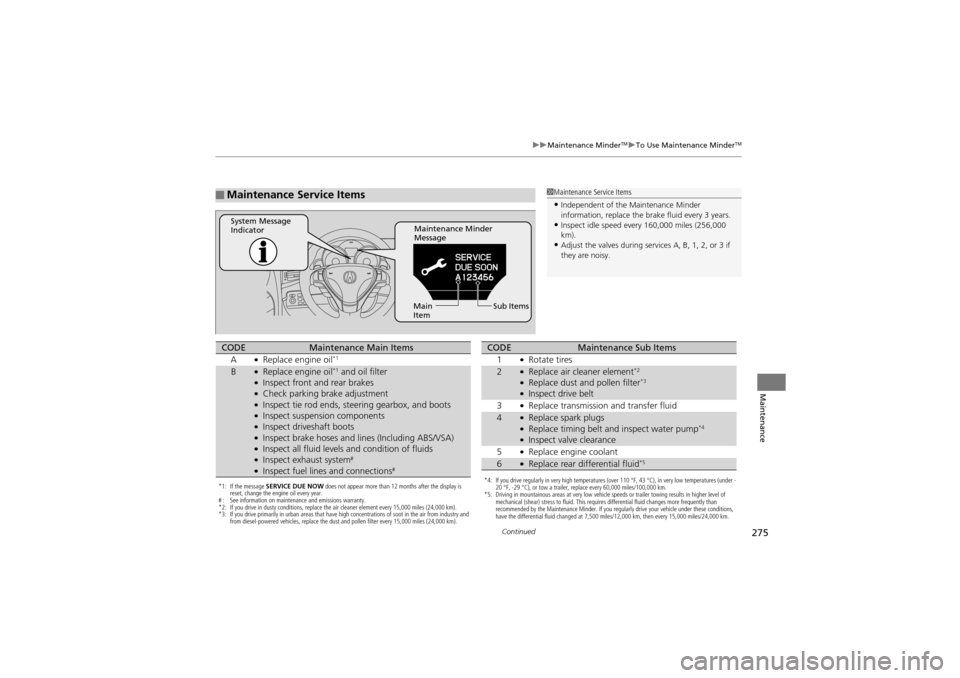
■Maintenance Service Items1Maintenance Service Items
•Independent of the Maintenance Minder
information, replace the brake fluid every 3 years.
•Inspect idle speed every 160,000 miles (256,000
km).
•Adjust the valves during services A, B, 1, 2, or 3 if
they are noisy.
Maintenance Minder
Message
System Message
Indicator
Sub Items
Main
Item
*1: If the message SERVICE DUE NOW does not appear more than 12 months after the display is
reset, change the engine oil every year.
# : See information on maintenance and emissions warranty.
*2: If you drive in dusty conditions, replace the air cleaner element every 15,000 miles (24,000 km).
*3: If you drive primarily in urban areas that have high concentrations of soot in the air from industry and
from diesel-powered vehicles, replace the dust and pollen filter every 15,000 miles (24,000 km).
CODEMaintenance Main Items
A●Replace engine oil*1
B●Replace engine oil*1 and oil filter●Inspect front and rear brakes●Check parking brake adjustment●Inspect tie rod ends, steering gearbox, and boots●Inspect suspension components●Inspect driveshaft boots●Inspect brake hoses and li nes (Including ABS/VSA)●Inspect all fluid levels and condition of fluids●Inspect exhaust system#
●Inspect fuel lines and connections#*4: If you drive regularly in very high temperatures (over 110 °F, 43 °C), in very low temperatures (under -
20 °F, -29 °C), or tow a trailer, replace every 60,000 miles/100,000 km.
*5: Driving in mountainous areas at very low vehicle speeds or trailer towing results in higher level of
mechanical (shear) stress to fluid. This requires differential fluid changes more frequently than
recommended by the Maintenance Minder. If you regularly drive your vehicle under these conditions,
have the differential fluid changed at 7,500 miles/12,000 km, then every 15,000 miles/24,000 km.
CODEMaintenance Sub Items
1●Rotate tires
2●Replace air cleaner element*2
●Replace dust and pollen filter*3
●Inspect drive belt
3●Replace transmission and transfer fluid
4●Replace spark plugs●Replace timing belt an d inspect water pump*4
●Inspect valve clearance
5●Replace engine coolant
6●Replace rear differential fluid*5
Page 279 of 370
277
Maintenance
Maintenance Under the Hood
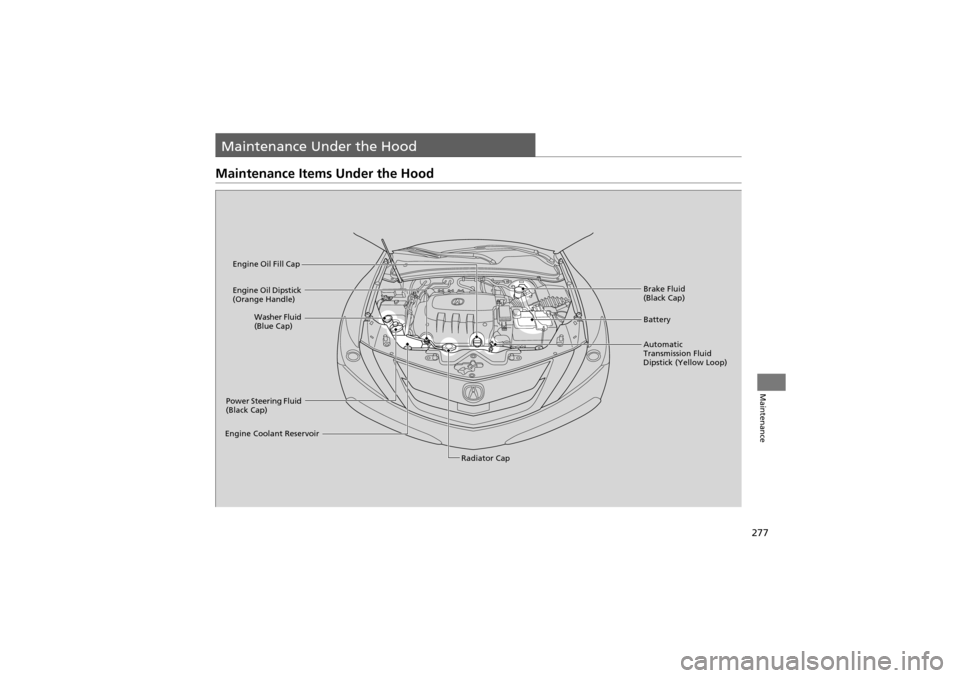
Maintenance Items Under the Hood
Brake Fluid
(Black Cap)
Engine Coolant Reservoir Radiator Cap
Washer Fluid
(Blue Cap)
Engine Oil Dipstick
(Orange Handle)
Engine Oil Fill Cap
Automatic
Transmission Fluid
Dipstick (Yellow Loop)Battery
Power Steering Fluid
(Black Cap)
Page 290 of 370
288
uuMaintenance Under the Hood uBrake Fluid
Maintenance
Brake Fluid
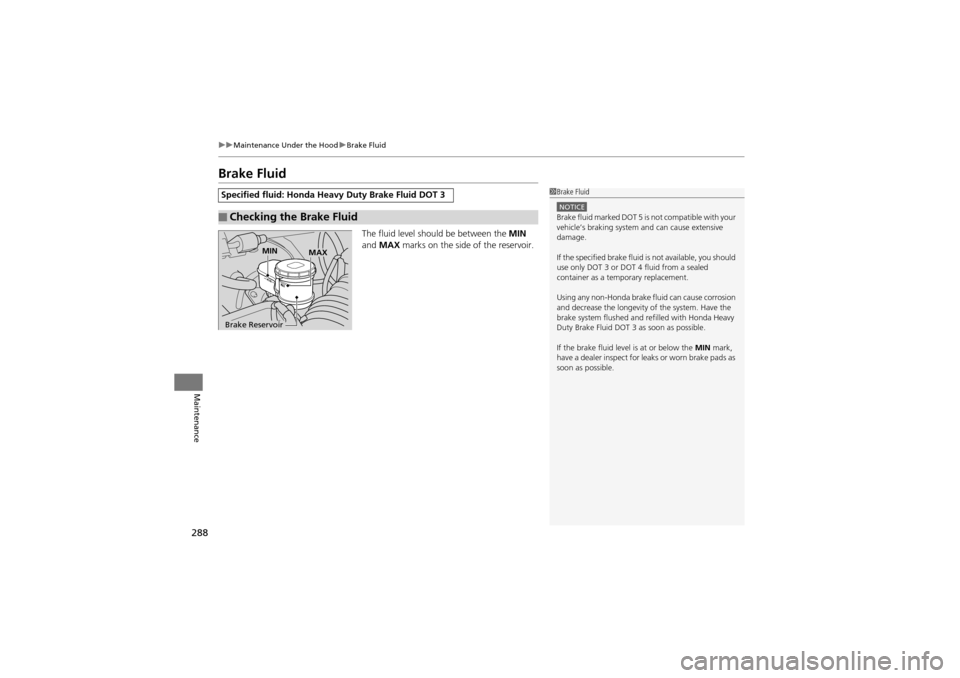
The fluid level should be between the MIN
and MAX marks on the side of the reservoir.
Specified fluid: Honda Heavy Duty Brake Fluid DOT 3
■Checking the Brake Fluid
1Brake Fluid
NOTICEBrake fluid marked DOT 5 is not compatible with your
vehicle’s braking system and can cause extensive
damage.
If the specified brake fluid is not available, you should
use only DOT 3 or DOT 4 fluid from a sealed
container as a temporary replacement.
Using any non-Honda brake fluid can cause corrosion
and decrease the longevity of the system. Have the
brake system flushed and refilled with Honda Heavy
Duty Brake Fluid DOT 3 as soon as possible.
If the brake fluid level is at or below the MIN mark,
have a dealer inspect for leaks or worn brake pads as
soon as possible.
Brake Reservoir MIN
MAX
Page 338 of 370
336
uuIndicator, Coming On/Blinking uIf the Brake System Indicator (Red) Comes On
Handling the Unexpected
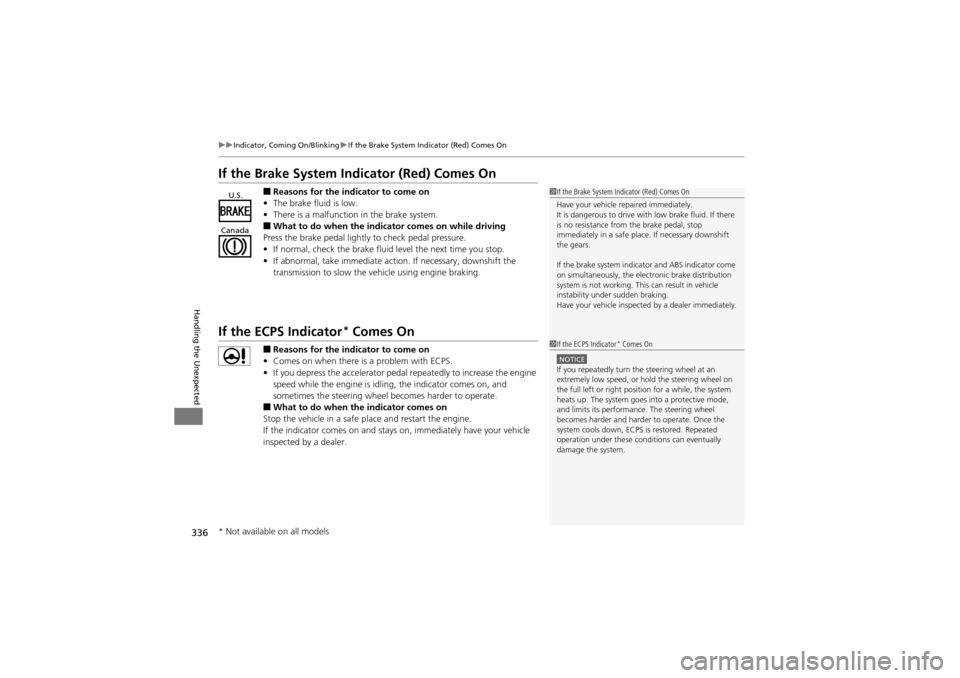
If the Brake System Indicator (Red) Comes On
■Reasons for the indicator to come on
• The brake fluid is low.
• There is a malfunction in the brake system.
■What to do when the indicator comes on while driving
Press the brake pedal lightly to check pedal pressure.
• If normal, check the brake fluid level the next time you stop.
• If abnormal, take immediate action. If necessary, downshift the
transmission to slow the vehicle using engine braking.
If the ECPS Indicator* Comes On
■Reasons for the indicator to come on
• Comes on when there is a problem with ECPS.
• If you depress the accelerator pedal repeatedly to increase the engine
speed while the engine is idling, the indicator comes on, and
sometimes the steering wheel becomes harder to operate.
■What to do when the indicator comes on
Stop the vehicle in a safe place and restart the engine.
If the indicator comes on and stays on, immediately have your vehicle
inspected by a dealer.
1 If the Brake System In dicator (Red) Comes On
Have your vehicle repaired immediately.
It is dangerous to drive with low brake fluid. If there
is no resistance from the brake pedal, stop
immediately in a safe plac e. If necessary downshift
the gears.
If the brake system indica tor and ABS indicator come
on simultaneously, the electronic brake distribution
system is not working. This can result in vehicle
instability under sudden braking.
Have your vehicle inspected by a dealer immediately.U.S.
Canada
1 If the ECPS Indicator* Comes On
NOTICEIf you repeatedly turn the steering wheel at an
extremely low speed, or ho ld the steering wheel on
the full left or right position for a while, the system
heats up. The system goes into a protective mode,
and limits its performance. The steering wheel
becomes harder and harder to operate. Once the
system cools down, ECPS is restored. Repeated
operation under these conditions can eventually
damage the system.
* Not available on all models
Page 352 of 370
350
Information
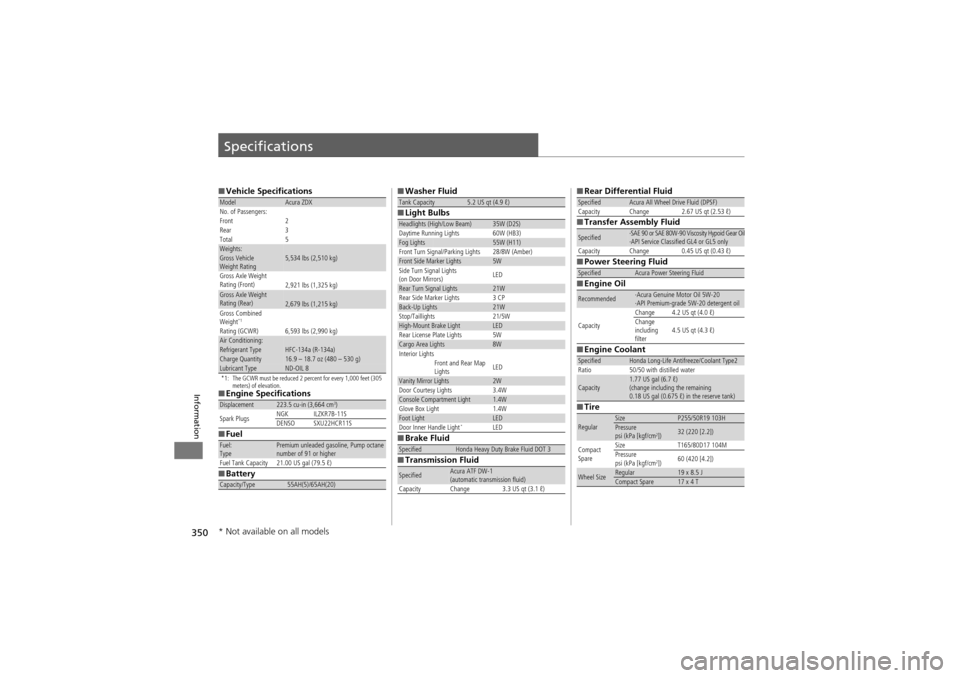
Specifications
■Vehicle Specifications
*1: The GCWR must be reduced 2 percent for every 1,000 feet (305
meters) of elevation.
■Engine Specifications
■ Fuel
■ Battery
ModelAcura ZDX
No. of Passengers:
Front 2
Rear 3
Total 5
Weights:Gross Vehicle
Weight Rating 5,534 lbs (2,510 kg)
Gross Axle Weight
Rating (Front)2,921 lbs (1,325 kg)Gross Axle Weight
Rating (Rear)2,679 lbs (1,215 kg)
Gross Combined
Weight
*1
Rating (GCWR) 6,593 lbs (2,990 kg)
Air Conditioning:Refrigerant Type HFC-134a (R-134a)Charge Quantity16.9 – 18.7 oz (480 – 530 g)Lubricant TypeND-OIL 8
Displacement223.5 cu-in (3,664 cm3)
Spark Plugs NGK ILZKR7B-11S
DENSO SXU22HCR11S
Fuel:
TypePremium unleaded gasoline, Pump octane
number of 91 or higher
Fuel Tank Capacity 21.00 US gal (79.5 ℓ)
Capacity/Type55AH(5)/65AH(20)
■ Washer Fluid
■ Light Bulbs
■ Brake Fluid
■ Transmission FluidTank Capacity5.2 US qt (4.9 ℓ)
Headlights (High/Low Beam)35W (D2S)
Daytime Running Lights 60W (HB3)
Fog Lights55W (H11)
Front Turn Signal/Parking Lights 28/8W (Amber)
Front Side Marker Lights5W
Side Turn Signal Lights
(on Door Mirrors) LED
Rear Turn Signal Lights21W
Rear Side Marker Lights 3 CP
Back-Up Lights21W
Stop/Taillights 21/5W
High-Mount Brake LightLED
Rear License Plate Lights 5W
Cargo Area Lights8W
Interior Lights
Front and Rear Map
LightsLED
Vanity Mirror Lights2WDoor Courtesy Lights3.4WConsole Compartment Light1.4WGlove Box Light1.4WFoot LightLEDDoor Inner Handle Light*LED
SpecifiedHonda Heavy Duty Brake Fluid DOT 3
SpecifiedAcura ATF DW-1
(automatic transmission fluid)
Capacity Change 3.3 US qt (3.1 ℓ)
■ Rear Differential Fluid
■ Transfer Assembly Fluid
■ Power Steering Fluid
■ Engine Oil
■ Engine Coolant
■ TireSpecifiedAcura All Wheel Drive Fluid (DPSF)
Capacity Change 2.67 US qt (2.53 ℓ)
Specified·SAE 90 or SAE 80W-90 Viscosity Hypoid Gear Oil
·API Service Classified GL4 or GL5 only
Capacity Change 0.45 US qt (0.43 ℓ)
SpecifiedAcura Power Steering Fluid
Recommended·Acura Genuine Motor Oil 5W-20
·API Premium-grade 5W-20 detergent oil
Capacity Change 4.2 US qt (4.0 ℓ)
Change
including
filter
4.5 US qt (4.3 ℓ)
SpecifiedHonda Long-Life Antifreeze/Coolant Type2
Ratio 50/50 with distilled water
Capacity1.77 US gal (6.7 ℓ)
(change including the remaining
0.18 US gal (0.675 ℓ) in the reserve tank)
RegularSizeP255/50R19 103HPressure
psi (kPa [kgf/cm2])32 (220 [2.2])
Compact
Spare Size T165/80D17 104M
Pressure
psi (kPa [kgf/cm
2])
60 (420 [4.2])
Wheel SizeRegular19 x 8.5 JCompact Spare17 x 4 T
* Not available on all models