panel Alfa Romeo Giulietta 2013 Owner handbook (in English)
[x] Cancel search | Manufacturer: ALFA ROMEO, Model Year: 2013, Model line: Giulietta, Model: Alfa Romeo Giulietta 2013Pages: 292, PDF Size: 13.06 MB
Page 68 of 292
MAIN BEAM HEADLIGHTSWith ring nut A at
pull the stalk towards the steering wheel (stable
position). The warning light
switches on on the instrument panel.
To turn the lights off, pull the stalk towards the steering wheel (dipped
headlights will stay on). It is not possible to switch on the main beam
headlights in fixed mode if the automatic lighting control system is
active.
FLASHINGPull the stalk towards the steering wheel (unstable position) regardless
of the position of ring nut A. The warning light
switches on on
the instrument panel.
DIRECTION INDICATORSBring the stalk into (stable) position:
❒upwards: activates right direction indicator;
❒downwards: activates left direction indicator.
Warning light
or
will flash in the instrument panel.
The indicators are switched off automatically when the steering wheel
is straightened.
"Lane change" function
If you want to signal that you are changing lane, hold the left stalk in
the unstable position for less than half a second. The direction indicator
on the side selected will flash five times and then switch off
automatically.
"FOLLOW ME HOME" DEVICEThis device allows you to illuminate the area in front of the car for a
certain amount of time.
Activation
With the ignition key at STOP or removed, pull stalk A towards the
steering wheel and move it within 2 minutes of the engine switching
off.
At each single movement of the stalk, the lights will remain on for an
extra 30 seconds up to a maximum of 210 seconds; then the lights are
switched off automatically.
The
warning light on the instrument panel will light up (and the
corresponding message will appear on the display) as long as the
function is active.
The light comes on when the stalk is first moved and stays on until the
function is automatically deactivated. Each movement of the stalk
only increases the amount of time the lights stay on.
Deactivation
Keep stalk A pulled towards the steering wheel for more than 2
seconds.
64GETTING TO
KNOW YOUR CAR
SAFETY
STARTING AND
DRIVING
IN AN EMERGENCY
SERVICING AND
MAINTENANCE
TECHNICAL
SPECIFICATIONS
INDEX
Page 77 of 292
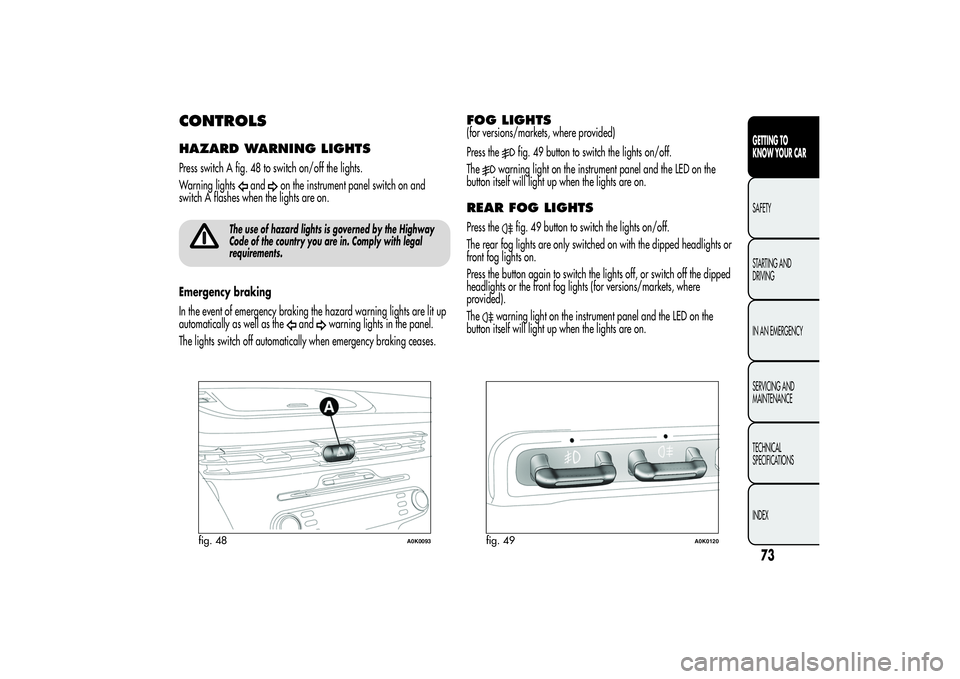
CONTROLSHAZARD WARNING LIGHTSPress switch A fig. 48 to switch on/off the lights.
Warning lights
and
on the instrument panel switch on and
switch A flashes when the lights are on.
The use of hazard lights is governed by the Highway
Code of the country you are in. Comply with legal
requirements.
Emergency braking
In the event of emergency braking the hazard warning lights are lit up
automatically as well as the
and
warning lights in the panel.
The lights switch off automatically when emergency braking ceases.
FOG LIGHTS(for versions/markets, where provided)
Press the
fig. 49 button to switch the lights on/off.
The
warning light on the instrument panel and the LED on the
button itself will light up when the lights are on.
REAR FOG LIGHTSPress the
fig. 49 button to switch the lights on/off.
The rear fog lights are only switched on with the dipped headlights or
front fog lights on.
Press the button again to switch the lights off, or switch off the dipped
headlights or the front fog lights (for versions/markets, where
provided).
The
warning light on the instrument panel and the LED on the
button itself will light up when the lights are on.
fig. 48
A0K0093
fig. 49
A0K0120
73GETTING TO
KNOW YOUR CARSAFETY
STARTING AND
DRIVING
IN AN EMERGENCY
SERVICING AND
MAINTENANCE
TECHNICAL
SPECIFICATIONS
INDEX
Page 85 of 292
ELECTRIC SUN ROOF(for versions/markets, where provided)
The sun roof comprises two glass panels; the front one is mobile and
the rear one fixed. These feature two sun blinds (front and rear) that
can be moved manually.
With the roof closed, the blinds can be placed in any position.OPERATIONThe sun roof can be operated only with the ignition key turned to MAR.
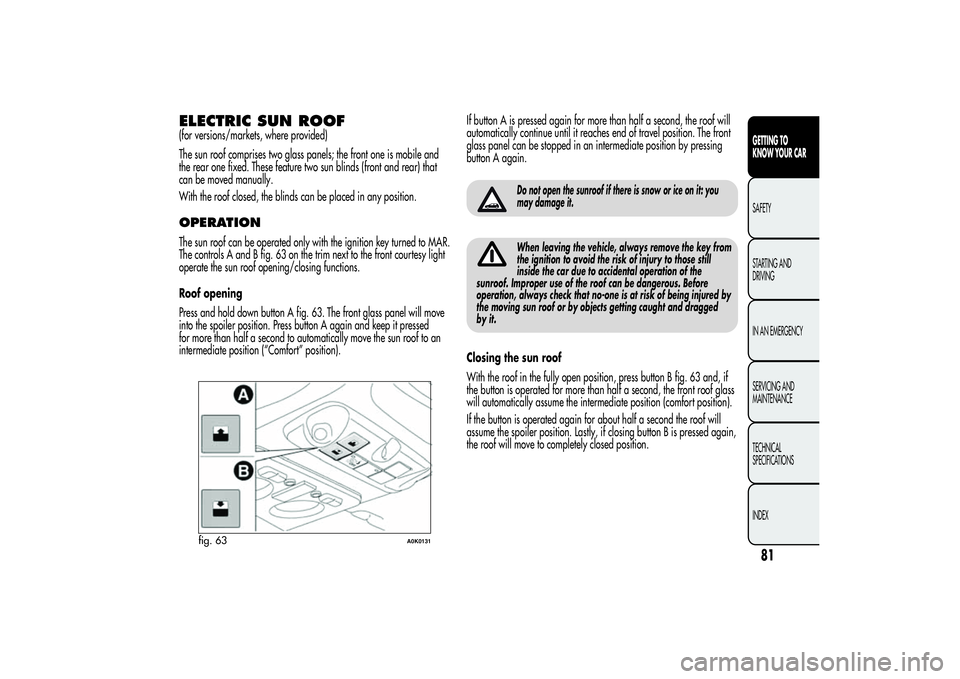
The controls A and B fig. 63 on the trim next to the front courtesy light
operate the sun roof opening/closing functions.
Roof opening
Press and hold down button A fig. 63. The front glass panel will move
into the spoiler position. Press button A again and keep it pressed
for more than half a second to automatically move the sun roof to an
intermediate position (“Comfort” position).If button A is pressed again for more than half a second, the roof will
automatically continue until it reaches end of travel position. The front
glass panel can be stopped in an intermediate position by pressing
button A again.
Do not open the sunroof if there is snow or ice on it: you
may damage it.When leaving the vehicle, always remove the key from
the ignition to avoid the risk of injury to those still
inside the car due to accidental operation of the
sunroof. Improper use of the roof can be dangerous. Before
operation, always check that no-one is at risk of being injured by
the moving sun roof or by objects getting caught and dragged
by it.
Closing the sun roof
With the roof in the fully open position, press button B fig. 63 and, if
the button is operated for more than half a second, the front roof glass
will automatically assume the intermediate position (comfort position).
If the button is operated again for about half a second the roof will
assume the spoiler position. Lastly, if closing button B is pressed again,
the roof will move to completely closed position.
fig. 63
A0K0131
81GETTING TO
KNOW YOUR CARSAFETY
STARTING AND
DRIVING
IN AN EMERGENCY
SERVICING AND
MAINTENANCE
TECHNICAL
SPECIFICATIONS
INDEX
Page 86 of 292
ANTI-PINCH SAFETY DEVICEThe sun roof has an anti-pinch safety system capable of detecting the
presence of an obstacle whilst the roof is closing; when this happens,
the system stops and the movement of the front glass is immediately
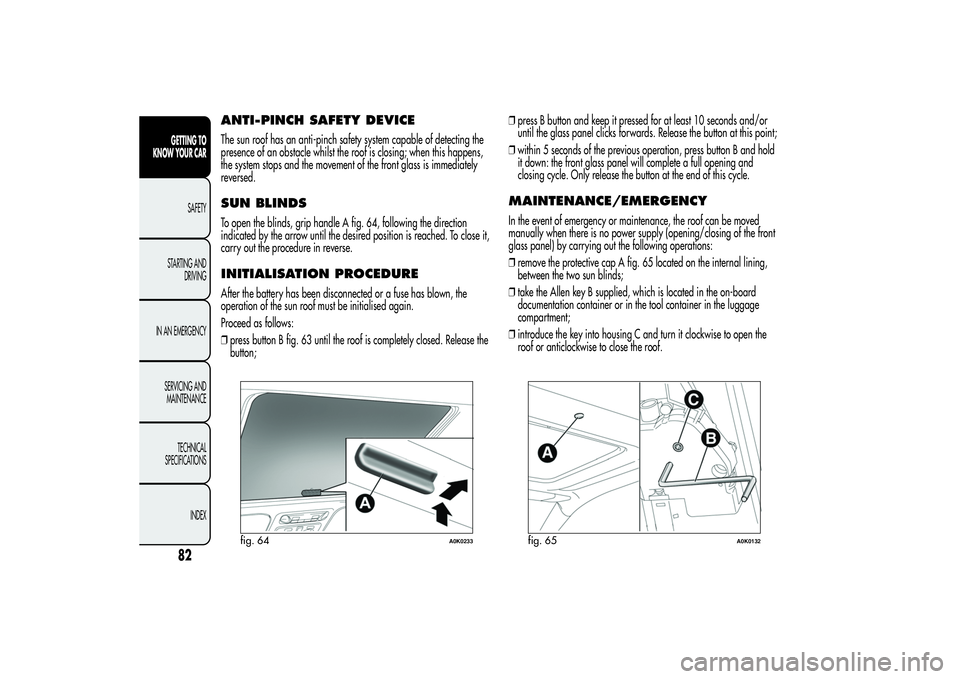
reversed.SUN BLINDSTo open the blinds, grip handle A fig. 64, following the direction
indicated by the arrow until the desired position is reached. To close it,
carry out the procedure in reverse.INITIALISATION PROCEDUREAfter the battery has been disconnected or a fuse has blown, the
operation of the sun roof must be initialised again.
Proceed as follows:
❒press button B fig. 63 until the roof is completely closed. Release the
button;❒press B button and keep it pressed for at least 10 seconds and/or
until the glass panel clicks forwards. Release the button at this point;
❒within 5 seconds of the previous operation, press button B and hold
it down: the front glass panel will complete a full opening and
closing cycle. Only release the button at the end of this cycle.
MAINTENANCE/EMERGENCYIn the event of emergency or maintenance, the roof can be moved
manually when there is no power supply (opening/closing of the front
glass panel) by carrying out the following operations:
❒remove the protective cap A fig. 65 located on the internal lining,
between the two sun blinds;
❒take the Allen key B supplied, which is located in the on-board
documentation container or in the tool container in the luggage
compartment;
❒introduce the key into housing C and turn it clockwise to open the
roof or anticlockwise to close the roof.
fig. 64
A0K0233
fig. 65
A0K0132
82GETTING TO
KNOW YOUR CAR
SAFETY
STARTING AND
DRIVING
IN AN EMERGENCY
SERVICING AND
MAINTENANCE
TECHNICAL
SPECIFICATIONS
INDEX
Page 89 of 292
EMERGENCY DOOR LOCKING DEVICEFront passenger side door
The front passenger side door has a device to lock it when there is no
current.
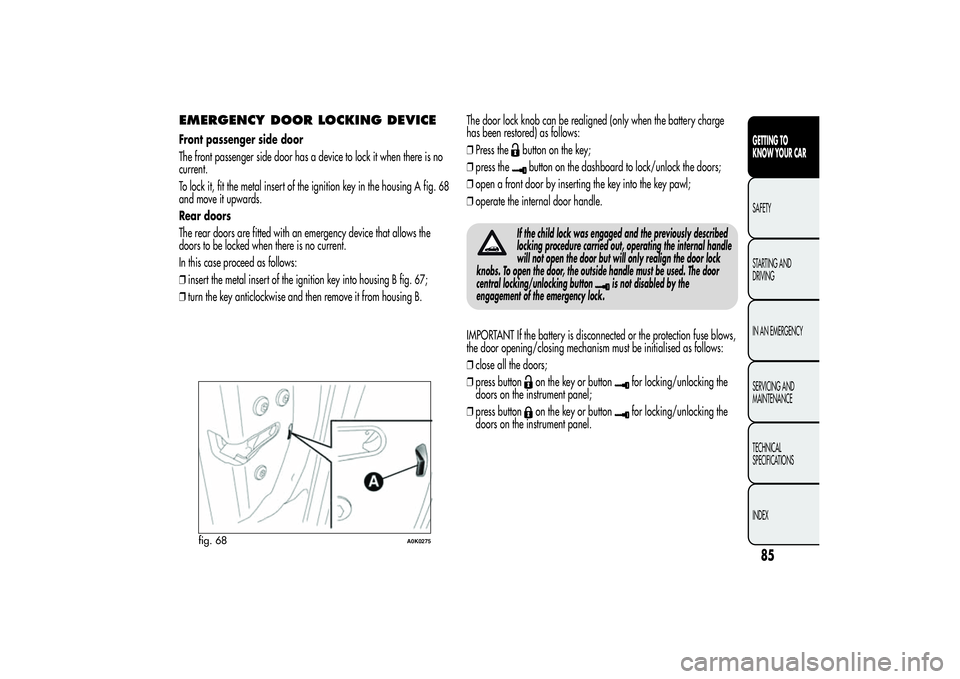
To lock it, fit the metal insert of the ignition key in the housing A fig. 68
and move it upwards.
Rear doors
The rear doors are fitted with an emergency device that allows the
doors to be locked when there is no current.
In this case proceed as follows:
❒insert the metal insert of the ignition key into housing B fig. 67;
❒turn the key anticlockwise and then remove it from housing B.The door lock knob can be realigned (only when the battery charge
has been restored) as follows:
❒Press the
button on the key;
❒press thebutton on the dashboard to lock/unlock the doors;
❒open a front door by inserting the key into the key pawl;
❒operate the internal door handle.
If the child lock was engaged and the previously described
locking procedure carried out, operating the internal handle
will not open the door but will only realign the door lock
knobs. To open the door, the outside handle must be used. The door
central locking/unlocking button
is not disabled by the
engagement of the emergency lock.
IMPORTANT If the battery is disconnected or the protection fuse blows,
the door opening/closing mechanism must be initialised as follows:
❒close all the doors;
❒press button
on the key or button
for locking/unlocking the
doors on the instrument panel;
❒press button
on the key or button
for locking/unlocking the
doors on the instrument panel.
fig. 68
A0K0275
85GETTING TO
KNOW YOUR CARSAFETY
STARTING AND
DRIVING
IN AN EMERGENCY
SERVICING AND
MAINTENANCE
TECHNICAL
SPECIFICATIONS
INDEX
Page 90 of 292
ELECTRIC WINDOWSThese operate when the ignition key is turned to MAR and for about
three minutes after turning the key to STOP or removing it if one of the
front doors is open.
The buttons are located in the door panel trim (the driver side door
panel can be used to operate all the windows). An anti-pinch device
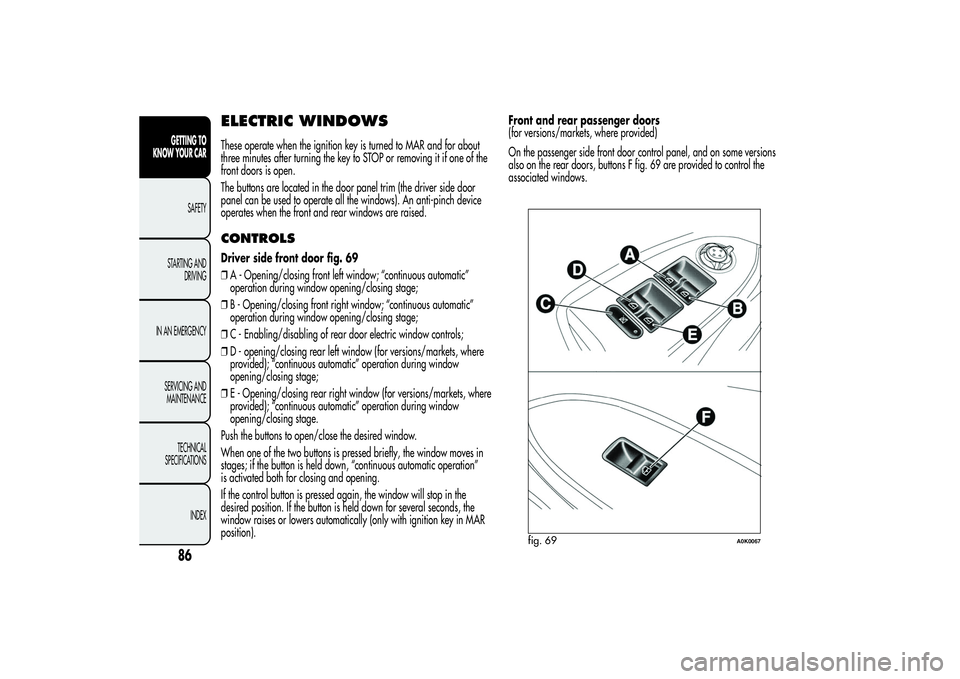
operates when the front and rear windows are raised.CONTROLSDriver side front door fig. 69
❒A - Opening/closing front left window; “continuous automatic”
operation during window opening/closing stage;
❒B - Opening/closing front right window; “continuous automatic”
operation during window opening/closing stage;
❒C - Enabling/disabling of rear door electric window controls;
❒D - opening/closing rear left window (for versions/markets, where
provided); “continuous automatic” operation during window
opening/closing stage;
❒E - Opening/closing rear right window (for versions/markets, where
provided); “continuous automatic” operation during window
opening/closing stage.
Push the buttons to open/close the desired window.
When one of the two buttons is pressed briefly, the window moves in
stages; if the button is held down, “continuous automatic operation”
is activated both for closing and opening.
If the control button is pressed again, the window will stop in the
desired position. If the button is held down for several seconds, the
window raises or lowers automatically (only with ignition key in MAR
position).Front and rear passenger doors
(for versions/markets, where provided)
On the passenger side front door control panel, and on some versions
also on the rear doors, buttons F fig. 69 are provided to control the
associated windows.
fig. 69
A0K0067
86GETTING TO
KNOW YOUR CAR
SAFETY
STARTING AND
DRIVING
IN AN EMERGENCY
SERVICING AND
MAINTENANCE
TECHNICAL
SPECIFICATIONS
INDEX
Page 101 of 292
ESC (Electronic Stability
Control) SYSTEMThis is an electronic system controlling car stability in the event of tyre
grip loss, helping to maintain directional control.
The system is capable of recognising potentially dangerous situations
in terms of the stability and intervenes automatically on the brakes in a
differentiated manner for the four wheels in order to provide a
stabilising torque.
The ESC system also includes the following systems:
❒Hill Holder
❒ASR
❒Brake Assist
❒MSR
❒CBC
❒“ELECTRONIC Q2” (“E-Q2”)
❒DST
❒RABSYSTEM ACTIVATIONThe ESC system switches on automatically when the engine is started
and cannot be switched off.SYSTEM INTERVENTIONIt is signalled by the flashing of theESCwarning light on the
instrument panel, to inform the driver that the car is in critical stability
and grip conditions.
HILL HOLDER SYSTEMThis system is an integral part of the ESC system and facilitates starting
on slopes.
It is automatically activated in the following conditions:
❒uphill: vehicle stationary on a road with a gradient higher than 5%,
engine running, brake pedal pressed and gearbox in neutral or
gear (other than reverse) engaged;
❒downhill: vehicle stationary on a road with a gradient higher than
5%, engine running, brake pedal pressed and reverse gear
engaged.
When setting off the ESC system control unit maintains the braking
pressure at the wheels until the engine torque required for departure is
reached or for approximately 2 seconds, allowing your right foot to
be moved easily from the brake pedal to the accelerator.
If the vehicle has not departed after this time, the system will deactivate
automatically by gradually releasing the brake force. A sound may
be heard during this stage: this indicates that the vehicle is about
to move off.
IMPORTANT The Hill Holder system is not a handbrake. Do not leave
the vehicle without having engaged the handbrake, switched off the
engine and engaged a gear.
97GETTING TO
KNOW YOUR CARSAFETY
STARTING AND
DRIVING
IN AN EMERGENCY
SERVICING AND
MAINTENANCE
TECHNICAL
SPECIFICATIONS
INDEX
Page 103 of 292
DST SYSTEM
(Dynamic Steering Torque)This function integrates Dual Pinion active steering into the operation of
ESC. For particular manoeuvres, the ESC system controls the steering
to actuate a steering torque and assist the driver in the best possible
way.
The system operates the brakes and steering in a coordinated manner
to increase the suspension and safety level of the car as a whole.
The steering provides additional torque on the steering wheel.RAB SYSTEM (Ready Alert Brakes)
(only with “Dynamic” mode
engaged)It is a function that achieves a pre-positioning of the brake pads (front
and rear) following a rapid release of the accelerator pedal to reduce
braking times, shortening stopping distances.
“Alfa DNA” SYSTEM
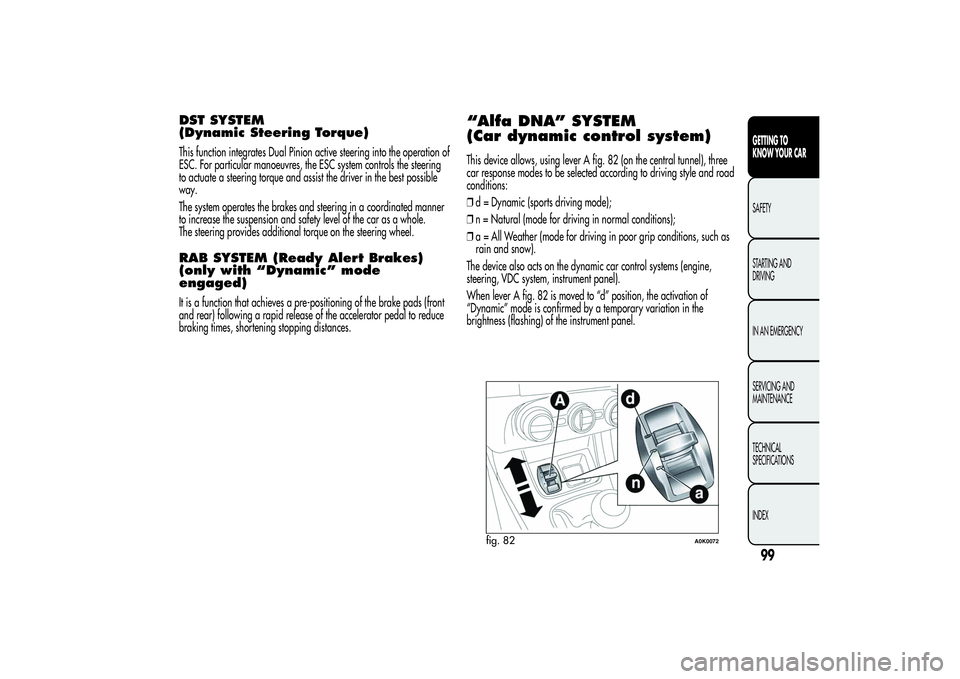
(Car dynamic control system)This device allows, using lever A fig. 82 (on the central tunnel), three
car response modes to be selected according to driving style and road
conditions:
❒d = Dynamic (sports driving mode);
❒n = Natural (mode for driving in normal conditions);
❒a = All Weather (mode for driving in poor grip conditions, such as
rain and snow).
The device also acts on the dynamic car control systems (engine,
steering, VDC system, instrument panel).
When lever A fig. 82 is moved to “d” position, the activation of
“Dynamic” mode is confirmed by a temporary variation in the
brightness (flashing) of the instrument panel.
fig. 82
A0K0072
99GETTING TO
KNOW YOUR CARSAFETY
STARTING AND
DRIVING
IN AN EMERGENCY
SERVICING AND
MAINTENANCE
TECHNICAL
SPECIFICATIONS
INDEX
Page 104 of 292
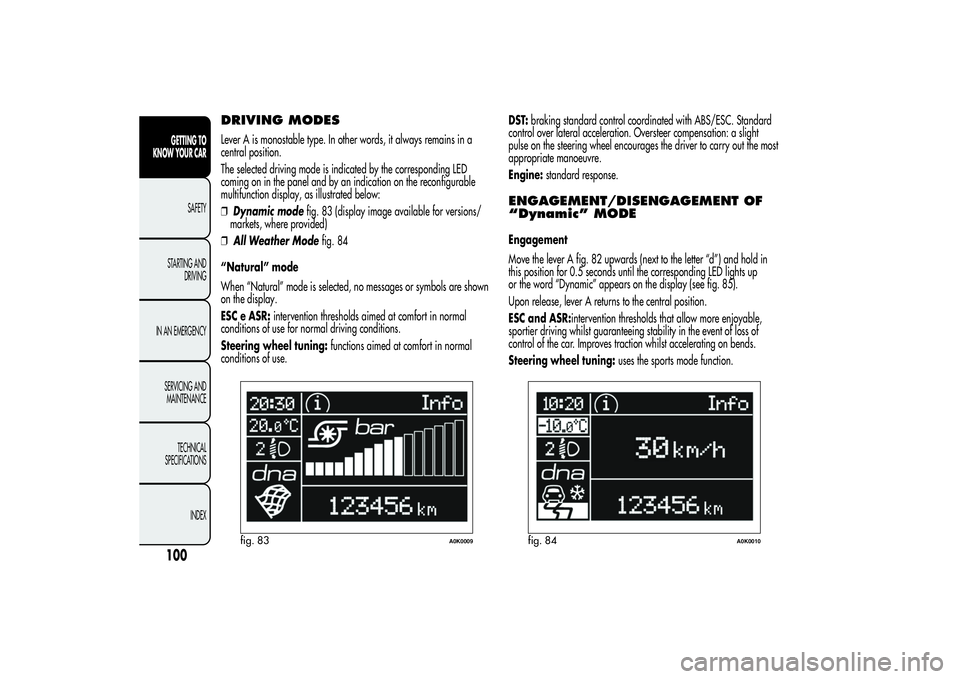
DRIVING MODESLever A is monostable type. In other words, it always remains in a
central position.
The selected driving mode is indicated by the corresponding LED
coming on in the panel and by an indication on the reconfigurable
multifunction display, as illustrated below:
❒Dynamic modefig. 83 (display image available for versions/
markets, where provided)
❒All Weather Modefig. 84
“Natural” mode
When “Natural” mode is selected, no messages or symbols are shown
on the display.
ESC e ASR:intervention thresholds aimed at comfort in normal
conditions of use for normal driving conditions.
Steering wheel tuning:functions aimed at comfort in normal
conditions of use.DST:braking standard control coordinated with ABS/ESC. Standard
control over lateral acceleration. Oversteer compensation: a slight
pulse on the steering wheel encourages the driver to carry out the most
appropriate manoeuvre.
Engine:standard response.
ENGAGEMENT/DISENGAGEMENT OF
“Dynamic” MODEEngagement
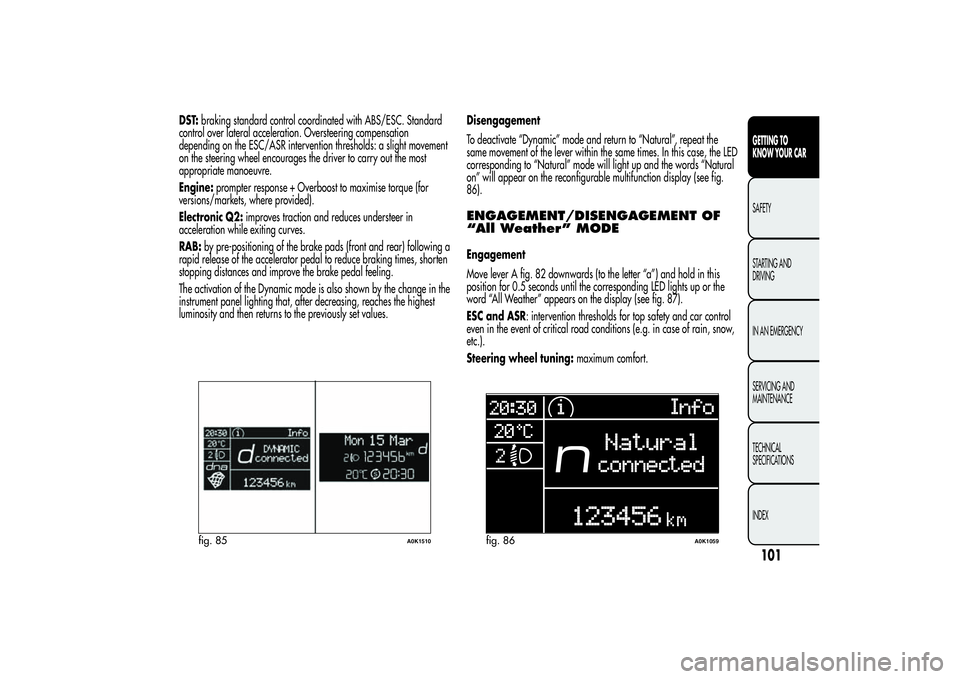
Move the lever A fig. 82 upwards (next to the letter “d”) and hold in
this position for 0.5 seconds until the corresponding LED lights up
or the word “Dynamic” appears on the display (see fig. 85).
Upon release, lever A returns to the central position.
ESC and ASR:intervention thresholds that allow more enjoyable,
sportier driving whilst guaranteeing stability in the event of loss of
control of the car. Improves traction whilst accelerating on bends.
Steering wheel tuning:uses the sports mode function.
fig. 83
A0K0009
fig. 84
A0K0010
100GETTING TO
KNOW YOUR CAR
SAFETY
STARTING AND
DRIVING
IN AN EMERGENCY
SERVICING AND
MAINTENANCE
TECHNICAL
SPECIFICATIONS
INDEX
Page 105 of 292
DST:braking standard control coordinated with ABS/ESC. Standard
control over lateral acceleration. Oversteering compensation
depending on the ESC/ASR intervention thresholds: a slight movement
on the steering wheel encourages the driver to carry out the most
appropriate manoeuvre.
Engine:prompter response + Overboost to maximise torque (for
versions/markets, where provided).
Electronic Q2:improves traction and reduces understeer in
acceleration while exiting curves.
RAB:by pre-positioning of the brake pads (front and rear) following a
rapid release of the accelerator pedal to reduce braking times, shorten
stopping distances and improve the brake pedal feeling.
The activation of the Dynamic mode is also shown by the change in the
instrument panel lighting that, after decreasing, reaches the highest
luminosity and then returns to the previously set values.Disengagement
To deactivate “Dynamic” mode and return to “Natural”, repeat the
same movement of the lever within the same times. In this case, the LED
corresponding to “Natural” mode will light up and the words “Natural
on” will appear on the reconfigurable multifunction display (see fig.
86).
ENGAGEMENT/DISENGAGEMENT OF
“All Weather” MODEEngagement
Move lever A fig. 82 downwards (to the letter “a”) and hold in this
position for 0.5 seconds until the corresponding LED lights up or the
word “All Weather” appears on the display (see fig. 87).
ESC and ASR: intervention thresholds for top safety and car control
even in the event of critical road conditions (e.g. in case of rain, snow,
etc.).
Steering wheel tuning:maximum comfort.
fig. 85
A0K1510
fig. 86
A0K1059
101GETTING TO
KNOW YOUR CARSAFETY
STARTING AND
DRIVING
IN AN EMERGENCY
SERVICING AND
MAINTENANCE
TECHNICAL
SPECIFICATIONS
INDEX