AUX Alfa Romeo Giulietta 2013 Owner handbook (in English)
[x] Cancel search | Manufacturer: ALFA ROMEO, Model Year: 2013, Model line: Giulietta, Model: Alfa Romeo Giulietta 2013Pages: 292, PDF Size: 13.06 MB
Page 110 of 292
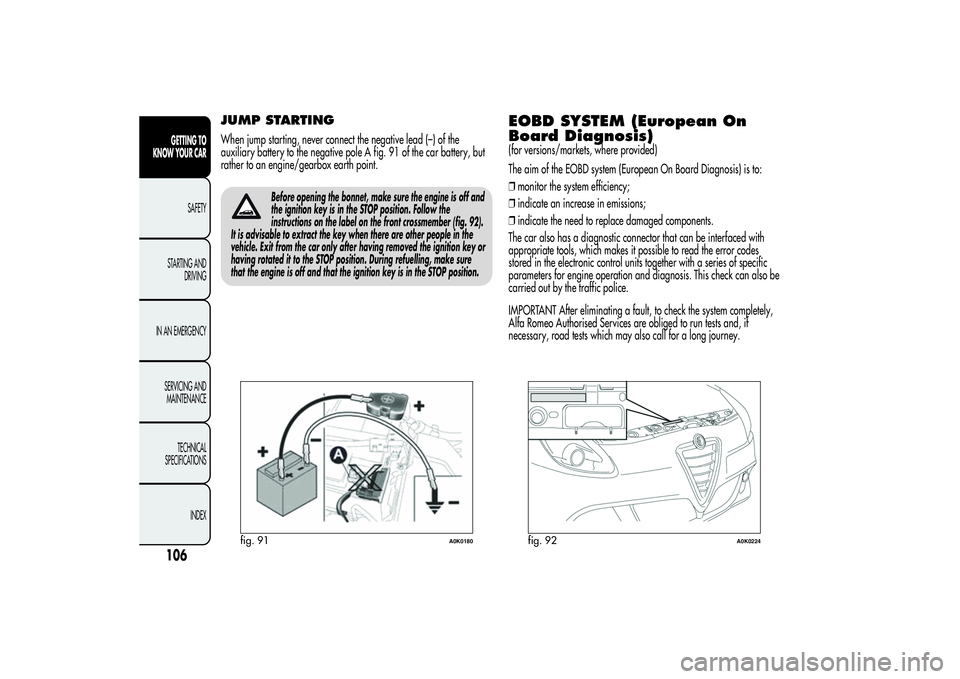
JUMP STARTINGWhen jump starting, never connect the negative lead (–) of the
auxiliary battery to the negative pole A fig. 91 of the car battery, but
rather to an engine/gearbox earth point.
Before opening the bonnet, make sure the engine is off and
the ignition key is in the STOP position. Follow the
instructions on the label on the front crossmember (fig. 92).
It is advisable to extract the key when there are other people in the
vehicle. Exit from the car only after having removed the ignition key or
having rotated it to the STOP position. During refuelling, make sure
that the engine is off and that the ignition key is in the STOP position.
EOBD SYSTEM (European On
Board Diagnosis)(for versions/markets, where provided)
The aim of the EOBD system (European On Board Diagnosis) is to:
❒monitor the system efficiency;
❒indicate an increase in emissions;
❒indicate the need to replace damaged components.
The car also has a diagnostic connector that can be interfaced with
appropriate tools, which makes it possible to read the error codes
stored in the electronic control units together with a series of specific
parameters for engine operation and diagnosis. This check can also be
carried out by the traffic police.
IMPORTANT After eliminating a fault, to check the system completely,
Alfa Romeo Authorised Services are obliged to run tests and, if
necessary, road tests which may also call for a long journey.
fig. 91
A0K0180
fig. 92
A0K0224
106GETTING TO
KNOW YOUR CAR
SAFETY
STARTING AND
DRIVING
IN AN EMERGENCY
SERVICING AND
MAINTENANCE
TECHNICAL
SPECIFICATIONS
INDEX
Page 146 of 292
IN AN EMERGENCY
In an emergency we recommend that you call the freephone number found in the Warranty Booklet. You can also
consult www.alfaromeo.com to find your nearest Alfa Romeo Authorized Services.STARTING THE ENGINEIf the
warning light on the instrument panel remains on constantly,
contact Alfa Romeo Authorized Services immediately.
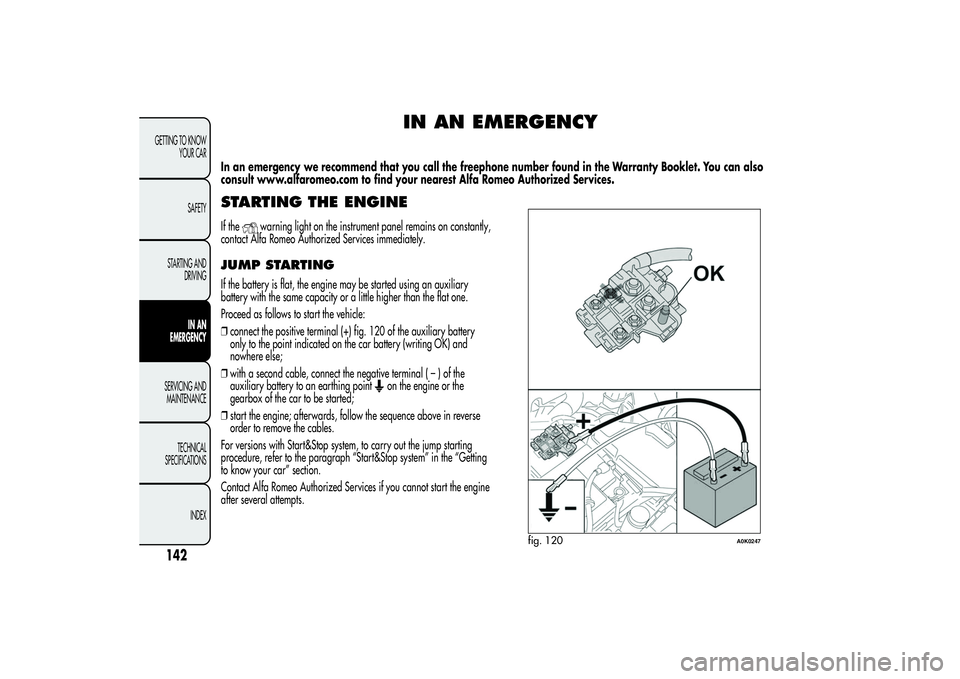
JUMP STARTINGIf the battery is flat, the engine may be started using an auxiliary
battery with the same capacity or a little higher than the flat one.
Proceed as follows to start the vehicle:
❒connect the positive terminal (+) fig. 120 of the auxiliary battery
only to the point indicated on the car battery (writing OK) and
nowhere else;
❒with a second cable, connect the negative terminal(–)ofthe
auxiliary battery to an earthing point
on the engine or the
gearbox of the car to be started;
❒start the engine; afterwards, follow the sequence above in reverse
order to remove the cables.
For versions with Start&Stop system, to carry out the jump starting
procedure, refer to the paragraph “Start&Stop system” in the “Getting
to know your car” section.
Contact Alfa Romeo Authorized Services if you cannot start the engine
after several attempts.
fig. 120
A0K0247
142GETTING TO KNOW
YOUR CAR
SAFETY
STARTING AND
DRIVING
IN AN
EMERGENCY
SERVICING AND
MAINTENANCE
TECHNICAL
SPECIFICATIONS
INDEX
Page 147 of 292
IMPORTANT Never connect the negative terminals of the two batteries
directly! If the auxiliary battery is installed on another car, prevent
accidental contact between metallic parts of the two cars.
Never use a fast battery-charger to start the engine as this
could damage the electronic systems of your car,
particularly the ignition and fuel supply control units.This starting procedure must be performed by expert
personnel because incorrect actions could cause
electrical discharge of considerable intensity.
Furthermore, battery fluid is poisonous and corrosive: avoid
contact with skin and eyes. Keep naked flames and lighted
cigarettes away from the battery and do not cause sparks.
BUMP STARTINGNever start the engine by pushing, towing or coasting downhill.
REPLACING A WHEELGENERAL INSTRUCTIONSThe car is equipped with the “Fix&Go Automatic Kit”: see the
paragraph “Fix&Go Automatic Kit” for how to use this device.
As an alternative to the “Fix&Go Automatic Kit” the car may be
equipped with a space-saver wheel: see the instructions on the
following pages for changing the tyre.
The spare wheel is specific for your car. Do not use it
on cars of different models. Do not use spare wheels of
different models on your car. The space-saver wheel
must only be used in case of emergency. It must only be used for
the distance necessary to reach a service point and the car speed
must not exceed 80 km/h. The space-saver wheel has an orange
sticker that summarises the main cautions for use and limitations.
Never remove or cover the label. Never apply any hub cap to
the space-saver spare wheel.Alert other drivers that the car is stationary in
compliance with local regulations: hazard warning
lights, warning triangle, etc. Any passengers on board
should leave the car, especially if it is heavily laden. Passengers
should stay away from on-coming traffic while the wheel is
being changed. In case of steep slopes or rough slopes, place
wedges or other materials suitable to stop the vehicle under the
wheels.
143GETTING TO KNOW
YOUR CAR
SAFETY
STARTING AND
DRIVINGIN AN
EMERGENCYSERVICING AND
MAINTENANCE
TECHNICAL
SPECIFICATIONS
INDEX
Page 243 of 292
TABLE OF CONTENTS
INTRODUCTION ........................................................................... 241
ADVICE ..................................................................................... 241
TECHNICAL CHARACTERISTICS ................................................... 242
BASIC LEVEL SYSTEM.................................................................. 243
MEDIUM LEVEL SYSTEM .............................................................. 243
BOSE HI-FI LEVEL SYSTEM ........................................................... 243
QUICK GUIDE............................................................................... 244
GENERAL FUNCTIONS ............................................................... 245
RADIO FUNCTIONS ................................................................... 246
CD FUNCTIONS ......................................................................... 246
Media Player FUNCTIONS (only withBlue&Me™) .................... 246
STEERING WHEEL CONTROLS ...................................................... 247
GENERAL INFORMATION ............................................................. 248
FUNCTIONS AND ADJUSTMENTS ................................................. 250
SWITCHING ON THE RADIO ...................................................... 250
SWITCHING OFF THE RADIO ...................................................... 250
SELECTING THE RADIO FUNCTIONS ........................................... 250
SELECTING CD FUNCTION ......................................................... 250
AUDIO SOURCE MEMORY FUNCTION ....................................... 250
VOLUME ADJUSTMENT .............................................................. 250
MUTE/PAUSE FUNCTION (zeroing the volume) ........................... 251
AUDIO SETTINGS....................................................................... 251
TONE ADJUSTMENT (bass/treble) ............................................... 252
BALANCE ADJUSTMENT ............................................................. 252
FADER ADJUSTMENT .................................................................. 252
LOUDNESS FUNCTION .............................................................. 252
EQ FUNCTION .......................................................................... 253
USER EQ SETTINGS FUNCTION ................................................. 253
MENU ....................................................................................... 254
AF SWITCHING function ............................................................ 254TRAFFIC INFORMATION function ................................................ 255
REGIONAL MODE function ........................................................ 256
MP3 DISPLAY function ................................................................ 256
SPEED VOLUME function ............................................................ 257
RADIO ON VOLUME function ..................................................... 257
AUX OFFSET function ................................................................. 258
RADIO OFF function .................................................................. 258
SYSTEM RESET function ............................................................... 258
PHONE FUNCTION .................................................................... 259
ANTI-THEFT PROTECTION ........................................................... 259
RADIO (TUNER) ............................................................................ 261
INTRODUCTION......................................................................... 261
FREQUENCY BAND SELECTION.................................................. 261
PRESET BUTTONS ....................................................................... 261
STORING THE LAST STATION LISTENED TO.................................. 262
AUTOMATIC TUNING................................................................. 262
MANUAL TUNING ..................................................................... 262
AUTOSTORE FUNCTION ........................................................... 262
EMERGENCY ALARM RECEPTION ............................................... 263
EON FUNCTION (Enhanced Other Network) ................................ 264
STEREOPHONIC BROADCASTERS ............................................... 264
CD PLAYER ................................................................................... 264
INTRODUCTION......................................................................... 264
SELECTING THE CD PLAYER ........................................................ 264
LOADING/EJECTING A CD ........................................................ 265
DISPLAY INFORMATION ............................................................. 265
TRACK SELECTION (forward/back) ............................................. 266
TRACK FAST FORWARD/REWIND ............................................... 266
PAUSE FUNCTION...................................................................... 266
MP3 CD PLAYER ............................................................................ 267
239SOUND-SYSTEM
Page 244 of 292
INTRODUCTION......................................................................... 267
MP3 MODE................................................................................ 267
SELECTING MP3 SESSIONS ON HYBRID DISCS ........................... 268
DISPLAY INFORMATION ............................................................. 268
SELECTING NEXT/PREVIOUS FOLDER ......................................... 269
STRUCTURE OF THE FOLDERS ..................................................... 269AUX (only with theBlue&Me™ system) ........................................ 270
INTRODUCTION......................................................................... 270
AUX MODE................................................................................ 270
TROUBLESHOOTING..................................................................... 271
GENERAL................................................................................... 271
CD PLAYER ................................................................................. 271
MP3 FILE READING .................................................................... 271
240
SOUND-SYSTEM
Page 249 of 292
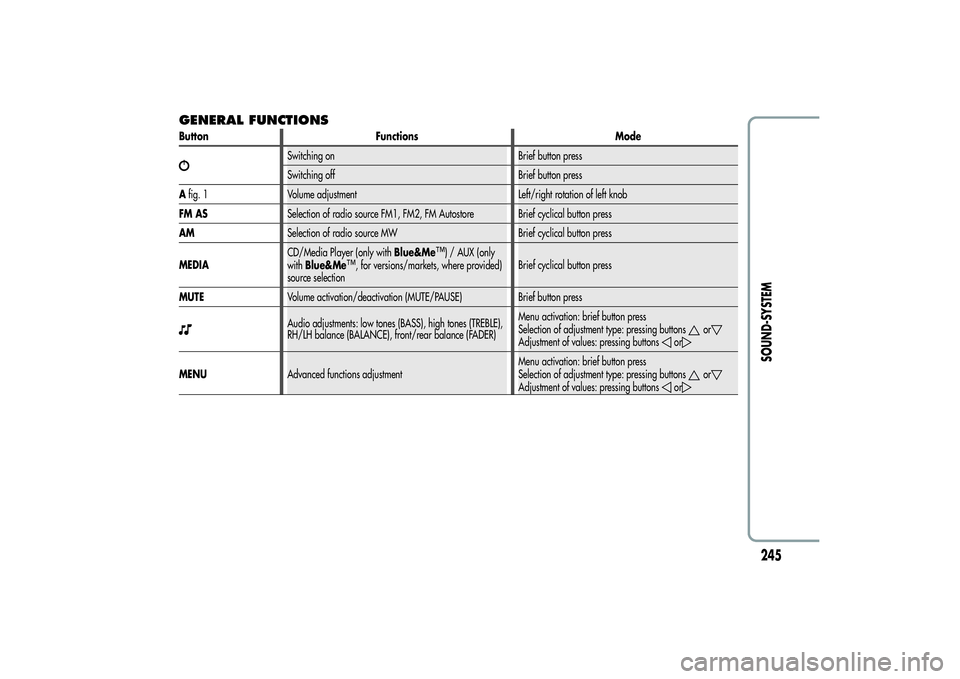
GENERAL FUNCTIONSButton Functions Mode
Switching on Brief button press
Switching off Brief button press
Afig. 1 Volume adjustment Left/right rotation of left knob
FM ASSelection of radio source FM1, FM2, FM Autostore Brief cyclical button press
AMSelection of radio source MW Brief cyclical button press
MEDIACD/Media Player (only withBlue&Me
™) / AUX (only
withBlue&Me
™, for versions/markets, where provided)
source selectionBrief cyclical button press
MUTEVolume activation/deactivation (MUTE/PAUSE) Brief button press
Audio adjustments: low tones (BASS), high tones (TREBLE),
RH/LH balance (BALANCE), front/rear balance (FADER)Menu activation: brief button press
Selection of adjustment type: pressing buttons
or
Adjustment of values: pressing buttons
or
MENUAdvanced functions adjustmentMenu activation: brief button press
Selection of adjustment type: pressing buttons
or
Adjustment of values: pressing buttons
or
245SOUND-SYSTEM
Page 251 of 292
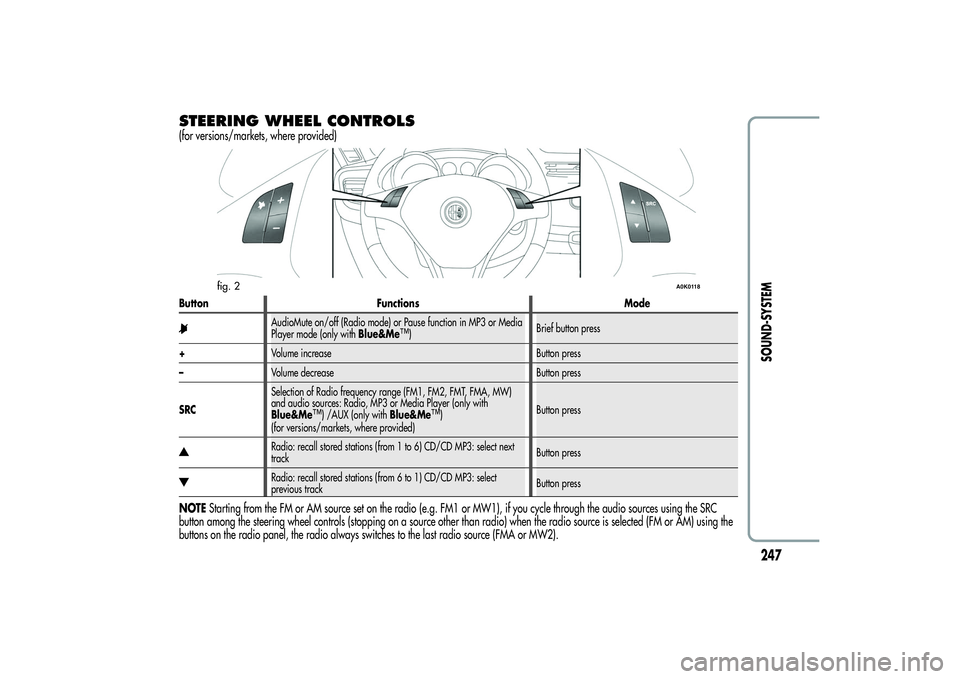
STEERING WHEEL CONTROLS(for versions/markets, where provided)Button Functions Mode
AudioMute on/off (Radio mode) or Pause function in MP3 or Media
Player mode (only withBlue&Me
™)Brief button press
+Volume increase Button press
–Volume decrease Button press
SRCSelection of Radio frequency range (FM1, FM2, FMT, FMA, MW)
and audio sources: Radio, MP3 or Media Player (only with
Blue&Me
™) /AUX (only withBlue&Me
™)
(for versions/markets, where provided)Button press
Radio: recall stored stations (from 1 to 6) CD/CD MP3: select next
trackButton pressRadio: recall stored stations (from 6 to 1) CD/CD MP3: select
previous trackButton press
NOTEStarting from the FM or AM source set on the radio (e.g. FM1 or MW1), if you cycle through the audio sources using the SRC
button among the steering wheel controls (stopping on a source other than radio) when the radio source is selected (FM or AM) using the
buttons on the radio panel, the radio always switches to the last radio source (FMA or MW2).
fig. 2
A0K0118
247SOUND-SYSTEM
Page 253 of 292
MP3 CD section
❒MP3-Info function (ID3-TAG);
❒Folder selection (previous/next);
❒Track selection (forward/back);
❒Fast advance (forward/back) through tracks;
❒MP3 Display function: display of name of folder, ID3-TAG
information, time elapsed since the start of the track, name of the
file);
❒Playing of audio or data CDs, CD-Rs and CD-RWs.
Audio section
❒Mute/Pause function;
❒Soft-Mute function;
❒Loudness function (excluding versions with Bose HI-FI system);
❒7-band graphic equaliser (excluding versions with Bose HI-FI
system);
❒Separate bass/treble adjustment;
❒Right/left channel balance.Media Player section (only with Blue&Me™)
For the Media Player functions see theBlue&Me™ supplement.
AUX section (only with Blue&Me™)
(for versions/markets, where provided)
❒AUX source selection;
❒AUX Offset function: alignment of the portable device volume
with that of the other sources;
❒Portable player playback.
249SOUND-SYSTEM
Page 255 of 292
MUTE/PAUSE FUNCTION
(zeroing the volume)Press the MUTE button briefly to activate the MUTE function. The
volume will gradually decrease and the words “RADIO Mute” (in
radio mode) or “PAUSE” (in CD mode) will be displayed.
Press the Mute button again to deactivate the MUTE function. The
volume will gradually increase until it reaches the level set
previously.
When the volume level is changed using the dedicated controls, the
Mute function is deactivated and the volume is adjusted to the new
level selected.
With the Mute function activated, it will be ignored when there is
an incoming traffic alert (if the TA function is activated), or if an
emergency alarm is received. The function will be reactivated when
the alert is over.
AUDIO SETTINGSThe functions in the audio menu differ according to the active
source: AM/FM/CD/Media Player (only withBlue&Me™) /AUX
(only withBlue&Me™) (for versions/markets, where provided).
Press the
button briefly to change the Audio functions.
After thebutton is first pressed, the display will show the bass
level value for the source activated at that time (e.g. in FM mode
the display will show the wording “FM Bass + 2”).
Use theor
buttons to scroll through the menu functions. To
change the setting of the function selected use the
or
buttons.
The current status of the function selected will be shown on the
display.
The functions managed by the Menu are:
❒BASS (adjustment of bass tones);
❒TREBLE (adjustment of high tones);
❒BALANCE (right/left balance adjustment);
❒FADER (front/back balance adjustment);
❒LOUDNESS (excluding versions with Bose HI-FI system)
(activation/deactivation of LOUDNESS function);
❒EQUALIZER (excluding versions with Bose HI-FI system)
(activation and selection of factory equalizer settings);
❒USER EQUALISER (excluding versions with Bose HI-FI system)
(personalised equaliser settings).
251SOUND-SYSTEM
Page 258 of 292
MENUMENU button functions
Press the MENU button briefly to activate the Menu function. The
display will show the first menu item that can be adjusted (AF) (“AF
Switching On” on the display).
Use the
or
buttons to scroll through the menu functions. To
change the setting of the function selected use the
or
buttons.
The current status of the function selected will be shown on the
display.
The functions managed by the Menu are:
❒AF SWITCHING (ON/OFF);
❒TRAFFIC INFORMATION (ON/OFF);
❒REGIONAL MODE regional programmes (ON/OFF);
❒MP3 DISPLAY (CD MP3 display settings);
❒SPEED VOLUME (speed dependent automatic volume
adjustment) (excluding versions with Bose HI-FI system);
❒RADIO ON VOLUME (radio volume limit
activation/deactivation);
❒AUX OFFSET (alignment of the portable device volume to that of
the other sources) (for versions/markets, where provided);
❒RADIO OFF (switching-off mode);
❒SYSTEM RESET
Press the MENU button again to exit the Menu function.
NoteThe AF SWITCHING, TRAFFIC INFORMATION and
REGIONAL MODE adjustments are only possible in FM mode.
AF SWITCHING function(alternative frequency search)
The radio can operate in two different modes using RDS:
❒“AF Switching On”: search for alternative frequencies active (the
letters “AF” appear on the display);
❒“AF Switching Off”: search for alternative frequencies not active.
Proceed as follows to activate/deactivate the function:
❒press the MENU button and select “AF Switching On”;
❒press the
/
buttons to activate/deactivate the function.
When the function is activated, the radio automatically tunes into
the station with the strongest signal broadcasting the same
programme. While driving, the same station can be continuously
listened to without having to change the frequency when you
change zones.
Obviously, it must be possible to receive the station that you are
listening to in the area you are driving through.
If the AF function has been activated, “AF” will light up in the
display.
If the AF function has been activated and the radio is not able to
receive the current station, the radio activates the automatic search,
during which “FM Search” appears on the display (only for top-of-
the-range radios).
With the AF function deactivated, the remaining RDS functions,
such as the display of the station name, still remain active.
The AF function can only be activated on FM bands.
254
SOUND-SYSTEM