audio Alfa Romeo Giulietta 2013 Owner handbook (in English)
[x] Cancel search | Manufacturer: ALFA ROMEO, Model Year: 2013, Model line: Giulietta, Model: Alfa Romeo Giulietta 2013Pages: 292, PDF Size: 13.06 MB
Page 29 of 292
❒press "
"or"
" to select the information you wish to see
on the main page of the display;
❒briefly press the SET/button to go back to the menu screen or
hold the button down to go back to the standard screen without
saving.
When the key is turned to MAR-ON and the initial check stage is over,
the display will show the information selected via the “First page”
menu function.
See radio (audio information
display)This function is used to display radio information.
❒Radio: selected radio station frequency or RDS message, automatic
tuning activation or AutoSTore;
❒Audio CD, MP3 CDs: track number;
❒CD Changer: CD number and track number;
To show the sound system information on the display (On) or clear it
(Off), proceed as follows:
❒briefly press the SET/
button, the display will show "On" or
"Off" flashing depending on the previous setting;
❒press the "
"or"
" button to select;
❒briefly press the SET/
button to go back to the menu screen or
hold the button down to go back to the standard screen without
saving.
Autoclose (Automatic door lock
operation with car running)When activated (On), this function locks the doors automatically when
the vehicle speed exceeds 20 km/h.Proceed as follows to activate or deactivate this function:
❒press the SET/
button briefly to display a submenu;
❒press the SET/button briefly to make the display flash "On" or
"Off" according to what was previously set;
❒press the ""or"
" button to select;
❒press the SET/
button briefly to return to the submenu screen or
hold the button down to return to the main menu screen without
saving;
❒hold the SET/button down again to return to the standard
screen or to the main menu according to where you are in the menu.
Unit of measurement (Setting the
unit of measurement)With this function it is possible to set the units through three submenus:
"Distances", "Consumption" and "Temperature".
To set the desired measurement unit, proceed as follows:
❒briefly press the SET/
button to display the three sub-menus;
❒press the "
"or"
" button to navigate through the three
submenus;
❒once the submenu to be modified has been selected, briefly press the
SET/
button;
❒if the submenu “Distance” is entered: by briefly pressing SET/
the display shows "km" or "mi" depending on the previous setting;
❒press the "
"or"
" button to select;
❒when you select “Consumption”, pressing SET/
button makes
km/l, l/100km or mpg appear on the display depending on the
previous setting;
25GETTING TO
KNOW YOUR CARSAFETY
STARTING AND
DRIVING
IN AN EMERGENCY
SERVICING AND
MAINTENANCE
TECHNICAL
SPECIFICATIONS
INDEX
Page 243 of 292
TABLE OF CONTENTS
INTRODUCTION ........................................................................... 241
ADVICE ..................................................................................... 241
TECHNICAL CHARACTERISTICS ................................................... 242
BASIC LEVEL SYSTEM.................................................................. 243
MEDIUM LEVEL SYSTEM .............................................................. 243
BOSE HI-FI LEVEL SYSTEM ........................................................... 243
QUICK GUIDE............................................................................... 244
GENERAL FUNCTIONS ............................................................... 245
RADIO FUNCTIONS ................................................................... 246
CD FUNCTIONS ......................................................................... 246
Media Player FUNCTIONS (only withBlue&Me™) .................... 246
STEERING WHEEL CONTROLS ...................................................... 247
GENERAL INFORMATION ............................................................. 248
FUNCTIONS AND ADJUSTMENTS ................................................. 250
SWITCHING ON THE RADIO ...................................................... 250
SWITCHING OFF THE RADIO ...................................................... 250
SELECTING THE RADIO FUNCTIONS ........................................... 250
SELECTING CD FUNCTION ......................................................... 250
AUDIO SOURCE MEMORY FUNCTION ....................................... 250
VOLUME ADJUSTMENT .............................................................. 250
MUTE/PAUSE FUNCTION (zeroing the volume) ........................... 251
AUDIO SETTINGS....................................................................... 251
TONE ADJUSTMENT (bass/treble) ............................................... 252
BALANCE ADJUSTMENT ............................................................. 252
FADER ADJUSTMENT .................................................................. 252
LOUDNESS FUNCTION .............................................................. 252
EQ FUNCTION .......................................................................... 253
USER EQ SETTINGS FUNCTION ................................................. 253
MENU ....................................................................................... 254
AF SWITCHING function ............................................................ 254TRAFFIC INFORMATION function ................................................ 255
REGIONAL MODE function ........................................................ 256
MP3 DISPLAY function ................................................................ 256
SPEED VOLUME function ............................................................ 257
RADIO ON VOLUME function ..................................................... 257
AUX OFFSET function ................................................................. 258
RADIO OFF function .................................................................. 258
SYSTEM RESET function ............................................................... 258
PHONE FUNCTION .................................................................... 259
ANTI-THEFT PROTECTION ........................................................... 259
RADIO (TUNER) ............................................................................ 261
INTRODUCTION......................................................................... 261
FREQUENCY BAND SELECTION.................................................. 261
PRESET BUTTONS ....................................................................... 261
STORING THE LAST STATION LISTENED TO.................................. 262
AUTOMATIC TUNING................................................................. 262
MANUAL TUNING ..................................................................... 262
AUTOSTORE FUNCTION ........................................................... 262
EMERGENCY ALARM RECEPTION ............................................... 263
EON FUNCTION (Enhanced Other Network) ................................ 264
STEREOPHONIC BROADCASTERS ............................................... 264
CD PLAYER ................................................................................... 264
INTRODUCTION......................................................................... 264
SELECTING THE CD PLAYER ........................................................ 264
LOADING/EJECTING A CD ........................................................ 265
DISPLAY INFORMATION ............................................................. 265
TRACK SELECTION (forward/back) ............................................. 266
TRACK FAST FORWARD/REWIND ............................................... 266
PAUSE FUNCTION...................................................................... 266
MP3 CD PLAYER ............................................................................ 267
239SOUND-SYSTEM
Page 246 of 292
❒Never use CDs that are very scratched, cracked, distorted, etc.
Their use could cause damage to the player or make it
malfunction;
❒to achieve the best quality audio reproduction we recommend
the use of original CD media. Correct operation is not
guaranteed when CD-R/RW media are used that were not
correctly burnt and/or with a maximum capacity above 650
Mb;
❒do not use commercially available protective sheets for CDs or
discs with stabilisers as they could get stuck in the internal
mechanism and damage the disc;
❒if a copy-protected CD is used, it may take a few seconds before
the system starts to play it. The CD player is not guaranteed to
play all copy-protected discs. The presence of copy protection is
often indicated in small letters or may be difficult to read on the
cover of the CD; it may say something like, for example, “COPY
CONTROL”, “COPY PROTECTED”, “THIS CD CANNOT BE
PLAYED ON A PC/MAC” or may be identified through the use
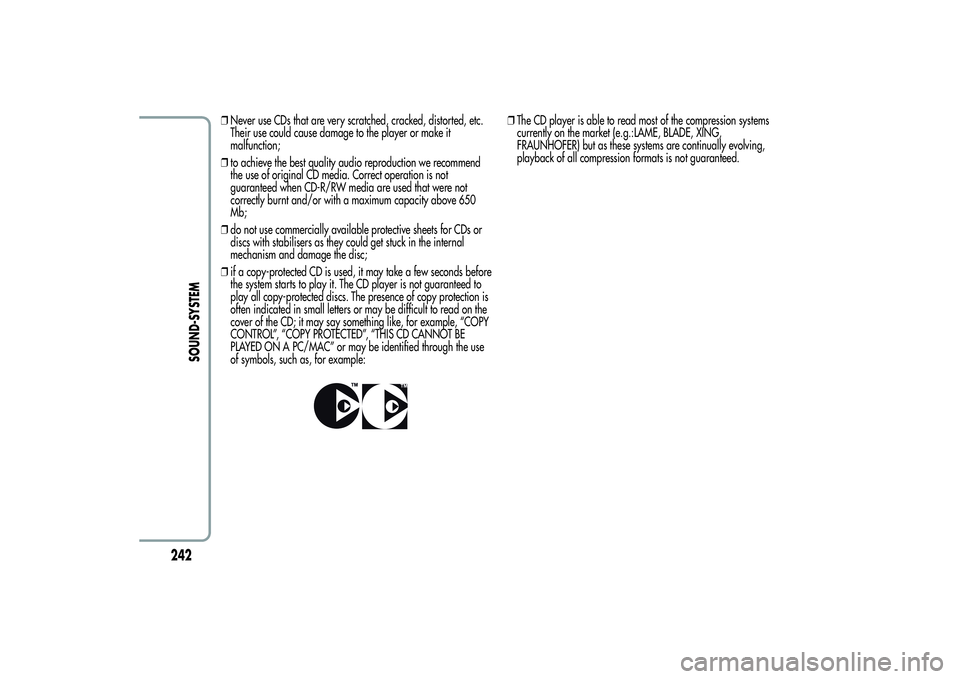
of symbols, such as, for example:
❒The CD player is able to read most of the compression systems
currently on the market (e.g.:LAME, BLADE, XING,
FRAUNHOFER) but as these systems are continually evolving,
playback of all compression formats is not guaranteed.
242
SOUND-SYSTEM
Page 247 of 292
TECHNICAL CHARACTERISTICSMaximum power: 4x30 WBASIC LEVEL SYSTEMStandard level audio
Front speakers
❒2 × tweeters,
38 mm;
❒2 × mid-woofer speakers,
165 mm.
Rear speakers
❒2 × full-range speakers,165 mm.
MEDIUM LEVEL SYSTEMMedium level audio
Front speakers
❒2 × tweeters,
38 mm;
❒2 × mid-woofer speakers,
165 mm.
Rear speakers
❒2 × tweeters,
38 mm;
❒2 × mid-woofer speakers,
165 mm.
High level radio(dual tuner and dual aerial).
BOSE HI-FI LEVEL SYSTEM(for versions/markets, where provided)
HI-FI level audio
Front speakers
❒2 × tweeters,
38 mm;
❒2 × mid-woofer speakers,
165 mm;
❒1 × mid-tweeter (Centerfill) speaker fitted in the dashboard.
Rear speakers
❒2 × tweeters,
38 mm;
❒2 × mid-woofer speakers,
165 mm;
❒1 × 8-channel amplifier;
❒1 × bass box.
High level radio(dual tuner and dual aerial).
The Bose HI-FI audio system has been carefully designed to provide
the best acoustic performance and reproduce sound like a live
concert in all areas of the passenger compartment.
The system faithfully reproduces crystalline treble tones and
provides full and rich bass tones that make the loudness function
superfluous.
The complete range of sound is reproduced throughout the entire
passenger compartment so that the occupants are enveloped with
the feeling of space experienced when listening to live music.
The components used have been patented and make use of the
most sophisticated technology whilst at the same time being easy to
use by even the most inexperienced people.
243SOUND-SYSTEM
Page 249 of 292
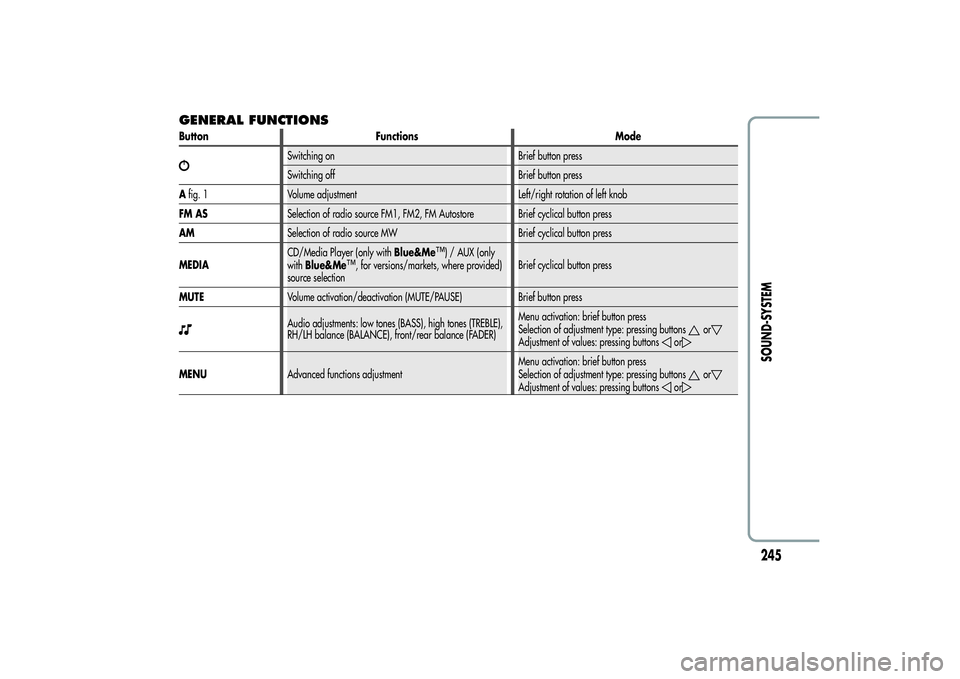
GENERAL FUNCTIONSButton Functions Mode
Switching on Brief button press
Switching off Brief button press
Afig. 1 Volume adjustment Left/right rotation of left knob
FM ASSelection of radio source FM1, FM2, FM Autostore Brief cyclical button press
AMSelection of radio source MW Brief cyclical button press
MEDIACD/Media Player (only withBlue&Me
™) / AUX (only
withBlue&Me
™, for versions/markets, where provided)
source selectionBrief cyclical button press
MUTEVolume activation/deactivation (MUTE/PAUSE) Brief button press
Audio adjustments: low tones (BASS), high tones (TREBLE),
RH/LH balance (BALANCE), front/rear balance (FADER)Menu activation: brief button press
Selection of adjustment type: pressing buttons
or
Adjustment of values: pressing buttons
or
MENUAdvanced functions adjustmentMenu activation: brief button press
Selection of adjustment type: pressing buttons
or
Adjustment of values: pressing buttons
or
245SOUND-SYSTEM
Page 251 of 292
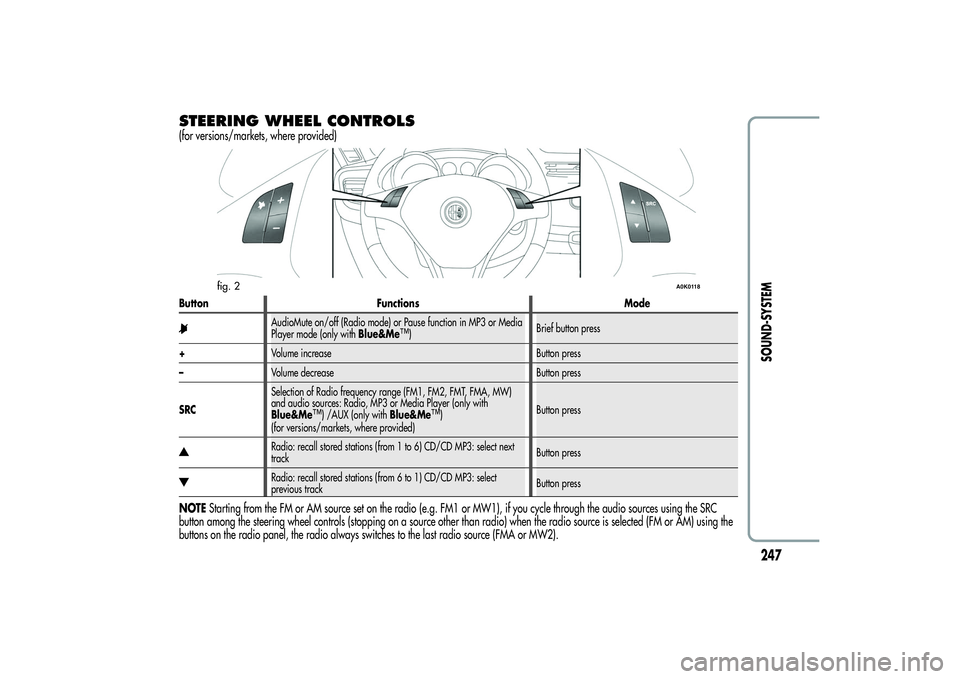
STEERING WHEEL CONTROLS(for versions/markets, where provided)Button Functions Mode
AudioMute on/off (Radio mode) or Pause function in MP3 or Media
Player mode (only withBlue&Me
™)Brief button press
+Volume increase Button press
–Volume decrease Button press
SRCSelection of Radio frequency range (FM1, FM2, FMT, FMA, MW)
and audio sources: Radio, MP3 or Media Player (only with
Blue&Me
™) /AUX (only withBlue&Me
™)
(for versions/markets, where provided)Button press
Radio: recall stored stations (from 1 to 6) CD/CD MP3: select next
trackButton pressRadio: recall stored stations (from 6 to 1) CD/CD MP3: select
previous trackButton press
NOTEStarting from the FM or AM source set on the radio (e.g. FM1 or MW1), if you cycle through the audio sources using the SRC
button among the steering wheel controls (stopping on a source other than radio) when the radio source is selected (FM or AM) using the
buttons on the radio panel, the radio always switches to the last radio source (FMA or MW2).
fig. 2
A0K0118
247SOUND-SYSTEM
Page 252 of 292
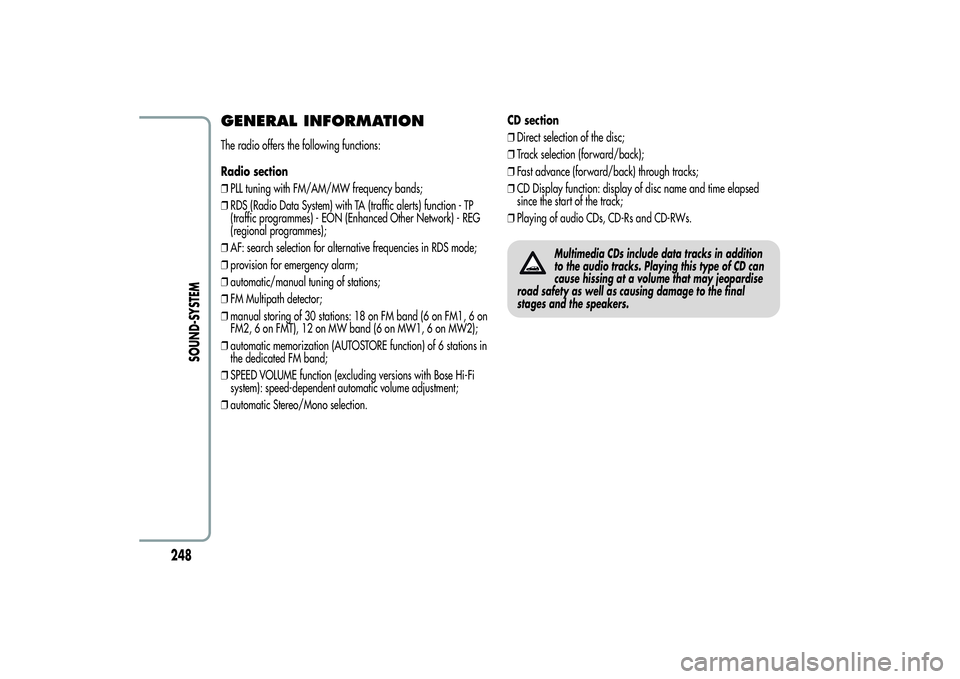
GENERAL INFORMATIONThe radio offers the following functions:
Radio section
❒PLL tuning with FM/AM/MW frequency bands;
❒RDS (Radio Data System) with TA (traffic alerts) function - TP
(traffic programmes) - EON (Enhanced Other Network) - REG
(regional programmes);
❒AF: search selection for alternative frequencies in RDS mode;
❒provision for emergency alarm;
❒automatic/manual tuning of stations;
❒FM Multipath detector;
❒manual storing of 30 stations: 18 on FM band (6 on FM1, 6 on
FM2, 6 on FMT), 12 on MW band (6 on MW1, 6 on MW2);
❒automatic memorization (AUTOSTORE function) of 6 stations in
the dedicated FM band;
❒SPEED VOLUME function (excluding versions with Bose Hi-Fi
system): speed-dependent automatic volume adjustment;
❒automatic Stereo/Mono selection.CD section
❒Direct selection of the disc;
❒Track selection (forward/back);
❒Fast advance (forward/back) through tracks;
❒CD Display function: display of disc name and time elapsed
since the start of the track;
❒Playing of audio CDs, CD-Rs and CD-RWs.
Multimedia CDs include data tracks in addition
to the audio tracks. Playing this type of CD can
cause hissing at a volume that may jeopardise
road safety as well as causing damage to the final
stages and the speakers.
248
SOUND-SYSTEM
Page 253 of 292
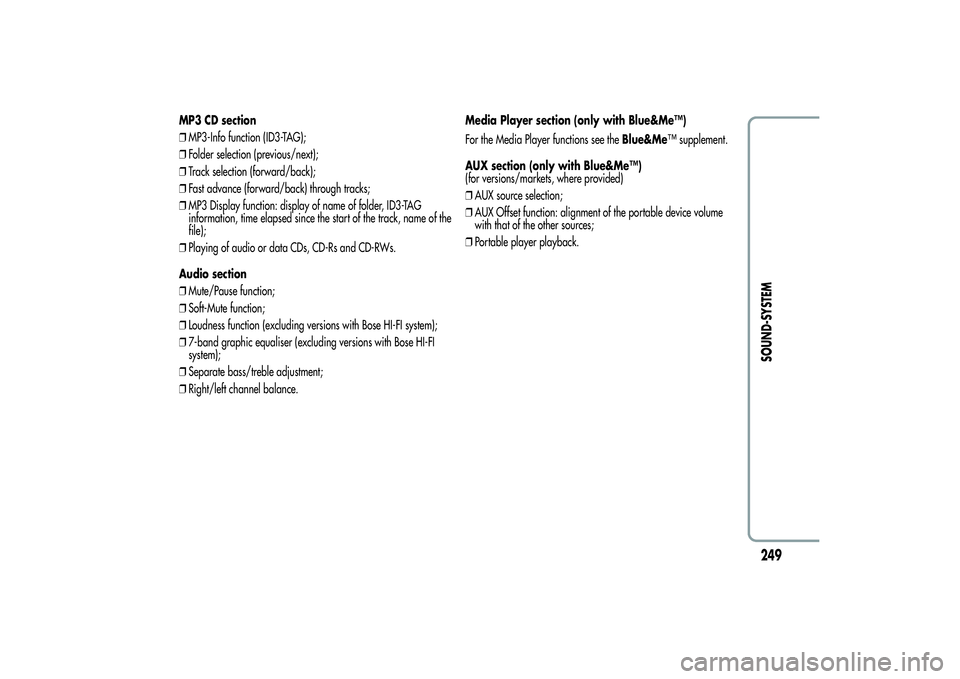
MP3 CD section
❒MP3-Info function (ID3-TAG);
❒Folder selection (previous/next);
❒Track selection (forward/back);
❒Fast advance (forward/back) through tracks;
❒MP3 Display function: display of name of folder, ID3-TAG
information, time elapsed since the start of the track, name of the
file);
❒Playing of audio or data CDs, CD-Rs and CD-RWs.
Audio section
❒Mute/Pause function;
❒Soft-Mute function;
❒Loudness function (excluding versions with Bose HI-FI system);
❒7-band graphic equaliser (excluding versions with Bose HI-FI
system);
❒Separate bass/treble adjustment;
❒Right/left channel balance.Media Player section (only with Blue&Me™)
For the Media Player functions see theBlue&Me™ supplement.
AUX section (only with Blue&Me™)
(for versions/markets, where provided)
❒AUX source selection;
❒AUX Offset function: alignment of the portable device volume
with that of the other sources;
❒Portable player playback.
249SOUND-SYSTEM
Page 254 of 292
FUNCTIONS AND ADJUSTMENTSSWITCHING ON THE RADIOThe radio switches on when the
button (ON/OFF) is pressed
briefly.
When the radio is turned on, the volume is limited to level 20 if it
was set to a higher value when previously used or to level 5 if it
was previously set to value 0 or to Mute/Pause. The previously set
value is maintained in all other cases.
When the radio is switched on with the key extracted from the
ignition, it switches off automatically after about 20 minutes. After
the radio has switched itself off automatically it can be switched on
for a further 20 minutes by pressing the
button (ON/OFF).
SWITCHING OFF THE RADIOBriefly press the
button (ON/OFF).
SELECTING THE RADIO FUNCTIONSBy pressing the FM AS button quickly and repeatedly, the following
audio sources can be selected cyclically:
❒TUNER (“FM1”, “FM2”, “FMA”).
By pressing the AM button briefly and repeatedly, the following
audio sources can be selected cyclically:
❒TUNER (“MW1”, “MW2”).SELECTING CD FUNCTIONBy pressing the MEDIA button briefly it is possible to select the CD
function.AUDIO SOURCE MEMORY FUNCTIONIf another function (e.g. the radio) is selected whilst listening to a
CD, playback is interrupted and is resumed from the same point
when returning to the CD source.
If another function is selected whilst listening to the radio, the last
station selected is tuned into when returning to Radio mode.VOLUME ADJUSTMENTTo adjust the volume, turn the left knobA(fig. 1).
If the volume level is changed during the transmission of traffic
news, the new setting will only be maintained until the update is
finished.
250
SOUND-SYSTEM
Page 255 of 292
MUTE/PAUSE FUNCTION
(zeroing the volume)Press the MUTE button briefly to activate the MUTE function. The
volume will gradually decrease and the words “RADIO Mute” (in
radio mode) or “PAUSE” (in CD mode) will be displayed.
Press the Mute button again to deactivate the MUTE function. The
volume will gradually increase until it reaches the level set
previously.
When the volume level is changed using the dedicated controls, the
Mute function is deactivated and the volume is adjusted to the new
level selected.
With the Mute function activated, it will be ignored when there is
an incoming traffic alert (if the TA function is activated), or if an
emergency alarm is received. The function will be reactivated when
the alert is over.
AUDIO SETTINGSThe functions in the audio menu differ according to the active
source: AM/FM/CD/Media Player (only withBlue&Me™) /AUX
(only withBlue&Me™) (for versions/markets, where provided).
Press the
button briefly to change the Audio functions.
After thebutton is first pressed, the display will show the bass
level value for the source activated at that time (e.g. in FM mode
the display will show the wording “FM Bass + 2”).
Use theor
buttons to scroll through the menu functions. To
change the setting of the function selected use the
or
buttons.
The current status of the function selected will be shown on the
display.
The functions managed by the Menu are:
❒BASS (adjustment of bass tones);
❒TREBLE (adjustment of high tones);
❒BALANCE (right/left balance adjustment);
❒FADER (front/back balance adjustment);
❒LOUDNESS (excluding versions with Bose HI-FI system)
(activation/deactivation of LOUDNESS function);
❒EQUALIZER (excluding versions with Bose HI-FI system)
(activation and selection of factory equalizer settings);
❒USER EQUALISER (excluding versions with Bose HI-FI system)
(personalised equaliser settings).
251SOUND-SYSTEM