phone Alfa Romeo Giulietta 2013 Owner handbook (in English)
[x] Cancel search | Manufacturer: ALFA ROMEO, Model Year: 2013, Model line: Giulietta, Model: Alfa Romeo Giulietta 2013Pages: 292, PDF Size: 13.06 MB
Page 113 of 292
RADIO TRANSMITTERS AND MOBILE
PHONESRadio transmitter equipment (vehicle mobile phones, CB radios,
amateur radio, etc.) cannot be used inside the car unless a separate
aerial is mounted externally.
IMPORTANT The use of similar devices inside the passenger
compartment (without separate aerial) produces radio-frequency
electromagnetic fields which, amplified by the resonance effects inside
the passenger compartment, may cause electrical systems equipping
the car to malfunction. This could compromise safety in addition to
constituting a potential hazard for the passengers.
In addition, transmission and reception of these devices may be
affected by the shielding effect of the car body.
As far as the use of EC-approved mobile phones is concerned (GSM,
GPRS, UMTS), follow the usage instructions provided by the mobile
phone manufacturer.
PARKING SENSORS(for versions/markets, where provided)
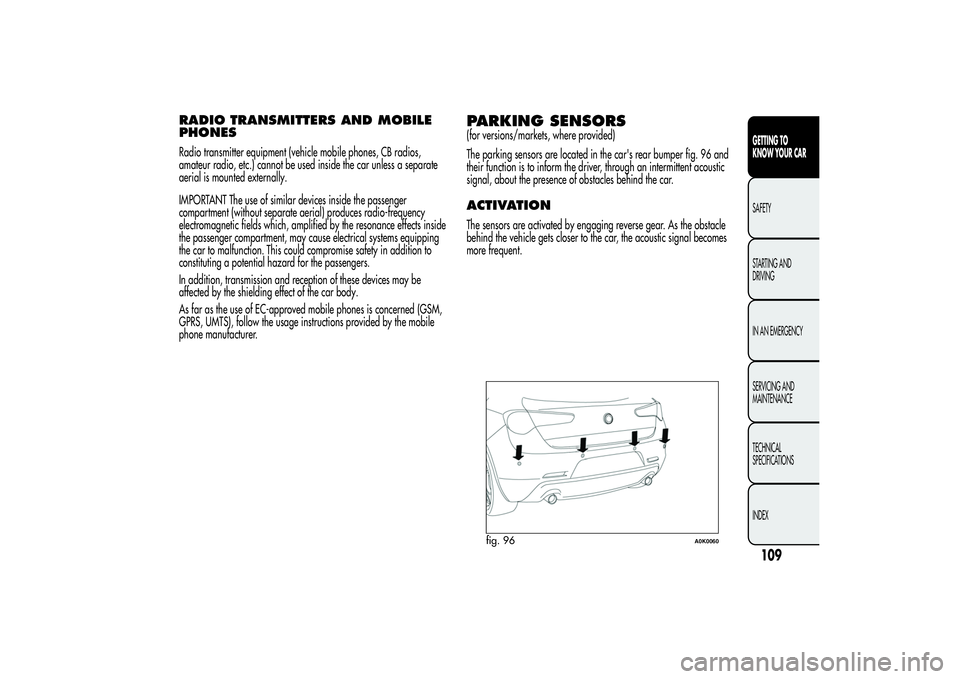
The parking sensors are located in the car's rear bumper fig. 96 and
their function is to inform the driver, through an intermittent acoustic
signal, about the presence of obstacles behind the car.ACTIVATIONThe sensors are activated by engaging reverse gear. As the obstacle
behind the vehicle gets closer to the car, the acoustic signal becomes
more frequent.
fig. 96
A0K0060
109GETTING TO
KNOW YOUR CARSAFETY
STARTING AND
DRIVING
IN AN EMERGENCY
SERVICING AND
MAINTENANCE
TECHNICAL
SPECIFICATIONS
INDEX
Page 146 of 292
IN AN EMERGENCY
In an emergency we recommend that you call the freephone number found in the Warranty Booklet. You can also
consult www.alfaromeo.com to find your nearest Alfa Romeo Authorized Services.STARTING THE ENGINEIf the
warning light on the instrument panel remains on constantly,
contact Alfa Romeo Authorized Services immediately.
JUMP STARTINGIf the battery is flat, the engine may be started using an auxiliary
battery with the same capacity or a little higher than the flat one.
Proceed as follows to start the vehicle:
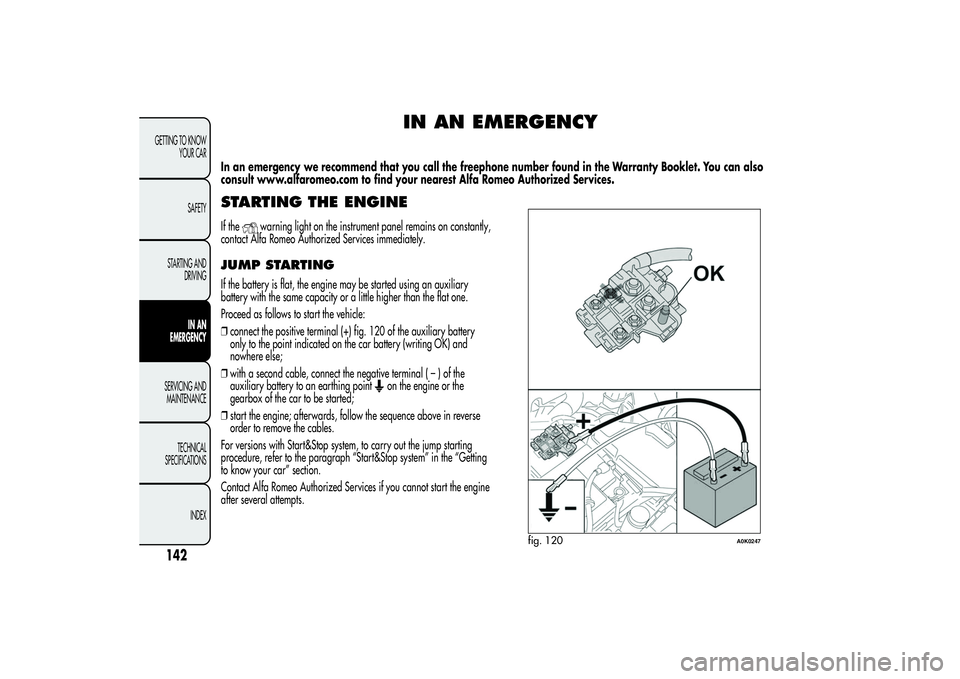
❒connect the positive terminal (+) fig. 120 of the auxiliary battery
only to the point indicated on the car battery (writing OK) and
nowhere else;
❒with a second cable, connect the negative terminal(–)ofthe
auxiliary battery to an earthing point
on the engine or the
gearbox of the car to be started;
❒start the engine; afterwards, follow the sequence above in reverse
order to remove the cables.
For versions with Start&Stop system, to carry out the jump starting
procedure, refer to the paragraph “Start&Stop system” in the “Getting
to know your car” section.
Contact Alfa Romeo Authorized Services if you cannot start the engine
after several attempts.
fig. 120
A0K0247
142GETTING TO KNOW
YOUR CAR
SAFETY
STARTING AND
DRIVING
IN AN
EMERGENCY
SERVICING AND
MAINTENANCE
TECHNICAL
SPECIFICATIONS
INDEX
Page 197 of 292
IMPORTANT If the charge level remains under 50% for a long time, the
battery is damaged by sulphation, reducing its capacity and
efficiency at start-up.
The battery will also be more at risk of freezing (this can happen as
early as –10°C). Refer to “Storing the car” in “Starting and driving” if
the car is left parked for a long time.
If after having purchased your car you decide to add accessories
requiring permanent electrical power (alarm etc.) or accessories that
require large amounts of power, contact Alfa Romeo Authorized
Services. They can calculate the overall electrical requirement.
Battery liquid is poisonous and corrosive. Avoid
contact with the skin and the eyes. Keep naked flames
and sources of sparks away from the battery: risk of
explosion and fire.Using the battery with insufficient fluid irreparably
damages the battery and may cause an explosion.
Incorrect installation of electric and electronic devices may
cause severe damage to your car. After purchasing your
car, if you wish to install any accessories (anti-theft, radio
phone etc.), contact Alfa Romeo Authorized Services, who will suggest
the most appropriate devices for your vehicle and will, most
importantly, advise you if a higher capacity battery needs to be
installed.Batteries contain substances which are very dangerous for
the environment. For the replacement of the battery,
contact Alfa Romeo Authorized Services.If the car will be unused for an extended period of
time in extremely cold weather conditions, remove the
battery and store it in a heated area to prevent it
from freezing.When performing any operation on the battery or near
it, always protect your eyes with special goggles.
193GETTING TO KNOW
YOUR CAR
SAFETY
STARTING AND
DRIVING
IN AN EMERGENCYSERVICING AND
MAINTENANCETECHNICAL
SPECIFICATIONS
INDEX
Page 236 of 292
PRESCRIPTIONS FOR HANDLING THE VEHICLE AT THE END OF ITS
LIFEFor years, Alfa Romeo has pursued a global commitment to protect and respect the environment by continually improving its production processes
and developing increasingly eco-compatible products. To ensure its customers the best possible service in compliance with environmental standards
and in response to obligations arising out of European Directive 2000/53/EC on end of life vehicles, Alfa Romeo offers its customers the chance
to hand back their vehicles (*) at the end of their life cycle at no additional cost.
The European Directive sets out that when the vehicle is handed over the last keeper or owner should not incur any expenses as a result of it
having a zero or negative market value. In particular, in almost all European Union countries, until 1st January 2007, vehicles registered after 1st
July 2002 will be collected free of charge, whilst from 2007 collection will be free of charge irrespective of the year of registration as long as
the vehicle contains its basic components (in particular, the engine and bodywork) and has no additional waste.
To hand your vehicle over at the end of its life without extra cost, contact one of our dealerships or an Alfa Romeo authorised collection and
scrapping centre. These centres have been carefully chosen to offer high-quality service for the collection, treatment and recycling of vehicles at
their end of life, respecting the surrounding environment.
You can find further information on these collection and scrapping centres either from an Alfa Romeo Dealership or by calling the freephone
number 00800 2532 0000 or on the Alfa Romeo website.
(*) Vehicle for transporting passengers with a maximum of nine seats and a total permitted weight of 3.5 t
232GETTING TO KNOW
YOUR CAR
SAFETY
STARTING AND
DRIVING
IN AN EMERGENCY
SERVICING AND
MAINTENANCE
TECHNICAL
SPECIFICATIONS
INDEX
Page 243 of 292
TABLE OF CONTENTS
INTRODUCTION ........................................................................... 241
ADVICE ..................................................................................... 241
TECHNICAL CHARACTERISTICS ................................................... 242
BASIC LEVEL SYSTEM.................................................................. 243
MEDIUM LEVEL SYSTEM .............................................................. 243
BOSE HI-FI LEVEL SYSTEM ........................................................... 243
QUICK GUIDE............................................................................... 244
GENERAL FUNCTIONS ............................................................... 245
RADIO FUNCTIONS ................................................................... 246
CD FUNCTIONS ......................................................................... 246
Media Player FUNCTIONS (only withBlue&Me™) .................... 246
STEERING WHEEL CONTROLS ...................................................... 247
GENERAL INFORMATION ............................................................. 248
FUNCTIONS AND ADJUSTMENTS ................................................. 250
SWITCHING ON THE RADIO ...................................................... 250
SWITCHING OFF THE RADIO ...................................................... 250
SELECTING THE RADIO FUNCTIONS ........................................... 250
SELECTING CD FUNCTION ......................................................... 250
AUDIO SOURCE MEMORY FUNCTION ....................................... 250
VOLUME ADJUSTMENT .............................................................. 250
MUTE/PAUSE FUNCTION (zeroing the volume) ........................... 251
AUDIO SETTINGS....................................................................... 251
TONE ADJUSTMENT (bass/treble) ............................................... 252
BALANCE ADJUSTMENT ............................................................. 252
FADER ADJUSTMENT .................................................................. 252
LOUDNESS FUNCTION .............................................................. 252
EQ FUNCTION .......................................................................... 253
USER EQ SETTINGS FUNCTION ................................................. 253
MENU ....................................................................................... 254
AF SWITCHING function ............................................................ 254TRAFFIC INFORMATION function ................................................ 255
REGIONAL MODE function ........................................................ 256
MP3 DISPLAY function ................................................................ 256
SPEED VOLUME function ............................................................ 257
RADIO ON VOLUME function ..................................................... 257
AUX OFFSET function ................................................................. 258
RADIO OFF function .................................................................. 258
SYSTEM RESET function ............................................................... 258
PHONE FUNCTION .................................................................... 259
ANTI-THEFT PROTECTION ........................................................... 259
RADIO (TUNER) ............................................................................ 261
INTRODUCTION......................................................................... 261
FREQUENCY BAND SELECTION.................................................. 261
PRESET BUTTONS ....................................................................... 261
STORING THE LAST STATION LISTENED TO.................................. 262
AUTOMATIC TUNING................................................................. 262
MANUAL TUNING ..................................................................... 262
AUTOSTORE FUNCTION ........................................................... 262
EMERGENCY ALARM RECEPTION ............................................... 263
EON FUNCTION (Enhanced Other Network) ................................ 264
STEREOPHONIC BROADCASTERS ............................................... 264
CD PLAYER ................................................................................... 264
INTRODUCTION......................................................................... 264
SELECTING THE CD PLAYER ........................................................ 264
LOADING/EJECTING A CD ........................................................ 265
DISPLAY INFORMATION ............................................................. 265
TRACK SELECTION (forward/back) ............................................. 266
TRACK FAST FORWARD/REWIND ............................................... 266
PAUSE FUNCTION...................................................................... 266
MP3 CD PLAYER ............................................................................ 267
239SOUND-SYSTEM
Page 259 of 292
TRAFFIC INFORMATION function(traffic information)
Some stations on the FM band (FM1, FM2 and FMA) can
broadcast information about traffic conditions. In this case the
letters “TA” appear on the display.
Proceed as follows to switch the TA function on/off:
❒press the MENU button briefly and select “Traffic info”;
❒press the
/
buttons to activate/deactivate the function.
If the TA function has been activated, the “TA” icon lights up on the
display.
NoteIf the TA function is activated with an audio source other
than Tuner (Radio) (CD, MP3, telephone or Mute/Pause), the radio
can carry out an automatic search and therefore it is possible,
when reactivating the Tuner (Radio) source, that the frequency
tuned into is different from the one previously set.
With the TA function, it is possible to:
❒search only for RDS stations that broadcast in FM and are
enabled to broadcast traffic information;
❒receive traffic information even when the CD player is in
operation;
❒receive traffic information at a minimum preset volume even with
the radio volume off.NoteIn some countries there are radio stations that, even with the
TP function activated, do not transmit traffic information (the “TP”
icon appears on the display).
If the radio is tuned to a station in the AM band, when TA is
activated it will tune into the last selected station in the FM1 band.
The volume at which the traffic news is transmitted depends on the
listening volume:
❒listening volume below 5: traffic news volume 5 (fixed value);
❒listening volume above 5: traffic news volume equal to listening
volume +1.
If the volume is changed during traffic news, the level will not be
shown on the display; the new level will only be maintained during
the news.
While traffic information is being received, “TRAFFIC
INFORMATION” will appear on the display.
The TA function can be interrupted by pressing any button on the
radio.
255SOUND-SYSTEM
Page 263 of 292
PHONE FUNCTION(telephone volume adjustment)
(only with Blue&Me™ system)
When a phone call is received, the audio passes to the car’s audio
system through the radio.
The telephone audio always arrives at a preset volume, but it is
possible to adjust it during a conversation using the left knobA
(fig. 1).
If, while using theBlue&Me™, the phone call volume is changed,
it is shown on the radio display, memorised and kept for all
following phone calls until the engine is switched off.
With the RADIO ON VOLUME function active, when the engine is
started again:
❒if the radio was switched off with aBlue&Me™ volume lower
than 12, theBlue&Me™ volume will be set to 12 automatically
for the next phone call;
❒if the radio was switched off with aBlue&Me™ volume higher
than 25, theBlue&Me™ volume will be set to 25 automatically
for the next phone call;
❒if the radio was switched off with aBlue&Me™ volume
between 12 and 25, theBlue&Me™ volume for the next
phone call will be that set previously by the user.
If, on the other hand, the RADIO ON VOLUME function is
deactivated, the radio keeps the last setting.
ANTI-THEFT PROTECTIONThe radio is equipped with an anti-theft protection system based on
the exchange of information between the radio and the electronic
control unit (Body Computer) on the car.
This system guarantees maximum safety and avoids the entry of
the secret code each time the radio power supply is disconnected.
If the check has a positive outcome, the radio will start to function,
whereas if the comparison codes are not the same or if the
electronic control unit (Body Computer) is replaced, the device will
ask the user to enter the secret code according to the procedure
described in the paragraph below.
Entering the secret code
When the radio is switched on, if the code is requested, the display
will show “Radio code” for about 2 seconds followed by four
dashes “----”.
The code is made up of four numbers from 1 to 6, each
corresponding to one of the dashes.
To enter the first digit of the code, press the corresponding button
of the pre-selected stations (from 1 to 6). Enter the other code
numbers in the same way.
If the four digits are not entered within 20 seconds, the display will
show “Enter code----”.Ifthisoccurs, it is not considered an
incorrect code entry.
After entering the fourth digit (within 20 seconds), the radio will
start to operate.
259SOUND-SYSTEM
Page 269 of 292
LOADING/EJECTING A CDTo load the CD, insert it gently into the slot to activate the motorised
loading system, which will position it correctly.
The CD can be loaded with radio off and the ignition key turned to
MAR: in this case the radio will remain off. When the radio is
turned on, the last source listened to prior to switching off will be
activated.
When a CD is inserted the display will show the symbol “CD-IN”
and the text “CD Reading”. They will remain displayed for the
entire time required for the radio to read the CD tracks. When this
time has elapsed the radio will automatically start to play the first
track.
Press the
button with the radio on to activate the motorised
ejection of the CD. After ejection, the last audio source listened to
before playing the CD will be heard.
If the CD is not removed from the radio, it will automatically be
reloaded about 20 seconds later and the Tuner mode will be
activated (Radio).
The CD cannot be ejected if the radio is off.
If the ejected CD is reloaded without having removed it completely
from the slot, the radio will not switch to the CD source.Possible error messages
If the CD loaded cannot be read (e.g. a CD ROM has been
inserted or the CD is inserted upside down or there is reading
error) the display will show the text “CD Disc error”.
The CD will then be ejected and the audio source activated prior to
the CD mode selection will be heard.
With an external audio source activated (“TA”, “ALARM” or
“Phone”), the CD that cannot be read will not be ejected until these
functions have ended. At the end, with the CD mode activated, the
display will show the text “CD Disc error” for a few seconds and
then the CD will be ejected.
265SOUND-SYSTEM
Page 288 of 292
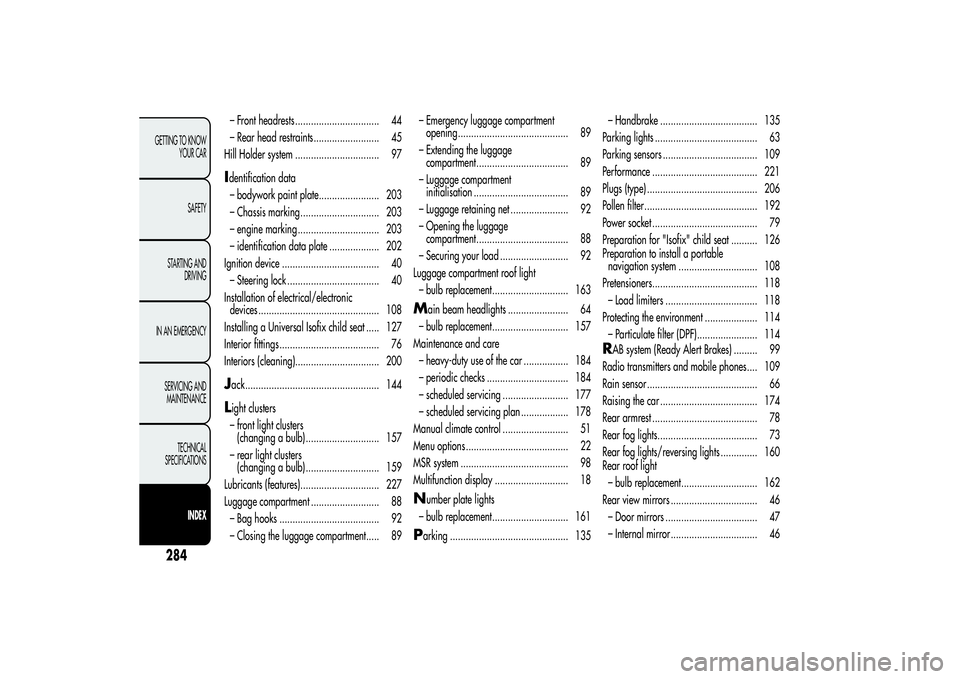
– Front headrests ................................ 44
– Rear head restraints......................... 45
Hill Holder system ................................ 97Identification data
– bodywork paint plate....................... 203
– Chassis marking .............................. 203
– engine marking ............................... 203
– identification data plate ................... 202
Ignition device ..................................... 40
– Steering lock ................................... 40
Installation of electrical/electronic
devices .............................................. 108
Installing a Universal Isofix child seat ..... 127
Interior fittings ...................................... 76
Interiors (cleaning)................................ 200Jack................................................... 144Light clusters
– front light clusters
(changing a bulb)............................ 157
– rear light clusters
(changing a bulb)............................ 159
Lubricants (features).............................. 227
Luggage compartment .......................... 88
– Bag hooks ...................................... 92
– Closing the luggage compartment..... 89– Emergency luggage compartment
opening .......................................... 89
– Extending the luggage
compartment................................... 89
– Luggage compartment
initialisation .................................... 89
– Luggage retaining net ...................... 92
– Opening the luggage
compartment................................... 88
– Securing your load .......................... 92
Luggage compartment roof light
– bulb replacement............................. 163
M
ain beam headlights ....................... 64
– bulb replacement............................. 157
Maintenance and care
– heavy-duty use of the car ................. 184
– periodic checks ............................... 184
– scheduled servicing ......................... 177
– scheduled servicing plan .................. 178
Manual climate control ......................... 51
Menu options ....................................... 22
MSR system ......................................... 98
Multifunction display ............................ 18
N
umber plate lights
– bulb replacement............................. 161
Parking ............................................. 135– Handbrake ..................................... 135
Parking lights ....................................... 63
Parking sensors .................................... 109
Performance ........................................ 221
Plugs (type) .......................................... 206
Pollen filter........................................... 192
Power socket ........................................ 79
Preparation for "Isofix" child seat .......... 126
Preparation to install a portable
navigation system .............................. 108
Pretensioners........................................ 118
– Load limiters ................................... 118
Protecting the environment .................... 114
– Particulate filter (DPF)....................... 114
RAB system (Ready Alert Brakes) ......... 99
Radio transmitters and mobile phones.... 109
Rain sensor .......................................... 66
Raising the car ..................................... 174
Rear armrest ........................................ 78
Rear fog lights...................................... 73
Rear fog lights/reversing lights .............. 160
Rear roof light
– bulb replacement............................. 162
Rear view mirrors ................................. 46
– Door mirrors ................................... 47
– Internal mirror ................................. 46
284GETTING TO KNOW
YOUR CAR
SAFETY
STARTING AND
DRIVING
IN AN EMERGENCY
SERVICING AND
MAINTENANCE
TECHNICAL
SPECIFICATIONS
INDEX