stop Alfa Romeo Giulietta 2016 User Guide
[x] Cancel search | Manufacturer: ALFA ROMEO, Model Year: 2016, Model line: Giulietta, Model: Alfa Romeo Giulietta 2016Pages: 288, PDF Size: 7.34 MB
Page 37 of 288
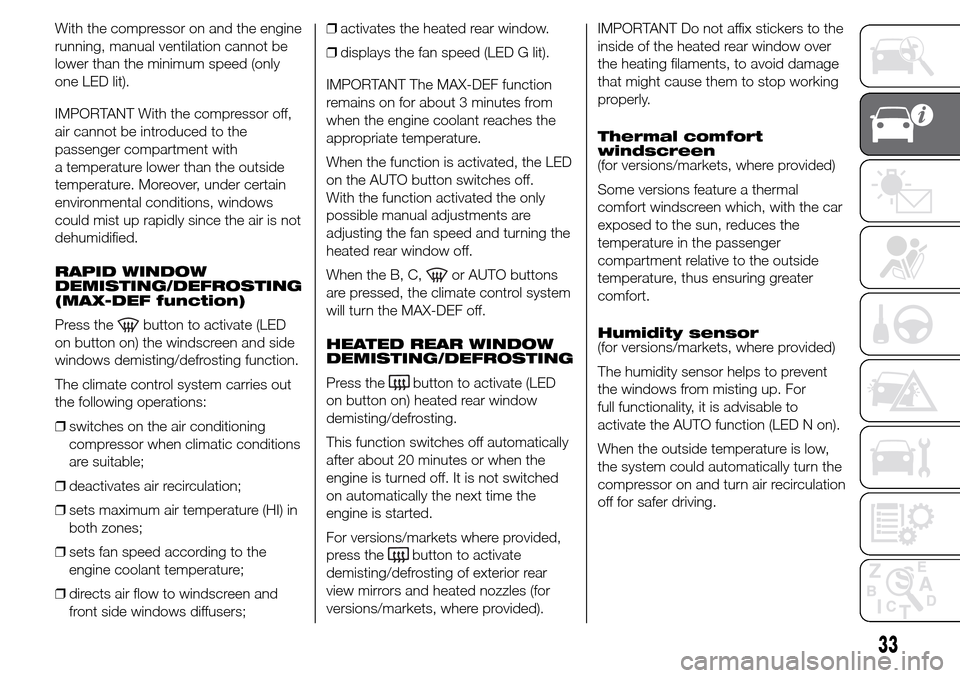
With the compressor on and the engine
running, manual ventilation cannot be
lower than the minimum speed (only
one LED lit).
IMPORTANT With the compressor off,
air cannot be introduced to the
passenger compartment with
a temperature lower than the outside
temperature. Moreover, under certain
environmental conditions, windows
could mist up rapidly since the air is not
dehumidified.
RAPID WINDOW
DEMISTING/DEFROSTING
(MAX-DEF function)
Press the
button to activate (LED
on button on) the windscreen and side
windows demisting/defrosting function.
The climate control system carries out
the following operations:
❒switches on the air conditioning
compressor when climatic conditions
are suitable;
❒deactivates air recirculation;
❒sets maximum air temperature (HI) in
both zones;
❒sets fan speed according to the
engine coolant temperature;
❒directs air flow to windscreen and
front side windows diffusers;❒activates the heated rear window.
❒displays the fan speed (LED G lit).
IMPORTANT The MAX-DEF function
remains on for about 3 minutes from
when the engine coolant reaches the
appropriate temperature.
When the function is activated, the LED
on the AUTO button switches off.
With the function activated the only
possible manual adjustments are
adjusting the fan speed and turning the
heated rear window off.
When the B, C,
or AUTO buttons
are pressed, the climate control system
will turn the MAX-DEF off.
HEATED REAR WINDOW
DEMISTING/DEFROSTING
Press the
button to activate (LED
on button on) heated rear window
demisting/defrosting.
This function switches off automatically
after about 20 minutes or when the
engine is turned off. It is not switched
on automatically the next time the
engine is started.
For versions/markets where provided,
press the
button to activate
demisting/defrosting of exterior rear
view mirrors and heated nozzles (for
versions/markets, where provided).IMPORTANT Do not affix stickers to the
inside of the heated rear window over
the heating filaments, to avoid damage
that might cause them to stop working
properly.
Thermal comfort
windscreen
(for versions/markets, where provided)
Some versions feature a thermal
comfort windscreen which, with the car
exposed to the sun, reduces the
temperature in the passenger
compartment relative to the outside
temperature, thus ensuring greater
comfort.
Humidity sensor
(for versions/markets, where provided)
The humidity sensor helps to prevent
the windows from misting up. For
full functionality, it is advisable to
activate the AUTO function (LED N on).
When the outside temperature is low,
the system could automatically turn the
compressor on and turn air recirculation
off for safer driving.
33
Page 38 of 288
SWITCHING OFF/ON THE
CLIMATE CONTROL
SYSTEM
Switching off the
climate control system
Press the
button (LED on button off).
With climate control off:
❒air recirculation is on, thus isolating
the passenger compartment from
the outside;
❒the compressor is off;
❒the fan is off;
❒the heated rear window can be
switched on or off;
❒the AQS (Air Quality System) function
(for versions/markets, where
provided) cannot be activated.
IMPORTANT The climate control
system control unit stores the
temperatures set before the system
was switched off and restores them
when any button of the system is
pressed (except for button D).Switching on the climate
control system
To switch on the climate control system
in fully automatic mode press the AUTO
button.
START&STOP
Automatic Climate
Control
The dual zone automatic climate control
manages the Start&Stop function
(engine off when the car speed is zero)
to guarantee a suitable comfort inside
the car.
Specifically, the Start&Stop function is
turned off when the weather is
particularly hot or cold to guarantee an
adequate level of comfort inside the
passenger compartment; therefore, the
engine will not be stopped during
these transient conditions, even if the
speed is zero.
When the Start&Stop function is active
(engine off at zero car speed), the
climate control system will request
restarting of the engine if the inside
temperature conditions rapidly
deteriorate (or if the user requests
maximum cooling – LO – or quick
demisting – MAX DEF).With the Start&Stop function on (engine
off at zero speed), air flow is reduced
to the minimum to maintain comfort
conditions inside the passenger
compartment as long as possible when
the system is in AUTO mode (LED N
on).
The climate control system control unit
attempts to manage the discomfort
caused by the engine stopping
(compressor and engine coolant pump
off) but operation of the climate control
system can be enhanced by turning
the Start&Stop off by pressing the
dedicated button on the dashboard.
NoteIn particularly severe climate
conditions it is recommended to limit
the use of the Start&Stop function
to prevent the compressor from
continuously switching on and off, with
consequent rapid misting of the
windows and accumulation of humidity
with unpleasant smells in the passenger
compartment.
NoteWhen the Start&Stop function is
on (engine off and vehicle speed zero),
the automatic recirculation
management is turned off always taking
air in from outside, to reduce the
probability of window misting up (as the
compressor is off).
34
GETTING TO KNOW YOUR CAR
Page 40 of 288
IMPORTANT The daytime running lights
are an alternative to the dipped beam
headlights for driving during the
daytime in countries where it is
compulsory to have lights on during the
day; where it is not compulsory, the
use of daytime running lights is
permitted.
IMPORTANT Daytime running lights
cannot replace dipped beam headlights
when driving at night or through
tunnels. The use of daytime running
lights is governed by the Highway Code
of the country in which you are driving.
Comply with legal requirements.
SIDE LIGHTS/DIPPED
BEAM HEADLIGHTS
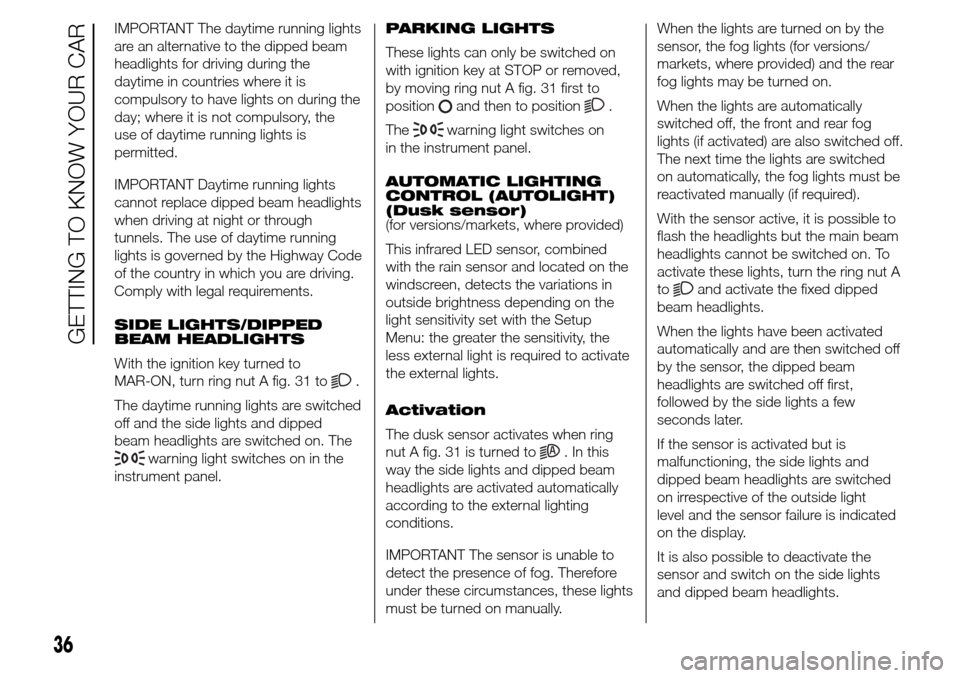
With the ignition key turned to
MAR-ON, turn ring nut A fig. 31 to
.
The daytime running lights are switched
off and the side lights and dipped
beam headlights are switched on. The
warning light switches on in the
instrument panel.PARKING LIGHTS
These lights can only be switched on
with ignition key at STOP or removed,
by moving ring nut A fig. 31 first to
position
and then to position.
The
warning light switches on
in the instrument panel.
AUTOMATIC LIGHTING
CONTROL (AUTOLIGHT)
(Dusk sensor)
(for versions/markets, where provided)
This infrared LED sensor, combined
with the rain sensor and located on the
windscreen, detects the variations in
outside brightness depending on the
light sensitivity set with the Setup
Menu: the greater the sensitivity, the
less external light is required to activate
the external lights.
Activation
The dusk sensor activates when ring
nut A fig. 31 is turned to
. In this
way the side lights and dipped beam
headlights are activated automatically
according to the external lighting
conditions.
IMPORTANT The sensor is unable to
detect the presence of fog. Therefore
under these circumstances, these lights
must be turned on manually.When the lights are turned on by the
sensor, the fog lights (for versions/
markets, where provided) and the rear
fog lights may be turned on.
When the lights are automatically
switched off, the front and rear fog
lights (if activated) are also switched off.
The next time the lights are switched
on automatically, the fog lights must be
reactivated manually (if required).
With the sensor active, it is possible to
flash the headlights but the main beam
headlights cannot be switched on. To
activate these lights, turn the ring nut A
to
and activate the fixed dipped
beam headlights.
When the lights have been activated
automatically and are then switched off
by the sensor, the dipped beam
headlights are switched off first,
followed by the side lights a few
seconds later.
If the sensor is activated but is
malfunctioning, the side lights and
dipped beam headlights are switched
on irrespective of the outside light
level and the sensor failure is indicated
on the display.
It is also possible to deactivate the
sensor and switch on the side lights
and dipped beam headlights.
36
GETTING TO KNOW YOUR CAR
Page 41 of 288
MAIN BEAM HEADLIGHTS
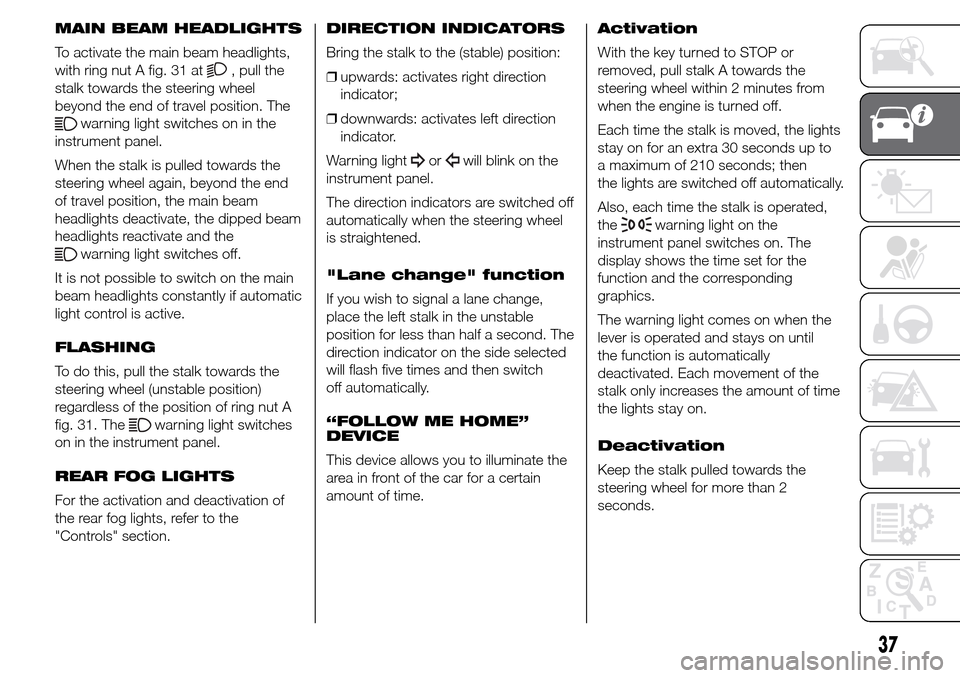
To activate the main beam headlights,
with ring nut A fig. 31 at
, pull the
stalk towards the steering wheel
beyond the end of travel position. The
warning light switches on in the
instrument panel.
When the stalk is pulled towards the
steering wheel again, beyond the end
of travel position, the main beam
headlights deactivate, the dipped beam
headlights reactivate and the
warning light switches off.
It is not possible to switch on the main
beam headlights constantly if automatic
light control is active.
FLASHING
To do this, pull the stalk towards the
steering wheel (unstable position)
regardless of the position of ring nut A
fig. 31. The
warning light switches
on in the instrument panel.
REAR FOG LIGHTS
For the activation and deactivation of
the rear fog lights, refer to the
"Controls" section.DIRECTION INDICATORS
Bring the stalk to the (stable) position:
❒upwards: activates right direction
indicator;
❒downwards: activates left direction
indicator.
Warning light
orwill blink on the
instrument panel.
The direction indicators are switched off
automatically when the steering wheel
is straightened.
"Lane change" function
If you wish to signal a lane change,
place the left stalk in the unstable
position for less than half a second. The
direction indicator on the side selected
will flash five times and then switch
off automatically.
“FOLLOW ME HOME”
DEVICE
This device allows you to illuminate the
area in front of the car for a certain
amount of time.Activation
With the key turned to STOP or
removed, pull stalk A towards the
steering wheel within 2 minutes from
when the engine is turned off.
Each time the stalk is moved, the lights
stay on for an extra 30 seconds up to
a maximum of 210 seconds; then
the lights are switched off automatically.
Also, each time the stalk is operated,
the
warning light on the
instrument panel switches on. The
display shows the time set for the
function and the corresponding
graphics.
The warning light comes on when the
lever is operated and stays on until
the function is automatically
deactivated. Each movement of the
stalk only increases the amount of time
the lights stay on.
Deactivation
Keep the stalk pulled towards the
steering wheel for more than 2
seconds.
37
Page 43 of 288
AUTOrain sensor activation (for
versions/markets, where
provided) (the windscreen wipers
adapt the operating speed
automatically to suit the intensity
of the rain)
intermittent operation;
continuous slow operation;
continuous fast operation.
Move the stalk upwards (unstable
position) to limit operation to the time
for which the stalk is held in this
position. When released, the stalk will
return to its default position and the
wiper will be automatically stopped.
"Smart washing"
function
Pull the lever towards the steering
wheel (unstable position) to operate the
windscreen washer. Keep the stalk
pulled for more than half a second to
operate the windscreen washer jet and
wiper automatically with a single
movement.
The wiper stops working three strokes
after the stalk is released. A further
stroke after approximately 6 seconds
completes the cycle.RAIN SENSOR
(for versions/markets, where provided)
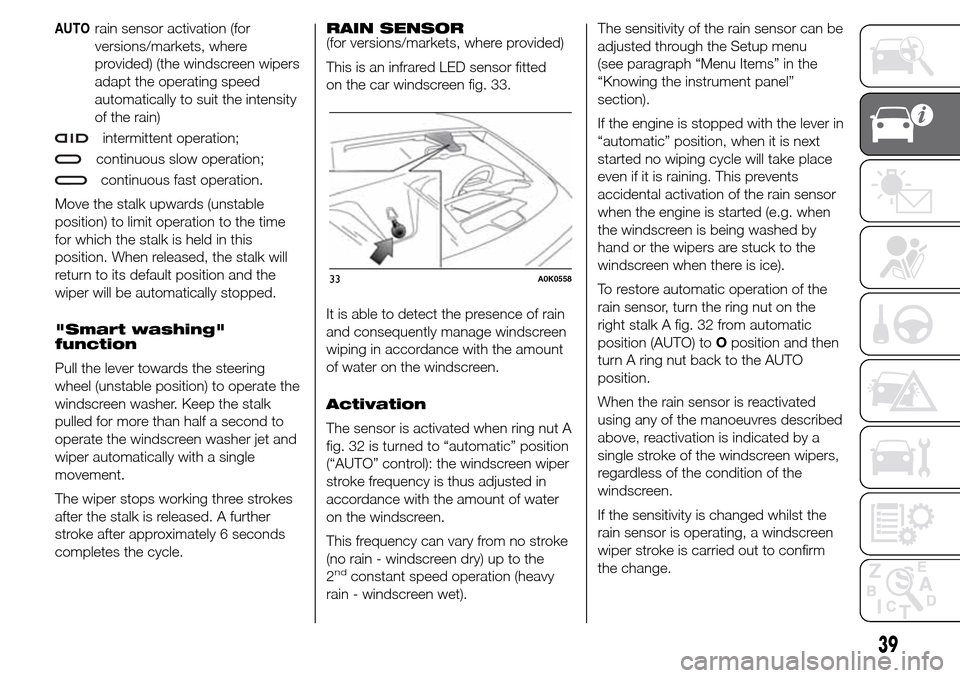
This is an infrared LED sensor fitted
on the car windscreen fig. 33.
It is able to detect the presence of rain
and consequently manage windscreen
wiping in accordance with the amount
of water on the windscreen.
Activation
The sensor is activated when ring nut A
fig. 32 is turned to “automatic” position
(“AUTO” control): the windscreen wiper
stroke frequency is thus adjusted in
accordance with the amount of water
on the windscreen.
This frequency can vary from no stroke
(no rain - windscreen dry) up to the
2
ndconstant speed operation (heavy
rain - windscreen wet).The sensitivity of the rain sensor can be
adjusted through the Setup menu
(see paragraph “Menu Items” in the
“Knowing the instrument panel”
section).
If the engine is stopped with the lever in
“automatic” position, when it is next
started no wiping cycle will take place
even if it is raining. This prevents
accidental activation of the rain sensor
when the engine is started (e.g. when
the windscreen is being washed by
hand or the wipers are stuck to the
windscreen when there is ice).
To restore automatic operation of the
rain sensor, turn the ring nut on the
right stalk A fig. 32 from automatic
position (AUTO) toOposition and then
turn A ring nut back to the AUTO
position.
When the rain sensor is reactivated
using any of the manoeuvres described
above, reactivation is indicated by a
single stroke of the windscreen wipers,
regardless of the condition of the
windscreen.
If the sensitivity is changed whilst the
rain sensor is operating, a windscreen
wiper stroke is carried out to confirm
the change.
33A0K0558
39
Page 46 of 288
❒by pressing the brake pedal, the
clutch or the accelerator; in this
last case the system is not effectively
deactivated but the system gives
priority to the acceleration request.
The device still remains active,
without the need to press the RES
button to return to the previous
conditions once acceleration
is concluded.
Automatic deactivation
The device deactivates automatically in
the following cases:
❒if the ABS or ESC systems intervene;
❒with the car speed below the set
limit;
❒in the event of system failure.
15) 16)
WARNING
15) When travelling with the device
active, do not move the gear lever
to neutral.
16) In the event of device faults or
failures, turn the ring nut A to
OFF and contact an Alfa Romeo
Dealership.
ROOF LIGHTS
FRONT ROOF LIGHT
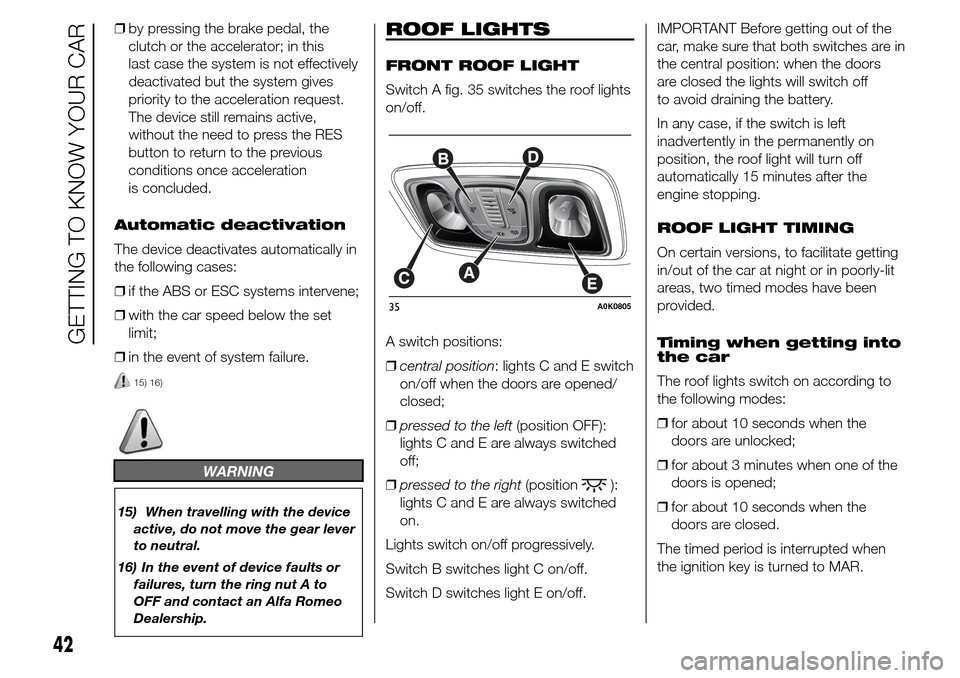
Switch A fig. 35 switches the roof lights
on/off.
A switch positions:
❒central position: lights C and E switch
on/off when the doors are opened/
closed;
❒pressed to the left(position OFF):
lights C and E are always switched
off;
❒pressed to the right(position
):
lights C and E are always switched
on.
Lights switch on/off progressively.
Switch B switches light C on/off.
Switch D switches light E on/off.IMPORTANT Before getting out of the
car, make sure that both switches are in
the central position: when the doors
are closed the lights will switch off
to avoid draining the battery.
In any case, if the switch is left
inadvertently in the permanently on
position, the roof light will turn off
automatically 15 minutes after the
engine stopping.
ROOF LIGHT TIMING
On certain versions, to facilitate getting
in/out of the car at night or in poorly-lit
areas, two timed modes have been
provided.
Timing when getting into
the car
The roof lights switch on according to
the following modes:
❒for about 10 seconds when the
doors are unlocked;
❒for about 3 minutes when one of the
doors is opened;
❒for about 10 seconds when the
doors are closed.
The timed period is interrupted when
the ignition key is turned to MAR.
35A0K0805
42
GETTING TO KNOW YOUR CAR
Page 47 of 288
Timing when getting out
of the car
After removing the key from the ignition
switch, the roof lights switch on as
follows:
❒within 2 minutes of the engine being
switched off for a period of around
10 seconds;
❒for about 3 minutes when one of the
doors is opened;
❒for about 10 seconds when one of
the doors is closed.
The timing stops automatically when
the doors are locked.
REAR ROOF LIGHT
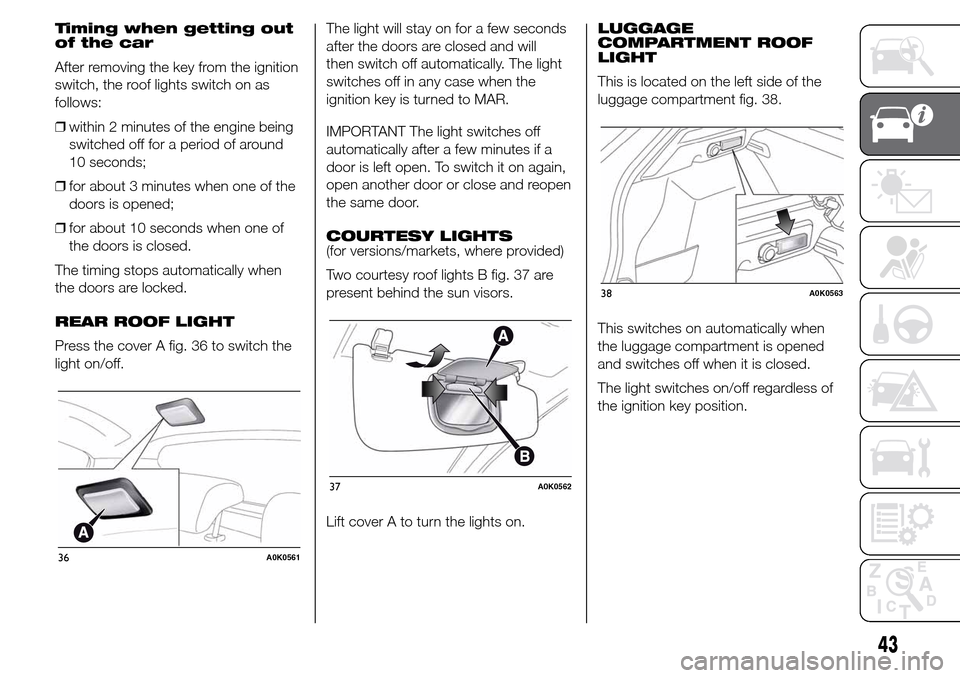
Press the cover A fig. 36 to switch the
light on/off.The light will stay on for a few seconds
after the doors are closed and will
then switch off automatically. The light
switches off in any case when the
ignition key is turned to MAR.
IMPORTANT The light switches off
automatically after a few minutes if a
door is left open. To switch it on again,
open another door or close and reopen
the same door.
COURTESY LIGHTS
(for versions/markets, where provided)
Two courtesy roof lights B fig. 37 are
present behind the sun visors.
Lift cover A to turn the lights on.LUGGAGE
COMPARTMENT ROOF
LIGHT
This is located on the left side of the
luggage compartment fig. 38.
This switches on automatically when
the luggage compartment is opened
and switches off when it is closed.
The light switches on/off regardless of
the ignition key position.
36A0K0561
37A0K0562
38A0K0563
43
Page 49 of 288
CENTRAL LOCKING
Operation
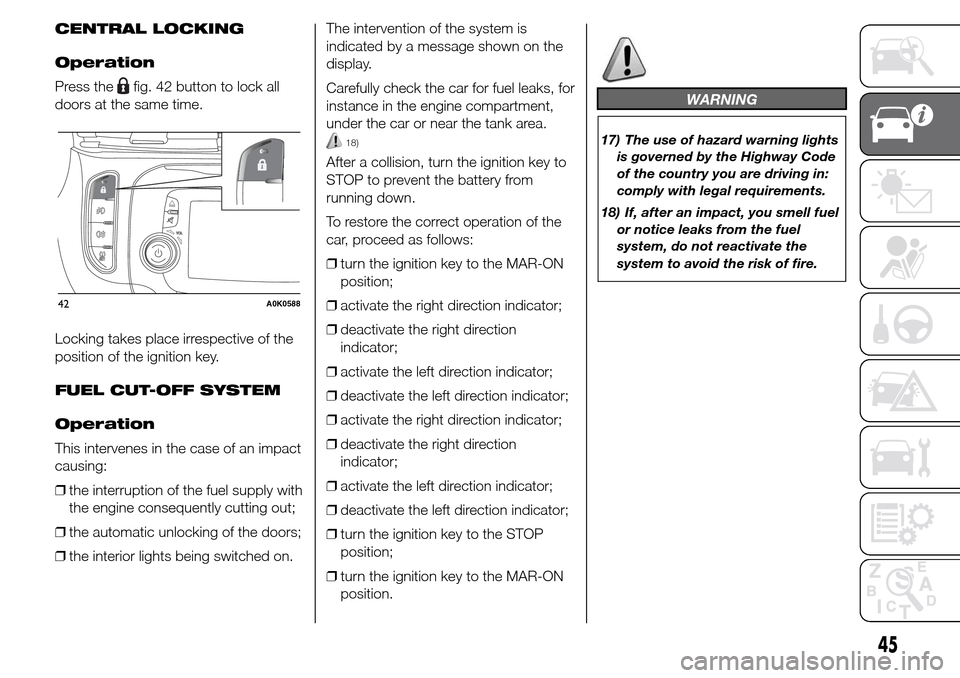
Press the
fig. 42 button to lock all
doors at the same time.
Locking takes place irrespective of the
position of the ignition key.
FUEL CUT-OFF SYSTEM
Operation
This intervenes in the case of an impact
causing:
❒the interruption of the fuel supply with
the engine consequently cutting out;
❒the automatic unlocking of the doors;
❒the interior lights being switched on.The intervention of the system is
indicated by a message shown on the
display.
Carefully check the car for fuel leaks, for
instance in the engine compartment,
under the car or near the tank area.
18)
After a collision, turn the ignition key to
STOP to prevent the battery from
running down.
To restore the correct operation of the
car, proceed as follows:
❒turn the ignition key to the MAR-ON
position;
❒activate the right direction indicator;
❒deactivate the right direction
indicator;
❒activate the left direction indicator;
❒deactivate the left direction indicator;
❒activate the right direction indicator;
❒deactivate the right direction
indicator;
❒activate the left direction indicator;
❒deactivate the left direction indicator;
❒turn the ignition key to the STOP
position;
❒turn the ignition key to the MAR-ON
position.
WARNING
17) The use of hazard warning lights
is governed by the Highway Code
of the country you are driving in:
comply with legal requirements.
18) If, after an impact, you smell fuel
or notice leaks from the fuel
system, do not reactivate the
system to avoid the risk of fire.
42A0K0588
45
Page 54 of 288
Roof opening
Press and hold down button A fig. 56:
the front glass panel will move into
the spoiler position. Press button A
again and keep it pressed for more than
half a second to automatically move
the sun roof to an intermediate position
(“Comfort” position).
If button A fig. 56 is pressed again for
more than half a second, the roof
will automatically continue until it
reaches end of travel position. The front
glass panel can be stopped in an
intermediate position by pressing the
button again.
3)
22)
Closing the sun roof
With the roof in the fully open position,
press button B fig. 56: if the button
is operated for more than half a
second, the front roof glass will
automatically assume the intermediate
position (“Comfort” position).
If the button is operated again for about
half a second the roof will assume the
spoiler position. Lastly, if closing button
B is pressed again, the roof will move
to completely closed position.ANTI-PINCH SAFETY
DEVICE
The sun roof has an anti-pinch safety
system capable of detecting the
presence of an obstacle whilst the roof
is closing; when this happens, the
system stops and the movement of the
front glass is immediately reversed.
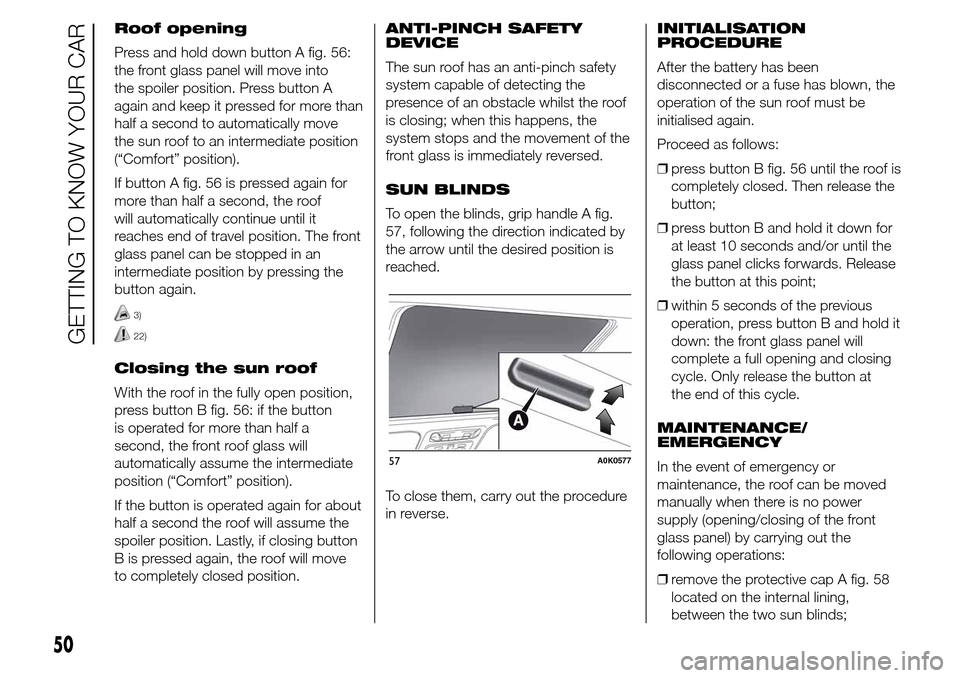
SUN BLINDS
To open the blinds, grip handle A fig.
57, following the direction indicated by
the arrow until the desired position is
reached.
To close them, carry out the procedure
in reverse.INITIALISATION
PROCEDURE
After the battery has been
disconnected or a fuse has blown, the
operation of the sun roof must be
initialised again.
Proceed as follows:
❒press button B fig. 56 until the roof is
completely closed. Then release the
button;
❒press button B and hold it down for
at least 10 seconds and/or until the
glass panel clicks forwards. Release
the button at this point;
❒within 5 seconds of the previous
operation, press button B and hold it
down: the front glass panel will
complete a full opening and closing
cycle. Only release the button at
the end of this cycle.
MAINTENANCE/
EMERGENCY
In the event of emergency or
maintenance, the roof can be moved
manually when there is no power
supply (opening/closing of the front
glass panel) by carrying out the
following operations:
❒remove the protective cap A fig. 58
located on the internal lining,
between the two sun blinds;
57A0K0577
50
GETTING TO KNOW YOUR CAR
Page 57 of 288
The door lock knob can be realigned
(only when the battery charge has been
restored) as follows:
❒press button
on the key;
❒press the
locking/unlocking button
on the dashboard;
❒opening the door by inserting the key
in the front door pawl;
❒operate the internal door handle.
6)
Opening/closing
mechanism initialisation
If the battery is disconnected or the
protection fuse blows, the door
opening/closing mechanism must be
initialised as follows:
❒close all the doors;
❒press the
button on the key or the
button on the dashboard;
❒press the
button on the key or the
button on the dashboard.
IMPORTANT
4) Always use this device when
carrying children.
5) After engaging the device on both
rear doors, check for proper
engagement by trying to open a
rear door with the internal handle.
6) If the child lock was engaged and
the previously described locking
procedure carried out, operating
the internal opening handle will
not open the door, just the
realignment of the lock knob. To
open the door, pull the external
handle. The door central
locking/unlocking button
is not
disabled by the engagement of
the emergency lock.
ELECTRIC WINDOWS
These operate when the ignition key is
turned to MAR-ON and for about 3
minutes after turning the key to STOP
or removing it if one of the front doors is
open.
The buttons are located in the door
panel trim fig. 62 (the driver side door
panel can be used to operate all the
windows).
An anti-pinch device operates when the
front and rear windows are raised.
23)
CONTROLS
Driver side front door
fig. 62
❒A: front left window opening/closing;
“continuous automatic” operation
during window opening/closing
stage;
❒B: front right window opening/
closing; “continuous automatic”
operation during window
opening/closing stage;
❒C: enabling/disabling of rear door
electric window controls;
53