phone Alfa Romeo Giulietta 2017 Owner's Manual
[x] Cancel search | Manufacturer: ALFA ROMEO, Model Year: 2017, Model line: Giulietta, Model: Alfa Romeo Giulietta 2017Pages: 212, PDF Size: 4.56 MB
Page 80 of 212
WARNING
76)Do not apply stickers or other objects on the steering wheel, on the dashboard in the passenger side airbag area, on side upholstery on the roof
or on the seats. Never put objects (e.g. mobile phones) on the passenger's side dashboard since they could interfere with correct inflation of the
airbag and also cause serious injury to the passengers.
77)Always drive keeping your hands on the steering wheel rim so the airbag can inflate freely if necessary. Do not drive with your body bent
forward. Keep the back of your seat upright and lean back into it.
78)When there is an active passenger airbag, DO NOT install rearward facing child restraint systems on the front seat. Deployment of the airbag
in an accident could cause fatal injuries to the child regardless of the severity of the impact. Therefore, always deactivate the passenger side
airbag when a rearward facing child restraint system is installed on the front passenger seat. The front passenger seat must also be positioned
back as far as possible in order to prevent the child restraint system from coming into contact with the dashboard. Immediately reactivate the
passenger airbag as soon as the child restraint system has been removed.
79)To deactivate the airbags, see the “Knowing your car” section, “Menu items” paragraph.
80)A failure of the
warning light is indicated by thewarning light switching on. In addition, the airbag system automatically disables the
airbag on the passenger's side (for versions/markets where provided). Before proceeding, contact an Alfa Romeo Dealership to have the system
checked immediately.
78
SAFETY
Page 97 of 212
A punctured tyre or a burnt-out bulb?
At times, a problem may interfere with our journey.
The pages on emergencies can help you to deal with critical
situations independently and with calm. In an emergency we
recommend that you call the freephone number found in the
Warranty Booklet. You can also use the universal, national or
international freephone number to find your nearest Authorised
Alfa Romeo Dealership.
IN AN EMERGENCY
HAZARD WARNING LIGHTS........................96
REPLACING A BULB.............................96
REPLACING AN EXTERIOR BULB....................100
REPLACING FUSES............................102
CHANGING A WHEEL ...........................110
FIX&GO KIT.................................113
JUMP STARTING..............................116
FUEL CUT-OFF SYSTEM . ........................117
TCT TRANSMISSION - KEY REMOVAL.................117
TOWING THE CAR.............................119
Page 141 of 212
do not keep accessories (e.g. radio,
hazard warning lights, etc.) switched on
for a long time when the engine is not
running;
before performing any operation on
the electrical system, disconnect the
negative battery cable.
IMPORTANT Every time the battery is
disconnected, the steering must be
initialised. This is indicated by the
appearance of the icon
. To carry out
this procedure, simply turn the steering
wheel all the way from one end to the
other or drive in a straight line for about a
hundred metres.
IMPORTANT If the charge level remains
under 50% for a long time, the battery is
damaged by sulphation, reducing its
capacity and efficiency at start-up.
The battery will also be more at risk of
freezing (this can happen as early as
-10°C). Refer to the "Vehicle inactivity"
paragraph in "Starting and driving"
chapter if the vehicle is left parked for a
long time.If, after purchasing the car, you wish to
install electrical accessories which
require permanent electrical supply (e.g.
alarm, etc.) or accessories which
influence the electrical supply
requirements, contact an Alfa Romeo
Dealership, whose qualified staff will
evaluate the overall electrical
consumption.
WARNING
140)Battery fluid is poisonous and
corrosive. Avoid contact with the skin and
eyes. Keep open flames away from the
battery and do not use objects that might
create sparks: risk of explosion and fire.
141)Using the battery with insufficient
fluid irreparably damages the battery and
may cause an explosion.
142)If the vehicle must remain unused for a
long time at a very low temperature, remove
the battery and take it to a warm place, to
avoid freezing.
143)When performing any operation on the
battery or near it, always protect your eyes
with special goggles.
IMPORTANT
47)Incorrect installation of electric and
electronic devices may cause severe damage
to your car. After purchasing your vehicle, if
you wish to install any accessories (e.g.
anti-theft, radio phone, etc.), go to an Alfa
Romeo Dealership, which will suggest the
most suitable devices and advise you
whether a higher capacity battery needs to
be installed.
IMPORTANT
5)Batteries contain substances which are
very dangerous for the environment. For
battery replacement, contact an Alfa Romeo
Dealership.
139
Page 174 of 212
TIPS, CONTROLS AND GENERAL
INFORMATION
TIPS
Road safety
Learn how to use the various system
functions before setting off.
Read the instructions for the system
carefully before setting off.
147) 148)
Reception conditions
Reception conditions change constantly
while driving. Reception may be
interfered with by the presence of
mountains, buildings or bridges,
especially when you are far away from
the broadcaster.
IMPORTANT The volume may be
increased when receiving traffic
bulletins.
Care and maintenance
52) 53)
Observe the following precautions to
ensure the system is fully operational:
never use alcohol, petrol or
petroleum-based solvents to clean the
display screen;
the display is sensitive to scratching,
liquids and detergents. The display
should not come into contact with
pointed or rigid objects which could
damage its surface. Do not press on the
display when cleaning it;
prevent any liquid from entering the
system: this could damage it beyond
repair.
SAFETY SETTINGS
Look at the screen only and when it is
necessary and safe. If you need to look at
the screen for a long time, pull over to a
safe place so as not to be distracted
while driving.
Immediately stop using the system in the
event of a fault. Otherwise the system
might be damaged. Contact an Alfa
Romeo Dealership as soon as possible to
have the system repaired.
WARNING
147)Follow the safety rules here below:
otherwise serious injuries may occur to the
occupants or the system may be damaged.
148)If the volume is too loud this can be
dangerous. Adjust the volume so that you
can still hear background noises (e.g. horns,
ambulances, police vehicles, etc.).
IMPORTANT
52)Only clean the front panel and the
display lens with a soft, clean, dry, anti-static
cloth. Cleaning and polishing products may
damage the surface. Never use alcohol,
petrols and derivatives.53)Do not use the display as a base for
supports with suction pads or adhesives for
external navigators or smartphones or
similar devices
172
MULTIMEDIA
Page 176 of 212
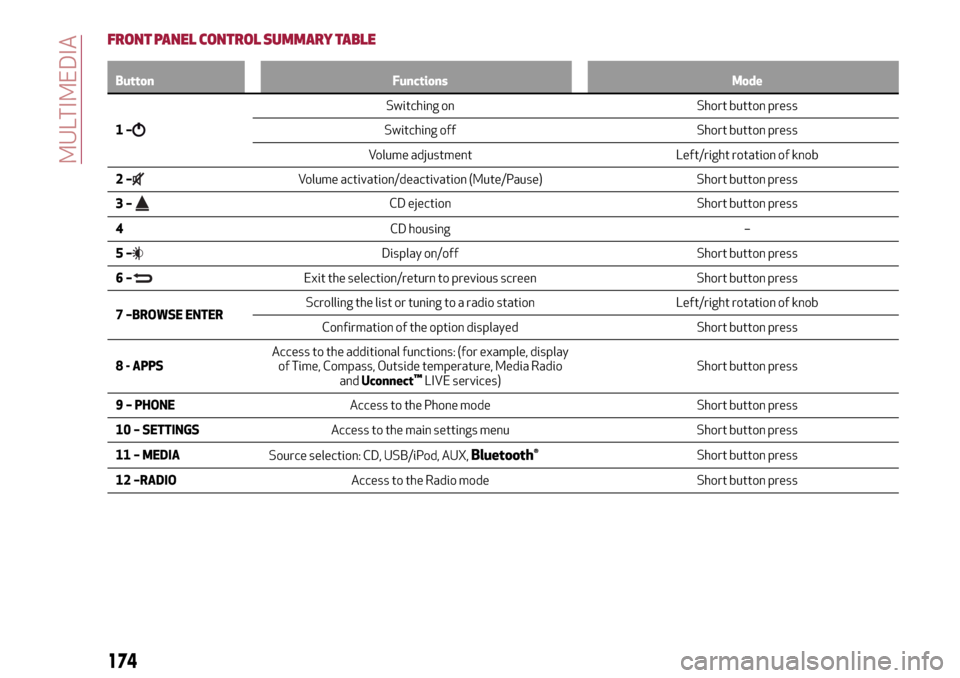
FRONT PANEL CONTROL SUMMARY TABLE
Button Functions Mode
1–
Switching on Short button press
Switching off Short button press
Volume adjustment Left/right rotation of knob
2–
Volume activation/deactivation (Mute/Pause) Short button press
3–
CD ejection Short button press
4CD housing –
5–
Display on/off Short button press
6–
Exit the selection/return to previous screen Short button press
7 –BROWSE ENTERScrolling the list or tuning to a radio station Left/right rotation of knob
Confirmation of the option displayed Short button press
8 - APPSAccess to the additional functions: (for example, display
of Time, Compass, Outside temperature, Media Radio
andUconnect
™LIVE services)Short button press
9 – PHONEAccess to the Phone mode Short button press
10 – SETTINGSAccess to the main settings menu Short button press
11 – MEDIA
Source selection: CD, USB/iPod, AUX,
Bluetooth®Short button press
12 –RADIOAccess to the Radio mode Short button press
174
MULTIMEDIA
Page 178 of 212
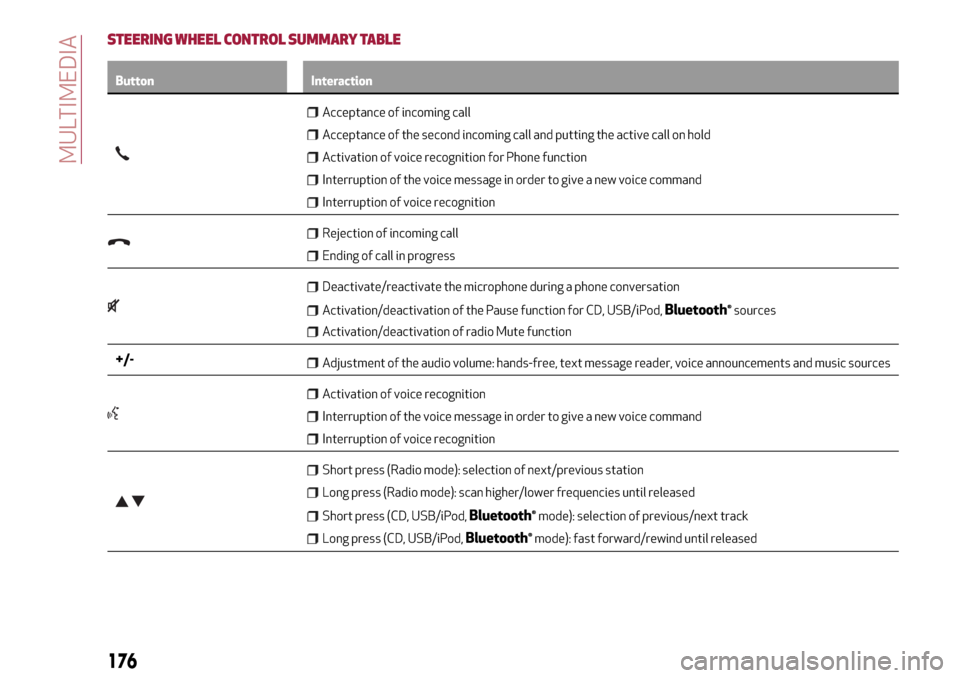
STEERING WHEEL CONTROL SUMMARY TABLE
Button Interaction
Acceptance of incoming call
Acceptance of the second incoming call and putting the active call on hold
Activation of voice recognition for Phone function
Interruption of the voice message in order to give a new voice command
Interruption of voice recognition
Rejection of incoming call
Ending of call in progress
Deactivate/reactivate the microphone during a phone conversation
Activation/deactivation of the Pause function for CD, USB/iPod,Bluetooth®sources
Activation/deactivation of radio Mute function
+/-Adjustment of the audio volume: hands-free, text message reader, voice announcements and music sources
Activation of voice recognition
Interruption of the voice message in order to give a new voice command
Interruption of voice recognition
Short press (Radio mode): selection of next/previous station
Long press (Radio mode): scan higher/lower frequencies until released
Short press (CD, USB/iPod,Bluetooth®mode): selection of previous/next track
Long press (CD, USB/iPod,Bluetooth®mode): fast forward/rewind until released
176
MULTIMEDIA
Page 181 of 212
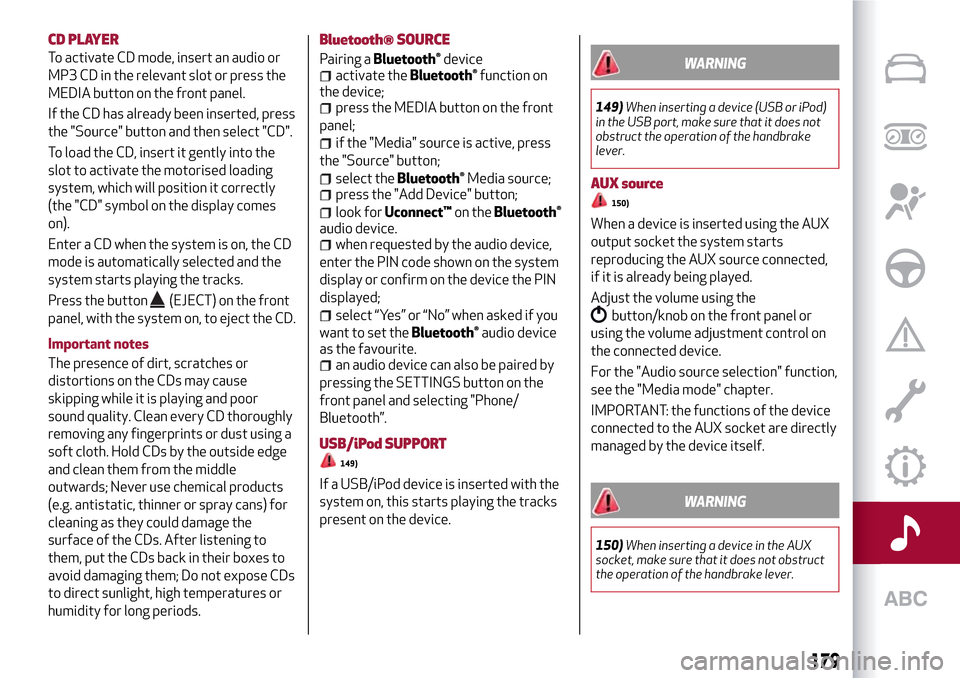
CD PLAYER
To activate CD mode, insert an audio or
MP3 CD in the relevant slot or press the
MEDIA button on the front panel.
If the CD has already been inserted, press
the "Source" button and then select "CD".
To load the CD, insert it gently into the
slot to activate the motorised loading
system, which will position it correctly
(the "CD" symbol on the display comes
on).
Enter a CD when the system is on, the CD
mode is automatically selected and the
system starts playing the tracks.
Press the button
(EJECT) on the front
panel, with the system on, to eject the CD.
Important notes
The presence of dirt, scratches or
distortions on the CDs may cause
skipping while it is playing and poor
sound quality. Clean every CD thoroughly
removing any fingerprints or dust using a
soft cloth. Hold CDs by the outside edge
and clean them from the middle
outwards; Never use chemical products
(e.g. antistatic, thinner or spray cans) for
cleaning as they could damage the
surface of the CDs. After listening to
them, put the CDs back in their boxes to
avoid damaging them; Do not expose CDs
to direct sunlight, high temperatures or
humidity for long periods.
Bluetooth® SOURCE
Pairing aBluetooth®deviceactivate theBluetooth®function on
the device;
press the MEDIA button on the front
panel;
if the "Media" source is active, press
the "Source" button;
select theBluetooth®Media source;press the "Add Device" button;
look forUconnect™on theBluetooth®
audio device.
when requested by the audio device,
enter the PIN code shown on the system
display or confirm on the device the PIN
displayed;
select “Yes” or “No” when asked if you
want to set the
Bluetooth®audio device
as the favourite.
an audio device can also be paired by
pressing the SETTINGS button on the
front panel and selecting "Phone/
Bluetooth”.
USB/iPod SUPPORT
149)
If a USB/iPod device is inserted with the
system on, this starts playing the tracks
present on the device.
WARNING
149)When inserting a device (USB or iPod)
in the USB port, make sure that it does not
obstruct the operation of the handbrake
lever.
AUX source
150)
When a device is inserted using the AUX
output socket the system starts
reproducing the AUX source connected,
if it is already being played.
Adjust the volume using the
button/knob on the front panel or
using the volume adjustment control on
the connected device.
For the "Audio source selection" function,
see the "Media mode" chapter.
IMPORTANT: the functions of the device
connected to the AUX socket are directly
managed by the device itself.
WARNING
150)When inserting a device in the AUX
socket, make sure that it does not obstruct
the operation of the handbrake lever.
179
Page 182 of 212
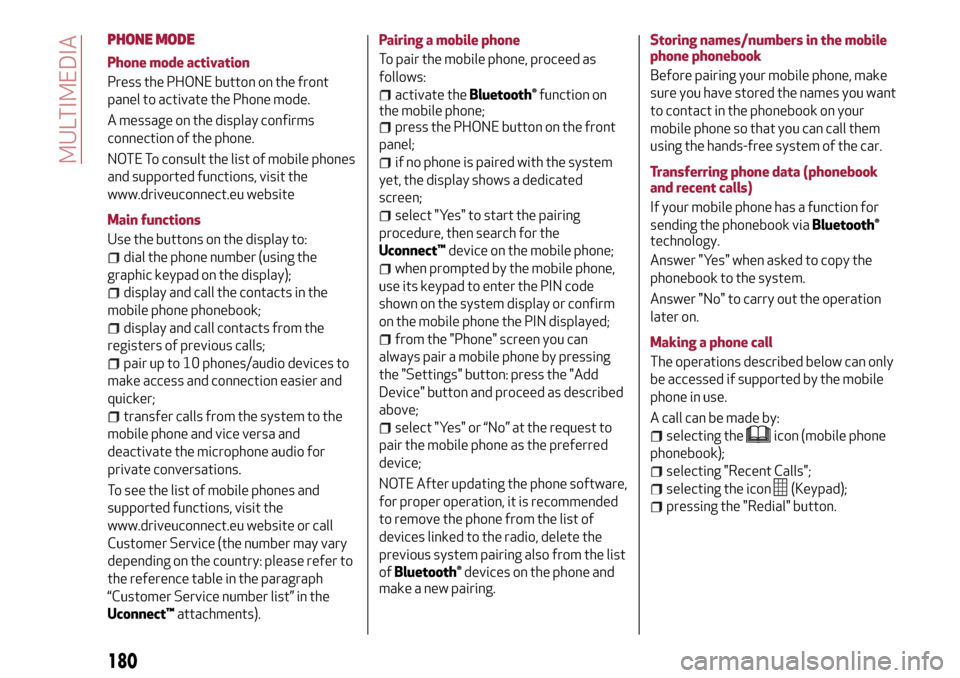
PHONE MODE
Phone mode activation
Press the PHONE button on the front
panel to activate the Phone mode.
A message on the display confirms
connection of the phone.
NOTE To consult the list of mobile phones
and supported functions, visit the
www.driveuconnect.eu website
Main functions
Use the buttons on the display to:
dial the phone number (using the
graphic keypad on the display);
display and call the contacts in the
mobile phone phonebook;
display and call contacts from the
registers of previous calls;
pair up to 10 phones/audio devices to
make access and connection easier and
quicker;
transfer calls from the system to the
mobile phone and vice versa and
deactivate the microphone audio for
private conversations.
To see the list of mobile phones and
supported functions, visit the
www.driveuconnect.eu website or call
Customer Service (the number may vary
depending on the country: please refer to
the reference table in the paragraph
“Customer Service number list” in the
Uconnect™attachments).Pairing a mobile phone
To pair the mobile phone, proceed as
follows:
activate theBluetooth®function on
the mobile phone;
press the PHONE button on the front
panel;
if no phone is paired with the system
yet, the display shows a dedicated
screen;
select "Yes" to start the pairing
procedure, then search for the
Uconnect™device on the mobile phone;
when prompted by the mobile phone,
use its keypad to enter the PIN code
shown on the system display or confirm
on the mobile phone the PIN displayed;
from the "Phone" screen you can
always pair a mobile phone by pressing
the "Settings" button: press the "Add
Device" button and proceed as described
above;
select "Yes" or “No” at the request to
pair the mobile phone as the preferred
device;
NOTE After updating the phone software,
for proper operation, it is recommended
to remove the phone from the list of
devices linked to the radio, delete the
previous system pairing also from the list
of
Bluetooth®devices on the phone and
make a new pairing.Storing names/numbers in the mobile
phone phonebook
Before pairing your mobile phone, make
sure you have stored the names you want
to contact in the phonebook on your
mobile phone so that you can call them
using the hands-free system of the car.
Transferring phone data (phonebook
and recent calls)
If your mobile phone has a function for
sending the phonebook via
Bluetooth®
technology.
Answer "Yes" when asked to copy the
phonebook to the system.
Answer "No" to carry out the operation
later on.
Making a phone call
The operations described below can only
be accessed if supported by the mobile
phone in use.
A call can be made by:
selecting theicon (mobile phone
phonebook);
selecting "Recent Calls";
selecting the icon(Keypad);
pressing the "Redial" button.
180
MULTIMEDIA
Page 183 of 212
Managing an incoming call
The buttons on the display allow the
following phone call functions to be
managed:
To answer a call: press the "Answer"
button or the
button on the steering
wheel controls;
To end a call: press the "Ignore" button
or the
button on the steering wheel
controls;
Ignore;
Put on hold/resume;
Deactivate/activate the microphone;
Transfer the call;
Switch from one call to the other;
Conference/merge two active calls.
Text message reader
To use this function the mobile phone
must support the SMS exchange function
through
Bluetooth®.
If this function is not supported by the
phone, the corresponding
button is
deactivated (grey).
When a text message is received, the
display will show a screen where the
options "Listen", "Call" or "Ignore" can be
selected.
The list of SMS messages received from
the mobile phone can be accessed by
pressing the
button.
NOTE Some mobile phones may not take
the SMS delivery confirmation settings
into account when interfacing withUconnect™. If an SMS message is sent via
Uconnect™, the user could face an
additional cost, without any warning, due
to the SMS delivery confirmation request
sent by the phone. For any problems
related to the above, contact your
telephone service provider.
SMS message options
Default SMS messages are stored in the
system memory and can be sent to
answer a received message or as a new
message:
Yes.
No.
Okay.
I can't talk right now.
Call me.
I'll call you later.
I'm on my way.
Thanks.
I will be late.
Stuck in traffic.
Start without me.
Where are you?
Are you there yet?
I need directions.
I'm lost.
See you later.
I will be 5 (or 10, 15, 20, 25, 30, 45,
60)* minutes late.
See you in 5 (or 10, 15, 20, 25, 30, 45,
60)* minutes.* Only use the numbers listed, otherwise
the system will not take the message.
“APPS” MODE
Press the APPS button on the front panel
to display the following operating
settings:
External temperature
Trip Computer
Clock
Bush
Uconnect™LIVE
Uconnect™LIVE SERVICES
Press the APPS button to access the
Uconnect™LIVEapplications.
The services available depend on the car
configuration and the market.
To use theUconnect™LIVEservices, you
need to download theUconnect™LIVE
app from Google Play or Apple Store and
register using the app or on
www.DriveUconnect.eu.
First access to the vehicle
Once you have launched the
Uconnect™LIVEApp and entered your
details, you have to pair the
Bluetooth®
with your smartphone and the radio, as
described in the "Pairing a mobile phone"
chapter, to access theUconnect™LIVE
services in your vehicle.
When pairing is complete, the connected
services can be accessed by pressing the
Uconnect™LIVEicon on the radio.
181
Page 184 of 212
Before you can use the connected
services, you must first do the
Bluetooth®pairing, then complete the
activation procedure by following the
instructions that appear in the
Uconnect™LIVEapp.
Settings of the Uconnect™ LIVE
services that can be managed through
the radio
From the dedicated radio menu for
Uconnect™LIVE servicesyou can access
the "Settings" section using the l'icon
In this section you can check the
system options and change them to suit
your own preferences.
System updates
If an update for theUconnect™LIVE
system is available while the
Uconnect™LIVEservices are being used,
the user will be informed with a message
on the radio screen.
Connected services that can be
accessed on the vehicle
The Efficient Drive and my:Car
applications were developed to improve
the customer's driving experience,
therefore they are available in all
markets where theUconnect™LIVE
services can be accessed.
If the navigation system is installed in the
radio, accessing theUconnect™LIVE
services enables use of the "Live"
services.Efficient Drive
The Efficient Drive application allows you
to display your driving behaviour in real
time, in order to help you reach a more
efficient driving style as far as
consumption and emissions are
concerned.
Driving style is evaluated by means of
four indices which monitor the following
parameters: acceleration, deceleration,
gearchange, speed
Display of the Efficient Drive
Press the Efficient Drive button to
interact with the function.
A screen will appear on the radio showing
4 indices: Acceleration, Deceleration,
Speed and Gear. These indices are grey
until the system has enough data to
evaluate the driving style. Once sufficient
data are available, the indices will have
5 colours depending on the evaluation:
dark green (very good), light green,
yellow, orange and red (very bad).
In the event of extended inactivity, the
display will show the average of the
indices until that moment (the "Average
index"), then the indices will be coloured
again in real time as soon as the vehicle is
restarted.my:Car
my:Car allows you to keep the "health" of
your vehicle always under control.
my:Car can detect malfunction in real
time and inform the user about the expiry
of the servicing interval. Press the
"my:Car" button to interact with the
application.
The display will show a screen with the
"care:Index" section, which provides all
the detailed information about the status
of the vehicle. Press the "Active
warnings" button to show (if present) the
details of the vehicle's faults which
caused a warning light to switch on.
SETTINGS
Press the SETTINGS button on the front
panel to display the main Settings menu.
NOTE The menu items displayed vary
according to the versions.
Display;
Clock & Date;
Safety/Assistance (for
versions/markets, where provided);
Lights (for versions/markets where
provided);
Doors and Door lock;
Audio;
Phone/Bluetooth;
Radio
Restore Default Settings.
182
MULTIMEDIA