Time Alfa Romeo MiTo 2014 Owner's Guide
[x] Cancel search | Manufacturer: ALFA ROMEO, Model Year: 2014, Model line: MiTo, Model: Alfa Romeo MiTo 2014Pages: 280, PDF Size: 8.79 MB
Page 53 of 280
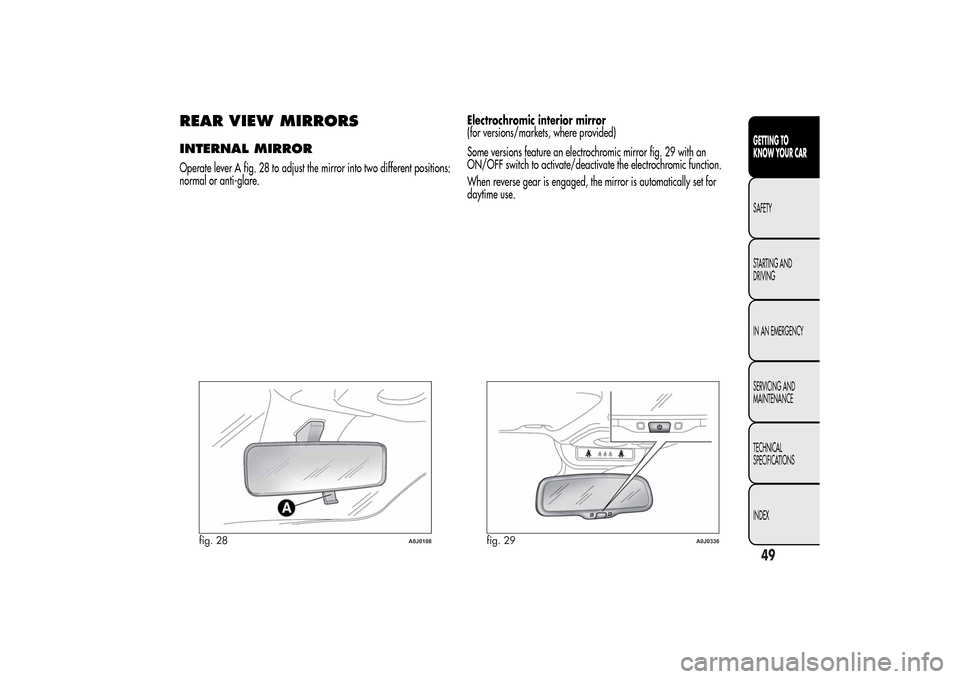
REAR VIEW MIRRORSINTERNAL MIRROROperate lever A fig. 28 to adjust the mirror into two different positions:
normal or anti-glare.Electrochromic interior mirror
(for versions/markets, where provided)
Some versions feature an electrochromic mirror fig. 29 with an
ON/OFF switch to activate/deactivate the electrochromic function.
When reverse gear is engaged, the mirror is automatically set for
daytime use.
fig. 28
A0J0108
fig. 29
A0J0336
49GETTING TO
KNOW YOUR CARSAFETY
STARTING AND
DRIVING
IN AN EMERGENCY
SERVICING AND
MAINTENANCE
TECHNICAL
SPECIFICATIONS
INDEX
Page 58 of 280
❒turn knob C to
;
❒press button D to disable internal air recirculation (LED on button
off).
After demisting/defrosting, operate the controls to restore the required
comfort conditions.
Window demisting
The climate control system is very useful in preventing the windows
from misting up in the event of high levels of humidity.
In the event of considerable outside moisture and/or rain and/or
considerable differences in temperature inside and outside the
passenger compartment, proceed as follows to demist the windows:
❒turn knob A to the red section;
❒press button D to disable internal air recirculation (LED on button
off);
❒turn knob C towith the possibility of moving it to position
if
demisting does not occur;
❒turn knob B to the 2
ndspeed.
HEATED REAR WINDOW
DEMISTING/DEFROSTINGPress button F (
) to turn the function on/off. The function is
automatically deactivated after 20 minutes.
For versions/markets where provided, press the
button to activate
demisting/defrosting of door mirrors, heated windscreen (for
versions/markets, where provided) and heated nozzles (for versions/
markets, where provided).
IMPORTANT Do not affix stickers to the inside of the heated rear
window over the heating filaments, to avoid damage that might cause
them to stop working properly.
INTERNAL AIR RECIRCULATIONPress button D (
). It is advisable to switch air recirculation on
while standing in traffic or in tunnels to prevent the introduction of
polluted air.
Do not use the function for a long time, particularly if there are many
passengers on board, to prevent the windows from misting up.
IMPORTANT Internal air recirculation makes it possible to reach the
required heating or cooling conditions more quickly depending on the
mode selected. Do not use the air recirculation function on rainy/cold
days as it would considerably increase the possibility of the windows
misting.
SYSTEM MAINTENANCEIn winter, the climate control system must be turned on at least once a
month for about 10 minutes.
Have the system checked by Alfa Romeo Authorized Services before
summer.
54GETTING TO
KNOW YOUR CAR
SAFETY
STARTING AND
DRIVING
IN AN EMERGENCY
SERVICING AND
MAINTENANCE
TECHNICAL
SPECIFICATIONS
INDEX
Page 61 of 280
❒
to speed up demisting/defrosting of front windows, rear
window and door mirrors;
❒to demist/defrost heated rear window and door mirrors.
During automatic operation, you can change the set temperatures, air
distribution and fan speed at any time by using the relevant buttons
or knobs: the system will automatically change the settings to adjust to
the new requirements.
In this way the climate control system will continue to automatically
manage all functions except for those that have been manually
adjusted. The fan speed is the same in all the zones of the passenger
compartment.
ADJUSTING THE AIR TEMPERATURETurn knob N or H to the right or left to adjust the air temperature: knob
N for the front left area, knob H for the front right area of the
passenger compartment. The set temperatures are shown on the
display.
Press the MONO button to align the air temperature of the two areas:
to set the same temperature, turn knob N.
To return to separate management of air temperature and distribution
between the two areas, turn knob N or H or press the MONO button
again (when the LED on the button is on).
Turn the knobs fully right or left to engage HI (maximum heating) or LO
(maximum cooling) respectively. To deactivate these functions, turn
the temperature knob to the desired temperature.
SETTING THE AIR DISTRIBUTIONBy pressing the buttons (
/
/
), it is possible to set one of the 7
possible air distributions manually:
Air flow to the windscreen and front side window diffusers to
demist/defrost them.Air flow at central and side dashboard vents to ventilate the chest
and the face during the hot season.Air flow to the front and rear footwell diffusers. This air
distribution setting heats the passenger compartment most
quickly, giving a prompt sensation of warmth.
Air flow distributed between footwell vents (hotter air) and
central and side dashboard vents (cooler air). This
distribution setting is useful in spring and autumn on sunny
days.Air flow distributed between footwell diffusers and
windscreen and front side window defrosting/demisting
diffusers. This distribution setting allows the passenger
compartment to warm up efficiently and prevents the
windows from misting up.Air flow distribution between windscreen demisting/
defrosting diffusers and side and central dashboard vents.
This allows air to be sent to the windscreen in conditions
of strong sunlight.
Air flow distribution to all vents on the car.
In FULL AUTO mode, the climate control system automatically manages
air distribution (the LEDs on buttons I and M are off). When set
manually, the air distribution is shown by the LEDs on the selected
buttons.
57GETTING TO
KNOW YOUR CARSAFETY
STARTING AND
DRIVING
IN AN EMERGENCY
SERVICING AND
MAINTENANCE
TECHNICAL
SPECIFICATIONS
INDEX
Page 64 of 280
RAPID WINDOW DEMISTING/
DEFROSTING (MAX-DEF function)Press button F to activate windscreen and side window demisting/
defrosting. The climate control system carries out the following
operations:
❒switches on the air conditioning compressor when climatic
conditions are suitable;
❒deactivates air recirculation;
❒sets maximum air temperature (HI) in both zones;
❒sets fan speed according to the engine coolant temperature;
❒directs air flow to windscreen and front side windows diffusers;
❒activates the heated rear window.
IMPORTANT The MAX-DEF function remains on for about 3 minutes
from when the engine coolant reaches the appropriate temperature.
When the function is active the words FULL AUTO disappear from the
display. With the function active the only possible manual adjustments
are adjusting the fan speed and turning the heated rear window off.
Pressing buttons B, C, F or AUTO switches off the MAX-DEF function
and restores the settings that were present before the function was
activated.HEATED REAR WINDOW
DEMISTING/DEFROSTINGPress the
button to activate heated rear windscreen demisting/
defrosting. This function switches off automatically after about 20
minutes or when the engine is turned off. It is not switched on
automatically the next time the engine is started.For versions/markets where provided, press the
button to activate
demisting/defrosting of door mirrors, heated windscreen (for
versions/markets, where provided) and heated nozzles (for versions/
markets, where provided).
IMPORTANT Do not affix stickers to the inside of the heated rear
window over the heating filaments, to avoid damage that might cause
them to stop working properly.
TURNING THE CLIMATE CONTROL
SYSTEM OFFPress the OFF button.
With climate control off:
❒air recirculation is on, thus isolating the passenger compartment
from the outside;
❒the compressor is off;
❒the fan is off;
❒the heated rear window can be switched on or off;
IMPORTANT The climate control system control unit stores the
temperatures set before the system was switched off and restores them
when any button of the system is pressed (except for button G). If the
function of the pressed button was not active before switching off, that
function will also be activated. If it was active, it will be restored.
To restart the climate control system in fully automatic mode press the
AUTO button.
60GETTING TO
KNOW YOUR CAR
SAFETY
STARTING AND
DRIVING
IN AN EMERGENCY
SERVICING AND
MAINTENANCE
TECHNICAL
SPECIFICATIONS
INDEX
Page 65 of 280
ADDITIONAL HEATER(only diesel versions)
(for versions/markets, where provided)
This allows the passenger compartment to be heated more quickly in
cold weather conditions. The additional heater turns off automatically
after the required comfort conditions are achieved.
Automatic dual zone climate control system
(for versions/markets, where provided)
The additional heater activates automatically when the ignition key is
turned to MAR-ON.
Manual heater and manual climate control
The additional heater activates automatically when knob N is turned to
the end of the red section and the fan is set to at least 1
stspeed.
IMPORTANT The heater only works if the outside temperature and
engine coolant temperature are low. The heater will not activate if the
battery voltage is too low.
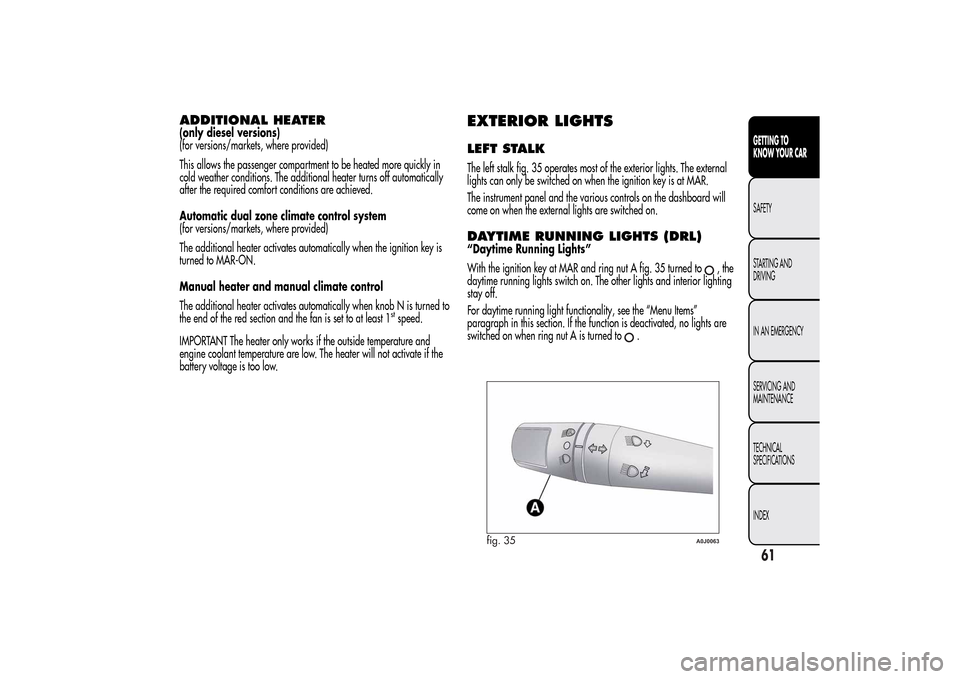
EXTERIOR LIGHTSLEFT STALKThe left stalk fig. 35 operates most of the exterior lights. The external
lights can only be switched on when the ignition key is at MAR.
The instrument panel and the various controls on the dashboard will
come on when the external lights are switched on.DAYTIME RUNNING LIGHTS (DRL)“Daytime Running Lights”
With the ignition key at MAR and ring nut A fig. 35 turned to
,the
daytime running lights switch on. The other lights and interior lighting
stay off.
For daytime running light functionality, see the “Menu Items”
paragraph in this section. If the function is deactivated, no lights are
switched on when ring nut A is turned to
.
fig. 35
A0J0063
61GETTING TO
KNOW YOUR CARSAFETY
STARTING AND
DRIVING
IN AN EMERGENCY
SERVICING AND
MAINTENANCE
TECHNICAL
SPECIFICATIONS
INDEX
Page 66 of 280
SIDE LIGHTS/DIPPED BEAM
HEADLIGHTSWith the ignition key turned to MAR, turn ring nut A fig. 35 to
.
The daytime running lights are switched off and the side lights and
dipped headlights are switched on. The warning light
switches
on on the instrument panel.
PARKING LIGHTSThese lights can only be switched on with ignition key at STOP or
removed, by moving ring nut A first to position
and then to position
.
When the parking lights are switched on, the number plate lights and
the front and rear side lights switch on as well (the daytime running
lights (DRLs) remain off however).
The warning light
switches on on the instrument panel.
When the direction indicator stalk is activated the side for the lights
(left or right) can be selected.
AUTOMATIC LIGHTING CONTROL
(AUTOLIGHT) (Dusk sensor)(for versions/markets, where provided)
This infrared LED sensor, combined with the rain sensor and located on
the windscreen, detects the variations in outside brightness depending
on the light sensitivity set with the Set-up Menu: the greater the
sensitivity, the less external light is required to activate the exterior
lights.Activation
The dusk sensor activates when ring nut A fig. 35 is turned to
.In
this way the side lights and dipped headlights are activated
automatically according to the external light level.
IMPORTANT The sensor is unable to detect the presence of fog.
Therefore under these circumstances, these lights must be turned on
manually.
When the lights are turned on by the sensor, the fog lights (for
versions/markets, where provided) and the rear fog lights may be
turned on.
When the lights are automatically switched off, the front and rear fog
lights (if activated) are also switched off. The next time the lights are
switched on automatically, the fog lights must be reactivated manually
(if required).
With the sensor active, it is possible to flash the headlights but the
main beam headlights cannot be switched on. If you need to turn these
lights on, turn ring nut A to position
and turn the dipped
headlights on.
When the lights have been activated automatically and are then
switched off by the sensor, the dipped beam headlights are switched
off first, followed by the side lights a few seconds later.
If the sensor is activated but is malfunctioning, the side lights and
dipped beam headlights are switched on irrespective of the outside
light level and the sensor failure is indicated on the instrument panel
display.
It is also possible to deactivate the sensor and switch on these lights if
necessary.
62GETTING TO
KNOW YOUR CAR
SAFETY
STARTING AND
DRIVING
IN AN EMERGENCY
SERVICING AND
MAINTENANCE
TECHNICAL
SPECIFICATIONS
INDEX
Page 67 of 280
MAIN BEAM HEADLIGHTSTo activate the main beam headlights, with ring nut A at
, pull the
stalk towards the steering wheel beyond the end of travel position.
The warning light
switches on on the instrument panel.
When the stalk is pulled towards the steering wheel again, beyond the
end of travel position, the main beam headlights deactivate, the
dipped beam headlights reactivate and the warning light
switches
off.
FLASHINGTo do this, pull the stalk towards the steering wheel (unstable position)
regardless of the position of ring nut A.
The warning light
switches on on the instrument panel.
DIRECTION INDICATORSBring the stalk into (stable) position:
❒upwards: activates right direction indicator;
❒downwards: activates left direction indicator.
Warning light
or
will flash in the instrument panel.
The indicators are switched off automatically when the steering wheel
is straightened."Lane change" function
If you want to signal that you are changing lane, hold the left stalk in
the unstable position for less than half a second. The direction indicator
on the selected side flashes 3 times and then switches off automatically.
"FOLLOW ME HOME" DEVICEThis device allows you to illuminate the area in front of the car for a
certain amount of time.
Activation
With the ignition key at STOP or removed, pull stalk A towards the
steering wheel and move it within 2 minutes of the engine switching
off.
At each single movement of the stalk, the lights will remain on for an
extra 30 seconds up to a maximum of 210 seconds; then the lights are
switched off automatically.
The
warning light on the instrument panel will light up (and the
corresponding message will appear on the display) as long as the
function is active.
The light comes on when the stalk is first moved and stays on until the
function is automatically deactivated. Each movement of the stalk
only increases the amount of time the lights stay on.
Deactivation
Keep stalk A pulled towards the steering wheel for more than 2
seconds.
63GETTING TO
KNOW YOUR CARSAFETY
STARTING AND
DRIVING
IN AN EMERGENCY
SERVICING AND
MAINTENANCE
TECHNICAL
SPECIFICATIONS
INDEX
Page 69 of 280
Move the stalk upwards (unstable position) to limit operation to the
time for which the stalk is held in this position. When released, the
stalk will return to its default position and the wiper will be
automatically stopped.
Do not use the windscreen wiper to remove layers of
snow or ice from the windscreen. In such conditions,
the windscreen wiper may be subjected to excessive
stress and the motor protection, which prevents operation for a
few seconds, may intervene. If operation is not restored, even
after turning the key and restarting the engine, contact Alfa
Romeo Authorized Services.Do not operate the windscreen wiper with the blades
lifted from the windscreen.
"Smart washing" function
Pull the lever towards the steering wheel (unstable position) to operate
the windscreen washer. Keep the stalk pulled for more than half a
second, with just one movement, to operate windscreen washer/wiper
jet at the same time.
The wiper stops working three strokes after the stalk is released. A
further stroke after approximately 6 seconds completes the cycle.RAIN SENSOR(for versions/markets, where provided)
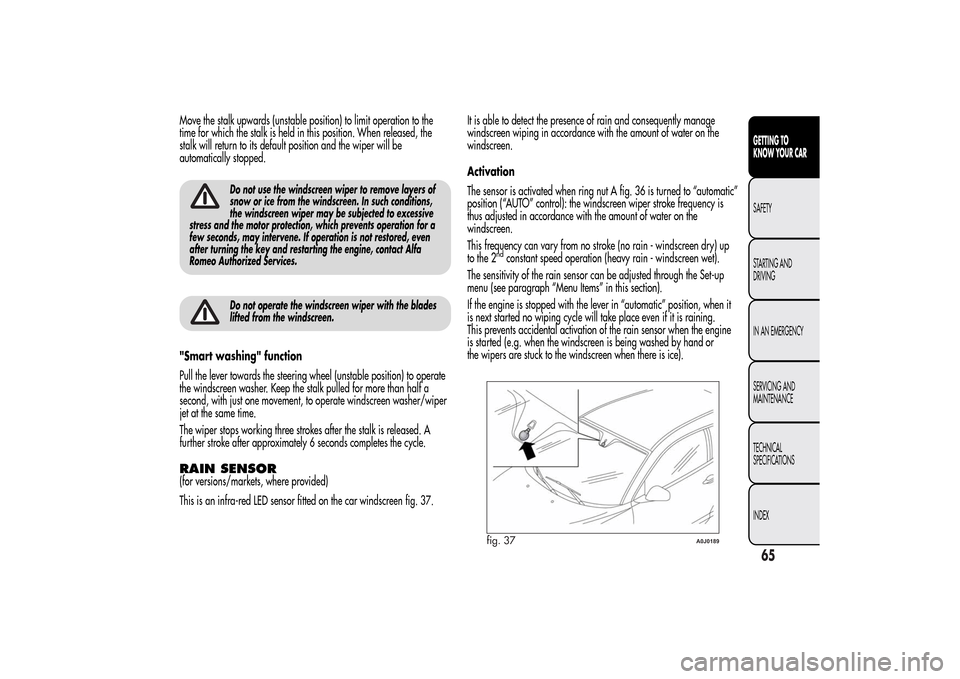
This is an infra-red LED sensor fitted on the car windscreen fig. 37.It is able to detect the presence of rain and consequently manage
windscreen wiping in accordance with the amount of water on the
windscreen.
Activation
The sensor is activated when ring nut A fig. 36 is turned to “automatic”
position (“AUTO” control): the windscreen wiper stroke frequency is
thus adjusted in accordance with the amount of water on the
windscreen.
This frequency can vary from no stroke (no rain - windscreen dry) up
to the 2
ndconstant speed operation (heavy rain - windscreen wet).
The sensitivity of the rain sensor can be adjusted through the Set-up
menu (see paragraph “Menu Items” in this section).
If the engine is stopped with the lever in “automatic” position, when it
is next started no wiping cycle will take place even if it is raining.
This prevents accidental activation of the rain sensor when the engine
is started (e.g. when the windscreen is being washed by hand or
the wipers are stuck to the windscreen when there is ice).
fig. 37
A0J0189
65GETTING TO
KNOW YOUR CARSAFETY
STARTING AND
DRIVING
IN AN EMERGENCY
SERVICING AND
MAINTENANCE
TECHNICAL
SPECIFICATIONS
INDEX
Page 71 of 280
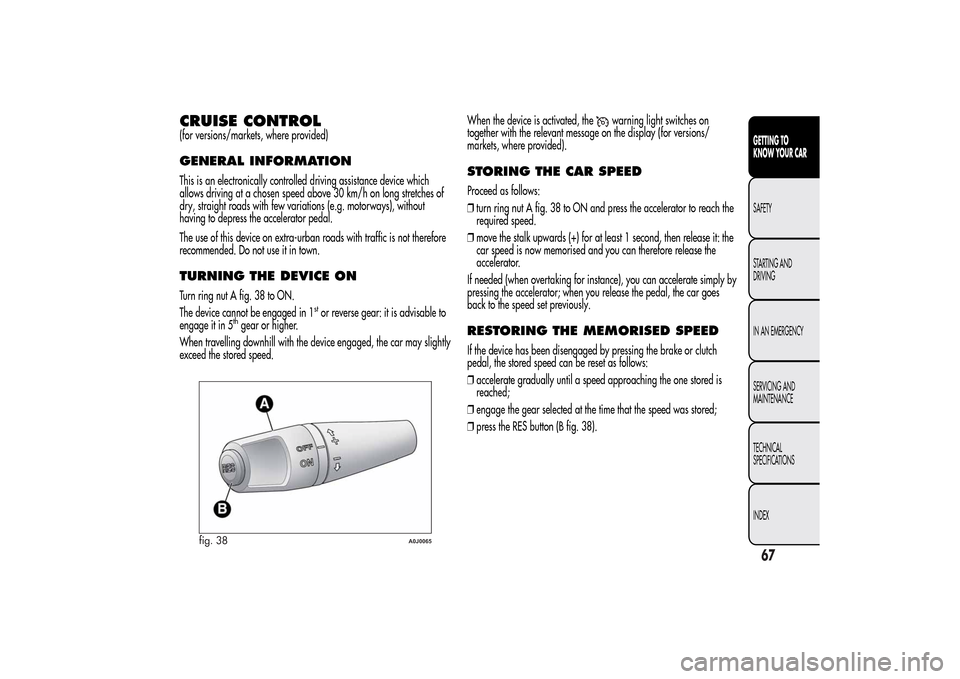
CRUISE CONTROL(for versions/markets, where provided)GENERAL INFORMATIONThis is an electronically controlled driving assistance device which
allows driving at a chosen speed above 30 km/h on long stretches of
dry, straight roads with few variations (e.g. motorways), without
having to depress the accelerator pedal.
The use of this device on extra-urban roads with traffic is not therefore
recommended. Do not use it in town.TURNING THE DEVICE ONTurn ring nut A fig. 38 to ON.
The device cannot be engaged in 1
stor reverse gear: it is advisable to
engage it in 5
thgear or higher.
When travelling downhill with the device engaged, the car may slightly
exceed the stored speed.When the device is activated, the
warning light switches on
together with the relevant message on the display (for versions/
markets, where provided).
STORING THE CAR SPEEDProceed as follows:
❒turn ring nut A fig. 38 to ON and press the accelerator to reach the
required speed.
❒move the stalk upwards (+) for at least 1 second, then release it: the
car speed is now memorised and you can therefore release the
accelerator.
If needed (when overtaking for instance), you can accelerate simply by
pressing the accelerator; when you release the pedal, the car goes
back to the speed set previously.RESTORING THE MEMORISED SPEEDIf the device has been disengaged by pressing the brake or clutch
pedal, the stored speed can be reset as follows:
❒accelerate gradually until a speed approaching the one stored is
reached;
❒engage the gear selected at the time that the speed was stored;
❒press the RES button (B fig. 38).
fig. 38
A0J0065
67GETTING TO
KNOW YOUR CARSAFETY
STARTING AND
DRIVING
IN AN EMERGENCY
SERVICING AND
MAINTENANCE
TECHNICAL
SPECIFICATIONS
INDEX
Page 73 of 280
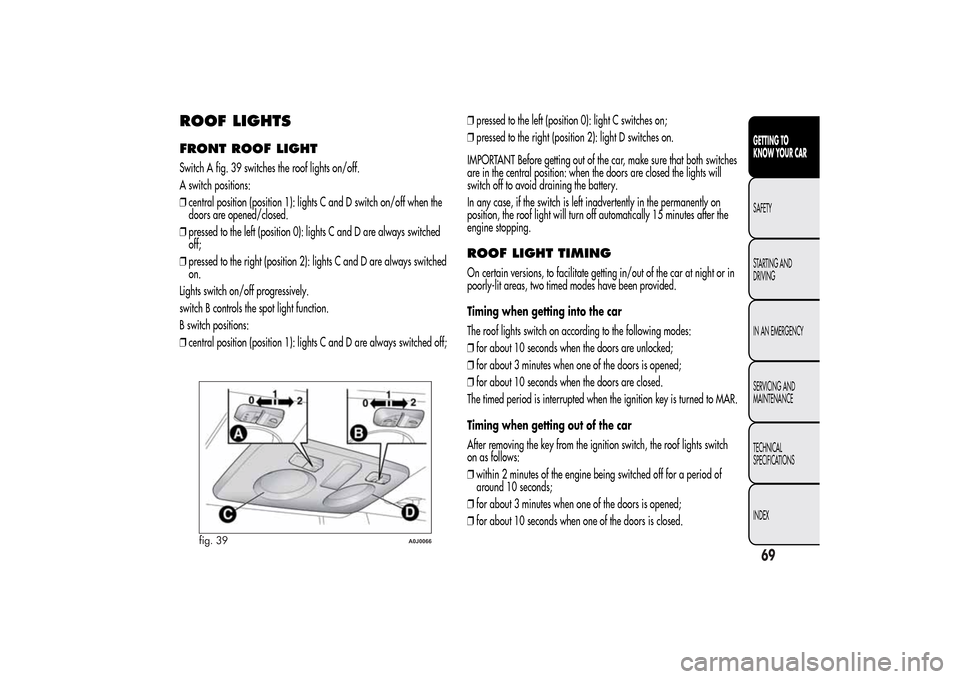
ROOF LIGHTSFRONT ROOF LIGHTSwitch A fig. 39 switches the roof lights on/off.
A switch positions:
❒central position (position 1): lights C and D switch on/off when the
doors are opened/closed.
❒pressed to the left (position 0): lights C and D are always switched
off;
❒pressed to the right (position 2): lights C and D are always switched
on.
Lights switch on/off progressively.
switch B controls the spot light function.
B switch positions:
❒central position (position 1): lights C and D are always switched off;❒pressed to the left (position 0): light C switches on;
❒pressed to the right (position 2): light D switches on.
IMPORTANT Before getting out of the car, make sure that both switches
are in the central position: when the doors are closed the lights will
switch off to avoid draining the battery.
In any case, if the switch is left inadvertently in the permanently on
position, the roof light will turn off automatically 15 minutes after the
engine stopping.
ROOF LIGHT TIMINGOn certain versions, to facilitate getting in/out of the car at night or in
poorly-lit areas, two timed modes have been provided.
Timing when getting into the car
The roof lights switch on according to the following modes:
❒for about 10 seconds when the doors are unlocked;
❒for about 3 minutes when one of the doors is opened;
❒for about 10 seconds when the doors are closed.
The timed period is interrupted when the ignition key is turned to MAR.
Timing when getting out of the car
After removing the key from the ignition switch, the roof lights switch
on as follows:
❒within 2 minutes of the engine being switched off for a period of
around 10 seconds;
❒for about 3 minutes when one of the doors is opened;
❒for about 10 seconds when one of the doors is closed.
fig. 39
A0J0066
69GETTING TO
KNOW YOUR CARSAFETY
STARTING AND
DRIVING
IN AN EMERGENCY
SERVICING AND
MAINTENANCE
TECHNICAL
SPECIFICATIONS
INDEX