Time Alfa Romeo MiTo 2014 Workshop Manual
[x] Cancel search | Manufacturer: ALFA ROMEO, Model Year: 2014, Model line: MiTo, Model: Alfa Romeo MiTo 2014Pages: 280, PDF Size: 8.79 MB
Page 177 of 280
SERVICING AND MAINTENANCE
SCHEDULED SERVICINGCorrect servicing is essential in guaranteeing a long life for the car
under the best conditions.
That’s why Alfa Romeo has prepared a series of checks and service
operations to be carried out every 30,000 kilometres (petrol versions)
or every 35,000 kilometres (diesel versions).
Check the items on the Scheduled Servicing Plan (e.g. periodically
check level of liquids, tyre pressure, etc.) before 30,000/35,000 km
and between these services deadlines.
Scheduled Servicing is carried out at Alfa Romeo Authorized Services
according to a set time schedule. If, during each operation, in addition
to the ones scheduled, the need arises for further replacements or
repairs, these may be carried out only with the explicit agreement of
the Customer. If your car is used frequently for towing, the interval
between one service operation and the next should be reduced.WARNING
At 2,000 km from the next service operation the display will show a
message.
The Scheduled Services intervals are set out by the Manufacturer.
Failure to comply with the schedule may invalidate the warranty.
It is advisable to inform Alfa Romeo Authorized Services of any small
faults without waiting for the next scheduled service.
173GETTING TO KNOW
YOUR CAR
SAFETY
STARTING AND
DRIVING
IN AN EMERGENCYSERVICING AND
MAINTENANCETECHNICAL
SPECIFICATIONS
INDEX
Page 191 of 280
AIR CLEANER/POLLEN
FILTER/DIESEL FILTERContact Alfa Romeo Authorized Services to replace the filters.
BATTERYBattery F (see previous pages) does not require the electrolyte to be
topped up with distilled water. A periodic check carried out at Alfa
Romeo Authorized Services is, however, necessary to check efficiency.REPLACING THE BATTERYIf necessary, replace the battery with another genuine battery with the
same specifications. Follow the battery manufacturer's instructions
for maintenance.USEFUL ADVICE FOR EXTENDING THE
LIFE OF YOUR BATTERYTo avoid draining your battery rapidly and maintain its efficiency over
time, carefully observe the following instructions:
❒when you park the car, ensure that the doors, bonnet and flaps are
closed correctly, to prevent any roof lights from remaining on inside
the passenger compartment;
❒switch off all roof lights inside the car: the car is however equipped
with a system which switches all internal lights off automatically;
❒do not keep accessories (e.g. sound system, hazard lights, etc.)
switched on for a long time when the engine is not running;
❒before performing any operation on the electrical system, disconnect
the negative battery pole;
IMPORTANT If the charge level remains under 50% for a long time, the
battery is damaged by sulphation, reducing its capacity and
efficiency at start-up.
The battery will also be more at risk of freezing (this can happen as
early as –10°C). Refer to “Storing the car” in “Starting and driving” if
the car is left parked for a long time.
187GETTING TO KNOW
YOUR CAR
SAFETY
STARTING AND
DRIVING
IN AN EMERGENCYSERVICING AND
MAINTENANCETECHNICAL
SPECIFICATIONS
INDEX
Page 192 of 280
If after having purchased your car you decide to add accessories
requiring permanent electrical power (alarm etc.) or accessories that
require large amounts of power, contact Alfa Romeo Authorized
Services. They can calculate the overall electrical requirement.
Battery liquid is poisonous and corrosive. Avoid
contact with the skin and the eyes. Keep naked flames
and sources of sparks away from the battery: risk of
explosion and fire.Using the battery with insufficient fluid irreparably
damages the battery and may cause an explosion.Incorrect installation of electric and electronic devices may
cause severe damage to your car. After purchasing your
car, if you wish to install any accessories (anti-theft, radio
phone etc.), contact Alfa Romeo Authorized Services, who will suggest
the most appropriate devices for your vehicle and will, most
importantly, advise you if a higher capacity battery needs to be
installed.
Batteries contain substances which are very dangerous for
the environment. For the replacement of the battery,
contact Alfa Romeo Authorized Services.If the car will be unused for an extended period of
time in extremely cold weather conditions, remove the
battery and store it in a heated area to prevent it
from freezing.When performing any operation on the battery or near
it, always protect your eyes with special goggles.
188GETTING TO KNOW
YOUR CAR
SAFETY
STARTING AND
DRIVING
IN AN EMERGENCYSERVICING AND
MAINTENANCE
TECHNICAL
SPECIFICATIONS
INDEX
Page 210 of 280
FUEL SUPPLYVersionsFuel supply
Turbo TwinAir–1.4 petrolTimed, sequential Multipoint electronic injection with knock control
1.4 Turbo MultiAirPhased sequential electronic injection with knock control and variable
intake valve actuation
1.3 JTD
M-2
– 1.6 JTD
M
Electronically controlled Common Rail MultiJet direct injection with turbo
and intercooler
Modifications or repairs to the fuel supply system that are not carried out correctly or do not take the system's technical
specifications into account can cause malfunctions leading to the risk of fire.
TRANSMISSIONVersions Gearbox Clutch Drive
1.4 Petrol
Five forward gears and reverse
with synchronizers for forward
gear engagementSelf-adjusting pedal without idle
strokeFront 1.4 Turbo MultiAir 135 HP
1.3 JTD
M-2
Turbo TwinAir
Six forward gears plus reverse
with synchronisers for forward
gear engagementSelf-adjusting pedal without idle
strokeFront 1.4 Turbo MultiAir 170 HP
Quadrifoglio Verde
1.6 JTD
M
206GETTING TO KNOW
YOUR CAR
SAFETY
STARTING AND
DRIVING
IN AN EMERGENCY
SERVICING AND
MAINTENANCE
TECHNICAL
SPECIFICATIONS
INDEX
Page 211 of 280
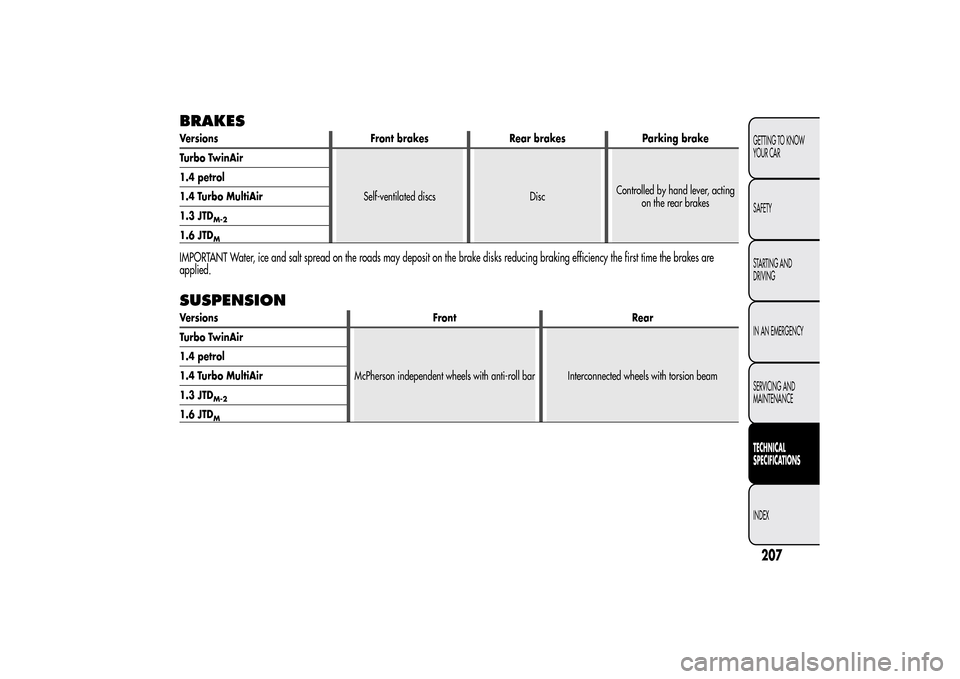
BRAKESVersions Front brakes Rear brakes Parking brake
Turbo TwinAir
Self-ventilated discs DiscControlled by hand lever, acting
on the rear brakes 1.4 petrol
1.4 Turbo MultiAir
1.3 JTD
M-2
1.6 JTD
M
IMPORTANT Water, ice and salt spread on the roads may deposit on the brake disks reducing braking efficiency the first time the brakes are
applied.SUSPENSIONVersions Front Rear
Turbo TwinAir
McPherson independent wheels with anti-roll bar Interconnected wheels with torsion beam 1.4 petrol
1.4 Turbo MultiAir
1.3 JTD
M-2
1.6 JTD
M
207GETTING TO KNOW
YOUR CAR
SAFETY
STARTING AND
DRIVING
IN AN EMERGENCY
SERVICING AND
MAINTENANCETECHNICAL
SPECIFICATIONSINDEX
Page 249 of 280
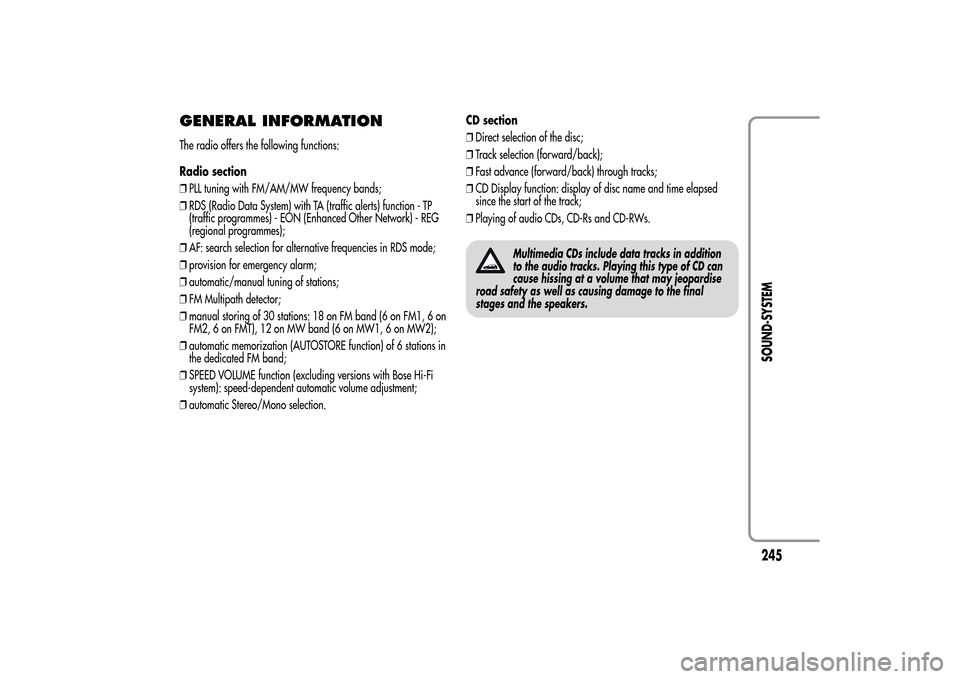
GENERAL INFORMATIONThe radio offers the following functions:
Radio section
❒PLL tuning with FM/AM/MW frequency bands;
❒RDS (Radio Data System) with TA (traffic alerts) function - TP
(traffic programmes) - EON (Enhanced Other Network) - REG
(regional programmes);
❒AF: search selection for alternative frequencies in RDS mode;
❒provision for emergency alarm;
❒automatic/manual tuning of stations;
❒FM Multipath detector;
❒manual storing of 30 stations: 18 on FM band (6 on FM1, 6 on
FM2, 6 on FMT), 12 on MW band (6 on MW1, 6 on MW2);
❒automatic memorization (AUTOSTORE function) of 6 stations in
the dedicated FM band;
❒SPEED VOLUME function (excluding versions with Bose Hi-Fi
system): speed-dependent automatic volume adjustment;
❒automatic Stereo/Mono selection.CD section
❒Direct selection of the disc;
❒Track selection (forward/back);
❒Fast advance (forward/back) through tracks;
❒CD Display function: display of disc name and time elapsed
since the start of the track;
❒Playing of audio CDs, CD-Rs and CD-RWs.
Multimedia CDs include data tracks in addition
to the audio tracks. Playing this type of CD can
cause hissing at a volume that may jeopardise
road safety as well as causing damage to the final
stages and the speakers.
245SOUND-SYSTEM
Page 250 of 280
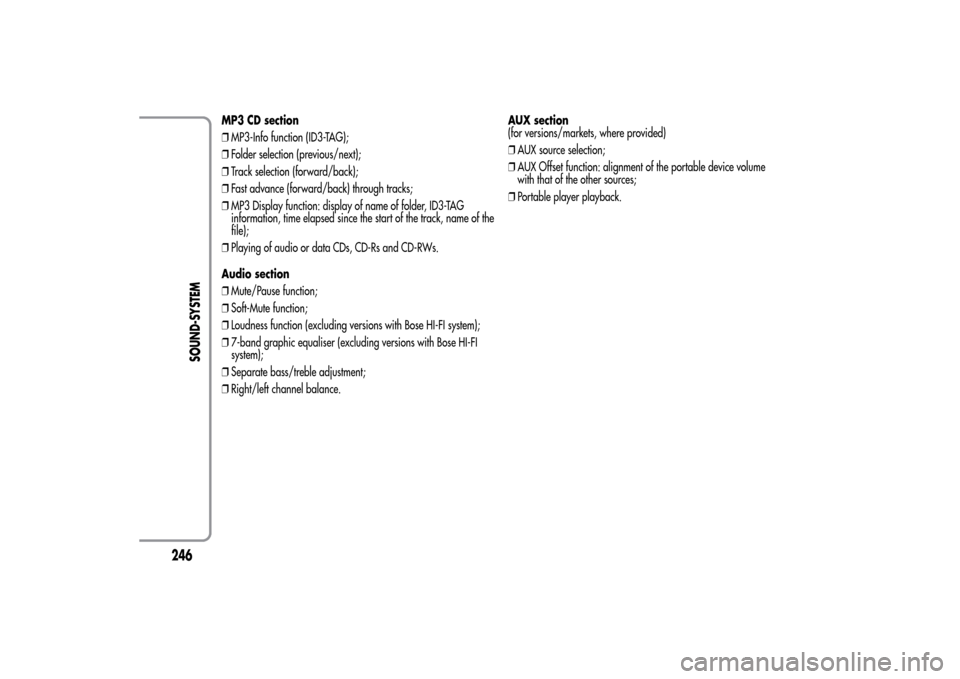
MP3 CD section
❒MP3-Info function (ID3-TAG);
❒Folder selection (previous/next);
❒Track selection (forward/back);
❒Fast advance (forward/back) through tracks;
❒MP3 Display function: display of name of folder, ID3-TAG
information, time elapsed since the start of the track, name of the
file);
❒Playing of audio or data CDs, CD-Rs and CD-RWs.
Audio section
❒Mute/Pause function;
❒Soft-Mute function;
❒Loudness function (excluding versions with Bose HI-FI system);
❒7-band graphic equaliser (excluding versions with Bose HI-FI
system);
❒Separate bass/treble adjustment;
❒Right/left channel balance.AUX section
(for versions/markets, where provided)
❒AUX source selection;
❒AUX Offset function: alignment of the portable device volume
with that of the other sources;
❒Portable player playback.
246
SOUND-SYSTEM
Page 252 of 280
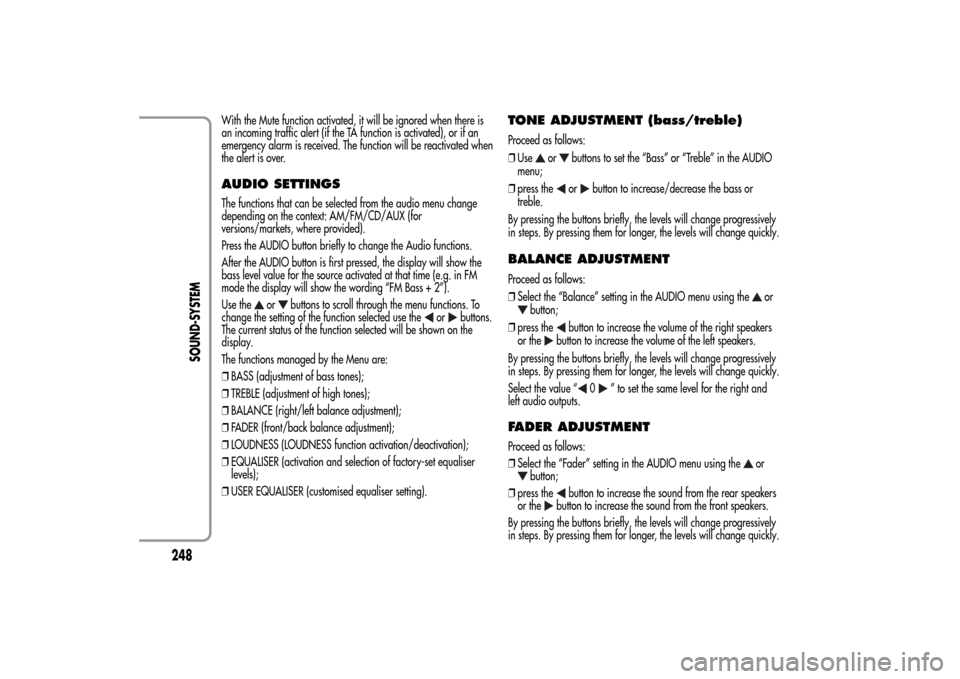
With the Mute function activated, it will be ignored when there is
an incoming traffic alert (if the TA function is activated), or if an
emergency alarm is received. The function will be reactivated when
the alert is over.AUDIO SETTINGSThe functions that can be selected from the audio menu change
depending on the context: AM/FM/CD/AUX (for
versions/markets, where provided).
Press the AUDIO button briefly to change the Audio functions.
After the AUDIO button is first pressed, the display will show the
bass level value for the source activated at that time (e.g. in FM
mode the display will show the wording “FM Bass + 2”).
Use the
or
buttons to scroll through the menu functions. To
change the setting of the function selected use the
or
buttons.
The current status of the function selected will be shown on the
display.
The functions managed by the Menu are:
❒BASS (adjustment of bass tones);
❒TREBLE (adjustment of high tones);
❒BALANCE (right/left balance adjustment);
❒FADER (front/back balance adjustment);
❒LOUDNESS (LOUDNESS function activation/deactivation);
❒EQUALISER (activation and selection of factory-set equaliser
levels);
❒USER EQUALISER (customised equaliser setting).
TONE ADJUSTMENT (bass/treble)Proceed as follows:
❒Use
or
buttons to set the “Bass” or “Treble” in the AUDIO
menu;
❒press theor
button to increase/decrease the bass or
treble.
By pressing the buttons briefly, the levels will change progressively
in steps. By pressing them for longer, the levels will change quickly.
BALANCE ADJUSTMENTProceed as follows:
❒Select the “Balance” setting in the AUDIO menu using the
or
button;
❒press the
button to increase the volume of the right speakers
or the
button to increase the volume of the left speakers.
By pressing the buttons briefly, the levels will change progressively
in steps. By pressing them for longer, the levels will change quickly.
Select the value “
0
” to set the same level for the right and
left audio outputs.
FADER ADJUSTMENTProceed as follows:
❒Select the “Fader” setting in the AUDIO menu using the
or
button;
❒press the
button to increase the sound from the rear speakers
or the
button to increase the sound from the front speakers.
By pressing the buttons briefly, the levels will change progressively
in steps. By pressing them for longer, the levels will change quickly.
248
SOUND-SYSTEM
Page 253 of 280
Select the value “
0
” to set the same level for the front and
rear audio outputs.
LOUDNESS FUNCTIONThe Loudness function improves the volume of the sound whilst
listening at low volumes, increasing the bass and treble.
To activate/deactivate the function, select the Loudness setting of
the AUDIO menu using the
or
buttons.
The condition of the function (on or off) is shown on the display for
a few seconds by the wording “Loudness On” or “Loudness Off”.
PRESET/USER/CLASSIC/ROCK/JAZZ
FUNCTIONS(equaliser activation/deactivation)
The built-in equaliser can be activated/deactivated. When the
equaliser function is off, the audio settings can only be changed by
adjusting the “Bass” and “Treble” settings, whereas when the
function is on, the acoustic curves can be adjusted.
To deactivate the equaliser, select the “EQ Preset” function using the
buttons
or
.
To activate the equaliser, use the
or
buttons to select one of
the adjustments:
❒“FM/AM/CD...EQ User” (adjustment of 7 equaliser bands that
can be changed by the user);
❒“Classic” (equaliser preset for optimal classical music sound);
❒“Rock” (equaliser preset for optimal rock and pop music sound);
❒“Jazz” (equaliser preset for optimal jazz music sound).
When one of the equaliser settings is activated the letters “EQ”
light up.
USER EQ SETTINGS FUNCTION(equaliser settings only if the USER setting is selected)
To set a personalised equaliser adjustment, set to “User” using the
or
button and press the MENU button.
A 7-bar graph appears on the display, in which each bar
represents a frequency.
Select the bar to adjust using the
or
buttons; the selected bar
will start to flash and it can be adjusted using the
or
buttons.
To store the setting, press the AUDIO button again. The display will
show the active source at that time followed by the word “USER”. If
the mode is “FM”, for example, the display will show the text “FM
EQ User”.
MENUMENU button functions
Press the MENU button briefly to activate the Menu function. The
display will show the first menu item that can be adjusted (AF) (“AF
Switching On” on the display).
Use the
or
buttons to scroll through the menu functions. To
change the setting of the function selected use the
or
buttons.
The current status of the function selected will be shown on the
display.
The functions managed by the Menu are:
❒AF SWITCHING (ON/OFF);
❒TRAFFIC INFORMATION (ON/OFF);
❒REGIONAL MODE regional programmes (ON/OFF);
❒MP3 DISPLAY (CD MP3 display settings);
249SOUND-SYSTEM
Page 255 of 280
With the TA function, it is possible to:
❒search only for RDS stations that broadcast in FM and are
enabled to broadcast traffic information;
❒receive traffic information even when the CD player is in
operation;
❒receive traffic information at a minimum preset volume even with
the radio volume off.
NoteIn some countries there are radio stations that, even with the
TP function activated, do not transmit traffic information (the “TP”
icon appears on the display).
If the radio is tuned to a station in the AM band, when TA is
activated it will tune into the last selected station in the FM1 band.
The volume at which the traffic news is transmitted depends on the
listening volume:
❒listening volume below 5: traffic news volume 5 (fixed value);
❒listening volume above 5: traffic news volume equal to listening
volume +1.
If the volume is changed during traffic news, the level will not be
shown on the display; the new level will only be maintained during
the news.
While traffic information is being received, “TRAFFIC
INFORMATION” will appear on the display.
The TA function can be interrupted by pressing any button on the
radio.
REGIONAL MODE function(regional transmission reception)
Some national broadcasters will transmit regional programmes at
certain times of the day (that vary from region to region).
This function makes it possible to tune into local (regional)
broadcasters automatically (see “EON function” paragraph).
If you want the radio to automatically tune into the regional
stations being broadcast on the selected network, the function must
be activated.
To activate/deactivate the function use the
or
buttons.
The current status of the function appears on the display:
❒“Regional On”: function activated;
❒“Regional Off”: function deactivated.
If the function is deactivated and you have tuned into a regional
station working in a given area and you enter a different area,
then the regional station received in the new area will be
broadcast.
NoteIf the AF and REG functions are on at the same time, once a
border between two regions is crossed, the radio may not switch
correctly to a valid alternative frequency.
251SOUND-SYSTEM