Lin Alfa Romeo MiTo 2017 Repair Manual
[x] Cancel search | Manufacturer: ALFA ROMEO, Model Year: 2017, Model line: MiTo, Model: Alfa Romeo MiTo 2017Pages: 212, PDF Size: 4.36 MB
Page 165 of 212
When the tires are warm, the inflation pressure should be + 0.3 bar in relation to the recommended figure. Check correct pressure
when the tyres are cold.
With snow tyres, add +0.2 bar to the prescribed pressure for standard tyres.
When travelling at speeds over 160 km/h, inflate the tyres to the values specified for fully laden conditions.
163
Page 171 of 212
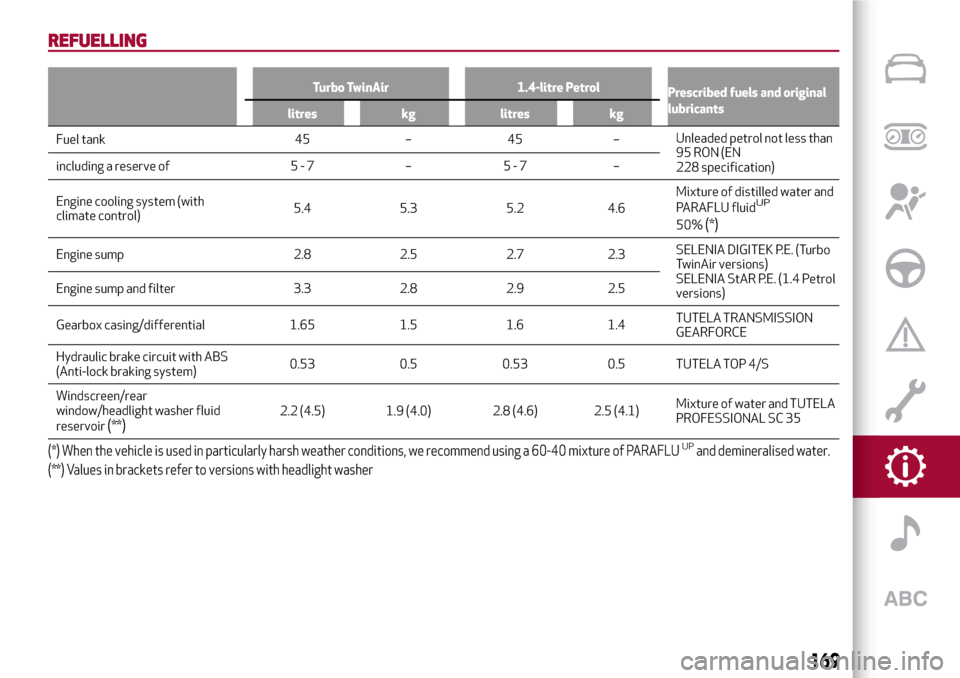
REFUELLING
Turbo TwinAir 1.4-litre Petrol
Prescribed fuels and original
lubricants
litres kg litres kg
Fuel tank 45 – 45 –Unleaded petrol not less than
95 RON (EN
228 specification) including a reserve of 5 - 7 – 5 - 7 –
Engine cooling system (with
climate control)5.4 5.3 5.2 4.6Mixture of distilled water and
PARAFLU fluid
UP
50%(*)
Engine sump 2.8 2.5 2.7 2.3SELENIA DIGITEK P.E. (Turbo
TwinAir versions)
SELENIA StAR P.E. (1.4 Petrol
versions) Engine sump and filter 3.3 2.8 2.9 2.5
Gearbox casing/differential 1.65 1.5 1.6 1.4TUTELA TRANSMISSION
GEARFORCE
Hydraulic brake circuit with ABS
(Anti-lock braking system)0.53 0.5 0.53 0.5 TUTELA TOP 4/S
Windscreen/rear
window/headlight washer fluid
reservoir
(**)2.2 (4.5) 1.9 (4.0) 2.8 (4.6) 2.5 (4.1)Mixture of water and TUTELA
PROFESSIONAL SC 35
(*) When the vehicle is used in particularly harsh weather conditions, we recommend using a 60-40 mixture of PARAFLUUPand demineralised water.
(**) Values in brackets refer to versions with headlight washer
169
Page 172 of 212
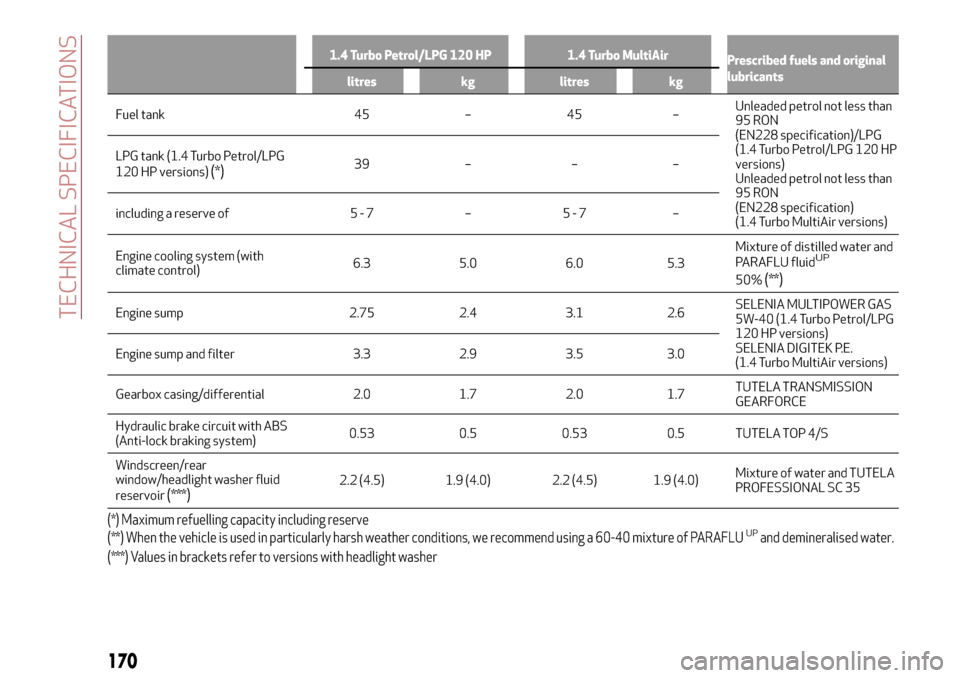
1.4 Turbo Petrol/LPG 120 HP 1.4 Turbo MultiAir
Prescribed fuels and original
lubricants
litres kg litres kg
Fuel tank 45 – 45 –Unleaded petrol not less than
95 RON
(EN228 specification)/LPG
(1.4 Turbo Petrol/LPG 120 HP
versions)
Unleaded petrol not less than
95 RON
(EN228 specification)
(1.4 Turbo MultiAir versions) LPG tank (1.4 Turbo Petrol/LPG
120 HP versions)
(*)39 – – –
including a reserve of 5 - 7 – 5 - 7 –
Engine cooling system (with
climate control)6.3 5.0 6.0 5.3Mixture of distilled water and
PARAFLU fluid
UP
50%(**)
Engine sump 2.75 2.4 3.1 2.6SELENIA MULTIPOWER GAS
5W-40 (1.4 Turbo Petrol/LPG
120 HP versions)
SELENIA DIGITEK P.E.
(1.4 Turbo MultiAir versions) Engine sump and filter 3.3 2.9 3.5 3.0
Gearbox casing/differential 2.0 1.7 2.0 1.7TUTELA TRANSMISSION
GEARFORCE
Hydraulic brake circuit with ABS
(Anti-lock braking system)0.53 0.5 0.53 0.5 TUTELA TOP 4/S
Windscreen/rear
window/headlight washer fluid
reservoir
(***)2.2 (4.5) 1.9 (4.0) 2.2 (4.5) 1.9 (4.0)Mixture of water and TUTELA
PROFESSIONAL SC 35
(*) Maximum refuelling capacity including reserve
(**) When the vehicle is used in particularly harsh weather conditions, we recommend using a 60-40 mixture of PARAFLUUPand demineralised water.
(***) Values in brackets refer to versions with headlight washer
170
TECHNICAL SPECIFICATIONS
Page 173 of 212
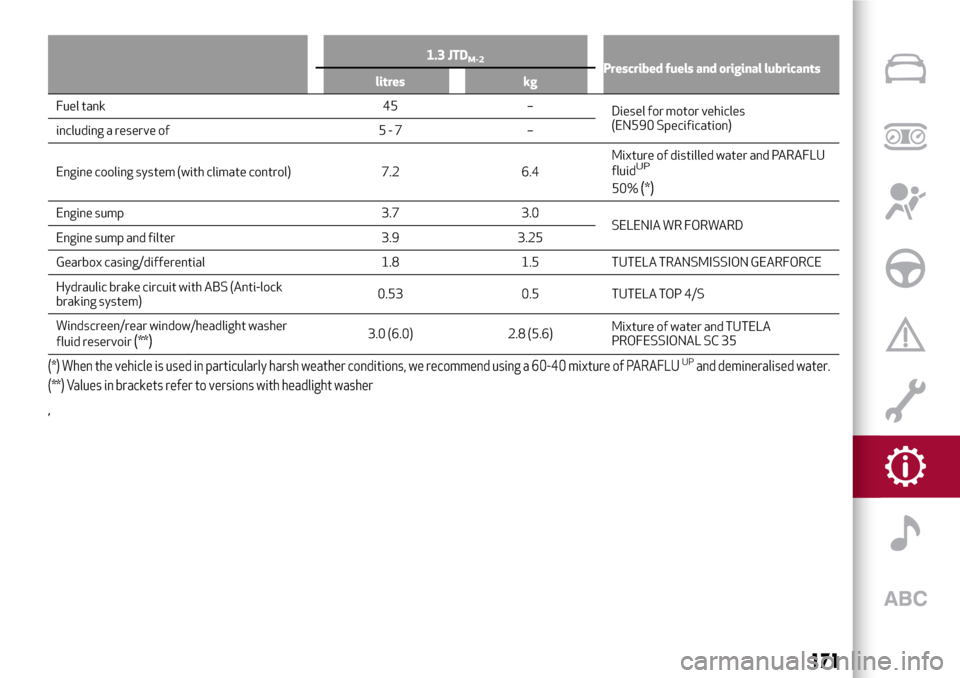
1.3 JTDM-2Prescribed fuels and original lubricants
litres kg
Fuel tank 45 –
Diesel for motor vehicles
(EN590 Specification)
including a reserve of 5 - 7 –
Engine cooling system (with climate control) 7.2 6.4Mixture of distilled water and PARAFLU
fluid
UP
50%(*)
Engine sump 3.7 3.0
SELENIA WR FORWARD
Engine sump and filter 3.9 3.25
Gearbox casing/differential 1.8 1.5 TUTELA TRANSMISSION GEARFORCE
Hydraulic brake circuit with ABS (Anti-lock
braking system)0.53 0.5 TUTELA TOP 4/S
Windscreen/rear window/headlight washer
fluid reservoir
(**)3.0 (6.0) 2.8 (5.6)Mixture of water and TUTELA
PROFESSIONAL SC 35
(*) When the vehicle is used in particularly harsh weather conditions, we recommend using a 60-40 mixture of PARAFLUUPand demineralised water.
(**) Values in brackets refer to versions with headlight washer
,
171
Page 181 of 212
PRESCRIPTIONS FOR HANDLING THE VEHICLE AT THE END OF ITS LIFE
(where provided)
FCA has been committed for many years to safeguarding the environment through the constant improvement of its production
processes and manufacturing products that are increasingly "eco-compatible". To grant customers the best possible service in terms
of respecting environmental laws and in response to European Directive 2000/53/EC governing vehicles at the end of their life, FCA
is offering its customers the chance to hand over their vehicle at the end of its life without incurring any additional costs. The
European Directive sets out that when the vehicle is handed over, the last keeper or owner should not incur any expenses as a result
of it having a zero or negative market value.
To hand your vehicle over at the end of its life without extra cost, contact one of our dealerships if you are purchasing another vehicle
or an FCA-authorised collection and scrapping centre. These centres have been carefully chosen to offer high quality service for the
collection, treatment and recycling of vehicles at their end of life, respecting the surrounding environment.
You can find further information on these collection and scrapping centres either from an FCA dealership or by calling the number in
the Warranty Booklet or by consulting the websites of the various FCA brands.
179
Page 186 of 212
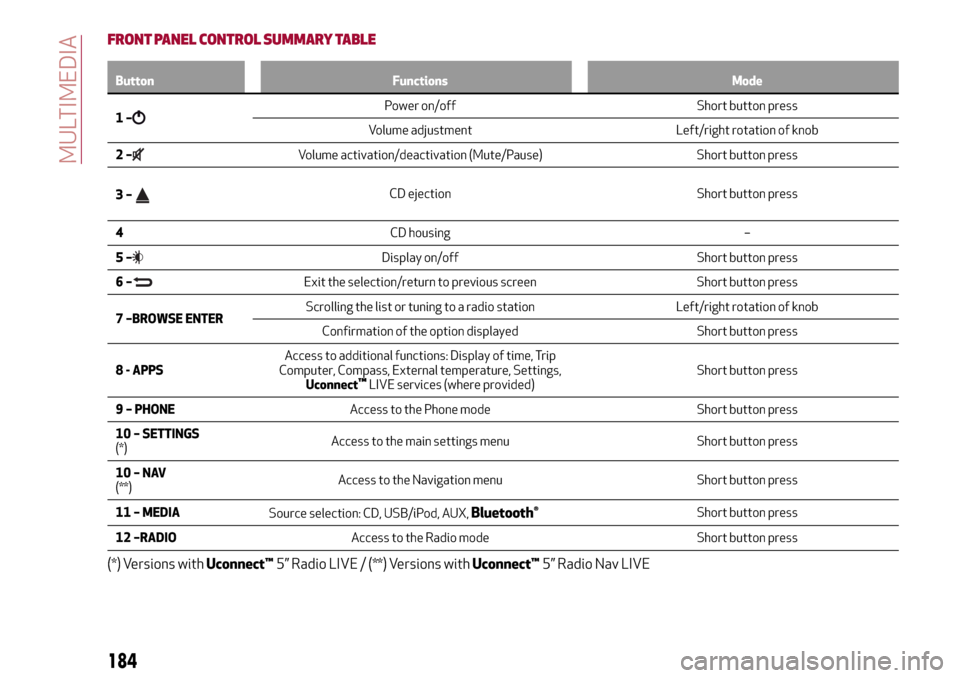
FRONT PANEL CONTROL SUMMARY TABLE
Button Functions Mode
1–Power on/off Short button press
Volume adjustment Left/right rotation of knob
2–
Volume activation/deactivation (Mute/Pause) Short button press
3–
CD ejection Short button press
4CD housing –
5–
Display on/off Short button press
6–
Exit the selection/return to previous screen Short button press
7 –BROWSE ENTERScrolling the list or tuning to a radio station Left/right rotation of knob
Confirmation of the option displayed Short button press
8 - APPSAccess to additional functions: Display of time, Trip
Computer, Compass, External temperature, Settings,
Uconnect
™LIVE services (where provided)Short button press
9 – PHONEAccess to the Phone mode Short button press
10 – SETTINGS
(*)Access to the main settings menu Short button press
10–NAV
(**)Access to the Navigation menu Short button press
11 – MEDIA
Source selection: CD, USB/iPod, AUX,
Bluetooth®Short button press
12 –RADIOAccess to the Radio mode Short button press
(*) Versions withUconnect™5” Radio LIVE / (**) Versions withUconnect™5” Radio Nav LIVE
184
MULTIMEDIA
Page 190 of 212
you wish to store, hold down the button
on the display which corresponds to the
desired preset or until an acoustic
confirmation signal is emitted.
The system can store up to 12 radio
stations in each mode: 3 radio stations
are displayed in the upper area.
Press the "All" button on the display to
show all the radio stations stored in the
frequency band selected.
Audio
To access the “Audio” menu, press the
APPS button on the front panel, scroll
through the menu, then select and press
the “Audio” option on the display.
The following adjustments can be carried
out using the "Audio" menu:
“Equaliser” (where provided): to adjust
the bass, medium and treble tones;
“Balance/Fader” (left/right and
front/rear audio balance adjustment);
“Volume/Speed” (excluding versions
with Hi-Fi system) speed-dependent
automatic volume adjustment;
“Loudness” (where provided):
improves audio quality at low volumes;
“Auto-On Radio”: provides the options
of radio on, radio off or restore status
when the ignition key was last turned to
STOP;
“Radio Off Delay”: keeps the radio on
for a preset time after the ignition key is
turned to STOP.
MEDIA MODE
Press the "Source" button to select the
desired audio source among those
available: CD,
Bluetooth®, AUX, USB/iPod
Change track (next/previous)
Briefly press the
graphic button or
press
on the steering wheel or,
alternatively, turn the BROWSE ENTER
button/knob clockwise to play the next
track. Briefly press the
graphic
button or press
on the steering wheel
or, alternatively, turn the BROWSE
ENTER button/knob clockwise to return
to the beginning of the track or return to
the beginning of the previous track of the
track has been playing for less than
8 seconds.
Fast forward/rewind through tracks
Press and hold down the
button to
fast forward the selected track or keep
the
button pressed to fast rewind
the track.
Track selection (Browse)
The selection options depend on the
device connected or the CD type
inserted.
Press the "Browse" button to activate
this function on the source being played.
NOTE A few
Bluetooth®devices do not
offer the possibility of scrolling tracks
through all categories.
NOTE Within each list, the “ABC” buttonallows the user to skip to the desired
letter in the list. This button might be
disabled for some
Apple®devices.
Turn the BROWSE ENTER button/knob
to select the desired category and then
press the button/knob to confirm the
selection.
Press the "X" button to cancel the
function.
Track information display
Press the "Info" button to display the
information on the track being listened to
for devices that support the function.
Press the "X" button to exit the screen.
Shuffle
Press the ">" button then the "Shuffle"
button to play the tracks on the CD,
USB/iPod or
Bluetooth®in a random
order.
Press the "Shuffle" button again to
deactivate the function.
Repeat
Press the ">" button then the "Repeat"
button to activate the function.
Press the "Repeat" button again to
deactivate the function.
188
MULTIMEDIA
Page 192 of 212
list” in theUconnect™attachments).
Main functions
Use the buttons on the display to:
dial the phone number (using the
graphic keypad on the display);
display and call the contacts in the
mobile phone phonebook;
display and call contacts from the
registers of previous calls;
pair up to 10 phones/audio devices to
make access and connection easier and
quicker;
transfer calls from the system to the
mobile phone and vice versa and
deactivate the microphone audio for
private conversations.
Pairing a mobile phone
To pair the mobile phone, proceed as
follows:
activate theBluetooth®function on
the mobile phone;
press the PHONE button on the front
panel;
if no phone is paired with the system
yet, the display shows a dedicated
screen;
select “Yes” to start the pairing
procedure, then search for the
Uconnect™device on the mobile phone;
when prompted by the mobile phone,
use its keypad to enter the PIN code
shown on the system display or confirm
on the mobile phone the PIN displayed;
from the “Phone” screen you can
always pair a mobile phone by pressing
the “Settings” button: press the “Add
Device” button and proceed as described
above;
select “Yes” or “No” at the request to
pair the mobile phone as the preferred
device;
NOTE After updating the phone software,
for proper operation, it is recommended
to remove the phone from the list of
devices linked to the radio, delete the
previous system pairing also from the list
of
Bluetooth®devices on the phone and
make a new pairing.
Storing names/numbers in the mobile
phone phonebook
Before pairing your mobile phone, make
sure you have stored the names you want
to contact in the phonebook on your
mobile phone so that you can call them
using the car's hands-free system.
Transferring phone data (phonebook
and recent calls)
If your mobile phone has a function for
sending the phonebook via
Bluetooth®
technology.
Answer “Yes” when asked to copy the
phonebook to the system. Answer “No” to
carry out the operation later on.Making a phone call
The operations described below can only
be accessed if supported by the mobile
phone in use.
A call can be made by:
selecting theicon (mobile phone
phonebook);
selecting “Recent Calls”;
selecting the icon(Keypad);
pressing the “Redial” button.
Handling an incoming call
The buttons on the display allow the
following phone call functions to be
managed:
To answer a call: press the “Answer”
button or the
button on the steering
wheel controls;
To end a call: press the “Ignore” button
or the
button on the steering wheel
controls;
Ignore;
Put on hold/resume;
Deactivate/activate the microphone;
Transfer the call;
Switch from one call to the other;
Conference/merge two active calls.
Text message reader
To use this function the mobile phone
must support the SMS exchange function
through
Bluetooth®.
If this function is not supported by the
190
MULTIMEDIA
Page 197 of 212
IMPORTANT INFORMATION AND RECOMMENDATIONS
WARNING
INTERIOR FITTINGSDo not travel with the storage compartment open: it may injure the front seat occupants in the event of an accident.
The cigar lighter gets extremely hot. Handle it carefully and make sure that children don’t use it: risk of fire and/or burns.
Do not use the ashtray as a waste paper basket: it may catch fire in contact with cigarette stubs.
ROOF RACK/SKI RACKAfter travelling for a few kilometres, check to ensure that the fixing screws for the attachments are well tightened.
Never exceed the maximum permitted loads (see chapter "Technical specifications").
Distribute the load evenly and pay attention to side winds when driving.
ELECTRIC POWER STEERINGBefore starting any servicing operation, stop the engine and remove the key from the ignition switch to operate the steering lock,
particularly when the wheels do not touch the ground. If this is not possible (for example if the key needs to be turned to MAR or the
engine must be running), remove the main fuse that protects the electric power steering.
INTERIORNever use flammable products, such as petrol ether or rectified petrol to clean the inside of the car. The electrostatic charges
which are generated by rubbing during the cleaning operation may cause a fire.
Do not keep aerosol cans in the car: they might explode. Aerosol cans must not be exposed to a temperature exceeding 50°C.
When the vehicle is exposed to sunlight, the internal temperature can greatly exceed this value.
Page 200 of 212
Your car has chosen PETRONAS Selenia
The quality of PETRONAS Selenia is divided into a range of technologically advanced products:
SELENIA WR FORWARD 0W-30/0W-20Fully synthetic, latest generation lubricant specifically formulated for EURO 6
diesel engines. Its fully synthetic formula and 0W-30 viscosity grade guaran-
tee excellent performance in terms of fuel economy for diesel engines
equipped with high efficiency turbo-charger. PETRONAS Selenia Forward
also features excellent resistance to oxidation, thus maintaining its technical
characteristics and promoting maximum engine performance throughout
the entire oil-change interval.
SELENIA DIGITEK P.E. 0W-30Is the fully synthetic lubricant created for the most modern petrol engines.
Its special viscosity grade and its specific formulation enhance the fuel
economy features and, consequently the reduction of CO2 emissions.
Especially created for TwinAir two-cylinder engines, it ensures maximum
engine protection even under high mechanical stress due to mainly city use.
SELENIA MULTIPOWER C3Is a high performance synthetic lubricant designed for petrol and diesel
engines requiring products able to reduce ash deposits to the absolute
minimum. It provides increased protection against wear and tear
and has excellent fuel economy characteristics. It protects the particle
filter (DPF) in diesel engines.
SELENIA SPORT POWERIs a fully synthetic lubricant designed to enhance the sporting
characteristics of direct injection petrol engines (GDI).
It maximizes sporting performances while maintaining complete engine
protection, even under the most severe conditions of use.
The PETRONAS Selenia range is completed with Selenia StAR Pure Energy, Selenia StAR,
Selenia WR Pure Energy, Selenia Sport, and Selenia Racing.
For further information concerning PETRONAS Selenia products, consult the website: www.pli-petronas.com
The engine of your car was made with PETRONAS Selenia, the range
of engine oils that satisfies the most advanced international specifications.
Subject to specific tests and boasting outstanding technical characteristics,
PETRONAS Selenia is a lubricant designed to equip your engine
with reliable, winning performance standards”