ESP AUDI A3 2015 Owner's Manual
[x] Cancel search | Manufacturer: AUDI, Model Year: 2015, Model line: A3, Model: AUDI A3 2015Pages: 288, PDF Size: 71.46 MB
Page 93 of 288
Warnings
Applies to vehicles: with Audi pre sense fro nt or Audi
adaptive cruise control
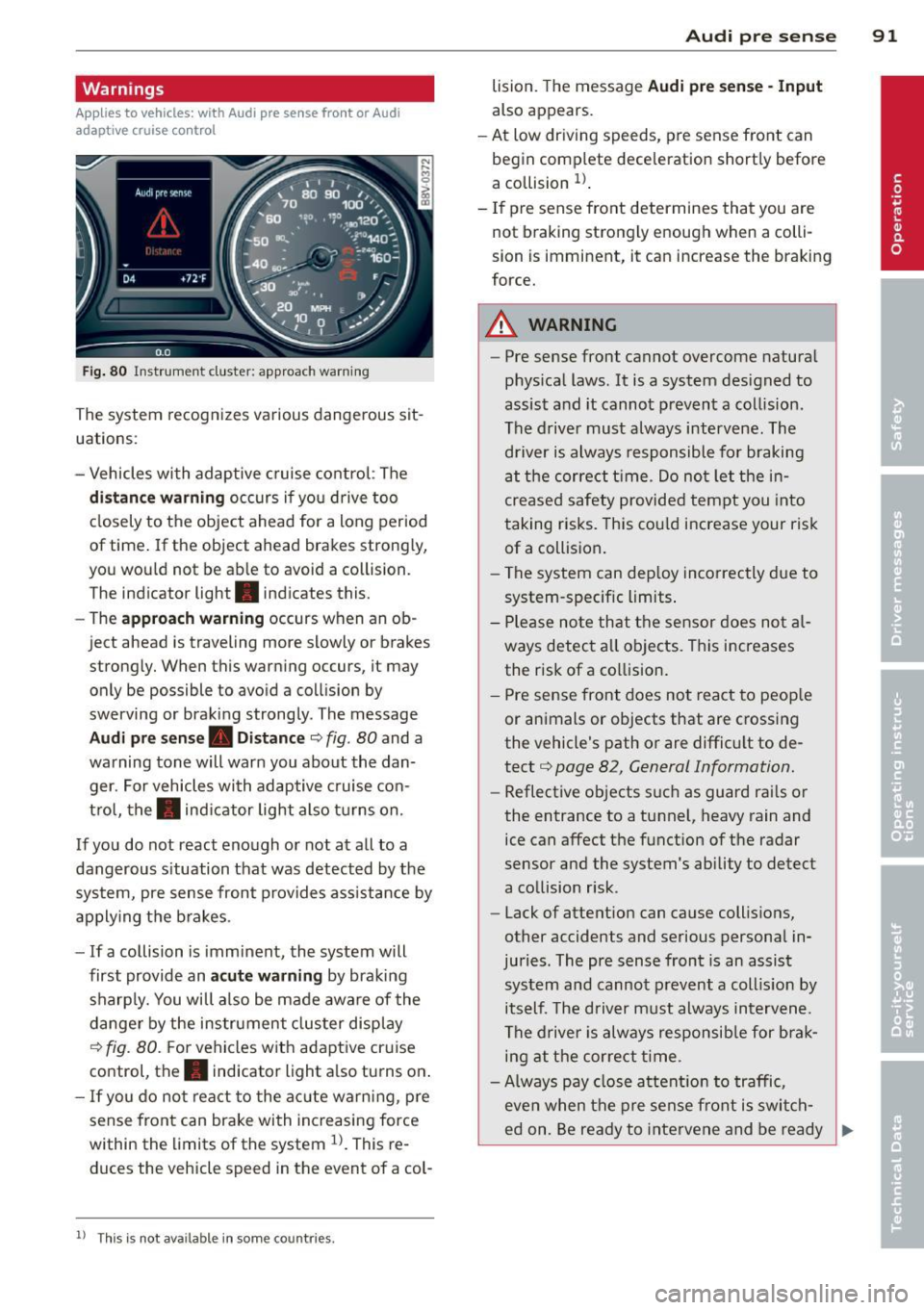
Fig . 80 Instrument cluster: approach warning
The system recognizes various dangerous sit
uations:
- Vehicles with adaptive cruise control: The
distance warning occurs if you drive too
closely to the object ahead for a long period
of time.
If the object ahead brakes strongly,
you would not be able to avoid a collision.
The ind icator light . indicates this.
- The
approach warning occurs when an ob
ject ahead is traveling more slowly or brakes
strongly. When this warning occurs, it may only be possible to avoid a collision by
swerving or braking strongly. The message
Audi pre sense. Distance c::> fig . 80 and a
warning tone will warn you about the dan ger. For vehicles with adaptive cruise con
trol, the. indicator light also turns on.
If you do not react enough or not at all to a
dangerous s ituation that was detected by the
system, pre sense front provides assistance by
applying the brakes .
- If a collision is imminent, the system will
first provide an
acute warning by braking
sharply. You will also be made aware of the
danger by the instrument cluster display
c::> fig. 80. For vehicles with adaptive cruise
control, the. indicator light also turns on .
-If you do not react to the acute warning, pre
sense front can brake with increasing force
within the limits of the system
l)_ This re
duces the vehicle speed in the event of a col-
l l This is not available in some countries .
Audi pre sense 91
lision. The message Audi pre sense -Input
also appears.
- At low driving speeds, pre sense front can
begin complete deceleration shortly before
a collision
l) .
-If pre sense front determines that you are
not braking strongly enough when a colli
sion is imminent, it can increase the braking
force.
A WARNING
--- Pre sense front cannot overcome natural
physical laws.
It is a system designed to
assist and it cannot prevent a collision .
The driver must always intervene. The driver is always responsible for braking
at the correct t ime. Do not let the in
creased safety provided tempt you into
taking risks. This could increase your risk
of a collision.
- The system can deploy incorrectly due to
system-specific limits .
- Please note that the sensor does not al
ways detect all objects . This increases
the risk of a collision.
- Pre sense front does not react to people
or animals or objects that are crossing
the vehicle's path or are difficult to de
tect
c::> page 82, General Information.
- Reflective objects such as guard rails or
the entrance to a tunnel, heavy rain and
ice can affect the function of the radar
sensor and the system's ability to detect
a collision risk .
- Lack of attention can cause collisions,
other accidents and serious personal in
juries. The pre sense front is an assist
system and cannot prevent a collis ion by
itself. The driver must always intervene.
The driver is always responsib le for brak
ing at the correct time.
- Always pay close attention to traffic,
even when the pre sense front is switch-
ed on. Be ready to intervene and be ready .,_
Page 94 of 288
92 Audi pre sense
to take complete control whenever necessary. Always keep the safe and legal
distance between your vehicle and
vehicles up ahead .
- Pre sense front works within limits and
will not respond outside the system lim
its, for example when approaching a
stopped vehicle or stationary obstacle
(end of a traffic jam or vehicle that has
broken down in traffic).
- Always remember that the radar sensor
for the pre sense front works only within
defined detection and range limits that
may prevent the proper detection of oth
er vehicles.
- The radar sensor's function and range
can be reduced by rain, snow and heavy
spray. Moving vehicles up ahead may not
be promptly detected or may not be de
tected at all.
- Reflective surfaces including crash barri
ers or tunnel entrances may impair the
function of the radar sensor.
(]) Note
The sensor can be displaced by impacts or
damage to the bumper, wheel housing and
underbody. The pre sense front sensor can
be damaged by this. Have your authorized
Audi dealer or qualified repair facility
check their function.
@ Tips
- You can cancel the braking with increas ing force that is initiated by the system
by braking yourself, by accelerating no
ticeably or by swerving.
- Driver messages about pre sense
¢page 92.
- Keep in mind that pre sense can brake
unexpectedly. Always secure any cargo or
objects that you are transporting to re
duce the risk of damage or injury.
- Certain pre sense front functions switch off when ESC is switched off (sport
mode) or when driving in reverse. -
The pre sense front functions are not
available if there is a malfunction in the
adaptive cruise control* system
¢page
88 or ¢page 92.
- Keep in mind that pre sense front can
brake unexpectedly. Always secure any
cargo or objects that you are transport
ing to reduce the risk of damage or in
jury .
Settings in the Infotainment system
Applies to vehicles: wit h Audi pre sense front or A udi
adap tive c ru ise contro l
.,. Select in the MMI: I MENU I button> Systems
control button or Car systems > Driver as
sistance
> Audi pre sense.
Switching the system on and off
Audi pre sense (System): If the system is
switched off, it switches on again automati
cally once the ignition is switched on again.
System -Switch Audi pre sense on-off. With
this, you can switch the prewarning and the
braking intervention from Audi pre sense on
or off .
Prewarning -The distance and approach
warnings can be switched
on/off.
(D Tips
- If you restrict or switch off the ESC, the
pre sense also switches itself
off
¢ page 187.
-Switch the pre sense off when you a re
loading the vehicle onto a vehicle carrier,
train, ship or other type of transporta
tion. This can prevent undesired warn
ings from the pre sense system.
Driver messages
Applies to vehicles: wit h Audi pre sense o r A udi ada ptive
cruise co ntrol
Audi pre sense currently unavailable. No sen
sor vision
This message appears if the sensor view is ob
structed, for example by leaves, snow, heavy .,.
Page 96 of 288
94 Audi acti ve lan e assi st
Audi active lane assist
Lane assist
Description
App lies to vehicles: with Audi active lane assist
Active lane ass ist detects lane marker lines
within the limits of the system using a camera
in the windshield . If you are approaching a de
tected lane marker line and it appears likely
that you wi ll leave the lane, the system will
warn you with corrective steering. You can
ove rride this steering at any time . If you pass
over a line, the steering wheel will vibrate lightly. In order for this warning vibration to
occur, it must first be switched on in the MMI.
Active lane ass ist is operable when the lane
marker line is detected on at least one side of
the vehicle .
The system will not warn you before cross ing
a lane marker Line if you have activated the
turn signal. In t his case, it assumes that you
a re changing lanes intent ionally.
The system is designed for driv ing on express
ways and h ighways and therefore only acti
vates at speeds above app roximately 40 mp h
(65 km/h).
A WARNING
- The sys tem w arns the d river that the ve
hicle is leaving the lane us ing corrective
steering . The driver is always responsible
for keeping the vehicle within the lane .
- The system can help you keep the vehicle
in the lane, but it does not drive by itself.
Always keep your hands on the steering
wheel.
- Co rrective stee ring may not occur in cer
tain situations, such as d uring heavy
braking.
- There may be cases where the camera
does not recognize all lane marker lines.
Corrective steering can only take p lace
on the side of the veh icle where lane
marke r lines a re detected .
l) Thi s func tion is not available in a ll co untries.
- Other road structures or objects cou ld
possibly be identified un intent ionally as
lane marker lines. As a result, correct ive
steer ing may be unexpected or may not
occ ur.
- The camera view can be restricted, for
examp le by vehicles driving ahead or by
ra in, snow , heavy spray light shining into
the camera or by dirt on the window . T his
can result in act ive lane assist not detect
ing the lane marke r lines or detec ting
them incorrect ly .
- I n certain sit uat ions where visibili ty is
low, the vehicle may swi tch from "early"
to "late" corrective steering
l).
-Unde r ce rtain condi tions such as ruts in
the road, an incl ined roadway or c ross
winds, the corrective steering alone may not be enough to keep the vehicle in the
middle of the lane.
- For safety reasons, active lane assist
must not be used when the re a re poor
road and/or weather conditions such as
slippery roads, fog, grave l, heavy rain,
snow and the potential for hydroplaning .
Using act ive lane assist under these con
d itions may increase the risk of a c rash .
Page 98 of 288
96 Audi active lane assist
@ So lid lines: act ive la ne assist is sw itch-
ed on and ready to provide wa rn in gs on
t he s ide th at is indica ted.
@ B linking lines ( left or right): active lane
assist is warning you by a vibration in
t he stee ring wheel that yo u are l eaving
t h e l ane.
® Unfilled line(s): active lane assist is
switched on but is not rea dy to prov ide
warnings.
N o lines: t he active lane assist is
switched
off .
Multicolored display
Refe r to¢ fig. 8 4
@ Solid white lines : active la ne assist is
switched on and ready to provide warn-
ings on the side that is ind icated.
@ Red lin es (left or r igh t): ac tive lane as-
sis t is warning you by a vibration in t he
steering whee l th at you a re leav ing the
lane.
® Gray unfilled lines: active lane ass ist is
s witched on but is not ready to prov ide
w ar nings.
N o lines: the active lane assist is
switched
off.
Messages in the instrument cluster
display
I f the active lane ass ist has a mal func tion, the
B indicato r light in the inst rumen t cluste r
di spl ay t urn s
off and one of the followi ng
me ssages appe ars:
Audi active lane assist: currently not avai la
ble. No camera view
This message appears if the camera is unable
to detect the li nes . This co uld happe n if:
- The came ra field of view ¢
page 95, fig. 82
is dirty o r covered i n ice. Clean the area on
t h e windshie ld.
l ) Thi s function is not available in all cou ntr ies.
- The camera field o f view is fo gged ove r. Wa it
until the fog has cleared before switching
the act ive lane assist on agai n.
- The system has bee n una ble to detect t he
lanes for an exten ded period of t ime due to
road conditions. Switch the active lane as
sist bac k on when the lines are more v is ible.
Audi active lane assist: currently unavailable
T he re is a te mporary a ct ive lane assis t mal
f unc tion. Try swi tching the active lane assi st
o n again later .
Audi active lane assist: system fault!
Drive to an authorized A udi dealer or qualified
repair fac ility immediately to have the mal
funct ion corrected.
B Audi active lane assist: Please continue
steering vehicle!
T his messa ge ap pears if yo u are not stee ring
by yoursel f. If th is is t he case, act ive lane as
s ist does not switch
off, but it is "not ready" to
provide a warning. The system can help you
kee p the vehicle in the lane. However, yo u are
r esponsible for dr iv ing the vehicle and must
stee r it yourse lf .
Adjusting the steering time and
vibration warning
App lies to veh icles: w ith Audi ac tive la ne ass ist
You can adju st individual active lane assis t
se ttings in the MMI.
"' Select: !ME NUI button> Systems cont ro l
but to n or
Car sy stem s > Driver assistance >
Audi active lane assist .
Steering timel)
Early :
in this setting, the correct ive steering
happens con tinuously to he lp keep the vehicle
i n t he c ent er of t he lane.
Late : in this setting, the system provides cor
rect ive steer ing just befo re a vehicle whee l
touches a detected lane marke r line . ..,.
Page 101 of 288
General information
Applies to vehicles: with Audi side assist
®
®
©
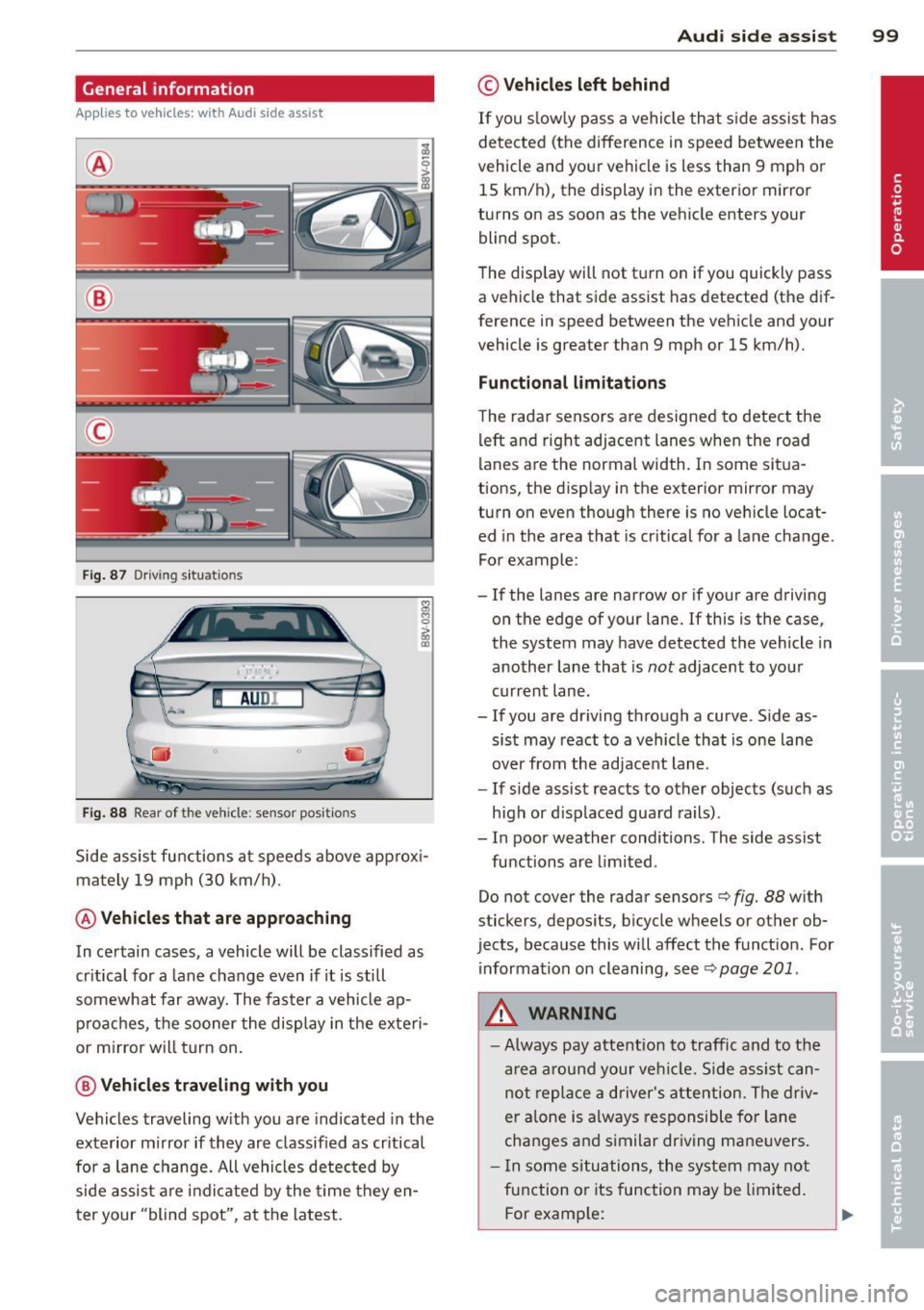
Fig . 87 Driving situations
I AUDI
Fi g. 88 Rear of the vehicle: sensor posit ions
Side assist functions at speeds above approx i
mately 19 mph (30 km/h).
@ Vehicl es th at ar e approaching
In certain cases, a vehicle will be classified as
cr itical for a lane change even if it is still
somewhat far away. The fas ter a vehicle ap
p roaches, t he sooner the display in the exteri
or m irror will t urn on.
@ V ehicles traveling with you
Vehicles traveling w ith you are indicated in the
exterior m irror if they are classified as cr itical
for a lane change. All vehicles detec ted by
side assist are indicated by the time they en
t er your "blind spot", at the latest.
Audi side assist 99
© Veh icles left behind
If you s low ly pass a vehi cle that s ide assist has
detected (the difference in speed between the
vehicle and you r vehicle is less than 9 mph or
15 km/h), the display in the exterio r mir ro r
turns on as soon as the vehicle enters your blind spot.
T he disp lay will not t urn on if you quickly pass
a vehicle that side assist has detected (the dif
ference in speed between the veh icle and your
vehicle is greater than 9 mph or 15 km/h).
Functional limitations
The radar sensors are designed to detect the
left and right adjacent lanes when the road
lanes are the normal width. In some sit ua
tions, the d isp lay in the exterior mirror may
turn on even though there is no ve hicle locat
ed in the area that is cr itical for a lane cha nge.
For example:
- If the lanes are narrow or if your are driving
on the edge of your lane.
If this is the case,
the system may have detected the vehicle in
another lane that is
not adjacent to you r
current lane .
-If you are dr iving through a curve . S ide as
sis t may react to a vehicle that is one lane
over from the adjacent lane.
- If side assist reacts to other objects (such as
high or d isp laced guard rails) .
- In poor weather conditions. The side assist
functions are limited .
Do not cover the radar sensors
c> fig. 88 with
stickers, depos its, bicycle wheels or other ob
jects, because this will affect the funct ion. For
information on cleaning, see
c> page 201 .
A WARNING
-Always pay attention to traffic and to the
a rea a round your ve hicl e. Side assi st can
not repla ce a d river's attention. The driv
er a lone is always responsible for la ne
cha nges and s imilar dr iv ing ma ne uvers.
- In some si tua tions, the system may not
function or its function may be limited.
F or examp le:
Page 104 of 288
102 Audi drive select
Audi drive select
Driving settings
Introduction
Applies to vehicles: with Audi drive select
Aud i d rive select makes it possibl e to expe ri
e nce diffe ren t types of vehi cle sett ings in o ne
ve hicl e. The dr ive r can se lect from three
c om
fort , auto and dynamic modes using the t.'i:.:1
button in the center conso le or the MM I to
switch between a sporty an d a comfortable
driving mode, for examp le. In the
individual *
mode, the sett ings can be ad justed to your
pe rsonal preferences. This makes it poss ib le
to comb ine settings such as a sporty eng ine
tuni ng with lig ht steer ing.
A WARNING ,_ -
Im prope r use of the A udi drive select can
ca use colli sion s, oth er a cciden ts an d se ri
ou s pe rson al injury.
Description
Applies to vehicles: with Audi drive select
The vehicle setup in each mode depends on
the vehicle's features. However, t he engine
and steering are always affected .
Engine and automatic transmission*
Depe nding on t he mode, the e ng ine and au to
mat ic tra nsm iss ion * respond more quickly or
in a more b alance d manner to acce lerator
pedal movements.
Adaptive dampers (Audi magnetic ride)*
The adaptive da mpers use senso rs to reco rd
i nfo rmat ion rega rding s teering moveme nts,
b rak ing and a cce le ra ti on operat ions by t he
d river, road s urface, driving speed, an d load.
W ith Aud i drive se lect yo u can adjust the
adaptive dampe rs sporty (dynamic), comfort
ab le (comfort) or balanced (auto).
Steering
T he stee ring ad apts in te rms o f stee ring assis
tance . There are different modes
~page 103 .
Indirect stee ring that moves eas ily as in com- f
ort mode is espec ially suited to long drives
o n a hig hway. The dynam ic mode provi des
spo rty, direct steering.
F o r vehicles wi th progressive stee ring * the
stee ring pe rformance is mo re agile.
Cornering light*
T he co rne ring light adjusts when driv ing on
c u rves a t speeds between 6 mph ( 10 km/h)
and 68 mph (1 10 km/h). The pivo ting act io n
and the light ing a re a lso adapted to the
mode.
Adaptive cruise control*
T he be hav ior when accelerating can be adjust
ed from comfor tab le to spor ty, depend ing on
t h e Au di drive sele ct mo de. Ad aptive cr uise
control also responds to the driv ing behavior
of the vehicle ahead in a more co nservative or
spo rty manne r.
(D Tips
In some mo dels, the maxim um vehicle
speed can on ly be reache d in t he a uto and
d ynam ic modes.
Page 113 of 288
Launch Control-Program
App lies to vehicles: with launch control
The Launch Control Program enables maxi
mum acceleration.
Requirement : The engine must be at operat
ing temperature and the steering wheel must
not be turned .
.. With the engine running, press the
!~ OFFI
button briefly one time 1).
.. Pull the selector lever back out of the 0/S
position briefly to select the S position, or
press it toward the right into the tipt ronic
pos it ion or select the
d ynamic dr iv ing mode
i n drive select*
~page 102.
.. Press the brake peda l firmly with your left
f oot and hold it all the way down for at least
1 second.
.. At the same time, press the gas peda l all the
way down with your right foot unti l the en
gine reaches and stays at a high RPM level.
.. Remove your left foot from the brake.
A WARNING
- Always adapt your driving to the traffic
flow.
- Only use Launch Cont ro l when road and
t raff ic conditions a llow it and other driv
ers wi ll not be endangered or impacted
by you r driving and the veh icle's acceler
ation.
- Please note tha t the dr ive whee ls can
spin and the vehicle can break away
when sport mode is switched on, espe
c ially when the road is sl ippery.
- Once the vehi cle has started moving,
press the
I ~ OFF I button br iefly to turn
the sport mode off.
(j) Tips
- The transm ission tempe rat ure may in
crease significantly after using the
l ) In vehicles with a dr iver info rmat ion system, an ESC
light in the in stru m ent cl us ter stays on contin uo usly
and the m essage
Stabilizatio n cont rol (ESC): spor t.
Warning! Restricted stability
appears temporarily.
Automa tic tran sm iss ion 11 1
Launch Control Program . If that hap
pens, the program may not be availab le
for a few m inutes. It will be ava ilable
again after a cool-down per iod.
- When accelerating using the Launch
Contro l Program, all vehicle parts are
subject to heavy loads. Th is can lead to
increased wear .
Emergency mode
Applies to vehicles: with S tronic transm ission
In the event of a system malfunction, there is
an emergency program.
If all of the selector lever positions are high
li ghted with a light backgro und in the instru
ment cluster d isplay, there is a system mal
funct ion and the S tronic transmission is run
ning in the emergency program . The vehicle
can still be driven in emergency mode, but on
ly w ith reduced speed and not in all gears. In
some cases, the veh icle
c ann ot driv e in re
v e rs e .
(D Note
If the transmission runs in emergency
mode, drive to your author ized Audi dealer
or q ua lified repa ir facil ity immed iate ly to
have the ma lf u nction corrected.
Transmission malfunction
• Tran smiss ion malfuncti on! Please stop
the vehicle and select P
T here is a malfunction in the transmiss ion .
Park the vehicle securely and do not continue
driv ing. See your authorized A udi dealer or
qualified repair facility.
• Transmi ssion overh eatin g! Plea se stop
the vehicle!
The transm iss io n is too hot and can become
damaged . Stop and let the transmission cool .,.
•
Page 116 of 288
114 Parking systems
Parking systems
General information
A ppl ies to vehicles: with rea r parking sys te m s/park in g
syste m plus/rearv iew camera
Depending on your vehicle's equipment, vari
ous parking aids will help you when parking
and maneuvering.
The
rear parking system is an audible parking
aid that warns you of obstacles
behind the ve
hicle
¢ page 115.
The parking system plus assists you when
parking by audibly and visually indicating ob
jects detected
in front of and behind the vehi
cle
¢ page 115.
The rearview camera shows the area behind
the vehicle in the MMI display . This display as
sists you when you are cross or parallel park
ing. The parking system plus functions are al
so available
¢ page 116.
& WARNING
- Always look for traffic and check the area
around your vehicle by looking at it di
rectly as well. The parking system cannot
replace the driver's attention. The driver
is always responsible when entering or
leaving a parking space and during simi
lar maneuvers .
- Please note that some surfaces, such as
clothing, are not detected by the system.
- Sensors and cameras have blind spots in
which people and objects cannot be de
tected . Be especially cautious of small
children and animals .
- Always pay attention to the area around
the vehicle -using the rearview mirror,
too.
- The sensors can be displaced by impacts
or damage to the radiator grille, bumper,
wheel housing and the underbody. The
parking systems may become impaired
as a result. Have your authorized Audi
dealer or qualified workshop check their
function. -
Make sure the sensors are not covered by
stickers, deposits or any other obstruc
tions as it may impair the sensor func
tion . For information on cleaning, refer
to ~
page 201 .
(D Note
- Some objects are not detected or dis
played by the system under certain cir
cumstances:
- Objects such as barrier chains, trailer
draw bars, vertical poles or fences
- Objects above the sensors such as wall
extensions
- Objects with specific surfaces or struc
tures such as chain link fences or pow
der snow
- If you continue driving closer to a low-ly
ing object, it may disappear from the
sensor range. Note that you will no lon
ger be warned about this obstacle.
- The sensors can be displaced by impacts
or damage to the radiator grille, bumper,
wheel housing and the underbody. The
parking system may become impaired as
a result. Have your authorized Audi deal
er or qualified repair facility check their
function .
(D Tips
- The system may provide a warning even
though there are no obstacles in the cov
erage area in some situations, such as:
- certain road surfaces or for long grass.
- external ultrasonic sources e.g. from
cleaning vehicles.
- heavy rain, snow, or thick vehicle ex
haust.
- We recommend that you practice park
ing in a traffic-free location or parking
lot to become familiar with the system.
When doing this, there should be good
light and weather conditions.
- You can change the volume and pitch of
the signals as well as the display
¢page 120.
Page 124 of 288
122 Driving safety
• Make sure that the tire pressure is correct.
• Make sure that all windows are clean and af
ford good visib ility to the outside .
• Secure a ll luggage and other items carefully
r:=:> page 60, r:=:> page 58.
• Make sure that noth ing can interfere wit h
the pedals.
• Adjust front seat , head restraint and mirrors
correctly for your he ight.
• Instruct passengers to adjust the head re
stra ints according to their height.
• Make sure to use the right child restraint
correct ly to protect children
r:::;, page 166,
Child Safety .
• Sit properly in your seat and make sure that
your passengers do the same
r=:> page 53,
Front seats.
• Fasten your safety belt a nd wear it properly .
Also instruct your passengers to fasten th eir
safety belts properly
r:::;.page 131 .
What impairs driving safety?
Safe driving is directly related to the condi
tion of the vehicle, the driver as well as the
driver 's ability to concentrate on the rood
without being distracted.
The driver is respons ible for the safety of the
vehicle and all of its occupants.
If your ability
to drive is impa ired, safety r isks for everybody
in the vehicle increase and yo u also become a
hazard to everyone else on the road
r:::;, &,.
Therefore:
• Do not let yourself be dis tracted by passe n
gers or by using a cellular telephone.
• NEVER drive when your driving ability is im
paired (by medications, alcohol, drugs, etc.).
• Observe all traffic laws, rules of the road
and speed limits and plain common sense.
• ALWAYS adjust your speed to road, traffic
and weather condit ions .
• Take frequent breaks on long trips . Do not
dr ive for more than two hours at a stretc h.
• Do NOT drive when you are t ired, under
pressure or when you are st ressed.
A WARNING
-Impaired dr iving safety increases the risk
of ser ious personal injury and death when
ever a vehicle is being used.
Proper occupant
seating positions
Proper seating position for the driver
The proper driver seating position is impor
tant for safe, relaxed driving.
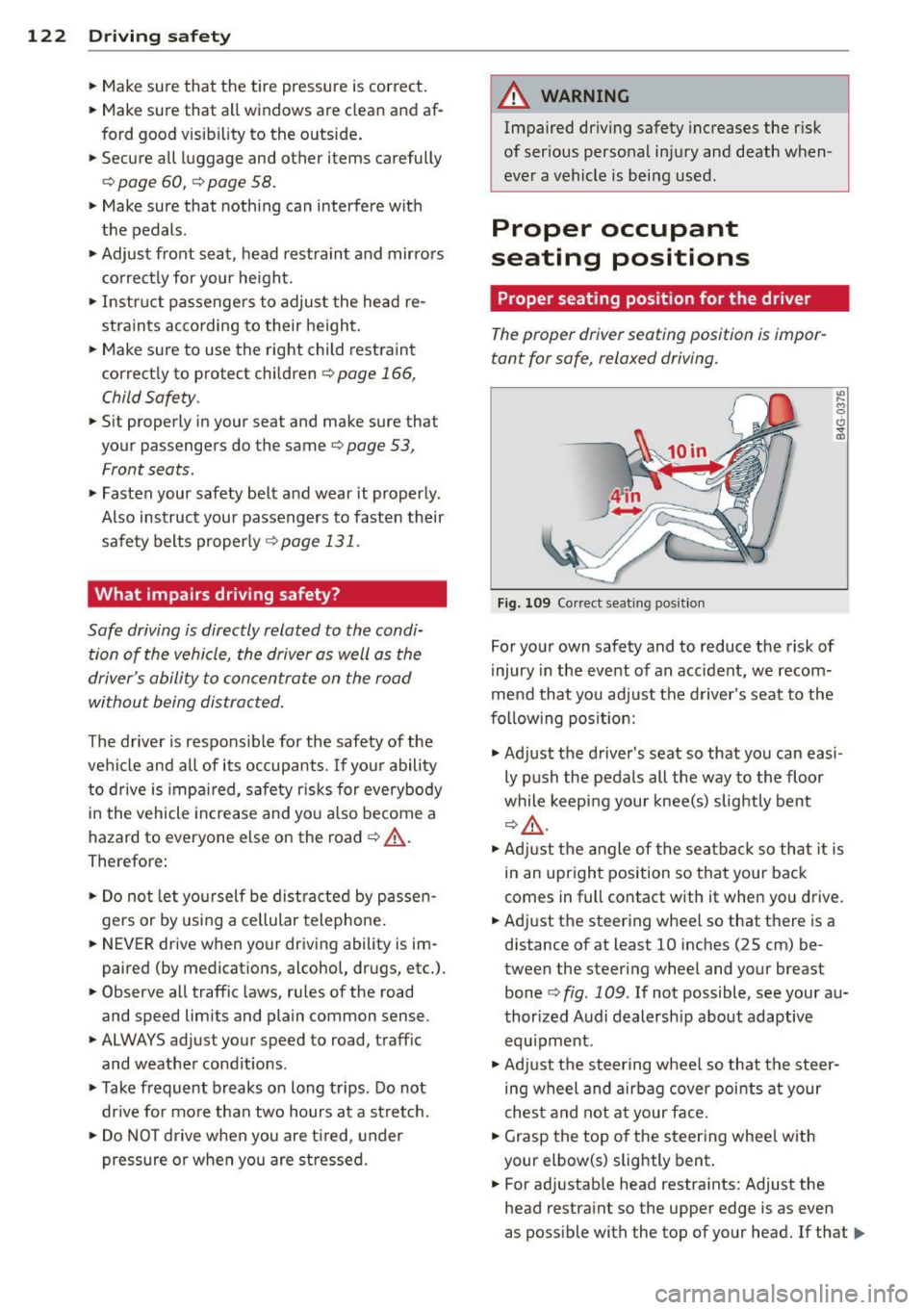
Fig . 109 Correct seat ing posit ion
For your own safety and to reduce the risk of
injury in the event of an accident, we recom
mend that you adjust the driver's seat to the
following position:
.,. Adjust the driver's seat so that you can easi
ly push the pedals all the way to the floor
while keeping your knee(s) slightly bent
r:::;,A .
.,. Adjust the angle of the seatback so that it is
in an upright position so that your back
comes in full contact with it when you drive.
• Adj ust the steering wheel so that there is a
distance of at least 10 inches (25 cm) be
tween the steering wheel and your breast
bone
c:::> fig. 109 . If not possible, see your au
thorized Audi dealersh ip about adaptive
equ ipment .
.. Adjust the steering wheel so that the steer
ing wheel and airbag cover points at your
chest and not at your face.
• Grasp the top of the steering whee l with
your elbow(s) slightly bent .
• For adjustable head restraints: Adjust the
head restraint so the upper edge is as even
as possible with the top of your head. If that..,_
Page 127 of 288

-For adjustable head restraints: always
adjust the head restra int properly so that
it can give maximum protection.
Proper adjustment of head restraints
Applies to vehicles: with adjustable head restraints
Correctly adjusted head restraints are an im
portant part of your vehicle's occupant re
straint system and can help to reduce the risk of injuries in accident situations.
Fig. 110 Head restraint: v iewed from t he front
The head restraints must be correctly adjust
ed to achieve the best protection.
.,. Adjust the head restraint so the upper edge
is as even as poss ible with the top of your
head.
If that is not possible, try to adjust
the head restraint so that it is as close to
this position as possible
r:!.> fig . 110. Move
the head restraint so that it is as close to the
back of the head as possible.
.,. If there is a passenger on the rear center
seat ing position, slide the center head re
stra int upward at least to the next notch .
Adjusting head restraints ¢
page 55.
_& WARNING
All seats are equipped with head re
straints. Dr iving without head restraints or
w ith head restraints that are not properly
adjusted increases the risk of serious or fa
tal neck injury dramat ically . To help reduce
the risk of injury:
- Always drive with the head restraints in
place and properly adjusted.
- Every person in the veh icle must have a
properly ad justed head restra int.
Driving safety 125
-Always make sure each person in the ve
hicle properly ad justs their head re
straint. Adjust the head restraint so the
upper edge is as even as possible with
the top of your head.
If that is not possi
ble, try to adjust the head restraint so
that it is as close to this position as pos
sible. Move the head restraint so that it
is as close to the back of the head as pos
sible.
- Never attempt to adjust head restraint
while driving. If you have driven off and
must adjust the driver headrest for any
reason, first stop the vehicle safely be
fore attempting to adjust the head re
straint .
- Ch ildr en must a lways be properly re
strained in a child restraint that is appro
priate for their age and size¢
page 166.
Examples of improper seating positions
The occupant restraint system can only re
duce the risk of injury if vehicle occupants are
properly seated .
Improper seating positions can cause serious
injury or death. Safety belts can only work
when they are properly positioned on the body. Improper seating positions reduce the
effectiveness of safety belts and will even in
crease the r isk of injury and death by mov ing
the safety belt to crit ical areas of the body.
Improper seating positions a lso inc rease the
risk of serious injury and death when an air
bag deploys and strikes an occupant who is
not in the proper seating position . A driver is
responsible for the safety of all veh icle occu
pants and espec ially for children. Therefore :
.,. Never allow anyone to assume an incorrect
seating position when the vehicle is being
used
r:!.> _&. .
The following bulletins list only some sample
positions that will increase the risk of serio us
injury and death. Our hope is that these exam
ples will make yo u more aware of seating po-
sitions that are dangerous. ..,.