infotainment AUDI A3 2020 Owner´s Manual
[x] Cancel search | Manufacturer: AUDI, Model Year: 2020, Model line: A3, Model: AUDI A3 2020Pages: 400, PDF Size: 107.47 MB
Page 31 of 400
8V2012721BK
Opening and closing
ZA WARNING
Read and following all warnings > A\ in De-
scription on page 25.
@ Tips
If your vehicle is left standing for a long peri-
od of time, note the following:
— The proximity sensor switches off after a
few days to save energy. You then have to
pull once on the door handle to unlock the
vehicle and a second time to open it.
—To prevent the vehicle battery from dis-
charging, the energy management gradual-
ly switches off convenience functions that
are not needed. You then may no longer be
able to unlock your vehicle with the sensors.
(eye eked Reauuia
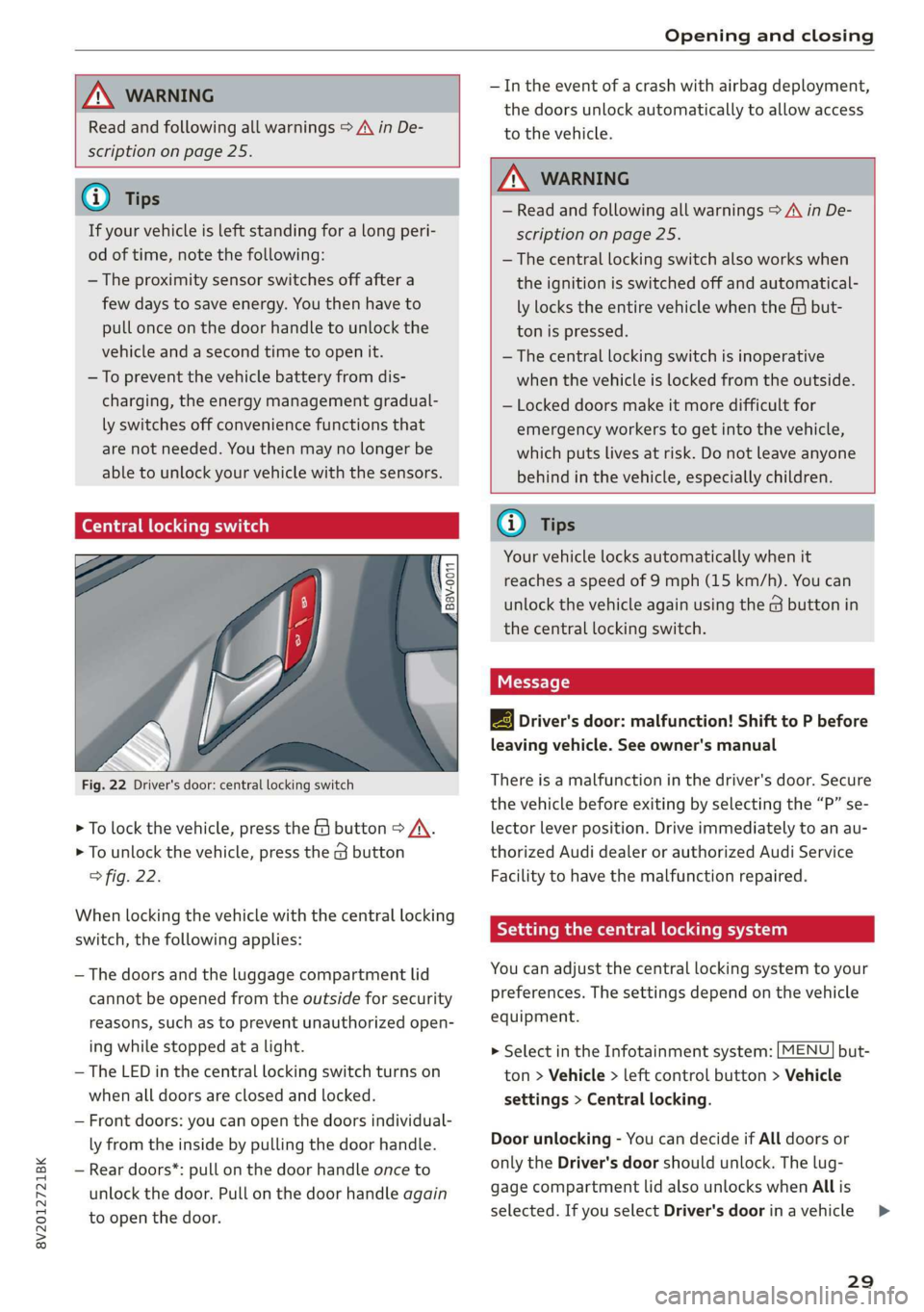
Fig. 22 Driver's door: central locking switch
> To lock the vehicle, press the & button > A\.
> To unlock the vehicle, press the G button
fig. 22.
When locking the vehicle with the central locking
switch,
the following applies:
— The doors and the luggage compartment lid
cannot be opened from the outside for security
reasons, such as to prevent unauthorized open-
ing while stopped at a light.
— The LED in the central locking switch turns on
when all doors are closed and locked.
— Front doors: you can open the doors individual-
ly from the inside by pulling the door handle.
— Rear doors*: pull on the door handle once to
unlock the door. Pull on the door handle again
to open the door.
— In the event of a crash with airbag deployment,
the doors unlock automatically to allow access
to the vehicle.
ZA WARNING
— Read and following all warnings > A in De-
scription on page 25.
— The central locking switch also works when
the ignition is switched off and automatical-
ly locks the entire vehicle when the & but-
ton is pressed.
—The central locking switch is inoperative
when the vehicle is locked from the outside.
— Locked doors make it more difficult for
emergency workers to get into the vehicle,
which puts lives at risk. Do not leave anyone
behind in the vehicle, especially children.
@ Tips
Your vehicle locks automatically when it
reaches a speed of 9 mph (15 km/h). You can
unlock the vehicle again using the @ button in
the central locking switch.
2B Driver's door: malfunction! Shift to P before
leaving vehicle. See owner's manual
There is a malfunction in the driver's door. Secure
the vehicle before exiting by selecting the “P” se-
lector lever position. Drive immediately to an au-
thorized Audi dealer or authorized Audi Service
Facility to have the malfunction repaired.
Setting the central locking system
You can adjust the central locking system to your
preferences. The settings depend on the vehicle
equipment.
> Select in the Infotainment system: [MENU] but-
ton > Vehicle > left control button > Vehicle
settings > Central locking.
Door unlocking - You can decide if All doors or
only the Driver's door should unlock. The lug-
gage compartment lid also unlocks when All is
selected. If you select Driver's door inavehicle >
29
Page 32 of 400
Opening and closing
with a convenience key*, only the door whose
handle you pull will unlock.
If you select Driver's door, all the doors and lug-
gage compartment lid will unlock if you press the
& button on the remote control key twice.
Long press to open windows - The convenience
opening/closing function can be switched on/off
=> page 34.
Fold mirrors - If you switch the function on, the
exterior mirrors will fold in automatically when
the vehicle is locked.
Confirmation tone - When checked off VY, a tone
will sound when you lock the vehicle )).
Mechanically unlocking and locking the
doors
If the central locking fails, you must unlock or
lock the doors separately.
B8V-0009 @)
th
7
=
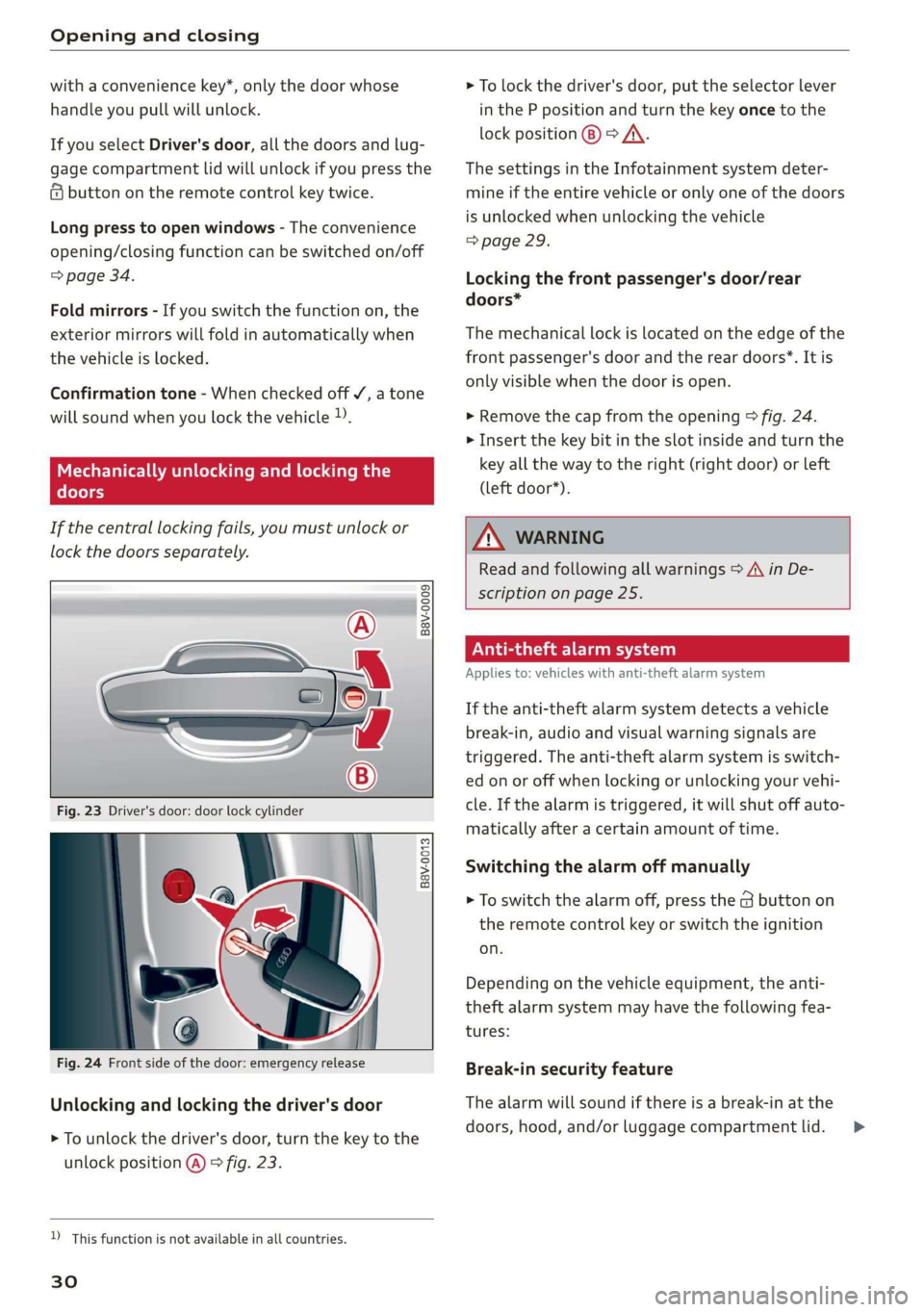
Fig. 23 Driver's door: door lock cylinder
B8v-0013
Fig. 24 Front side of the door: emergency release
Unlocking and locking the driver's door
> To unlock the driver's door, turn the key to the
unlock position @) © fig. 23.
D This function is not available in all countries.
30
> To lock the driver's door, put the selector lever
in the P position and turn the key once to the
lock position @) > A\.
The settings in the Infotainment system deter-
mine if the entire vehicle or only one of the doors
is unlocked when unlocking the vehicle
=> page 29.
Locking the front passenger's door/rear
doors*
The mechanical lock is located on the edge of the
front passenger's door and the rear doors”. It is
only visible when the door is open.
> Remove the cap from the opening > fig. 24.
> Insert the key bit in the slot inside and turn the
key all the way to the right (right door) or left
(left door*).
Z\ WARNING
Read and following all warnings = A\ in De-
scription on page 25.
ON eae ey)
Applies to: vehicles with anti-theft alarm system
If the anti-theft alarm system detects a vehicle
break-in, audio and visual warning signals are
triggered. The anti-theft alarm system is switch-
ed on or off when locking or unlocking your vehi-
cle. If the alarm is triggered, it will shut off auto-
matically after a certain amount of time.
Switching the alarm off manually
> To switch the alarm off, press the G button on
the remote control key or switch the ignition
on.
Depending on the vehicle equipment, the anti-
theft alarm system may have the following fea-
tures:
Break-in security feature
The alarm will sound if there is a break-in at the
doors, hood, and/or luggage compartment lid. >
Page 36 of 400
Opening and closing
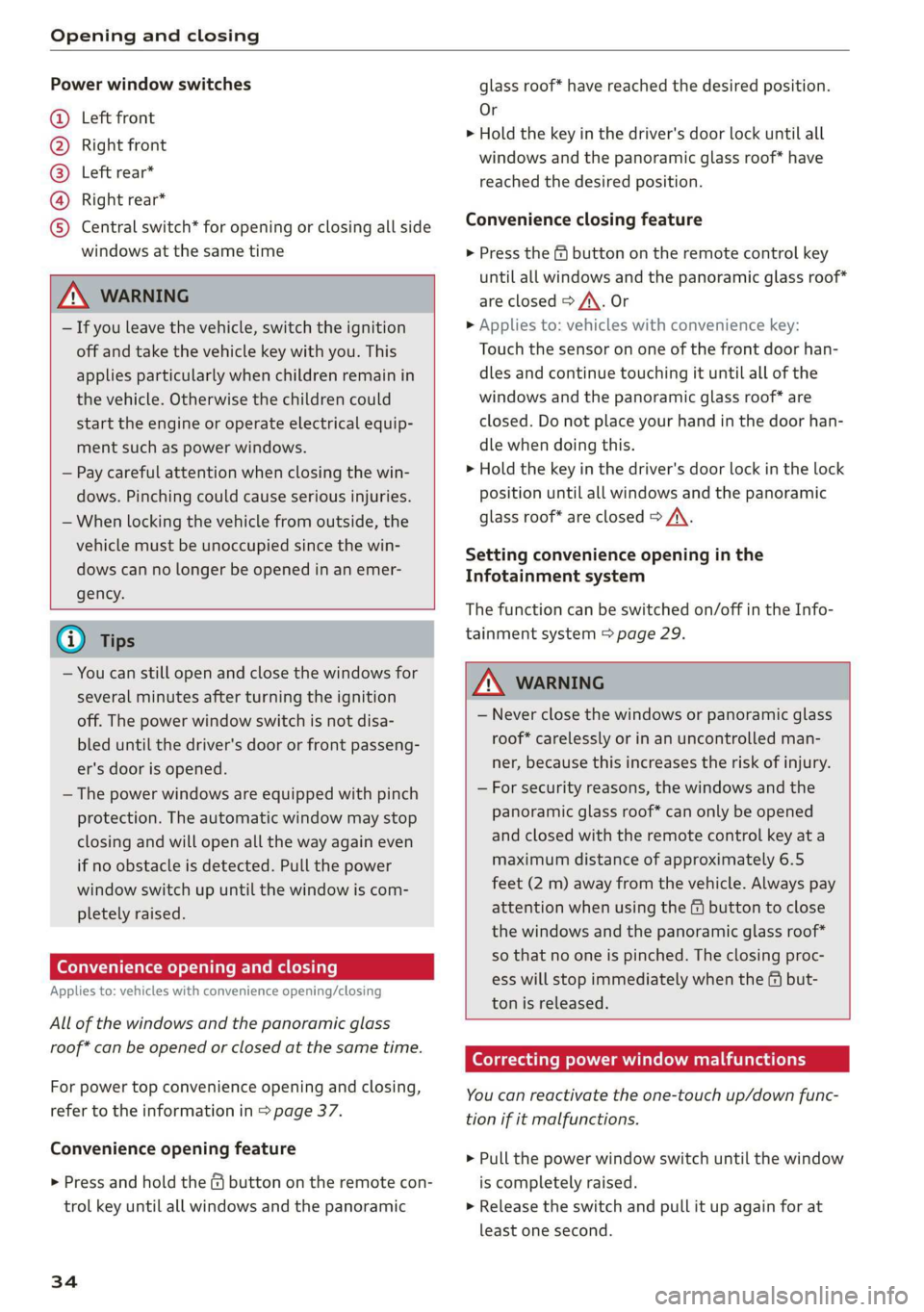
Power window switches
@ Left front
@ Right front
@® Left rear*
@ Right rear*
© Central switch* for opening or closing all side
windows at the same time
ZA\ WARNING
— If you leave the vehicle, switch the ignition
off and take the vehicle key with you. This
applies particularly when children remain in
the vehicle. Otherwise the children could
start the engine or operate electrical equip-
ment such as power windows.
— Pay careful attention when closing the win-
dows. Pinching could cause serious injuries.
— When locking the vehicle from outside, the
vehicle must be unoccupied since the win-
dows can no longer be opened in an emer-
gency.
@) Tips
— You can still open and close the windows for
several minutes after turning the ignition
off. The power window switch is not disa-
bled until the driver's door or front passeng-
er's door is opened.
— The power windows are equipped with pinch
protection. The automatic window may stop
closing and will open all the way again even
if no obstacle is detected. Pull the power
window switch up until the window is com-
pletely raised.
Convenience opening and closing
Applies to: vehicles with convenience opening/closing
All of the windows and the panoramic glass
roof* can be opened or closed at the same time.
For power top convenience opening and closing,
refer to the information in > page 37.
Convenience opening feature
> Press and hold the @ button on the remote con-
trol key until all windows and the panoramic
34
glass roof* have reached the desired position.
Or
> Hold the key in the driver's door lock until all
windows and the panoramic glass roof* have
reached the desired position.
Convenience closing feature
> Press the & button on the remote control key
until all windows and the panoramic glass roof*
are closed > A\. Or
> Applies to: vehicles with convenience key:
Touch the sensor on one of the front door han-
dles and continue touching it until all of the
windows and the panoramic glass roof* are
closed. Do not place your hand in the door han-
dle when doing this.
> Hold the key in the driver's door lock in the lock
position until all windows and the panoramic
glass roof* are closed > A\.
Setting convenience opening in the
Infotainment system
The function can be switched on/off in the Info-
tainment system > page 29.
ZA WARNING
— Never close the windows or panoramic glass
roof* carelessly or in an uncontrolled man-
ner, because this increases the risk of injury.
— For security reasons, the windows and the
panoramic glass roof* can only be opened
and closed with the remote control key at a
maximum distance of approximately 6.5
feet (2 m) away from the vehicle. Always pay
attention when using the & button to close
the windows and the panoramic glass roof*
so that no one is pinched. The closing proc-
ess will stop immediately when the f# but-
ton is released.
Correcting power window malfunctions
You can reactivate the one-touch up/down func-
tion if it malfunctions.
> Pull the power window switch until the window
is completely raised.
> Release the switch and pull it up again for at
least one second.
Page 45 of 400
8V2012721BK
Lights and Vision
Lights and Vision
Exterior lighting
Stare MUL Las eal
B8V-0430
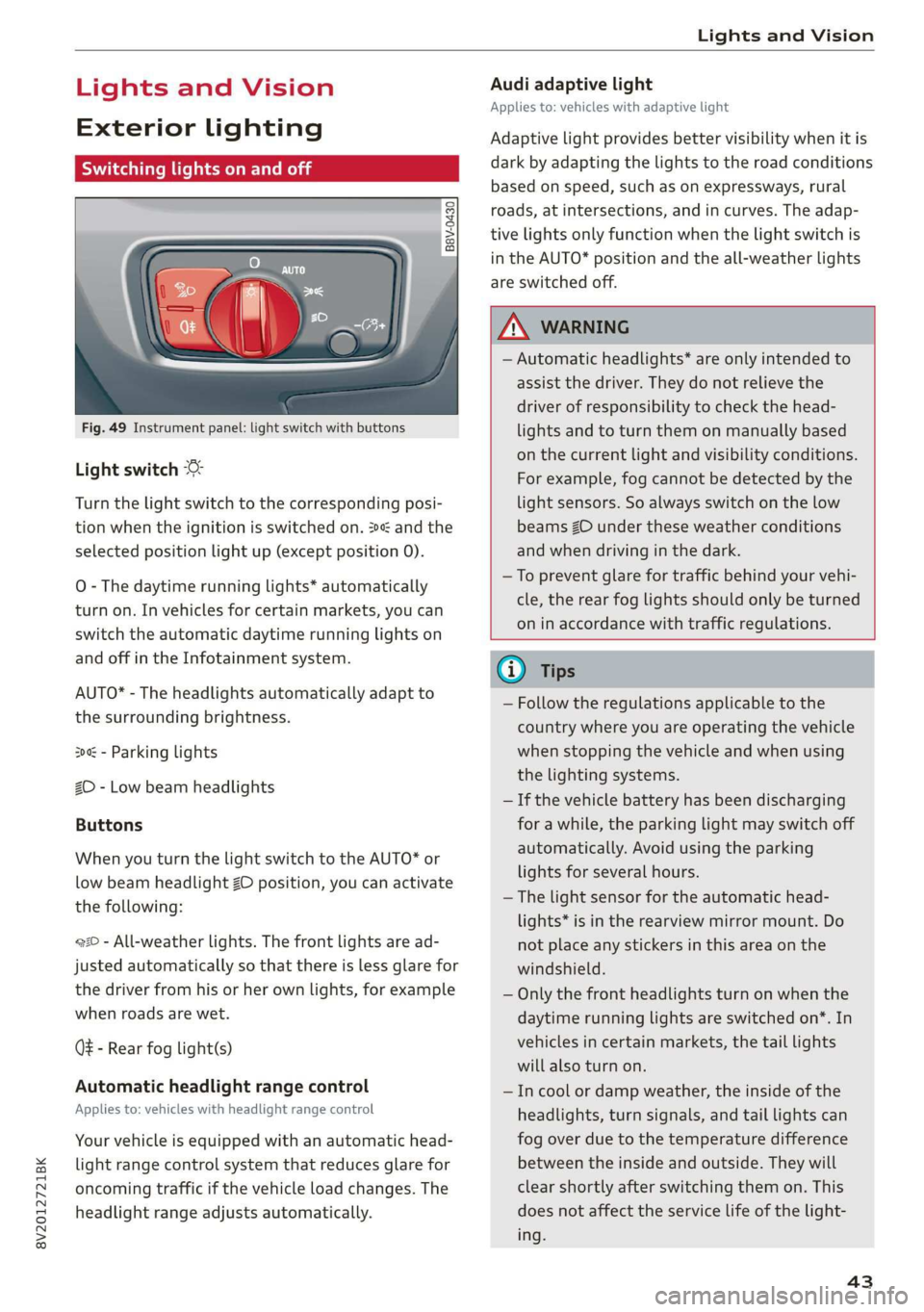
Fig. 49 Instrument panel: light switch with buttons
Light switch
Turn the light switch to the corresponding posi-
tion when the ignition is switched on. 2 and the
selected position light up (except position 0).
O
- The daytime running lights* automatically
turn on. In vehicles for certain markets, you can
switch the automatic daytime running lights on
and off in the Infotainment system.
AUTO* - The headlights automatically adapt to
the surrounding brightness.
300 - Parking lights
2D - Low beam headlights
Buttons
When you turn the light switch to the AUTO* or
low beam headlight ZO position, you can activate
the following:
220 - All-weather lights. The front lights are ad-
justed automatically so that there is less glare for
the driver from his or her own lights, for example
when roads are wet.
Q - Rear fog light(s)
Automatic headlight range control
Applies to: vehicles with headlight range control
Your vehicle is equipped with an automatic head-
light range control system that reduces glare for
oncoming traffic if the vehicle load changes. The
headlight range adjusts automatically.
Audi adaptive light
Applies to: vehicles with adaptive light
Adaptive light provides better visibility when it is
dark by adapting the lights to the road conditions
based on speed, such as on expressways, rural
roads, at intersections, and in curves. The adap-
tive lights only function when the light switch is
in the AUTO* position and the all-weather lights
are switched off.
Z\ WARNING
— Automatic headlights* are only intended to
assist the driver. They do not relieve the
driver of responsibility to check the head-
lights and to turn them on manually based
on the current light and visibility conditions.
For example, fog cannot be detected by the
light sensors. So always switch on the low
beams ZO under these weather conditions
and when driving in the dark.
—To prevent glare for traffic behind your vehi-
cle, the rear fog lights should only be turned
on in accordance with traffic regulations.
G) Tips
— Follow the regulations applicable to the
country where you are operating the vehicle
when stopping the vehicle and when using
the lighting systems.
— If the vehicle battery has been discharging
for a while, the parking light may switch off
automatically. Avoid using the parking
lights for several hours.
— The light sensor for the automatic head-
lights* is in the rearview mirror mount. Do
not place any stickers in this area on the
windshield.
— Only the front headlights turn on when the
daytime running lights are switched on*. In
vehicles in certain markets, the tail lights
will also turn on.
—Incool or damp weather, the inside of the
headlights, turn signals, and tail lights can
fog
over due to the temperature difference
between the inside and outside. They will
clear shortly after switching them on. This
does not affect the service life of the light-
ing.
43
Page 46 of 400
Lights and Vision
Turn signal and high beam lever
©
»
|
@
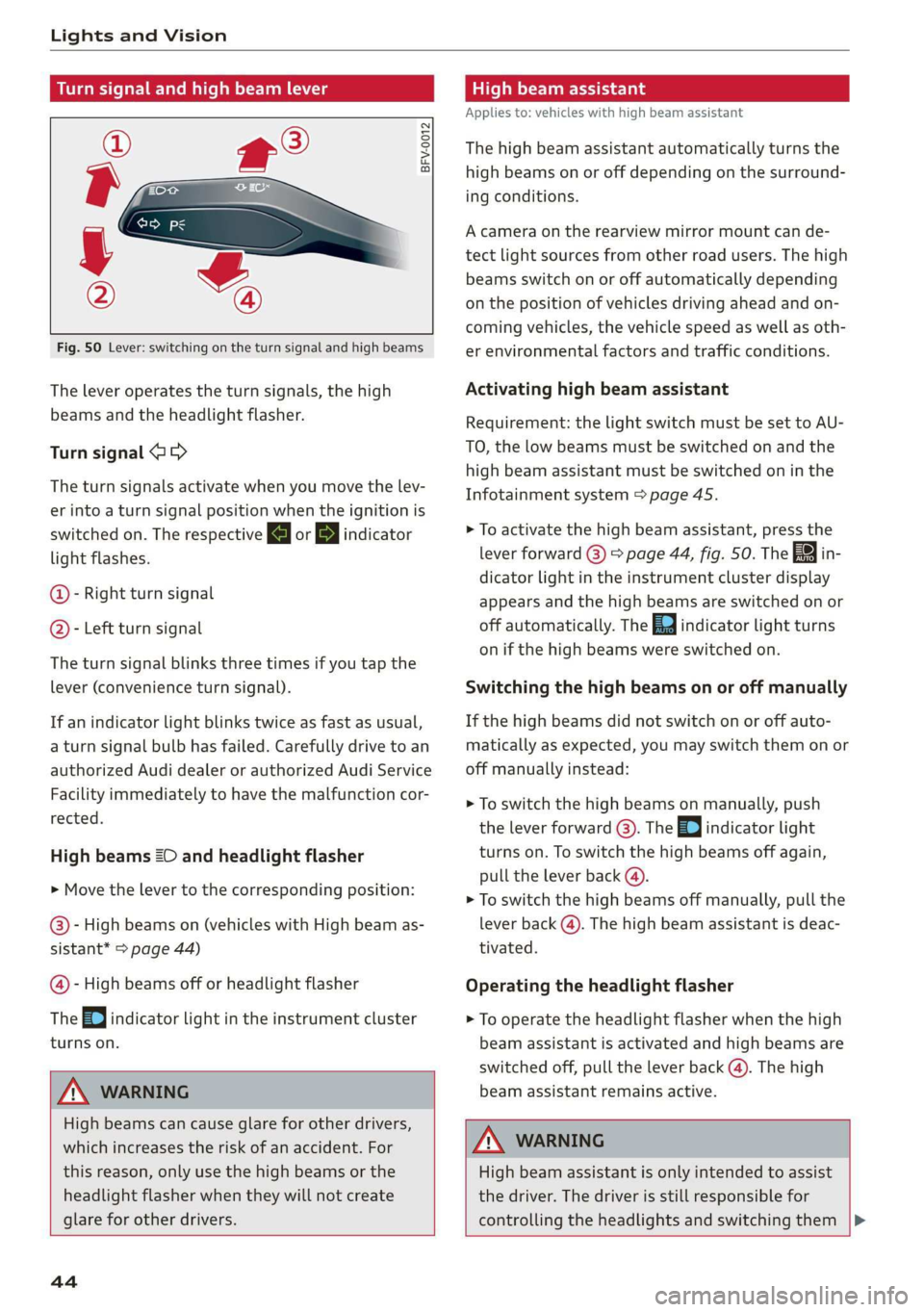
Fig. 50 Lever: switching on the turn signal and high beams
The lever operates the turn signals, the high
beams and the headlight flasher.
Turn signal @ >
The turn signals activate when you move the lev-
er into a turn signal position when the ignition is
switched on. The respective a or B indicator
light flashes.
@- Right turn signal
@- Left turn signal
The turn signal blinks three times if you tap the
lever (convenience turn signal).
If an indicator light blinks twice as fast as usual,
a turn signal bulb has failed. Carefully drive to an
authorized Audi dealer or authorized Audi Service
Facility immediately to have the malfunction cor-
rected.
High beams 2D and headlight flasher
> Move the lever to the corresponding position:
@- High beams on (vehicles with High beam as-
sistant* > page 44)
@- High beams off or headlight flasher
The
=0| indicator light in the instrument cluster
turns on.
Z\ WARNING
High beams can cause glare for other drivers,
which increases the risk of an accident. For
this reason, only use the high beams or the
headlight flasher when they will not create
glare for other drivers.
teh melee lad
Applies to: vehicles with high beam assistant
The high beam assistant automatically turns the
high beams on or off depending on the surround-
ing conditions.
A camera on the rearview mirror mount can de-
tect light sources from other road users. The high
beams switch on or off automatically depending
on the position of vehicles driving ahead and on-
coming vehicles, the vehicle speed as well as oth-
er environmental factors and traffic conditions.
Activating high beam assistant
Requirement: the light switch must be set to AU-
TO, the low beams must be switched on and the
high beam assistant must be switched on in the
Infotainment system = page 45.
> To activate the high beam assistant, press the
lever
forward @) > page 44, fig. 50. Th i
dicator light in the instrument cluster display
appears and the high beams are switched on or
off automatically. The Ea indicator light turns
on if the high beams were switched on.
Switching the high beams on or off manually
If the high beams did not switch on or off auto-
matically as expected, you may switch them on or
off manually instead:
> To switch the high beams on manually, push
the lever forward @). The Ea indicator light
turns on. To switch the high beams off again,
pull the lever back @).
> To switch the high beams off manually, pull the
lever back @). The high beam assistant is deac-
tivated.
Operating the headlight flasher
> To operate the headlight flasher when the high
beam assistant is activated and high beams are
switched off, pull the lever back (). The high
beam assistant remains active.
ZA WARNING
High beam assistant is only intended to assist
the driver. The driver is still responsible for
controlling the headlights and switching them
44
Page 47 of 400
8V2012721BK
Lights and Vision
manually depending on light and visibility
conditions. It may be necessary to operate
them manually in situations such as:
— In adverse weather conditions such as fog,
heavy rain, blowing snow or spraying water.
— On roads where oncoming traffic may be
partially obscured, such as expressways.
— If there are road users with poor lighting,
such as bicyclists.
— In tight curves and on steep hills.
—In poorly lit areas.
— With strong reflectors, such as signs.
— If the area of the windshield near the sensor
is fogged over, dirty, icy or covered with a
sticker.
Adjusting the exterior lighting
You can adjust the exterior lighting separately.
The settings depend on the vehicle equipment.
The functions are adjusted in the Infotainment
system.
> Select in the Infotainment system: [MENU] but-
ton > Vehicle > left control button > Vehicle
settings > Exterior lighting.
Automatic headlights
You can adjust the following settings in the Auto-
matic
headlights menu:
Activation time - You can adjust if the headlights
switch on Early, Medium or Late according to the
sensitivity of the light sensor.
Headlight assistant - You can switch the high
beam assistant* on and off.
Entry/exit lighting
When it is dark, the Entry/exit lighting illumi-
nates the area around the vehicle when unlocking
the vehicle and after switching off the ignition
and opening the driver's door.
The entry/exit lighting only works when it is dark
and the light switch is in the AUTO* position.
)_ This function is not available in all countries.
Daytime running lights!)
The daytime running lights can be turned on and
off. When daytime running lights are turned on,
the lights will stay on continuously whenever the
ignition is switched on.
Emergency flashers
B8V-0210
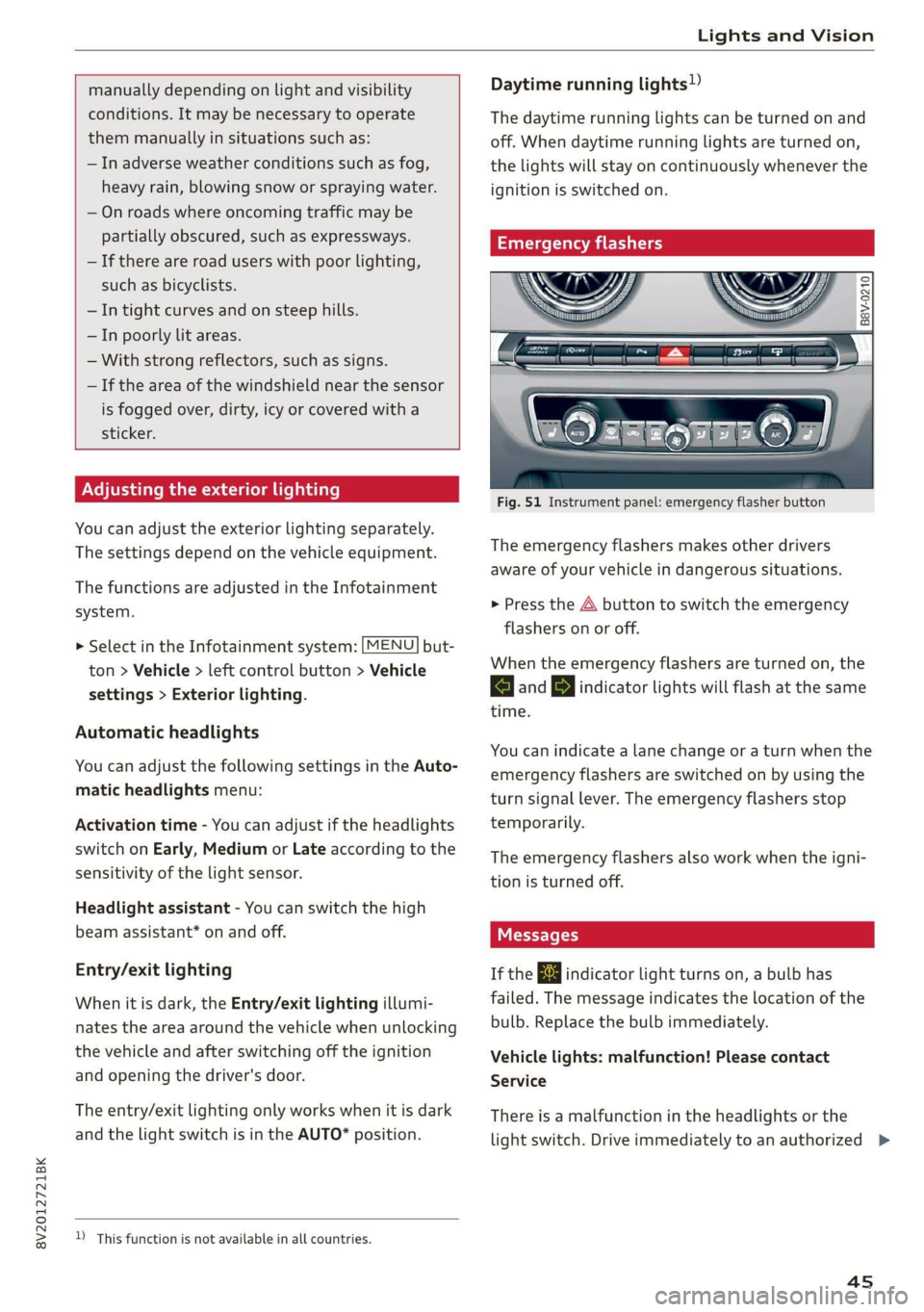
Fig. 51 Instrument panel: emergency flasher button
The emergency flashers makes other drivers
aware of your vehicle in dangerous situations.
> Press the A button to switch the emergency
flashers on or off.
When the emergency flashers are turned on, the
a and BY indicator lights will flash at the same
time.
You can indicate a lane change or a turn when the
emergency flashers are switched on by using the
turn signal lever. The emergency flashers stop
temporarily.
The emergency flashers also work when the igni-
tion is turned off.
If the ka indicator light turns on, a bulb has
failed. The message indicates the location of the
bulb. Replace the bulb immediately.
Vehicle lights: malfunction! Please contact
Service
There is a malfunction in the headlights or the
light switch. Drive immediately to an authorized >
45
Page 49 of 400
8V2012721BK
Lights and Vision
> To activate the manual dimming function,
touch the surface @ when the light is switched
off and keep touching it until the desired
brightness is reached.
Rear interior lighting
Applies to: vehicles with rear reading lights
Fig. 54 Headliner: rear reading lights
> To turn a reading light on or off, press the 7%
or “* button.
Interior lighting
Applies to: vehicles with interior lighting
The Interior lighting can be adjusted in the Info-
tainment system.
> Select in the Infotainment system: [MENU] but-
ton > Vehicle > left control button > Vehicle
settings > Interior lighting.
You may be able to adjust the brightness of the
individual zones, depending on vehicle equip-
ment.
> Press the right control button and select one of
the zones that is shown.
The interior lighting turns on when you switch
the headlights on while the ignition is on.
ear ace)
[o}
2 t 3 S &
————— a
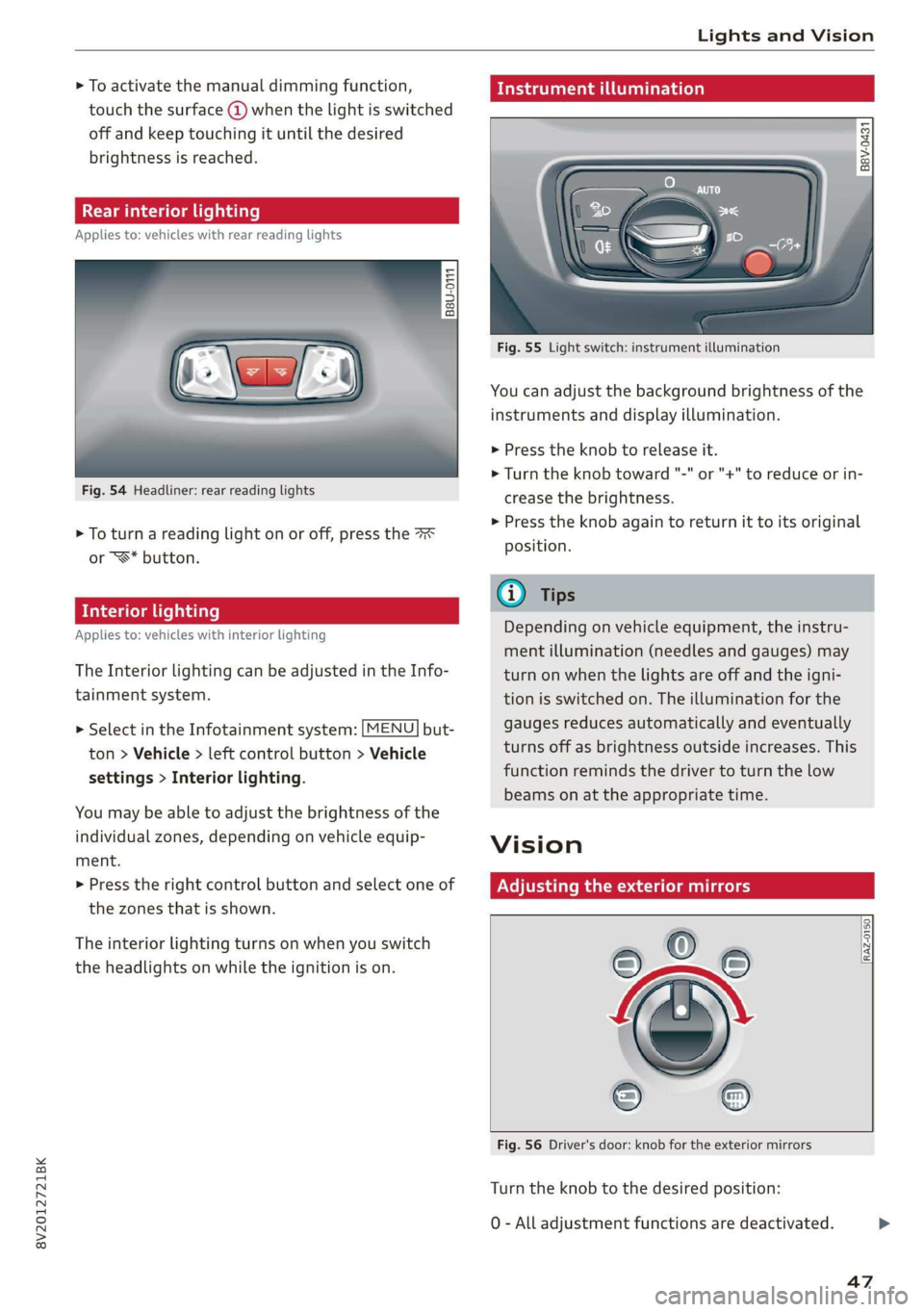
Fig. 55 Light switch: instrument illumination
You can adjust the background brightness of the
instruments and display illumination.
> Press the knob to release it.
> Turn the knob toward "-" or "+" to reduce or in-
crease the brightness.
> Press the knob again to return it to its original
position.
Depending on vehicle equipment, the instru-
ment illumination (needles and gauges) may
turn on when the lights are off and the igni-
tion is switched on. The illumination for the
gauges reduces automatically and eventually
turns off as brightness outside increases. This
function reminds the driver to turn the low
beams on at the appropriate time.
Vision
Adjusting the exterior mirrors
RAZ-0150
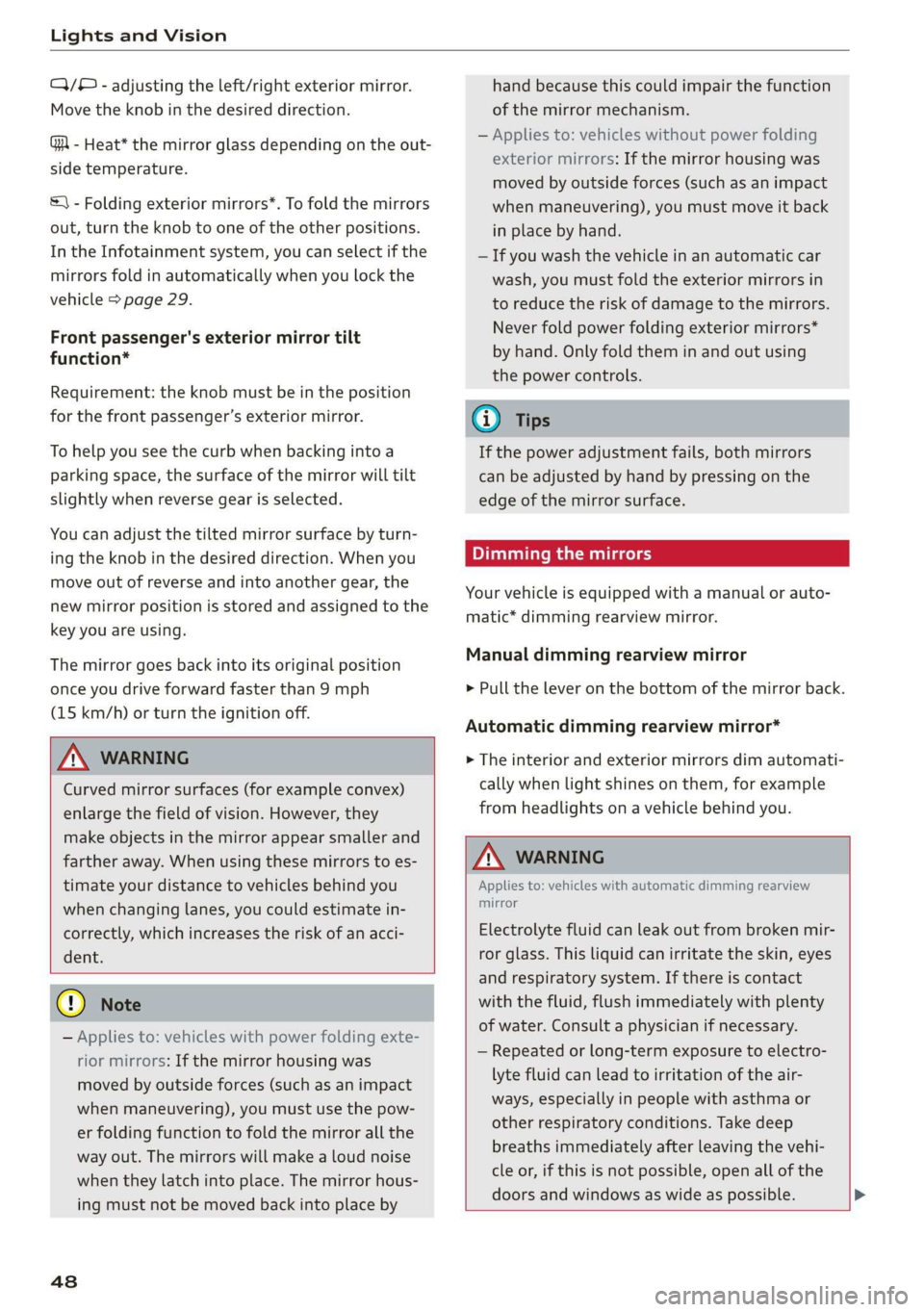
Fig. 56 Driver's door: knob for the exterior mirrors
Turn the knob to the desired position:
0 - All adjustment functions are deactivated.
47
Page 50 of 400
Lights and Vision
Q/® - adjusting the left/right exterior mirror.
Move the knob in the desired direction.
GA - Heat* the mirror glass depending on the out-
side temperature.
&) - Folding exterior mirrors*. To fold the mirrors
out, turn the knob to one of the other positions.
In the Infotainment system, you can select if the
mirrors fold in automatically when you lock the
vehicle > page 29.
Front passenger's exterior mirror tilt
function*
Requirement: the knob must be in the position
for the front passenger’s exterior mirror.
To help you see the curb when backing into a
parking space, the surface of the mirror will tilt
slightly when reverse gear is selected.
You can adjust the tilted mirror surface by turn-
ing the knob in the desired direction. When you
move out of reverse and into another gear, the
new mirror position is stored and assigned to the
key you are using.
The mirror goes back into its original position
once you drive forward faster than 9 mph
(15 km/h) or turn the ignition off.
Z\ WARNING
Curved mirror surfaces (for example convex)
enlarge the field of vision. However, they
make objects in the mirror appear smaller and
farther away. When using these mirrors to es-
timate your distance to vehicles behind you
when changing lanes, you could estimate in-
correctly, which increases the risk of an acci-
dent.
@) Note
— Applies to: vehicles with power folding exte-
rior mirrors: If the mirror housing was
moved by outside forces (such as an impact
when maneuvering), you must use the pow-
er folding function to fold the mirror all the
way out. The mirrors will make a loud noise
when they latch into place. The mirror hous-
ing must not be moved back into place by
48
hand because this could impair the function
of the mirror mechanism.
— Applies to: vehicles without power folding
exterior mirrors: If the mirror housing was
moved by outside forces (such as an impact
when maneuvering), you must move it back
in place by hand.
— If you wash the vehicle in an automatic car
wash, you must fold the exterior mirrors in
to reduce the risk of damage to the mirrors.
Never fold power folding exterior mirrors*
by hand. Only fold them in and out using
the power controls.
G) Tips
If the power adjustment fails, both mirrors
can be adjusted by hand by pressing on the
edge of the mirror surface.
Dimming the mirrors
Your vehicle is equipped with a manual or auto-
matic* dimming rearview mirror.
Manual dimming rearview mirror
> Pull the lever on the bottom of the mirror back.
Automatic dimming rearview mirror*
> The interior and exterior mirrors dim automati-
cally when light shines on them, for example
from headlights on a vehicle behind you.
Z\ WARNING
Applies to: vehicles with automatic dimming rearview
mirror
Electrolyte fluid can leak out from broken mir-
ror glass. This liquid can irritate the skin, eyes
and respiratory system. If there is contact
with the fluid, flush immediately with plenty
of water. Consult a physician if necessary.
— Repeated or long-term exposure to electro-
lyte fluid can lead to irritation of the air-
ways, especially in people with asthma or
other respiratory conditions. Take deep
breaths immediately after leaving the vehi-
cle or, if this is not possible, open all of the
doors and windows as wide as possible. >
Page 51 of 400

8V2012721BK
Lights and Vision
— If electrolyte fluid comes into contact with
the eyes, flush them thoroughly with plenty
of clean water for at least 15 minutes and
then seek medical attention.
— If electrolyte fluid comes into contact with
the skin, flush the affected area with clean
water for at least 15 minutes, and then
clean with soap and water and seek medical
attention. Clean affected clothing and shoes
thoroughly before wearing again.
— If the fluid was swallowed and the person is
conscious, flush the mouth with water for at
least 15 minutes. Do not induce vomiting
unless this is recommended by medical pro-
fessionals. Seek medical attention immedi-
ately.
@) Note
Applies to: vehicles with automatic dimming rearview
mirror
Electrolyte fluid can leak out from broken mir-
ror glass. This liquid damages plastic surfa-
ces. Clean this liquid as quickly as possible
with a wet sponge.
G) Tips
Applies to: vehicles with automatic dimming rearview
mirror
— If the light reaching the rearview mirror is
obstructed, the automatic dimming mirror
will not function correctly,
— The automatic dimming mirrors do not dim
when the interior lighting is turned on or
the reverse gear is selected.
Sun visors
B8X-0209
Fig. 57 Front headliner: sun visor
The sun visors can be moved out of their brackets
and turned toward the doors (a). The sunshade
can also be moved back and forth lengthwise in
this position*.
The mirror light switches on when the cover over
the
vanity mirror* @) opens.
Windshield wipers
Switching the windshield wipers on
B8V-0600
B8V-0601
Fig. 59 Lever: rear window wiper*
Move the windshield wiper lever S7 to the corre-
sponding position:
@©- Windshield wipers off
@- Interval mode. To increase/decrease the wip-
er intervals, move the switch @ to the left/right.
In vehicles with a rain sensor, the wipers turn on
in the rain once the vehicle speed exceeds ap-
proximately 2 mph (4 km/h). The higher the sen-
sitivity of the rain sensor that is set (switch @) to
the right), the earlier the windshield wipers react
to moisture on the windshield. You can deacti-
vate the rain sensor mode in the Infotainment
system, which switches the intermittent mode
on. To do this, select: [MENU] button > Vehicle >
49
>
Page 67 of 400
8V2012721BK
Warm and cold
Warm and cold
Climate control system
Your vehicle has a deluxe automatic climate con-
trol system with two zones where the tempera-
ture, air distribution, and amount of air can be
adjusted separately on the left and right front
sides.
The climate control system circulates, warms or
cools, and removes humidity from the air in the
vehicle interior. It is the most effective when the
windows and panoramic glass roof* or power
top* are closed. If there is a build-up of heat in-
side the vehicle, ventilation can help to speed up
the cooling process.
Pollutant filter
The pollutant filter removes pollutants such as
dust and pollen from the air.
Presets
Several functions can be preset in the Infotain-
ment system.
Select in the Infotainment system: [MENU] but-
ton > Vehicle > left control button > Air condi-
tioning
freeze on the windshield and impair visibili-
ty.
ZA WARNING
Poor visibility can lead to accidents.
— For safer driving, keep all windows free of
ice, snow and fog.
— Become familiar with the correct use and
function of the climate control system as
quickly as possible, especially with the de-
frosting and defogging functions.
— When the temperature is below freezing,
only use the windshield washer system after
the
windshield has been warmed by the cli-
mate control system. The washer fluid could
() Note
— If you suspect that the climate control sys-
tem is damaged, switch the system off to
prevent further damage and have it checked
by an authorized Audi dealer or authorized
Audi Service Facility.
— Repairs to the Audi climate control system
require special technical knowledge and
special
tools. See an authorized Audi dealer
or authorized Audi Service Facility.
@) For the sake of the environment
— Energy can be saved by switching off the A/C
mode.
— In vehicles with the efficiency program”, you
can find other consumption information and
more economy tips > page 23.
iG) Tips
—To prevent interference with the heating
and cooling output and to prevent the win-
dows from fogging over, the air intake in
front of the windshield must be free of ice,
snow, and leaves.
— Condensation from the cooling system can
drip and form a puddle of water under the
vehicle. This is normal and does not mean
there is a leak.
— The energy management system may tem-
porarily switch off certain functions, such as
the seat heating* or rear window defogger.
These systems are available again as soon as
the energy supply has been restored.
— The climate control settings are automati-
cally stored and assigned to the vehicle key
that is in use. These settings are different
when the power top* is open or closed.
65